
© 2015 Adobe Systems Incorporated. All Rights Reserved. Adobe Confidential.
Load Balancing, Failover and Scalability
with ColdFusion
Presenters
Mike Collins, Sr. Consultant
Priyank Shrivastava Sr. Product
Consultant
© 2015 Adobe Systems Incorporated. All Rights Reserved. Adobe Confidential.
Today’s Agenda
 Modeling for Scalability
 ColdFusion and Web Server Configurations
 ColdFusion Clustering
 Load Balancing with Connector
 Using the Tomcat Connector Admin
 Session Management Strategies
 Demo Load Balancing and Failover
© 2015 Adobe Systems Incorporated. All Rights Reserved. Adobe Confidential.
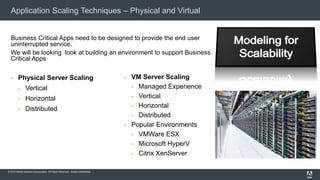
Application Scaling Techniques – Physical and Virtual
 Physical Server Scaling
 Vertical
 Horizontal
 Distributed
 VM Server Scaling
 Managed Experience
 Vertical
 Horizontal
 Distributed
 Popular Environments
 VMWare ESX
 Microsoft HyperV
 Citrix XenServer
Business Critical Apps need to be designed to provide the end user
uninterrupted service.
We will be looking look at building an environment to support Business
Critical Apps
© 2015 Adobe Systems Incorporated. All Rights Reserved. Adobe Confidential.
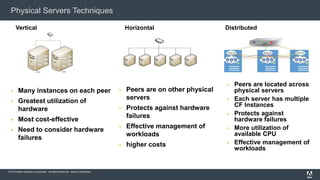
Physical Servers Techniques
 Many instances on each peer
 Greatest utilization of
hardware
 Most cost-effective
 Need to consider hardware
failures
Vertical Horizontal
 Peers are on other physical
servers
 Protects against hardware
failures
 Effective management of
workloads
 higher costs
Distributed
 Peers are located across
physical servers
 Each server has multiple
CF Instances
 Protects against
hardware failures
 More utilization of
available CPU
 Effective management of
workloads
© 2015 Adobe Systems Incorporated. All Rights Reserved. Adobe Confidential.
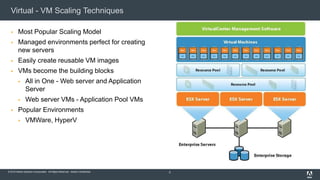
Virtual - VM Scaling Techniques
 Most Popular Scaling Model
 Managed environments perfect for creating
new servers
 Easily create reusable VM images
 VMs become the building blocks
 All in One - Web server and Application
Server
 Web server VMs - Application Pool VMs
 Popular Environments
 VMWare, HyperV
5
© 2015 Adobe Systems Incorporated. All Rights Reserved. Adobe Confidential.
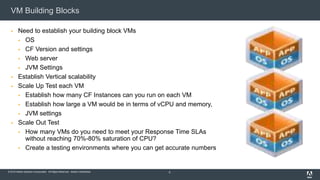
VM Building Blocks
 Need to establish your building block VMs
 OS
 CF Version and settings
 Web server
 JVM Settings
 Establish Vertical scalability
 Scale Up Test each VM
 Establish how many CF Instances can you run on each VM
 Establish how large a VM would be in terms of vCPU and memory,
 JVM settings
 Scale Out Test
 How many VMs do you need to meet your Response Time SLAs
without reaching 70%-80% saturation of CPU?
 Create a testing environments where you can get accurate numbers
6
© 2015 Adobe Systems Incorporated. All Rights Reserved. Adobe Confidential.
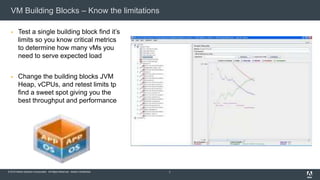
VM Building Blocks – Know the limitations
 Test a single building block find it’s
limits so you know critical metrics
to determine how many vMs you
need to serve expected load
 Change the building blocks JVM
Heap, vCPUs, and retest limits tp
find a sweet spot giving you the
best throughput and performance
7
© 2015 Adobe Systems Incorporated. All Rights Reserved. Adobe Confidential.
Sample VM Topologies
 Let’s take a look at some sample topologies
8
© 2015 Adobe Systems Incorporated. All Rights Reserved. Adobe Confidential.
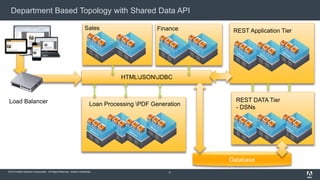
Department Based Topology with Shared Data API
9
Finance
Load Balancer Loan Processing PDF Generation
REST Application Tier
REST DATA Tier
- DSNs
HTMLJSONJDBC
Database
Sales
© 2015 Adobe Systems Incorporated. All Rights Reserved. Adobe Confidential.
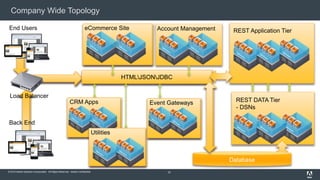
HTMLJSONJDBC
Company Wide Topology
10
Account Management
Load Balancer
REST Application Tier
REST DATA Tier
- DSNs
HTMLJSONJDBC
Database
eCommerce SiteEnd Users
Back End
CRM Apps
Utilities
Event Gateways
© 2015 Adobe Systems Incorporated. All Rights Reserved. Adobe Confidential.
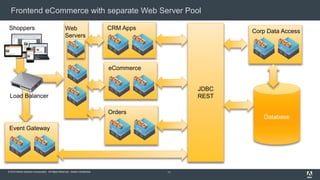
Frontend eCommerce with separate Web Server Pool
11
Load Balancer
Database
Web
Servers
Shoppers CRM Apps
eCommerce
Event Gateway
Orders
Corp Data Access
JDBC
REST
© 2015 Adobe Systems Incorporated. All Rights Reserved. Adobe Confidential.
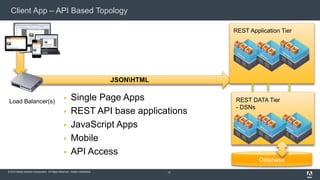
Database
Client App – API Based Topology
 Single Page Apps
 REST API base applications
 JavaScript Apps
 Mobile
 API Access
12
JSONHTML
REST Application Tier
REST DATA Tier
- DSNs
Load Balancer(s)
© 2015 Adobe Systems Incorporated. All Rights Reserved. Adobe Confidential.
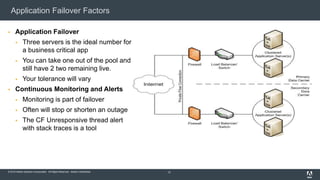
Application Failover Factors
 Application Failover
 Three servers is the ideal number for
a business critical app
 You can take one out of the pool and
still have 2 two remaining live.
 Your tolerance will vary
 Continuous Monitoring and Alerts
 Monitoring is part of failover
 Often will stop or shorten an outage
 The CF Unresponsive thread alert
with stack traces is a tool
13
© 2015 Adobe Systems Incorporated. All Rights Reserved. Adobe Confidential.
Syncing your Code and Resource Files
 Peers will need access to uniform set of source code and resource files
 Common ways
 Each peer can synch from a common network drive
 Build script can move files to all the servers
 Always possibility of something getting out of sync
 Need to consider if code could be sensitive to one server being updated prior to another
 Usually not an issue but scenarios could exist
© 2015 Adobe Systems Incorporated. All Rights Reserved. Adobe Confidential.
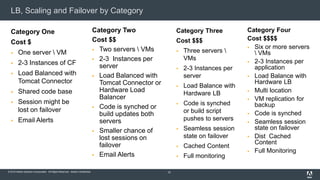
LB, Scaling and Failover by Category
Category One
Cost $
 One server  VM
 2-3 Instances of CF
 Load Balanced with
Tomcat Connector
 Shared code base
 Session might be
lost on failover
 Email Alerts
15
Category Three
Cost $$$
 Three servers 
VMs
 2-3 Instances per
server
 Load Balance with
Hardware LB
 Code is synched
or build script
pushes to servers
 Seamless session
state on failover
 Cached Content
 Full monitoring
Category Four
Cost $$$$
 Six or more servers
 VMs
 2-3 Instances per
application
 Load Balance with
Hardware LB
 Multi location
 VM replication for
backup
 Code is synched
 Seamless session
state on failover
 Dist Cached
Content
 Full Monitoring
Category Two
Cost $$
 Two servers  VMs
 2-3 Instances per
server
 Load Balanced with
Tomcat Connector or
Hardware Load
Balancer
 Code is synched or
build updates both
servers
 Smaller chance of
lost sessions on
failover
 Email Alerts
© 2015 Adobe Systems Incorporated. All Rights Reserved. Adobe Confidential.
Load Balancing Scalability and Failover with ColdFusion
Priyank Shrivastava| Sr. Product Consultant
Load Balancing, Scalability and Failover with ColdFusion
Priyank Shrivastava | Sr. Product Consultant
© 2015 Adobe Systems Incorporated. All Rights Reserved. Adobe Confidential.
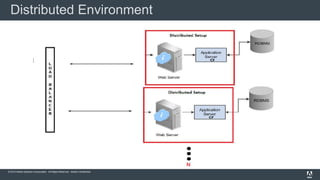
Distributed Environment
© 2015 Adobe Systems Incorporated. All Rights Reserved. Adobe Confidential.
 Reliability
 Availability
 Scalability
Advantages of Distributed Environment
© 2015 Adobe Systems Incorporated. All Rights Reserved. Adobe Confidential.
How to setup Distributed Environment?
Distributed Environment
© 2015 Adobe Systems Incorporated. All Rights Reserved. Adobe Confidential.
Distributed Environment
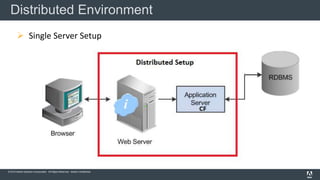
 Single Server Setup
© 2015 Adobe Systems Incorporated. All Rights Reserved. Adobe Confidential.
Distributed Environment
© 2015 Adobe Systems Incorporated. All Rights Reserved. Adobe Confidential.
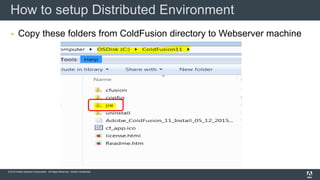
 Copy these folders from ColdFusion directory to Webserver machine
How to setup Distributed Environment
© 2015 Adobe Systems Incorporated. All Rights Reserved. Adobe Confidential.
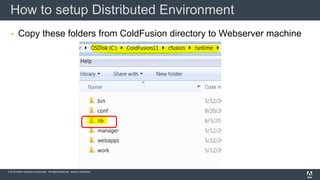
 Copy these folders from ColdFusion directory to Webserver machine
How to setup Distributed Environment
© 2015 Adobe Systems Incorporated. All Rights Reserved. Adobe Confidential.
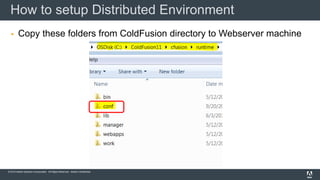
 Copy these folders from ColdFusion directory to Webserver machine
How to setup Distributed Environment
© 2015 Adobe Systems Incorporated. All Rights Reserved. Adobe Confidential.
 Required directories copied
 Install Microsoft Visual C++ Redistributable
(2008 and 2012 32 bit/64 bit)
 Command to create the connector
How to setup Distributed Environment
© 2015 Adobe Systems Incorporated. All Rights Reserved. Adobe Confidential.
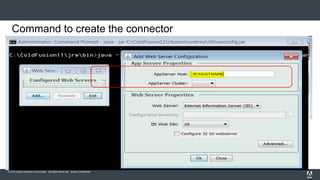
Command to create the connector
© 2015 Adobe Systems Incorporated. All Rights Reserved. Adobe Confidential.
 Required directories copied
 Install Microsoft Visual C++ Redistributable
(2008 and 2012 32 bit/64 bit)
 Command to create the connector
How to setup Distributed Environment
© 2015 Adobe Systems Incorporated. All Rights Reserved. Adobe Confidential.
How to setup Distributed Environment with ColdFusion Cluster?
Distributed Environment with Cluster
© 2015 Adobe Systems Incorporated. All Rights Reserved. Adobe Confidential.
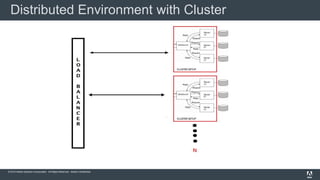
Distributed Environment with Cluster
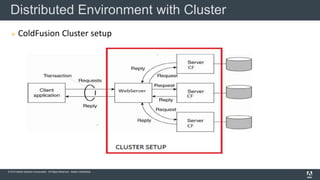
 ColdFusion Cluster setup
© 2015 Adobe Systems Incorporated. All Rights Reserved. Adobe Confidential.
Distributed Environment with Cluster
© 2015 Adobe Systems Incorporated. All Rights Reserved. Adobe Confidential.
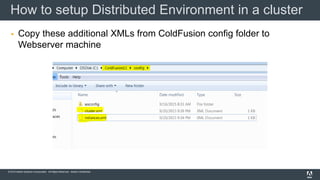
 Copy these additional XMLs from ColdFusion config folder to
Webserver machine
How to setup Distributed Environment in a cluster
© 2015 Adobe Systems Incorporated. All Rights Reserved. Adobe Confidential.
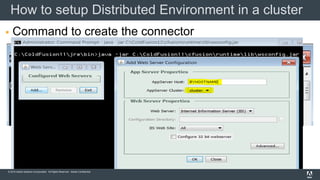
 Command to create the connector
How to setup Distributed Environment in a cluster
© 2015 Adobe Systems Incorporated. All Rights Reserved. Adobe Confidential.
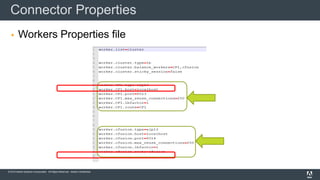
 Workers Properties file
Connector Properties
© 2015 Adobe Systems Incorporated. All Rights Reserved. Adobe Confidential.
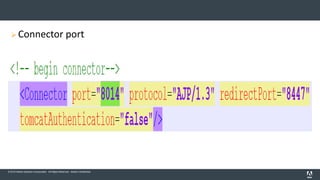
 Connector port
© 2015 Adobe Systems Incorporated. All Rights Reserved. Adobe Confidential.
 Check the ColdFusion Handlers
 Check the ISAPI Filter
 Check the Connector folder and files
 Check if the ISAPI_REDIRECT.dll is correct
Check List
© 2015 Adobe Systems Incorporated. All Rights Reserved. Adobe Confidential.
 Microsoft Visual C++ Redistributable (2008 and 2012 32 bit/64 bit)
 Port should be open
 Required files needs to be copied
Things to remember
© 2015 Adobe Systems Incorporated. All Rights Reserved. Adobe Confidential.
Reference links
http://blogs.coldfusion.com/post.cfm/setting-up-coldfusion-in-
distributed-envionment
https://helpx.adobe.com/coldfusion/configuring-
administering/using-multiple-server-instances.html
© 2015 Adobe Systems Incorporated. All Rights Reserved. Adobe Confidential.
Thank you
cfsup@adobe.com
cf.install@adobe.com
Priyank Shrivastava.
priyank_adobe
© 2015 Adobe Systems Incorporated. All Rights Reserved. Adobe Confidential.
Clustering and Load Balancing Decision Points
 Do you have a Load Balancer routing
traffic, monitoring connectivity?
 Do we need to share state across peers?
 Do you have any tolerance for throwing
errors on failover?
 Can the server go down for 15 minutes
from time to time?
44
Each application will have different requirements
© 2015 Adobe Systems Incorporated. All Rights Reserved. Adobe Confidential.
ColdFusion Clustering Basics
 Clustering Basics
 Allows for 2 or more peer servers to work together
 Peers can be local or remote
 Uses Multicast to auto recognize when peers are up or down
 Can be defined in the ColdFusion Administrator
 When the Web Server Connector is setup it builds the load balancing rules based on the cluster
you have defined.
 Additional Properties and settings are located in these files
 Cluster.xml
 Server.xml
© 2015 Adobe Systems Incorporated. All Rights Reserved. Adobe Confidential.
Getting Started with Clustering – Creating Instances
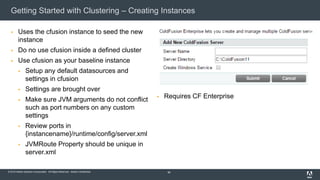
 Uses the cfusion instance to seed the new
instance
 Do no use cfusion inside a defined cluster
 Use cfusion as your baseline instance
 Setup any default datasources and
settings in cfusion
 Settings are brought over
 Make sure JVM arguments do not conflict
such as port numbers on any custom
settings
 Review ports in
{instancename}/runtime/config/server.xml
 JVMRoute Property should be unique in
server.xml
46
 Requires CF Enterprise
© 2015 Adobe Systems Incorporated. All Rights Reserved. Adobe Confidential.
ColdFusion Cluster Setup
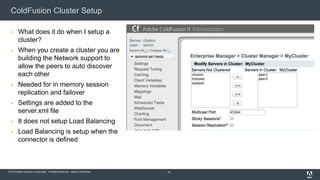
 What does it do when I setup a
cluster?
 When you create a cluster you are
building the Network support to
allow the peers to auto discover
each other
 Needed for in memory session
replication and failover
 Settings are added to the
server.xml file
 It does not setup Load Balancing
 Load Balancing is setup when the
connector is defined
47
© 2015 Adobe Systems Incorporated. All Rights Reserved. Adobe Confidential.
Cluster Setup – Remote Instances are supported
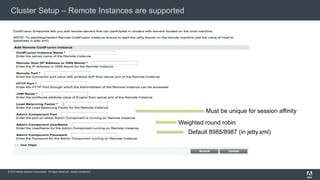
Default 8985/8987 (in jetty.xml)
Must be unique for session affinity
Weighted round robin
© 2015 Adobe Systems Incorporated. All Rights Reserved. Adobe Confidential.
ColdFusion Clustering and Load Balancing
 Clustering
 Auto discovery of peers required to
support in memory session replication
 Edits the Server.xml with multicast
settings so peers can have a
backchannel to communicate
 Clustering setup in the CF Admin does
nothing for Load Balancing
 Essentially the Cluster Setup in the CF
Admin gives you the support for in
memory session replication
49
 Load balancing is done when you define the
web server connector
 But wait Adobe does not recommend in memory
session replication
 Do I even need to setup a cluster if I just want
load balancing
 No you don’t
 However you might want to use it to initially
setup your connector files to get started with
load balancing
 Once your connector settings are setup to
load balance you can delete your cluster in
the CF Admin
Load balancing does not require CF Enterprise just
make sure each server has it’s own Standard
license.
© 2015 Adobe Systems Incorporated. All Rights Reserved. Adobe Confidential.
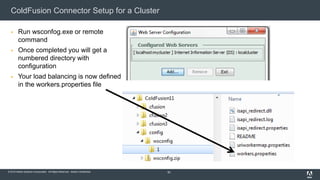
ColdFusion Connector Setup for a Cluster
 Run wsconfog.exe or remote
command
 Once completed you will get a
numbered directory with
configuration
 Your load balancing is now defined
in the workers.properties file
50
© 2015 Adobe Systems Incorporated. All Rights Reserved. Adobe Confidential.
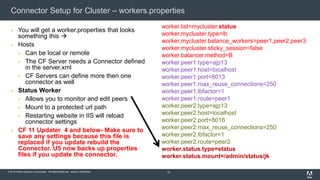
Connector Setup for Cluster – workers.properties
 You will get a worker.properties that looks
something this 
 Hosts
 Can be local or remote
 The CF Server needs a Connector defined
in the server.xml
 CF Servers can define more then one
connector as well
 Status Worker
 Allows you to monitor and edit peers
 Mount to a protected url path
 Restarting website in IIS will reload
connector settings
 CF 11 Updater 4 and below- Make sure to
save any settings because this file is
replaced if you update rebuild the
Connector. U5 now backs up properties
files if you update the connector.
51
worker.list=mycluster,status
worker.mycluster.type=lb
worker.mycluster.balance_workers=peer1,peer2,peer3
worker.mycluster.sticky_session=false
worker.balancer.method=B
worker.peer1.type=ajp13
worker.peer1.host=localhost
worker.peer1.port=8013
worker.peer1.max_reuse_connections=250
worker.peer1.lbfactor=1
worker.peer1.route=peer1
worker.peer2.type=ajp13
worker.peer2.host=localhost
worker.peer2.port=8016
worker.peer2.max_reuse_connections=250
worker.peer2.lbfactor=1
worker.peer2.route=peer2
worker.status.type=status
worker.status.mount=/admin/status/jk
© 2015 Adobe Systems Incorporated. All Rights Reserved. Adobe Confidential.
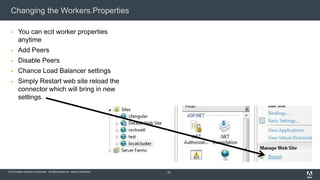
Changing the Workers.Properties
 You can ecit worker properties
anytime
 Add Peers
 Disable Peers
 Chance Load Balancer settings
 Simply Restart web site reload the
connector which will bring in new
settings.
52
© 2015 Adobe Systems Incorporated. All Rights Reserved. Adobe Confidential.
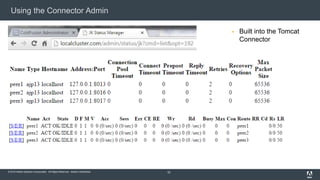
Using the Connector Admin
 Built into the Tomcat
Connector
53
© 2015 Adobe Systems Incorporated. All Rights Reserved. Adobe Confidential.
Options Around Session Management
 Sticky Session – Server Affinity
 Must turn on J2EE Sessions
 Easy setup - Works great
 Must have some tolerance for errors on a failover
 Needs in memory session replication to get seamless failover, however session failover has limitations and is not
recommended by Adobe CF team
 Client Scope
 Setup client scope to be stored in database
 Great solution for seamless failover
 Great solution for round robin load balancing
 Need to probably write your own purge routine to best control timing of the purges and to control locking
 Distributed Caching – EHCache
 Great solution similar to Client Scope just different mechanism
 Can take the work off your database
 Needs some expertise to setup and maintain
 Check out the EHCache Session from CFSummit 2015 about some great new features
 Custom Solution
 Nothing to stop you from writing your own solution into the database, shared file system etc
© 2015 Adobe Systems Incorporated. All Rights Reserved. Adobe Confidential.
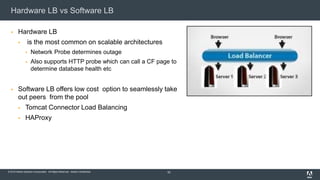
Hardware LB vs Software LB
 Hardware LB
 is the most common on scalable architectures
 Network Probe determines outage
 Also supports HTTP probe which can call a CF page to
determine database health etc
 Software LB offers low cost option to seamlessly take
out peers from the pool
 Tomcat Connector Load Balancing
 HAProxy
55
© 2015 Adobe Systems Incorporated. All Rights Reserved. Adobe Confidential.
Demo Application Failover
 What we will see in the demo
 Create 3 peers that are load balanced with worker.properies
settings
 Create Load on Web server(s)
 Application is setup to use Client scope for user information
 Client scope is defined to go to the database
 Gracefully take server out of pool using Tomcat Connector admin
 Restart IIS website to bring in new connector settings
 Watch peers pick up traffic
 Look to see of server threw any errors
 Place server back into pool
 Restart IIS website to bring in pool changes made with Tomcat
connector admin
 Peers pick up traffic
© 2015 Adobe Systems Incorporated. All Rights Reserved. Adobe Confidential.
Questions

Load Balancing, Failover and Scalability with ColdFusion

  • 1.
    © 2015 AdobeSystems Incorporated. All Rights Reserved. Adobe Confidential. Load Balancing, Failover and Scalability with ColdFusion Presenters Mike Collins, Sr. Consultant Priyank Shrivastava Sr. Product Consultant
  • 2.
    © 2015 AdobeSystems Incorporated. All Rights Reserved. Adobe Confidential. Today’s Agenda  Modeling for Scalability  ColdFusion and Web Server Configurations  ColdFusion Clustering  Load Balancing with Connector  Using the Tomcat Connector Admin  Session Management Strategies  Demo Load Balancing and Failover
  • 3.
    © 2015 AdobeSystems Incorporated. All Rights Reserved. Adobe Confidential. Application Scaling Techniques – Physical and Virtual  Physical Server Scaling  Vertical  Horizontal  Distributed  VM Server Scaling  Managed Experience  Vertical  Horizontal  Distributed  Popular Environments  VMWare ESX  Microsoft HyperV  Citrix XenServer Business Critical Apps need to be designed to provide the end user uninterrupted service. We will be looking look at building an environment to support Business Critical Apps
  • 4.
    © 2015 AdobeSystems Incorporated. All Rights Reserved. Adobe Confidential. Physical Servers Techniques  Many instances on each peer  Greatest utilization of hardware  Most cost-effective  Need to consider hardware failures Vertical Horizontal  Peers are on other physical servers  Protects against hardware failures  Effective management of workloads  higher costs Distributed  Peers are located across physical servers  Each server has multiple CF Instances  Protects against hardware failures  More utilization of available CPU  Effective management of workloads
  • 5.
    © 2015 AdobeSystems Incorporated. All Rights Reserved. Adobe Confidential. Virtual - VM Scaling Techniques  Most Popular Scaling Model  Managed environments perfect for creating new servers  Easily create reusable VM images  VMs become the building blocks  All in One - Web server and Application Server  Web server VMs - Application Pool VMs  Popular Environments  VMWare, HyperV 5
  • 6.
    © 2015 AdobeSystems Incorporated. All Rights Reserved. Adobe Confidential. VM Building Blocks  Need to establish your building block VMs  OS  CF Version and settings  Web server  JVM Settings  Establish Vertical scalability  Scale Up Test each VM  Establish how many CF Instances can you run on each VM  Establish how large a VM would be in terms of vCPU and memory,  JVM settings  Scale Out Test  How many VMs do you need to meet your Response Time SLAs without reaching 70%-80% saturation of CPU?  Create a testing environments where you can get accurate numbers 6
  • 7.
    © 2015 AdobeSystems Incorporated. All Rights Reserved. Adobe Confidential. VM Building Blocks – Know the limitations  Test a single building block find it’s limits so you know critical metrics to determine how many vMs you need to serve expected load  Change the building blocks JVM Heap, vCPUs, and retest limits tp find a sweet spot giving you the best throughput and performance 7
  • 8.
    © 2015 AdobeSystems Incorporated. All Rights Reserved. Adobe Confidential. Sample VM Topologies  Let’s take a look at some sample topologies 8
  • 9.
    © 2015 AdobeSystems Incorporated. All Rights Reserved. Adobe Confidential. Department Based Topology with Shared Data API 9 Finance Load Balancer Loan Processing PDF Generation REST Application Tier REST DATA Tier - DSNs HTMLJSONJDBC Database Sales
  • 10.
    © 2015 AdobeSystems Incorporated. All Rights Reserved. Adobe Confidential. HTMLJSONJDBC Company Wide Topology 10 Account Management Load Balancer REST Application Tier REST DATA Tier - DSNs HTMLJSONJDBC Database eCommerce SiteEnd Users Back End CRM Apps Utilities Event Gateways
  • 11.
    © 2015 AdobeSystems Incorporated. All Rights Reserved. Adobe Confidential. Frontend eCommerce with separate Web Server Pool 11 Load Balancer Database Web Servers Shoppers CRM Apps eCommerce Event Gateway Orders Corp Data Access JDBC REST
  • 12.
    © 2015 AdobeSystems Incorporated. All Rights Reserved. Adobe Confidential. Database Client App – API Based Topology  Single Page Apps  REST API base applications  JavaScript Apps  Mobile  API Access 12 JSONHTML REST Application Tier REST DATA Tier - DSNs Load Balancer(s)
  • 13.
    © 2015 AdobeSystems Incorporated. All Rights Reserved. Adobe Confidential. Application Failover Factors  Application Failover  Three servers is the ideal number for a business critical app  You can take one out of the pool and still have 2 two remaining live.  Your tolerance will vary  Continuous Monitoring and Alerts  Monitoring is part of failover  Often will stop or shorten an outage  The CF Unresponsive thread alert with stack traces is a tool 13
  • 14.
    © 2015 AdobeSystems Incorporated. All Rights Reserved. Adobe Confidential. Syncing your Code and Resource Files  Peers will need access to uniform set of source code and resource files  Common ways  Each peer can synch from a common network drive  Build script can move files to all the servers  Always possibility of something getting out of sync  Need to consider if code could be sensitive to one server being updated prior to another  Usually not an issue but scenarios could exist
  • 15.
    © 2015 AdobeSystems Incorporated. All Rights Reserved. Adobe Confidential. LB, Scaling and Failover by Category Category One Cost $  One server VM  2-3 Instances of CF  Load Balanced with Tomcat Connector  Shared code base  Session might be lost on failover  Email Alerts 15 Category Three Cost $$$  Three servers VMs  2-3 Instances per server  Load Balance with Hardware LB  Code is synched or build script pushes to servers  Seamless session state on failover  Cached Content  Full monitoring Category Four Cost $$$$  Six or more servers VMs  2-3 Instances per application  Load Balance with Hardware LB  Multi location  VM replication for backup  Code is synched  Seamless session state on failover  Dist Cached Content  Full Monitoring Category Two Cost $$  Two servers VMs  2-3 Instances per server  Load Balanced with Tomcat Connector or Hardware Load Balancer  Code is synched or build updates both servers  Smaller chance of lost sessions on failover  Email Alerts
  • 16.
    © 2015 AdobeSystems Incorporated. All Rights Reserved. Adobe Confidential. Load Balancing Scalability and Failover with ColdFusion Priyank Shrivastava| Sr. Product Consultant Load Balancing, Scalability and Failover with ColdFusion Priyank Shrivastava | Sr. Product Consultant
  • 17.
    © 2015 AdobeSystems Incorporated. All Rights Reserved. Adobe Confidential. Distributed Environment
  • 18.
    © 2015 AdobeSystems Incorporated. All Rights Reserved. Adobe Confidential.  Reliability  Availability  Scalability Advantages of Distributed Environment
  • 19.
    © 2015 AdobeSystems Incorporated. All Rights Reserved. Adobe Confidential. How to setup Distributed Environment? Distributed Environment
  • 20.
    © 2015 AdobeSystems Incorporated. All Rights Reserved. Adobe Confidential. Distributed Environment  Single Server Setup
  • 21.
    © 2015 AdobeSystems Incorporated. All Rights Reserved. Adobe Confidential. Distributed Environment
  • 22.
    © 2015 AdobeSystems Incorporated. All Rights Reserved. Adobe Confidential.  Copy these folders from ColdFusion directory to Webserver machine How to setup Distributed Environment
  • 23.
    © 2015 AdobeSystems Incorporated. All Rights Reserved. Adobe Confidential.  Copy these folders from ColdFusion directory to Webserver machine How to setup Distributed Environment
  • 24.
    © 2015 AdobeSystems Incorporated. All Rights Reserved. Adobe Confidential.  Copy these folders from ColdFusion directory to Webserver machine How to setup Distributed Environment
  • 25.
    © 2015 AdobeSystems Incorporated. All Rights Reserved. Adobe Confidential.  Required directories copied  Install Microsoft Visual C++ Redistributable (2008 and 2012 32 bit/64 bit)  Command to create the connector How to setup Distributed Environment
  • 26.
    © 2015 AdobeSystems Incorporated. All Rights Reserved. Adobe Confidential. Command to create the connector
  • 27.
    © 2015 AdobeSystems Incorporated. All Rights Reserved. Adobe Confidential.  Required directories copied  Install Microsoft Visual C++ Redistributable (2008 and 2012 32 bit/64 bit)  Command to create the connector How to setup Distributed Environment
  • 28.
    © 2015 AdobeSystems Incorporated. All Rights Reserved. Adobe Confidential. How to setup Distributed Environment with ColdFusion Cluster? Distributed Environment with Cluster
  • 29.
    © 2015 AdobeSystems Incorporated. All Rights Reserved. Adobe Confidential. Distributed Environment with Cluster  ColdFusion Cluster setup
  • 30.
    © 2015 AdobeSystems Incorporated. All Rights Reserved. Adobe Confidential. Distributed Environment with Cluster
  • 31.
    © 2015 AdobeSystems Incorporated. All Rights Reserved. Adobe Confidential.  Copy these additional XMLs from ColdFusion config folder to Webserver machine How to setup Distributed Environment in a cluster
  • 32.
    © 2015 AdobeSystems Incorporated. All Rights Reserved. Adobe Confidential.  Command to create the connector How to setup Distributed Environment in a cluster
  • 33.
    © 2015 AdobeSystems Incorporated. All Rights Reserved. Adobe Confidential.  Workers Properties file Connector Properties
  • 34.
    © 2015 AdobeSystems Incorporated. All Rights Reserved. Adobe Confidential.  Connector port
  • 35.
    © 2015 AdobeSystems Incorporated. All Rights Reserved. Adobe Confidential.  Check the ColdFusion Handlers  Check the ISAPI Filter  Check the Connector folder and files  Check if the ISAPI_REDIRECT.dll is correct Check List
  • 36.
    © 2015 AdobeSystems Incorporated. All Rights Reserved. Adobe Confidential.  Microsoft Visual C++ Redistributable (2008 and 2012 32 bit/64 bit)  Port should be open  Required files needs to be copied Things to remember
  • 37.
    © 2015 AdobeSystems Incorporated. All Rights Reserved. Adobe Confidential. Reference links http://blogs.coldfusion.com/post.cfm/setting-up-coldfusion-in- distributed-envionment https://helpx.adobe.com/coldfusion/configuring- administering/using-multiple-server-instances.html
  • 38.
    © 2015 AdobeSystems Incorporated. All Rights Reserved. Adobe Confidential. Thank you cfsup@adobe.com cf.install@adobe.com Priyank Shrivastava. priyank_adobe
  • 39.
    © 2015 AdobeSystems Incorporated. All Rights Reserved. Adobe Confidential. Clustering and Load Balancing Decision Points  Do you have a Load Balancer routing traffic, monitoring connectivity?  Do we need to share state across peers?  Do you have any tolerance for throwing errors on failover?  Can the server go down for 15 minutes from time to time? 44 Each application will have different requirements
  • 40.
    © 2015 AdobeSystems Incorporated. All Rights Reserved. Adobe Confidential. ColdFusion Clustering Basics  Clustering Basics  Allows for 2 or more peer servers to work together  Peers can be local or remote  Uses Multicast to auto recognize when peers are up or down  Can be defined in the ColdFusion Administrator  When the Web Server Connector is setup it builds the load balancing rules based on the cluster you have defined.  Additional Properties and settings are located in these files  Cluster.xml  Server.xml
  • 41.
    © 2015 AdobeSystems Incorporated. All Rights Reserved. Adobe Confidential. Getting Started with Clustering – Creating Instances  Uses the cfusion instance to seed the new instance  Do no use cfusion inside a defined cluster  Use cfusion as your baseline instance  Setup any default datasources and settings in cfusion  Settings are brought over  Make sure JVM arguments do not conflict such as port numbers on any custom settings  Review ports in {instancename}/runtime/config/server.xml  JVMRoute Property should be unique in server.xml 46  Requires CF Enterprise
  • 42.
    © 2015 AdobeSystems Incorporated. All Rights Reserved. Adobe Confidential. ColdFusion Cluster Setup  What does it do when I setup a cluster?  When you create a cluster you are building the Network support to allow the peers to auto discover each other  Needed for in memory session replication and failover  Settings are added to the server.xml file  It does not setup Load Balancing  Load Balancing is setup when the connector is defined 47
  • 43.
    © 2015 AdobeSystems Incorporated. All Rights Reserved. Adobe Confidential. Cluster Setup – Remote Instances are supported Default 8985/8987 (in jetty.xml) Must be unique for session affinity Weighted round robin
  • 44.
    © 2015 AdobeSystems Incorporated. All Rights Reserved. Adobe Confidential. ColdFusion Clustering and Load Balancing  Clustering  Auto discovery of peers required to support in memory session replication  Edits the Server.xml with multicast settings so peers can have a backchannel to communicate  Clustering setup in the CF Admin does nothing for Load Balancing  Essentially the Cluster Setup in the CF Admin gives you the support for in memory session replication 49  Load balancing is done when you define the web server connector  But wait Adobe does not recommend in memory session replication  Do I even need to setup a cluster if I just want load balancing  No you don’t  However you might want to use it to initially setup your connector files to get started with load balancing  Once your connector settings are setup to load balance you can delete your cluster in the CF Admin Load balancing does not require CF Enterprise just make sure each server has it’s own Standard license.
  • 45.
    © 2015 AdobeSystems Incorporated. All Rights Reserved. Adobe Confidential. ColdFusion Connector Setup for a Cluster  Run wsconfog.exe or remote command  Once completed you will get a numbered directory with configuration  Your load balancing is now defined in the workers.properties file 50
  • 46.
    © 2015 AdobeSystems Incorporated. All Rights Reserved. Adobe Confidential. Connector Setup for Cluster – workers.properties  You will get a worker.properties that looks something this   Hosts  Can be local or remote  The CF Server needs a Connector defined in the server.xml  CF Servers can define more then one connector as well  Status Worker  Allows you to monitor and edit peers  Mount to a protected url path  Restarting website in IIS will reload connector settings  CF 11 Updater 4 and below- Make sure to save any settings because this file is replaced if you update rebuild the Connector. U5 now backs up properties files if you update the connector. 51 worker.list=mycluster,status worker.mycluster.type=lb worker.mycluster.balance_workers=peer1,peer2,peer3 worker.mycluster.sticky_session=false worker.balancer.method=B worker.peer1.type=ajp13 worker.peer1.host=localhost worker.peer1.port=8013 worker.peer1.max_reuse_connections=250 worker.peer1.lbfactor=1 worker.peer1.route=peer1 worker.peer2.type=ajp13 worker.peer2.host=localhost worker.peer2.port=8016 worker.peer2.max_reuse_connections=250 worker.peer2.lbfactor=1 worker.peer2.route=peer2 worker.status.type=status worker.status.mount=/admin/status/jk
  • 47.
    © 2015 AdobeSystems Incorporated. All Rights Reserved. Adobe Confidential. Changing the Workers.Properties  You can ecit worker properties anytime  Add Peers  Disable Peers  Chance Load Balancer settings  Simply Restart web site reload the connector which will bring in new settings. 52
  • 48.
    © 2015 AdobeSystems Incorporated. All Rights Reserved. Adobe Confidential. Using the Connector Admin  Built into the Tomcat Connector 53
  • 49.
    © 2015 AdobeSystems Incorporated. All Rights Reserved. Adobe Confidential. Options Around Session Management  Sticky Session – Server Affinity  Must turn on J2EE Sessions  Easy setup - Works great  Must have some tolerance for errors on a failover  Needs in memory session replication to get seamless failover, however session failover has limitations and is not recommended by Adobe CF team  Client Scope  Setup client scope to be stored in database  Great solution for seamless failover  Great solution for round robin load balancing  Need to probably write your own purge routine to best control timing of the purges and to control locking  Distributed Caching – EHCache  Great solution similar to Client Scope just different mechanism  Can take the work off your database  Needs some expertise to setup and maintain  Check out the EHCache Session from CFSummit 2015 about some great new features  Custom Solution  Nothing to stop you from writing your own solution into the database, shared file system etc
  • 50.
    © 2015 AdobeSystems Incorporated. All Rights Reserved. Adobe Confidential. Hardware LB vs Software LB  Hardware LB  is the most common on scalable architectures  Network Probe determines outage  Also supports HTTP probe which can call a CF page to determine database health etc  Software LB offers low cost option to seamlessly take out peers from the pool  Tomcat Connector Load Balancing  HAProxy 55
  • 51.
    © 2015 AdobeSystems Incorporated. All Rights Reserved. Adobe Confidential. Demo Application Failover  What we will see in the demo  Create 3 peers that are load balanced with worker.properies settings  Create Load on Web server(s)  Application is setup to use Client scope for user information  Client scope is defined to go to the database  Gracefully take server out of pool using Tomcat Connector admin  Restart IIS website to bring in new connector settings  Watch peers pick up traffic  Look to see of server threw any errors  Place server back into pool  Restart IIS website to bring in pool changes made with Tomcat connector admin  Peers pick up traffic
  • 52.
    © 2015 AdobeSystems Incorporated. All Rights Reserved. Adobe Confidential. Questions

Editor's Notes

  • #2 http://www.slideshare.net/ColdFusionConference/2014-cf-summitclustering
  • #17 Introduction, I love to work on setting up environment and that is all about me. Today, we use a lot web application and ColdFusion gives you more flexibility to build these applications easily. Lot of users are running mission critical applications with zero downtime and in case application goes down, they might lose the revenue. How to avoid those outages and create more robust architecture and provide security. To achieve this there is highly used standard knows as Multi-tier architecture.
  • #18 Today, we use a lot web application and ColdFusion gives you more flexibility to build these applications easily. Lot of users are running mission critical applications with zero downtime and in case application goes down, they might lose the revenue. How to avoid those outages and create more robust infrastructure. To achieve this there is highly used standard knows as Multi-tier architecture. When we talk about Multi-tier architecture so the question is can we achieve this using ColdFusion? Answer is YES However is it easy to setup distributed environment using ColdFusion? Yes
  • #21 In this architecture diagram, we have a web server in a separate machine and Application server(ColdFusion) in a separate server. To be able to communicate between ColdFusion and webserver, we need to create connector. Connector is a bridge which routes the request from Webserver to ColdFusion. However this is just one server, it has be multiple webserver and multiple Application server, so there is no single point of failure.
  • #36 AJP protocol works in the same way as HTTP protocol however it allow Tomcat to communicate with Webserver.
  • #42 Let me summarize what we have went through, how to setup distributed environment using single server and using cluster, also that is easily achieved by ColdFusion. By using these simple techniques, we can provide high availability to Mission critical application using ColdFusion that can not only help you grow your business and make our end user happy.