
Server side JavaScript environment
Khaled Mosharraf, M.Sc
Fh Kiel Germany
mosharrafkhaled@gmx.de
A.K.M Bahalul Haque, M.Sc
M.Sc Fh Kiel Germany
pallob.nstu@gmail.com
What is NodeJS?
 Complete software platform for scalable server-side &
networking applications
 Bundled with JavaScript Interpreter
 JavaScript runtime environment running Google Chrome’s V8
engine
 Runs over command line
 Never blocks, not even for I/O
 Uses the CommonJS framework
Making it a little closer to a real OO language
Why is it so cool......
• Node JS is fast, in theory
• Low maintenance (small impact on resources)
• Programs must not stress the CPU
• Programming is not THAT easy
• API are well documented
• The Node JS standard library can be EXTENDED
by the use of modules
• the number of available modules is HUGE
• optimised (low resources)
• runs everywhere
Overall Structure
Two Main Components are --
• Main Core, written in C & C++
• Modules, such as Libuv library and V8 runtime
engine, also written
in C++
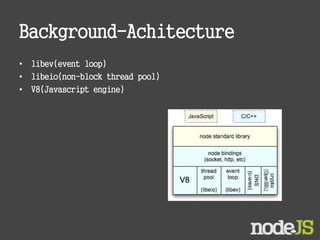
Background-Achitecture
• libev(event loop)
• libeio(non-block thread pool)
• V8(Javascript engine)
What can NodeJS be used for…..
• Http,
• networking,
• Websockets
• Network servers (HTTP, Proxies, messaging)
• API backends
• Real time applications
• Streaming data
“One page” web sites
• Command line tools
• Bots
---but also it is an invaluable tool for
developers
Browsers
• Every browser has its own VM
• Firefox? Spidermonkey
• Internet Explorer? Chakra
• Chrome? V8
• Safari? JavaScriptCore
• Opera? Carakan
• Also Rhino, stand alone
• Completely event driven (asynchronous, non-
blocking)
When to use Node.js?
• Node.js is good for creating streaming based
real-time services, web chat applications,
static file servers etc.
• If you need high level concurrency and not
worried about CPU-cycles.
• If you are great at writing JavaScript code
because then you can use the same language
at both the places: server-side and client-side.
When to not use Node.js
• When you are doing heavy and CPU intensive calculations on server
side, because event-loops are CPU hungry.
• Node.js API is still in beta, it keeps on changing a lot from one
revision to another and there is a very little backward compatibility.
Most of the packages are also unstable. Therefore is not yet
production ready.
• Node.js is a no match for enterprise level application frameworks
like Spring(java), Django(python), Symfony(php) etc. Applications
written on such platforms are meant to be highly user interactive
and involve complex business logic.
• Read further on disadvantages of Node.js on Quora:
http://www.quora.com/What-are-the-disadvantages-of-using-
Node-js
Features
 Non-blocking I/O
 Event Driven
 CommonJS
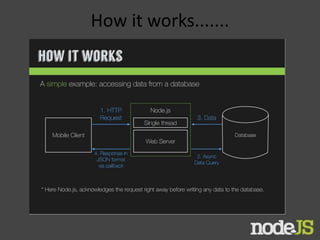
How it works.......
Async
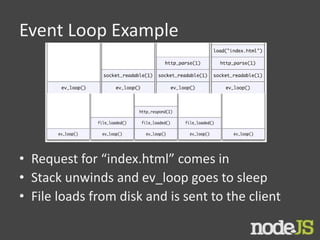
Event Loop Example
• Request for “index.html” comes in
• Stack unwinds and ev_loop goes to sleep
• File loads from disk and is sent to the client
What is the “Node Standard Library”?
• A powerful HTTP(S) library (client and server
in no time)
• DNS name resolution
• Crypto
• Access to the file system
• URL manipulation
• ZLIB
• UDP datagrams
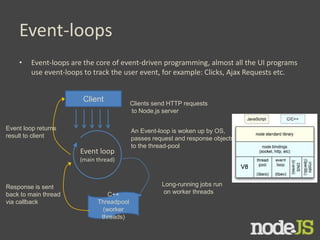
Event-loops
• Event-loops are the core of event-driven programming, almost all the UI programs
use event-loops to track the user event, for example: Clicks, Ajax Requests etc.
Client
Event loop
(main thread)
C++
Threadpool
(worker
threads)
Clients send HTTP requests
to Node.js server
An Event-loop is woken up by OS,
passes request and response objects
to the thread-pool
Long-running jobs run
on worker threads
Response is sent
back to main thread
via callback
Event loop returns
result to client
Node.js benchmarks
Taken from:
http://nodejs.org/jsconf2010.pdf
The benchmark shows the response
time in milli-secs for 4 evented
servers.
Taken from:
http://code.google.com/p/node-js-vs-apache-
php-benchmark/wiki/Tests
A benchmark between Apache+PHP
and node.js, shows the response
time for 1000 concurrent
connections making 10,000 requests
each, for 5 tests.
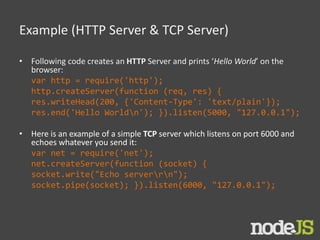
Example (HTTP Server & TCP Server)
• Following code creates an HTTP Server and prints ‘Hello World’ on the
browser:
var http = require('http');
http.createServer(function (req, res) {
res.writeHead(200, {'Content-Type': 'text/plain'});
res.end('Hello Worldn'); }).listen(5000, "127.0.0.1");
• Here is an example of a simple TCP server which listens on port 6000 and
echoes whatever you send it:
var net = require('net');
net.createServer(function (socket) {
socket.write("Echo serverrn");
socket.pipe(socket); }).listen(6000, "127.0.0.1");
Lets connect to a DB (MongoDB)
• Install mongojs using npm, a mongoDB driver for
Node.js
npm install mongojs
• Code to retrieve all the documents from a
collection:
var db = require("mongojs")
.connect("localhost:27017/test", ['test']);
db.test.find({}, function(err, posts) {
if( err || !posts) console.log("No posts found");
else posts.forEach( function(post) {
console.log(post);
});
});
Node.js Ecosystem
• Node.js heavily relies on modules, in previous
examples require keyword loaded the http & net
modules.
• Creating a module is easy, just put your JavaScript code
in a separate js file and include it in your code by using
keyword require, like:
var modulex = require(‘./modulex’);
• Libraries in Node.js are called packages and they can be
installed by typing
npm install “package_name”; //package should be available in npm
registry @ nmpjs.org
• NPM (Node Package Manager) comes bundled with
Node.js installation.
Critical Analysis......
Benefits
• Because of single threaded nonb locking scheme nodejs can
support up to one million concurrent nodes
• Can be used to implement entire havascript based web
applications
• Request are acknowledged because of asynchronous nature
• Native JSON handling
• Easy RESTful services
• Speedy native bindings in C
• Realtime nature i.e possible to process fiels while they are
being uploaded
Critical Analysis......
Best for..
• REST + JSON Api
• Quick Prototyping
• Chat applications
• Ideal for computing and orchastration tasks
• For fast growing applications
Limitations....
• Tightly coupled Node & V8 engines
• Low fault tolerance
• Exception handling
• Some lackings in code quality
Who is using Node.js in production?
• Yahoo! : iPad App Livestand uses Yahoo! Manhattan
framework which is based on Node.js.
• LinkedIn : LinkedIn uses a combination of Node.js and
MongoDB for its mobile platform. iOS and Android apps are
based on it.
• eBay : Uses Node.js along with ql.io to help application
developers in improving eBay’s end user experience.
• Dow Jones : The WSJ Social front-end is written completely
in Node.js, using Express.js, and many other modules.
• Complete list can be found at:
https://github.com/joyent/node/wiki/Projects,-
Applications,-and-Companies-Using-Node
Conclusion
 Still in beta
 Non-blocking nature takes some getting used
to
 Interesting API
 Can almost remake Dash!
??
Any
Question 

Beginners Node.js

  • 1.
    Server side JavaScriptenvironment Khaled Mosharraf, M.Sc Fh Kiel Germany mosharrafkhaled@gmx.de A.K.M Bahalul Haque, M.Sc M.Sc Fh Kiel Germany pallob.nstu@gmail.com
  • 2.
    What is NodeJS? Complete software platform for scalable server-side & networking applications  Bundled with JavaScript Interpreter  JavaScript runtime environment running Google Chrome’s V8 engine  Runs over command line  Never blocks, not even for I/O  Uses the CommonJS framework Making it a little closer to a real OO language
  • 4.
    Why is itso cool...... • Node JS is fast, in theory • Low maintenance (small impact on resources) • Programs must not stress the CPU • Programming is not THAT easy • API are well documented • The Node JS standard library can be EXTENDED by the use of modules • the number of available modules is HUGE • optimised (low resources) • runs everywhere
  • 5.
    Overall Structure Two MainComponents are -- • Main Core, written in C & C++ • Modules, such as Libuv library and V8 runtime engine, also written in C++
  • 6.
    Background-Achitecture • libev(event loop) •libeio(non-block thread pool) • V8(Javascript engine)
  • 7.
    What can NodeJSbe used for….. • Http, • networking, • Websockets • Network servers (HTTP, Proxies, messaging) • API backends • Real time applications • Streaming data “One page” web sites • Command line tools • Bots ---but also it is an invaluable tool for developers
  • 8.
    Browsers • Every browserhas its own VM • Firefox? Spidermonkey • Internet Explorer? Chakra • Chrome? V8 • Safari? JavaScriptCore • Opera? Carakan • Also Rhino, stand alone • Completely event driven (asynchronous, non- blocking)
  • 9.
    When to useNode.js? • Node.js is good for creating streaming based real-time services, web chat applications, static file servers etc. • If you need high level concurrency and not worried about CPU-cycles. • If you are great at writing JavaScript code because then you can use the same language at both the places: server-side and client-side.
  • 10.
    When to notuse Node.js • When you are doing heavy and CPU intensive calculations on server side, because event-loops are CPU hungry. • Node.js API is still in beta, it keeps on changing a lot from one revision to another and there is a very little backward compatibility. Most of the packages are also unstable. Therefore is not yet production ready. • Node.js is a no match for enterprise level application frameworks like Spring(java), Django(python), Symfony(php) etc. Applications written on such platforms are meant to be highly user interactive and involve complex business logic. • Read further on disadvantages of Node.js on Quora: http://www.quora.com/What-are-the-disadvantages-of-using- Node-js
  • 11.
    Features  Non-blocking I/O Event Driven  CommonJS
  • 12.
  • 13.
  • 14.
    Event Loop Example •Request for “index.html” comes in • Stack unwinds and ev_loop goes to sleep • File loads from disk and is sent to the client
  • 15.
    What is the“Node Standard Library”? • A powerful HTTP(S) library (client and server in no time) • DNS name resolution • Crypto • Access to the file system • URL manipulation • ZLIB • UDP datagrams
  • 16.
    Event-loops • Event-loops arethe core of event-driven programming, almost all the UI programs use event-loops to track the user event, for example: Clicks, Ajax Requests etc. Client Event loop (main thread) C++ Threadpool (worker threads) Clients send HTTP requests to Node.js server An Event-loop is woken up by OS, passes request and response objects to the thread-pool Long-running jobs run on worker threads Response is sent back to main thread via callback Event loop returns result to client
  • 17.
    Node.js benchmarks Taken from: http://nodejs.org/jsconf2010.pdf Thebenchmark shows the response time in milli-secs for 4 evented servers. Taken from: http://code.google.com/p/node-js-vs-apache- php-benchmark/wiki/Tests A benchmark between Apache+PHP and node.js, shows the response time for 1000 concurrent connections making 10,000 requests each, for 5 tests.
  • 18.
    Example (HTTP Server& TCP Server) • Following code creates an HTTP Server and prints ‘Hello World’ on the browser: var http = require('http'); http.createServer(function (req, res) { res.writeHead(200, {'Content-Type': 'text/plain'}); res.end('Hello Worldn'); }).listen(5000, "127.0.0.1"); • Here is an example of a simple TCP server which listens on port 6000 and echoes whatever you send it: var net = require('net'); net.createServer(function (socket) { socket.write("Echo serverrn"); socket.pipe(socket); }).listen(6000, "127.0.0.1");
  • 19.
    Lets connect toa DB (MongoDB) • Install mongojs using npm, a mongoDB driver for Node.js npm install mongojs • Code to retrieve all the documents from a collection: var db = require("mongojs") .connect("localhost:27017/test", ['test']); db.test.find({}, function(err, posts) { if( err || !posts) console.log("No posts found"); else posts.forEach( function(post) { console.log(post); }); });
  • 20.
    Node.js Ecosystem • Node.jsheavily relies on modules, in previous examples require keyword loaded the http & net modules. • Creating a module is easy, just put your JavaScript code in a separate js file and include it in your code by using keyword require, like: var modulex = require(‘./modulex’); • Libraries in Node.js are called packages and they can be installed by typing npm install “package_name”; //package should be available in npm registry @ nmpjs.org • NPM (Node Package Manager) comes bundled with Node.js installation.
  • 21.
    Critical Analysis...... Benefits • Becauseof single threaded nonb locking scheme nodejs can support up to one million concurrent nodes • Can be used to implement entire havascript based web applications • Request are acknowledged because of asynchronous nature • Native JSON handling • Easy RESTful services • Speedy native bindings in C • Realtime nature i.e possible to process fiels while they are being uploaded
  • 22.
    Critical Analysis...... Best for.. •REST + JSON Api • Quick Prototyping • Chat applications • Ideal for computing and orchastration tasks • For fast growing applications
  • 23.
    Limitations.... • Tightly coupledNode & V8 engines • Low fault tolerance • Exception handling • Some lackings in code quality
  • 24.
    Who is usingNode.js in production? • Yahoo! : iPad App Livestand uses Yahoo! Manhattan framework which is based on Node.js. • LinkedIn : LinkedIn uses a combination of Node.js and MongoDB for its mobile platform. iOS and Android apps are based on it. • eBay : Uses Node.js along with ql.io to help application developers in improving eBay’s end user experience. • Dow Jones : The WSJ Social front-end is written completely in Node.js, using Express.js, and many other modules. • Complete list can be found at: https://github.com/joyent/node/wiki/Projects,- Applications,-and-Companies-Using-Node
  • 25.
    Conclusion  Still inbeta  Non-blocking nature takes some getting used to  Interesting API  Can almost remake Dash!
  • 26.