Enterprise Vulnerability Management
BSIDES AUSTIN - April 2016
Damon Small & Kevin Dunn - NCC Group
Agenda
Welcome & Introductions 03
Session Overview 07
Session Definitions 08
Vulnerability Management 101 09
VulnerabilityAssessment Scans 10
Failing & Pitfalls 21
VMP: Making a Real Difference 22
Session Close 31
2
3
Welcome & Introductions
NCC Group – A Global Security Firm
• Formed in June 1999 showing immense growth over the past 16 years.
• 1800 employees, in 30 office locations
• North America, the United Kingdom, Europe and Australia.
• We strive to provide Total Information Assurance for our clients.
NCC Group in North America
• Currently 8 offices in the NA: New York, Atlanta, Chicago, Austin, Seattle,
San Francisco, Sunnyvale and Waterloo.
• NCC Group combines the best of bread US security brands of iSEC
Partners, Matasano, Intrepidus Group and NGS.
4
Welcome & Introductions
NCC Group – Security Consulting
• Attack & Penetration Focus
• Applications
• Mobile
• Networks & Infrastructure
• Physical Security
• Embedded Systems
• Red Teaming
• Incident Response & Forensics
• Enterprise Risk / VA Strategy
5
Welcome & Introductions
Your Speakers – DAMON SMALL, Technical PM for NCC Group in NA
• In IT since 1995; InfoSec since 2001
• Louisiana native: “Not from Texas but I got here as fast as I could!”
• Studied music at LSU; grad school in 2005 for Information Assurance
• Supported healthcare orgs. in the Texas Medical Center
• Vulnerability Management Programs:
o Two for Health Care orgs.
o One for Oil & Gas
o Workflow Analysis & Development
o Scanner Platform Deployments
6
Welcome & Introductions
Your Speakers – KEVIN DUNN, Technical VP for NCC Group in NA
• Technical VP for NCC Group, based in Austin TX.
• 14 year career focused on Attack & Penetration techniques & defenses
• Prior to that security focused government/military background
• Responsible for:
o Regional Development & Management
o Development of Strategic Technical Practices:
§ Strategic Infrastructure Security (SIS)
§ NA Computer Incident Response Team (NA-CIRT)
• Specialist in Red Team / Black Ops engagements
o (Forms of extreme penetration testing and attack modeling)
7
Session Overview
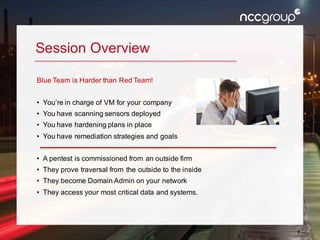
Blue Team is Harder than Red Team!
• You’re in charge of VM for your company
• You have scanning sensors deployed
• You have hardening plans in place
• You have remediation strategies and goals
• A pentest is commissioned from an outside firm
• They prove traversal from the outside to the inside
• They become Domain Admin on your network
• They access your most critical data and systems.
8
Session Definitions
• Vulnerability Assessment: The act of gathering information regarding
vulnerabilities on specific hosts, often using scanning tools. (Does include
penetration testing).
• Vulnerability Management: A business process that includes the following
key components:
o Identification
o Classification
o Decision/Decision Record
o Mitigation
9
Vulnerability Management 101
• A business process that includes:
1. Identifying Vulnerabilities (VA)
2. Promotes Patching / Hardening / Fix of Issues
3. Decision process regarding remediation activities:
a. Fix it, accept it, or transfer the risk.
b. Creates an auditable decision record, process for validation,
and a process to periodically review “no action” remediation
where risk is accepted.
c. Decision process should be multi-disciplinary and represent all
stakeholders (IT, business, InfoSec, etc.)
10
Vulnerability Assessment Scans
Scanning - What is it Good For?
• Identifying Vulnerabilities
• Remediation Information
• Software Inventory
• Asset Management
Scanning - What is it Not Good For?
• Identifying Vulnerabilities
• Going Beyond Patching
• Workflow/Business Processes
11
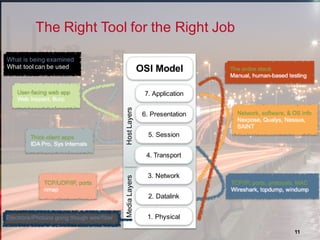
Electrons/Photons going though wire/fiber
What is being examined
What tool can be used
1. Physical
2. Datalink
3. Network
4. Transport
5. Session
6. Presentation
7. Application
MediaLayersHostLayers
OSI Model
The Right Tool for the Right Job
12
Patching vs. Hardening
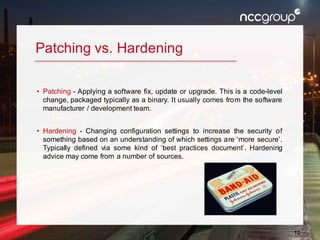
• Patching - Applying a software fix, update or upgrade. This is a code-level
change, packaged typically as a binary. It usually comes from the software
manufacturer / development team.
• Hardening - Changing configuration settings to increase the security of
something based on an understanding of which settings are ‘more secure’.
Typically defined via some kind of ‘best practices document’. Hardening
advice may come from a number of sources.
13
Over-Focus on Scanning / Patching
Depth of System Hardening is Typically Shallow
• Consider the following issues found on most Pentests!
o MSSQL Weak SA Password
o Tomcat Manager Weak Password
o Jenkins Groovy Script Command Execution
o Printer Default Credentials
14
Over-Focus on Scanning / Patching
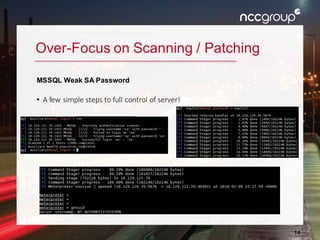
MSSQL Weak SA Password
• A few simple steps to full control of server!
15
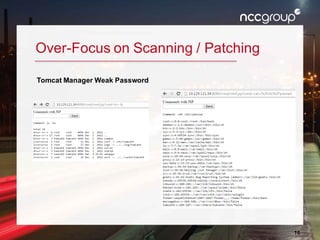
Over-Focus on Scanning / Patching
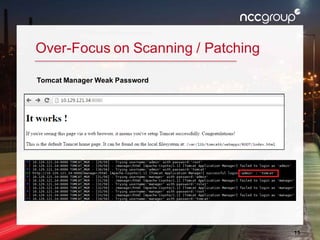
Tomcat Manager Weak Password
16
Over-Focus on Scanning / Patching
Tomcat Manager Weak Password
17
Over-Focus on Scanning / Patching
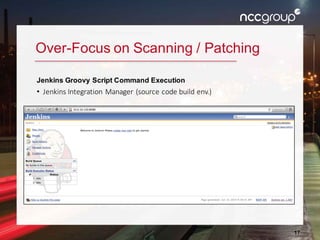
Jenkins Groovy Script Command Execution
• Jenkins Integration Manager (source code build env.)
18
Over-Focus on Scanning / Patching
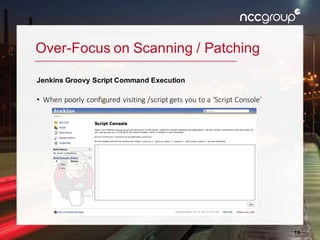
Jenkins Groovy Script Command Execution
• When poorly configured visiting /script gets you to a ‘Script Console’
19
Over-Focus on Scanning / Patching
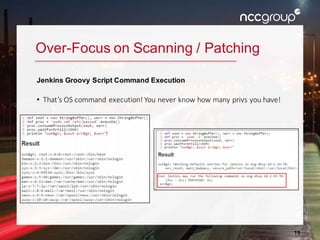
Jenkins Groovy Script Command Execution
• That’s OS command execution! You never know how many privs you have!
20
Over-Focus on Scanning / Patching
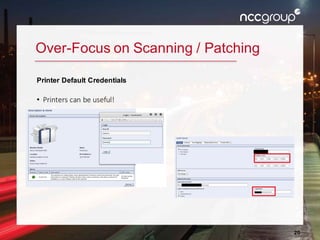
Printer Default Credentials
• Printers can be useful!
21
Failings & Pitfalls
Common VMP Problems
• Over-prioritization of Scanning - no workflow development
• Scan All the Things - but do nothing with the results…
• Generate False Positives - and lose credibility*
• No Consideration for Network & Business Impact*
• No Security Team & Support Org. Relationship
• Mistaking VA (alone) as a DefensiveActivity
22
VMP: Making a Real Difference
HIGHEST PRIORITIES
• Asset Inventory Management
• Decision & Remediation Workflows
• Visualization & Metrics
LOWER PRIORITIES
• VulnerabilityAssessment Scanning
• Penetration Testing
• Buying Cool Toys
23
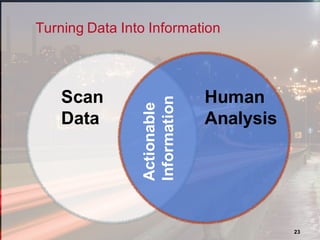
Scan
Data
Human
Analysis
Actionable
Information
Turning Data Into Information
24
VMP Process Overview
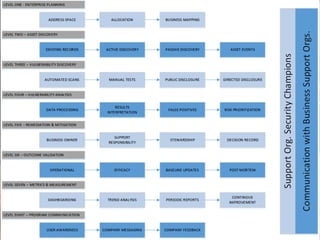
Visualizing VMP Workflows
• VMP workflows can be difficult to visualize without prior exposure!
• Workflows and process will vary between organizations
• For the purposes of this discussion we’ve created an example
• Most of our workflows can scale up or down to your requirements
• Bring on the HUGE diagram!
25
26
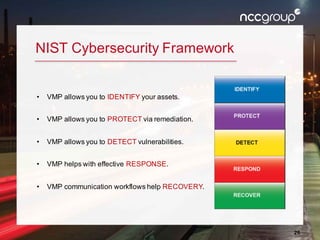
NIST Cybersecurity Framework
• VMP allows you to IDENTIFY your assets.
• VMP allows you to PROTECT via remediation.
• VMP allows you to DETECT vulnerabilities.
• VMP helps with effective RESPONSE.
• VMP communication workflows help RECOVERY.
27
Considerations
Analysis Methods & Opportunities for Improvement
• Macro vs Micro Analysis
o Vulnerabilities by Host
o Hosts by Vulnerability
• Minimizing False Positives
o Confirmation of Issues from VMP Team
§ How?
o Prior to Escalation to Support Org.
o Maintain Credibility
28
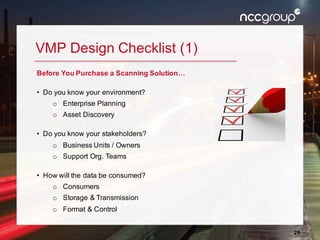
VMP Design Checklist (1)
Before You Purchase a Scanning Solution…
• Do you know your environment?
o Enterprise Planning
o Asset Discovery
• Do you know your stakeholders?
o Business Units / Owners
o Support Org. Teams
• How will the data be consumed?
o Consumers
o Storage & Transmission
o Format & Control
29
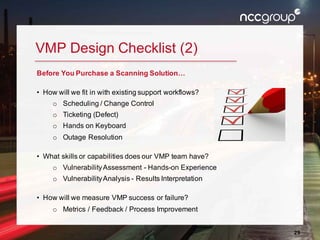
VMP Design Checklist (2)
Before You Purchase a Scanning Solution…
• How will we fit in with existing support workflows?
o Scheduling / Change Control
o Ticketing (Defect)
o Hands on Keyboard
o Outage Resolution
• What skills or capabilities does our VMP team have?
o VulnerabilityAssessment - Hands-on Experience
o VulnerabilityAnalysis - Results Interpretation
• How will we measure VMP success or failure?
o Metrics / Feedback / Process Improvement
30
Okay!
Now you can have lunch with a scanner sales person! J
31
Session Close
• Scanners have been around for 20 years and yet we still don’t know how
to use them, consume their data properly, or fix the things they find to
satisfaction.
Call to Action
• Orgs - If you think the number and types of scans you do is the critical
success factor, you are doing it wrong.
• Be sure to consider your VMP design and workflows FIRST.
• Scanner Vendors - Flinging packets is easy. Workflow integration, data
aggregation, ticketing and tracking is much harder than it should be.
Please help!
32
Ways to Stay in Touch
Kevin Dunn
Technical VP – NCC Group, Security Consulting
E: kevin.dunn@nccgroup.trust
L: https://www.linkedin.com/in/kevdunn
T: @kdunn_ncc
Damon Small
Technical PM - NCC Group, Security Consulting
E: damon.small@nccgroup.trust
L: https://www.linkedin.com/in/damon-small-7400501
T: @damonsmall

Enterprise Vulnerability Management: Back to Basics

  • 1.
    Enterprise Vulnerability Management BSIDESAUSTIN - April 2016 Damon Small & Kevin Dunn - NCC Group
  • 2.
    Agenda Welcome & Introductions03 Session Overview 07 Session Definitions 08 Vulnerability Management 101 09 VulnerabilityAssessment Scans 10 Failing & Pitfalls 21 VMP: Making a Real Difference 22 Session Close 31 2
  • 3.
    3 Welcome & Introductions NCCGroup – A Global Security Firm • Formed in June 1999 showing immense growth over the past 16 years. • 1800 employees, in 30 office locations • North America, the United Kingdom, Europe and Australia. • We strive to provide Total Information Assurance for our clients. NCC Group in North America • Currently 8 offices in the NA: New York, Atlanta, Chicago, Austin, Seattle, San Francisco, Sunnyvale and Waterloo. • NCC Group combines the best of bread US security brands of iSEC Partners, Matasano, Intrepidus Group and NGS.
  • 4.
    4 Welcome & Introductions NCCGroup – Security Consulting • Attack & Penetration Focus • Applications • Mobile • Networks & Infrastructure • Physical Security • Embedded Systems • Red Teaming • Incident Response & Forensics • Enterprise Risk / VA Strategy
  • 5.
    5 Welcome & Introductions YourSpeakers – DAMON SMALL, Technical PM for NCC Group in NA • In IT since 1995; InfoSec since 2001 • Louisiana native: “Not from Texas but I got here as fast as I could!” • Studied music at LSU; grad school in 2005 for Information Assurance • Supported healthcare orgs. in the Texas Medical Center • Vulnerability Management Programs: o Two for Health Care orgs. o One for Oil & Gas o Workflow Analysis & Development o Scanner Platform Deployments
  • 6.
    6 Welcome & Introductions YourSpeakers – KEVIN DUNN, Technical VP for NCC Group in NA • Technical VP for NCC Group, based in Austin TX. • 14 year career focused on Attack & Penetration techniques & defenses • Prior to that security focused government/military background • Responsible for: o Regional Development & Management o Development of Strategic Technical Practices: § Strategic Infrastructure Security (SIS) § NA Computer Incident Response Team (NA-CIRT) • Specialist in Red Team / Black Ops engagements o (Forms of extreme penetration testing and attack modeling)
  • 7.
    7 Session Overview Blue Teamis Harder than Red Team! • You’re in charge of VM for your company • You have scanning sensors deployed • You have hardening plans in place • You have remediation strategies and goals • A pentest is commissioned from an outside firm • They prove traversal from the outside to the inside • They become Domain Admin on your network • They access your most critical data and systems.
  • 8.
    8 Session Definitions • VulnerabilityAssessment: The act of gathering information regarding vulnerabilities on specific hosts, often using scanning tools. (Does include penetration testing). • Vulnerability Management: A business process that includes the following key components: o Identification o Classification o Decision/Decision Record o Mitigation
  • 9.
    9 Vulnerability Management 101 •A business process that includes: 1. Identifying Vulnerabilities (VA) 2. Promotes Patching / Hardening / Fix of Issues 3. Decision process regarding remediation activities: a. Fix it, accept it, or transfer the risk. b. Creates an auditable decision record, process for validation, and a process to periodically review “no action” remediation where risk is accepted. c. Decision process should be multi-disciplinary and represent all stakeholders (IT, business, InfoSec, etc.)
  • 10.
    10 Vulnerability Assessment Scans Scanning- What is it Good For? • Identifying Vulnerabilities • Remediation Information • Software Inventory • Asset Management Scanning - What is it Not Good For? • Identifying Vulnerabilities • Going Beyond Patching • Workflow/Business Processes
  • 11.
    11 Electrons/Photons going thoughwire/fiber What is being examined What tool can be used 1. Physical 2. Datalink 3. Network 4. Transport 5. Session 6. Presentation 7. Application MediaLayersHostLayers OSI Model The Right Tool for the Right Job
  • 12.
    12 Patching vs. Hardening •Patching - Applying a software fix, update or upgrade. This is a code-level change, packaged typically as a binary. It usually comes from the software manufacturer / development team. • Hardening - Changing configuration settings to increase the security of something based on an understanding of which settings are ‘more secure’. Typically defined via some kind of ‘best practices document’. Hardening advice may come from a number of sources.
  • 13.
    13 Over-Focus on Scanning/ Patching Depth of System Hardening is Typically Shallow • Consider the following issues found on most Pentests! o MSSQL Weak SA Password o Tomcat Manager Weak Password o Jenkins Groovy Script Command Execution o Printer Default Credentials
  • 14.
    14 Over-Focus on Scanning/ Patching MSSQL Weak SA Password • A few simple steps to full control of server!
  • 15.
    15 Over-Focus on Scanning/ Patching Tomcat Manager Weak Password
  • 16.
    16 Over-Focus on Scanning/ Patching Tomcat Manager Weak Password
  • 17.
    17 Over-Focus on Scanning/ Patching Jenkins Groovy Script Command Execution • Jenkins Integration Manager (source code build env.)
  • 18.
    18 Over-Focus on Scanning/ Patching Jenkins Groovy Script Command Execution • When poorly configured visiting /script gets you to a ‘Script Console’
  • 19.
    19 Over-Focus on Scanning/ Patching Jenkins Groovy Script Command Execution • That’s OS command execution! You never know how many privs you have!
  • 20.
    20 Over-Focus on Scanning/ Patching Printer Default Credentials • Printers can be useful!
  • 21.
    21 Failings & Pitfalls CommonVMP Problems • Over-prioritization of Scanning - no workflow development • Scan All the Things - but do nothing with the results… • Generate False Positives - and lose credibility* • No Consideration for Network & Business Impact* • No Security Team & Support Org. Relationship • Mistaking VA (alone) as a DefensiveActivity
  • 22.
    22 VMP: Making aReal Difference HIGHEST PRIORITIES • Asset Inventory Management • Decision & Remediation Workflows • Visualization & Metrics LOWER PRIORITIES • VulnerabilityAssessment Scanning • Penetration Testing • Buying Cool Toys
  • 23.
  • 24.
    24 VMP Process Overview VisualizingVMP Workflows • VMP workflows can be difficult to visualize without prior exposure! • Workflows and process will vary between organizations • For the purposes of this discussion we’ve created an example • Most of our workflows can scale up or down to your requirements • Bring on the HUGE diagram!
  • 25.
  • 26.
    26 NIST Cybersecurity Framework •VMP allows you to IDENTIFY your assets. • VMP allows you to PROTECT via remediation. • VMP allows you to DETECT vulnerabilities. • VMP helps with effective RESPONSE. • VMP communication workflows help RECOVERY.
  • 27.
    27 Considerations Analysis Methods &Opportunities for Improvement • Macro vs Micro Analysis o Vulnerabilities by Host o Hosts by Vulnerability • Minimizing False Positives o Confirmation of Issues from VMP Team § How? o Prior to Escalation to Support Org. o Maintain Credibility
  • 28.
    28 VMP Design Checklist(1) Before You Purchase a Scanning Solution… • Do you know your environment? o Enterprise Planning o Asset Discovery • Do you know your stakeholders? o Business Units / Owners o Support Org. Teams • How will the data be consumed? o Consumers o Storage & Transmission o Format & Control
  • 29.
    29 VMP Design Checklist(2) Before You Purchase a Scanning Solution… • How will we fit in with existing support workflows? o Scheduling / Change Control o Ticketing (Defect) o Hands on Keyboard o Outage Resolution • What skills or capabilities does our VMP team have? o VulnerabilityAssessment - Hands-on Experience o VulnerabilityAnalysis - Results Interpretation • How will we measure VMP success or failure? o Metrics / Feedback / Process Improvement
  • 30.
    30 Okay! Now you canhave lunch with a scanner sales person! J
  • 31.
    31 Session Close • Scannershave been around for 20 years and yet we still don’t know how to use them, consume their data properly, or fix the things they find to satisfaction. Call to Action • Orgs - If you think the number and types of scans you do is the critical success factor, you are doing it wrong. • Be sure to consider your VMP design and workflows FIRST. • Scanner Vendors - Flinging packets is easy. Workflow integration, data aggregation, ticketing and tracking is much harder than it should be. Please help!
  • 32.
    32 Ways to Stayin Touch Kevin Dunn Technical VP – NCC Group, Security Consulting E: kevin.dunn@nccgroup.trust L: https://www.linkedin.com/in/kevdunn T: @kdunn_ncc Damon Small Technical PM - NCC Group, Security Consulting E: damon.small@nccgroup.trust L: https://www.linkedin.com/in/damon-small-7400501 T: @damonsmall

Editor's Notes

  • #12 The purpose of this slide is to illustrate how certain tools are used to gather specific types of information. Regardless of whether you are discussing scanning or manual app testing, one clear message is that you must have humans involved. Manual app testing will always be more sophisticated than scanners alone, but even with VA scanners, you must have humans analyzing the results and configuring the scans to ensure they network is not taken down. Interest from someone who controlled ICS networks and wanted to give a scanner to a low-end IT employee to scan. This is a bad idea and can wreak havoc if you are not careful. You also need a skilled security pro to analyze the results. (Story about httpd vulns found. Server ops claimed that they must be false positives because these were not web servers. The vuln actually came from the HP SMS server which includes Apache server. Previous analysts failed to recognize this because the results were not vetted by an experienced security pro.) Sampling of tools vs the OSI model. Doesn’t represent well unless you have a defined lexicon. At a particular client site, “Application,” “application,” and “software” meant different things to different people.