TDM Systems Inc. Your Partner for Tool Data Management Chris Rezny Executive Account Manager Midwest and West TDM Systems – The competence center for  Tool Data Management in the SANDVIK-Group
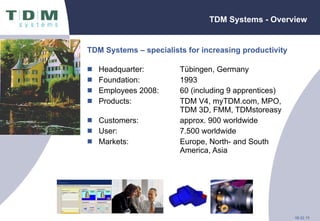
TDM Systems - Overview TDM Systems – specialists for increasing productivity Headquarter: Tübingen, Germany Foundation: 1993  Employees 2008: 60 (including 9 apprentices) Products: TDM V4, myTDM.com, MPO,  TDM 3D, FMM, TDMstoreasy Customers: approx. 900 worldwide User: 7.500 worldwide Markets: Europe, North- and South America, Asia
TDM Systems, Inc. Schaumburg, IL - Overview Location: Schaumburg, IL, 20 min. from Chicago O’Hare Airport Foundation: 2006 Employees 2008:  4 Customers: > 48 Markets: USA, Canada, Mexico Service and Sales Office Chicago Sales Office Buffalo, NY Sales Office New Braunfels, TX
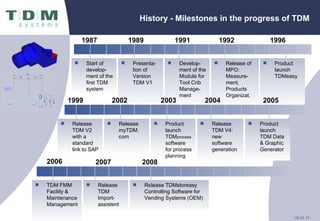
History - Milestones in the progress of TDM 1987 1989 Start of develop-ment of the first TDM system Presenta-tion of Version TDM V1  1991 Develop-ment of the Module for Tool Crib Manage-ment  1992 Release of MPO: Measure-ment, Products Organizat. 1996 Product launch  TDMeasy 1999 2002 2003 2004 2005 Product launch TDM Data & Graphic Generator Release TDM V2 with a  standard link to SAP Release myTDM. com Product launch TDM process software for process planning Release TDM V4: new software generation TDM FMM Facility & Maintenance Management Release TDM Import- assistent Release TDMstoreasy Controlling Software for Vending Systems (OEM) 2008 2006 2007
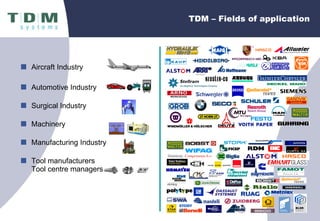
TDM – Fields of application Aircraft Industry Automotive Industry  Surgical Industry  Machinery Manufacturing Industry Tool manufacturers Tool centre manager s
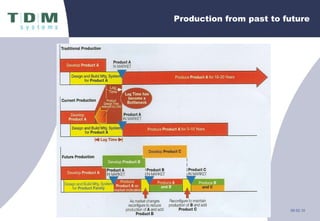
Production from past to future
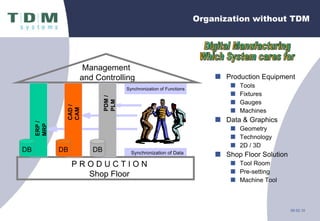
Organization without TDM Production Equipment Tools Fixtures Gauges Machines Data & Graphics Geometry Technology 2D / 3D Shop Floor Solution Tool Room Pre-setting Machine Tool Management  and Controlling Digital Manufacturing Which System cares for Synchronization of Data Synchronization of Functions P R O D U C T I O N Shop Floor ERP / MRP DB CAD / CAM DB PDM / PLM DB
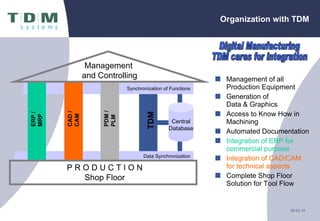
Management of all Production Equipment Generation of  Data & Graphics Access to Know How in Machining Automated Documentation Integration of ERP for commercial purpose Integration of CAD/CAM for technical aspects Complete Shop Floor Solution for Tool Flow Organization with TDM Digital Manufacturing TDM cares for integration TDM Central Database Data Synchronization Synchronization of Functions ERP / MRP CAD / CAM PDM / PLM Management  and Controlling P R O D U C T I O N Shop Floor
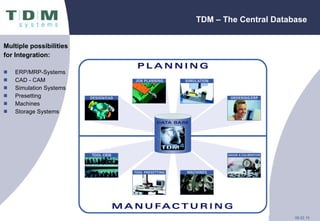
TDM – The Central Database Multiple possibilities for Integration: ERP/MRP-Systems CAD - CAM Simulation Systems  Presetting Machines Storage Systems
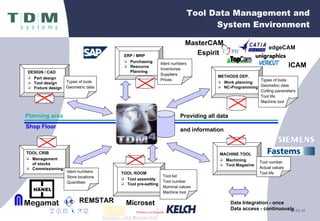
Tool Data Management and System Environment ICAM MasterCAM Espirit REMSTAR Microset TOOL ROOM Tool assembly Tool pre-setting Shop Floor TOOL CRIB Management of stocks Commissioning MACHINE TOOL Machining Tool Magazine Planning area DESIGN / CAD Part design Tool design Fixture design ERP / MRP Purchasing Resource Planning METHODS DEP. Work planning NC-Programming edgeCAM Providing   all data and information Types of tools Geometric data Cutting parameters Tool life Machine tool Tool number Actual values Tool life Ident numbers Store locations Quantities Tool list Tool number Nominal values Machine tool Types of tools Geometric data Ident numbers Inventories Suppliers Prices Data Integration - once Data access - continuously
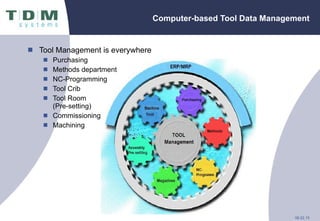
Computer-based Tool Data Management Tool Management is everywhere Purchasing Methods department NC-Programming Tool Crib Tool Room  (Pre-setting) Commissioning Machining
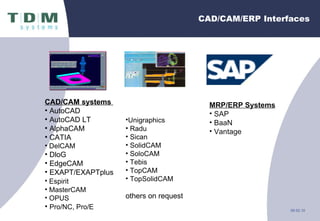
CAD/CAM/ERP Interfaces CAD/CAM systems  AutoCAD AutoCAD LT AlphaCAM CATIA DelCAM DloG EdgeCAM EXAPT/EXAPTplus Espirit   MasterCAM OPUS Pro/NC, Pro/E Unigraphics   Radu Sican SolidCAM SoloCAM Tebis TopCAM TopSolidCAM others on request MRP/ERP Systems SAP BaaN Vantage
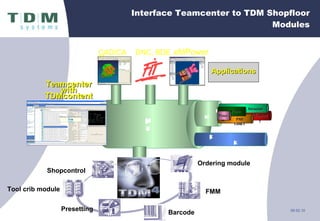
Interface Teamcenter to TDM Shopfloor Modules Open Manufacturing Backbone Teamcenter with TDMcontent TC Extensions (Application Interface & CC) CAD/CAM DNC, BDE Applications eMPower FMM Barcode Ordering module Shopcontrol Tool crib module Presetting PLM XML Geometry Structure PMI GD&T Features Process
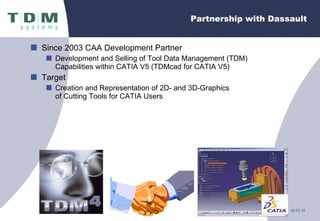
Partnership with Dassault  Since 2003 CAA Development Partner  Development and Selling of Tool Data Management (TDM) Capabilities within CATIA V5 (TDMcad for CATIA V5) Target Creation and Representation of 2D- and 3D-Graphics  of Cutting Tools for CATIA Users
TDM – MasterCAM MX2   MasterCAM MX2 TDM V4.2
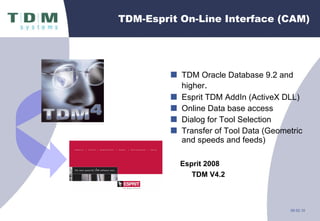
TDM-Esprit On-Line Interface (CAM) TDM Oracle Database 9.2 and higher . Esprit TDM AddIn (ActiveX DLL) Online Data base access Dialog for Tool Selection Transfer of Tool Data (Geometric and speeds and feeds)  Esprit 2008 TDM V4.2
Partnership with Hänel  Signing of  a  co - operation contract between  TDM S ysteme s  GmbH and Hänel GmbH + Co. KG Commercial  P artneship Technical  P artnership Target Development and  M erchandising of PC-Storage Management Systems
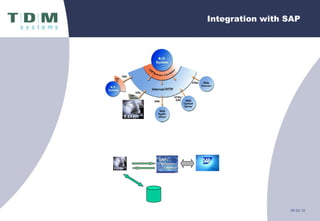
Integration with SAP
Overview TDM V4 Highlights
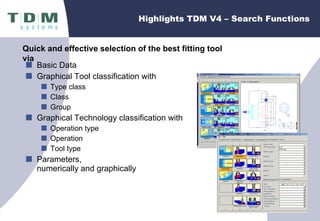
Highlights TDM V4 – Search Functions Basic Data Graphical Tool classification with Type class Class Group Graphical Technology classification with Operation type Operation Tool type Parameters,  numerically and graphically  Quick and effective selection of the best fitting tool via
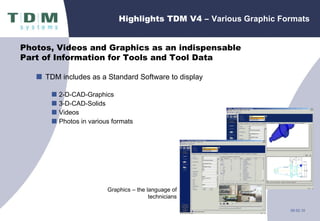
Highlights TDM V4 –  Various Graphic Formats TDM includes as a Standard Software to display   2-D-CAD-Graphics 3-D-CAD-Solids Videos Photos in various formats Photos, Videos and Graphics as an indispensable  Part of Information for Tools and Tool Data Graphics – the language of technicians
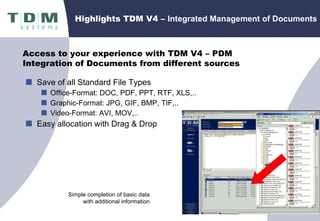
Highlights TDM V4 –  Integrated Management of Documents Save of all Standard File Types Office-Format: DOC, PDF, PPT, RTF, XLS,.. Graphic-Format: JPG, GIF, BMP, TIF,.. Video-Format: AVI, MOV,.. Easy allocation with Drag & Drop Simple completion of basic data with additional information Access to your experience with TDM V4 – PDM Integration of Documents from different sources
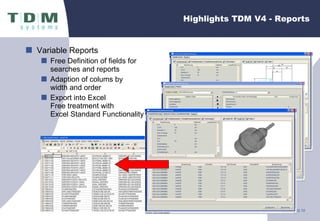
Highlights TDM V4 - Reports Variable Reports Free Definition of fields for  searches and reports Adaption of colums by  width and order Export into Excel Free treatment with  Excel Standard Functionality
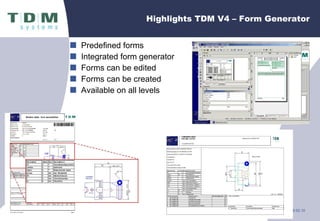
Predefined forms Integrated form generator  Forms can be edited Forms can be created Available on all levels Highlights TDM V4 – Form Generator
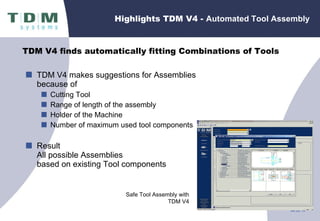
Highlights TDM V4 -  Automated Tool Assembly TDM V4 makes suggestions for Assemblies because of Cutting Tool Range of length of the assembly Holder of the Machine Number of maximum used tool components  Result All possible Assemblies  based on existing Tool components Safe Tool Assembly with TDM V4 TDM V4 finds automatically fitting Combinations of Tools
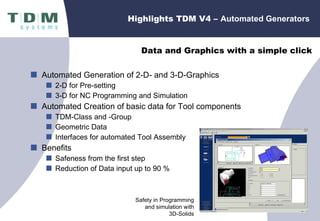
Highlights TDM V4 –  Automated Generators Automated Generation of 2-D- and 3-D-Graphics 2-D for Pre-setting  3-D for NC Programming and Simulation Automated Creation of basic data for Tool components TDM-Class and -Group Geometric Data Interfaces for automated Tool Assembly Benefits  Safeness from the first step Reduction of Data input up to 90 % Safety in Programming and simulation with  3D-Solids Data and Graphics with a simple click
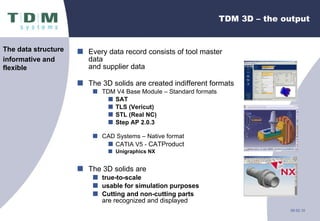
TDM 3D – the output Every data record consists of tool master data  and supplier data The 3D solids are created indifferent formats  TDM V4 Base Module – Standard formats SAT TLS (Vericut) STL (Real NC) Step AP 2.0.3 CAD Systems – Native format CATIA V5 -  CATProduct Unigraphics NX The 3D solids are true-to-scale usable for simulation   purposes Cutting and non-cutting parts   are recognized and displayed The data structure informative and  flexible
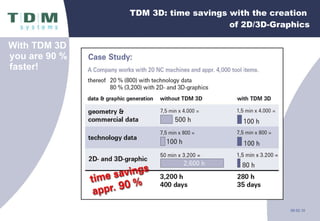
TDM 3D: time savings with the creation  of 2D/3D-Graphics With TDM 3D you are 90 % faster!
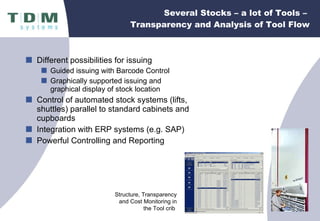
Several Stocks – a lot of Tools –  Transparency and Analysis of Tool Flow Different possibilities for issuing Guided issuing with Barcode Control Graphically supported issuing and  graphical display of stock location Control of automated stock systems (lifts, shuttles) parallel to standard cabinets and cupboards Integration with ERP systems (e.g. SAP) Powerful Controlling and Reporting Structure, Transparency and Cost Monitoring in the Tool crib
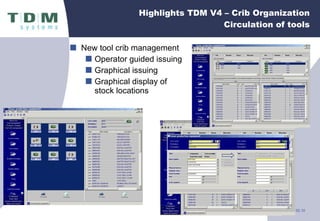
New tool crib management Operator guided issuing Graphical issuing Graphical display of stock locations Highlights TDM V4 – Crib Organization Circulation of tools
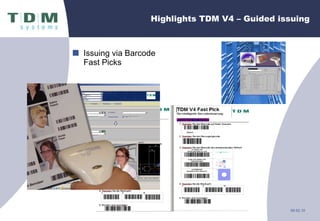
Issuing via Barcode Fast Picks Highlights TDM V4 – Guided issuing
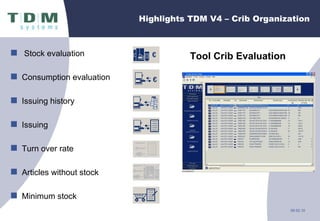
Tool Crib Evaluation  Highlights TDM V4 – Crib Organization Stock evaluation Consumption evaluation Issuing history Issuing  Turn over rate Articles without stock Minimum stock
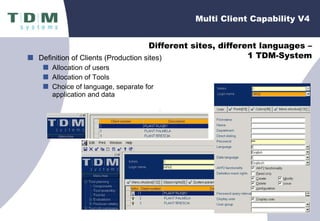
Definition of Clients (Production sites) Allocation of users Allocation of Tools Choice of language, separate for application and data Multi Client Capability V4 Different sites, different languages – 1 TDM-System
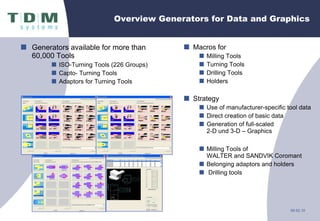
Overview Generators for Data and Graphics Generators available for more than 60,000 Tools ISO-Turning Tools (226 Groups) Capto- Turning Tools  Adaptors for Turning Tools Macros for Milling Tools Turning Tools Drilling Tools Holders Strategy Use of manufacturer-specific tool data Direct creation of basic data  Generation of full-scaled  2-D und 3-D – Graphics Milling Tools of  WALTER and SANDVIK Coromant Belonging adaptors and holders Drilling tools
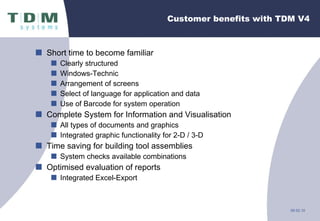
Customer benefits with TDM V4 Short time to become familiar Clearly structured Windows-Technic Arrangement of screens Select of language for application and data Use of Barcode for system operation Complete System for Information and Visualisation All types of documents and graphics Integrated graphic functionality for 2-D / 3-D Time saving for building tool assemblies System checks available combinations Optimised evaluation of reports Integrated Excel-Export
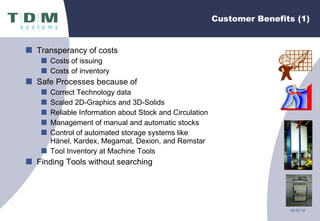
Customer Benefits (1) Transperancy of costs Costs of issuing Costs of inventory Safe Processes because of Correct Technology data Scaled 2D-Graphics and 3D-Solids Reliable Information about Stock and Circulation Management of manual and automatic stocks Control of automated storage systems like Hänel, Kardex, Megamat, Dexion, and Remstar Tool Inventory at Machine Tools Finding Tools without searching
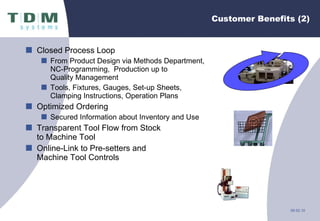
Customer Benefits (2) Closed Process Loop From Product Design via Methods Department,  NC-Programming,  Production up to Quality Management Tools, Fixtures, Gauges, Set-up Sheets, Clamping Instructions, Operation Plans Optimized Ordering Secured Information about Inventory and Use Transparent Tool Flow from Stock to Machine Tool Online-Link to Pre-setters and  Machine Tool Controls
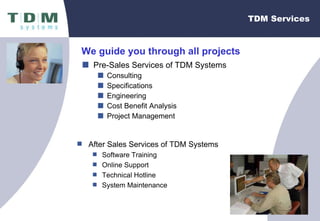
TDM Services Pre-Sales Services of TDM Systems Consulting Specifications Engineering Cost Benefit Analysis Project Management We guide you through all projects After Sales Services of TDM Systems Software Training Online Support Technical Hotline System Maintenance
Cost Savings Machine Related Savings Reduction of machine down time due to missing tools No operators hunting for tooling Reduction of machine set-up time  Reduce quantity of tool movements per new job (difference lists) Increase of common tooling per NC-Program  (higher use of default tool-kits per machine) Reduction of cycle time due to optimized speeds and feeds Reduction of scrap Optimal  tool life time Accurate tool offset data Know your tooling cost per part
Cost Savings Savings at NC-Programming Build speeds and feeds data base. Direct access to tool data (geometry…) Elimination of search time for tools. Reduce time to create NC-Program. Program available earlier to production. NC-Programmers have access to stock on-hand information.  Needed for HOT or RUSH jobs Dramatic improved learning curve for new NC-Programmers.
Cost Savings Stock / Tool Room Related Savings Reduction of variety in stock Reduction of tool inventory (less value on stock) Use existing tool bodies instead of buying new Elimination of dead stock Accessibility to tools at crib and on machine Reduction of effort on purchasing Buy larger number of less items Reduce number of tool suppliers Reduce the total tooling cost per year Reduction of rush tool orders Tooling regrind usage

New TDM Systems 2010

  • 1.
    TDM Systems Inc.Your Partner for Tool Data Management Chris Rezny Executive Account Manager Midwest and West TDM Systems – The competence center for Tool Data Management in the SANDVIK-Group
  • 2.
    TDM Systems -Overview TDM Systems – specialists for increasing productivity Headquarter: Tübingen, Germany Foundation: 1993 Employees 2008: 60 (including 9 apprentices) Products: TDM V4, myTDM.com, MPO, TDM 3D, FMM, TDMstoreasy Customers: approx. 900 worldwide User: 7.500 worldwide Markets: Europe, North- and South America, Asia
  • 3.
    TDM Systems, Inc.Schaumburg, IL - Overview Location: Schaumburg, IL, 20 min. from Chicago O’Hare Airport Foundation: 2006 Employees 2008: 4 Customers: > 48 Markets: USA, Canada, Mexico Service and Sales Office Chicago Sales Office Buffalo, NY Sales Office New Braunfels, TX
  • 4.
    History - Milestonesin the progress of TDM 1987 1989 Start of develop-ment of the first TDM system Presenta-tion of Version TDM V1 1991 Develop-ment of the Module for Tool Crib Manage-ment 1992 Release of MPO: Measure-ment, Products Organizat. 1996 Product launch TDMeasy 1999 2002 2003 2004 2005 Product launch TDM Data & Graphic Generator Release TDM V2 with a standard link to SAP Release myTDM. com Product launch TDM process software for process planning Release TDM V4: new software generation TDM FMM Facility & Maintenance Management Release TDM Import- assistent Release TDMstoreasy Controlling Software for Vending Systems (OEM) 2008 2006 2007
  • 5.
    TDM – Fieldsof application Aircraft Industry Automotive Industry Surgical Industry Machinery Manufacturing Industry Tool manufacturers Tool centre manager s
  • 6.
  • 7.
    Organization without TDMProduction Equipment Tools Fixtures Gauges Machines Data & Graphics Geometry Technology 2D / 3D Shop Floor Solution Tool Room Pre-setting Machine Tool Management and Controlling Digital Manufacturing Which System cares for Synchronization of Data Synchronization of Functions P R O D U C T I O N Shop Floor ERP / MRP DB CAD / CAM DB PDM / PLM DB
  • 8.
    Management of allProduction Equipment Generation of Data & Graphics Access to Know How in Machining Automated Documentation Integration of ERP for commercial purpose Integration of CAD/CAM for technical aspects Complete Shop Floor Solution for Tool Flow Organization with TDM Digital Manufacturing TDM cares for integration TDM Central Database Data Synchronization Synchronization of Functions ERP / MRP CAD / CAM PDM / PLM Management and Controlling P R O D U C T I O N Shop Floor
  • 9.
    TDM – TheCentral Database Multiple possibilities for Integration: ERP/MRP-Systems CAD - CAM Simulation Systems Presetting Machines Storage Systems
  • 10.
    Tool Data Managementand System Environment ICAM MasterCAM Espirit REMSTAR Microset TOOL ROOM Tool assembly Tool pre-setting Shop Floor TOOL CRIB Management of stocks Commissioning MACHINE TOOL Machining Tool Magazine Planning area DESIGN / CAD Part design Tool design Fixture design ERP / MRP Purchasing Resource Planning METHODS DEP. Work planning NC-Programming edgeCAM Providing all data and information Types of tools Geometric data Cutting parameters Tool life Machine tool Tool number Actual values Tool life Ident numbers Store locations Quantities Tool list Tool number Nominal values Machine tool Types of tools Geometric data Ident numbers Inventories Suppliers Prices Data Integration - once Data access - continuously
  • 11.
    Computer-based Tool DataManagement Tool Management is everywhere Purchasing Methods department NC-Programming Tool Crib Tool Room (Pre-setting) Commissioning Machining
  • 12.
    CAD/CAM/ERP Interfaces CAD/CAMsystems AutoCAD AutoCAD LT AlphaCAM CATIA DelCAM DloG EdgeCAM EXAPT/EXAPTplus Espirit MasterCAM OPUS Pro/NC, Pro/E Unigraphics Radu Sican SolidCAM SoloCAM Tebis TopCAM TopSolidCAM others on request MRP/ERP Systems SAP BaaN Vantage
  • 13.
    Interface Teamcenter toTDM Shopfloor Modules Open Manufacturing Backbone Teamcenter with TDMcontent TC Extensions (Application Interface & CC) CAD/CAM DNC, BDE Applications eMPower FMM Barcode Ordering module Shopcontrol Tool crib module Presetting PLM XML Geometry Structure PMI GD&T Features Process
  • 14.
    Partnership with Dassault Since 2003 CAA Development Partner Development and Selling of Tool Data Management (TDM) Capabilities within CATIA V5 (TDMcad for CATIA V5) Target Creation and Representation of 2D- and 3D-Graphics of Cutting Tools for CATIA Users
  • 15.
    TDM – MasterCAMMX2 MasterCAM MX2 TDM V4.2
  • 16.
    TDM-Esprit On-Line Interface(CAM) TDM Oracle Database 9.2 and higher . Esprit TDM AddIn (ActiveX DLL) Online Data base access Dialog for Tool Selection Transfer of Tool Data (Geometric and speeds and feeds) Esprit 2008 TDM V4.2
  • 17.
    Partnership with Hänel Signing of a co - operation contract between TDM S ysteme s GmbH and Hänel GmbH + Co. KG Commercial P artneship Technical P artnership Target Development and M erchandising of PC-Storage Management Systems
  • 18.
  • 19.
    Overview TDM V4Highlights
  • 20.
    Highlights TDM V4– Search Functions Basic Data Graphical Tool classification with Type class Class Group Graphical Technology classification with Operation type Operation Tool type Parameters, numerically and graphically Quick and effective selection of the best fitting tool via
  • 21.
    Highlights TDM V4– Various Graphic Formats TDM includes as a Standard Software to display 2-D-CAD-Graphics 3-D-CAD-Solids Videos Photos in various formats Photos, Videos and Graphics as an indispensable Part of Information for Tools and Tool Data Graphics – the language of technicians
  • 22.
    Highlights TDM V4– Integrated Management of Documents Save of all Standard File Types Office-Format: DOC, PDF, PPT, RTF, XLS,.. Graphic-Format: JPG, GIF, BMP, TIF,.. Video-Format: AVI, MOV,.. Easy allocation with Drag & Drop Simple completion of basic data with additional information Access to your experience with TDM V4 – PDM Integration of Documents from different sources
  • 23.
    Highlights TDM V4- Reports Variable Reports Free Definition of fields for searches and reports Adaption of colums by width and order Export into Excel Free treatment with Excel Standard Functionality
  • 24.
    Predefined forms Integratedform generator Forms can be edited Forms can be created Available on all levels Highlights TDM V4 – Form Generator
  • 25.
    Highlights TDM V4- Automated Tool Assembly TDM V4 makes suggestions for Assemblies because of Cutting Tool Range of length of the assembly Holder of the Machine Number of maximum used tool components Result All possible Assemblies based on existing Tool components Safe Tool Assembly with TDM V4 TDM V4 finds automatically fitting Combinations of Tools
  • 26.
    Highlights TDM V4– Automated Generators Automated Generation of 2-D- and 3-D-Graphics 2-D for Pre-setting 3-D for NC Programming and Simulation Automated Creation of basic data for Tool components TDM-Class and -Group Geometric Data Interfaces for automated Tool Assembly Benefits Safeness from the first step Reduction of Data input up to 90 % Safety in Programming and simulation with 3D-Solids Data and Graphics with a simple click
  • 27.
    TDM 3D –the output Every data record consists of tool master data and supplier data The 3D solids are created indifferent formats TDM V4 Base Module – Standard formats SAT TLS (Vericut) STL (Real NC) Step AP 2.0.3 CAD Systems – Native format CATIA V5 - CATProduct Unigraphics NX The 3D solids are true-to-scale usable for simulation purposes Cutting and non-cutting parts are recognized and displayed The data structure informative and flexible
  • 28.
    TDM 3D: timesavings with the creation of 2D/3D-Graphics With TDM 3D you are 90 % faster!
  • 29.
    Several Stocks –a lot of Tools – Transparency and Analysis of Tool Flow Different possibilities for issuing Guided issuing with Barcode Control Graphically supported issuing and graphical display of stock location Control of automated stock systems (lifts, shuttles) parallel to standard cabinets and cupboards Integration with ERP systems (e.g. SAP) Powerful Controlling and Reporting Structure, Transparency and Cost Monitoring in the Tool crib
  • 30.
    New tool cribmanagement Operator guided issuing Graphical issuing Graphical display of stock locations Highlights TDM V4 – Crib Organization Circulation of tools
  • 31.
    Issuing via BarcodeFast Picks Highlights TDM V4 – Guided issuing
  • 32.
    Tool Crib Evaluation Highlights TDM V4 – Crib Organization Stock evaluation Consumption evaluation Issuing history Issuing Turn over rate Articles without stock Minimum stock
  • 33.
    Definition of Clients(Production sites) Allocation of users Allocation of Tools Choice of language, separate for application and data Multi Client Capability V4 Different sites, different languages – 1 TDM-System
  • 34.
    Overview Generators forData and Graphics Generators available for more than 60,000 Tools ISO-Turning Tools (226 Groups) Capto- Turning Tools Adaptors for Turning Tools Macros for Milling Tools Turning Tools Drilling Tools Holders Strategy Use of manufacturer-specific tool data Direct creation of basic data Generation of full-scaled 2-D und 3-D – Graphics Milling Tools of WALTER and SANDVIK Coromant Belonging adaptors and holders Drilling tools
  • 35.
    Customer benefits withTDM V4 Short time to become familiar Clearly structured Windows-Technic Arrangement of screens Select of language for application and data Use of Barcode for system operation Complete System for Information and Visualisation All types of documents and graphics Integrated graphic functionality for 2-D / 3-D Time saving for building tool assemblies System checks available combinations Optimised evaluation of reports Integrated Excel-Export
  • 36.
    Customer Benefits (1)Transperancy of costs Costs of issuing Costs of inventory Safe Processes because of Correct Technology data Scaled 2D-Graphics and 3D-Solids Reliable Information about Stock and Circulation Management of manual and automatic stocks Control of automated storage systems like Hänel, Kardex, Megamat, Dexion, and Remstar Tool Inventory at Machine Tools Finding Tools without searching
  • 37.
    Customer Benefits (2)Closed Process Loop From Product Design via Methods Department, NC-Programming, Production up to Quality Management Tools, Fixtures, Gauges, Set-up Sheets, Clamping Instructions, Operation Plans Optimized Ordering Secured Information about Inventory and Use Transparent Tool Flow from Stock to Machine Tool Online-Link to Pre-setters and Machine Tool Controls
  • 38.
    TDM Services Pre-SalesServices of TDM Systems Consulting Specifications Engineering Cost Benefit Analysis Project Management We guide you through all projects After Sales Services of TDM Systems Software Training Online Support Technical Hotline System Maintenance
  • 39.
    Cost Savings MachineRelated Savings Reduction of machine down time due to missing tools No operators hunting for tooling Reduction of machine set-up time Reduce quantity of tool movements per new job (difference lists) Increase of common tooling per NC-Program (higher use of default tool-kits per machine) Reduction of cycle time due to optimized speeds and feeds Reduction of scrap Optimal tool life time Accurate tool offset data Know your tooling cost per part
  • 40.
    Cost Savings Savingsat NC-Programming Build speeds and feeds data base. Direct access to tool data (geometry…) Elimination of search time for tools. Reduce time to create NC-Program. Program available earlier to production. NC-Programmers have access to stock on-hand information. Needed for HOT or RUSH jobs Dramatic improved learning curve for new NC-Programmers.
  • 41.
    Cost Savings Stock/ Tool Room Related Savings Reduction of variety in stock Reduction of tool inventory (less value on stock) Use existing tool bodies instead of buying new Elimination of dead stock Accessibility to tools at crib and on machine Reduction of effort on purchasing Buy larger number of less items Reduce number of tool suppliers Reduce the total tooling cost per year Reduction of rush tool orders Tooling regrind usage

Editor's Notes

  • #11 As we build this work flow example it is easy to see were the data disconnects can happen. Can you tell me Mr. Customer what areas you can identify with? How many db’s do you have? TDM can make you more efficient. Can you tell me a little on your process… Just so we can both identify with this slide, what is your current: CAD/CAM system? ERP/MRP system? Do you have a methods dept. and what do they use? What type of machine tools do you have? Do you know what controllers they have? What system do you use in the tool room, for tool assemblies and pre-setting data? How does your tool crib work? Can you tell me how you deal with gauging and inspection tools? Now lets see what it looks like with TDM Systems in place… A central database will get you the correct information at the right time.
  • #21 With the new search functionality you can find the right to at the right time. To quote one of our customers, Rainer Rosskopf from Walter AG says… “this feature maximizes comfort in use and makes each search a find” “ And it also lets us see right away how we can use one of the same tools for different types of machining applications in an optimal way. Found in TDM Message 12-2006 pg. 5