CAD
PLM
 Introduction of CAD, CAM &
CAE
 Product cycle without and
with CAD, CAM & CAE
 Benefits of CAD, CAM & CAE
 Relationship between CAD,
CAM & CAE
 Introduction of PLM
 3D Engineering Automation
LLP product verticals
INTRODUCTION OF CAD, CAM & CAE
CAD
 CAD stands for Computer Aided Designing
 CAD software's used for making 2D and 3D designs of products.
These software's can generate drafting sheets as well as
documentations related to product design. Mainly these are
used for converting 2D drawing into 3D designs
 CAD enables the development, modification, and optimization
of the design process. It replaces manual drafting.
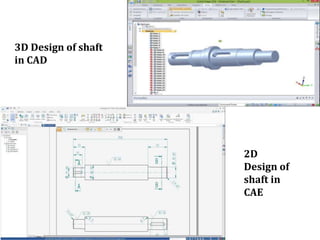
3D Design of shaft
in CAD
2D
Design of
shaft in
CAE
INTRODUCTION OF CAD, CAM & CAE
CAM
 CAM stands for Computer Aided Manufacturing
 CAM is a category of software's where you will be able to
manufacture actual products by programming & operating
machine tools which is completely computer based.
 CAM software helps people create programs for a variety of CNC
machines to support different manufacturing processes. These
may include milling, turning, cutting, and additive
manufacturing, to name a few.
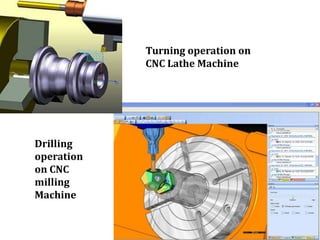
Turning operation on
CNC Lathe Machine
Drilling
operation
on CNC
milling
Machine
INTRODUCTION OF CAD, CAM & CAE
CAE
 CAE stands for Computer Aided Engineering
 CAE is a category of software's where you will be able to
simulate design for its better quality & performance with the
help of computer.
 This includes simulation, validation and optimization of
products, processes, and manufacturing tools.
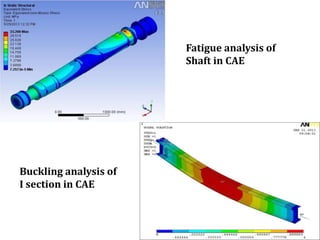
Fatigue analysis of
Shaft in CAE
Buckling analysis of
I section in CAE
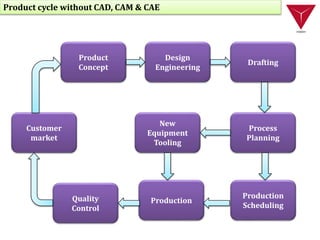
Product cycle without CAD, CAM & CAE
Customer
market
New
Equipment
Tooling
Quality
Control
Production
Production
Scheduling
Process
Planning
Drafting
Design
Engineering
Product
Concept
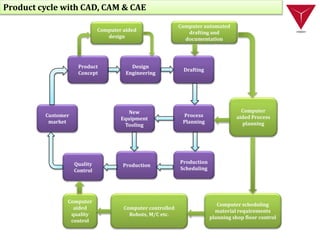
Customer
market
New
Equipment
Tooling
Quality
Control
Production
Production
Scheduling
Process
Planning
Drafting
Design
Engineering
Product
Concept
Computer aided
design
Computer automated
drafting and
documentation
Computer
aided Process
planning
Computer scheduling
material requirements
planning shop floor control
Computer controlled
Robots, M/C etc.
Computer
aided
quality
control
Product cycle with CAD, CAM & CAE
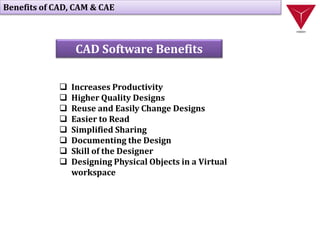
Benefits of CAD, CAM & CAE
 Increases Productivity
 Higher Quality Designs
 Reuse and Easily Change Designs
 Easier to Read
 Simplified Sharing
 Documenting the Design
 Skill of the Designer
 Designing Physical Objects in a Virtual
workspace
CAD Software Benefits
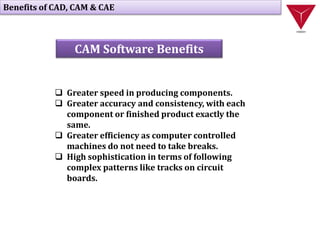
 Greater speed in producing components.
 Greater accuracy and consistency, with each
component or finished product exactly the
same.
 Greater efficiency as computer controlled
machines do not need to take breaks.
 High sophistication in terms of following
complex patterns like tracks on circuit
boards.
Benefits of CAD, CAM & CAE
CAM Software Benefits
 The benefits of CAE include reduced product
development cost and time, with improved product
quality and durability.
 Design decisions can be made based on their impact
on performance.
 Designs can be evaluated and refined using computer
simulations rather than physical prototype testing,
saving money and time.
Benefits of CAD, CAM & CAE
CAE Software Benefits
CAD
CAM
CAE
Relationship between CAD, CAM & CAE
Introduction of PLM
PLM
 PLM stands for Product Lifecycle Management
 These software manages data during the
development of a product from inception
through the manufacturing, servicing, and
disposal processes. Companies use PLM software
to increase productivity and collaboration,
improve quality, bolster creativity, and shorten
time to market for a product.
3D Engineering Automation LLP Product verticals
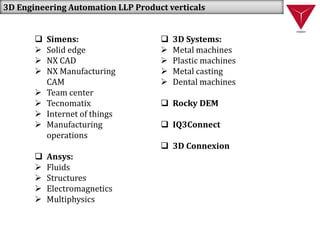
 Simens:
 Solid edge
 NX CAD
 NX Manufacturing
CAM
 Team center
 Tecnomatix
 Internet of things
 Manufacturing
operations
 Ansys:
 Fluids
 Structures
 Electromagnetics
 Multiphysics
 3D Systems:
 Metal machines
 Plastic machines
 Metal casting
 Dental machines
 Rocky DEM
 IQ3Connect
 3D Connexion

CAD CAM CAE and PLM Study

  • 1.
    CAD PLM  Introduction ofCAD, CAM & CAE  Product cycle without and with CAD, CAM & CAE  Benefits of CAD, CAM & CAE  Relationship between CAD, CAM & CAE  Introduction of PLM  3D Engineering Automation LLP product verticals
  • 2.
    INTRODUCTION OF CAD,CAM & CAE CAD  CAD stands for Computer Aided Designing  CAD software's used for making 2D and 3D designs of products. These software's can generate drafting sheets as well as documentations related to product design. Mainly these are used for converting 2D drawing into 3D designs  CAD enables the development, modification, and optimization of the design process. It replaces manual drafting.
  • 3.
    3D Design ofshaft in CAD 2D Design of shaft in CAE
  • 4.
    INTRODUCTION OF CAD,CAM & CAE CAM  CAM stands for Computer Aided Manufacturing  CAM is a category of software's where you will be able to manufacture actual products by programming & operating machine tools which is completely computer based.  CAM software helps people create programs for a variety of CNC machines to support different manufacturing processes. These may include milling, turning, cutting, and additive manufacturing, to name a few.
  • 5.
    Turning operation on CNCLathe Machine Drilling operation on CNC milling Machine
  • 6.
    INTRODUCTION OF CAD,CAM & CAE CAE  CAE stands for Computer Aided Engineering  CAE is a category of software's where you will be able to simulate design for its better quality & performance with the help of computer.  This includes simulation, validation and optimization of products, processes, and manufacturing tools.
  • 7.
    Fatigue analysis of Shaftin CAE Buckling analysis of I section in CAE
  • 8.
    Product cycle withoutCAD, CAM & CAE Customer market New Equipment Tooling Quality Control Production Production Scheduling Process Planning Drafting Design Engineering Product Concept
  • 9.
    Customer market New Equipment Tooling Quality Control Production Production Scheduling Process Planning Drafting Design Engineering Product Concept Computer aided design Computer automated draftingand documentation Computer aided Process planning Computer scheduling material requirements planning shop floor control Computer controlled Robots, M/C etc. Computer aided quality control Product cycle with CAD, CAM & CAE
  • 10.
    Benefits of CAD,CAM & CAE  Increases Productivity  Higher Quality Designs  Reuse and Easily Change Designs  Easier to Read  Simplified Sharing  Documenting the Design  Skill of the Designer  Designing Physical Objects in a Virtual workspace CAD Software Benefits
  • 11.
     Greater speedin producing components.  Greater accuracy and consistency, with each component or finished product exactly the same.  Greater efficiency as computer controlled machines do not need to take breaks.  High sophistication in terms of following complex patterns like tracks on circuit boards. Benefits of CAD, CAM & CAE CAM Software Benefits
  • 12.
     The benefitsof CAE include reduced product development cost and time, with improved product quality and durability.  Design decisions can be made based on their impact on performance.  Designs can be evaluated and refined using computer simulations rather than physical prototype testing, saving money and time. Benefits of CAD, CAM & CAE CAE Software Benefits
  • 13.
  • 14.
    Introduction of PLM PLM PLM stands for Product Lifecycle Management  These software manages data during the development of a product from inception through the manufacturing, servicing, and disposal processes. Companies use PLM software to increase productivity and collaboration, improve quality, bolster creativity, and shorten time to market for a product.
  • 15.
    3D Engineering AutomationLLP Product verticals  Simens:  Solid edge  NX CAD  NX Manufacturing CAM  Team center  Tecnomatix  Internet of things  Manufacturing operations  Ansys:  Fluids  Structures  Electromagnetics  Multiphysics  3D Systems:  Metal machines  Plastic machines  Metal casting  Dental machines  Rocky DEM  IQ3Connect  3D Connexion