Programmatic Use of Weka for Naïve
             Bayes Classifier
From WekaWiki, online at:
http://weka.sourceforge.net/wiki/index.php/Programmatic_Use, accessed 24th July 2007

Introduction
This tutorial shows how to use Weka (build feature vector, train a classifier, test a
classifier, use a classifier) directly from Java code. It is not intended to replace the
Explorer/Experimenter GUI that offer the visualization and engineering tools required to
set up and debug machine learning experiments. Weka’s automation is useful to embed a
classifier in a larger program and to create a training/testing loop that can be seen as a
regression test for machine learning capabilities.

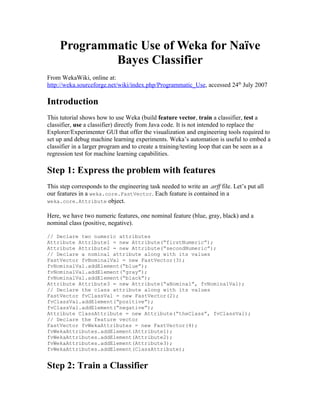
Step 1: Express the problem with features
This step corresponds to the engineering task needed to write an .arff file. Let’s put all
our features in a weka.core.FastVector. Each feature is contained in a
weka.core.Attribute object.

Here, we have two numeric features, one nominal feature (blue, gray, black) and a
nominal class (positive, negative).

// Declare two numeric attributes
Attribute Attribute1 = new Attribute(“firstNumeric”);
Attribute Attribute2 = new Attribute(“secondNumeric”);
// Declare a nominal attribute along with its values
FastVector fvNominalVal = new FastVector(3);
fvNominalVal.addElement(“blue”);
fvNominalVal.addElement(“gray”);
fvNominalVal.addElement(“black”);
Attribute Attribute3 = new Attribute(“aNominal”, fvNominalVal);
// Declare the class attribute along with its values
FastVector fvClassVal = new FastVector(2);
fvClassVal.addElement(“positive”);
fvClassVal.addElement(“negative”);
Attribute ClassAttribute = new Attribute(“theClass”, fvClassVal);
// Declare the feature vector
FastVector fvWekaAttributes = new FastVector(4);
fvWekaAttributes.addElement(Attribute1);
fvWekaAttributes.addElement(Attribute2);
fvWekaAttributes.addElement(Attribute3);
fvWekaAttributes.addElement(ClassAttribute);


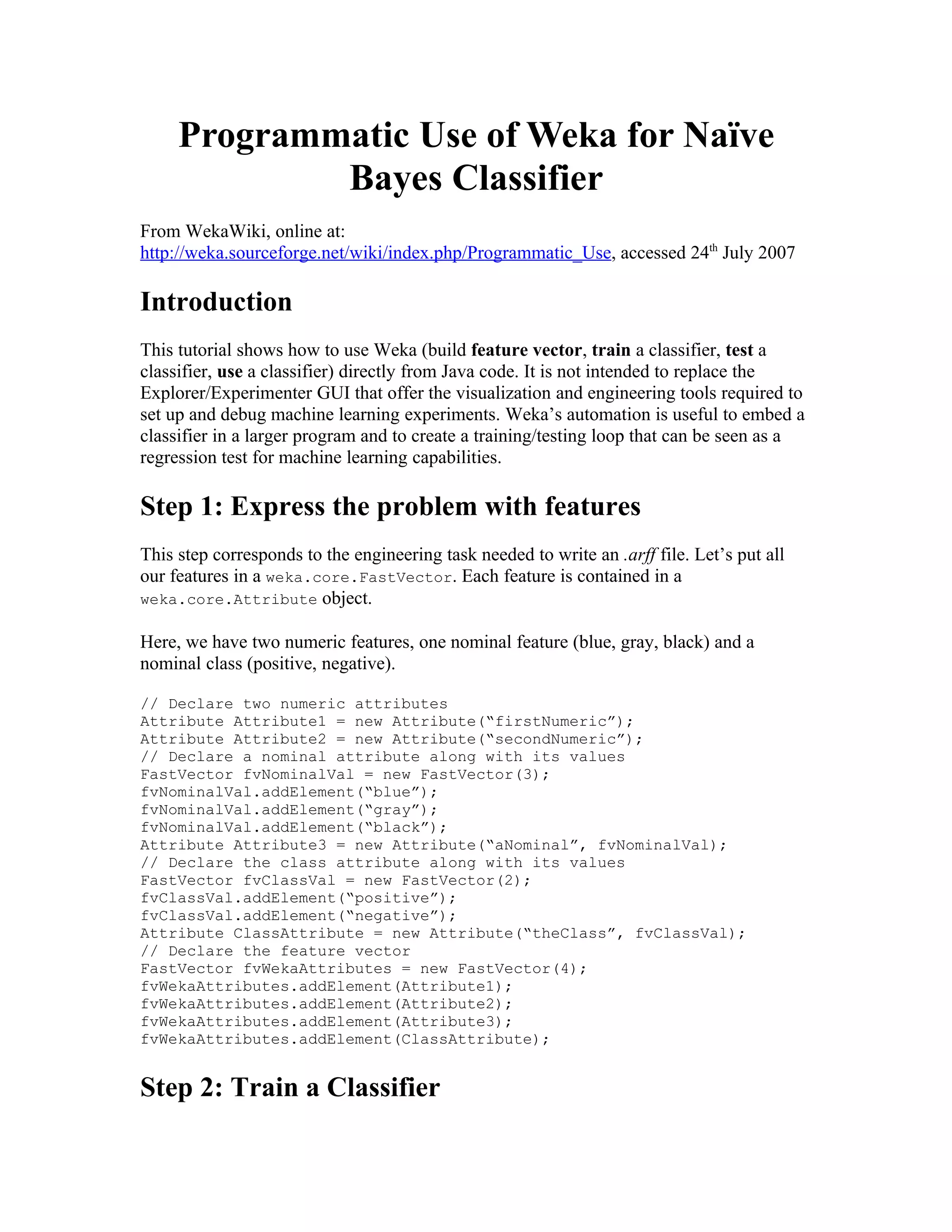
Step 2: Train a Classifier
Training requires 1) having a training set of instances and 2) choosing a classifier.

Let’s first create an empty training set (weka.core.Instances). We named the relation
“Rel”. The attribute prototype is declared using the vector from step 1. We give an initial
set capacity of 10. We also declare that the class attribute is the fourth one in the vector
(see step 1)

// Create an empty training set
Instances isTrainingSet = new Instances("Rel", fvWekaAttributes, 10);

// Set class index
isTrainingSet.setClassIndex(3);

Now, let’s fill the training set with one instance (weka.core.Instance):

// Create the instance
Instance iExample = new Instance(4);
iExample.setValue((Attribute)fvWekaAttributes.elementAt(0),                  1.0);
iExample.setValue((Attribute)fvWekaAttributes.elementAt(1),                  0.5);
iExample.setValue((Attribute)fvWekaAttributes.elementAt(2),                  "gray");
iExample.setValue((Attribute)fvWekaAttributes.elementAt(3),                  "positive");
// add the instance
isTrainingSet.add(iExample);

Finally, Choose a classifier (weka.classifiers.Classifier) and create the model.
Let’s, for example, create a naive Bayes classifier
(weka.classifiers.bayes.NaiveBayes)

// Create a naïve bayes classifier
Classifier cModel = (Classifier)new NaiveBayes();
cModel.buildClassifier(isTrainingSet);


Step 3: Test the classifier
Now that we create and trained a classifier, let’s test it. To do so, we need an evaluation
module (weka.classifiers.Evaluation) to which we feed a testing set (see section 2,
since the testing set is built like the training set).

// Test the model
Evaluation eTest = new Evaluation(isTrainingSet);
eTest.evaluateModel(cModel, isTestingSet);

The evaluation module can output a bunch of statistics:

// Print the result à la Weka explorer:
String strSummary = eTest.toSummaryString();
System.out.println(strSummary);
// Get the confusion matrix
double[][] cmMatrix = eTest.confusionMatrix();
Step 4: use the classifier
For real world applications, the actual use of the classifier is the ultimate goal. Here’s the
simplest way to achieve that. Let’s say we’ve built an instance (named iUse) as explained
in step 2:

// Specify that the instance belong to the training set
// in order to inherit from the set description
iUse.setDataset(isTrainingSet);
// Get the likelihood of each classes
// fDistribution[0] is the probability of being “positive”
// fDistribution[1] is the probability of being “negative”
double[] fDistribution = cModel.distributionForInstance(iUse);


Conclusion and More Information
This tutorial shows the basic way to train, test and use a classifier programmatically in
Weka. The code shown was not compiled nor tested since it requires being part of a real
classification problem.

New Microsoft Word Document.doc

  • 1.
    Programmatic Use ofWeka for Naïve Bayes Classifier From WekaWiki, online at: http://weka.sourceforge.net/wiki/index.php/Programmatic_Use, accessed 24th July 2007 Introduction This tutorial shows how to use Weka (build feature vector, train a classifier, test a classifier, use a classifier) directly from Java code. It is not intended to replace the Explorer/Experimenter GUI that offer the visualization and engineering tools required to set up and debug machine learning experiments. Weka’s automation is useful to embed a classifier in a larger program and to create a training/testing loop that can be seen as a regression test for machine learning capabilities. Step 1: Express the problem with features This step corresponds to the engineering task needed to write an .arff file. Let’s put all our features in a weka.core.FastVector. Each feature is contained in a weka.core.Attribute object. Here, we have two numeric features, one nominal feature (blue, gray, black) and a nominal class (positive, negative). // Declare two numeric attributes Attribute Attribute1 = new Attribute(“firstNumeric”); Attribute Attribute2 = new Attribute(“secondNumeric”); // Declare a nominal attribute along with its values FastVector fvNominalVal = new FastVector(3); fvNominalVal.addElement(“blue”); fvNominalVal.addElement(“gray”); fvNominalVal.addElement(“black”); Attribute Attribute3 = new Attribute(“aNominal”, fvNominalVal); // Declare the class attribute along with its values FastVector fvClassVal = new FastVector(2); fvClassVal.addElement(“positive”); fvClassVal.addElement(“negative”); Attribute ClassAttribute = new Attribute(“theClass”, fvClassVal); // Declare the feature vector FastVector fvWekaAttributes = new FastVector(4); fvWekaAttributes.addElement(Attribute1); fvWekaAttributes.addElement(Attribute2); fvWekaAttributes.addElement(Attribute3); fvWekaAttributes.addElement(ClassAttribute); Step 2: Train a Classifier
  • 2.
    Training requires 1)having a training set of instances and 2) choosing a classifier. Let’s first create an empty training set (weka.core.Instances). We named the relation “Rel”. The attribute prototype is declared using the vector from step 1. We give an initial set capacity of 10. We also declare that the class attribute is the fourth one in the vector (see step 1) // Create an empty training set Instances isTrainingSet = new Instances("Rel", fvWekaAttributes, 10); // Set class index isTrainingSet.setClassIndex(3); Now, let’s fill the training set with one instance (weka.core.Instance): // Create the instance Instance iExample = new Instance(4); iExample.setValue((Attribute)fvWekaAttributes.elementAt(0), 1.0); iExample.setValue((Attribute)fvWekaAttributes.elementAt(1), 0.5); iExample.setValue((Attribute)fvWekaAttributes.elementAt(2), "gray"); iExample.setValue((Attribute)fvWekaAttributes.elementAt(3), "positive"); // add the instance isTrainingSet.add(iExample); Finally, Choose a classifier (weka.classifiers.Classifier) and create the model. Let’s, for example, create a naive Bayes classifier (weka.classifiers.bayes.NaiveBayes) // Create a naïve bayes classifier Classifier cModel = (Classifier)new NaiveBayes(); cModel.buildClassifier(isTrainingSet); Step 3: Test the classifier Now that we create and trained a classifier, let’s test it. To do so, we need an evaluation module (weka.classifiers.Evaluation) to which we feed a testing set (see section 2, since the testing set is built like the training set). // Test the model Evaluation eTest = new Evaluation(isTrainingSet); eTest.evaluateModel(cModel, isTestingSet); The evaluation module can output a bunch of statistics: // Print the result à la Weka explorer: String strSummary = eTest.toSummaryString(); System.out.println(strSummary); // Get the confusion matrix double[][] cmMatrix = eTest.confusionMatrix();
  • 3.
    Step 4: usethe classifier For real world applications, the actual use of the classifier is the ultimate goal. Here’s the simplest way to achieve that. Let’s say we’ve built an instance (named iUse) as explained in step 2: // Specify that the instance belong to the training set // in order to inherit from the set description iUse.setDataset(isTrainingSet); // Get the likelihood of each classes // fDistribution[0] is the probability of being “positive” // fDistribution[1] is the probability of being “negative” double[] fDistribution = cModel.distributionForInstance(iUse); Conclusion and More Information This tutorial shows the basic way to train, test and use a classifier programmatically in Weka. The code shown was not compiled nor tested since it requires being part of a real classification problem.