Java Beans Unit 4(Part 1)
BY:SURBHI SAROHA
SYLLABUS
 Java Beans
 Java Beans component model
 Bean development environments
 Creating a Java Bean class
 Exploring indexed , bound and constrained properties
Java Beans
 A JavaBean is a Java class that should follow the following conventions:
 It should have a no-arg constructor.
 It should be Serializable.
 It should provide methods to set and get the values of the properties, known as getter and setter
methods.
 // Java program to illustrate the
 // structure of JavaBean class
 public class TestBean {
 private String name;
 public void setName(String name)
 {
Cont
.
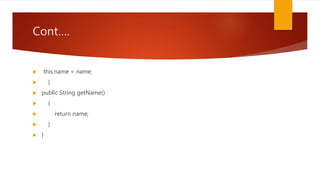
 this.name = name;
 }
 public String getName()
 {
 return name;
 }
 }
Cont
.
 Syntax for setter methods:
 It should be public in nature.
 The return-type should be void.
 The setter method should be prefixed with set.
 It should take some argument i.e. it should not be no-arg method.
 Syntax for getter methods:
 It should be public in nature.
 The return-type should not be void i.e. according to our requirement we have to give return-type.
 The getter method should be prefixed with get.
 It should not take any argument.
Cont

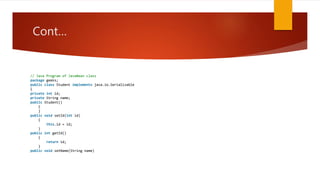
// Java Program of JavaBean class
package geeks;
public class Student implements java.io.Serializable
{
private int id;
private String name;
public Student()
{
}
public void setId(int id)
{
this.id = id;
}
public int getId()
{
return id;
}
public void setName(String name)
Cont

 {
 this.name = name;
 }
 public String getName()
 {
 return name;
 }
 }
 // Java program to access JavaBean class
 package geeks;
 public class Test {
 public static void main(String args[])
Cont
.
 {
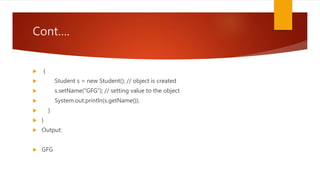
 Student s = new Student(); // object is created
 s.setName("GFG"); // setting value to the object
 System.out.println(s.getName());
 }
 }
 Output:
 GFG
Java Beans component model
 JavaBeans are introduced in 1996 by Sun Microsystem and defined as
 “A JavaBean is reusable, platform independent component that can be
manipulated visually in a builder tool.”
 In computing, based on the Java Platform, JavaBeans are classes that encapsulate
many objects into a single object (the bean). Builder tool enables you to create and
use beans for application development purpose. In simple words JavaBean is nothing
but a Java class. When these JavaBeans are used in other applications, the internal
working of such components are hidden from the application developer.
 Example:
 All Swing and AWT classes are JavaBeans. GUI components are ideal JavaBeans.
Components of JavaBeans
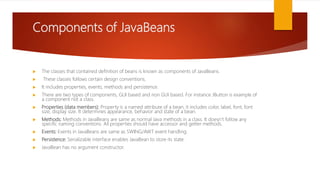
 The classes that contained definition of beans is known as components of JavaBeans.
 These classes follows certain design conventions.
 It includes properties, events, methods and persistence.
 There are two types of components, GUI based and non GUI based. For instance JButton is example of
a component not a class.
 Properties (data members): Property is a named attribute of a bean, it includes color, label, font, font
size, display size. It determines appearance, behavior and state of a bean.
 Methods: Methods in JavaBeans are same as normal Java methods in a class. It doesn’t follow any
specific naming conventions. All properties should have accessor and getter methods.
 Events: Events in JavaBeans are same as SWING/AWT event handling.
 Persistence: Serializable interface enables JavaBean to store its state.
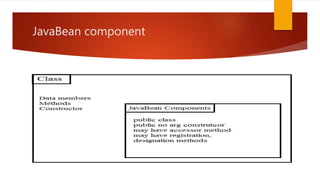
 JavaBean has no argument constructor.
JavaBean component
JavaBeans Properties
 JavaBean property can be access by the user of the object, it can be read, write,
read only or write only. We can access these JavaBeans properties with the help
of getPropertyName() method also known as getter or accessor and
setPropertyName() method known as setter written in implementation class of
bean.
 GetPropertyName(): For example, if property name is Title, your method name
would be geTitle().
 SetPropertyName(): For example, if property name is Title, your method name
would be setTitle().
Advantages of JavaBeans
 Following are some advantages of JavaBeans:
 Reusability in different environments.
 Used to create applet, servlet, application or other components.
 JavaBeans are dynamic, can be customized.
 Can be deployed in network systems
Bean development environments
 Beans Development Kit Is a development environment to create, configure, and test
JavaBeans.
 The features of BDK environment are:
 Provides a GUI to create, configure, and test JavaBeans.
 Enables you to modify JavaBean properties and link multiple JavaBeans in an
application using BDK.
 Provides a set of sample JavaBeans.
 Enables you to associate pre-defined events with sample JavaBeans.
 Identifying BDK Components
 ‱ Execute the run.bat file of BDK to start the BDK development environment.
Cont
.
 The components of BDK development environment are:
 1.ToolBox
 2. BeanBox
 3. Properties
 4. Method Tracer
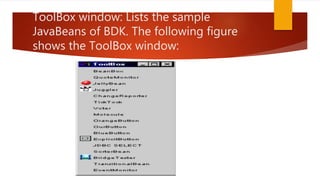
ToolBox window: Lists the sample
JavaBeans of BDK. The following figure
shows the ToolBox window:
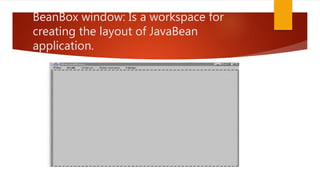
BeanBox window: Is a workspace for
creating the layout of JavaBean
application.
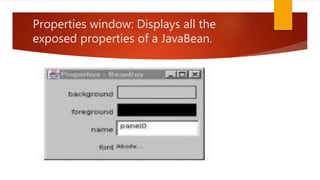
Properties window: Displays all the
exposed properties of a JavaBean.
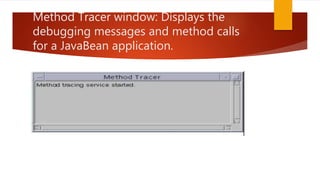
Method Tracer window: Displays the
debugging messages and method calls
for a JavaBean application.
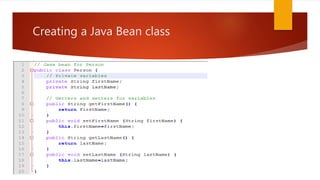
Creating a Java Bean class
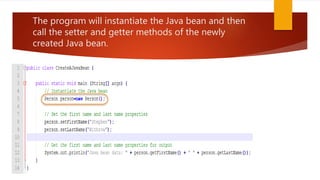
The program will instantiate the Java bean and then
call the setter and getter methods of the newly
created Java bean.
Exploring indexed , bound and
constrained properties
 Indexed Properties
 An indexed property is an array instead of a single value. In this case, the bean class
provides a method for getting and setting the entire array. Here is an example for an
int[] property called testGrades:
 public int[] getTestGrades() {
 return mTestGrades;
 }
 public void setTestGrades(int[] tg) {
 mTestGrades = tg;
 }
Cont
.
 For indexed properties, the bean class also provides methods for getting and
setting a specific element of the array.
 public int getTestGrades(int index) {
 return mTestGrades[index];
 }
 public void setTestGrades(int index, int grade) {
 mTestGrades[index] = grade;
 }
Bound Properties
 A bound property notifies listeners when its value changes. This has two
implications:
 The bean class includes addPropertyChangeListener() and
removePropertyChangeListener() methods for managing the bean's listeners.
 When a bound property is changed, the bean sends a PropertyChangeEvent to its
registered listeners.
 PropertyChangeEvent and PropertyChangeListener live in the java.beans package.
 The java.beans package also includes a class, PropertyChangeSupport, that takes
care of most of the work of bound properties. This handy class keeps track of
property listeners and includes a convenience method that fires property change
events to all registered listeners.
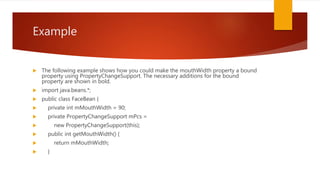
Example
 The following example shows how you could make the mouthWidth property a bound
property using PropertyChangeSupport. The necessary additions for the bound
property are shown in bold.
 import java.beans.*;
 public class FaceBean {
 private int mMouthWidth = 90;
 private PropertyChangeSupport mPcs =
 new PropertyChangeSupport(this);
 public int getMouthWidth() {
 return mMouthWidth;
 }
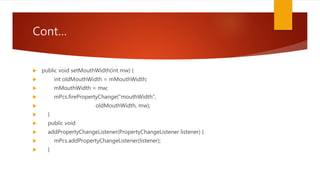
Cont

 public void setMouthWidth(int mw) {
 int oldMouthWidth = mMouthWidth;
 mMouthWidth = mw;
 mPcs.firePropertyChange("mouthWidth",
 oldMouthWidth, mw);
 }
 public void
 addPropertyChangeListener(PropertyChangeListener listener) {
 mPcs.addPropertyChangeListener(listener);
 }
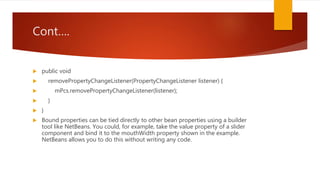
Cont
.
 public void
 removePropertyChangeListener(PropertyChangeListener listener) {
 mPcs.removePropertyChangeListener(listener);
 }
 }
 Bound properties can be tied directly to other bean properties using a builder
tool like NetBeans. You could, for example, take the value property of a slider
component and bind it to the mouthWidth property shown in the example.
NetBeans allows you to do this without writing any code.
Constrained Properties
 A constrained property is a special kind of bound property. For a constrained
property, the bean keeps track of a set of veto listeners. When a constrained
property is about to change, the listeners are consulted about the change. Any
one of the listeners has a chance to veto the change, in which case the property
remains unchanged.
 The veto listeners are separate from the property change listeners. Fortunately,
the java.beans package includes a VetoableChangeSupport class that greatly
simplifies constrained properties.
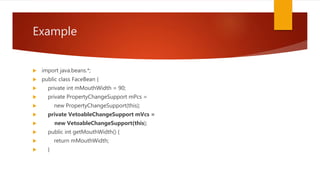
 Changes to the mouthWidth example are shown in bold:
Example
 import java.beans.*;
 public class FaceBean {
 private int mMouthWidth = 90;
 private PropertyChangeSupport mPcs =
 new PropertyChangeSupport(this);
 private VetoableChangeSupport mVcs =
 new VetoableChangeSupport(this);
 public int getMouthWidth() {
 return mMouthWidth;
 }
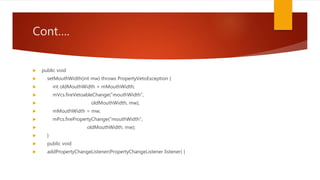
Cont
.
 public void
 setMouthWidth(int mw) throws PropertyVetoException {
 int oldMouthWidth = mMouthWidth;
 mVcs.fireVetoableChange("mouthWidth",
 oldMouthWidth, mw);
 mMouthWidth = mw;
 mPcs.firePropertyChange("mouthWidth",
 oldMouthWidth, mw);
 }
 public void
 addPropertyChangeListener(PropertyChangeListener listener) {
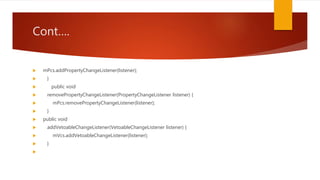
Cont
.
 mPcs.addPropertyChangeListener(listener);
 }
 public void
 removePropertyChangeListener(PropertyChangeListener listener) {
 mPcs.removePropertyChangeListener(listener);
 }
 public void
 addVetoableChangeListener(VetoableChangeListener listener) {
 mVcs.addVetoableChangeListener(listener);
 }

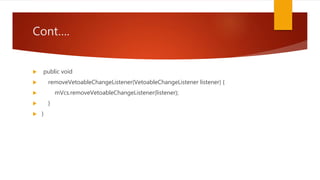
Cont
.
 public void
 removeVetoableChangeListener(VetoableChangeListener listener) {
 mVcs.removeVetoableChangeListener(listener);
 }
 }
Thank you 

Java Beans Unit 4(Part 1)

  • 1.
    Java Beans Unit4(Part 1) BY:SURBHI SAROHA
  • 2.
    SYLLABUS  Java Beans Java Beans component model  Bean development environments  Creating a Java Bean class  Exploring indexed , bound and constrained properties
  • 3.
    Java Beans  AJavaBean is a Java class that should follow the following conventions:  It should have a no-arg constructor.  It should be Serializable.  It should provide methods to set and get the values of the properties, known as getter and setter methods.  // Java program to illustrate the  // structure of JavaBean class  public class TestBean {  private String name;  public void setName(String name)  {
  • 4.
    Cont
.  this.name =name;  }  public String getName()  {  return name;  }  }
  • 5.
    Cont
.  Syntax forsetter methods:  It should be public in nature.  The return-type should be void.  The setter method should be prefixed with set.  It should take some argument i.e. it should not be no-arg method.  Syntax for getter methods:  It should be public in nature.  The return-type should not be void i.e. according to our requirement we have to give return-type.  The getter method should be prefixed with get.  It should not take any argument.
  • 6.
    Cont
 // Java Programof JavaBean class package geeks; public class Student implements java.io.Serializable { private int id; private String name; public Student() { } public void setId(int id) { this.id = id; } public int getId() { return id; } public void setName(String name)
  • 7.
    Cont
  {  this.name= name;  }  public String getName()  {  return name;  }  }  // Java program to access JavaBean class  package geeks;  public class Test {  public static void main(String args[])
  • 8.
    Cont
.  {  Students = new Student(); // object is created  s.setName("GFG"); // setting value to the object  System.out.println(s.getName());  }  }  Output:  GFG
  • 9.
    Java Beans componentmodel  JavaBeans are introduced in 1996 by Sun Microsystem and defined as  “A JavaBean is reusable, platform independent component that can be manipulated visually in a builder tool.”  In computing, based on the Java Platform, JavaBeans are classes that encapsulate many objects into a single object (the bean). Builder tool enables you to create and use beans for application development purpose. In simple words JavaBean is nothing but a Java class. When these JavaBeans are used in other applications, the internal working of such components are hidden from the application developer.  Example:  All Swing and AWT classes are JavaBeans. GUI components are ideal JavaBeans.
  • 10.
    Components of JavaBeans The classes that contained definition of beans is known as components of JavaBeans.  These classes follows certain design conventions.  It includes properties, events, methods and persistence.  There are two types of components, GUI based and non GUI based. For instance JButton is example of a component not a class.  Properties (data members): Property is a named attribute of a bean, it includes color, label, font, font size, display size. It determines appearance, behavior and state of a bean.  Methods: Methods in JavaBeans are same as normal Java methods in a class. It doesn’t follow any specific naming conventions. All properties should have accessor and getter methods.  Events: Events in JavaBeans are same as SWING/AWT event handling.  Persistence: Serializable interface enables JavaBean to store its state.  JavaBean has no argument constructor.
  • 11.
  • 12.
    JavaBeans Properties  JavaBeanproperty can be access by the user of the object, it can be read, write, read only or write only. We can access these JavaBeans properties with the help of getPropertyName() method also known as getter or accessor and setPropertyName() method known as setter written in implementation class of bean.  GetPropertyName(): For example, if property name is Title, your method name would be geTitle().  SetPropertyName(): For example, if property name is Title, your method name would be setTitle().
  • 13.
    Advantages of JavaBeans Following are some advantages of JavaBeans:  Reusability in different environments.  Used to create applet, servlet, application or other components.  JavaBeans are dynamic, can be customized.  Can be deployed in network systems
  • 14.
    Bean development environments Beans Development Kit Is a development environment to create, configure, and test JavaBeans.  The features of BDK environment are:  Provides a GUI to create, configure, and test JavaBeans.  Enables you to modify JavaBean properties and link multiple JavaBeans in an application using BDK.  Provides a set of sample JavaBeans.  Enables you to associate pre-defined events with sample JavaBeans.  Identifying BDK Components  ‱ Execute the run.bat file of BDK to start the BDK development environment.
  • 15.
    Cont
.  The componentsof BDK development environment are:  1.ToolBox  2. BeanBox  3. Properties  4. Method Tracer
  • 16.
    ToolBox window: Liststhe sample JavaBeans of BDK. The following figure shows the ToolBox window:
  • 17.
    BeanBox window: Isa workspace for creating the layout of JavaBean application.
  • 18.
    Properties window: Displaysall the exposed properties of a JavaBean.
  • 19.
    Method Tracer window:Displays the debugging messages and method calls for a JavaBean application.
  • 20.
    Creating a JavaBean class
  • 21.
    The program willinstantiate the Java bean and then call the setter and getter methods of the newly created Java bean.
  • 22.
    Exploring indexed ,bound and constrained properties  Indexed Properties  An indexed property is an array instead of a single value. In this case, the bean class provides a method for getting and setting the entire array. Here is an example for an int[] property called testGrades:  public int[] getTestGrades() {  return mTestGrades;  }  public void setTestGrades(int[] tg) {  mTestGrades = tg;  }
  • 23.
    Cont
.  For indexedproperties, the bean class also provides methods for getting and setting a specific element of the array.  public int getTestGrades(int index) {  return mTestGrades[index];  }  public void setTestGrades(int index, int grade) {  mTestGrades[index] = grade;  }
  • 24.
    Bound Properties  Abound property notifies listeners when its value changes. This has two implications:  The bean class includes addPropertyChangeListener() and removePropertyChangeListener() methods for managing the bean's listeners.  When a bound property is changed, the bean sends a PropertyChangeEvent to its registered listeners.  PropertyChangeEvent and PropertyChangeListener live in the java.beans package.  The java.beans package also includes a class, PropertyChangeSupport, that takes care of most of the work of bound properties. This handy class keeps track of property listeners and includes a convenience method that fires property change events to all registered listeners.
  • 25.
    Example  The followingexample shows how you could make the mouthWidth property a bound property using PropertyChangeSupport. The necessary additions for the bound property are shown in bold.  import java.beans.*;  public class FaceBean {  private int mMouthWidth = 90;  private PropertyChangeSupport mPcs =  new PropertyChangeSupport(this);  public int getMouthWidth() {  return mMouthWidth;  }
  • 26.
    Cont
  public voidsetMouthWidth(int mw) {  int oldMouthWidth = mMouthWidth;  mMouthWidth = mw;  mPcs.firePropertyChange("mouthWidth",  oldMouthWidth, mw);  }  public void  addPropertyChangeListener(PropertyChangeListener listener) {  mPcs.addPropertyChangeListener(listener);  }
  • 27.
    Cont
.  public void removePropertyChangeListener(PropertyChangeListener listener) {  mPcs.removePropertyChangeListener(listener);  }  }  Bound properties can be tied directly to other bean properties using a builder tool like NetBeans. You could, for example, take the value property of a slider component and bind it to the mouthWidth property shown in the example. NetBeans allows you to do this without writing any code.
  • 28.
    Constrained Properties  Aconstrained property is a special kind of bound property. For a constrained property, the bean keeps track of a set of veto listeners. When a constrained property is about to change, the listeners are consulted about the change. Any one of the listeners has a chance to veto the change, in which case the property remains unchanged.  The veto listeners are separate from the property change listeners. Fortunately, the java.beans package includes a VetoableChangeSupport class that greatly simplifies constrained properties.  Changes to the mouthWidth example are shown in bold:
  • 29.
    Example  import java.beans.*; public class FaceBean {  private int mMouthWidth = 90;  private PropertyChangeSupport mPcs =  new PropertyChangeSupport(this);  private VetoableChangeSupport mVcs =  new VetoableChangeSupport(this);  public int getMouthWidth() {  return mMouthWidth;  }
  • 30.
    Cont
.  public void setMouthWidth(int mw) throws PropertyVetoException {  int oldMouthWidth = mMouthWidth;  mVcs.fireVetoableChange("mouthWidth",  oldMouthWidth, mw);  mMouthWidth = mw;  mPcs.firePropertyChange("mouthWidth",  oldMouthWidth, mw);  }  public void  addPropertyChangeListener(PropertyChangeListener listener) {
  • 31.
    Cont
.  mPcs.addPropertyChangeListener(listener);  } public void  removePropertyChangeListener(PropertyChangeListener listener) {  mPcs.removePropertyChangeListener(listener);  }  public void  addVetoableChangeListener(VetoableChangeListener listener) {  mVcs.addVetoableChangeListener(listener);  } 
  • 32.
    Cont
.  public void removeVetoableChangeListener(VetoableChangeListener listener) {  mVcs.removeVetoableChangeListener(listener);  }  }
  • 33.