Copyright 2015 IT Professional Academy 1
Automation (QTP) Testing
Course
DAY - 7
Copyright 2015 IT Professional Academy 2
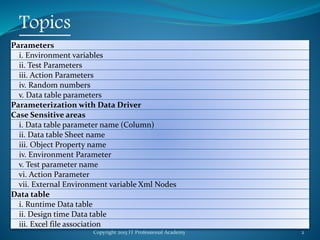
Topics
Parameters
i. Environment variables
ii. Test Parameters
iii. Action Parameters
iv. Random numbers
v. Data table parameters
Parameterization with Data Driver
Case Sensitive areas
i. Data table parameter name (Column)
ii. Data table Sheet name
iii. Object Property name
iv. Environment Parameter
v. Test parameter name
vi. Action Parameter
vii. External Environment variable Xml Nodes
Data table
i. Runtime Data table
ii. Design time Data table
iii. Excel file association
Copyright 2015 IT Professional Academy 3
Topics
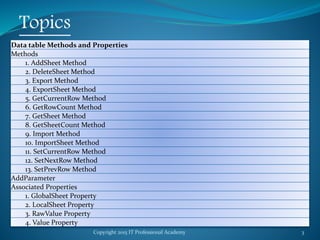
Data table Methods and Properties
Methods
1. AddSheet Method
2. DeleteSheet Method
3. Export Method
4. ExportSheet Method
5. GetCurrentRow Method
6. GetRowCount Method
7. GetSheet Method
8. GetSheetCount Method
9. Import Method
10. ImportSheet Method
11. SetCurrentRow Method
12. SetNextRow Method
13. SetPrevRow Method
AddParameter
Associated Properties
1. GlobalSheet Property
2. LocalSheet Property
3. RawValue Property
4. Value Property
Copyright 2015 IT Professional Academy 4
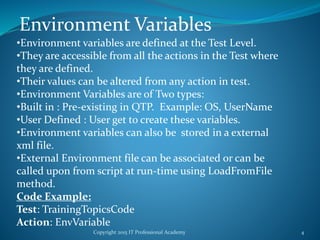
Environment Variables
•Environment variables are defined at the Test Level.
•They are accessible from all the actions in the Test where
they are defined.
•Their values can be altered from any action in test.
•Environment Variables are of Two types:
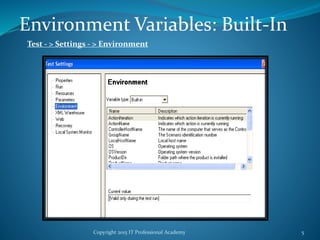
•Built in : Pre-existing in QTP. Example: OS, UserName
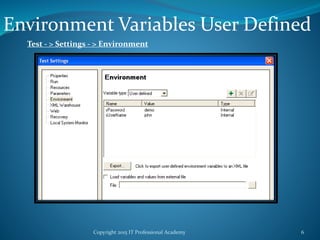
•User Defined : User get to create these variables.
•Environment variables can also be stored in a external
xml file.
•External Environment file can be associated or can be
called upon from script at run-time using LoadFromFile
method.
Code Example:
Test: TrainingTopicsCode
Action: EnvVariable
Copyright 2015 IT Professional Academy 5
Environment Variables: Built-In
Test - > Settings - > Environment
Copyright 2015 IT Professional Academy 6
Environment Variables User Defined
Test - > Settings - > Environment
Copyright 2015 IT Professional Academy 7
Environment Variable XML File
Static: Set the Path for the XML File in the Environment Variable Window
Environment Variables XML:
<Environment>
<Variable>
<Name>This is the first variable's name</Name>
<Value>This is the first variable's value</Value>
<Name>This is the first variable's name</Name>
<Value>This is the first variable's value</Value>
</Variable>
</Environment>
Copyright 2015 IT Professional Academy 8
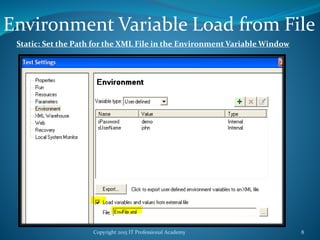
Environment Variable Load from File
Static: Set the Path for the XML File in the Environment Variable Window
Copyright 2015 IT Professional Academy 9
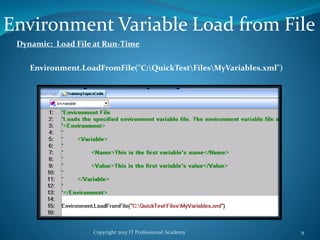
Environment Variable Load from File
Dynamic: Load File at Run-Time
Environment.LoadFromFile("C:QuickTestFilesMyVariables.xml")
Copyright 2015 IT Professional Academy 10
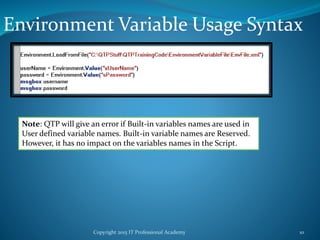
Environment Variable Usage Syntax
Note: QTP will give an error if Built-in variables names are used in
User defined variable names. Built-in variable names are Reserved.
However, it has no impact on the variables names in the Script.
Copyright 2015 IT Professional Academy 11
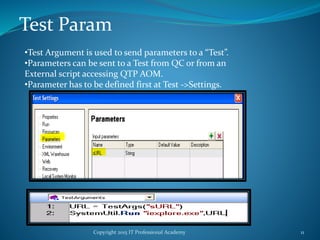
Test Param
•Test Argument is used to send parameters to a “Test”.
•Parameters can be sent to a Test from QC or from an
External script accessing QTP AOM.
•Parameter has to be defined first at Test ->Settings.
Copyright 2015 IT Professional Academy 12
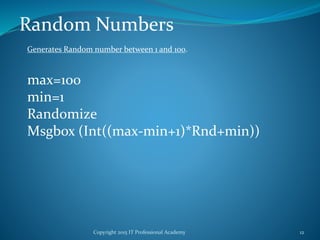
Random Numbers
max=100
min=1
Randomize
Msgbox (Int((max-min+1)*Rnd+min))
Generates Random number between 1 and 100.
Copyright 2015 IT Professional Academy 13
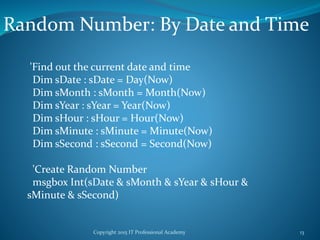
Random Number: By Date and Time
'Find out the current date and time
Dim sDate : sDate = Day(Now)
Dim sMonth : sMonth = Month(Now)
Dim sYear : sYear = Year(Now)
Dim sHour : sHour = Hour(Now)
Dim sMinute : sMinute = Minute(Now)
Dim sSecond : sSecond = Second(Now)
'Create Random Number
msgbox Int(sDate & sMonth & sYear & sHour &
sMinute & sSecond)
Copyright 2015 IT Professional Academy 14
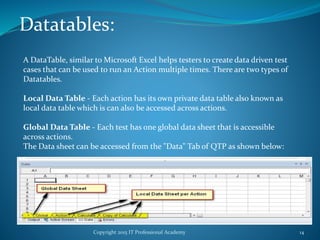
Datatables:
A DataTable, similar to Microsoft Excel helps testers to create data driven test
cases that can be used to run an Action multiple times. There are two types of
Datatables.
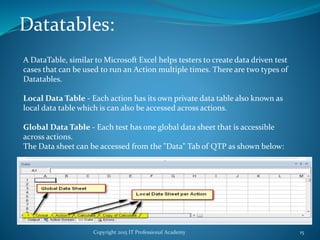
Local Data Table - Each action has its own private data table also known as
local data table which is can also be accessed across actions.
Global Data Table - Each test has one global data sheet that is accessible
across actions.
The Data sheet can be accessed from the "Data" Tab of QTP as shown below:
Copyright 2015 IT Professional Academy 15
Datatables:
A DataTable, similar to Microsoft Excel helps testers to create data driven test
cases that can be used to run an Action multiple times. There are two types of
Datatables.
Local Data Table - Each action has its own private data table also known as
local data table which is can also be accessed across actions.
Global Data Table - Each test has one global data sheet that is accessible
across actions.
The Data sheet can be accessed from the "Data" Tab of QTP as shown below:
Copyright 2015 IT Professional Academy 16
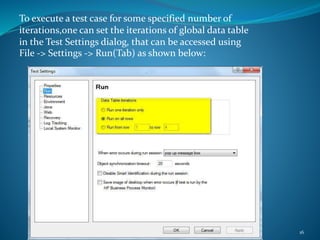
To execute a test case for some specified number of
iterations,one can set the iterations of global data table
in the Test Settings dialog, that can be accessed using
File -> Settings -> Run(Tab) as shown below:
Copyright 2015 IT Professional Academy 17
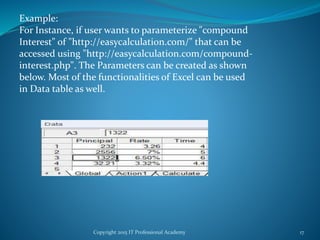
Example:
For Instance, if user wants to parameterize "compound
Interest" of "http://easycalculation.com/" that can be
accessed using "http://easycalculation.com/compound-
interest.php". The Parameters can be created as shown
below. Most of the functionalities of Excel can be used
in Data table as well.
Copyright 2015 IT Professional Academy 18
Data Table Operations:
There are three types of objects to access Data Table.
Data Table Operations can be well understood by
traversing through the below link:
Object Type Description
Data Table Methods Gives Detailed information about the
data table methods.
DTParameter Object Methods
Gives Detailed information about the
DTParameter methods.
DTSheet Object Methods Gives Detailed information about the
DTSheet methods.
Copyright 2015 IT Professional Academy 19
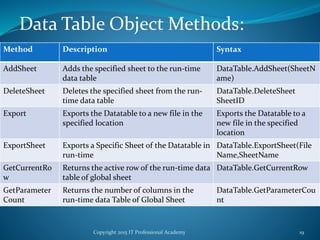
Data Table Object Methods:
Method Description Syntax
AddSheet Adds the specified sheet to the run-time
data table
DataTable.AddSheet(SheetN
ame)
DeleteSheet Deletes the specified sheet from the run-
time data table
DataTable.DeleteSheet
SheetID
Export Exports the Datatable to a new file in the
specified location
Exports the Datatable to a
new file in the specified
location
ExportSheet Exports a Specific Sheet of the Datatable in
run-time
DataTable.ExportSheet(File
Name,SheetName
GetCurrentRo
w
Returns the active row of the run-time data
table of global sheet
DataTable.GetCurrentRow
GetParameter
Count
Returns the number of columns in the
run-time data Table of Global Sheet
DataTable.GetParameterCou
nt
Copyright 2015 IT Professional Academy 20
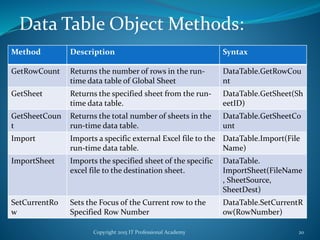
Data Table Object Methods:
Method Description Syntax
GetRowCount Returns the number of rows in the run-
time data table of Global Sheet
DataTable.GetRowCou
nt
GetSheet Returns the specified sheet from the run-
time data table.
DataTable.GetSheet(Sh
eetID)
GetSheetCoun
t
Returns the total number of sheets in the
run-time data table.
DataTable.GetSheetCo
unt
Import Imports a specific external Excel file to the
run-time data table.
DataTable.Import(File
Name)
ImportSheet Imports the specified sheet of the specific
excel file to the destination sheet.
DataTable.
ImportSheet(FileName
, SheetSource,
SheetDest)
SetCurrentRo
w
Sets the Focus of the Current row to the
Specified Row Number
DataTable.SetCurrentR
ow(RowNumber)
Copyright 2015 IT Professional Academy 21
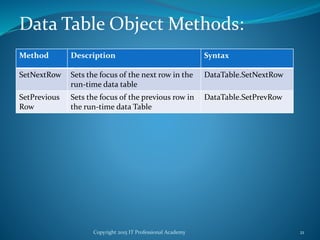
Data Table Object Methods:
Method Description Syntax
SetNextRow Sets the focus of the next row in the
run-time data table
DataTable.SetNextRow
SetPrevious
Row
Sets the focus of the previous row in
the run-time data Table
DataTable.SetPrevRow
Copyright 2015 IT Professional Academy 22
Data Table Object Properties
Property Name Description Syntax
Global Sheet Returns the first sheet of
the run-time data table.
DataTable.GlobalSheet
LocalSheet Returns the Active local
sheet of the run-time
data table.
DataTable.LocalSheet
RawValue Retrieves the raw value
of the cell
DataTable.RawValue
ParameterID, [SheetID]
Value Retrieves the value of the
cell in the specified
parameter.
DataTable.Value(Parame
terID, [SheetID])
Copyright 2015 IT Professional Academy 23
Example
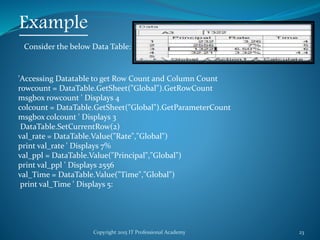
Consider the below Data Table:
'Accessing Datatable to get Row Count and Column Count
rowcount = DataTable.GetSheet("Global").GetRowCount
msgbox rowcount ' Displays 4
colcount = DataTable.GetSheet("Global").GetParameterCount
msgbox colcount ' Displays 3
DataTable.SetCurrentRow(2)
val_rate = DataTable.Value("Rate","Global")
print val_rate ' Displays 7%
val_ppl = DataTable.Value("Principal","Global")
print val_ppl ' Displays 2556
val_Time = DataTable.Value("Time","Global")
print val_Time ' Displays 5:
Copyright 2015 IT Professional Academy 24
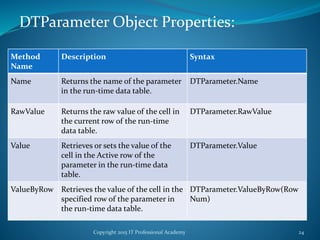
DTParameter Object Properties:
Method
Name
Description Syntax
Name Returns the name of the parameter
in the run-time data table.
DTParameter.Name
RawValue Returns the raw value of the cell in
the current row of the run-time
data table.
DTParameter.RawValue
Value Retrieves or sets the value of the
cell in the Active row of the
parameter in the run-time data
table.
DTParameter.Value
ValueByRow Retrieves the value of the cell in the
specified row of the parameter in
the run-time data table.
DTParameter.ValueByRow(Row
Num)
Copyright 2015 IT Professional Academy 25
Example:-
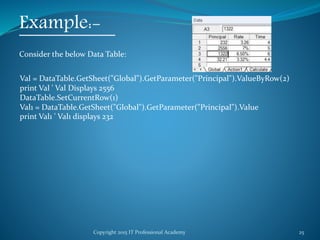
Consider the below Data Table:
Val = DataTable.GetSheet("Global").GetParameter("Principal").ValueByRow(2)
print Val ' Val Displays 2556
DataTable.SetCurrentRow(1)
Val1 = DataTable.GetSheet("Global").GetParameter("Principal").Value
print Val1 ' Val1 displays 232
Copyright 2015 IT Professional Academy 26
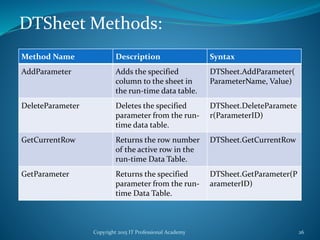
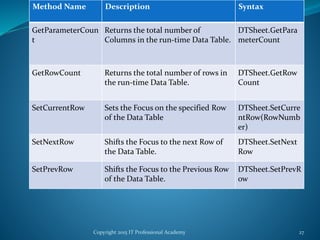
DTSheet Methods:
Method Name Description Syntax
AddParameter Adds the specified
column to the sheet in
the run-time data table.
DTSheet.AddParameter(
ParameterName, Value)
DeleteParameter Deletes the specified
parameter from the run-
time data table.
DTSheet.DeleteParamete
r(ParameterID)
GetCurrentRow Returns the row number
of the active row in the
run-time Data Table.
DTSheet.GetCurrentRow
GetParameter Returns the specified
parameter from the run-
time Data Table.
DTSheet.GetParameter(P
arameterID)
Copyright 2015 IT Professional Academy 27
Method Name Description Syntax
GetParameterCoun
t
Returns the total number of
Columns in the run-time Data Table.
DTSheet.GetPara
meterCount
GetRowCount Returns the total number of rows in
the run-time Data Table.
DTSheet.GetRow
Count
SetCurrentRow Sets the Focus on the specified Row
of the Data Table
DTSheet.SetCurre
ntRow(RowNumb
er)
SetNextRow Shifts the Focus to the next Row of
the Data Table.
DTSheet.SetNext
Row
SetPrevRow Shifts the Focus to the Previous Row
of the Data Table.
DTSheet.SetPrevR
ow
Copyright 2015 IT Professional Academy 28
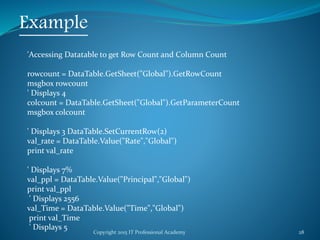
Example
'Accessing Datatable to get Row Count and Column Count
rowcount = DataTable.GetSheet("Global").GetRowCount
msgbox rowcount
' Displays 4
colcount = DataTable.GetSheet("Global").GetParameterCount
msgbox colcount
' Displays 3 DataTable.SetCurrentRow(2)
val_rate = DataTable.Value("Rate","Global")
print val_rate
' Displays 7%
val_ppl = DataTable.Value("Principal","Global")
print val_ppl
' Displays 2556
val_Time = DataTable.Value("Time","Global")
print val_Time
' Displays 5
Copyright 2015 IT Professional Academy 29
Thanks

QTP Automation Testing Tutorial 7

  • 1.
    Copyright 2015 ITProfessional Academy 1 Automation (QTP) Testing Course DAY - 7
  • 2.
    Copyright 2015 ITProfessional Academy 2 Topics Parameters i. Environment variables ii. Test Parameters iii. Action Parameters iv. Random numbers v. Data table parameters Parameterization with Data Driver Case Sensitive areas i. Data table parameter name (Column) ii. Data table Sheet name iii. Object Property name iv. Environment Parameter v. Test parameter name vi. Action Parameter vii. External Environment variable Xml Nodes Data table i. Runtime Data table ii. Design time Data table iii. Excel file association
  • 3.
    Copyright 2015 ITProfessional Academy 3 Topics Data table Methods and Properties Methods 1. AddSheet Method 2. DeleteSheet Method 3. Export Method 4. ExportSheet Method 5. GetCurrentRow Method 6. GetRowCount Method 7. GetSheet Method 8. GetSheetCount Method 9. Import Method 10. ImportSheet Method 11. SetCurrentRow Method 12. SetNextRow Method 13. SetPrevRow Method AddParameter Associated Properties 1. GlobalSheet Property 2. LocalSheet Property 3. RawValue Property 4. Value Property
  • 4.
    Copyright 2015 ITProfessional Academy 4 Environment Variables •Environment variables are defined at the Test Level. •They are accessible from all the actions in the Test where they are defined. •Their values can be altered from any action in test. •Environment Variables are of Two types: •Built in : Pre-existing in QTP. Example: OS, UserName •User Defined : User get to create these variables. •Environment variables can also be stored in a external xml file. •External Environment file can be associated or can be called upon from script at run-time using LoadFromFile method. Code Example: Test: TrainingTopicsCode Action: EnvVariable
  • 5.
    Copyright 2015 ITProfessional Academy 5 Environment Variables: Built-In Test - > Settings - > Environment
  • 6.
    Copyright 2015 ITProfessional Academy 6 Environment Variables User Defined Test - > Settings - > Environment
  • 7.
    Copyright 2015 ITProfessional Academy 7 Environment Variable XML File Static: Set the Path for the XML File in the Environment Variable Window Environment Variables XML: <Environment> <Variable> <Name>This is the first variable's name</Name> <Value>This is the first variable's value</Value> <Name>This is the first variable's name</Name> <Value>This is the first variable's value</Value> </Variable> </Environment>
  • 8.
    Copyright 2015 ITProfessional Academy 8 Environment Variable Load from File Static: Set the Path for the XML File in the Environment Variable Window
  • 9.
    Copyright 2015 ITProfessional Academy 9 Environment Variable Load from File Dynamic: Load File at Run-Time Environment.LoadFromFile("C:QuickTestFilesMyVariables.xml")
  • 10.
    Copyright 2015 ITProfessional Academy 10 Environment Variable Usage Syntax Note: QTP will give an error if Built-in variables names are used in User defined variable names. Built-in variable names are Reserved. However, it has no impact on the variables names in the Script.
  • 11.
    Copyright 2015 ITProfessional Academy 11 Test Param •Test Argument is used to send parameters to a “Test”. •Parameters can be sent to a Test from QC or from an External script accessing QTP AOM. •Parameter has to be defined first at Test ->Settings.
  • 12.
    Copyright 2015 ITProfessional Academy 12 Random Numbers max=100 min=1 Randomize Msgbox (Int((max-min+1)*Rnd+min)) Generates Random number between 1 and 100.
  • 13.
    Copyright 2015 ITProfessional Academy 13 Random Number: By Date and Time 'Find out the current date and time Dim sDate : sDate = Day(Now) Dim sMonth : sMonth = Month(Now) Dim sYear : sYear = Year(Now) Dim sHour : sHour = Hour(Now) Dim sMinute : sMinute = Minute(Now) Dim sSecond : sSecond = Second(Now) 'Create Random Number msgbox Int(sDate & sMonth & sYear & sHour & sMinute & sSecond)
  • 14.
    Copyright 2015 ITProfessional Academy 14 Datatables: A DataTable, similar to Microsoft Excel helps testers to create data driven test cases that can be used to run an Action multiple times. There are two types of Datatables. Local Data Table - Each action has its own private data table also known as local data table which is can also be accessed across actions. Global Data Table - Each test has one global data sheet that is accessible across actions. The Data sheet can be accessed from the "Data" Tab of QTP as shown below:
  • 15.
    Copyright 2015 ITProfessional Academy 15 Datatables: A DataTable, similar to Microsoft Excel helps testers to create data driven test cases that can be used to run an Action multiple times. There are two types of Datatables. Local Data Table - Each action has its own private data table also known as local data table which is can also be accessed across actions. Global Data Table - Each test has one global data sheet that is accessible across actions. The Data sheet can be accessed from the "Data" Tab of QTP as shown below:
  • 16.
    Copyright 2015 ITProfessional Academy 16 To execute a test case for some specified number of iterations,one can set the iterations of global data table in the Test Settings dialog, that can be accessed using File -> Settings -> Run(Tab) as shown below:
  • 17.
    Copyright 2015 ITProfessional Academy 17 Example: For Instance, if user wants to parameterize "compound Interest" of "http://easycalculation.com/" that can be accessed using "http://easycalculation.com/compound- interest.php". The Parameters can be created as shown below. Most of the functionalities of Excel can be used in Data table as well.
  • 18.
    Copyright 2015 ITProfessional Academy 18 Data Table Operations: There are three types of objects to access Data Table. Data Table Operations can be well understood by traversing through the below link: Object Type Description Data Table Methods Gives Detailed information about the data table methods. DTParameter Object Methods Gives Detailed information about the DTParameter methods. DTSheet Object Methods Gives Detailed information about the DTSheet methods.
  • 19.
    Copyright 2015 ITProfessional Academy 19 Data Table Object Methods: Method Description Syntax AddSheet Adds the specified sheet to the run-time data table DataTable.AddSheet(SheetN ame) DeleteSheet Deletes the specified sheet from the run- time data table DataTable.DeleteSheet SheetID Export Exports the Datatable to a new file in the specified location Exports the Datatable to a new file in the specified location ExportSheet Exports a Specific Sheet of the Datatable in run-time DataTable.ExportSheet(File Name,SheetName GetCurrentRo w Returns the active row of the run-time data table of global sheet DataTable.GetCurrentRow GetParameter Count Returns the number of columns in the run-time data Table of Global Sheet DataTable.GetParameterCou nt
  • 20.
    Copyright 2015 ITProfessional Academy 20 Data Table Object Methods: Method Description Syntax GetRowCount Returns the number of rows in the run- time data table of Global Sheet DataTable.GetRowCou nt GetSheet Returns the specified sheet from the run- time data table. DataTable.GetSheet(Sh eetID) GetSheetCoun t Returns the total number of sheets in the run-time data table. DataTable.GetSheetCo unt Import Imports a specific external Excel file to the run-time data table. DataTable.Import(File Name) ImportSheet Imports the specified sheet of the specific excel file to the destination sheet. DataTable. ImportSheet(FileName , SheetSource, SheetDest) SetCurrentRo w Sets the Focus of the Current row to the Specified Row Number DataTable.SetCurrentR ow(RowNumber)
  • 21.
    Copyright 2015 ITProfessional Academy 21 Data Table Object Methods: Method Description Syntax SetNextRow Sets the focus of the next row in the run-time data table DataTable.SetNextRow SetPrevious Row Sets the focus of the previous row in the run-time data Table DataTable.SetPrevRow
  • 22.
    Copyright 2015 ITProfessional Academy 22 Data Table Object Properties Property Name Description Syntax Global Sheet Returns the first sheet of the run-time data table. DataTable.GlobalSheet LocalSheet Returns the Active local sheet of the run-time data table. DataTable.LocalSheet RawValue Retrieves the raw value of the cell DataTable.RawValue ParameterID, [SheetID] Value Retrieves the value of the cell in the specified parameter. DataTable.Value(Parame terID, [SheetID])
  • 23.
    Copyright 2015 ITProfessional Academy 23 Example Consider the below Data Table: 'Accessing Datatable to get Row Count and Column Count rowcount = DataTable.GetSheet("Global").GetRowCount msgbox rowcount ' Displays 4 colcount = DataTable.GetSheet("Global").GetParameterCount msgbox colcount ' Displays 3 DataTable.SetCurrentRow(2) val_rate = DataTable.Value("Rate","Global") print val_rate ' Displays 7% val_ppl = DataTable.Value("Principal","Global") print val_ppl ' Displays 2556 val_Time = DataTable.Value("Time","Global") print val_Time ' Displays 5:
  • 24.
    Copyright 2015 ITProfessional Academy 24 DTParameter Object Properties: Method Name Description Syntax Name Returns the name of the parameter in the run-time data table. DTParameter.Name RawValue Returns the raw value of the cell in the current row of the run-time data table. DTParameter.RawValue Value Retrieves or sets the value of the cell in the Active row of the parameter in the run-time data table. DTParameter.Value ValueByRow Retrieves the value of the cell in the specified row of the parameter in the run-time data table. DTParameter.ValueByRow(Row Num)
  • 25.
    Copyright 2015 ITProfessional Academy 25 Example:- Consider the below Data Table: Val = DataTable.GetSheet("Global").GetParameter("Principal").ValueByRow(2) print Val ' Val Displays 2556 DataTable.SetCurrentRow(1) Val1 = DataTable.GetSheet("Global").GetParameter("Principal").Value print Val1 ' Val1 displays 232
  • 26.
    Copyright 2015 ITProfessional Academy 26 DTSheet Methods: Method Name Description Syntax AddParameter Adds the specified column to the sheet in the run-time data table. DTSheet.AddParameter( ParameterName, Value) DeleteParameter Deletes the specified parameter from the run- time data table. DTSheet.DeleteParamete r(ParameterID) GetCurrentRow Returns the row number of the active row in the run-time Data Table. DTSheet.GetCurrentRow GetParameter Returns the specified parameter from the run- time Data Table. DTSheet.GetParameter(P arameterID)
  • 27.
    Copyright 2015 ITProfessional Academy 27 Method Name Description Syntax GetParameterCoun t Returns the total number of Columns in the run-time Data Table. DTSheet.GetPara meterCount GetRowCount Returns the total number of rows in the run-time Data Table. DTSheet.GetRow Count SetCurrentRow Sets the Focus on the specified Row of the Data Table DTSheet.SetCurre ntRow(RowNumb er) SetNextRow Shifts the Focus to the next Row of the Data Table. DTSheet.SetNext Row SetPrevRow Shifts the Focus to the Previous Row of the Data Table. DTSheet.SetPrevR ow
  • 28.
    Copyright 2015 ITProfessional Academy 28 Example 'Accessing Datatable to get Row Count and Column Count rowcount = DataTable.GetSheet("Global").GetRowCount msgbox rowcount ' Displays 4 colcount = DataTable.GetSheet("Global").GetParameterCount msgbox colcount ' Displays 3 DataTable.SetCurrentRow(2) val_rate = DataTable.Value("Rate","Global") print val_rate ' Displays 7% val_ppl = DataTable.Value("Principal","Global") print val_ppl ' Displays 2556 val_Time = DataTable.Value("Time","Global") print val_Time ' Displays 5
  • 29.
    Copyright 2015 ITProfessional Academy 29 Thanks