TWO CORPORATE CENTER DRIVE
                                                                                                                  MELVILLE, NY     11747-3157
                                                                                                                  DIGITAL TECHNICAL SUPPORT
                                                                                                                  CONSUMER PRODUCTS GROUP
                                                                                                                  (888) 553-4448
                                                                                                                  http://support.olympusamerica.com
DOCUMENT NUMBER 3219


                                               MACINTOSH OS X - PRODUCT COMPATIBILITY

Macintosh OS X compatibility with Olympus digital products is supplied below by model. This information will be updated as additional testing is
completed.

Digital Cameras:

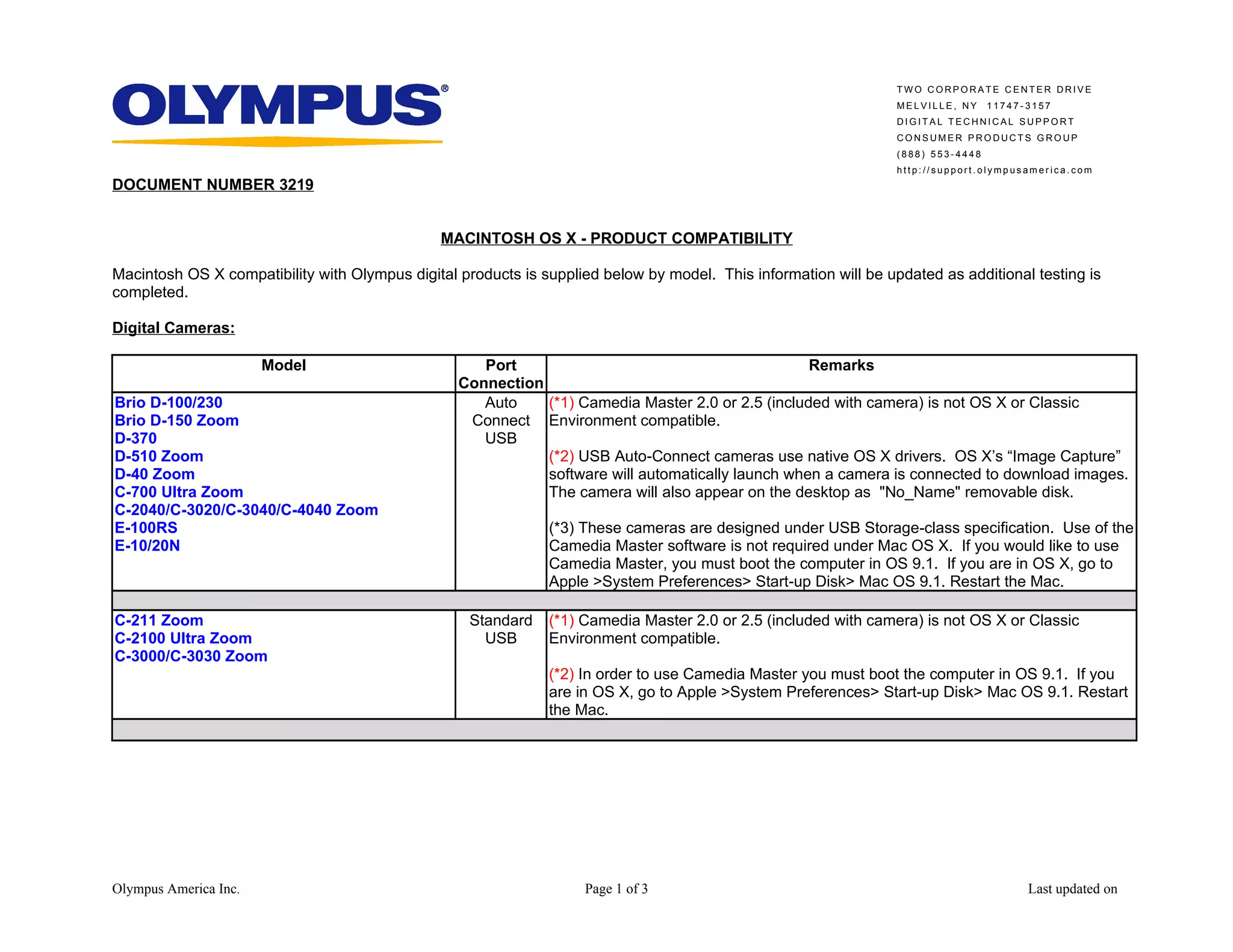
                       Model                         Port                                          Remarks
                                                  Connection
Brio D-100/230                                       Auto    (*1) Camedia Master 2.0 or 2.5 (included with camera) is not OS X or Classic
Brio D-150 Zoom                                    Connect Environment compatible.
D-370                                                USB
D-510 Zoom                                                   (*2) USB Auto-Connect cameras use native OS X drivers. OS X’s “Image Capture”
D-40 Zoom                                                    software will automatically launch when a camera is connected to download images.
C-700 Ultra Zoom                                             The camera will also appear on the desktop as "No_Name" removable disk.
C-2040/C-3020/C-3040/C-4040 Zoom
E-100RS                                                        (*3) These cameras are designed under USB Storage-class specification. Use of the
E-10/20N                                                       Camedia Master software is not required under Mac OS X. If you would like to use
                                                               Camedia Master, you must boot the computer in OS 9.1. If you are in OS X, go to
                                                               Apple >System Preferences> Start-up Disk> Mac OS 9.1. Restart the Mac.

C-211 Zoom                                          Standard   (*1) Camedia Master 2.0 or 2.5 (included with camera) is not OS X or Classic
C-2100 Ultra Zoom                                     USB      Environment compatible.
C-3000/C-3030 Zoom
                                                               (*2) In order to use Camedia Master you must boot the computer in OS 9.1. If you
                                                               are in OS X, go to Apple >System Preferences> Start-up Disk> Mac OS 9.1. Restart
                                                               the Mac.


Olympus America Inc.                                                Page 1 of 3                                                          Last updated on
TWO CORPORATE CENTER DRIVE
                                                                                                   MELVILLE, NY     11747-3157
                                                                                                   DIGITAL TECHNICAL SUPPORT
                                                                                                   CONSUMER PRODUCTS GROUP
                                                                                                   (888) 553-4448
                                                                                                   http://support.olympusamerica.com


                       Model        Port                                            Remarks
                                 Connection
D-320L, D-340L, D-360L, D-340R     Serial   (*1) OS X does not support devices requiring a serial communications port. A serial
D-500/600/620L                              interface card or a USB to serial interface adapter is not supported.
D-400/450/460/490 Zoom
C-2000/2020 Zoom                              (*2) Olympus offers alternative download accessories such as a USB Reader/Writer.
C-21                                          These devices feature a faster transfer rate than serial, require no external power,
C-2500L                                       and do not require connecting the camera. Visit the Olympus Emporium at
                                              https://emporium.olympus.com/innards/emp.asp?category=1&sub_category=7
                                              for more information.


Photo Printers:

                       Model                                                 Remarks
P-400                            (*1) P-400 Mac driver (included with the printer) is not OS X or Classic Environment compatible.

                                 (*2) In order to use the P-400, you must boot the computer in OS 9.1. If you are in OS X, go to
                                 Apple >System Preferences> Start-up Disk> Mac OS 9.1. Restart the Mac.
P-300/330/330N                   OS X does not support devices requiring a serial communications port. A serial interface card
                                 or a USB to serial interface adapter is not supported.
P-200                            This printer is not Macintosh compatible.


Digital Voice Recorders:

                  Model                                                   Remarks
DS-150/320, DS-2000/3000         DSS Player for Mac OS 10.1 can be downloaded at
                                 http://www.olympusamerica.com/files/DSS_MacOS_10.sit
DM-1                             (*1) DSS Player for Mac OS 10.1 can be downloaded at
                                 http://www.olympusamerica.com/files/DSS_MacOS_10.sit

                                 (*2) Software will work for voice files only, not music files. Music files must be uploaded from a
                                 Windows PC.


Olympus America Inc.                                Page 2 of 3                                                           Last updated on
TWO CORPORATE CENTER DRIVE
                                                                                                             MELVILLE, NY     11747-3157
                                                                                                             DIGITAL TECHNICAL SUPPORT
                                                                                                             CONSUMER PRODUCTS GROUP
                                                                                                             (888) 553-4448
                                                                                                             http://support.olympusamerica.com


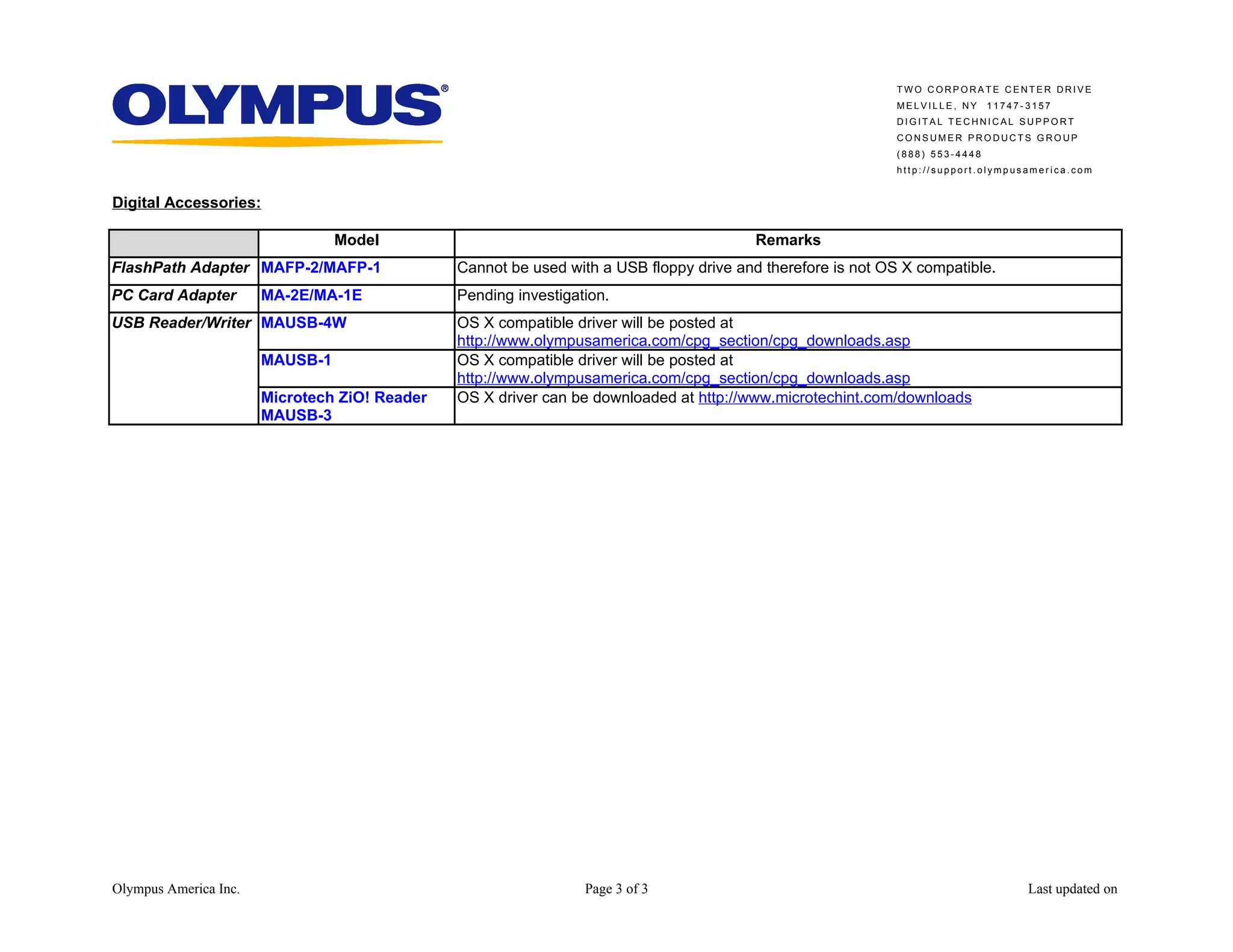
Digital Accessories:

                                 Model                                                   Remarks
FlashPath Adapter MAFP-2/MAFP-1                Cannot be used with a USB floppy drive and therefore is not OS X compatible.
PC Card Adapter        MA-2E/MA-1E             Pending investigation.
USB Reader/Writer MAUSB-4W                     OS X compatible driver will be posted at
                                               http://www.olympusamerica.com/cpg_section/cpg_downloads.asp
                       MAUSB-1                 OS X compatible driver will be posted at
                                               http://www.olympusamerica.com/cpg_section/cpg_downloads.asp
                       Microtech ZiO! Reader   OS X driver can be downloaded at http://www.microtechint.com/downloads
                       MAUSB-3


Olympus America Inc.                                             Page 3 of 3                                                        Last updated on

C-2100 Ultra Zoom.doc

  • 1.
    TWO CORPORATE CENTERDRIVE MELVILLE, NY 11747-3157 DIGITAL TECHNICAL SUPPORT CONSUMER PRODUCTS GROUP (888) 553-4448 http://support.olympusamerica.com DOCUMENT NUMBER 3219 MACINTOSH OS X - PRODUCT COMPATIBILITY Macintosh OS X compatibility with Olympus digital products is supplied below by model. This information will be updated as additional testing is completed. Digital Cameras: Model Port Remarks Connection Brio D-100/230 Auto (*1) Camedia Master 2.0 or 2.5 (included with camera) is not OS X or Classic Brio D-150 Zoom Connect Environment compatible. D-370 USB D-510 Zoom (*2) USB Auto-Connect cameras use native OS X drivers. OS X’s “Image Capture” D-40 Zoom software will automatically launch when a camera is connected to download images. C-700 Ultra Zoom The camera will also appear on the desktop as "No_Name" removable disk. C-2040/C-3020/C-3040/C-4040 Zoom E-100RS (*3) These cameras are designed under USB Storage-class specification. Use of the E-10/20N Camedia Master software is not required under Mac OS X. If you would like to use Camedia Master, you must boot the computer in OS 9.1. If you are in OS X, go to Apple >System Preferences> Start-up Disk> Mac OS 9.1. Restart the Mac. C-211 Zoom Standard (*1) Camedia Master 2.0 or 2.5 (included with camera) is not OS X or Classic C-2100 Ultra Zoom USB Environment compatible. C-3000/C-3030 Zoom (*2) In order to use Camedia Master you must boot the computer in OS 9.1. If you are in OS X, go to Apple >System Preferences> Start-up Disk> Mac OS 9.1. Restart the Mac. Olympus America Inc. Page 1 of 3 Last updated on
  • 2.
    TWO CORPORATE CENTERDRIVE MELVILLE, NY 11747-3157 DIGITAL TECHNICAL SUPPORT CONSUMER PRODUCTS GROUP (888) 553-4448 http://support.olympusamerica.com Model Port Remarks Connection D-320L, D-340L, D-360L, D-340R Serial (*1) OS X does not support devices requiring a serial communications port. A serial D-500/600/620L interface card or a USB to serial interface adapter is not supported. D-400/450/460/490 Zoom C-2000/2020 Zoom (*2) Olympus offers alternative download accessories such as a USB Reader/Writer. C-21 These devices feature a faster transfer rate than serial, require no external power, C-2500L and do not require connecting the camera. Visit the Olympus Emporium at https://emporium.olympus.com/innards/emp.asp?category=1&sub_category=7 for more information. Photo Printers: Model Remarks P-400 (*1) P-400 Mac driver (included with the printer) is not OS X or Classic Environment compatible. (*2) In order to use the P-400, you must boot the computer in OS 9.1. If you are in OS X, go to Apple >System Preferences> Start-up Disk> Mac OS 9.1. Restart the Mac. P-300/330/330N OS X does not support devices requiring a serial communications port. A serial interface card or a USB to serial interface adapter is not supported. P-200 This printer is not Macintosh compatible. Digital Voice Recorders: Model Remarks DS-150/320, DS-2000/3000 DSS Player for Mac OS 10.1 can be downloaded at http://www.olympusamerica.com/files/DSS_MacOS_10.sit DM-1 (*1) DSS Player for Mac OS 10.1 can be downloaded at http://www.olympusamerica.com/files/DSS_MacOS_10.sit (*2) Software will work for voice files only, not music files. Music files must be uploaded from a Windows PC. Olympus America Inc. Page 2 of 3 Last updated on
  • 3.
    TWO CORPORATE CENTERDRIVE MELVILLE, NY 11747-3157 DIGITAL TECHNICAL SUPPORT CONSUMER PRODUCTS GROUP (888) 553-4448 http://support.olympusamerica.com Digital Accessories: Model Remarks FlashPath Adapter MAFP-2/MAFP-1 Cannot be used with a USB floppy drive and therefore is not OS X compatible. PC Card Adapter MA-2E/MA-1E Pending investigation. USB Reader/Writer MAUSB-4W OS X compatible driver will be posted at http://www.olympusamerica.com/cpg_section/cpg_downloads.asp MAUSB-1 OS X compatible driver will be posted at http://www.olympusamerica.com/cpg_section/cpg_downloads.asp Microtech ZiO! Reader OS X driver can be downloaded at http://www.microtechint.com/downloads MAUSB-3 Olympus America Inc. Page 3 of 3 Last updated on