1
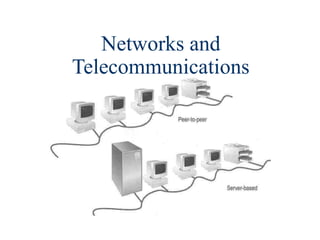
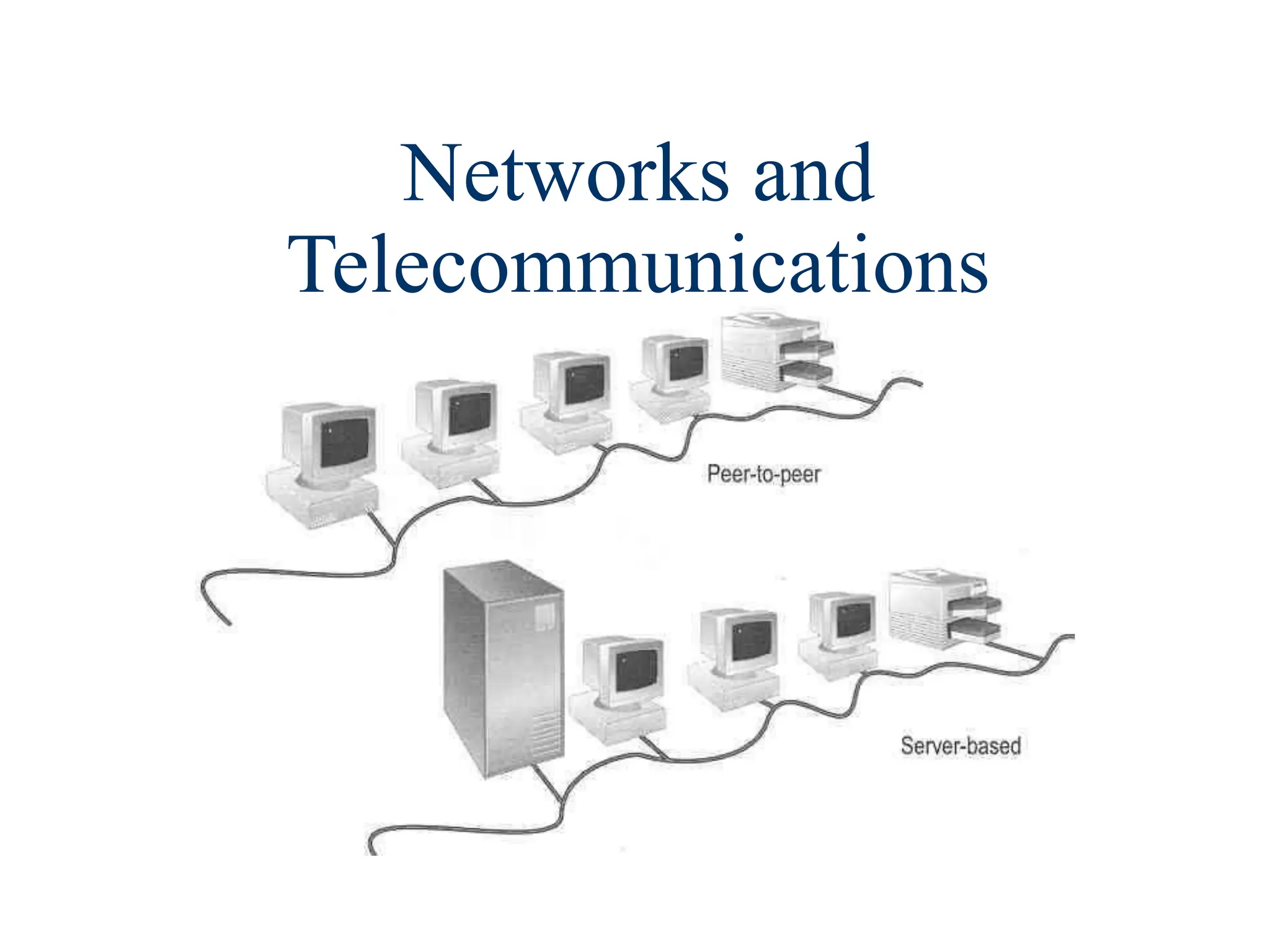
Networks and
Telecommunications
2
3
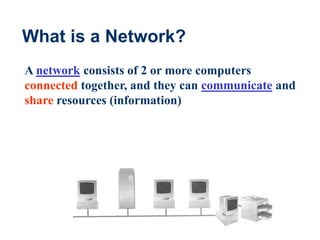
What is a Network?
A network consists of 2 or more computers
connected together, and they can communicate and
share resources (information)
4
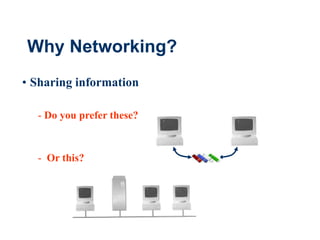
Why Networking?
• Sharing information
- Do you prefer these?
- Or this?
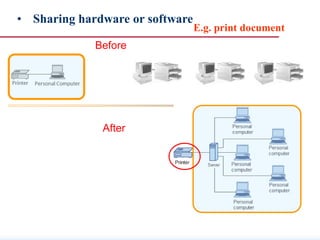
After
• Sharing hardware or software
Before
E.g. print document
6
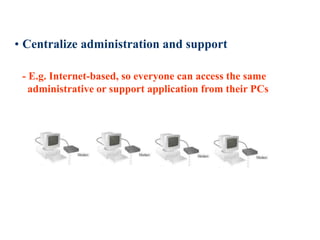
• Centralize administration and support
- E.g. Internet-based, so everyone can access the same
administrative or support application from their PCs
7
How many kinds of Networks?
• We can classify networks in different ways
• Based on transmission media: Wired (twisted-
pair cables, coaxial cables, fiber-optic cables)
and Wireless
• Based on network size: LAN and WAN (and
MAN)
• Based on management method: Peer-to-peer
and Client/Server
• Based on topology (connectivity): Bus, Star,
Ring …
8
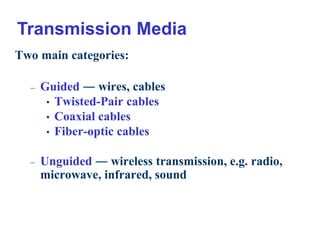
Two main categories:
– Guided ― wires, cables
• Twisted-Pair cables
• Coaxial cables
• Fiber-optic cables
– Unguided ― wireless transmission, e.g. radio,
microwave, infrared, sound
Transmission Media
9
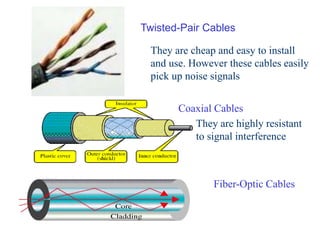
Coaxial Cables
Twisted-Pair Cables
Fiber-Optic Cables
They are cheap and easy to install
and use. However these cables easily
pick up noise signals
They are highly resistant
to signal interference
10
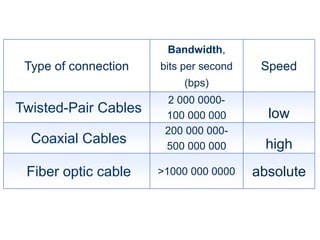
Type of connection
Bandwidth,
bits per second
(bps)
Speed
Twisted-Pair Cables
2 000 0000-
100 000 000 low
Coaxial Cables
200 000 000-
500 000 000 high
Fiber optic cable >1000 000 0000 absolute
11
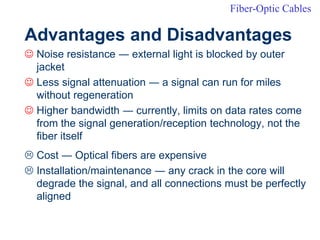
Advantages and Disadvantages
 Noise resistance ― external light is blocked by outer
jacket
 Less signal attenuation ― a signal can run for miles
without regeneration
 Higher bandwidth ― currently, limits on data rates come
from the signal generation/reception technology, not the
fiber itself
 Cost ― Optical fibers are expensive
 Installation/maintenance ― any crack in the core will
degrade the signal, and all connections must be perfectly
aligned
Fiber-Optic Cables
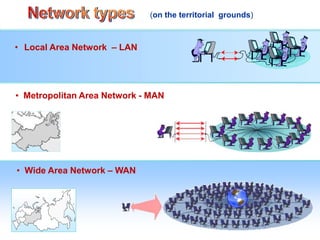
• Local Area Network – LAN
• Wide Area Network – WAN
• Metropolitan Area Network - MAN
(on the territorial grounds)
13
LAN and WAN
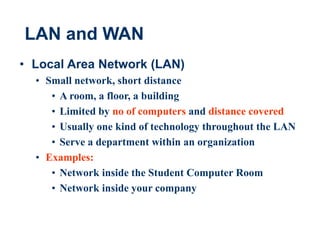
• Local Area Network (LAN)
• Small network, short distance
• A room, a floor, a building
• Limited by no of computers and distance covered
• Usually one kind of technology throughout the LAN
• Serve a department within an organization
• Examples:
• Network inside the Student Computer Room
• Network inside your company
Mbit / s.
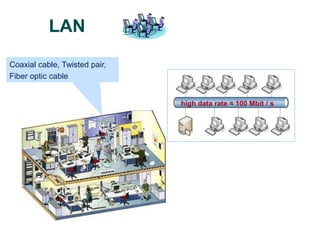
Coaxial cable, Twisted pair,
Fiber optic cable
LAN
high data rate ≈ 100 Mbit / s
15
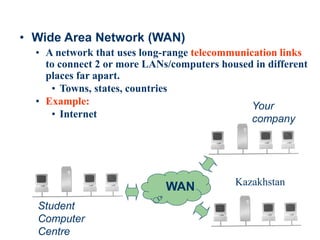
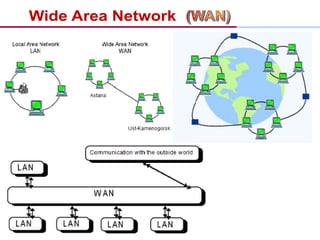
• Wide Area Network (WAN)
• A network that uses long-range telecommunication links
to connect 2 or more LANs/computers housed in different
places far apart.
• Towns, states, countries
• Example:
• Internet
WAN
Student
Computer
Centre
Your
company
Kazakhstan
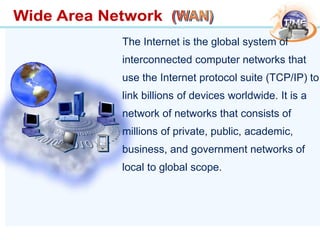
The Internet is the global system of
interconnected computer networks that
use the Internet protocol suite (TCP/IP) to
link billions of devices worldwide. It is a
network of networks that consists of
millions of private, public, academic,
business, and government networks of
local to global scope.
18
Example of WAN: Broadband Cable Network
• Cable TV services have been extensively developed in most
modern cities
• Cable TV companies try to make use of their coaxial cable
installed to deliver broadband data services
• Many cable network wiring has been replaced with hybrid
fiber-coax (HFC) ― i.e. use of fiber-optic cable to connect to
the subscribers’ buildings, and then the coaxial cable to
connect to each household
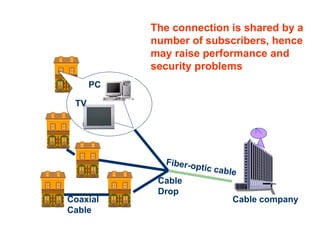
The connection is shared by a
number of subscribers, hence
may raise performance and
security problems
Cable company
Coaxial
Cable
TV
PC
Cable
Drop
20
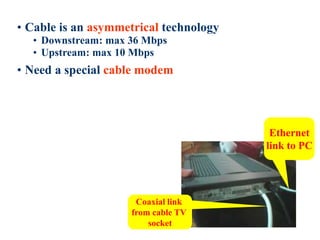
• Cable is an asymmetrical technology
• Downstream: max 36 Mbps
• Upstream: max 10 Mbps
• Need a special cable modem
Ethernet
link to PC
Coaxial link
from cable TV
socket
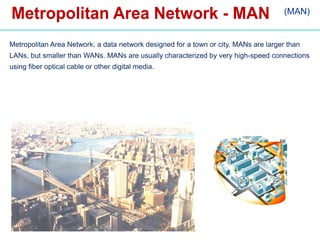
(MAN)
Metropolitan Area Network, a data network designed for a town or city. MANs are larger than
LANs, but smaller than WANs. MANs are usually characterized by very high-speed connections
using fiber optical cable or other digital media.
Internet Connections
There are various technologies available that you can use
to connect a home computer to the Internet
– A phone modem converts computer data into an
analog audio signal for transfer over a telephone
line, and then a modem at the destination converts it
back again into data
– A digital subscriber line (DSL) uses regular
copper phone lines to transfer digital data to and
from the phone company’s central office
– A cable modem uses the same line that your cable
TV signals come in on to transfer the data back and
forth
23
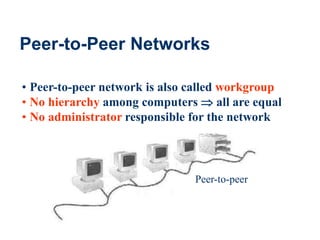
Peer-to-Peer Networks
• Peer-to-peer network is also called workgroup
• No hierarchy among computers  all are equal
• No administrator responsible for the network
Peer-to-peer
24
• Advantages of peer-to-peer networks:
• Low cost
• Simple to configure
• User has full accessibility of the computer
• Disadvantages of peer-to-peer networks:
• May have duplication in resources
• Difficult to uphold security policy
• Difficult to handle uneven loading
• Where peer-to-peer network is appropriate:
• 10 or less users
• No specialized services required
• Security is not an issue
• Only limited growth in the future
25
Clients and Servers
• Network Clients (Workstation)
• Computers that request network resources or services
• Network Servers
• Computers that manage and provide network resources
and services to clients
• Usually have more processing power, memory and
hard disk space than clients
• Run Network Operating System that can manage not
only data, but also users, groups, security, and
applications on the network
• Servers often have a more stringent requirement on its
performance and reliability
26
• Advantages of client/server networks
• Facilitate resource sharing – centrally administrate and
control
• Facilitate system backup and improve fault tolerance
• Enhance security – only administrator can have access
to Server
• Support more users – difficult to achieve with peer-to-
peer networks
• Disadvantages of client/server networks
• High cost for Servers
• Need expert to configure the network
27
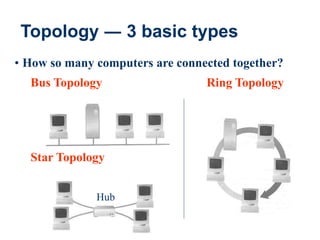
Topology ― 3 basic types
• How so many computers are connected together?
Bus Topology Ring Topology
Star Topology
Hub
28
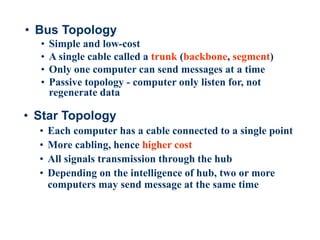
• Bus Topology
• Simple and low-cost
• A single cable called a trunk (backbone, segment)
• Only one computer can send messages at a time
• Passive topology - computer only listen for, not
regenerate data
• Star Topology
• Each computer has a cable connected to a single point
• More cabling, hence higher cost
• All signals transmission through the hub
• Depending on the intelligence of hub, two or more
computers may send message at the same time
29
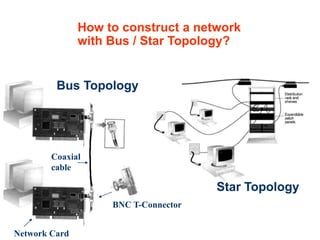
How to construct a network
with Bus / Star Topology?
Star Topology
Bus Topology
BNC T-Connector
Coaxial
cable
Network Card
30
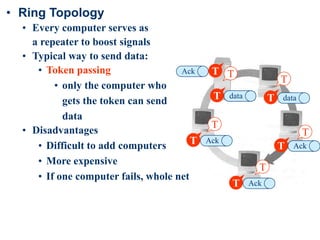
• Ring Topology
• Every computer serves as
a repeater to boost signals
• Typical way to send data:
• Token passing
• only the computer who
gets the token can send
data
• Disadvantages
• Difficult to add computers
• More expensive
• If one computer fails, whole network fails
T
T
T
data
T
data
T
data
T data T data
T data
T Ack
T Ack
T Ack
T
Ack T
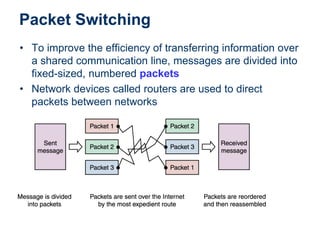
Packet Switching
• To improve the efficiency of transferring information over
a shared communication line, messages are divided into
fixed-sized, numbered packets
• Network devices called routers are used to direct
packets between networks
Internet, Packets and Routing
At the sender, data is broken into packets
and sent to the nearest node (router)
At each router, it sends the packet to
another router that is closer to the final
destination
At the receiver, packets are reassembled
to get the original data
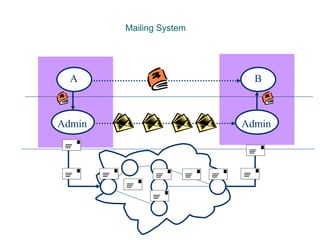
A simple analogy: mailing system
Mailing System
A B
Admin Admin
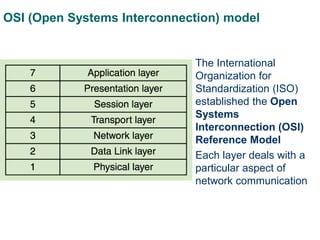
OSI (Open Systems Interconnection) model
• The International
Organization for
Standardization (ISO)
established the Open
Systems
Interconnection (OSI)
Reference Model
• Each layer deals with a
particular aspect of
network communication
• Layer 7: Application - This is the layer that actually
interacts with the operating system or application
whenever the user chooses to transfer files, read
messages or perform other network-related activities.
• Layer 6: Presentation - Layer 6 takes the data provided
by the Application layer and converts it into a standard
format that the other layers can understand.
• Layer 5: Session - Layer 5 establishes, maintains and
ends communication with the receiving device.
Application Set
OSI
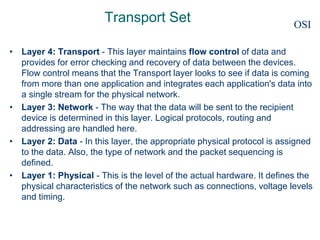
Transport Set
• Layer 4: Transport - This layer maintains flow control of data and
provides for error checking and recovery of data between the devices.
Flow control means that the Transport layer looks to see if data is coming
from more than one application and integrates each application's data into
a single stream for the physical network.
• Layer 3: Network - The way that the data will be sent to the recipient
device is determined in this layer. Logical protocols, routing and
addressing are handled here.
• Layer 2: Data - In this layer, the appropriate physical protocol is assigned
to the data. Also, the type of network and the packet sequencing is
defined.
• Layer 1: Physical - This is the level of the actual hardware. It defines the
physical characteristics of the network such as connections, voltage levels
and timing.
OSI
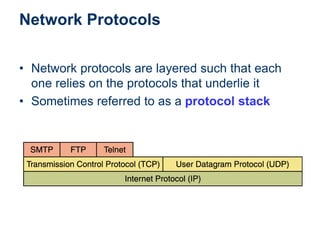
Network Protocols
• Network protocols are layered such that each
one relies on the protocols that underlie it
• Sometimes referred to as a protocol stack
TCP/IP
• TCP stands for Transmission Control
Protocol
TCP software breaks messages into packets, hands
them off to the IP software for delivery, and then
orders and reassembles the packets at their
destination
• IP stands for Internet Protocol
IP software deals with the routing of packets
through the maze of interconnected networks to
their final destination
TCP/IP and Domain Names
Basic task of IP – moving packets as quickly
as possible from one router to another
Yet, it doesn’t check whether packets are
delivered successfully, thus need TCP
TCP (Transmission Control Protocol) –
disassemble/reassemble packets, error
checking, ACK packets
High-Level Protocols
• Other protocols build on the foundation
established by the TCP/IP protocol suite
– Simple Mail Transfer Protocol (SMTP)
– File Transfer Protocol (FTP)
– Telnet
– Hyper Text Transfer Protocol (http)
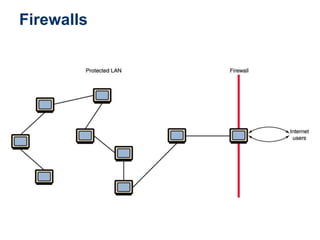
Firewalls
• Firewall A machine and its software that serve
as a special gateway to a network, protecting it
from inappropriate access
– Filters the network traffic that comes in, checking
the validity of the messages as much as possible
and perhaps denying some messages altogether
– Enforces an organization’s access control policy
Firewalls
Network Addresses
Hostname - a unique identification that specifies
a particular computer on the Internet
For example
matisse.csc.villanova.edu
condor.develocorp.com
Network software translates a hostname into its
corresponding IP address
For example
205.39.145.18
Every host on the Internet has a unique IP address,
made up of four numbers. E.g.. 192.56.215.131,
each number is between 0 and 255
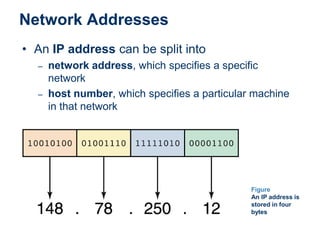
Network Addresses
• An IP address can be split into
– network address, which specifies a specific
network
– host number, which specifies a particular machine
in that network
Figure
An IP address is
stored in four
bytes
Domain Name System
• A hostname consists of the computer name
followed by the domain name
• csc.villanova.edu is the domain name
– A domain name is separated into two or more
sections that specify the organization, and possibly
a subset of an organization, of which the computer
is a part
– Two organizations can have a computer named the
same thing because the domain name makes it
clear which one is being referred to
The numbers in an IP address is hard to
remember, while names are easier
Domain Name System – a mapping
between the human-readable name (domain
name) of a host and its IP address
A domain name consists of two or more
parts, e.g. do.ektu.kz
The rightmost label conveys the top-level
domain, e.g. kz
Each label to the left specifies a
subdomain, in our example, subdomain is
ektu, and sub-subdomain is do.
A top-level domain contains of multiple
subdomains, each subdomain can contain
multiple sub-subdomain, so on.
Mapping between a domain name and an
IP address is stored on DNS server.
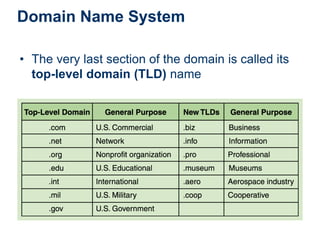
Domain Name System
• The very last section of the domain is called its
top-level domain (TLD) name
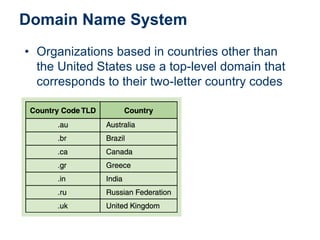
Domain Name System
• Organizations based in countries other than
the United States use a top-level domain that
corresponds to their two-letter country codes
Domain Name System
• The domain name system (DNS) is chiefly
used to translate hostnames into numeric IP
addresses
– DNS is an example of a distributed database
– If that server can resolve the hostname, it does so
– If not, that server asks another domain name server
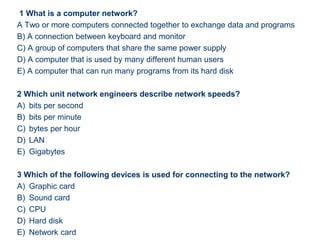
1 What is a computer network?
A Two or more computers connected together to exchange data and programs
B) A connection between keyboard and monitor
C) A group of computers that share the same power supply
D) A computer that is used by many different human users
E) A computer that can run many programs from its hard disk
2 Which unit network engineers describe network speeds?
A) bits per second
B) bits per minute
C) bytes per hour
D) LAN
E) Gigabytes
3 Which of the following devices is used for connecting to the network?
A) Graphic card
B) Sound card
C) CPU
D) Hard disk
E) Network card
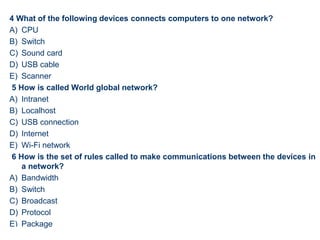
4 What of the following devices connects computers to one network?
A) CPU
B) Switch
C) Sound card
D) USB cable
E) Scanner
5 How is called World global network?
A) Intranet
B) Localhost
C) USB connection
D) Internet
E) Wi-Fi network
6 How is the set of rules called to make communications between the devices in
a network?
A) Bandwidth
B) Switch
C) Broadcast
D) Protocol
E) Package
52
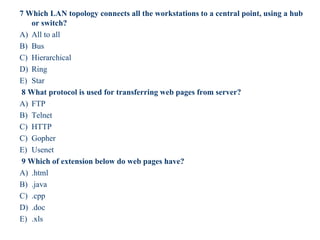
7 Which LAN topology connects all the workstations to a central point, using a hub
or switch?
A) All to all
B) Bus
C) Hierarchical
D) Ring
E) Star
8 What protocol is used for transferring web pages from server?
A) FTP
B) Telnet
C) HTTP
C) Gopher
E) Usenet
9 Which of extension below do web pages have?
A) .html
B) .java
C) .cpp
D) .doc
E) .xls
53
10 The WWW is also called?
A) Multimedia
B) World Wide Learn
C) Virus
D) World Wide Web
E) Games
11 The World Wide Web allows text, pictures, sound and movies to be
displayed on the Internet user's screen, via a software called …
A) Multimedia
B) Utilities
C) Web Browsers
D) The Internet
E) Games
12 When WWW is began?
A) 1983
B) 1981
C) 1984
D) 1986
E) 1980
54
13 The Internet was created for the U.S Department of Defense for military
communications purposes in …
A) 1966
B) 1967
C) 1968
D) 1969
E) 1970
14 Translates domain names to their IP addresses and vise versa.
A) FTP Server
B) Mail Server
C) Web Site
D) Domain Name Server
E) Web Browsers
15 How is the bandwidth described?
A) Bits per second
B) Bytes per second
C) Meter
D) Cost per meter
E) Byte
55
56
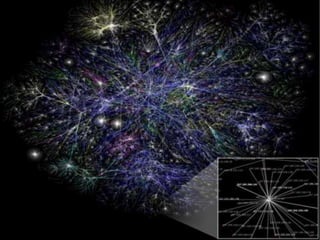
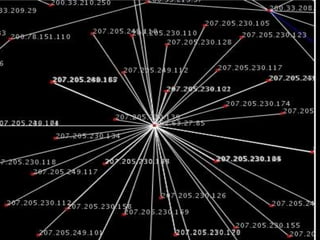
A Visualization of Internet

Networking presentationNetworking presentation.pptNetworking presentation.ppt.ppt

  • 1.
  • 2.
  • 3.
    3 What is aNetwork? A network consists of 2 or more computers connected together, and they can communicate and share resources (information)
  • 4.
    4 Why Networking? • Sharinginformation - Do you prefer these? - Or this?
  • 5.
    After • Sharing hardwareor software Before E.g. print document
  • 6.
    6 • Centralize administrationand support - E.g. Internet-based, so everyone can access the same administrative or support application from their PCs
  • 7.
    7 How many kindsof Networks? • We can classify networks in different ways • Based on transmission media: Wired (twisted- pair cables, coaxial cables, fiber-optic cables) and Wireless • Based on network size: LAN and WAN (and MAN) • Based on management method: Peer-to-peer and Client/Server • Based on topology (connectivity): Bus, Star, Ring …
  • 8.
    8 Two main categories: –Guided ― wires, cables • Twisted-Pair cables • Coaxial cables • Fiber-optic cables – Unguided ― wireless transmission, e.g. radio, microwave, infrared, sound Transmission Media
  • 9.
    9 Coaxial Cables Twisted-Pair Cables Fiber-OpticCables They are cheap and easy to install and use. However these cables easily pick up noise signals They are highly resistant to signal interference
  • 10.
    10 Type of connection Bandwidth, bitsper second (bps) Speed Twisted-Pair Cables 2 000 0000- 100 000 000 low Coaxial Cables 200 000 000- 500 000 000 high Fiber optic cable >1000 000 0000 absolute
  • 11.
    11 Advantages and Disadvantages Noise resistance ― external light is blocked by outer jacket  Less signal attenuation ― a signal can run for miles without regeneration  Higher bandwidth ― currently, limits on data rates come from the signal generation/reception technology, not the fiber itself  Cost ― Optical fibers are expensive  Installation/maintenance ― any crack in the core will degrade the signal, and all connections must be perfectly aligned Fiber-Optic Cables
  • 12.
    • Local AreaNetwork – LAN • Wide Area Network – WAN • Metropolitan Area Network - MAN (on the territorial grounds)
  • 13.
    13 LAN and WAN •Local Area Network (LAN) • Small network, short distance • A room, a floor, a building • Limited by no of computers and distance covered • Usually one kind of technology throughout the LAN • Serve a department within an organization • Examples: • Network inside the Student Computer Room • Network inside your company
  • 14.
    Mbit / s. Coaxialcable, Twisted pair, Fiber optic cable LAN high data rate ≈ 100 Mbit / s
  • 15.
    15 • Wide AreaNetwork (WAN) • A network that uses long-range telecommunication links to connect 2 or more LANs/computers housed in different places far apart. • Towns, states, countries • Example: • Internet WAN Student Computer Centre Your company Kazakhstan
  • 17.
    The Internet isthe global system of interconnected computer networks that use the Internet protocol suite (TCP/IP) to link billions of devices worldwide. It is a network of networks that consists of millions of private, public, academic, business, and government networks of local to global scope.
  • 18.
    18 Example of WAN:Broadband Cable Network • Cable TV services have been extensively developed in most modern cities • Cable TV companies try to make use of their coaxial cable installed to deliver broadband data services • Many cable network wiring has been replaced with hybrid fiber-coax (HFC) ― i.e. use of fiber-optic cable to connect to the subscribers’ buildings, and then the coaxial cable to connect to each household
  • 19.
    The connection isshared by a number of subscribers, hence may raise performance and security problems Cable company Coaxial Cable TV PC Cable Drop
  • 20.
    20 • Cable isan asymmetrical technology • Downstream: max 36 Mbps • Upstream: max 10 Mbps • Need a special cable modem Ethernet link to PC Coaxial link from cable TV socket
  • 21.
    (MAN) Metropolitan Area Network,a data network designed for a town or city. MANs are larger than LANs, but smaller than WANs. MANs are usually characterized by very high-speed connections using fiber optical cable or other digital media.
  • 22.
    Internet Connections There arevarious technologies available that you can use to connect a home computer to the Internet – A phone modem converts computer data into an analog audio signal for transfer over a telephone line, and then a modem at the destination converts it back again into data – A digital subscriber line (DSL) uses regular copper phone lines to transfer digital data to and from the phone company’s central office – A cable modem uses the same line that your cable TV signals come in on to transfer the data back and forth
  • 23.
    23 Peer-to-Peer Networks • Peer-to-peernetwork is also called workgroup • No hierarchy among computers  all are equal • No administrator responsible for the network Peer-to-peer
  • 24.
    24 • Advantages ofpeer-to-peer networks: • Low cost • Simple to configure • User has full accessibility of the computer • Disadvantages of peer-to-peer networks: • May have duplication in resources • Difficult to uphold security policy • Difficult to handle uneven loading • Where peer-to-peer network is appropriate: • 10 or less users • No specialized services required • Security is not an issue • Only limited growth in the future
  • 25.
    25 Clients and Servers •Network Clients (Workstation) • Computers that request network resources or services • Network Servers • Computers that manage and provide network resources and services to clients • Usually have more processing power, memory and hard disk space than clients • Run Network Operating System that can manage not only data, but also users, groups, security, and applications on the network • Servers often have a more stringent requirement on its performance and reliability
  • 26.
    26 • Advantages ofclient/server networks • Facilitate resource sharing – centrally administrate and control • Facilitate system backup and improve fault tolerance • Enhance security – only administrator can have access to Server • Support more users – difficult to achieve with peer-to- peer networks • Disadvantages of client/server networks • High cost for Servers • Need expert to configure the network
  • 27.
    27 Topology ― 3basic types • How so many computers are connected together? Bus Topology Ring Topology Star Topology Hub
  • 28.
    28 • Bus Topology •Simple and low-cost • A single cable called a trunk (backbone, segment) • Only one computer can send messages at a time • Passive topology - computer only listen for, not regenerate data • Star Topology • Each computer has a cable connected to a single point • More cabling, hence higher cost • All signals transmission through the hub • Depending on the intelligence of hub, two or more computers may send message at the same time
  • 29.
    29 How to constructa network with Bus / Star Topology? Star Topology Bus Topology BNC T-Connector Coaxial cable Network Card
  • 30.
    30 • Ring Topology •Every computer serves as a repeater to boost signals • Typical way to send data: • Token passing • only the computer who gets the token can send data • Disadvantages • Difficult to add computers • More expensive • If one computer fails, whole network fails T T T data T data T data T data T data T data T Ack T Ack T Ack T Ack T
  • 31.
    Packet Switching • Toimprove the efficiency of transferring information over a shared communication line, messages are divided into fixed-sized, numbered packets • Network devices called routers are used to direct packets between networks
  • 32.
    Internet, Packets andRouting At the sender, data is broken into packets and sent to the nearest node (router) At each router, it sends the packet to another router that is closer to the final destination At the receiver, packets are reassembled to get the original data A simple analogy: mailing system
  • 33.
  • 34.
    OSI (Open SystemsInterconnection) model • The International Organization for Standardization (ISO) established the Open Systems Interconnection (OSI) Reference Model • Each layer deals with a particular aspect of network communication
  • 35.
    • Layer 7:Application - This is the layer that actually interacts with the operating system or application whenever the user chooses to transfer files, read messages or perform other network-related activities. • Layer 6: Presentation - Layer 6 takes the data provided by the Application layer and converts it into a standard format that the other layers can understand. • Layer 5: Session - Layer 5 establishes, maintains and ends communication with the receiving device. Application Set OSI
  • 36.
    Transport Set • Layer4: Transport - This layer maintains flow control of data and provides for error checking and recovery of data between the devices. Flow control means that the Transport layer looks to see if data is coming from more than one application and integrates each application's data into a single stream for the physical network. • Layer 3: Network - The way that the data will be sent to the recipient device is determined in this layer. Logical protocols, routing and addressing are handled here. • Layer 2: Data - In this layer, the appropriate physical protocol is assigned to the data. Also, the type of network and the packet sequencing is defined. • Layer 1: Physical - This is the level of the actual hardware. It defines the physical characteristics of the network such as connections, voltage levels and timing. OSI
  • 37.
    Network Protocols • Networkprotocols are layered such that each one relies on the protocols that underlie it • Sometimes referred to as a protocol stack
  • 38.
    TCP/IP • TCP standsfor Transmission Control Protocol TCP software breaks messages into packets, hands them off to the IP software for delivery, and then orders and reassembles the packets at their destination • IP stands for Internet Protocol IP software deals with the routing of packets through the maze of interconnected networks to their final destination
  • 39.
    TCP/IP and DomainNames Basic task of IP – moving packets as quickly as possible from one router to another Yet, it doesn’t check whether packets are delivered successfully, thus need TCP TCP (Transmission Control Protocol) – disassemble/reassemble packets, error checking, ACK packets
  • 40.
    High-Level Protocols • Otherprotocols build on the foundation established by the TCP/IP protocol suite – Simple Mail Transfer Protocol (SMTP) – File Transfer Protocol (FTP) – Telnet – Hyper Text Transfer Protocol (http)
  • 41.
    Firewalls • Firewall Amachine and its software that serve as a special gateway to a network, protecting it from inappropriate access – Filters the network traffic that comes in, checking the validity of the messages as much as possible and perhaps denying some messages altogether – Enforces an organization’s access control policy
  • 42.
  • 43.
    Network Addresses Hostname -a unique identification that specifies a particular computer on the Internet For example matisse.csc.villanova.edu condor.develocorp.com Network software translates a hostname into its corresponding IP address For example 205.39.145.18 Every host on the Internet has a unique IP address, made up of four numbers. E.g.. 192.56.215.131, each number is between 0 and 255
  • 44.
    Network Addresses • AnIP address can be split into – network address, which specifies a specific network – host number, which specifies a particular machine in that network Figure An IP address is stored in four bytes
  • 45.
    Domain Name System •A hostname consists of the computer name followed by the domain name • csc.villanova.edu is the domain name – A domain name is separated into two or more sections that specify the organization, and possibly a subset of an organization, of which the computer is a part – Two organizations can have a computer named the same thing because the domain name makes it clear which one is being referred to
  • 46.
    The numbers inan IP address is hard to remember, while names are easier Domain Name System – a mapping between the human-readable name (domain name) of a host and its IP address A domain name consists of two or more parts, e.g. do.ektu.kz The rightmost label conveys the top-level domain, e.g. kz
  • 47.
    Each label tothe left specifies a subdomain, in our example, subdomain is ektu, and sub-subdomain is do. A top-level domain contains of multiple subdomains, each subdomain can contain multiple sub-subdomain, so on. Mapping between a domain name and an IP address is stored on DNS server.
  • 48.
    Domain Name System •The very last section of the domain is called its top-level domain (TLD) name
  • 49.
    Domain Name System •Organizations based in countries other than the United States use a top-level domain that corresponds to their two-letter country codes
  • 50.
    Domain Name System •The domain name system (DNS) is chiefly used to translate hostnames into numeric IP addresses – DNS is an example of a distributed database – If that server can resolve the hostname, it does so – If not, that server asks another domain name server
  • 51.
    1 What isa computer network? A Two or more computers connected together to exchange data and programs B) A connection between keyboard and monitor C) A group of computers that share the same power supply D) A computer that is used by many different human users E) A computer that can run many programs from its hard disk 2 Which unit network engineers describe network speeds? A) bits per second B) bits per minute C) bytes per hour D) LAN E) Gigabytes 3 Which of the following devices is used for connecting to the network? A) Graphic card B) Sound card C) CPU D) Hard disk E) Network card
  • 52.
    4 What ofthe following devices connects computers to one network? A) CPU B) Switch C) Sound card D) USB cable E) Scanner 5 How is called World global network? A) Intranet B) Localhost C) USB connection D) Internet E) Wi-Fi network 6 How is the set of rules called to make communications between the devices in a network? A) Bandwidth B) Switch C) Broadcast D) Protocol E) Package 52
  • 53.
    7 Which LANtopology connects all the workstations to a central point, using a hub or switch? A) All to all B) Bus C) Hierarchical D) Ring E) Star 8 What protocol is used for transferring web pages from server? A) FTP B) Telnet C) HTTP C) Gopher E) Usenet 9 Which of extension below do web pages have? A) .html B) .java C) .cpp D) .doc E) .xls 53
  • 54.
    10 The WWWis also called? A) Multimedia B) World Wide Learn C) Virus D) World Wide Web E) Games 11 The World Wide Web allows text, pictures, sound and movies to be displayed on the Internet user's screen, via a software called … A) Multimedia B) Utilities C) Web Browsers D) The Internet E) Games 12 When WWW is began? A) 1983 B) 1981 C) 1984 D) 1986 E) 1980 54
  • 55.
    13 The Internetwas created for the U.S Department of Defense for military communications purposes in … A) 1966 B) 1967 C) 1968 D) 1969 E) 1970 14 Translates domain names to their IP addresses and vise versa. A) FTP Server B) Mail Server C) Web Site D) Domain Name Server E) Web Browsers 15 How is the bandwidth described? A) Bits per second B) Bytes per second C) Meter D) Cost per meter E) Byte 55
  • 56.
  • 57.