Networking Simulation
Basics with Cisco
Packet Tracer
01. What is Networking
02. Types of Networks
03. Basic Networking Concept and Technology
04. Network Topology
05. What is Cisco Packet Tracer
06. Demonstration
07.Q&A
Course Overview
What is
Networking?
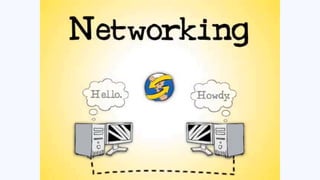
Networking is the process of
connecting two or more computing
devices, such as desktop
computers, mobile devices,
routers, or applications, to enable
the transmission and exchange of
information and resources.
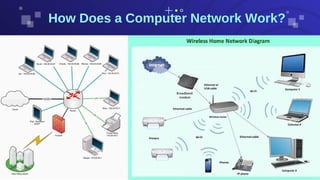
How Does Computer Network Works
Network Node - can be illustrated as Equipment for Data
Communication like a Modem, Router, etc., or Equipment of a
Data Terminal like connecting two computers or more.
Link - in Computer Networks can be defined as wires or cables
or free space of wireless networks.

How Does a Computer Network Work?
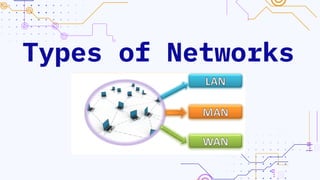
Types of Networks
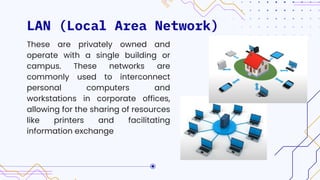
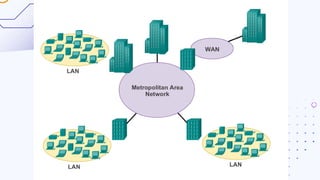
LAN (Local Area Network)
These are privately owned and
operate with a single building or
campus. These networks are
commonly used to interconnect
personal computers and
workstations in corporate offices,
allowing for the sharing of resources
like printers and facilitating
information exchange
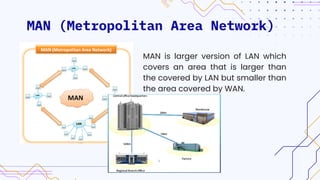
MAN (Metropolitan Area Network)
MAN is larger version of LAN which
covers an area that is larger than
the covered by LAN but smaller than
the area covered by WAN.
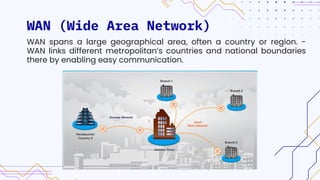
WAN (Wide Area Network)
WAN spans a large geographical area, often a country or region. -
WAN links different metropolitan’s countries and national boundaries
there by enabling easy communication.
Basic Networking
Concept and
Technology
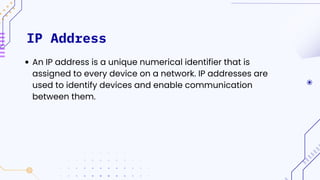
IP Address
An IP address is a unique numerical identifier that is
assigned to every device on a network. IP addresses are
used to identify devices and enable communication
between them.
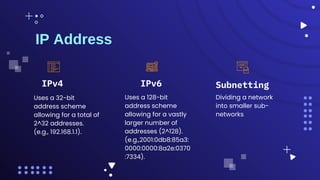
IP Address
Subnetting
Uses a 32-bit
address scheme
allowing for a total of
2^32 addresses.
(e.g., 192.168.1.1).
Uses a 128-bit
address scheme
allowing for a vastly
larger number of
addresses (2^128).
(e.g.,2001:0db8:85a3:
0000:0000:8a2e:0370
:7334).
Dividing a network
into smaller sub-
networks
IPv4 IPv6
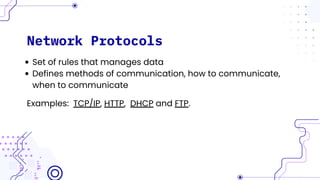
Network Protocols
Set of rules that manages data
Defines methods of communication, how to communicate,
when to communicate
Examples: TCP/IP, HTTP, DHCP and FTP.
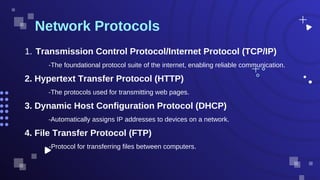
-The foundational protocol suite of the internet, enabling reliable communication.
Network Protocols
Transmission Control Protocol/Internet Protocol (TCP/IP)
1.
2. Hypertext Transfer Protocol (HTTP)
-The protocols used for transmitting web pages.
3. Dynamic Host Configuration Protocol (DHCP)
-Automatically assigns IP addresses to devices on a network.
4. File Transfer Protocol (FTP)
-Protocol for transferring files between computers.
DNS(Domain Name System )
The Domain Name System is a system that translates human-
readable domain names into IP addresses that computers use
to identify each other on the network. This system is crucial for
the functionality of the internet, as it allows users to access
websites using easily memorable domain names rather than
numerical IP addresses.
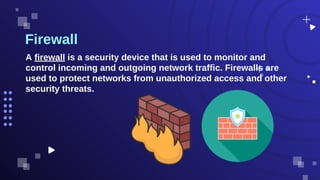
Firewall
A firewall is a security device that is used to monitor and
control incoming and outgoing network traffic. Firewalls are
used to protect networks from unauthorized access and other
security threats.
Network Technologies
Ethernet
Fast Ethernet
Giga Ethernet
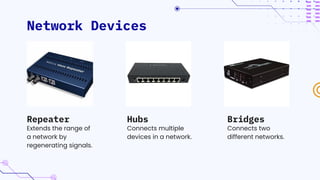
Network Devices
Extends the range of
a network by
regenerating signals.
Connects multiple
devices in a network.
Bridges
Repeater Hubs
Connects two
different networks.
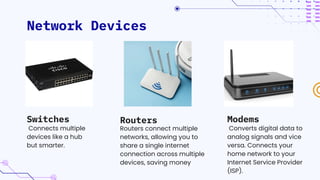
Network Devices
Connects multiple
devices like a hub
but smarter.
Routers connect multiple
networks, allowing you to
share a single internet
connection across multiple
devices, saving money
Modems
Switches Routers
Converts digital data to
analog signals and vice
versa. Connects your
home network to your
Internet Service Provider
(ISP).
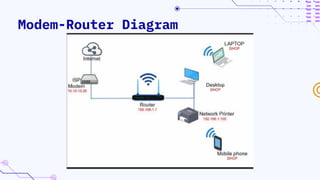
Modem-Router Diagram
Network
Topology
Network topology refers to
the arrangement of different
elements like nodes, links,
and devices in a computer
network. It defines how
these components are
connected and interact with
each other.
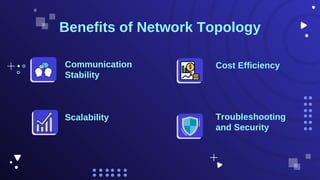
Benefits of Network Topology
Cost Efficiency
Scalability Troubleshooting
and Security
Communication
Stability
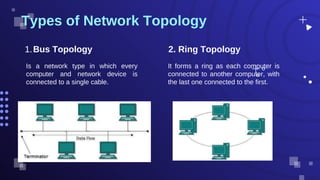
Is a network type in which every
computer and network device is
connected to a single cable.
Types of Network Topology
Bus Topology
1. 2. Ring Topology
It forms a ring as each computer is
connected to another computer, with
the last one connected to the first.
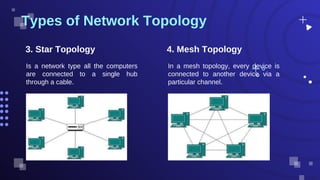
Is a network type all the computers
are connected to a single hub
through a cable.
Types of Network Topology
3. Star Topology 4. Mesh Topology
In a mesh topology, every device is
connected to another device via a
particular channel.
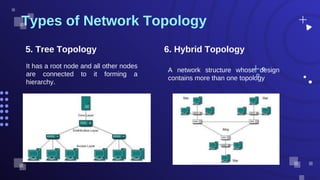
It has a root node and all other nodes
are connected to it forming a
hierarchy.
Types of Network Topology
5. Tree Topology 6. Hybrid Topology
A network structure whose design
contains more than one topology
WHAT IS CISCO PACKET TRACER ?
Cisco Packet Tracer is a network
simulation software that allows
users to create, configure, and
troubleshoot network topologies
and devices
Demonstration
Thank You For Listening !
Project goals
Goal 2
Mercury is the closest
planet to the Sun and
the smallest one
Goal 1
Venus has a beautiful
name, but also high
temperatures
Goal 3
Mars is actually a cold
place. It’s full of iron
oxide dust
Key Networking Components
Contents of this template
This is a slide structure based on a project proposal presentation
1.
You can delete this slide when you’re done editing the presentation
2.
Fonts To view this template correctly in PowerPoint, download and install the fonts we used
Used and alternative resources An assortment of graphic resources that are suitable for use in this presentation
Thanks slide You must keep it so that proper credits for our design are given
Colors All the colors used in this presentation
Infographic resources These can be used in the template, and their size and color can be edited
Customizable icons They are sorted by theme so you can use them in all kinds of presentations
For more info:
SLIDESGO | SLIDESGO SCHOOL | FAQS
You can visit our sister projects:
FREEPIK | FLATICON | STORYSET | WEPIK | VIDFY
—Someone Famous
“This is a quote, words
full of wisdom that
someone important said
and can make the
reader get inspired.”
Budget
$50,000,000
34%
Budget 1
11%
Budget 3
35%
Budget 2
38%
Budget 4
Follow the link in the graph to modify its data and then paste the new one here. For more info, click here
Awesome
words
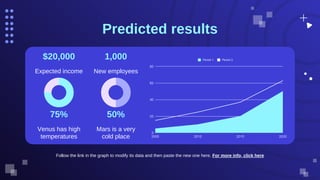
Predicted results
Follow the link in the graph to modify its data and then paste the new one here. For more info, click here
$20,000
Expected income
1,000
New employees
75%
Venus has high
temperatures
50%
Mars is a very
cold place
Sneak peek
You can replace the image on
the screen with your own work.
Just right-click on it and select
“Replace image”
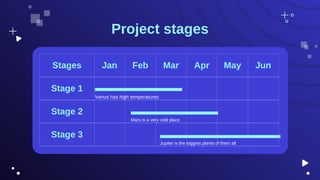
Project stages
Stages Jan Feb Mar Apr May Jun
Stage 1
Stage 2
Stage 3
Venus has high temperatures
Mars is a very cold place
Jupiter is the biggest planet of them all
150,000
Big numbers catch your audience’s attention
Our timeline
Mars is a very
cold place
Day 1
Venus has high
temperatures
Day 3
Jupiter is the
biggest planet
Day 2 Day 4
Mercury is the
smallest planet
Day 5
Neptune is far
away from us
Despite being red, Mars
is very cold
Neptune is the farthest
planet from the Sun
Mars Neptune
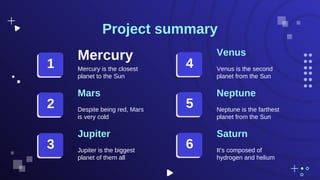
Project summary
Mercury
Mercury is the closest
planet to the Sun
Venus
Venus is the second
planet from the Sun
Jupiter
Jupiter is the biggest
planet of them all
Saturn
It’s composed of
hydrogen and helium
1
2
3
4
5
6
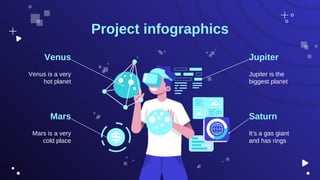
Project infographics
Mars is a very
cold place
Venus
Venus is a very
hot planet
Jupiter
Jupiter is the
biggest planet
Mars Saturn
It’s a gas giant
and has rings
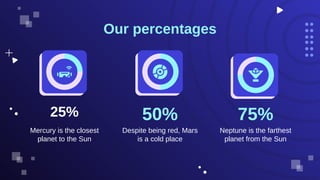
25%
Mercury is the closest
planet to the Sun
50%
Despite being red, Mars
is a cold place
75%
Neptune is the farthest
planet from the Sun
Our percentages
Our team
Sue Doe
You can talk a bit
about this person here
Joe Jimmy
You can talk a bit
about this person here
CREDITS: This presentation template was created by Slidesgo, and
includes icons by Flaticon, and infographics and images by Freepik
Thank you!
Do you have any questions?
youremail@freepik.com
+91 620 421 838
yourwebsite.com
Please keep this slide for attribution
Icon pack
Here’s an assortment of alternative resources whose
style fits that of this template:
Vectors
Gradient metaverse background
Hand drawn geometric metaverse twitch banner
Alternative resources
Did you like the resources on this template? Get them
for free at our other websites:
Photos
Metaverse concept collage design
Close-up man wearing virtual reality gadget
Medium shot young woman holding smartphone
Woman with vr glasses side view
Medium shot woman with vr glasses
Front view smiley woman wearing vr glasses
Icons
Virtual and Augmented Reality | Filled
Resources slide
Vectors
Hand drawn metaverse landing page
Hand drawn metaverse webinar template
Hand drawn metaverse sale banner template
Hand drawn geometric metaverse facebook post
Hand drawn geometric metaverse twitch
background
Hand drawn geometric metaverse facebook
cover
Gradient metaverse background

Networking-Basics-with-Cisco-Packet-Tracer-for-Beginners.pdf

  • 1.
  • 2.
    01. What isNetworking 02. Types of Networks 03. Basic Networking Concept and Technology 04. Network Topology 05. What is Cisco Packet Tracer 06. Demonstration 07.Q&A Course Overview
  • 3.
    What is Networking? Networking isthe process of connecting two or more computing devices, such as desktop computers, mobile devices, routers, or applications, to enable the transmission and exchange of information and resources.
  • 4.
    How Does ComputerNetwork Works Network Node - can be illustrated as Equipment for Data Communication like a Modem, Router, etc., or Equipment of a Data Terminal like connecting two computers or more. Link - in Computer Networks can be defined as wires or cables or free space of wireless networks.
  • 5.
    How Does aComputer Network Work?
  • 6.
  • 7.
    LAN (Local AreaNetwork) These are privately owned and operate with a single building or campus. These networks are commonly used to interconnect personal computers and workstations in corporate offices, allowing for the sharing of resources like printers and facilitating information exchange
  • 8.
    MAN (Metropolitan AreaNetwork) MAN is larger version of LAN which covers an area that is larger than the covered by LAN but smaller than the area covered by WAN.
  • 9.
    WAN (Wide AreaNetwork) WAN spans a large geographical area, often a country or region. - WAN links different metropolitan’s countries and national boundaries there by enabling easy communication.
  • 11.
  • 12.
    IP Address An IPaddress is a unique numerical identifier that is assigned to every device on a network. IP addresses are used to identify devices and enable communication between them.
  • 13.
    IP Address Subnetting Uses a32-bit address scheme allowing for a total of 2^32 addresses. (e.g., 192.168.1.1). Uses a 128-bit address scheme allowing for a vastly larger number of addresses (2^128). (e.g.,2001:0db8:85a3: 0000:0000:8a2e:0370 :7334). Dividing a network into smaller sub- networks IPv4 IPv6
  • 14.
    Network Protocols Set ofrules that manages data Defines methods of communication, how to communicate, when to communicate Examples: TCP/IP, HTTP, DHCP and FTP.
  • 15.
    -The foundational protocolsuite of the internet, enabling reliable communication. Network Protocols Transmission Control Protocol/Internet Protocol (TCP/IP) 1. 2. Hypertext Transfer Protocol (HTTP) -The protocols used for transmitting web pages. 3. Dynamic Host Configuration Protocol (DHCP) -Automatically assigns IP addresses to devices on a network. 4. File Transfer Protocol (FTP) -Protocol for transferring files between computers.
  • 16.
    DNS(Domain Name System) The Domain Name System is a system that translates human- readable domain names into IP addresses that computers use to identify each other on the network. This system is crucial for the functionality of the internet, as it allows users to access websites using easily memorable domain names rather than numerical IP addresses.
  • 17.
    Firewall A firewall isa security device that is used to monitor and control incoming and outgoing network traffic. Firewalls are used to protect networks from unauthorized access and other security threats.
  • 18.
  • 19.
    Network Devices Extends therange of a network by regenerating signals. Connects multiple devices in a network. Bridges Repeater Hubs Connects two different networks.
  • 20.
    Network Devices Connects multiple deviceslike a hub but smarter. Routers connect multiple networks, allowing you to share a single internet connection across multiple devices, saving money Modems Switches Routers Converts digital data to analog signals and vice versa. Connects your home network to your Internet Service Provider (ISP).
  • 21.
  • 23.
    Network Topology Network topology refersto the arrangement of different elements like nodes, links, and devices in a computer network. It defines how these components are connected and interact with each other.
  • 24.
    Benefits of NetworkTopology Cost Efficiency Scalability Troubleshooting and Security Communication Stability
  • 25.
    Is a networktype in which every computer and network device is connected to a single cable. Types of Network Topology Bus Topology 1. 2. Ring Topology It forms a ring as each computer is connected to another computer, with the last one connected to the first.
  • 26.
    Is a networktype all the computers are connected to a single hub through a cable. Types of Network Topology 3. Star Topology 4. Mesh Topology In a mesh topology, every device is connected to another device via a particular channel.
  • 27.
    It has aroot node and all other nodes are connected to it forming a hierarchy. Types of Network Topology 5. Tree Topology 6. Hybrid Topology A network structure whose design contains more than one topology
  • 28.
    WHAT IS CISCOPACKET TRACER ? Cisco Packet Tracer is a network simulation software that allows users to create, configure, and troubleshoot network topologies and devices
  • 29.
  • 30.
    Thank You ForListening ! Thank You For Listening !
  • 31.
    Project goals Goal 2 Mercuryis the closest planet to the Sun and the smallest one Goal 1 Venus has a beautiful name, but also high temperatures Goal 3 Mars is actually a cold place. It’s full of iron oxide dust Key Networking Components Key Networking Components
  • 32.
    Contents of thistemplate This is a slide structure based on a project proposal presentation 1. You can delete this slide when you’re done editing the presentation 2. Fonts To view this template correctly in PowerPoint, download and install the fonts we used Used and alternative resources An assortment of graphic resources that are suitable for use in this presentation Thanks slide You must keep it so that proper credits for our design are given Colors All the colors used in this presentation Infographic resources These can be used in the template, and their size and color can be edited Customizable icons They are sorted by theme so you can use them in all kinds of presentations For more info: SLIDESGO | SLIDESGO SCHOOL | FAQS You can visit our sister projects: FREEPIK | FLATICON | STORYSET | WEPIK | VIDFY
  • 33.
    —Someone Famous “This isa quote, words full of wisdom that someone important said and can make the reader get inspired.”
  • 34.
    Budget $50,000,000 34% Budget 1 11% Budget 3 35% Budget2 38% Budget 4 Follow the link in the graph to modify its data and then paste the new one here. For more info, click here
  • 35.
  • 36.
    Predicted results Follow thelink in the graph to modify its data and then paste the new one here. For more info, click here $20,000 Expected income 1,000 New employees 75% Venus has high temperatures 50% Mars is a very cold place
  • 37.
    Sneak peek You canreplace the image on the screen with your own work. Just right-click on it and select “Replace image”
  • 38.
    Project stages Stages JanFeb Mar Apr May Jun Stage 1 Stage 2 Stage 3 Venus has high temperatures Mars is a very cold place Jupiter is the biggest planet of them all
  • 39.
    150,000 Big numbers catchyour audience’s attention
  • 40.
    Our timeline Mars isa very cold place Day 1 Venus has high temperatures Day 3 Jupiter is the biggest planet Day 2 Day 4 Mercury is the smallest planet Day 5 Neptune is far away from us
  • 41.
    Despite being red,Mars is very cold Neptune is the farthest planet from the Sun Mars Neptune Project summary Mercury Mercury is the closest planet to the Sun Venus Venus is the second planet from the Sun Jupiter Jupiter is the biggest planet of them all Saturn It’s composed of hydrogen and helium 1 2 3 4 5 6
  • 42.
    Project infographics Mars isa very cold place Venus Venus is a very hot planet Jupiter Jupiter is the biggest planet Mars Saturn It’s a gas giant and has rings
  • 43.
    25% Mercury is theclosest planet to the Sun 50% Despite being red, Mars is a cold place 75% Neptune is the farthest planet from the Sun Our percentages
  • 44.
    Our team Sue Doe Youcan talk a bit about this person here Joe Jimmy You can talk a bit about this person here
  • 45.
    CREDITS: This presentationtemplate was created by Slidesgo, and includes icons by Flaticon, and infographics and images by Freepik Thank you! Do you have any questions? youremail@freepik.com +91 620 421 838 yourwebsite.com Please keep this slide for attribution
  • 46.
  • 47.
    Here’s an assortmentof alternative resources whose style fits that of this template: Vectors Gradient metaverse background Hand drawn geometric metaverse twitch banner Alternative resources
  • 48.
    Did you likethe resources on this template? Get them for free at our other websites: Photos Metaverse concept collage design Close-up man wearing virtual reality gadget Medium shot young woman holding smartphone Woman with vr glasses side view Medium shot woman with vr glasses Front view smiley woman wearing vr glasses Icons Virtual and Augmented Reality | Filled Resources slide Vectors Hand drawn metaverse landing page Hand drawn metaverse webinar template Hand drawn metaverse sale banner template Hand drawn geometric metaverse facebook post Hand drawn geometric metaverse twitch background Hand drawn geometric metaverse facebook cover Gradient metaverse background