
Network Basics 
By K.Baxter
Network Types
Wide Area Network 
 The Internet is a WAN  
 WANs are LANs connected to other LANs  
 WANs use publically available telecoms infrastructure  
 WANs facilitate business activities from any location  
Metropolitan Area Network 
 In simple terms a MAN is larger than a LAN but smaller than a 
WAN 
 MANs usually cover a city wide area or large region 
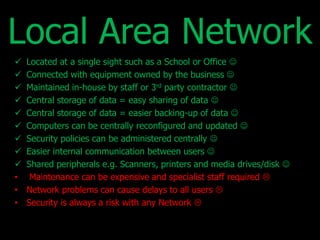
Local Area Network 
 Located at a single sight such as a School or Office  
 Connected with equipment owned by the business  
 Maintained in-house by staff or 3rd party contractor  
 Central storage of data = easy sharing of data  
 Central storage of data = easier backing-up of data  
 Computers can be centrally reconfigured and updated  
 Security policies can be administered centrally  
 Easier internal communication between users  
 Shared peripherals e.g. Scanners, printers and media drives/disk  
• Maintenance can be expensive and specialist staff required  
• Network problems can cause delays to all users  
• Security is always a risk with any Network 
Client-Server 
Hub or 
Switch Server 
Client 1 Client 3 
Client 2 
 Servers are high-end computers capable of handling network functions  
 Servers have plenty of storage and enough speed and processing power to 
serve the needs of connected computers  
 A Network can have more than one server  
 A server doesn’t always have to be a separate physical machine a server can 
have virtual server software to serve multiple needs  
• More complex to set-up that a peer-to-peer Network  
• More expensive equipment required  
• Faulty server = No Network 
Network Types
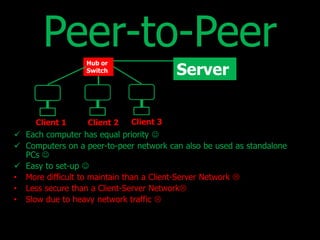
Peer-to-Peer 
Hub or 
Switch Server 
Client 1 Client 3 
Client 2 
 Each computer has equal priority  
 Computers on a peer-to-peer network can also be used as standalone 
PCs  
 Easy to set-up  
• More difficult to maintain than a Client-Server Network  
• Less secure than a Client-Server Network 
• Slow due to heavy network traffic 
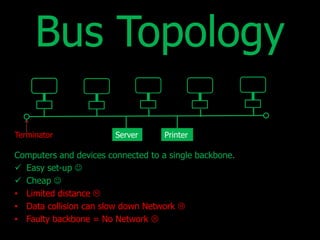
Bus Topology 
Terminator Server Printer 
Computers and devices connected to a single backbone. 
 Easy set-up  
 Cheap  
• Limited distance  
• Data collision can slow down Network  
• Faulty backbone = No Network 
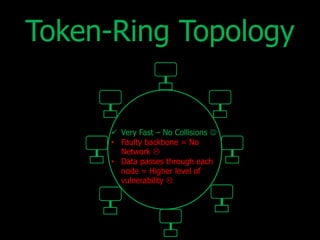
Token-Ring Topology 
 Very Fast – No Collisions  
• Faulty backbone = No 
Network  
• Data passes through each 
node = Higher level of 
vulnerability 
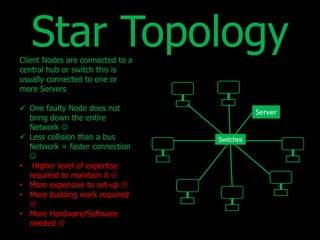
Star Topology 
Client Nodes are connected to a 
central hub or switch this is 
usually connected to one or 
more Servers 
 One faulty Node does not 
bring down the entire 
Network  
 Less collision than a bus 
Network = faster connection 
 
• Higher level of expertise 
required to maintain it  
• More expensive to set-up  
• More building work required 
 
• More Hardware/Software 
needed  
Switches
Thank you for viewing this short presentation 


Basic Computer Network types and typologies

  • 1.
  • 2.
  • 3.
    Wide Area Network  The Internet is a WAN   WANs are LANs connected to other LANs   WANs use publically available telecoms infrastructure   WANs facilitate business activities from any location  Metropolitan Area Network  In simple terms a MAN is larger than a LAN but smaller than a WAN  MANs usually cover a city wide area or large region 
  • 4.
    Local Area Network  Located at a single sight such as a School or Office   Connected with equipment owned by the business   Maintained in-house by staff or 3rd party contractor   Central storage of data = easy sharing of data   Central storage of data = easier backing-up of data   Computers can be centrally reconfigured and updated   Security policies can be administered centrally   Easier internal communication between users   Shared peripherals e.g. Scanners, printers and media drives/disk  • Maintenance can be expensive and specialist staff required  • Network problems can cause delays to all users  • Security is always a risk with any Network 
  • 5.
    Client-Server Hub or Switch Server Client 1 Client 3 Client 2  Servers are high-end computers capable of handling network functions   Servers have plenty of storage and enough speed and processing power to serve the needs of connected computers   A Network can have more than one server   A server doesn’t always have to be a separate physical machine a server can have virtual server software to serve multiple needs  • More complex to set-up that a peer-to-peer Network  • More expensive equipment required  • Faulty server = No Network 
  • 6.
  • 7.
    Peer-to-Peer Hub or Switch Server Client 1 Client 3 Client 2  Each computer has equal priority   Computers on a peer-to-peer network can also be used as standalone PCs   Easy to set-up  • More difficult to maintain than a Client-Server Network  • Less secure than a Client-Server Network • Slow due to heavy network traffic 
  • 8.
    Bus Topology TerminatorServer Printer Computers and devices connected to a single backbone.  Easy set-up   Cheap  • Limited distance  • Data collision can slow down Network  • Faulty backbone = No Network 
  • 9.
    Token-Ring Topology Very Fast – No Collisions  • Faulty backbone = No Network  • Data passes through each node = Higher level of vulnerability 
  • 10.
    Star Topology ClientNodes are connected to a central hub or switch this is usually connected to one or more Servers  One faulty Node does not bring down the entire Network   Less collision than a bus Network = faster connection  • Higher level of expertise required to maintain it  • More expensive to set-up  • More building work required  • More Hardware/Software needed  Switches
  • 11.
    Thank you forviewing this short presentation 