COMPUTER NETWORK
AND
IT’S TYPES
Presented by:
Kajal sharma
Computer Network
Network
A group or system of interconnected people or things.
Computer Network
A computer network is a set of computers connected together
for the purpose of sharing resources. Computer network is
helpful in data communication. The most common resource
shared today is connection to the Internet.
Uses of Computer Network
 Facilitate communication
 Sharing of single hardware device
 Enable file sharing
 Sharing of software or operating programs
 Make information easier
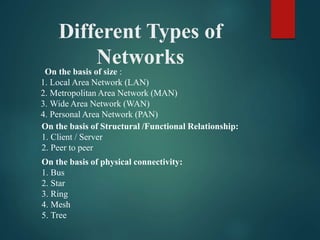
Different Types of
Networks
On the basis of size :
1. Local Area Network (LAN)
2. Metropolitan Area Network (MAN)
3. Wide Area Network (WAN)
4. Personal Area Network (PAN)
On the basis of Structural /Functional Relationship:
1. Client / Server
2. Peer to peer
On the basis of physical connectivity:
1. Bus
2. Star
3. Ring
4. Mesh
5. Tree
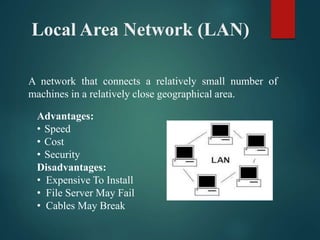
Local Area Network (LAN)
A network that connects a relatively small number of
machines in a relatively close geographical area.
Advantages:
• Speed
• Cost
• Security
Disadvantages:
• Expensive To Install
• File Server May Fail
• Cables May Break
Metropolitan Area Network
(MAN)
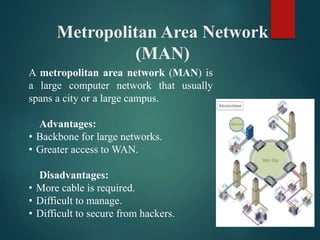
A metropolitan area network (MAN) is
a large computer network that usually
spans a city or a large campus.
Advantages:
• Backbone for large networks.
• Greater access to WAN.
Disadvantages:
• More cable is required.
• Difficult to manage.
• Difficult to secure from hackers.
Personal Area Network
(PAN)
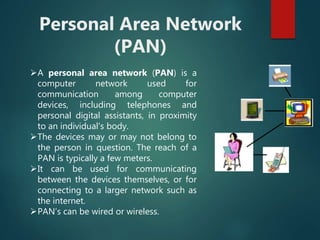
A personal area network (PAN) is a
computer network used for
communication among computer
devices, including telephones and
personal digital assistants, in proximity
to an individual's body.
The devices may or may not belong to
the person in question. The reach of a
PAN is typically a few meters.
It can be used for communicating
between the devices themselves, or for
connecting to a larger network such as
the internet.
PAN’s can be wired or wireless.
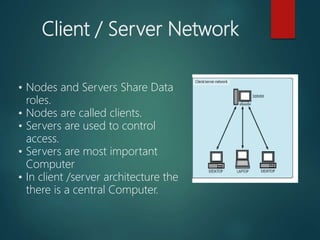
Client / Server Network
• Nodes and Servers Share Data
roles.
• Nodes are called clients.
• Servers are used to control
access.
• Servers are most important
Computer
• In client /server architecture the
there is a central Computer.
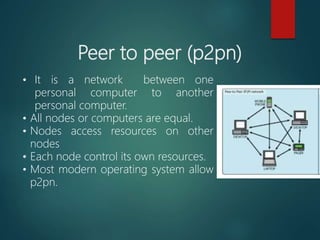
Peer to peer (p2pn)
• It is a network between one
personal computer to another
personal computer.
• All nodes or computers are equal.
• Nodes access resources on other
nodes
• Each node control its own resources.
• Most modern operating system allow
p2pn.
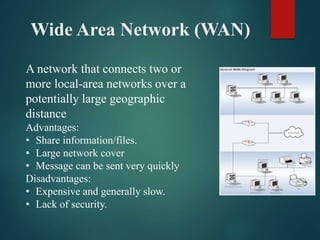
Wide Area Network (WAN)
A network that connects two or
more local-area networks over a
potentially large geographic
distance
Advantages:
• Share information/files.
• Large network cover
• Message can be sent very quickly
Disadvantages:
• Expensive and generally slow.
• Lack of security.
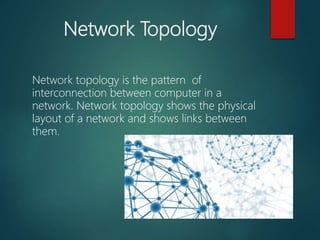
Network Topology
Network topology is the pattern of
interconnection between computer in a
network. Network topology shows the physical
layout of a network and shows links between
them.
Types of Network Topology
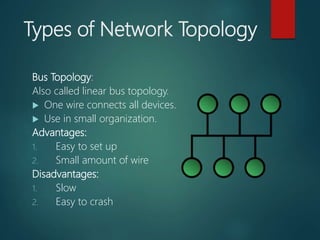
Bus Topology:
Also called linear bus topology.
 One wire connects all devices.
 Use in small organization.
Advantages:
1. Easy to set up
2. Small amount of wire
Disadvantages:
1. Slow
2. Easy to crash
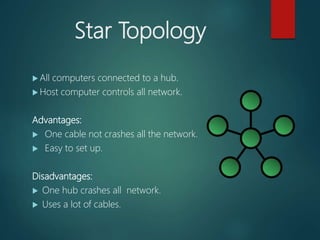
Star Topology
 All computers connected to a hub.
 Host computer controls all network.
Advantages:
 One cable not crashes all the network.
 Easy to set up.
Disadvantages:
 One hub crashes all network.
 Uses a lot of cables.
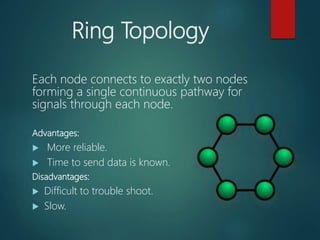
Ring Topology
Each node connects to exactly two nodes
forming a single continuous pathway for
signals through each node.
Advantages:
 More reliable.
 Time to send data is known.
Disadvantages:
 Difficult to trouble shoot.
 Slow.
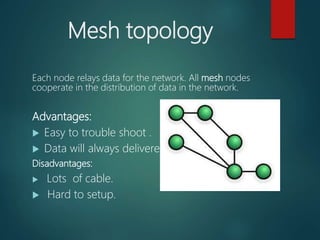
Mesh topology
Each node relays data for the network. All mesh nodes
cooperate in the distribution of data in the network.
Advantages:
 Easy to trouble shoot .
 Data will always delivered.
Disadvantages:
 Lots of cable.
 Hard to setup.
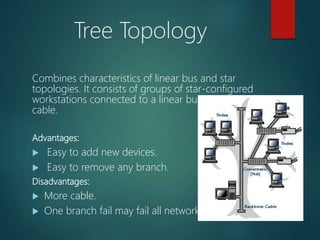
Tree Topology
Combines characteristics of linear bus and star
topologies. It consists of groups of star-configured
workstations connected to a linear bus backbone
cable.
Advantages:
 Easy to add new devices.
 Easy to remove any branch.
Disadvantages:
 More cable.
 One branch fail may fail all network.
Computer network ppt communication

Computer network ppt communication

  • 1.
  • 2.
    Computer Network Network A groupor system of interconnected people or things. Computer Network A computer network is a set of computers connected together for the purpose of sharing resources. Computer network is helpful in data communication. The most common resource shared today is connection to the Internet.
  • 3.
    Uses of ComputerNetwork  Facilitate communication  Sharing of single hardware device  Enable file sharing  Sharing of software or operating programs  Make information easier
  • 4.
    Different Types of Networks Onthe basis of size : 1. Local Area Network (LAN) 2. Metropolitan Area Network (MAN) 3. Wide Area Network (WAN) 4. Personal Area Network (PAN) On the basis of Structural /Functional Relationship: 1. Client / Server 2. Peer to peer On the basis of physical connectivity: 1. Bus 2. Star 3. Ring 4. Mesh 5. Tree
  • 5.
    Local Area Network(LAN) A network that connects a relatively small number of machines in a relatively close geographical area. Advantages: • Speed • Cost • Security Disadvantages: • Expensive To Install • File Server May Fail • Cables May Break
  • 6.
    Metropolitan Area Network (MAN) Ametropolitan area network (MAN) is a large computer network that usually spans a city or a large campus. Advantages: • Backbone for large networks. • Greater access to WAN. Disadvantages: • More cable is required. • Difficult to manage. • Difficult to secure from hackers.
  • 7.
    Personal Area Network (PAN) Apersonal area network (PAN) is a computer network used for communication among computer devices, including telephones and personal digital assistants, in proximity to an individual's body. The devices may or may not belong to the person in question. The reach of a PAN is typically a few meters. It can be used for communicating between the devices themselves, or for connecting to a larger network such as the internet. PAN’s can be wired or wireless.
  • 8.
    Client / ServerNetwork • Nodes and Servers Share Data roles. • Nodes are called clients. • Servers are used to control access. • Servers are most important Computer • In client /server architecture the there is a central Computer.
  • 9.
    Peer to peer(p2pn) • It is a network between one personal computer to another personal computer. • All nodes or computers are equal. • Nodes access resources on other nodes • Each node control its own resources. • Most modern operating system allow p2pn.
  • 10.
    Wide Area Network(WAN) A network that connects two or more local-area networks over a potentially large geographic distance Advantages: • Share information/files. • Large network cover • Message can be sent very quickly Disadvantages: • Expensive and generally slow. • Lack of security.
  • 11.
    Network Topology Network topologyis the pattern of interconnection between computer in a network. Network topology shows the physical layout of a network and shows links between them.
  • 12.
    Types of NetworkTopology Bus Topology: Also called linear bus topology.  One wire connects all devices.  Use in small organization. Advantages: 1. Easy to set up 2. Small amount of wire Disadvantages: 1. Slow 2. Easy to crash
  • 13.
    Star Topology  Allcomputers connected to a hub.  Host computer controls all network. Advantages:  One cable not crashes all the network.  Easy to set up. Disadvantages:  One hub crashes all network.  Uses a lot of cables.
  • 14.
    Ring Topology Each nodeconnects to exactly two nodes forming a single continuous pathway for signals through each node. Advantages:  More reliable.  Time to send data is known. Disadvantages:  Difficult to trouble shoot.  Slow.
  • 15.
    Mesh topology Each noderelays data for the network. All mesh nodes cooperate in the distribution of data in the network. Advantages:  Easy to trouble shoot .  Data will always delivered. Disadvantages:  Lots of cable.  Hard to setup.
  • 16.
    Tree Topology Combines characteristicsof linear bus and star topologies. It consists of groups of star-configured workstations connected to a linear bus backbone cable. Advantages:  Easy to add new devices.  Easy to remove any branch. Disadvantages:  More cable.  One branch fail may fail all network.

Editor's Notes

  • #7 Advantages: Provides a good backbone for large networks. Provide greater access to WAN. Disadvantages: More cable required for connection. Difficult to manage. Difficult to secure from hackers