Topology Mathematical term Roughly interpreted as "geometry for curved surface"
Network Topologies A network "topology" is the structure or organization of communications that links between hosts or devices on a network.  LAN topology A LAN is a shared medium that serves many DTEs( data terminal equipment) located in close proximity such as in one building. Three basic topologies associated with LANs: bus, ring, and star WAN topology A WAN links networks that are geographically separated by long distance through switches, routers, and/or bridges. Two topologies: mesh and tree
LAN Topologies Bus topology:  All hosts (DTEs) are connected to a common cable or medium.
LAN Topologies (cont’d) Tree topology: Transmission medium is a branching cable with no closed loops. Generalization of bus topology.   Hub Host
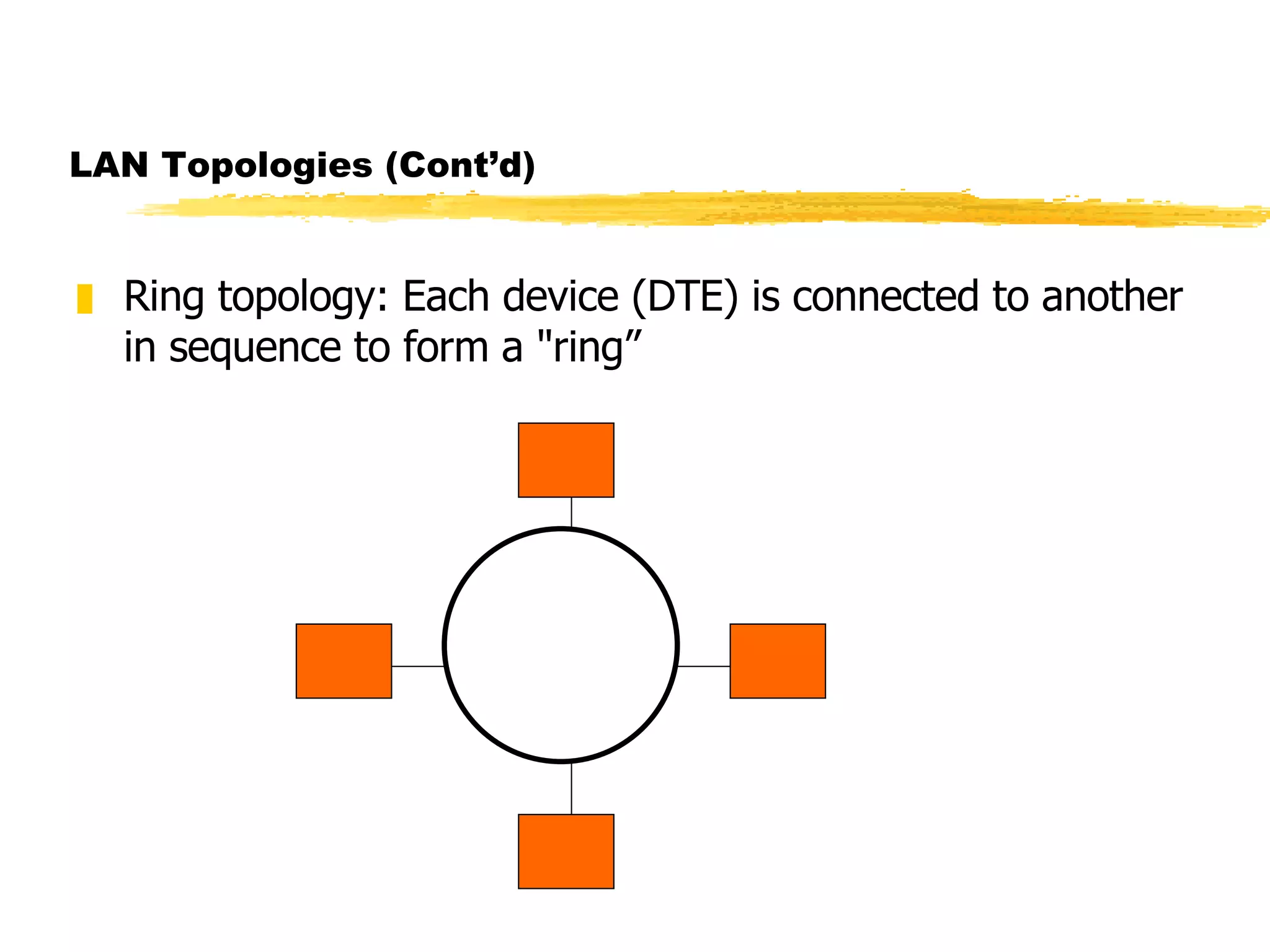
LAN Topologies (Cont’d) Ring topology: Each device (DTE) is connected to another in sequence to form a "ring”
LAN Topologies (Cont’d) Star Topology: All of the devices on the network are connected to a central "hub" or concentrator
Advantages and Disadvantages of Bus Topology Advantages of bus topologies: Inexpensive to install (uses less cable) Easy to add new devices onto the bus or onto the network Disadvantages of bus topologies: Can be expensive to maintain and troubleshoot A naive user can easily "bring down" the entire bus Overall maximum length of the bus is limited (for example, in a 10-Base-2 ethernet, 200m maximum from one terminator to the other along the cable)
Advantages and Disadvantages of Ring Topology Advantages of ring topologies: Very predictable network performance May be slightly more secure than other topologies Disadvantages of ring topologies: Expensive as compared to bus/star topologies Hardware for ring topologies is less available and therefore more expensive Many systems lack good support for networking in ring environments Unique wiring requirements More complex networking and operational protocol
Advantages and Disadvantages of Star   Topology Advantages of star topologies: Each node has a dedicated connection to the network --disconnecting a single node does not bring down the rest of the nodes on the network Network and cable administration are centralized Disadvantages of star topologies: More expensive to install -- require more cable and the additional cost of a hub Maximum length of each spoke of the hub is limited to the allowed maximum length of the medium  (for example, on a 10-Base-T network using UTP cable, the maximum distance from the hub to a host is 100m) Breakdown of the hub causes breakdown of the entire system
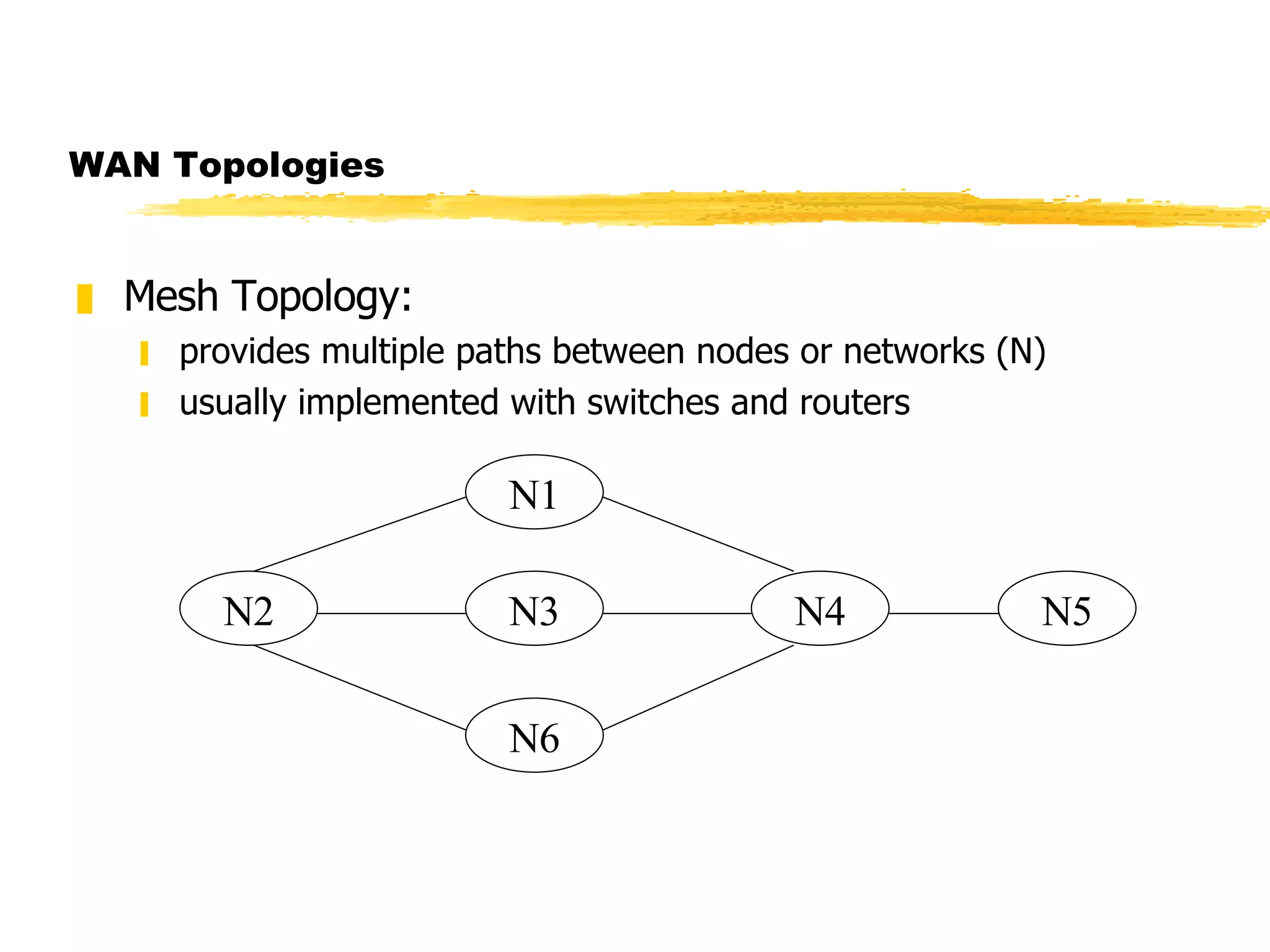
WAN Topologies Mesh Topology: provides multiple paths between nodes or networks (N) usually implemented with switches and routers N1 N2 N3 N4 N6 N5
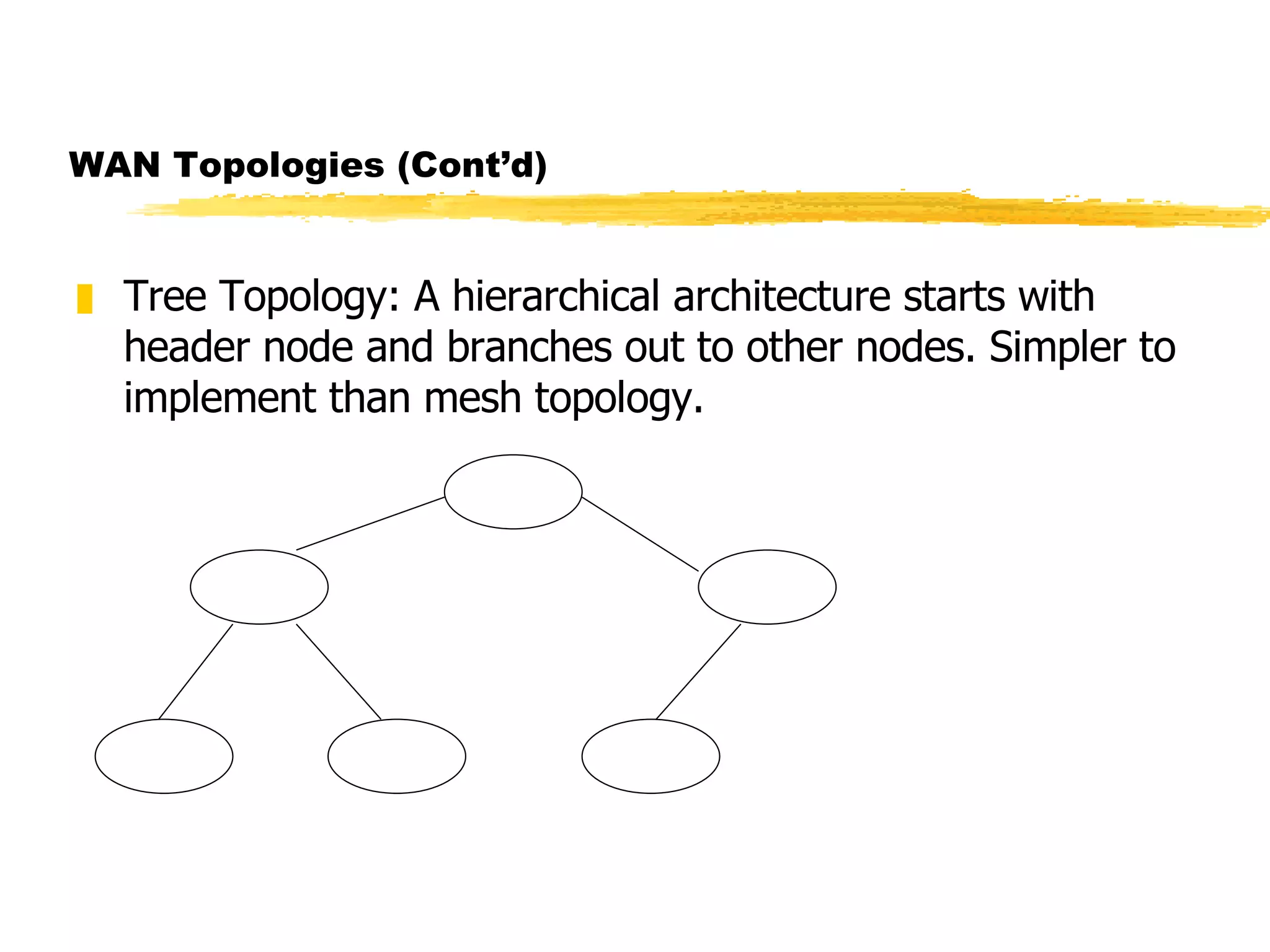
WAN Topologies (Cont’d) Tree Topology: A hierarchical architecture starts with header node and branches out to other nodes. Simpler to implement than mesh topology.
Data Link Layer Specifies how two devices or hosts communicate with each other when they are connected to the same medium (e.g., connected via a common bus or a common hub).  Major functions of the layer: Flow control:  prevents receiver’s buffer overflow Error detection:  uses error-detecting code and algorithm Error control : retransmits damaged frames upon request or if no acknowledgement received from the receiver
Terminology Subnet The devices which are linked together by a common medium are collectively known as a  subnet .  Frame Data are sent in blocks called  frames . A frame, in addition to data, contains some header information such as source and destination addresses, control data bits, error-checking bits, etc. Frame size, the number of bits, depends on the underlying protocol. Actual frame format depends on the protocol.
Data Link Layer: Sharing Medium In A LAN Shared medium used for all transmissions Only one station transmits at any time Stations "take turns" using medium Media Access Control (MAC) policy ensures fairness (MAC protocol)
Media Access Control Protocols Media Access Control determines the rules about when hosts on a subnet are allowed to transmit data onto the physical medium Two broad control schemes:   Centralized control greater control through priorities, overrides, and guaranteed capacity simple but creates a bottleneck and a single point of failure  Distributed control
MAC Control Techniques Round Robin Each station takes turn to transmit May be centralized (polling) or distributed (token passing) Efficient when many stations transmit High overhead when only few stations transmit Reservation Transmitting station reserves slots (stream traffic) May be centralized or distributed
MAC Control Techniques (cont’d) Contention Appropriate for bursty traffic Distributed by nature Simple to implement Efficient for light to moderate load Performance tends to collapse under heavy load  Examples:  ALOHA Slotted ALOHA CSMA  CSMA/CD
ALOHA Developed for packet radio networks Transmits whenever a station has a frame to send Wait and listens for an acknowledgement Wait time = maximum possible roundtrip propagation delay plus a small fixed time increment Resends the frame if no acknowledgement is received. Gives up after many repeated, failed transmissions Simple but poor utilization. Maximum utilization is only about 18%
Slotted Aloha Similar to ALOHA but stations are allowed to transmit during a time slot Channel is organized into uniform time slots Size of the time slot = Frame transmission time Some central clock synchronizes all stations If a frame collides with other one, it collides completely Maximum utilization is about 37%
An Important Note Both  ALOHA  and  slotted ALOHA  exhibit poor utilization and fail to take advantage of the fact that propagation delay is usually very small compared to frame transmission time for both packet radio and LANs.
CSMA (Carrier Sense Multiple Access) Advantageous over slotted Aloha when  propagation time  is small compared to  frame transmission time . Listens if another transmission is in progress (carrier sense) Transmits if medium is idle Wait for acknowledgement Wait time = maximum roundtrip propagation time + medium access time for the receiver Retransmits if no acknowledgement is received Disadvantage: medium remains unusable for the duration of transmission of damaged frames after collision
CSMA/CD Carrier Sense Multiple Access/Collision Detection) A protocol for Ethernet 1.   If medium is idle, transmit and go to step 3; otherwise, go to step 2. 2. If medium is busy, continue to listen; transmit immediately if idle. 3. If collision detected, transmit a brief jamming signal to inform other stations. 4. Wait a  random amount of time  after transmitting jamming signal (backoff), then go to step 1. Note:With CSMA/CD, the amount of wasted capacity is reduced to the time it takes to detect a collision.
Collision Detection Mechanisms Baseband Ethernet : Higher voltage swings than those produced by a single transmitter are detected. Cable length is limited to 500 meters. Broadband Ethernet : RF Carrier is detected. Bit-by-bit comparison is done between transmitted and received data. Twisted-pair star topology : If a hub detects presence of more than one input signal at its ports, it assumes a collision and sends out collision presence signal.
Backoff After Collision (Wait Time Calculation) When collision occurs Wait random time t 1 , 0  <  t 1   <  d Use CSMA and try again If second collision occurs  Wait random time t 2 , 0  <  t 2   <  2d Double range for each successive collision Called exponential backoff
CSMA/CA Used on wireless networks Both sides send small message followed by data transmission &quot;X is about to send to Y” &quot;Y is about to receive from X” Data frame sent from X to Y Purpose: inform all stations in range of X or Y before transmission Known as Collision Avoidance (CA)
Example Bus Network: Ethernet Most popular LAN Widely used IEEE standard 802.3 Several generations Same frame format Different data rates Different wiring schemes
Identifying A Destination All stations on shared-media LAN receive all transmissions To allow sender to specify destination Each station assigned unique number Known as station’s address Each frame contains address of intended recipient
Ethernet Addressing Standardized by IEEE Each station is assigned with a unique 48-bit address Address is assigned when network interface card is (NIC) manufactured Each address is a physical address
Ethernet Address Recognition Each frame contains destination address All stations receive a transmission Station discards any frame addressed to another station Important: interface hardware, not software, checks address. Does not utilize CPU to check address
Possible Ways to Direct Frames Frames can be sent to: Single destination (unicast) All stations on network (broadcast) Subset of stations (multicast) Some feature of destination address is used to distinguish type (unicast, broadcast, or multicast)
Broadcast on Ethernet All 1s address specifies broadcast Sender Places broadcast address in frame Transmits one copy on shared network All stations receive copy Receiver always accepts frame that contains Station's unicast address The broadcast address
Multicast on Ethernet Half of addresses reserved for multicast Network interface card Always accepts unicast and broadcast Can accept zero or more multicast addresses Software Determines multicast address to accept  Informs network interface card
Promiscuous Mode Designed to testing/debugging Allows interface to accept all packets Available on most interface hardware
Network Analyzer Device used for testing and maintenance Listens in promiscuous mode Produces Summaries (e.g., % of broadcast frames) Specific items (e.g., frames from a given address)
Identifying Frame Contents Integer  type field  tells recipient the type of data being carried Two possibilities Self-identifying  or  explicit type  (hardware records type) Implicit type  (application sending data must handle type)
Conceptual Frame Format Header Contains address and type information Layout fixed Payload Contains data being sent Payload Header
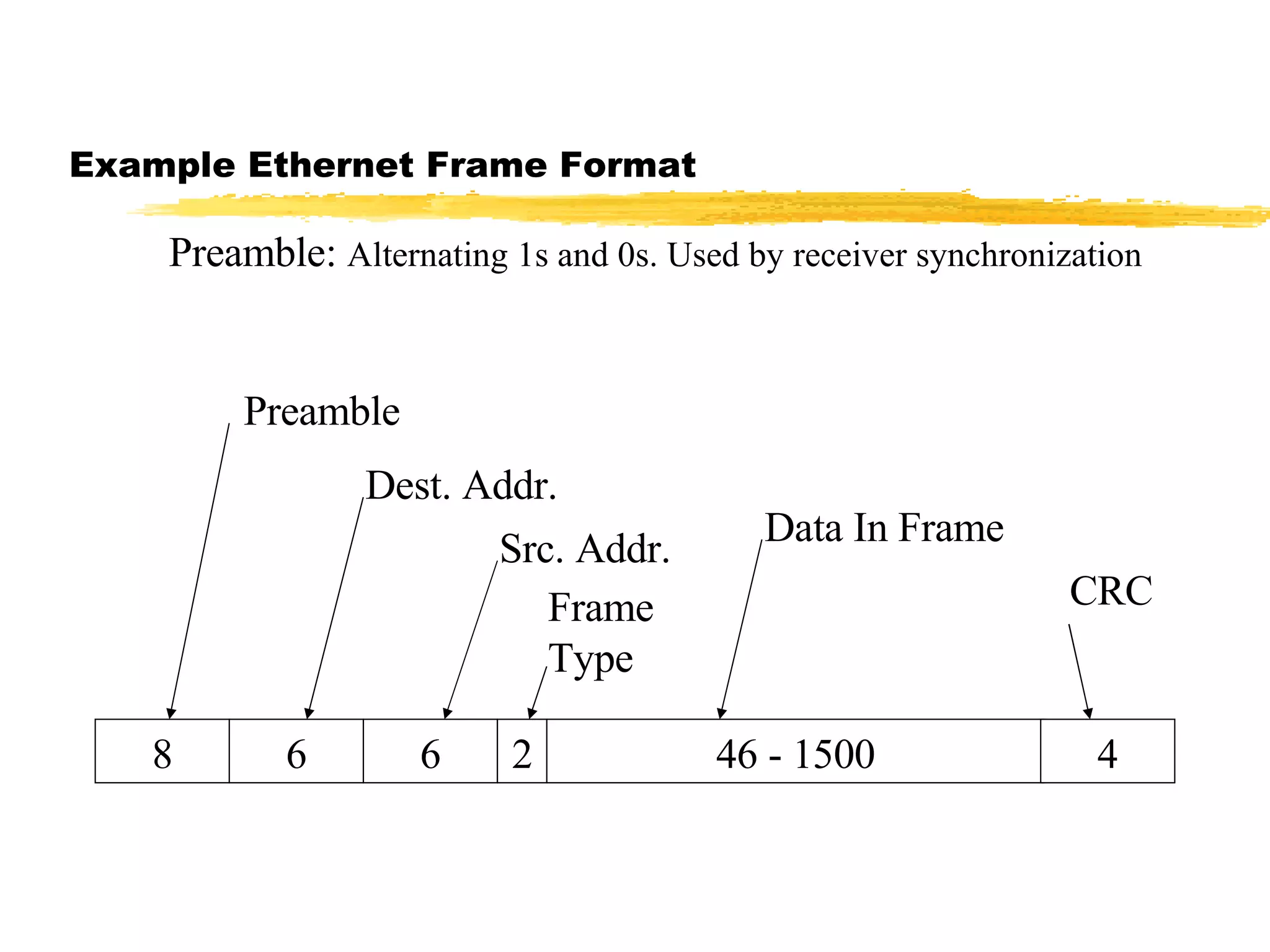
Example Ethernet Frame Format 8 6 6 2 46 - 1500 4 Preamble Dest. Addr. Src. Addr. Data In Frame CRC Frame Type Preamble:  Alternating 1s and 0s. Used by receiver synchronization
Example Frame Types
When Network Hardware Does Not include Types Sending and receiving computers must agree  To send one type of data To put type information in first few octets of payload Most systems need type information
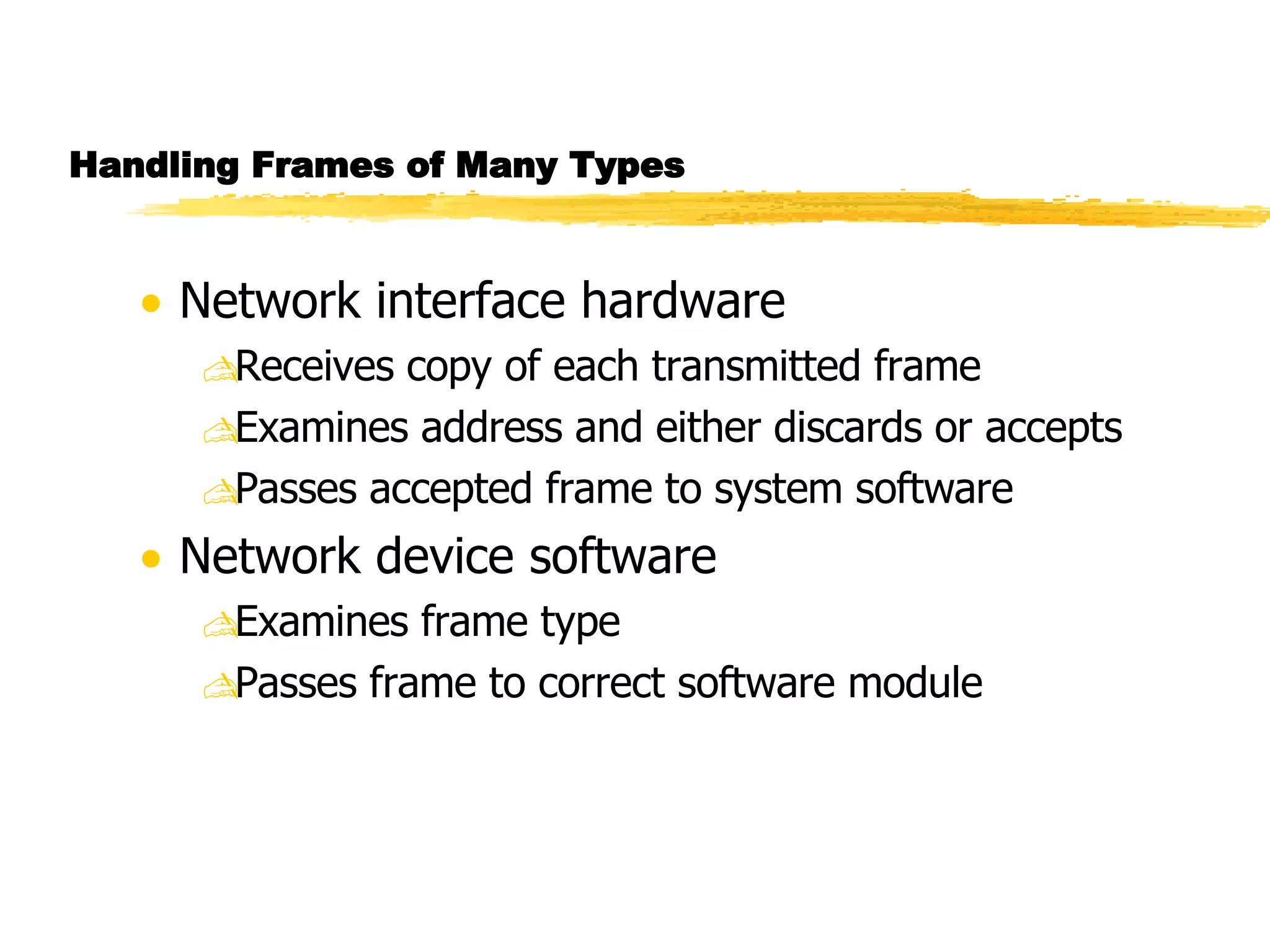
Handling Frames of Many Types Network interface hardware Receives copy of each transmitted frame Examines address and either discards or accepts Passes accepted frame to system software Network device software Examines frame type Passes frame to correct software module
Network Analyzer Device used for testing and maintenance Listens in promiscuous mode Produces Summaries (e.g., % of broadcast frames) Specific items (e.g., frames from a given address) Note: Check web for free network analyzer/packet sniffer.
10Base2 Ethernet Wiring (Thinnet) Use coax cables (10Base2), NICs, BNC connectors, terminators
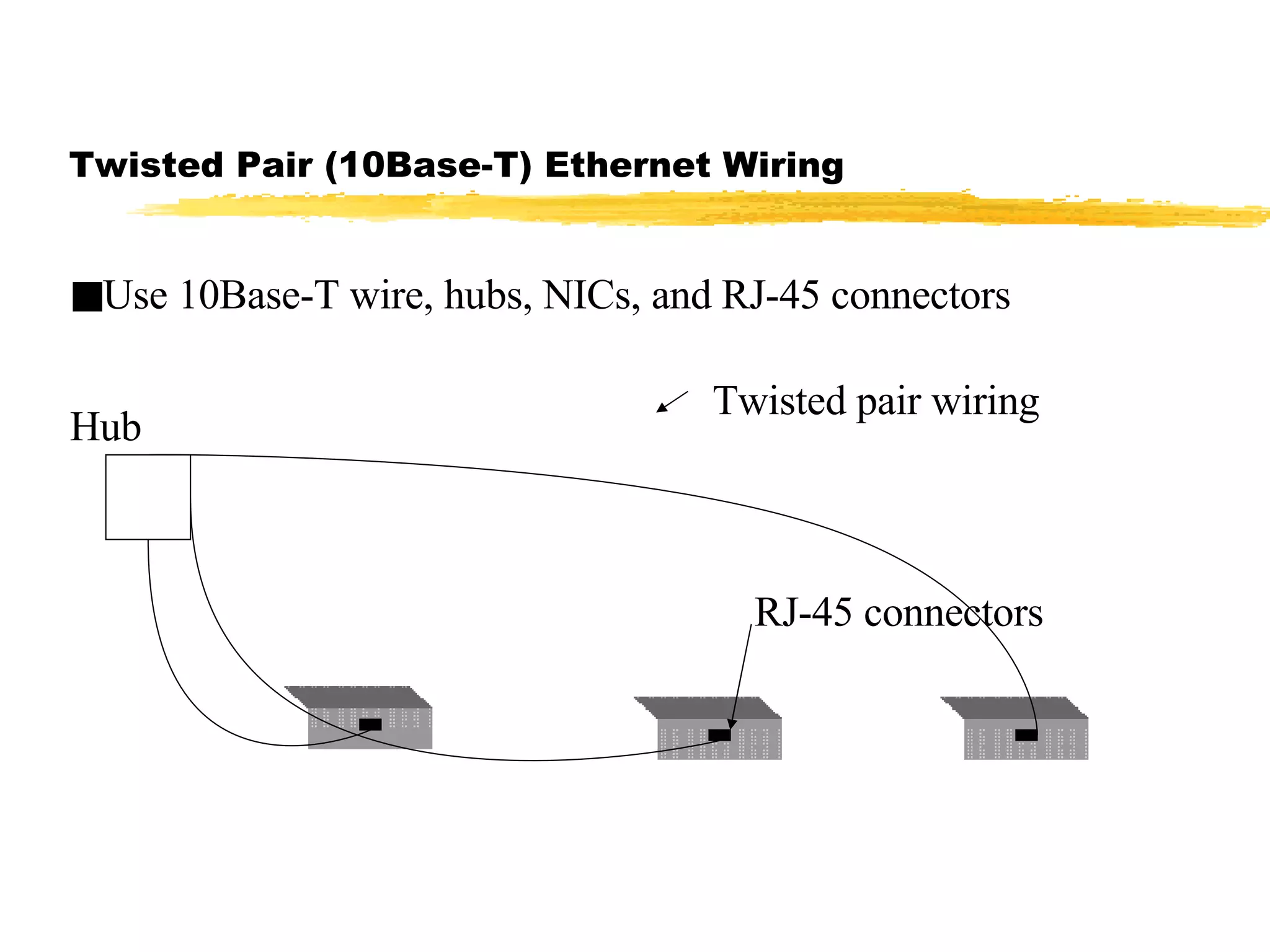
Twisted Pair (10Base-T) Ethernet Wiring Use 10Base-T wire, hubs, NICs, and RJ-45 connectors Hub Twisted pair wiring RJ-45 connectors
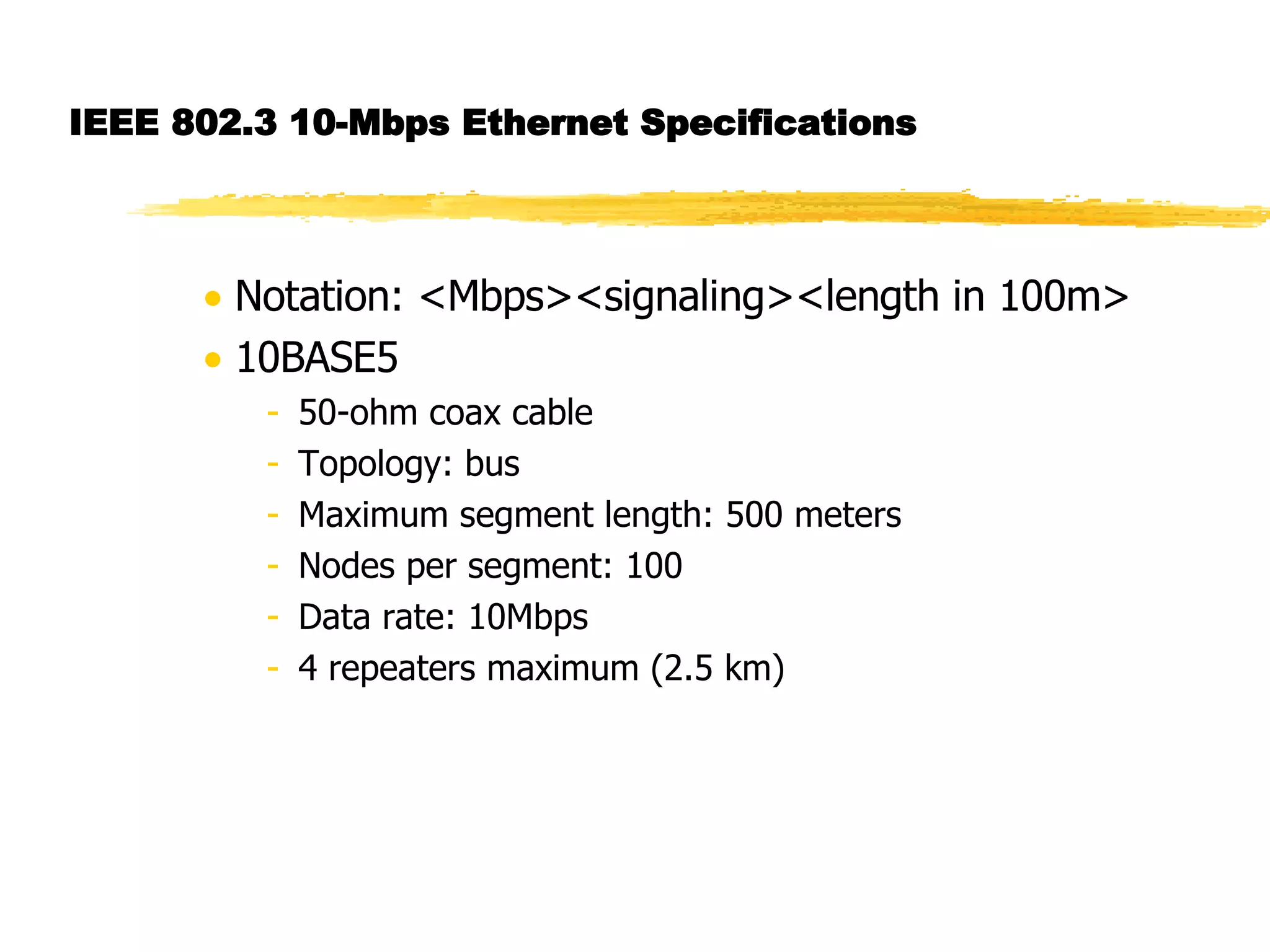
IEEE 802.3 10-Mbps Ethernet Specifications Notation: <Mbps><signaling><length in 100m> 10BASE5 50-ohm coax cable Topology: bus Maximum segment length: 500 meters Nodes per segment: 100 Data rate: 10Mbps 4 repeaters maximum (2.5 km)
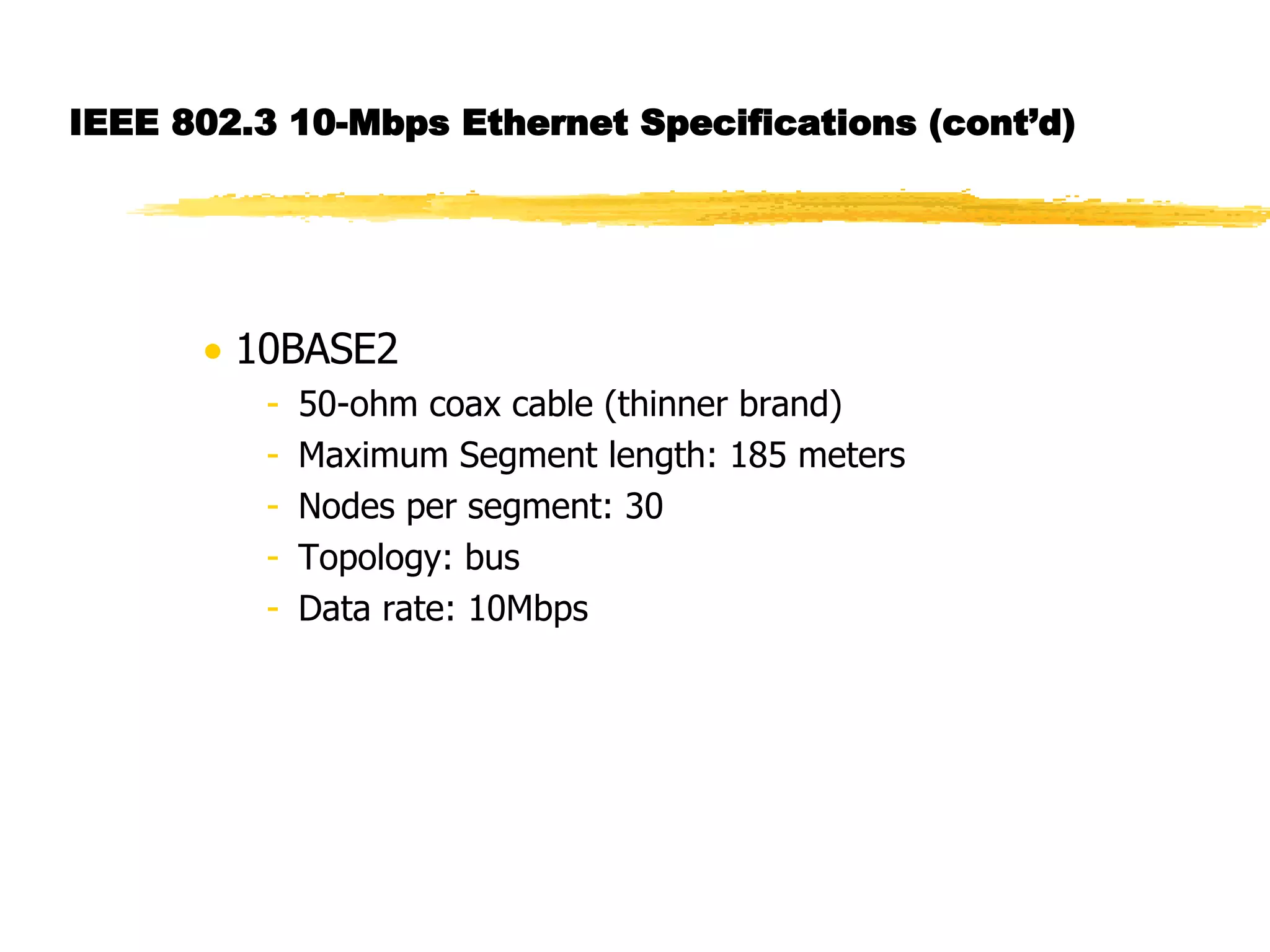
IEEE 802.3 10-Mbps Ethernet Specifications (cont’d) 10BASE2 50-ohm coax cable (thinner brand) Maximum Segment length: 185 meters Nodes per segment: 30 Topology: bus Data rate: 10Mbps
IEEE 802.3 10-Mbps Ethernet Specifications (cont’d) 10BASE-T (Twisted pair) Maximum segment length: 100 meters Topology: star Data rate: 10Mbps 10BROAD36 75-ohm CATV coaxial cable Maximum individual segment length is 1800 meters. Maximum end-to-end span 3600 meters.
IEEE 802.3 100-Mbps Fast Ethernet Specifications 100BASE-TX Data rate: 100Mbps 2 Shielded twisted pair(STP) or high-quality Category 5 unshielded twisted pair(UTP) Maximum segment length: 100 meters Network span: 200 meters 100BASE-FX 2 Optical fibers Data rate: 100 Mbps Maximum segment length: 200 meters Network span: 400 meters
Token Ring Token Ring  Most commonly used MAC protocol for rings IEEE 802.5 standard Token - a small frame
Token passing mechanism A station seizes a token by changing one bit Changed token is a start-of-frame sequence Transmitted frame is absorbed by the transmitting station after a round-trip The station will insert a new token at the end of transmission and at the detection of leading edge of transmitted frame after circulation
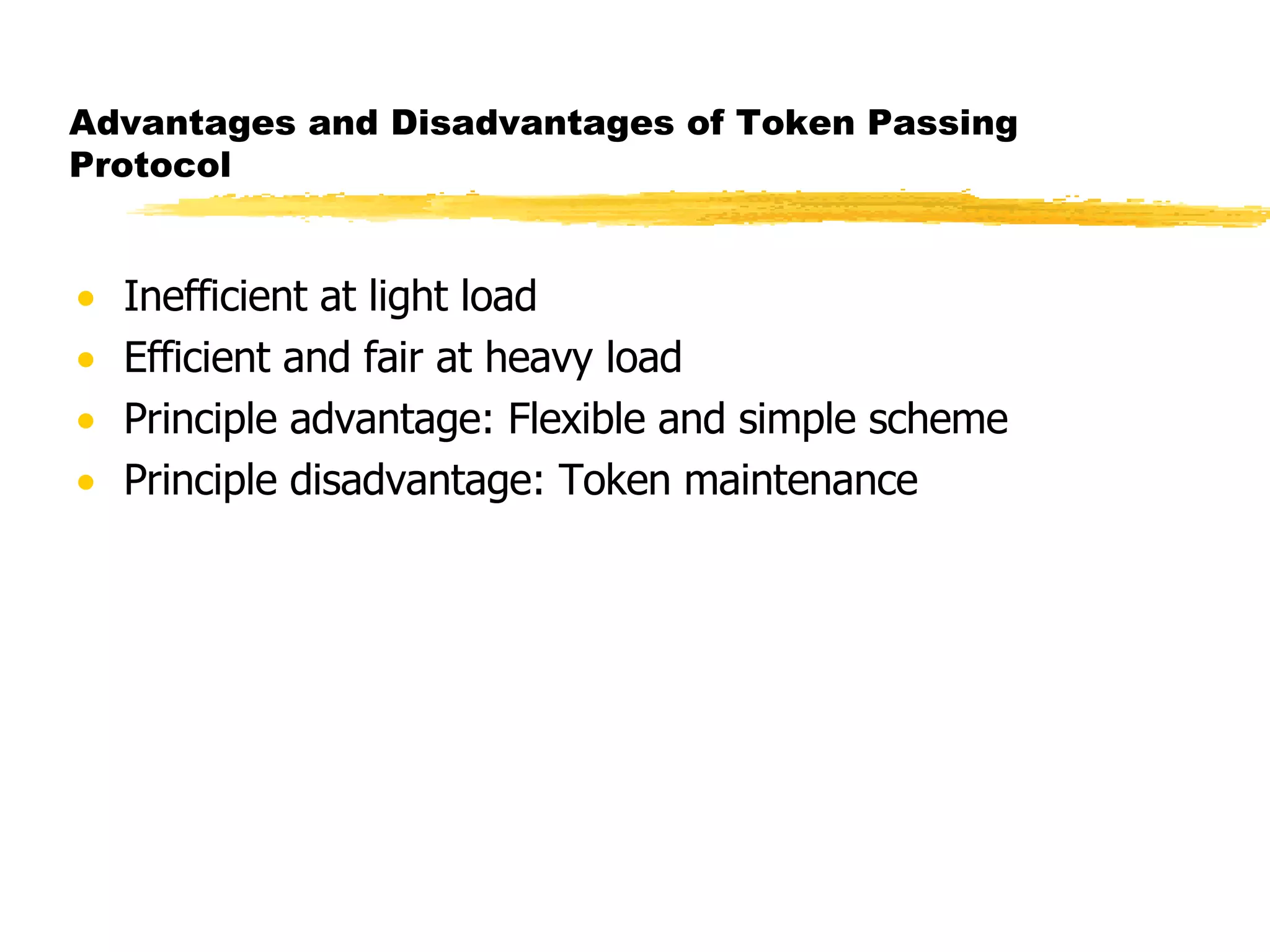
Advantages and Disadvantages of Token Passing Protocol Inefficient at light load Efficient and fair at heavy load Principle advantage: Flexible and simple scheme Principle disadvantage: Token maintenance
Token Maintenance Problems Token passing protocols are much more complex than contention-based protocols.  For example, the protocol must deal with: What happens when a token gets lost What happens if two or more tokens show up on the subnet
IEEE 802.5 Frame Format SD AC FC DA SA Data unit FCS ED FS 1 1 1 6 6 > 0 4 1 1 SD: starting delimiter SA: source address AC: access control FCS: frame check sequence FC: frame control ED: ending delimiter DA: destination address FS: frame status Bytes SD AC ED 1 1 1 A. General frame format B. Token frame format
IEEE 802.5 Frame Format (cont’d) Starting delimiter (SD).  Indicates start of frame. Access control (AC).  Used to identify data or token frame and indicate priorities. Frame Control (FC ). Indicates whether this is an LLC data frame End delimiter (ED) . Error detection bit is set by a repeater. Frame status (FS) . Contains the address recognized (A) and frame-copied (C) bits. Set by the receiver and used by sender for checking. A = 0, C = 0 meaning destination does not exist A = 1, C = 0 meaning frame not copied A = 1, C = 1 meaning frame received Uses some priority scheme to transmit high priority frames.
Comparison of contention-based and token-passing protocols
Comparison of contention-based and token-passing protocols (cont’d)
Ring LANs Consists of repeaters Unidirectional transmission Single closed path Bit by bit transmission from one repeater to the next Each repeater regenerates and retransmits each bit Repeaters perform the data insertion and reception functions Packet is usually removed by transmitting repeater after one trip around Medium - Twisted pair, baseband coax, and fiber optic cable
Ring LAN Repeaters: States States of a repeater: listen state transmit state bypass states 1-bit delay To station To station From station A. Listen state B. Transmit state C. Bypass state
Ring Problems Timing jitter - timing jitter accumulates as the signal travels around the ring. It limits the number of repeaters in a ring Link failure/repeater failure disables the entire network Installation of a new repeater is difficult and disruptive Star-ring architecture eliminates some of the above problems partly.
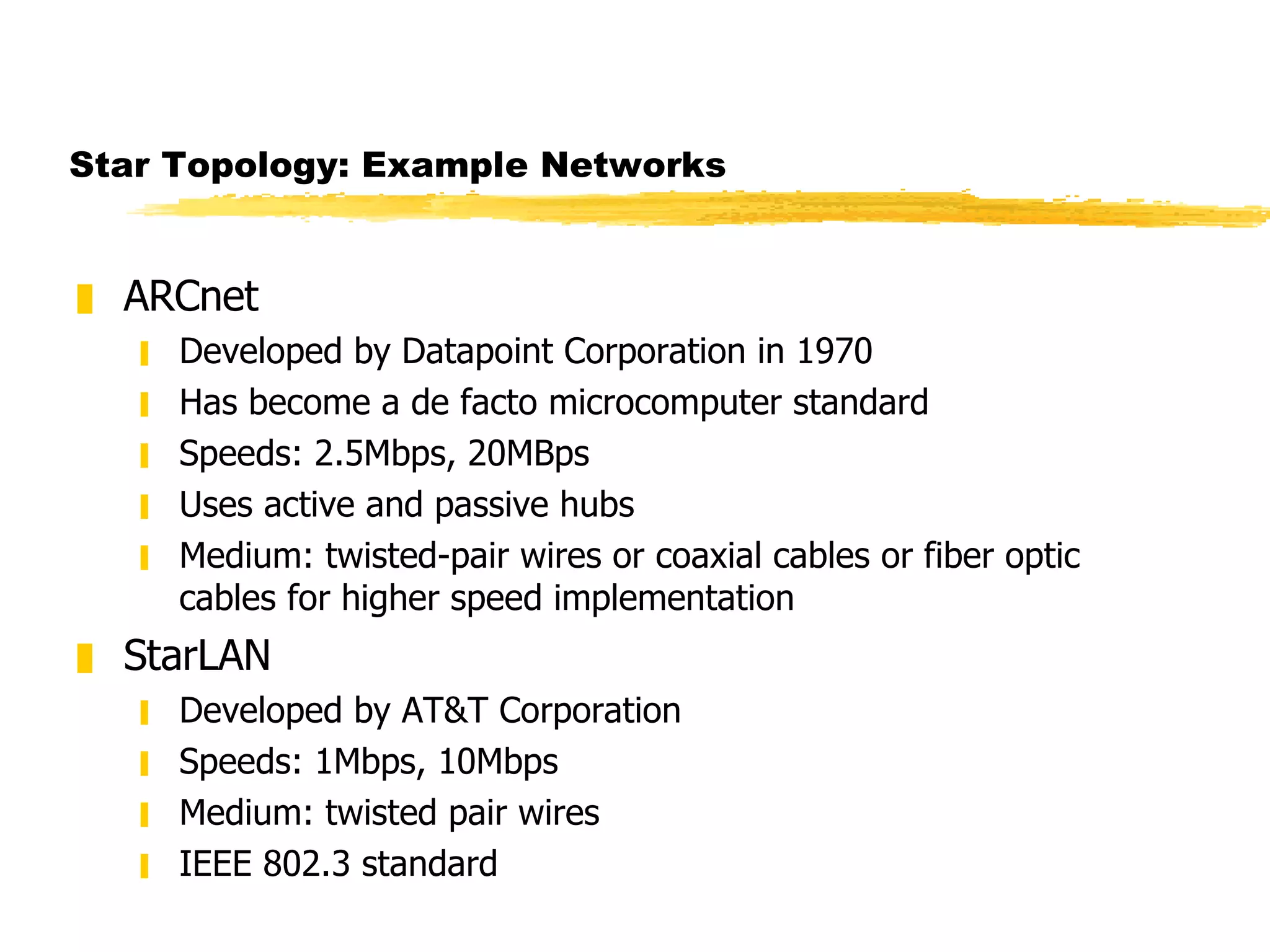
Star Topology: Example Networks ARCnet Developed by Datapoint Corporation in 1970 Has become a de facto microcomputer standard Speeds: 2.5Mbps, 20MBps Uses active and passive hubs Medium: twisted-pair wires or coaxial cables or fiber optic cables for higher speed implementation StarLAN Developed by AT&T Corporation Speeds: 1Mbps, 10Mbps Medium: twisted pair wires IEEE 802.3 standard
ARCNet Example Active Hub Passive Hub
Terminology: Hubs Active hub Used in an ARCnet LAN that provides signal regeneration  allows nodes to be located up to 2000 feet from the hub Passive Hub Used in an ARCnet LAN that does not provide signal regeneration Nodes can be located no farther than 100 feet from the hub
LAN Summary
LAN Summary (Contd)

Network Topologies

  • 1.
    Topology Mathematical termRoughly interpreted as &quot;geometry for curved surface&quot;
  • 2.
    Network Topologies Anetwork &quot;topology&quot; is the structure or organization of communications that links between hosts or devices on a network. LAN topology A LAN is a shared medium that serves many DTEs( data terminal equipment) located in close proximity such as in one building. Three basic topologies associated with LANs: bus, ring, and star WAN topology A WAN links networks that are geographically separated by long distance through switches, routers, and/or bridges. Two topologies: mesh and tree
  • 3.
    LAN Topologies Bustopology: All hosts (DTEs) are connected to a common cable or medium.
  • 4.
    LAN Topologies (cont’d)Tree topology: Transmission medium is a branching cable with no closed loops. Generalization of bus topology. Hub Host
  • 5.
    LAN Topologies (Cont’d)Ring topology: Each device (DTE) is connected to another in sequence to form a &quot;ring”
  • 6.
    LAN Topologies (Cont’d)Star Topology: All of the devices on the network are connected to a central &quot;hub&quot; or concentrator
  • 7.
    Advantages and Disadvantagesof Bus Topology Advantages of bus topologies: Inexpensive to install (uses less cable) Easy to add new devices onto the bus or onto the network Disadvantages of bus topologies: Can be expensive to maintain and troubleshoot A naive user can easily &quot;bring down&quot; the entire bus Overall maximum length of the bus is limited (for example, in a 10-Base-2 ethernet, 200m maximum from one terminator to the other along the cable)
  • 8.
    Advantages and Disadvantagesof Ring Topology Advantages of ring topologies: Very predictable network performance May be slightly more secure than other topologies Disadvantages of ring topologies: Expensive as compared to bus/star topologies Hardware for ring topologies is less available and therefore more expensive Many systems lack good support for networking in ring environments Unique wiring requirements More complex networking and operational protocol
  • 9.
    Advantages and Disadvantagesof Star Topology Advantages of star topologies: Each node has a dedicated connection to the network --disconnecting a single node does not bring down the rest of the nodes on the network Network and cable administration are centralized Disadvantages of star topologies: More expensive to install -- require more cable and the additional cost of a hub Maximum length of each spoke of the hub is limited to the allowed maximum length of the medium (for example, on a 10-Base-T network using UTP cable, the maximum distance from the hub to a host is 100m) Breakdown of the hub causes breakdown of the entire system
  • 10.
    WAN Topologies MeshTopology: provides multiple paths between nodes or networks (N) usually implemented with switches and routers N1 N2 N3 N4 N6 N5
  • 11.
    WAN Topologies (Cont’d)Tree Topology: A hierarchical architecture starts with header node and branches out to other nodes. Simpler to implement than mesh topology.
  • 12.
    Data Link LayerSpecifies how two devices or hosts communicate with each other when they are connected to the same medium (e.g., connected via a common bus or a common hub). Major functions of the layer: Flow control: prevents receiver’s buffer overflow Error detection: uses error-detecting code and algorithm Error control : retransmits damaged frames upon request or if no acknowledgement received from the receiver
  • 13.
    Terminology Subnet Thedevices which are linked together by a common medium are collectively known as a subnet . Frame Data are sent in blocks called frames . A frame, in addition to data, contains some header information such as source and destination addresses, control data bits, error-checking bits, etc. Frame size, the number of bits, depends on the underlying protocol. Actual frame format depends on the protocol.
  • 14.
    Data Link Layer:Sharing Medium In A LAN Shared medium used for all transmissions Only one station transmits at any time Stations &quot;take turns&quot; using medium Media Access Control (MAC) policy ensures fairness (MAC protocol)
  • 15.
    Media Access ControlProtocols Media Access Control determines the rules about when hosts on a subnet are allowed to transmit data onto the physical medium Two broad control schemes: Centralized control greater control through priorities, overrides, and guaranteed capacity simple but creates a bottleneck and a single point of failure Distributed control
  • 16.
    MAC Control TechniquesRound Robin Each station takes turn to transmit May be centralized (polling) or distributed (token passing) Efficient when many stations transmit High overhead when only few stations transmit Reservation Transmitting station reserves slots (stream traffic) May be centralized or distributed
  • 17.
    MAC Control Techniques(cont’d) Contention Appropriate for bursty traffic Distributed by nature Simple to implement Efficient for light to moderate load Performance tends to collapse under heavy load Examples: ALOHA Slotted ALOHA CSMA CSMA/CD
  • 18.
    ALOHA Developed forpacket radio networks Transmits whenever a station has a frame to send Wait and listens for an acknowledgement Wait time = maximum possible roundtrip propagation delay plus a small fixed time increment Resends the frame if no acknowledgement is received. Gives up after many repeated, failed transmissions Simple but poor utilization. Maximum utilization is only about 18%
  • 19.
    Slotted Aloha Similarto ALOHA but stations are allowed to transmit during a time slot Channel is organized into uniform time slots Size of the time slot = Frame transmission time Some central clock synchronizes all stations If a frame collides with other one, it collides completely Maximum utilization is about 37%
  • 20.
    An Important NoteBoth ALOHA and slotted ALOHA exhibit poor utilization and fail to take advantage of the fact that propagation delay is usually very small compared to frame transmission time for both packet radio and LANs.
  • 21.
    CSMA (Carrier SenseMultiple Access) Advantageous over slotted Aloha when propagation time is small compared to frame transmission time . Listens if another transmission is in progress (carrier sense) Transmits if medium is idle Wait for acknowledgement Wait time = maximum roundtrip propagation time + medium access time for the receiver Retransmits if no acknowledgement is received Disadvantage: medium remains unusable for the duration of transmission of damaged frames after collision
  • 22.
    CSMA/CD Carrier SenseMultiple Access/Collision Detection) A protocol for Ethernet 1. If medium is idle, transmit and go to step 3; otherwise, go to step 2. 2. If medium is busy, continue to listen; transmit immediately if idle. 3. If collision detected, transmit a brief jamming signal to inform other stations. 4. Wait a random amount of time after transmitting jamming signal (backoff), then go to step 1. Note:With CSMA/CD, the amount of wasted capacity is reduced to the time it takes to detect a collision.
  • 23.
    Collision Detection MechanismsBaseband Ethernet : Higher voltage swings than those produced by a single transmitter are detected. Cable length is limited to 500 meters. Broadband Ethernet : RF Carrier is detected. Bit-by-bit comparison is done between transmitted and received data. Twisted-pair star topology : If a hub detects presence of more than one input signal at its ports, it assumes a collision and sends out collision presence signal.
  • 24.
    Backoff After Collision(Wait Time Calculation) When collision occurs Wait random time t 1 , 0 < t 1 < d Use CSMA and try again If second collision occurs Wait random time t 2 , 0 < t 2 < 2d Double range for each successive collision Called exponential backoff
  • 25.
    CSMA/CA Used onwireless networks Both sides send small message followed by data transmission &quot;X is about to send to Y” &quot;Y is about to receive from X” Data frame sent from X to Y Purpose: inform all stations in range of X or Y before transmission Known as Collision Avoidance (CA)
  • 26.
    Example Bus Network:Ethernet Most popular LAN Widely used IEEE standard 802.3 Several generations Same frame format Different data rates Different wiring schemes
  • 27.
    Identifying A DestinationAll stations on shared-media LAN receive all transmissions To allow sender to specify destination Each station assigned unique number Known as station’s address Each frame contains address of intended recipient
  • 28.
    Ethernet Addressing Standardizedby IEEE Each station is assigned with a unique 48-bit address Address is assigned when network interface card is (NIC) manufactured Each address is a physical address
  • 29.
    Ethernet Address RecognitionEach frame contains destination address All stations receive a transmission Station discards any frame addressed to another station Important: interface hardware, not software, checks address. Does not utilize CPU to check address
  • 30.
    Possible Ways toDirect Frames Frames can be sent to: Single destination (unicast) All stations on network (broadcast) Subset of stations (multicast) Some feature of destination address is used to distinguish type (unicast, broadcast, or multicast)
  • 31.
    Broadcast on EthernetAll 1s address specifies broadcast Sender Places broadcast address in frame Transmits one copy on shared network All stations receive copy Receiver always accepts frame that contains Station's unicast address The broadcast address
  • 32.
    Multicast on EthernetHalf of addresses reserved for multicast Network interface card Always accepts unicast and broadcast Can accept zero or more multicast addresses Software Determines multicast address to accept Informs network interface card
  • 33.
    Promiscuous Mode Designedto testing/debugging Allows interface to accept all packets Available on most interface hardware
  • 34.
    Network Analyzer Deviceused for testing and maintenance Listens in promiscuous mode Produces Summaries (e.g., % of broadcast frames) Specific items (e.g., frames from a given address)
  • 35.
    Identifying Frame ContentsInteger type field tells recipient the type of data being carried Two possibilities Self-identifying or explicit type (hardware records type) Implicit type (application sending data must handle type)
  • 36.
    Conceptual Frame FormatHeader Contains address and type information Layout fixed Payload Contains data being sent Payload Header
  • 37.
    Example Ethernet FrameFormat 8 6 6 2 46 - 1500 4 Preamble Dest. Addr. Src. Addr. Data In Frame CRC Frame Type Preamble: Alternating 1s and 0s. Used by receiver synchronization
  • 38.
  • 39.
    When Network HardwareDoes Not include Types Sending and receiving computers must agree To send one type of data To put type information in first few octets of payload Most systems need type information
  • 40.
    Handling Frames ofMany Types Network interface hardware Receives copy of each transmitted frame Examines address and either discards or accepts Passes accepted frame to system software Network device software Examines frame type Passes frame to correct software module
  • 41.
    Network Analyzer Deviceused for testing and maintenance Listens in promiscuous mode Produces Summaries (e.g., % of broadcast frames) Specific items (e.g., frames from a given address) Note: Check web for free network analyzer/packet sniffer.
  • 42.
    10Base2 Ethernet Wiring(Thinnet) Use coax cables (10Base2), NICs, BNC connectors, terminators
  • 43.
    Twisted Pair (10Base-T)Ethernet Wiring Use 10Base-T wire, hubs, NICs, and RJ-45 connectors Hub Twisted pair wiring RJ-45 connectors
  • 44.
    IEEE 802.3 10-MbpsEthernet Specifications Notation: <Mbps><signaling><length in 100m> 10BASE5 50-ohm coax cable Topology: bus Maximum segment length: 500 meters Nodes per segment: 100 Data rate: 10Mbps 4 repeaters maximum (2.5 km)
  • 45.
    IEEE 802.3 10-MbpsEthernet Specifications (cont’d) 10BASE2 50-ohm coax cable (thinner brand) Maximum Segment length: 185 meters Nodes per segment: 30 Topology: bus Data rate: 10Mbps
  • 46.
    IEEE 802.3 10-MbpsEthernet Specifications (cont’d) 10BASE-T (Twisted pair) Maximum segment length: 100 meters Topology: star Data rate: 10Mbps 10BROAD36 75-ohm CATV coaxial cable Maximum individual segment length is 1800 meters. Maximum end-to-end span 3600 meters.
  • 47.
    IEEE 802.3 100-MbpsFast Ethernet Specifications 100BASE-TX Data rate: 100Mbps 2 Shielded twisted pair(STP) or high-quality Category 5 unshielded twisted pair(UTP) Maximum segment length: 100 meters Network span: 200 meters 100BASE-FX 2 Optical fibers Data rate: 100 Mbps Maximum segment length: 200 meters Network span: 400 meters
  • 48.
    Token Ring TokenRing Most commonly used MAC protocol for rings IEEE 802.5 standard Token - a small frame
  • 49.
    Token passing mechanismA station seizes a token by changing one bit Changed token is a start-of-frame sequence Transmitted frame is absorbed by the transmitting station after a round-trip The station will insert a new token at the end of transmission and at the detection of leading edge of transmitted frame after circulation
  • 50.
    Advantages and Disadvantagesof Token Passing Protocol Inefficient at light load Efficient and fair at heavy load Principle advantage: Flexible and simple scheme Principle disadvantage: Token maintenance
  • 51.
    Token Maintenance ProblemsToken passing protocols are much more complex than contention-based protocols. For example, the protocol must deal with: What happens when a token gets lost What happens if two or more tokens show up on the subnet
  • 52.
    IEEE 802.5 FrameFormat SD AC FC DA SA Data unit FCS ED FS 1 1 1 6 6 > 0 4 1 1 SD: starting delimiter SA: source address AC: access control FCS: frame check sequence FC: frame control ED: ending delimiter DA: destination address FS: frame status Bytes SD AC ED 1 1 1 A. General frame format B. Token frame format
  • 53.
    IEEE 802.5 FrameFormat (cont’d) Starting delimiter (SD). Indicates start of frame. Access control (AC). Used to identify data or token frame and indicate priorities. Frame Control (FC ). Indicates whether this is an LLC data frame End delimiter (ED) . Error detection bit is set by a repeater. Frame status (FS) . Contains the address recognized (A) and frame-copied (C) bits. Set by the receiver and used by sender for checking. A = 0, C = 0 meaning destination does not exist A = 1, C = 0 meaning frame not copied A = 1, C = 1 meaning frame received Uses some priority scheme to transmit high priority frames.
  • 54.
    Comparison of contention-basedand token-passing protocols
  • 55.
    Comparison of contention-basedand token-passing protocols (cont’d)
  • 56.
    Ring LANs Consistsof repeaters Unidirectional transmission Single closed path Bit by bit transmission from one repeater to the next Each repeater regenerates and retransmits each bit Repeaters perform the data insertion and reception functions Packet is usually removed by transmitting repeater after one trip around Medium - Twisted pair, baseband coax, and fiber optic cable
  • 57.
    Ring LAN Repeaters:States States of a repeater: listen state transmit state bypass states 1-bit delay To station To station From station A. Listen state B. Transmit state C. Bypass state
  • 58.
    Ring Problems Timingjitter - timing jitter accumulates as the signal travels around the ring. It limits the number of repeaters in a ring Link failure/repeater failure disables the entire network Installation of a new repeater is difficult and disruptive Star-ring architecture eliminates some of the above problems partly.
  • 59.
    Star Topology: ExampleNetworks ARCnet Developed by Datapoint Corporation in 1970 Has become a de facto microcomputer standard Speeds: 2.5Mbps, 20MBps Uses active and passive hubs Medium: twisted-pair wires or coaxial cables or fiber optic cables for higher speed implementation StarLAN Developed by AT&T Corporation Speeds: 1Mbps, 10Mbps Medium: twisted pair wires IEEE 802.3 standard
  • 60.
    ARCNet Example ActiveHub Passive Hub
  • 61.
    Terminology: Hubs Activehub Used in an ARCnet LAN that provides signal regeneration allows nodes to be located up to 2000 feet from the hub Passive Hub Used in an ARCnet LAN that does not provide signal regeneration Nodes can be located no farther than 100 feet from the hub
  • 62.
  • 63.