VIPS
FIT-MS-WORD Lab
[Type the document subtitle]
FC 1
9/30/2013
[Type the abstract of the documenthere.The abstractistypicallyashort summaryof the contentsof
the document.Type the abstract of the documenthere.The abstract istypicallyashortsummaryof the
contentsof the document.]
FIT-MS-WORD Lab
By:Rashmi Bakshi Page 2
Title- MS-Word Lab {align text = center}
Align text- left
All the heading should be in Font= Times New Roman, Size=14, line spacing=Double
Rest of the content should be in Font=Times New Roman, Size=14, line spacing=1.5
Today we are goingto learnbasic elements/featuresof Microsoftword document.We will learnhowto
formata document(howtouse page layout, header,footer, cut,copy,paste,bulletedtext,settinga
font, italics, underline etc).
clickon Page Layout,Page Borders.Choose anystyle,width,artyouwant. Make sure itis elegantand
semi formal.
Header:clickon Inserttab,Insertheader(Alphabet) {whatisitusedfor?Whydo we needitina
document?}
Footer:clickon Inserttab,Insertfooter(Alphabet) {whatisitusedfor?Whydo we needitina
document?}
CUT: CTRL+ X {whatis itusedfor?}
COPY: CTRL+ C {whatis itusedfor?}
PASTE:CTRL+V {what isit usedfor?}
BulletedText
 There are,on an averagesix typesof bulletoptionsavailable inMSword.We are using
basicdocumentbulletforthislab.
 Bulletsare usedina documenttoemphasize onimportanttasks.Itismore visible and
clearto read bulletedtextthananormal paragraph. Bulletedtextcanbe easily
distinguishedandthusgathersreader’sattention.
FIT-MS-WORD Lab
By:Rashmi Bakshi Page 3
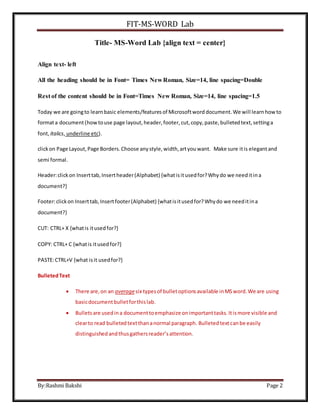
Lets Learn how to insert a clip art {click Insert tab on Menu toolbar , click clip art, type computer in
search for textbox, search in – office collections, results should be media file types.}
Thisis an image of a computerwitha user.
Clickinserttaband inserta textbox
Linkto your institute'swebsite {create ahyperlink}
Addyour personal details.
Name,Surname,semester,section,Roll
number
FIT-MS-WORD Lab
By:Rashmi Bakshi Page 4
ow we are goingto learnabout dropcap. Clickon inserttab,ClickoverDrop cap and
enlarge the firstwordof the paragraph. Write downthe use of dropcap includingkinds of
documentsthatrequire it.
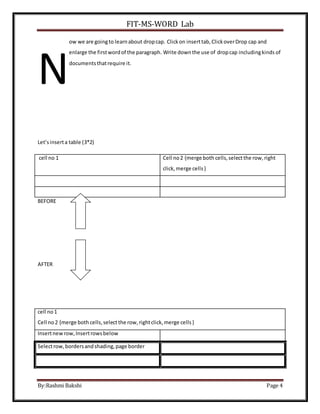
Let’sinserta table (3*2)
cell no 1 Cell no2 {merge both cells,selectthe row,right
click,merge cells}
BEFORE
AFTER
N
cell no1
Cell no2 {merge both cells,selectthe row,rightclick,merge cells}
Insertnewrow,Insertrowsbelow
Selectrow,bordersandshading,page border
FIT-MS-WORD Lab
By:Rashmi Bakshi Page 5
Insertnew page
In the end,
I needa worddocument(hardcopy) that consistsof maximum6pages. In case If itexceeds6pages,
thenreduce line spacingtoSingle andfontsize to10.
It shouldclearlydescribeanddemonstrate all the featuresof MSworddiscussedin class.Itshouldbe
orderedandorganized.Listall the tabsof menubar first. Andthendiscusstheirsubelements.
For example firsttabonMenubar is Home
Try to describe all the featuresunderthistabwithdemonstrations.
Thengo to Inserttab and explainitsfeatures. ThengotoPage Layout. Soon and so forth.
Studentsshouldtryto include extrafeaturestogetgood marks. Students will be judgedaccordingto
theirinterestandamountof time spentonthisexercise. Yourhard copy shouldreflectyourefforts
investedindoingso.
Please give time tothislab.Itisveryessential thatyoulearnall the features- becauseyouwill be
creatinglotsof reports,worddocumentsinyourupcomingsemesterssostartpreparingfromnowon !
Thank you!
FIT-MS-WORD Lab
By:Rashmi Bakshi Page 6

FIT-MS-WORD Lab | BCA

  • 1.
    VIPS FIT-MS-WORD Lab [Type thedocument subtitle] FC 1 9/30/2013 [Type the abstract of the documenthere.The abstractistypicallyashort summaryof the contentsof the document.Type the abstract of the documenthere.The abstract istypicallyashortsummaryof the contentsof the document.]
  • 2.
    FIT-MS-WORD Lab By:Rashmi BakshiPage 2 Title- MS-Word Lab {align text = center} Align text- left All the heading should be in Font= Times New Roman, Size=14, line spacing=Double Rest of the content should be in Font=Times New Roman, Size=14, line spacing=1.5 Today we are goingto learnbasic elements/featuresof Microsoftword document.We will learnhowto formata document(howtouse page layout, header,footer, cut,copy,paste,bulletedtext,settinga font, italics, underline etc). clickon Page Layout,Page Borders.Choose anystyle,width,artyouwant. Make sure itis elegantand semi formal. Header:clickon Inserttab,Insertheader(Alphabet) {whatisitusedfor?Whydo we needitina document?} Footer:clickon Inserttab,Insertfooter(Alphabet) {whatisitusedfor?Whydo we needitina document?} CUT: CTRL+ X {whatis itusedfor?} COPY: CTRL+ C {whatis itusedfor?} PASTE:CTRL+V {what isit usedfor?} BulletedText  There are,on an averagesix typesof bulletoptionsavailable inMSword.We are using basicdocumentbulletforthislab.  Bulletsare usedina documenttoemphasize onimportanttasks.Itismore visible and clearto read bulletedtextthananormal paragraph. Bulletedtextcanbe easily distinguishedandthusgathersreader’sattention.
  • 3.
    FIT-MS-WORD Lab By:Rashmi BakshiPage 3 Lets Learn how to insert a clip art {click Insert tab on Menu toolbar , click clip art, type computer in search for textbox, search in – office collections, results should be media file types.} Thisis an image of a computerwitha user. Clickinserttaband inserta textbox Linkto your institute'swebsite {create ahyperlink} Addyour personal details. Name,Surname,semester,section,Roll number
  • 4.
    FIT-MS-WORD Lab By:Rashmi BakshiPage 4 ow we are goingto learnabout dropcap. Clickon inserttab,ClickoverDrop cap and enlarge the firstwordof the paragraph. Write downthe use of dropcap includingkinds of documentsthatrequire it. Let’sinserta table (3*2) cell no 1 Cell no2 {merge both cells,selectthe row,right click,merge cells} BEFORE AFTER N cell no1 Cell no2 {merge both cells,selectthe row,rightclick,merge cells} Insertnewrow,Insertrowsbelow Selectrow,bordersandshading,page border
  • 5.
    FIT-MS-WORD Lab By:Rashmi BakshiPage 5 Insertnew page In the end, I needa worddocument(hardcopy) that consistsof maximum6pages. In case If itexceeds6pages, thenreduce line spacingtoSingle andfontsize to10. It shouldclearlydescribeanddemonstrate all the featuresof MSworddiscussedin class.Itshouldbe orderedandorganized.Listall the tabsof menubar first. Andthendiscusstheirsubelements. For example firsttabonMenubar is Home Try to describe all the featuresunderthistabwithdemonstrations. Thengo to Inserttab and explainitsfeatures. ThengotoPage Layout. Soon and so forth. Studentsshouldtryto include extrafeaturestogetgood marks. Students will be judgedaccordingto theirinterestandamountof time spentonthisexercise. Yourhard copy shouldreflectyourefforts investedindoingso. Please give time tothislab.Itisveryessential thatyoulearnall the features- becauseyouwill be creatinglotsof reports,worddocumentsinyourupcomingsemesterssostartpreparingfromnowon ! Thank you!
  • 6.