MUSIC VIDEO
PRODUCTION
PROCESS
LOGFAITH FOMEKONG
FILMING
Technical- I wasn’t able to get a hold of a camera because they
had all being booked out so I had to use my phone. I didn’t use
any technical equipment but towards the end of my music
video my little sister was lip signing.She sang the song out
loud so that I could edit the sound out and put the lip sync in
line with the original song
Personnel-On the day that we were supposed to meet one cast
member didn’t come because she was busy. It was unexpected
because she didn’t tell me in advanced but I was able to
manage without her so it wasn’t a big issue
However when one of my crew members didn’t turn up
because she wasn’t able to make it, it had a big impact on my
final idea.
She did tell me the day before so I was able to change my idea
and replace her as one of my crew members unexpectedly
brought there siblings along so I added them in my video; this
also drasticly changed my whole original idea
FILMING
Planning- My planning was really useful as I knew exactly
were to put certain shots but in general my music video
didn’t come out as planned. I think that it could have worked
better if all my cast and crew members turned up. I also felt
like I didn’t have enough members in my crew so when it said
in the song ‘The mandem gonna fall in love’ I figured that I
could add a teenage boy in it so that it goes with the
lyrics.This changed my planning for the better
Next steps- I don’t have anything to re-film and I don’t need
any more shots. I also havent changed my video
FILMING –
PRODUCTION STILLS
Where appropriate add stills from when you were filming,
annotate where necessary
EDITING
• Record your edit progress, decisions, problems, etc. in
this section
• Include screenshots with annotations, statements, etc.
• Try to explain how you worked and justify why you chose
to work the way you did.
• Follow the structure and what to include on each slide as
this is necessary for evidence for assessment
EDITING
EDITING
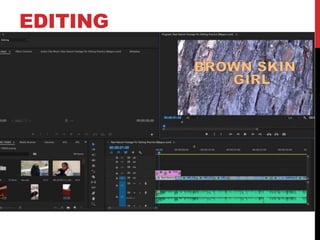
• i started by downloading the song on mp3 Youtube
converter then I opened Premiere Pro and added the song
on there
• I added the few shots that I started to shoot on Premiere
Pro
FILE MANAGEMENT
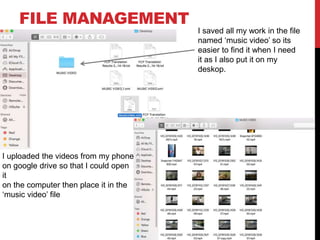
I saved all my work in the file
named ‘music video’ so its
easier to find it when I need
it as I also put it on my
deskop.
I uploaded the videos from my phone
on google drive so that I could open
it
on the computer then place it in the
‘music video’ file
EDITING –
SETTING UP PREMIERE
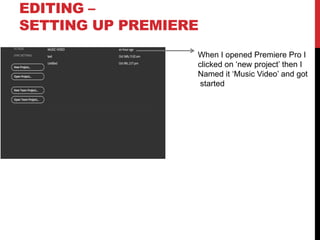
When I opened Premiere Pro I
clicked on ‘new project’ then I
Named it ‘Music Video’ and got
started
EDITING –
IMPORTING FOOTAGE
Show how you imported your footage, your file set up in
Premiere and how you have organised your different docs
[video, audio, etc]
EDITING –
WORKSPACE
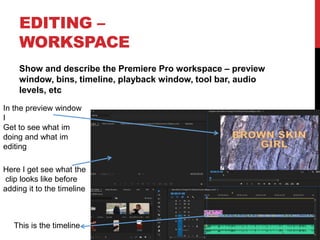
Show and describe the Premiere Pro workspace – preview
window, bins, timeline, playback window, tool bar, audio
levels, etc
In the preview window
I
Get to see what im
doing and what im
editing
Here I get see what the
clip looks like before
adding it to the timeline
This is the timeline
EDITING –
ASSEMBLY EDIT
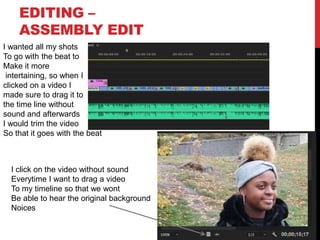
I wanted all my shots
To go with the beat to
Make it more
intertaining, so when I
clicked on a video I
made sure to drag it to
the time line without
sound and afterwards
I would trim the video
So that it goes with the beat
I click on the video without sound
Everytime I want to drag a video
To my timeline so that we wont
Be able to hear the original background
Noices
EDITING –
ASSEMBLY EDIT
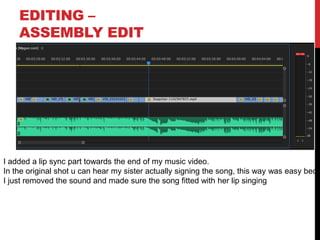
I added a lip sync part towards the end of my music video.
In the original shot u can hear my sister actually signing the song, this way was easy beca
I just removed the sound and made sure the song fitted with her lip singing
EDITING –
REFINEMENT
Show and explain how you have refined and improved your
initial sequence edit
EDITING –
COLOUR CORRECTION/SFX
Show and explain your colour correction process/effects
process – use staged screenshots to show each part of the
process and the effect. Explain why you chose to do this
EDITING –
EXPORT
Show how you exported your completed project, show which
settings you have used and explain your choice of file name
and where you have saved it

Mv process log form 2019 2

  • 1.
  • 2.
    FILMING Technical- I wasn’table to get a hold of a camera because they had all being booked out so I had to use my phone. I didn’t use any technical equipment but towards the end of my music video my little sister was lip signing.She sang the song out loud so that I could edit the sound out and put the lip sync in line with the original song Personnel-On the day that we were supposed to meet one cast member didn’t come because she was busy. It was unexpected because she didn’t tell me in advanced but I was able to manage without her so it wasn’t a big issue However when one of my crew members didn’t turn up because she wasn’t able to make it, it had a big impact on my final idea. She did tell me the day before so I was able to change my idea and replace her as one of my crew members unexpectedly brought there siblings along so I added them in my video; this also drasticly changed my whole original idea
  • 3.
    FILMING Planning- My planningwas really useful as I knew exactly were to put certain shots but in general my music video didn’t come out as planned. I think that it could have worked better if all my cast and crew members turned up. I also felt like I didn’t have enough members in my crew so when it said in the song ‘The mandem gonna fall in love’ I figured that I could add a teenage boy in it so that it goes with the lyrics.This changed my planning for the better Next steps- I don’t have anything to re-film and I don’t need any more shots. I also havent changed my video
  • 4.
    FILMING – PRODUCTION STILLS Whereappropriate add stills from when you were filming, annotate where necessary
  • 5.
    EDITING • Record youredit progress, decisions, problems, etc. in this section • Include screenshots with annotations, statements, etc. • Try to explain how you worked and justify why you chose to work the way you did. • Follow the structure and what to include on each slide as this is necessary for evidence for assessment
  • 6.
  • 7.
    EDITING • i startedby downloading the song on mp3 Youtube converter then I opened Premiere Pro and added the song on there • I added the few shots that I started to shoot on Premiere Pro
  • 8.
    FILE MANAGEMENT I savedall my work in the file named ‘music video’ so its easier to find it when I need it as I also put it on my deskop. I uploaded the videos from my phone on google drive so that I could open it on the computer then place it in the ‘music video’ file
  • 9.
    EDITING – SETTING UPPREMIERE When I opened Premiere Pro I clicked on ‘new project’ then I Named it ‘Music Video’ and got started
  • 10.
    EDITING – IMPORTING FOOTAGE Showhow you imported your footage, your file set up in Premiere and how you have organised your different docs [video, audio, etc]
  • 11.
    EDITING – WORKSPACE Show anddescribe the Premiere Pro workspace – preview window, bins, timeline, playback window, tool bar, audio levels, etc In the preview window I Get to see what im doing and what im editing Here I get see what the clip looks like before adding it to the timeline This is the timeline
  • 12.
    EDITING – ASSEMBLY EDIT Iwanted all my shots To go with the beat to Make it more intertaining, so when I clicked on a video I made sure to drag it to the time line without sound and afterwards I would trim the video So that it goes with the beat I click on the video without sound Everytime I want to drag a video To my timeline so that we wont Be able to hear the original background Noices
  • 13.
    EDITING – ASSEMBLY EDIT Iadded a lip sync part towards the end of my music video. In the original shot u can hear my sister actually signing the song, this way was easy beca I just removed the sound and made sure the song fitted with her lip singing
  • 14.
    EDITING – REFINEMENT Show andexplain how you have refined and improved your initial sequence edit
  • 15.
    EDITING – COLOUR CORRECTION/SFX Showand explain your colour correction process/effects process – use staged screenshots to show each part of the process and the effect. Explain why you chose to do this
  • 16.
    EDITING – EXPORT Show howyou exported your completed project, show which settings you have used and explain your choice of file name and where you have saved it