Mysore MuleSoft Meetup
21-Nov-2023
ADO Pipeline setup for
Mule APIs
AGENDA
• What is CI/CD?
• Introduction to Azure DevOps
• Deployment targets
• Pipeline Structure
• Various stages of Pipeline
• Set-up the Pipeline
• Q&A
• Networking time
• Wrap-Up
Organizers
Shubham Chaurasia
Billennium India
Pro Integration Developer
Giridhar Meka
Sr. Technical Architect
linkedin.com/in/giridharmeka
linkedin.com/in/shubhamchaurasia1
Priya Shaw
LTI MindTree
Sr. Integration Specialist
linkedin.com/in/priya-shaw
Speaker
• Software Engineer II
• Working in Hashedin By Deloitte
• 4 Years of Experience
• 1x MuleSoft Certified
• 1x Azure Certified
Abhishek Jindal
ADO Pipeline setup for
Mule APIs
CI/CD
● Continuous integration (CI) is the development approach of integrating all your code
changes into a shared code repository.
● Code changes are validated by triggering a build and running automated test cases (eg:
Munit).
● With continuous integration, errors and security issues can be identified and fixed more
easily, and much earlier in the development process.
● Continuous delivery (CD) is the approach of automatically deploying to build to selected
environments, like - development, test, UAT and production.
● With continuous delivery, software can be released more often and faster.
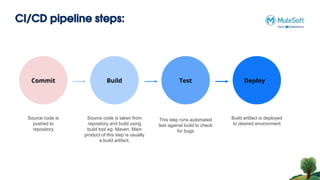
CI/CD pipeline steps:
Commit Build Test Deploy
Source code is
pushed to
repository
Build artifact is deployed
to desired environment
Source code is taken from
repository and build using
build tool eg: Maven. Main
product of this step is usually
a build artifact.
Commit Build Test
This step runs automated
test against build to check
for bugs
Commit
Commit
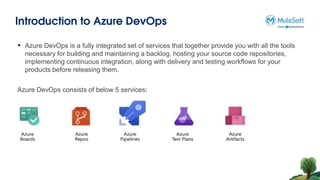
Introduction to Azure DevOps
Azure DevOps consists of below 5 services:
 Azure DevOps is a fully integrated set of services that together provide you with all the tools
necessary for building and maintaining a backlog, hosting your source code repositories,
implementing continuous integration, along with delivery and testing workflows for your
products before releasing them.
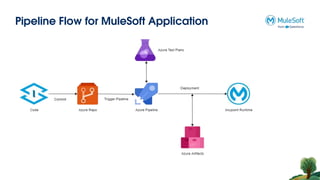
Pipeline Flow for MuleSoft Application
Mule applications deployment targets
● CloudHub 2.0: CloudHub 2.0 is a fully managed, containerized integration platform as a
service (iPaaS) where you can deploy APIs and integrations as lightweight containers in the
cloud.
● CloudHub: CloudHub is a complete integration platform as a service (iPaaS) that provides
server functionality for you to deploy your applications without having to configure a hosting
environment.
● Hybrid: With the hybrid deployment option, you deploy your applications from the Runtime
Manager cloud console to your Mule servers and use Runtime Manager to manage them.
● Anypoint Platform Private Cloud Edition: Anypoint Platform Private Cloud Edition is a
containerized distribution of the management and engagement capabilities of Anypoint
Platform that you host on-premises or in your organization’s private cloud environment.
● Anypoint Runtime Fabric: Anypoint Runtime Fabric is a container service that automates
the deployment and orchestration of Mule applications and API gateways.
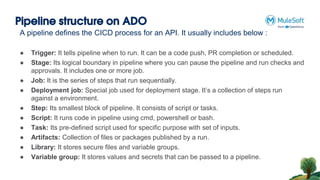
Pipeline structure on ADO
A pipeline defines the CICD process for an API. It usually includes below :
● Trigger: It tells pipeline when to run. It can be a code push, PR completion or scheduled.
● Stage: Its logical boundary in pipeline where you can pause the pipeline and run checks and
approvals. It includes one or more job.
● Job: It is the series of steps that run sequentially.
● Deployment job: Special job used for deployment stage. It’s a collection of steps run
against a environment.
● Step: Its smallest block of pipeline. It consists of script or tasks.
● Script: It runs code in pipeline using cmd, powershell or bash.
● Task: Its pre-defined script used for specific purpose with set of inputs.
● Artifacts: Collection of files or packages published by a run.
● Library: It stores secure files and variable groups.
● Variable group: It stores values and secrets that can be passed to a pipeline.
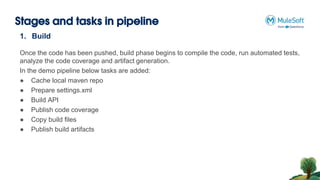
Stages and tasks in pipeline
1. Build
Once the code has been pushed, build phase begins to compile the code, run automated tests,
analyze the code coverage and artifact generation.
In the demo pipeline below tasks are added:
● Cache local maven repo
● Prepare settings.xml
● Build API
● Publish code coverage
● Copy build files
● Publish build artifacts
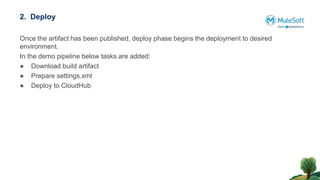
2. Deploy
Once the artifact has been published, deploy phase begins the deployment to desired
environment.
In the demo pipeline below tasks are added:
● Download build artifact
● Prepare settings.xml
● Deploy to CloudHub
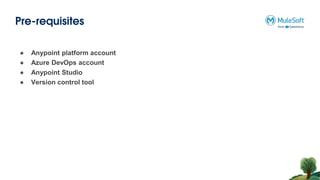
Pre-requisites
● Anypoint platform account
● Azure DevOps account
● Anypoint Studio
● Version control tool
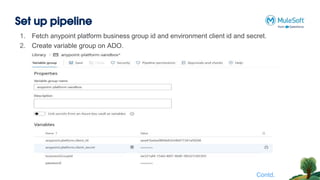
Set up pipeline
1. Fetch anypoint platform business group id and environment client id and secret.
2. Create variable group on ADO.
Contd.
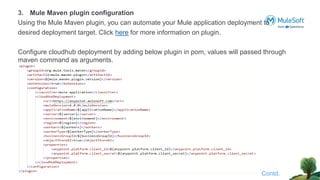
3. Mule Maven plugin configuration
Using the Mule Maven plugin, you can automate your Mule application deployment to
desired deployment target. Click here for more information on plugin.
Configure cloudhub deployment by adding below plugin in pom, values will passed through
maven command as arguments.
Contd.
4. Create pipeline
● Go to repo and branch, click set up build.
● Next is configure pipeline.
○ Choose starter pipeline if want to create new yaml file
○ Choose existing azure yaml file if yaml file exists in repo.
● Next is review, once done with yaml file. Click save and run.
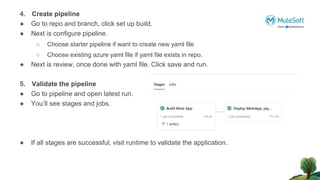
5. Validate the pipeline
● Go to pipeline and open latest run.
● You’ll see stages and jobs.
● If all stages are successful, visit runtime to validate the application.
Business
Use-cases
Networking time
Thank You

Azure DevOps Pipeline setup for Mule APIs #36

  • 2.
    Mysore MuleSoft Meetup 21-Nov-2023 ADOPipeline setup for Mule APIs
  • 3.
    AGENDA • What isCI/CD? • Introduction to Azure DevOps • Deployment targets • Pipeline Structure • Various stages of Pipeline • Set-up the Pipeline • Q&A • Networking time • Wrap-Up
  • 4.
    Organizers Shubham Chaurasia Billennium India ProIntegration Developer Giridhar Meka Sr. Technical Architect linkedin.com/in/giridharmeka linkedin.com/in/shubhamchaurasia1 Priya Shaw LTI MindTree Sr. Integration Specialist linkedin.com/in/priya-shaw
  • 5.
    Speaker • Software EngineerII • Working in Hashedin By Deloitte • 4 Years of Experience • 1x MuleSoft Certified • 1x Azure Certified Abhishek Jindal
  • 6.
    ADO Pipeline setupfor Mule APIs
  • 7.
    CI/CD ● Continuous integration(CI) is the development approach of integrating all your code changes into a shared code repository. ● Code changes are validated by triggering a build and running automated test cases (eg: Munit). ● With continuous integration, errors and security issues can be identified and fixed more easily, and much earlier in the development process. ● Continuous delivery (CD) is the approach of automatically deploying to build to selected environments, like - development, test, UAT and production. ● With continuous delivery, software can be released more often and faster.
  • 8.
    CI/CD pipeline steps: CommitBuild Test Deploy Source code is pushed to repository Build artifact is deployed to desired environment Source code is taken from repository and build using build tool eg: Maven. Main product of this step is usually a build artifact. Commit Build Test This step runs automated test against build to check for bugs Commit Commit
  • 9.
    Introduction to AzureDevOps Azure DevOps consists of below 5 services:  Azure DevOps is a fully integrated set of services that together provide you with all the tools necessary for building and maintaining a backlog, hosting your source code repositories, implementing continuous integration, along with delivery and testing workflows for your products before releasing them.
  • 10.
    Pipeline Flow forMuleSoft Application
  • 11.
    Mule applications deploymenttargets ● CloudHub 2.0: CloudHub 2.0 is a fully managed, containerized integration platform as a service (iPaaS) where you can deploy APIs and integrations as lightweight containers in the cloud. ● CloudHub: CloudHub is a complete integration platform as a service (iPaaS) that provides server functionality for you to deploy your applications without having to configure a hosting environment. ● Hybrid: With the hybrid deployment option, you deploy your applications from the Runtime Manager cloud console to your Mule servers and use Runtime Manager to manage them. ● Anypoint Platform Private Cloud Edition: Anypoint Platform Private Cloud Edition is a containerized distribution of the management and engagement capabilities of Anypoint Platform that you host on-premises or in your organization’s private cloud environment. ● Anypoint Runtime Fabric: Anypoint Runtime Fabric is a container service that automates the deployment and orchestration of Mule applications and API gateways.
  • 12.
    Pipeline structure onADO A pipeline defines the CICD process for an API. It usually includes below : ● Trigger: It tells pipeline when to run. It can be a code push, PR completion or scheduled. ● Stage: Its logical boundary in pipeline where you can pause the pipeline and run checks and approvals. It includes one or more job. ● Job: It is the series of steps that run sequentially. ● Deployment job: Special job used for deployment stage. It’s a collection of steps run against a environment. ● Step: Its smallest block of pipeline. It consists of script or tasks. ● Script: It runs code in pipeline using cmd, powershell or bash. ● Task: Its pre-defined script used for specific purpose with set of inputs. ● Artifacts: Collection of files or packages published by a run. ● Library: It stores secure files and variable groups. ● Variable group: It stores values and secrets that can be passed to a pipeline.
  • 13.
    Stages and tasksin pipeline 1. Build Once the code has been pushed, build phase begins to compile the code, run automated tests, analyze the code coverage and artifact generation. In the demo pipeline below tasks are added: ● Cache local maven repo ● Prepare settings.xml ● Build API ● Publish code coverage ● Copy build files ● Publish build artifacts
  • 14.
    2. Deploy Once theartifact has been published, deploy phase begins the deployment to desired environment. In the demo pipeline below tasks are added: ● Download build artifact ● Prepare settings.xml ● Deploy to CloudHub
  • 15.
    Pre-requisites ● Anypoint platformaccount ● Azure DevOps account ● Anypoint Studio ● Version control tool
  • 16.
    Set up pipeline 1.Fetch anypoint platform business group id and environment client id and secret. 2. Create variable group on ADO. Contd.
  • 17.
    3. Mule Mavenplugin configuration Using the Mule Maven plugin, you can automate your Mule application deployment to desired deployment target. Click here for more information on plugin. Configure cloudhub deployment by adding below plugin in pom, values will passed through maven command as arguments. Contd.
  • 18.
    4. Create pipeline ●Go to repo and branch, click set up build. ● Next is configure pipeline. ○ Choose starter pipeline if want to create new yaml file ○ Choose existing azure yaml file if yaml file exists in repo. ● Next is review, once done with yaml file. Click save and run. 5. Validate the pipeline ● Go to pipeline and open latest run. ● You’ll see stages and jobs. ● If all stages are successful, visit runtime to validate the application.
  • 19.
  • 20.
  • 21.