Mysore MuleSoft Meetup
09-Jan-2024
STATE MANAGEMENT
Organizers
Shubham Chaurasia
Billennium India
Pro Integration Developer
Giridhar Meka
Sr. Technology Architect
/in/giridharmeka
/in/shubhamchaurasia1
Priya Shaw
LTI MindTree
Sr. Integration Specialist
/in/priya-shaw
• MuleSoft Developer at Hashedin by Deloitte
• 4.5+ Years of Experience
• MuleSoft Certified Developer & Architect (MCIA)
Vijay Kumar
Speaker
Vijay Kumar
● Managing State (Data) in Mule Applications
 Mule Event
 Object Store
 VM Queues
 Batch Job Scope Queues
 File-based persistence
 External data store
● Optimal Methods for storing state
 Pros and Cons of different state storage
 Trade off between different state storage
● Exploring State Implementation
 Cloudhub 1.0
 Cloudhub 2.0
● Real-world Examples
● Q&A
● Networking Time & Wrap-Up
Agenda
Managing State (Data) in
Mule Applications
Storing State using Mule Event
• The Mule event is an in-memory object that carries state
- Using variables, state can be carries between event processor.
- Over transport protocols via payload, attributes.
• State is lost as soon as flow completes.
Storing State using Object Store
• Every Mule application is provided a default Object Store instance
- This is automatically selected as the default Object Store for Mule components that use an Object Store
- This is configured as a persistent Object Store
• Additional object store instances (also called partitions) can be added as global
elements to the Mule application
- Pick persistent vs. non-persistent, max entries, TTL and expiration interval
Storing State using VM Queues
• VM queues are configured as transient or persistent
• Mule applications can use VM queues
- Store messages in a first-in-first-out (FIFO) order and supports at-least-once message delivery
• Quality of Service varies depending on number of factors, such as:
- Queue type
- Number of replicas of Mule app
- Runtime plane and its configuration
Storing State using Batch Job Queues
• The initial request to Batch Job holds state in the Mule Event
- Usually a stream for input
• A Batch Job splits messages into individual records and stores them into persistent queues
- Process large data sets with reliability
- Recovery of state of processing in event of a crash
• If the storage is ephemeral, reprovision will lose the state
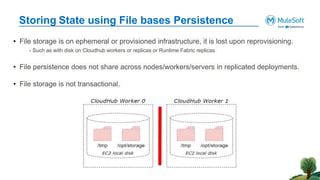
Storing State using File bases Persistence
• File storage is on ephemeral or provisioned infrastructure, it is lost upon reprovisioning.
- Such as with disk on Cloudhub workers or replicas or Runtime Fabric replicas
• File persistence does not share across nodes/workers/servers in replicated deployments.
• File storage is not transactional.
Storing State using External Storage
An external system or store is required
– When the Mule application requires additional guarantees, such as transactional guarantees
– To share data among distributed applications, perhaps including non-Mule applications
– Examples include a database, an SFTP server, Redis, an S3 bucket, or an external in-memory data grid
Optimal Methods for
State Storage
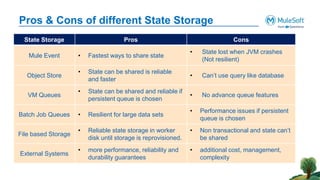
Pros & Cons of different State Storage
State Storage Pros Cons
Mule Event • Fastest ways to share state
• State lost when JVM crashes
(Not resilient)
Object Store
• State can be shared is reliable
and faster
• Can’t use query like database
VM Queues
• State can be shared and reliable if
persistent queue is chosen
• No advance queue features
Batch Job Queues • Resilient for large data sets
• Performance issues if persistent
queue is chosen
File based Storage
• Reliable state storage in worker
disk until storage is reprovisioned.
• Non transactional and state can’t
be shared
External Systems
• more performance, reliability and
durability guarantees
• additional cost, management,
complexity
State Implementation of
OSv2 and VM Queues
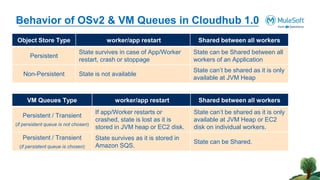
Behavior of OSv2 & VM Queues in Cloudhub 1.0
Object Store Type worker/app restart Shared between all workers
Persistent
State survives in case of App/Worker
restart, crash or stoppage
State can be Shared between all
workers of an Application
Non-Persistent State is not available
State can’t be shared as it is only
available at JVM Heap
VM Queues Type worker/app restart Shared between all workers
Persistent / Transient
(if persistent queue is not chosen)
If app/Worker restarts or
crashed, state is lost as it is
stored in JVM heap or EC2 disk.
State can’t be shared as it is only
available at JVM Heap or EC2
disk on individual workers.
Persistent / Transient
(if persistent queue is chosen)
State survives as it is stored in
Amazon SQS.
State can be Shared.
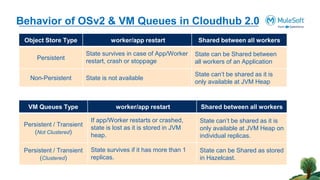
Behavior of OSv2 & VM Queues in Cloudhub 2.0
Object Store Type worker/app restart Shared between all workers
Persistent
State survives in case of App/Worker
restart, crash or stoppage
State can be Shared between
all workers of an Application
Non-Persistent State is not available
State can’t be shared as it is
only available at JVM Heap
VM Queues Type worker/app restart Shared between all workers
Persistent / Transient
(Not Clustered)
If app/Worker restarts or crashed,
state is lost as it is stored in JVM
heap.
State can’t be shared as it is
only available at JVM Heap on
individual replicas.
Persistent / Transient
(Clustered)
State survives if it has more than 1
replicas.
State can be Shared as stored
in Hazelcast.
Networking time
Thank You

State Management in Mule applications | MuleSoft Mysore Meetup #42

  • 2.
  • 3.
    Organizers Shubham Chaurasia Billennium India ProIntegration Developer Giridhar Meka Sr. Technology Architect /in/giridharmeka /in/shubhamchaurasia1 Priya Shaw LTI MindTree Sr. Integration Specialist /in/priya-shaw
  • 4.
    • MuleSoft Developerat Hashedin by Deloitte • 4.5+ Years of Experience • MuleSoft Certified Developer & Architect (MCIA) Vijay Kumar Speaker Vijay Kumar
  • 5.
    ● Managing State(Data) in Mule Applications  Mule Event  Object Store  VM Queues  Batch Job Scope Queues  File-based persistence  External data store ● Optimal Methods for storing state  Pros and Cons of different state storage  Trade off between different state storage ● Exploring State Implementation  Cloudhub 1.0  Cloudhub 2.0 ● Real-world Examples ● Q&A ● Networking Time & Wrap-Up Agenda
  • 6.
    Managing State (Data)in Mule Applications
  • 7.
    Storing State usingMule Event • The Mule event is an in-memory object that carries state - Using variables, state can be carries between event processor. - Over transport protocols via payload, attributes. • State is lost as soon as flow completes.
  • 8.
    Storing State usingObject Store • Every Mule application is provided a default Object Store instance - This is automatically selected as the default Object Store for Mule components that use an Object Store - This is configured as a persistent Object Store • Additional object store instances (also called partitions) can be added as global elements to the Mule application - Pick persistent vs. non-persistent, max entries, TTL and expiration interval
  • 9.
    Storing State usingVM Queues • VM queues are configured as transient or persistent • Mule applications can use VM queues - Store messages in a first-in-first-out (FIFO) order and supports at-least-once message delivery • Quality of Service varies depending on number of factors, such as: - Queue type - Number of replicas of Mule app - Runtime plane and its configuration
  • 10.
    Storing State usingBatch Job Queues • The initial request to Batch Job holds state in the Mule Event - Usually a stream for input • A Batch Job splits messages into individual records and stores them into persistent queues - Process large data sets with reliability - Recovery of state of processing in event of a crash • If the storage is ephemeral, reprovision will lose the state
  • 11.
    Storing State usingFile bases Persistence • File storage is on ephemeral or provisioned infrastructure, it is lost upon reprovisioning. - Such as with disk on Cloudhub workers or replicas or Runtime Fabric replicas • File persistence does not share across nodes/workers/servers in replicated deployments. • File storage is not transactional.
  • 12.
    Storing State usingExternal Storage An external system or store is required – When the Mule application requires additional guarantees, such as transactional guarantees – To share data among distributed applications, perhaps including non-Mule applications – Examples include a database, an SFTP server, Redis, an S3 bucket, or an external in-memory data grid
  • 13.
  • 14.
    Pros & Consof different State Storage State Storage Pros Cons Mule Event • Fastest ways to share state • State lost when JVM crashes (Not resilient) Object Store • State can be shared is reliable and faster • Can’t use query like database VM Queues • State can be shared and reliable if persistent queue is chosen • No advance queue features Batch Job Queues • Resilient for large data sets • Performance issues if persistent queue is chosen File based Storage • Reliable state storage in worker disk until storage is reprovisioned. • Non transactional and state can’t be shared External Systems • more performance, reliability and durability guarantees • additional cost, management, complexity
  • 15.
  • 16.
    Behavior of OSv2& VM Queues in Cloudhub 1.0 Object Store Type worker/app restart Shared between all workers Persistent State survives in case of App/Worker restart, crash or stoppage State can be Shared between all workers of an Application Non-Persistent State is not available State can’t be shared as it is only available at JVM Heap VM Queues Type worker/app restart Shared between all workers Persistent / Transient (if persistent queue is not chosen) If app/Worker restarts or crashed, state is lost as it is stored in JVM heap or EC2 disk. State can’t be shared as it is only available at JVM Heap or EC2 disk on individual workers. Persistent / Transient (if persistent queue is chosen) State survives as it is stored in Amazon SQS. State can be Shared.
  • 17.
    Behavior of OSv2& VM Queues in Cloudhub 2.0 Object Store Type worker/app restart Shared between all workers Persistent State survives in case of App/Worker restart, crash or stoppage State can be Shared between all workers of an Application Non-Persistent State is not available State can’t be shared as it is only available at JVM Heap VM Queues Type worker/app restart Shared between all workers Persistent / Transient (Not Clustered) If app/Worker restarts or crashed, state is lost as it is stored in JVM heap. State can’t be shared as it is only available at JVM Heap on individual replicas. Persistent / Transient (Clustered) State survives if it has more than 1 replicas. State can be Shared as stored in Hazelcast.
  • 18.
  • 19.