October 20th, 2018.
Second Caracas MuleSoft
Meetup
All contents © MuleSoft Inc.
What’s all about?
2
• A group from the community to the
community.
• A safe environment to learn and share
your integration experiences both good
and bad with your peers.
• Discuss a variety of topics key to
successful application network with
MuleSoft Anypoint Platform.
Agenda
All contents © MuleSoft Inc.
Agenda
4
• 2:00pm: Introductions.
• 2:15pm: Presentation: Anypoint Platform 101: Platform overview.
• 3:00pm: Q&A / Networking
• 3:15pm: Presentation: Mule 4 - What's new?
• 3:50pm: Q&A / Networking.
Introductions
All contents © MuleSoft Inc.
Introductions
6
• Meet the leader: MuleSoft Technical Lead.
APIs and Microservices enthusiat.
Experience on MuleSoft development
life cycles in several projects in
countries such as USA, Myanmar,
Mexico, Panamá, and Venezuela using
MuleSoft Anypoint Integration
Solutions.
Certified as MuleSoft Integration and
API Associate, MuleSoft Certified API
Design Associate (RAML 0.8) and I
participated in Anypoint Platform:
Advance Developer Course and
Anypoint Operations: Customer Hosted
Runtimes
All contents © MuleSoft Inc.
Introductions
7
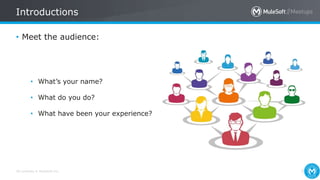
• Meet the audience:
• What’s your name?
• What do you do?
• What have been your experience?
Anypoint Platform 101:
Platform overview
Speaker: Fernando Silva
All contents © MuleSoft Inc.
Integration
The biggest not resolved IT
problem
9
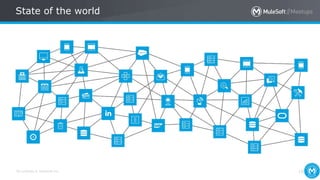
State of the world
All contents © MuleSoft Inc.
State of the world
10
All contents © MuleSoft Inc.
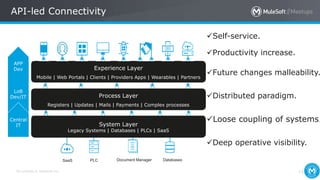
API-led Connectivity
Self-service.
Productivity increase.
Future changes malleability.
Distributed paradigm.
Loose coupling of systems.
Deep operative visibility.
Experience Layer
Mobile | Web Portals | Clients | Providers Apps | Wearables | Partners
Process Layer
Registers | Updates | Mails | Payments | Complex processes
APP
Dev
LoB
Dev/IT
Central
IT System Layer
Legacy Systems | Databases | PLCs | SaaS
PLC DatabasesSaaS Document Manager
11
All contents © MuleSoft Inc.
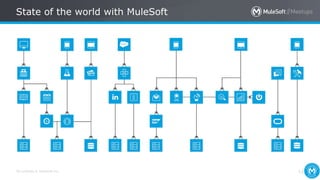
State of the world with MuleSoft
12
All contents © MuleSoft Inc.
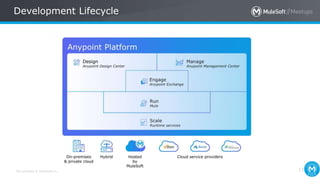
Development Lifecycle
13
All contents © MuleSoft Inc. 14
Demo: Anypoint Platform
All contents © MuleSoft Inc.
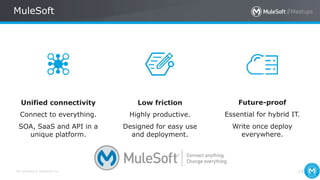
MuleSoft
15
Connect to everything.
SOA, SaaS and API in a
unique platform.
Highly productive.
Designed for easy use
and deployment.
Essential for hybrid IT.
Write once deploy
everywhere.
Unified connectivity Low friction Future-proof
Q&A
All contents © MuleSoft Inc. 17
Snack break time!
Mule 4
What's new?
Speaker: Fernando Silva
All contents © MuleSoft Inc.
Mule 4
19
• Simplified Event and Message models.
• DataWeave 2.0 as the default simpler expression language.
• Seamless Streaming.
• Better enrichment in fewer steps.
• Smarter mule:Self-tuning runtime.
• Simpler batch module.
• Simplified Error Handling.
• Mule SDK.
• Frictionless Upgrades.
All contents © MuleSoft Inc. 20
New Message Structure
All contents © MuleSoft Inc. 21
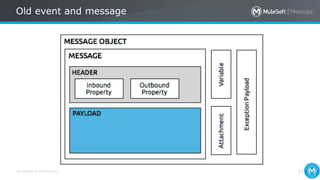
Old event and message
All contents © MuleSoft Inc.
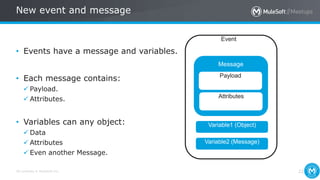
New event and message
22
• Events have a message and variables.
• Each message contains:
 Payload.
 Attributes.
• Variables can any object:
 Data
 Attributes
 Even another Message.
Message
Event
Payload
Attributes
Variable1 (Object)
Variable2 (Message)
All contents © MuleSoft Inc.
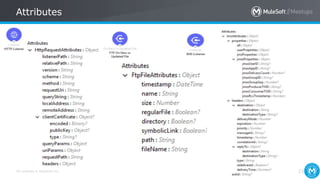
Attributes
23
All contents © MuleSoft Inc. 24
Simpler Language
All contents © MuleSoft Inc.
Dataweave 2.0
25
• Default transformation and expression language, replacing Mule
Expression Language (MEL).
All contents © MuleSoft Inc.
Mule 3 compatibility and MEL
26
• MEL is still around, it’s just deprecated.
• Every expression can feature the “mel:” prefix to indicate that it
should be evaluated with MEL.
All contents © MuleSoft Inc.
Dataweave 2.0
27
• Imports and modules.
• Java interoperability.
• New data formats.
• Simplified syntax
• New advanced capabilities.
All contents © MuleSoft Inc.
Transformation and Data Simplified
28
• Formal type system defined. Types can be:
 Binary.
 CSV.
 JSON.
 XML.
 Object (and sub types – List, Attributes, etc).
 Scalar – Number, String, etc.
• If you feel the need to do Object to Byte Array/String/etc – you’re
doing it wrong or it’s a bug.
All contents © MuleSoft Inc. 29
Seamless Streaming
All contents © MuleSoft Inc.
Seamless Streaming
30
All contents © MuleSoft Inc.
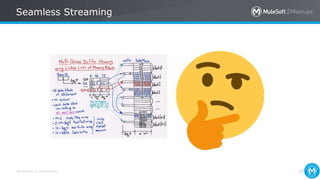
Seamless Streaming
31
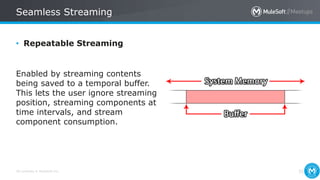
• Repeatable Streaming
Enabled by streaming contents
being saved to a temporal buffer.
This lets the user ignore streaming
position, streaming components at
time intervals, and stream
component consumption.

All contents © MuleSoft Inc.
Seamless Streaming
32
All contents © MuleSoft Inc. 33
No more Message Enricher
All contents © MuleSoft Inc.
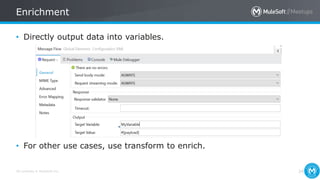
Enrichment
34
• Directly output data into variables.
• For other use cases, use transform to enrich.
All contents © MuleSoft Inc. 35
Self-tuning Engine
Smarter Mule
All contents © MuleSoft Inc.
Non-blocking execution engine
36
• Mule 4 now analyzes runtime conditions and makes adjustments
automatically.
• Achieves optimal performance without having to do manual tuning
steps, such as:
 Declaring exchange patterns.
 Processing strategies
 Threading configuration.
All contents © MuleSoft Inc. 37
Simpler Batch Module
All contents © MuleSoft Inc.
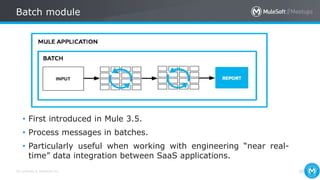
Batch module
38
• First introduced in Mule 3.5.
• Process messages in batches.
• Particularly useful when working with engineering “near real-
time” data integration between SaaS applications.
All contents © MuleSoft Inc.
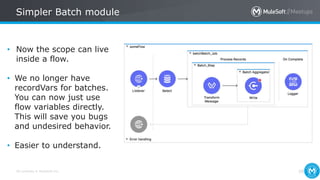
Simpler Batch module
39
• Now the scope can live
inside a flow.
• We no longer have
recordVars for batches.
You can now just use
flow variables directly.
This will save you bugs
and undesired behavior.
• Easier to understand.
All contents © MuleSoft Inc. 40
Simpler Error Handling
All contents © MuleSoft Inc.
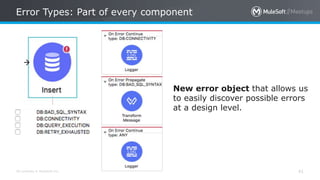
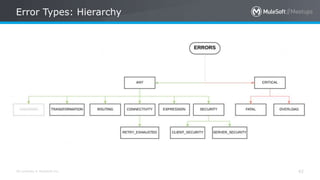
Error Types: Part of every component
41
New error object that allows us
to easily discover possible errors
at a design level.
All contents © MuleSoft Inc.
Error Types: Hierarchy
42
All contents © MuleSoft Inc.
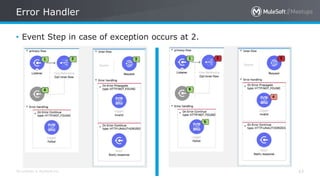
Error Handler
43
• Event Step in case of exception occurs at 2.
All contents © MuleSoft Inc.
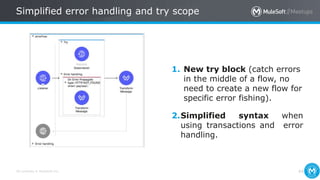
Simplified error handling and try scope
44
1. New try block (catch errors
in the middle of a flow, no
need to create a new flow for
specific error fishing).
2.Simplified syntax when
using transactions and error
handling.
All contents © MuleSoft Inc. 45
Mule SDK
All contents © MuleSoft Inc.
Mule SDK
46
The Mule SDK is the successor for Anypoint Connector Devkit.
• Allows extending Mule runtime with your own modules and
connectors.
• No more generated code
• Classloading isolation
• Consistent connect experience
All contents © MuleSoft Inc.
Migrating from DevKit
47
• Anypoint Connector DevKit is not compatible with Mule 4.
• DevKit migration tool (https://docs.mulesoft.com/mule-
sdk/v/1.1/dmt)
 A new project will be generated which adapts your existing code into an SDK
compatible Project (it will still require your review and adjustment)
All contents © MuleSoft Inc. 48
Frictionless upgrades
All contents © MuleSoft Inc.
Classloader isolation
49
• Runtime, and Anypoint Connectors, any library changes that occur
internally do not affect the application itself.
• Connectors are distributed outside the runtime as well, making it
possible to get connector enhancements and fixes without having to
upgrade the runtime or vice versa.
All contents © MuleSoft Inc.
Frequently asked questions
50
• Is the Mule 4 available on CloudHub?
Yes! Mule 4 is already available and ready to deploy.
• Is Studio 7 compatible with Mule 3.x?
No. You must use Studio 6 to open 3.x projects. Similarly, if you
want to deploy applications on Mule 4.0, you must compose those
applications in either Anypoint Studio 7.0 or Anypoint Design Center -
flow designer.
All contents © MuleSoft Inc.
Frequently asked questions
51
• Can you run a 3.x app on 4.0 runtime?
No. There will be a migration tool available to assist with migrating
apps currently running on Mule 3.x to Mule 4.0.
• What tools will be available to assist in this migration?
Mulesoft will be releasing a migration tool integrated in Anypoint
Studio 7 that will automatically update old configurations to use Mule
4 components.
Q&A
All contents © MuleSoft Inc.
What’s next?
53
• Share:
– Tweet your pictures with the hashtag #MuleMeetup
– Invite your network to join: https://meetups.mulesoft.com/caracas
– Contact your organizer at https://meetups.mulesoft.com/caracas to
suggest topics .
– Contact MuleSoft at meetup@mulesoft.com for ways to improve the
program.
• Our next meetup:
– Date: Planning…
– Location: What do you think about the current space?
– Topic: What would you like to talk about in the next meeting?
Thank you!
See you next time.
Second Caracas MuleSoft Meetup Slides

Second Caracas MuleSoft Meetup Slides

  • 1.
    October 20th, 2018. SecondCaracas MuleSoft Meetup
  • 2.
    All contents ©MuleSoft Inc. What’s all about? 2 • A group from the community to the community. • A safe environment to learn and share your integration experiences both good and bad with your peers. • Discuss a variety of topics key to successful application network with MuleSoft Anypoint Platform.
  • 3.
  • 4.
    All contents ©MuleSoft Inc. Agenda 4 • 2:00pm: Introductions. • 2:15pm: Presentation: Anypoint Platform 101: Platform overview. • 3:00pm: Q&A / Networking • 3:15pm: Presentation: Mule 4 - What's new? • 3:50pm: Q&A / Networking.
  • 5.
  • 6.
    All contents ©MuleSoft Inc. Introductions 6 • Meet the leader: MuleSoft Technical Lead. APIs and Microservices enthusiat. Experience on MuleSoft development life cycles in several projects in countries such as USA, Myanmar, Mexico, Panamá, and Venezuela using MuleSoft Anypoint Integration Solutions. Certified as MuleSoft Integration and API Associate, MuleSoft Certified API Design Associate (RAML 0.8) and I participated in Anypoint Platform: Advance Developer Course and Anypoint Operations: Customer Hosted Runtimes
  • 7.
    All contents ©MuleSoft Inc. Introductions 7 • Meet the audience: • What’s your name? • What do you do? • What have been your experience?
  • 8.
    Anypoint Platform 101: Platformoverview Speaker: Fernando Silva
  • 9.
    All contents ©MuleSoft Inc. Integration The biggest not resolved IT problem 9 State of the world
  • 10.
    All contents ©MuleSoft Inc. State of the world 10
  • 11.
    All contents ©MuleSoft Inc. API-led Connectivity Self-service. Productivity increase. Future changes malleability. Distributed paradigm. Loose coupling of systems. Deep operative visibility. Experience Layer Mobile | Web Portals | Clients | Providers Apps | Wearables | Partners Process Layer Registers | Updates | Mails | Payments | Complex processes APP Dev LoB Dev/IT Central IT System Layer Legacy Systems | Databases | PLCs | SaaS PLC DatabasesSaaS Document Manager 11
  • 12.
    All contents ©MuleSoft Inc. State of the world with MuleSoft 12
  • 13.
    All contents ©MuleSoft Inc. Development Lifecycle 13
  • 14.
    All contents ©MuleSoft Inc. 14 Demo: Anypoint Platform
  • 15.
    All contents ©MuleSoft Inc. MuleSoft 15 Connect to everything. SOA, SaaS and API in a unique platform. Highly productive. Designed for easy use and deployment. Essential for hybrid IT. Write once deploy everywhere. Unified connectivity Low friction Future-proof
  • 16.
  • 17.
    All contents ©MuleSoft Inc. 17 Snack break time!
  • 18.
  • 19.
    All contents ©MuleSoft Inc. Mule 4 19 • Simplified Event and Message models. • DataWeave 2.0 as the default simpler expression language. • Seamless Streaming. • Better enrichment in fewer steps. • Smarter mule:Self-tuning runtime. • Simpler batch module. • Simplified Error Handling. • Mule SDK. • Frictionless Upgrades.
  • 20.
    All contents ©MuleSoft Inc. 20 New Message Structure
  • 21.
    All contents ©MuleSoft Inc. 21 Old event and message
  • 22.
    All contents ©MuleSoft Inc. New event and message 22 • Events have a message and variables. • Each message contains:  Payload.  Attributes. • Variables can any object:  Data  Attributes  Even another Message. Message Event Payload Attributes Variable1 (Object) Variable2 (Message)
  • 23.
    All contents ©MuleSoft Inc. Attributes 23
  • 24.
    All contents ©MuleSoft Inc. 24 Simpler Language
  • 25.
    All contents ©MuleSoft Inc. Dataweave 2.0 25 • Default transformation and expression language, replacing Mule Expression Language (MEL).
  • 26.
    All contents ©MuleSoft Inc. Mule 3 compatibility and MEL 26 • MEL is still around, it’s just deprecated. • Every expression can feature the “mel:” prefix to indicate that it should be evaluated with MEL.
  • 27.
    All contents ©MuleSoft Inc. Dataweave 2.0 27 • Imports and modules. • Java interoperability. • New data formats. • Simplified syntax • New advanced capabilities.
  • 28.
    All contents ©MuleSoft Inc. Transformation and Data Simplified 28 • Formal type system defined. Types can be:  Binary.  CSV.  JSON.  XML.  Object (and sub types – List, Attributes, etc).  Scalar – Number, String, etc. • If you feel the need to do Object to Byte Array/String/etc – you’re doing it wrong or it’s a bug.
  • 29.
    All contents ©MuleSoft Inc. 29 Seamless Streaming
  • 30.
    All contents ©MuleSoft Inc. Seamless Streaming 30
  • 31.
    All contents ©MuleSoft Inc. Seamless Streaming 31 • Repeatable Streaming Enabled by streaming contents being saved to a temporal buffer. This lets the user ignore streaming position, streaming components at time intervals, and stream component consumption.
  • 32.
    All contents ©MuleSoft Inc. Seamless Streaming 32
  • 33.
    All contents ©MuleSoft Inc. 33 No more Message Enricher
  • 34.
    All contents ©MuleSoft Inc. Enrichment 34 • Directly output data into variables. • For other use cases, use transform to enrich.
  • 35.
    All contents ©MuleSoft Inc. 35 Self-tuning Engine Smarter Mule
  • 36.
    All contents ©MuleSoft Inc. Non-blocking execution engine 36 • Mule 4 now analyzes runtime conditions and makes adjustments automatically. • Achieves optimal performance without having to do manual tuning steps, such as:  Declaring exchange patterns.  Processing strategies  Threading configuration.
  • 37.
    All contents ©MuleSoft Inc. 37 Simpler Batch Module
  • 38.
    All contents ©MuleSoft Inc. Batch module 38 • First introduced in Mule 3.5. • Process messages in batches. • Particularly useful when working with engineering “near real- time” data integration between SaaS applications.
  • 39.
    All contents ©MuleSoft Inc. Simpler Batch module 39 • Now the scope can live inside a flow. • We no longer have recordVars for batches. You can now just use flow variables directly. This will save you bugs and undesired behavior. • Easier to understand.
  • 40.
    All contents ©MuleSoft Inc. 40 Simpler Error Handling
  • 41.
    All contents ©MuleSoft Inc. Error Types: Part of every component 41 New error object that allows us to easily discover possible errors at a design level.
  • 42.
    All contents ©MuleSoft Inc. Error Types: Hierarchy 42
  • 43.
    All contents ©MuleSoft Inc. Error Handler 43 • Event Step in case of exception occurs at 2.
  • 44.
    All contents ©MuleSoft Inc. Simplified error handling and try scope 44 1. New try block (catch errors in the middle of a flow, no need to create a new flow for specific error fishing). 2.Simplified syntax when using transactions and error handling.
  • 45.
    All contents ©MuleSoft Inc. 45 Mule SDK
  • 46.
    All contents ©MuleSoft Inc. Mule SDK 46 The Mule SDK is the successor for Anypoint Connector Devkit. • Allows extending Mule runtime with your own modules and connectors. • No more generated code • Classloading isolation • Consistent connect experience
  • 47.
    All contents ©MuleSoft Inc. Migrating from DevKit 47 • Anypoint Connector DevKit is not compatible with Mule 4. • DevKit migration tool (https://docs.mulesoft.com/mule- sdk/v/1.1/dmt)  A new project will be generated which adapts your existing code into an SDK compatible Project (it will still require your review and adjustment)
  • 48.
    All contents ©MuleSoft Inc. 48 Frictionless upgrades
  • 49.
    All contents ©MuleSoft Inc. Classloader isolation 49 • Runtime, and Anypoint Connectors, any library changes that occur internally do not affect the application itself. • Connectors are distributed outside the runtime as well, making it possible to get connector enhancements and fixes without having to upgrade the runtime or vice versa.
  • 50.
    All contents ©MuleSoft Inc. Frequently asked questions 50 • Is the Mule 4 available on CloudHub? Yes! Mule 4 is already available and ready to deploy. • Is Studio 7 compatible with Mule 3.x? No. You must use Studio 6 to open 3.x projects. Similarly, if you want to deploy applications on Mule 4.0, you must compose those applications in either Anypoint Studio 7.0 or Anypoint Design Center - flow designer.
  • 51.
    All contents ©MuleSoft Inc. Frequently asked questions 51 • Can you run a 3.x app on 4.0 runtime? No. There will be a migration tool available to assist with migrating apps currently running on Mule 3.x to Mule 4.0. • What tools will be available to assist in this migration? Mulesoft will be releasing a migration tool integrated in Anypoint Studio 7 that will automatically update old configurations to use Mule 4 components.
  • 52.
  • 53.
    All contents ©MuleSoft Inc. What’s next? 53 • Share: – Tweet your pictures with the hashtag #MuleMeetup – Invite your network to join: https://meetups.mulesoft.com/caracas – Contact your organizer at https://meetups.mulesoft.com/caracas to suggest topics . – Contact MuleSoft at meetup@mulesoft.com for ways to improve the program. • Our next meetup: – Date: Planning… – Location: What do you think about the current space? – Topic: What would you like to talk about in the next meeting?
  • 54.