Microsoft Teams
Developer community call
March 1, 2018
8:00 AM PST
Bill Bliss
@bill_bliss
Topics
LOB App Scenarios and Platform Overview
Demo of “Contoso HR” LOB app
Q&A
Create enterprise-specific solutions for enterprise end users by
integrating with existing internal services and processes
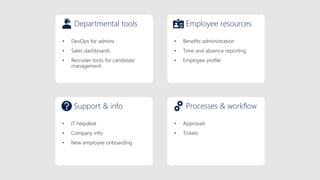
Departmental tools Employee resources
Support & info Processes & workflow
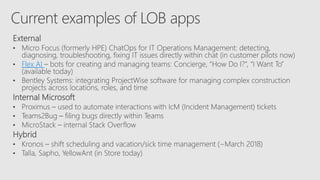
Flex AI
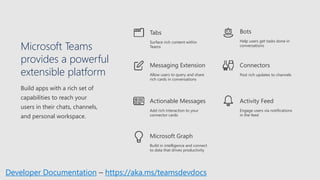
Microsoft Teams
provides a powerful
extensible platform
Build apps with a rich set of
capabilities to reach your
users in their chats, channels,
and personal workspace.
Connectors
Post rich updates to channels
Activity Feed
Engage users via notifications
in the feed
Bots
Help users get tasks done in
conversations
Actionable Messages
Add rich interaction to your
connector cards
Messaging Extension
Allow users to query and share
rich cards in conversations
Tabs
Surface rich content within
Teams
Build in intelligence and connect
to data that drives productivity
Microsoft Graph
Developer Documentation – https://aka.ms/teamsdevdocs
Example app:
Recruiting tool for HR
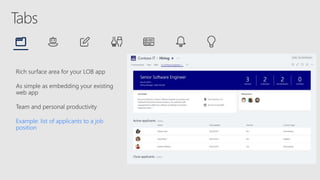
Rich surface area for your LOB app
As simple as embedding your existing
web app
Team and personal productivity
Example: list of applicants to a job
position
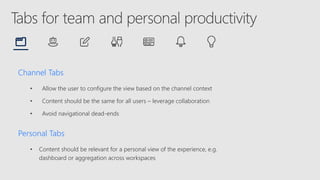
Channel Tabs
• Allow the user to configure the view based on the channel context
• Content should be the same for all users – leverage collaboration
• Avoid navigational dead-ends
Personal Tabs
• Content should be relevant for a personal view of the experience, e.g.
dashboard or aggregation across workspaces
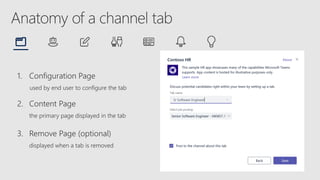
1. Configuration Page
used by end user to configure the tab
2. Content Page
the primary page displayed in the tab
3. Remove Page (optional)
displayed when a tab is removed
• Minimize context switching – make it easy for users to access what they need
• Leverage collaborative nature of the product
• Design for bite-size tasks – power users should use your full app
• Minimize extra chrome – focus on what you want the user to do
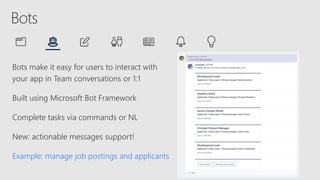
Bots make it easy for users to interact with
your app in Team conversations or 1:1
Built using Microsoft Bot Framework
Complete tasks via commands or NL
New: actionable messages support!
Example: manage job postings and applicants
• Whether used as a CLI or to manage workflows, ensure an experience that takes
advantage of natural language interaction
• Use cards and enhance with tabs to complete your experience
• Use context to provide the appropriate functionality in 1:1 chat vs. groups
• Use the input menu to keep your end users “on rails”
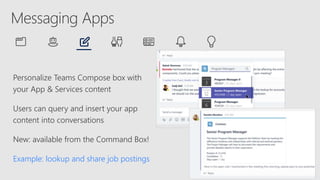
Personalize Teams Compose box with
your App & Services content
Users can query and insert your app
content into conversations
New: available from the Command Box!
Example: lookup and share job postings
• Return content that makes most sense in a chat or group context
• Take advantage of the various card types
• Optimize search results to keep it snappy and responsive
• Leverage Teams SDKs to easily add to your core Bot offering
Push rich interactive cards into channels
Users can take quick actions like comment, select options, set a date
Fully supported in Teams, Outlook, and Yammer
Example: notify the channel whenever a new candidate applies to a job
posting
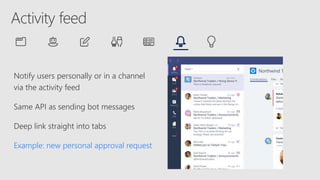
Notify users personally or in a channel
via the activity feed
Same API as sending bot messages
Deep link straight into tabs
Example: new personal approval request
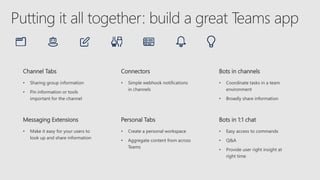
Channel Tabs
• Sharing group information
• Pin information or tools
important for the channel
Connectors
• Simple webhook notifications
in channels
Bots in channels
• Coordinate tasks in a team
environment
• Broadly share information
Messaging Extensions
• Make it easy for your users to
look up and share information
Personal Tabs
• Create a personal workspace
• Aggregate content from across
Teams
Bots in 1:1 chat
• Easy access to commands
• Q&A
• Provide user right insight at
right time
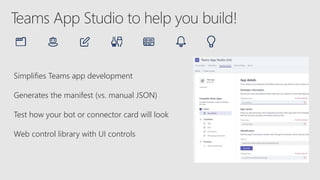
Simplifies Teams app development
Generates the manifest (vs. manual JSON)
Test how your bot or connector card will look
Web control library with UI controls
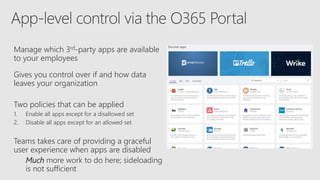
Manage which 3rd-party apps are available
to your employees
Gives you control over if and how data
leaves your organization
Two policies that can be applied
1. Enable all apps except for a disallowed set
2. Disable all apps except for an allowed set
Teams takes care of providing a graceful
user experience when apps are disabled
Much more work to do here; sideloading
is not sufficient
Integrate with the Microsoft Graph in your Teams app
Leverage existing Graph APIs like profile, groups, emails, and documents
Teams-specific APIs available today in Beta
• List of teams
• List of channels
• Create a channel
• Add Teams to an existing Office 365 Group
We are working hard to add new APIs and making them easier to use
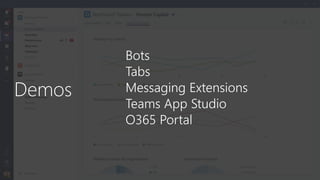
Bots
Tabs
Messaging Extensions
Teams App Studio
O365 Portal
Ms teams dev community call march 2018

Ms teams dev community call march 2018

  • 1.
    Microsoft Teams Developer communitycall March 1, 2018 8:00 AM PST Bill Bliss @bill_bliss
  • 2.
    Topics LOB App Scenariosand Platform Overview Demo of “Contoso HR” LOB app Q&A
  • 3.
    Create enterprise-specific solutionsfor enterprise end users by integrating with existing internal services and processes
  • 4.
    Departmental tools Employeeresources Support & info Processes & workflow
  • 5.
  • 6.
    Microsoft Teams provides apowerful extensible platform Build apps with a rich set of capabilities to reach your users in their chats, channels, and personal workspace. Connectors Post rich updates to channels Activity Feed Engage users via notifications in the feed Bots Help users get tasks done in conversations Actionable Messages Add rich interaction to your connector cards Messaging Extension Allow users to query and share rich cards in conversations Tabs Surface rich content within Teams Build in intelligence and connect to data that drives productivity Microsoft Graph Developer Documentation – https://aka.ms/teamsdevdocs
  • 7.
  • 8.
    Rich surface areafor your LOB app As simple as embedding your existing web app Team and personal productivity Example: list of applicants to a job position
  • 9.
    Channel Tabs • Allowthe user to configure the view based on the channel context • Content should be the same for all users – leverage collaboration • Avoid navigational dead-ends Personal Tabs • Content should be relevant for a personal view of the experience, e.g. dashboard or aggregation across workspaces
  • 10.
    1. Configuration Page usedby end user to configure the tab 2. Content Page the primary page displayed in the tab 3. Remove Page (optional) displayed when a tab is removed
  • 11.
    • Minimize contextswitching – make it easy for users to access what they need • Leverage collaborative nature of the product • Design for bite-size tasks – power users should use your full app • Minimize extra chrome – focus on what you want the user to do
  • 12.
    Bots make iteasy for users to interact with your app in Team conversations or 1:1 Built using Microsoft Bot Framework Complete tasks via commands or NL New: actionable messages support! Example: manage job postings and applicants
  • 13.
    • Whether usedas a CLI or to manage workflows, ensure an experience that takes advantage of natural language interaction • Use cards and enhance with tabs to complete your experience • Use context to provide the appropriate functionality in 1:1 chat vs. groups • Use the input menu to keep your end users “on rails”
  • 14.
    Personalize Teams Composebox with your App & Services content Users can query and insert your app content into conversations New: available from the Command Box! Example: lookup and share job postings
  • 15.
    • Return contentthat makes most sense in a chat or group context • Take advantage of the various card types • Optimize search results to keep it snappy and responsive • Leverage Teams SDKs to easily add to your core Bot offering
  • 16.
    Push rich interactivecards into channels Users can take quick actions like comment, select options, set a date Fully supported in Teams, Outlook, and Yammer Example: notify the channel whenever a new candidate applies to a job posting
  • 17.
    Notify users personallyor in a channel via the activity feed Same API as sending bot messages Deep link straight into tabs Example: new personal approval request
  • 18.
    Channel Tabs • Sharinggroup information • Pin information or tools important for the channel Connectors • Simple webhook notifications in channels Bots in channels • Coordinate tasks in a team environment • Broadly share information Messaging Extensions • Make it easy for your users to look up and share information Personal Tabs • Create a personal workspace • Aggregate content from across Teams Bots in 1:1 chat • Easy access to commands • Q&A • Provide user right insight at right time
  • 19.
    Simplifies Teams appdevelopment Generates the manifest (vs. manual JSON) Test how your bot or connector card will look Web control library with UI controls
  • 20.
    Manage which 3rd-partyapps are available to your employees Gives you control over if and how data leaves your organization Two policies that can be applied 1. Enable all apps except for a disallowed set 2. Disable all apps except for an allowed set Teams takes care of providing a graceful user experience when apps are disabled Much more work to do here; sideloading is not sufficient
  • 21.
    Integrate with theMicrosoft Graph in your Teams app Leverage existing Graph APIs like profile, groups, emails, and documents Teams-specific APIs available today in Beta • List of teams • List of channels • Create a channel • Add Teams to an existing Office 365 Group We are working hard to add new APIs and making them easier to use
  • 22.

Editor's Notes

  • #4 Land the point about why IT developers should be interested in building apps for their businesses. Give some examples
  • #5 Land the point about why IT developers should be interested in building apps for their businesses. Give some examples
  • #7 Quickly run through some of the key capabilities we support – will give deeper dive in coming sections
  • #9 Let’s start with tabs
  • #10 DEMO NEXT SLIDE
  • #13 DEMO NEXT SLIDE
  • #16 Follow up the previous section on bots by mentioning how messaging extensions can extend the bot functionality to allow users to query and share content
  • #19 If you have an app integrating with our APIs, it’s easy to make it ring the activity feed as well
  • #20 Quick recap of the capabilities
  • #21 Quick recap of the capabilities
  • #22 Top request from IT admin Delivered this in September Already have seen lots of tenants selectively enable apps More coming soon, e.g. LOB app distribution DEMO NEXT SLIDE
  • #23 - Integrate other O365 workloads into your app - Limited set of scenarios available today - Making it easier to call Graph APIs if you already have a bot
  • #24 Since you’re getting into the meat of the technical content here, I would recommend using this section to set up a few things: Defining the app via manifest Creating the app package using the manifest.json and icon files Side loading the app into Teams Once the setup is done, you can show the tab and code. I would recommend doing the following: Go through the config flow to pin the tab in a channel. Explain what’s going on during config Show the final result Jump into code editor and briefly explain what’s happening with the config.html and content.html pages. If possible, explain how it uses the JS library to integrate