Microsoft identity platform
April 16, 2020 | 9:00AM PST
Community call
Develop multi-tenant
applications secured with the
Microsoft identity platform
Kalyan Krishna
Microsoft
@kalyankrishna1
Aboutthissession
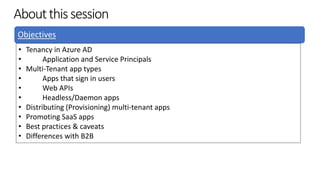
Objectives
• Tenancy in Azure AD
• Application and Service Principals
• Multi-Tenant app types
• Apps that sign in users
• Web APIs
• Headless/Daemon apps
• Distributing (Provisioning) multi-tenant apps
• Promoting SaaS apps
• Best practices & caveats
• Differences with B2B
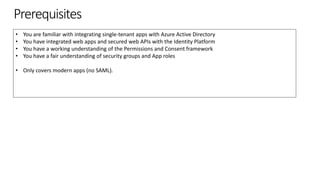
Prerequisites
• You are familiar with integrating single-tenant apps with Azure Active Directory
• You have integrated web apps and secured web APIs with the Identity Platform
• You have a working understanding of the Permissions and Consent framework
• You have a fair understanding of security groups and App roles
• Only covers modern apps (no SAML).
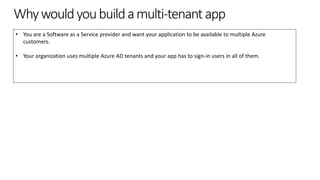
Whywouldyoubuildamulti-tenantapp
• You are a Software as a Service provider and want your application to be available to multiple Azure
customers.
• Your organization uses multiple Azure AD tenants and your app has to sign-in users in all of them.
https://aka.ms/identityplatform
Tenancy in Azure Active Directory
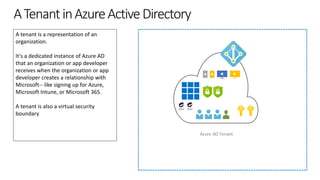
ATenantinAzureActiveDirectory
A tenant is a representation of an
organization.
It's a dedicated instance of Azure AD
that an organization or app developer
receives when the organization or app
developer creates a relationship with
Microsoft-- like signing up for Azure,
Microsoft Intune, or Microsoft 365.
A tenant is also a virtual security
boundary
Azure AD Tenant
Group Group
https://aka.ms/identityplatform
Application and Service Principals
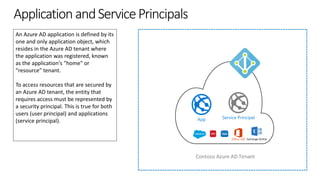
ApplicationandServicePrincipals
An Azure AD application is defined by its
one and only application object, which
resides in the Azure AD tenant where
the application was registered, known
as the application's "home" or
“resource” tenant.
To access resources that are secured by
an Azure AD tenant, the entity that
requires access must be represented by
a security principal. This is true for both
users (user principal) and applications
(service principal).
Contoso Azure AD Tenant
App Service Principal
Office 365 Exchange Online
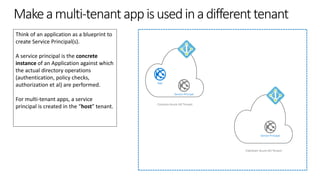
Makeamulti-tenantappisusedinadifferenttenant
Think of an application as a blueprint to
create Service Principal(s).
A service principal is the concrete
instance of an Application against which
the actual directory operations
(authentication, policy checks,
authorization et al) are performed.
For multi-tenant apps, a service
principal is created in the “host” tenant.
Fabrikam Azure AD Tenant
Contoso Azure AD Tenant
App
Service Principal
Service Principal
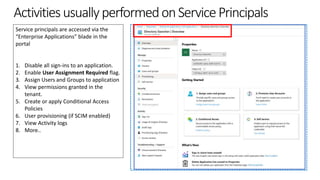
ActivitiesusuallyperformedonServicePrincipals
Service principals are accessed via the
“Enterprise Applications” blade in the
portal
1. Disable all sign-ins to an application.
2. Enable User Assignment Required flag.
3. Assign Users and Groups to application
4. View permissions granted in the
tenant.
5. Create or apply Conditional Access
Policies
6. User provisioning (if SCIM enabled)
7. View Activity logs
8. More..
https://aka.ms/identityplatform
Multi-tenant apps that sign in users
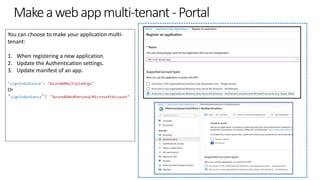
Makeawebappmulti-tenant-Portal
You can choose to make your application multi-
tenant:
1. When registering a new application.
2. Update the Authentication settings.
3. Update manifest of an app.
"signInAudience": "AzureADMultipleOrgs"
Or
"signInAudience": "AzureADAndPersonalMicrosoftAccount"
https://aka.ms/identityplatform
Demo:
Register an app as multi-tenant
How multi-tenant apps differ from single-tenant apps
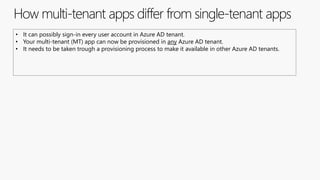
• It can possibly sign-in every user account in Azure AD tenant.
• Your multi-tenant (MT) app can now be provisioned in any Azure AD tenant.
• It needs to be taken trough a provisioning process to make it available in other Azure AD tenants.
Codechangestoamulti-tenantappthatsignsinusers
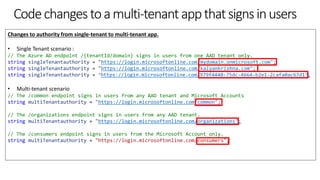
Changes to authority from single-tenant to multi-tenant app.
• Single Tenant scenario :
// The Azure AD endpoint /{tenantId/domain} signs in users from one AAD tenant only.
string singleTenantauthority = "https://login.microsoftonline.com/mydomain.onmicrosoft.com";
string singleTenantauthority = "https://login.microsoftonline.com/kalyankrishna.com";
string singleTenantauthority = "https://login.microsoftonline.com/979f4440-75dc-4664-b2e1-2cafa0ac67d1";
• Multi-tenant scenario
// The /common endpoint signs in users from any AAD tenant and Microsoft Accounts
string multiTenantauthority = "https://login.microsoftonline.com/common";
// The /organizations endpoint signs in users from any AAD tenant.
string multiTenantauthority = "https://login.microsoftonline.com/organizations";
// The /consumers endpoint signs in users from the Microsoft Account only.
string multiTenantauthority = "https://login.microsoftonline.com/consumers";
Codechangestoamulti-tenantappthatsignsinusers
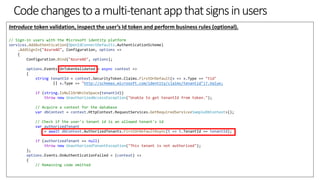
Introduce token validation, inspect the user’s Id token and perform business rules (optional).
// Sign-in users with the Microsoft identity platform
services.AddAuthentication(OpenIdConnectDefaults.AuthenticationScheme)
.AddSignIn("AzureAD", Configuration, options =>
{
Configuration.Bind("AzureAD", options);
options.Events.OnTokenValidated = async context =>
{
string tenantId = context.SecurityToken.Claims.FirstOrDefault(x => x.Type == "tid"
|| x.Type == "http://schemas.microsoft.com/identity/claims/tenantid")?.Value;
if (string.IsNullOrWhiteSpace(tenantId))
throw new UnauthorizedAccessException("Unable to get tenantId from token.");
// Acquire a context for the database
var dbContext = context.HttpContext.RequestServices.GetRequiredService<SampleDbContext>();
// Check if the user's tenant id is an allowed tenant's id
var authorizedTenant
= await dbContext.AuthorizedTenants.FirstOrDefaultAsync(t => t.TenantId == tenantId);
if (authorizedTenant == null)
throw new UnauthorizedTenantException("This tenant is not authorized");
};
options.Events.OnAuthenticationFailed = (context) =>
{
// Remaining code omitted
https://aka.ms/identityplatform
Multi-tenant Web APIs
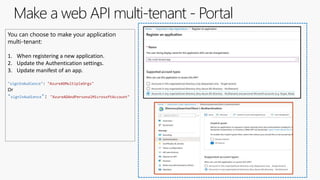
Make a web API multi-tenant - Portal
You can choose to make your application
multi-tenant:
1. When registering a new application.
2. Update the Authentication settings.
3. Update manifest of an app.
"signInAudience": "AzureADMultipleOrgs"
Or
"signInAudience": "AzureADAndPersonalMicrosoftAccount"
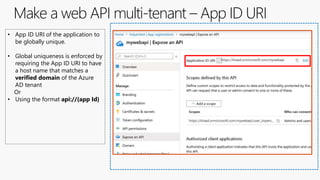
Make a web API multi-tenant – App ID URI
• App ID URI of the application to
be globally unique.
• Global uniqueness is enforced by
requiring the App ID URI to have
a host name that matches a
verified domain of the Azure
AD tenant
Or
• Using the format api://{app Id}
Code changes in a multi-tenant Web API
During token validation, inspect the access token and allow callers from all tenants
new WindowsAzureActiveDirectoryBearerAuthenticationOptions
{
Tenant = ConfigurationManager.AppSettings["ida:Tenant"],
TokenValidationParameters = new TokenValidationParameters
{
ValidAudience = ConfigurationManager.AppSettings["ida:Audience"],
// If you do not care which tenant the user came from, or sign-in users from any AAD tenant, then set this flag to false.
ValidateIssuer = false
},
});
Code changes in a multi-tenant Web API
During token validation, allow certain tenants.
new WindowsAzureActiveDirectoryBearerAuthenticationOptions
{
Tenant = ConfigurationManager.AppSettings["ida:Tenant"],
TokenValidationParameters = new TokenValidationParameters
{
ValidAudience = ConfigurationManager.AppSettings["ida:Audience"],
// When you wish to limit the tenants from where users can sign into this app, then set it to "true"
// and populate the ValidIssuers collections as explained above.
ValidateIssuer = true,
ValidIssuers = new List<string>()
{
"https://sts.windows.net/72f988bf-86f1-41af-91ab-2d7cd011db47/",
"https://login.microsoftonline.com/161335b9-9e1b-4386-bb58-160a62e6c889/v2.0",
"https://login.microsoftonline.com/c72a295d-d7a5-41ea-a351-b15dd9f67215/v2.0"
},
},
});
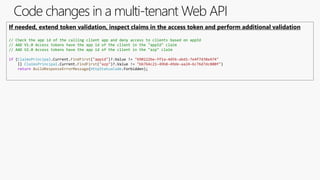
Code changes in a multi-tenant Web API
If needed, extend token validation, inspect claims in the access token and perform additional validation
// Check the app id of the calling client app and deny access to clients based on appId
// AAD V1.0 Access tokens have the app id of the client in the "appId" claim
// AAD V2.0 Access tokens have the app id of the client in the "azp" claim
if (ClaimsPrincipal.Current.FindFirst("appid")?.Value != "690222be-ff1a-4d56-abd1-7e4f7d38e474"
|| ClaimsPrincipal.Current.FindFirst("azp")?.Value != "bb764c21-49b8-49de-aa24-6c76d7dc800f")
return BuildResponseErrorMessage(HttpStatusCode.Forbidden);
How multi-tenant Web API api differ from single-tenant ones
• Your multi-tenant (MT) api can now be provisioned in any Azure AD tenant.
• Its published permissions can be consumed by both single tenant and multi-tenant apps.
• It needs to be provisioned in an Azure AD tenant before the clients that are dependent on it can use it.
• Microsoft Graph is the most popular multi-tenant Web API.
https://aka.ms/identityplatform
Daemon/Headless multi-tenant apps
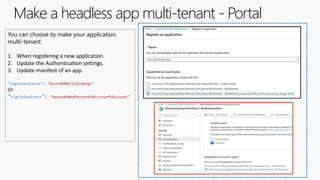
Make a headless app multi-tenant - Portal
You can choose to make your application
multi-tenant:
1. When registering a new application.
2. Update the Authentication settings.
3. Update manifest of an app.
"signInAudience": "AzureADMultipleOrgs"
Or
"signInAudience": "AzureADAndPersonalMicrosoftAccount"
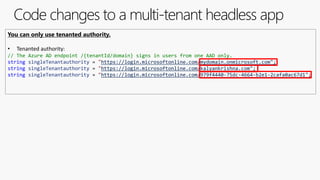
Code changes to a multi-tenant headless app
You can only use tenanted authority.
• Tenanted authority:
// The Azure AD endpoint /{tenantId/domain} signs in users from one AAD only.
string singleTenantauthority = "https://login.microsoftonline.com/mydomain.onmicrosoft.com";
string singleTenantauthority = "https://login.microsoftonline.com/kalyankrishna.com";
string singleTenantauthority = "https://login.microsoftonline.com/979f4440-75dc-4664-b2e1-2cafa0ac67d1";
Multi-tenant headless apps
• Headless/Daemon apps use the Client-credentials Flow to obtain Access tokens for other APIs.
• They cannot use the multiplexers (/common endpoint) as Azure AD has no way to find out in which
tenant you wanted to obtain a token in.
• Multiplexers use the login name provided by the user to locate their tenant.
https://aka.ms/identityplatform
Questions
https://aka.ms/identityplatform
Distributing (Provisioning)
multi-tenant apps
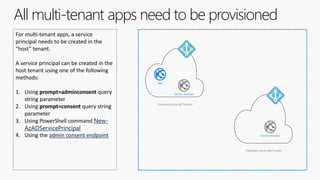
All multi-tenant apps need to be provisioned
For multi-tenant apps, a service
principal needs to be created in the
“host” tenant.
A service principal can be created in the
host tenant using one of the following
methods:
1. Using prompt=adminconsent query
string parameter
2. Using prompt=consent query string
parameter
3. Using PowerShell command New-
AzADServicePrincipal
4. Using the admin consent endpoint
Fabrikam Azure AD Tenant
Contoso Azure AD Tenant
App
Service Principal
Service Principal
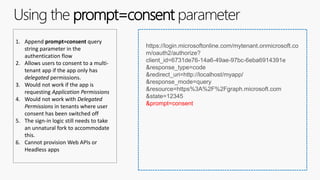
Using the prompt=consent parameter
1. Append prompt=consent query
string parameter in the
authentication flow
2. Allows users to consent to a multi-
tenant app if the app only has
delegated permissions.
3. Would not work if the app is
requesting Application Permissions
4. Would not work with Delegated
Permissions in tenants where user
consent has been switched off
5. The sign-in logic still needs to take
an unnatural fork to accommodate
this.
6. Cannot provision Web APIs or
Headless apps
https://login.microsoftonline.com/mytenant.onmicrosoft.co
m/oauth2/authorize?
client_id=6731de76-14a6-49ae-97bc-6eba6914391e
&response_type=code
&redirect_uri=http://localhost/myapp/
&response_mode=query
&resource=https%3A%2F%2Fgraph.microsoft.com
&state=12345
&prompt=consent
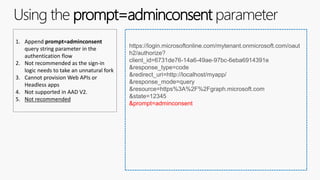
Using the prompt=adminconsent parameter
1. Append prompt=adminconsent
query string parameter in the
authentication flow
2. Not recommended as the sign-in
logic needs to take an unnatural fork
3. Cannot provision Web APIs or
Headless apps
4. Not supported in AAD V2.
5. Not recommended
https://login.microsoftonline.com/mytenant.onmicrosoft.com/oaut
h2/authorize?
client_id=6731de76-14a6-49ae-97bc-6eba6914391e
&response_type=code
&redirect_uri=http://localhost/myapp/
&response_mode=query
&resource=https%3A%2F%2Fgraph.microsoft.com
&state=12345
&prompt=adminconsent
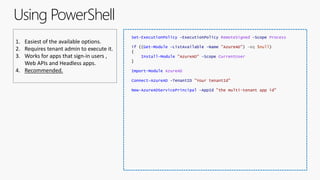
Using PowerShell
1. Easiest of the available options.
2. Requires tenant admin to execute it.
3. Works for apps that sign-in users ,
Web APIs and Headless apps.
4. Recommended.
Set-ExecutionPolicy -ExecutionPolicy RemoteSigned -Scope Process
if ((Get-Module -ListAvailable -Name "AzureAD") -eq $null)
{
Install-Module "AzureAD" -Scope CurrentUser
}
Import-Module AzureAD
Connect-AzureAD -TenantID "Your tenantId"
New-AzureADServicePrincipal -AppId "the multi-tenant app id"
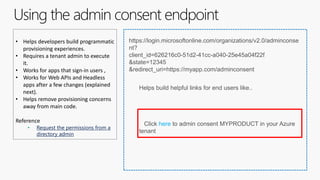
Using the admin consent endpoint
• Helps developers build programmatic
provisioning experiences.
• Requires a tenant admin to execute
it.
• Works for apps that sign-in users ,
• Works for Web APIs and Headless
apps after a few changes (explained
next).
• Helps remove provisioning concerns
away from main code.
Reference
• Request the permissions from a
directory admin
https://login.microsoftonline.com/organizations/v2.0/adminconse
nt?
client_id=626216c0-51d2-41cc-a040-25e45a04f22f
&state=12345
&redirect_uri=https://myapp.com/adminconsent
Helps build helpful links for end users like..
Click here to admin consent MYPRODUCT in your Azure
tenant
https://aka.ms/identityplatform
Demo:
Provisioning using admin consent
Order of provisioning for multiple apps
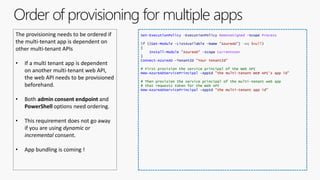
The provisioning needs to be ordered if
the multi-tenant app is dependent on
other multi-tenant APIs
• If a multi tenant app is dependent
on another multi-tenant web API,
the web API needs to be provisioned
beforehand.
• Both admin consent endpoint and
PowerShell options need ordering.
• This requirement does not go away
if you are using dynamic or
incremental consent.
• App bundling is coming !
Set-ExecutionPolicy -ExecutionPolicy RemoteSigned -Scope Process
if ((Get-Module -ListAvailable -Name "AzureAD") -eq $null)
{
Install-Module "AzureAD" -Scope CurrentUser
}
Connect-AzureAD -TenantID "Your tenantId"
# First provision the service principal of the Web API
New-AzureADServicePrincipal -AppId "the multi-tenant WEB API’s app id"
# Then provision the service principal of the multi-tenant web app
# that requests token for the Web API
New-AzureADServicePrincipal -AppId "the multi-tenant app id"
Order of provisioning for multiple apps
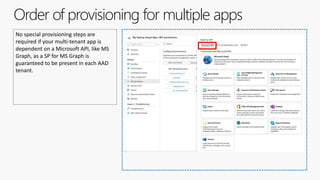
No special provisioning steps are
required if your multi-tenant app is
dependent on a Microsoft API, like MS
Graph, as a SP for MS Graph is
guaranteed to be present in each AAD
tenant.
Special considerations for Web APIs and Headless apps
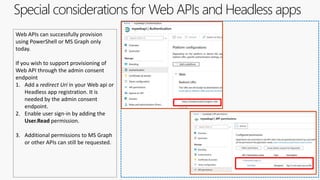
Web APIs can successfully provision
using PowerShell or MS Graph only
today.
If you wish to support provisioning of
Web API through the admin consent
endpoint
1. Add a redirect Uri in your Web api or
Headless app registration. It is
needed by the admin consent
endpoint.
2. Enable user sign-in by adding the
User.Read permission.
3. Additional permissions to MS Graph
or other APIs can still be requested.
https://aka.ms/identityplatform
Questions
https://aka.ms/identityplatform
Promoting SaaS apps
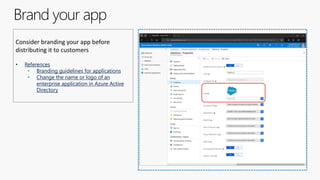
Brand your app
Consider branding your app before
distributing it to customers
• References
• Branding guidelines for applications
• Change the name or logo of an
enterprise application in Azure Active
Directory
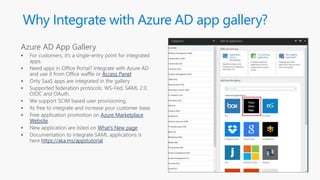
Why Integrate with Azure AD app gallery?
Access Panel
Azure Marketplace
Website
What’s New page
https://aka.ms/appstutorial
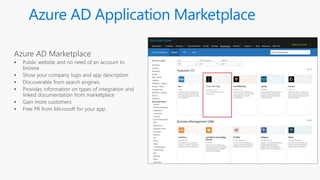
Azure AD Application Marketplace
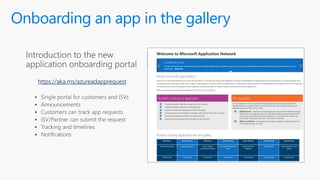
Onboarding an app in the gallery
https://aka.ms/azureadapprequest
https://aka.ms/identityplatform
Questions
https://aka.ms/identityplatform
Best practices & Caveats
Best practices and Caveats
• Carefully choose your permissions. Use the least privilege principal.
• Not all host tenants will comfortably grant admin consent for highly privileged permissions.
• Use App roles instead of Groups to scale across multiple tenants.
• Group names that you desire is not guaranteed to be available in each host tenant.
• Log the tenant Ids of users signing-in to your app.
• You might need to reach out to tenant owners later.
• Use a library like MSAL to effectively sign-in users and reap benefits like correctly cache tokens for
multi-tenant scenarios.
• Carefully consider the extra effort required when using optional claims like directory extensions as
extra steps are needed beyond service principal provisioning.
Propagating app changes
• Changes to apps, redirect URIs, permissions are reflected in the Service Principal (SP) of the home
tenant only.
• Deleting SPs in other tenants can potentially make your app unusable to all users in all host
tenants.
• It might affect the work performed on your SP in a host tenant, like user assignments and CA
policy enforcement
• To propagate changes to your app’s service principals
• Reach out to your customers with guidance on how to perform admin consent again.
https://aka.ms/identityplatform
Differences with B2B
B2B versus building a multi-tenant app
• Advantages:
• Programming model is simpler.
• App management is easier, as it’s a single-tenant app.
• No extra effort to block external user access.
• Service principal provisioning is not required.
• Only works if the number of users is small.
• Disadvantages
• Would not scale if you need to address a large population of users.
• Users in the tenant bloat and licensing cost of the home tenant would go up.
• User lifecycle management is not possible
• No access to data being held in Graph or Azure APIs for guest users in their home tenant.
• Tenant admins for Home tenants might not wish to invite a large number of guest users.
• Tenant admins for host tenants would not prefer their users signing in as guests in other tenants.
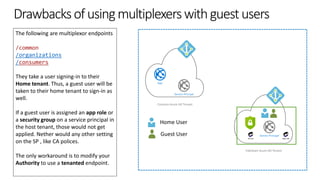
Drawbacksofusingmultiplexerswithguestusers
The following are multiplexor endpoints
/common
/organizations
/consumers
They take a user signing-in to their
Home tenant. Thus, a guest user will be
taken to their home tenant to sign-in as
well.
If a guest user is assigned an app role or
a security group on a service principal in
the host tenant, those would not get
applied. Nether would any other setting
on the SP , like CA polices.
The only workaround is to modify your
Authority to use a tenanted endpoint.
Fabrikam Azure AD Tenant
Contoso Azure AD Tenant
App
Service Principal
Service Principal
Group App role
Home User
Guest User
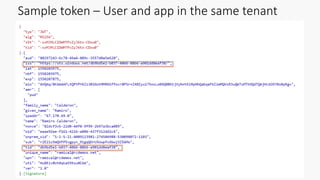
Sample token – User and app in the same tenant
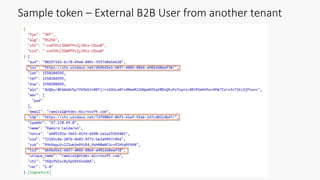
Sample token – External B2B User from another tenant
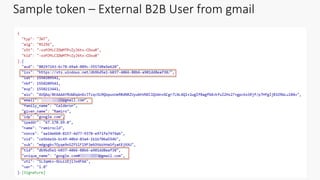
Sample token – External B2B User from gmail
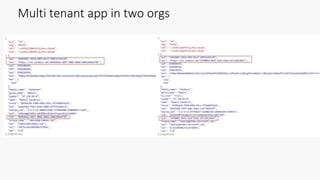
Multi tenant app in two orgs
https://aka.ms/identityplatform
Questions
References
and
Samples
What is Azure Active Directory?
Set up a tenant
Application and service principal objects in Azure Active Directory
Azure Active Directory app manifest
Authentication flows and application scenarios
Authority Endpoints
New-AzureADServicePrincipal
Create a Service Principal using the admin consent endpoint
Branding guidelines for applications
Change the name or logo of an enterprise application in Azure Active Directory
Microsoft identity platform developer documentation
Guide: Sign in any Azure Active Directory user using the multi-tenant application
pattern
Azure Active Directory B2B documentation
Sample: Build a multi-tenant SaaS web application using Azure AD
Sample: Extended Token Validation sample
Sample: Add authorization using app roles & roles claims to an app
Microsoft 365
https://aka.ms/adaptivecardscommunitycall
https://aka.ms/microsoftgraphcall
https://aka.ms/IDDevCommunityCalendar
https://aka.ms/microsoftteamscommunitycall
https://aka.ms/officeaddinscommunitycall
https://aka.ms/PowerAppsMonthlyCall
https://aka.ms/spdev-call
https://aka.ms/spdev-sig-call
https://aka.ms/spdev-spfx-call
https://aka.ms/M365DevCalls
Join the Developer Program
Benefits
Free renewable Office 365 E5 subscription
Be your own admin
Dev sandbox creation tools
Preload sample users and data for Microsoft Graph, and more
Access to Microsoft 365 experts
Join bootcamps and monthly community calls
Tools, training and documentation
Learn, discover and explore about Office 365 development
Blogs, newsletters and social
Stay up to date with the community
https://aka.ms/o365devprogram
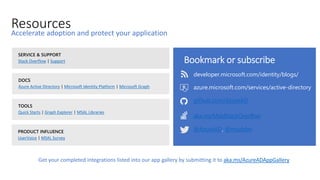
Resources
Stack Overflow Support
@AzureAD, @msiddev
developer.microsoft.com/identity/blogs/
Azure Active Directory Microsoft Identity Platform Microsoft Graph
Quick Starts Graph Explorer MSAL Libraries
UserVoice MSAL Survey
github.com/AzureAD
aka.ms/MsIdStackOverflow
azure.microsoft.com/services/active-directory
aka.ms/AzureADAppGallery
Microsoft Confidential
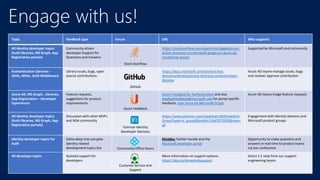
Engage with us!
Topic Feedback type Forum URL Who supports
All identity developer topics
(Auth libraries, MS Graph, App
Registration portals)
Community-driven
developer Support for
Questions and Answers
Stack Overflow
https://stackoverflow.com/questions/tagged/azure-
active-directory+or+microsoft-graph+or+azure-ad-
conditional-access
Supported by Microsoft and community
Authentication Libraries –
ADAL, MSAL, Auth Middleware
Library issues, bugs, open
source contributions
GitHub
https://docs.microsoft.com/azure/active-
directory/develop/active-directory-authentication-
libraries
Azure AD teams manage issues, bugs
and review/ approve contribution
Azure AD, MS Graph, Libraries,
App Registration – Developer
Experiences
Feature requests,
suggestions for product
improvements
Azure Feedback
Azure Feedback for Authentication and also
AppRegFeedback@microsoft.com for portal specific
feedback. User Voice for Microsoft Graph
Azure AD teams triage feature requests
All identity developer topics
(Auth libraries, MS Graph, App
Registration portals)
Discussion with other MVPs
and NDA community
Yammer Identity
Developer Advisors
https://www.yammer.com/cepartners/#/threads/in
Group?type=in_group&feedId=13045972992&view=
all
Engagement with Identity Advisors and
Microsoft product groups
Identity developer topics for
Auth
Delve deep into complex
identity related
development topics live Community Office Hours
Msiddev Twitter handle and the
Microsoft developer portal
Opportunity to make questions and
answers in real time to product teams
via live conference
All developer topics Assisted support for
developers
Customer Service and
Support
More information on support options:
https://aka.ms/devexhelpsupport
Direct 1:1 help from our support
engineering teams
Recording will be available soon on our
Microsoft 365 Developer YouTube channel
https://aka.ms/M365DevYouTube
(subscribe today)
Follow us on Twitter
@Microsoft365Dev and @azuread
Next call: May 21st at 09:00am PST
https://aka.ms/IDDevCommunityCalendar
Thank you

Community call: Develop multi tenant apps with the Microsoft identity platform

  • 1.
    Microsoft identity platform April16, 2020 | 9:00AM PST Community call Develop multi-tenant applications secured with the Microsoft identity platform Kalyan Krishna Microsoft @kalyankrishna1
  • 2.
    Aboutthissession Objectives • Tenancy inAzure AD • Application and Service Principals • Multi-Tenant app types • Apps that sign in users • Web APIs • Headless/Daemon apps • Distributing (Provisioning) multi-tenant apps • Promoting SaaS apps • Best practices & caveats • Differences with B2B
  • 3.
    Prerequisites • You arefamiliar with integrating single-tenant apps with Azure Active Directory • You have integrated web apps and secured web APIs with the Identity Platform • You have a working understanding of the Permissions and Consent framework • You have a fair understanding of security groups and App roles • Only covers modern apps (no SAML).
  • 4.
    Whywouldyoubuildamulti-tenantapp • You area Software as a Service provider and want your application to be available to multiple Azure customers. • Your organization uses multiple Azure AD tenants and your app has to sign-in users in all of them.
  • 5.
  • 6.
    ATenantinAzureActiveDirectory A tenant isa representation of an organization. It's a dedicated instance of Azure AD that an organization or app developer receives when the organization or app developer creates a relationship with Microsoft-- like signing up for Azure, Microsoft Intune, or Microsoft 365. A tenant is also a virtual security boundary Azure AD Tenant Group Group
  • 7.
  • 8.
    ApplicationandServicePrincipals An Azure ADapplication is defined by its one and only application object, which resides in the Azure AD tenant where the application was registered, known as the application's "home" or “resource” tenant. To access resources that are secured by an Azure AD tenant, the entity that requires access must be represented by a security principal. This is true for both users (user principal) and applications (service principal). Contoso Azure AD Tenant App Service Principal Office 365 Exchange Online
  • 9.
    Makeamulti-tenantappisusedinadifferenttenant Think of anapplication as a blueprint to create Service Principal(s). A service principal is the concrete instance of an Application against which the actual directory operations (authentication, policy checks, authorization et al) are performed. For multi-tenant apps, a service principal is created in the “host” tenant. Fabrikam Azure AD Tenant Contoso Azure AD Tenant App Service Principal Service Principal
  • 10.
    ActivitiesusuallyperformedonServicePrincipals Service principals areaccessed via the “Enterprise Applications” blade in the portal 1. Disable all sign-ins to an application. 2. Enable User Assignment Required flag. 3. Assign Users and Groups to application 4. View permissions granted in the tenant. 5. Create or apply Conditional Access Policies 6. User provisioning (if SCIM enabled) 7. View Activity logs 8. More..
  • 11.
  • 12.
    Makeawebappmulti-tenant-Portal You can chooseto make your application multi- tenant: 1. When registering a new application. 2. Update the Authentication settings. 3. Update manifest of an app. "signInAudience": "AzureADMultipleOrgs" Or "signInAudience": "AzureADAndPersonalMicrosoftAccount"
  • 13.
  • 14.
    How multi-tenant appsdiffer from single-tenant apps • It can possibly sign-in every user account in Azure AD tenant. • Your multi-tenant (MT) app can now be provisioned in any Azure AD tenant. • It needs to be taken trough a provisioning process to make it available in other Azure AD tenants.
  • 15.
    Codechangestoamulti-tenantappthatsignsinusers Changes to authorityfrom single-tenant to multi-tenant app. • Single Tenant scenario : // The Azure AD endpoint /{tenantId/domain} signs in users from one AAD tenant only. string singleTenantauthority = "https://login.microsoftonline.com/mydomain.onmicrosoft.com"; string singleTenantauthority = "https://login.microsoftonline.com/kalyankrishna.com"; string singleTenantauthority = "https://login.microsoftonline.com/979f4440-75dc-4664-b2e1-2cafa0ac67d1"; • Multi-tenant scenario // The /common endpoint signs in users from any AAD tenant and Microsoft Accounts string multiTenantauthority = "https://login.microsoftonline.com/common"; // The /organizations endpoint signs in users from any AAD tenant. string multiTenantauthority = "https://login.microsoftonline.com/organizations"; // The /consumers endpoint signs in users from the Microsoft Account only. string multiTenantauthority = "https://login.microsoftonline.com/consumers";
  • 16.
    Codechangestoamulti-tenantappthatsignsinusers Introduce token validation,inspect the user’s Id token and perform business rules (optional). // Sign-in users with the Microsoft identity platform services.AddAuthentication(OpenIdConnectDefaults.AuthenticationScheme) .AddSignIn("AzureAD", Configuration, options => { Configuration.Bind("AzureAD", options); options.Events.OnTokenValidated = async context => { string tenantId = context.SecurityToken.Claims.FirstOrDefault(x => x.Type == "tid" || x.Type == "http://schemas.microsoft.com/identity/claims/tenantid")?.Value; if (string.IsNullOrWhiteSpace(tenantId)) throw new UnauthorizedAccessException("Unable to get tenantId from token."); // Acquire a context for the database var dbContext = context.HttpContext.RequestServices.GetRequiredService<SampleDbContext>(); // Check if the user's tenant id is an allowed tenant's id var authorizedTenant = await dbContext.AuthorizedTenants.FirstOrDefaultAsync(t => t.TenantId == tenantId); if (authorizedTenant == null) throw new UnauthorizedTenantException("This tenant is not authorized"); }; options.Events.OnAuthenticationFailed = (context) => { // Remaining code omitted
  • 17.
  • 18.
    Make a webAPI multi-tenant - Portal You can choose to make your application multi-tenant: 1. When registering a new application. 2. Update the Authentication settings. 3. Update manifest of an app. "signInAudience": "AzureADMultipleOrgs" Or "signInAudience": "AzureADAndPersonalMicrosoftAccount"
  • 19.
    Make a webAPI multi-tenant – App ID URI • App ID URI of the application to be globally unique. • Global uniqueness is enforced by requiring the App ID URI to have a host name that matches a verified domain of the Azure AD tenant Or • Using the format api://{app Id}
  • 20.
    Code changes ina multi-tenant Web API During token validation, inspect the access token and allow callers from all tenants new WindowsAzureActiveDirectoryBearerAuthenticationOptions { Tenant = ConfigurationManager.AppSettings["ida:Tenant"], TokenValidationParameters = new TokenValidationParameters { ValidAudience = ConfigurationManager.AppSettings["ida:Audience"], // If you do not care which tenant the user came from, or sign-in users from any AAD tenant, then set this flag to false. ValidateIssuer = false }, });
  • 21.
    Code changes ina multi-tenant Web API During token validation, allow certain tenants. new WindowsAzureActiveDirectoryBearerAuthenticationOptions { Tenant = ConfigurationManager.AppSettings["ida:Tenant"], TokenValidationParameters = new TokenValidationParameters { ValidAudience = ConfigurationManager.AppSettings["ida:Audience"], // When you wish to limit the tenants from where users can sign into this app, then set it to "true" // and populate the ValidIssuers collections as explained above. ValidateIssuer = true, ValidIssuers = new List<string>() { "https://sts.windows.net/72f988bf-86f1-41af-91ab-2d7cd011db47/", "https://login.microsoftonline.com/161335b9-9e1b-4386-bb58-160a62e6c889/v2.0", "https://login.microsoftonline.com/c72a295d-d7a5-41ea-a351-b15dd9f67215/v2.0" }, }, });
  • 22.
    Code changes ina multi-tenant Web API If needed, extend token validation, inspect claims in the access token and perform additional validation // Check the app id of the calling client app and deny access to clients based on appId // AAD V1.0 Access tokens have the app id of the client in the "appId" claim // AAD V2.0 Access tokens have the app id of the client in the "azp" claim if (ClaimsPrincipal.Current.FindFirst("appid")?.Value != "690222be-ff1a-4d56-abd1-7e4f7d38e474" || ClaimsPrincipal.Current.FindFirst("azp")?.Value != "bb764c21-49b8-49de-aa24-6c76d7dc800f") return BuildResponseErrorMessage(HttpStatusCode.Forbidden);
  • 23.
    How multi-tenant WebAPI api differ from single-tenant ones • Your multi-tenant (MT) api can now be provisioned in any Azure AD tenant. • Its published permissions can be consumed by both single tenant and multi-tenant apps. • It needs to be provisioned in an Azure AD tenant before the clients that are dependent on it can use it. • Microsoft Graph is the most popular multi-tenant Web API.
  • 24.
  • 25.
    Make a headlessapp multi-tenant - Portal You can choose to make your application multi-tenant: 1. When registering a new application. 2. Update the Authentication settings. 3. Update manifest of an app. "signInAudience": "AzureADMultipleOrgs" Or "signInAudience": "AzureADAndPersonalMicrosoftAccount"
  • 26.
    Code changes toa multi-tenant headless app You can only use tenanted authority. • Tenanted authority: // The Azure AD endpoint /{tenantId/domain} signs in users from one AAD only. string singleTenantauthority = "https://login.microsoftonline.com/mydomain.onmicrosoft.com"; string singleTenantauthority = "https://login.microsoftonline.com/kalyankrishna.com"; string singleTenantauthority = "https://login.microsoftonline.com/979f4440-75dc-4664-b2e1-2cafa0ac67d1";
  • 27.
    Multi-tenant headless apps •Headless/Daemon apps use the Client-credentials Flow to obtain Access tokens for other APIs. • They cannot use the multiplexers (/common endpoint) as Azure AD has no way to find out in which tenant you wanted to obtain a token in. • Multiplexers use the login name provided by the user to locate their tenant.
  • 28.
  • 29.
  • 30.
    All multi-tenant appsneed to be provisioned For multi-tenant apps, a service principal needs to be created in the “host” tenant. A service principal can be created in the host tenant using one of the following methods: 1. Using prompt=adminconsent query string parameter 2. Using prompt=consent query string parameter 3. Using PowerShell command New- AzADServicePrincipal 4. Using the admin consent endpoint Fabrikam Azure AD Tenant Contoso Azure AD Tenant App Service Principal Service Principal
  • 31.
    Using the prompt=consentparameter 1. Append prompt=consent query string parameter in the authentication flow 2. Allows users to consent to a multi- tenant app if the app only has delegated permissions. 3. Would not work if the app is requesting Application Permissions 4. Would not work with Delegated Permissions in tenants where user consent has been switched off 5. The sign-in logic still needs to take an unnatural fork to accommodate this. 6. Cannot provision Web APIs or Headless apps https://login.microsoftonline.com/mytenant.onmicrosoft.co m/oauth2/authorize? client_id=6731de76-14a6-49ae-97bc-6eba6914391e &response_type=code &redirect_uri=http://localhost/myapp/ &response_mode=query &resource=https%3A%2F%2Fgraph.microsoft.com &state=12345 &prompt=consent
  • 32.
    Using the prompt=adminconsentparameter 1. Append prompt=adminconsent query string parameter in the authentication flow 2. Not recommended as the sign-in logic needs to take an unnatural fork 3. Cannot provision Web APIs or Headless apps 4. Not supported in AAD V2. 5. Not recommended https://login.microsoftonline.com/mytenant.onmicrosoft.com/oaut h2/authorize? client_id=6731de76-14a6-49ae-97bc-6eba6914391e &response_type=code &redirect_uri=http://localhost/myapp/ &response_mode=query &resource=https%3A%2F%2Fgraph.microsoft.com &state=12345 &prompt=adminconsent
  • 33.
    Using PowerShell 1. Easiestof the available options. 2. Requires tenant admin to execute it. 3. Works for apps that sign-in users , Web APIs and Headless apps. 4. Recommended. Set-ExecutionPolicy -ExecutionPolicy RemoteSigned -Scope Process if ((Get-Module -ListAvailable -Name "AzureAD") -eq $null) { Install-Module "AzureAD" -Scope CurrentUser } Import-Module AzureAD Connect-AzureAD -TenantID "Your tenantId" New-AzureADServicePrincipal -AppId "the multi-tenant app id"
  • 34.
    Using the adminconsent endpoint • Helps developers build programmatic provisioning experiences. • Requires a tenant admin to execute it. • Works for apps that sign-in users , • Works for Web APIs and Headless apps after a few changes (explained next). • Helps remove provisioning concerns away from main code. Reference • Request the permissions from a directory admin https://login.microsoftonline.com/organizations/v2.0/adminconse nt? client_id=626216c0-51d2-41cc-a040-25e45a04f22f &state=12345 &redirect_uri=https://myapp.com/adminconsent Helps build helpful links for end users like.. Click here to admin consent MYPRODUCT in your Azure tenant
  • 35.
  • 36.
    Order of provisioningfor multiple apps The provisioning needs to be ordered if the multi-tenant app is dependent on other multi-tenant APIs • If a multi tenant app is dependent on another multi-tenant web API, the web API needs to be provisioned beforehand. • Both admin consent endpoint and PowerShell options need ordering. • This requirement does not go away if you are using dynamic or incremental consent. • App bundling is coming ! Set-ExecutionPolicy -ExecutionPolicy RemoteSigned -Scope Process if ((Get-Module -ListAvailable -Name "AzureAD") -eq $null) { Install-Module "AzureAD" -Scope CurrentUser } Connect-AzureAD -TenantID "Your tenantId" # First provision the service principal of the Web API New-AzureADServicePrincipal -AppId "the multi-tenant WEB API’s app id" # Then provision the service principal of the multi-tenant web app # that requests token for the Web API New-AzureADServicePrincipal -AppId "the multi-tenant app id"
  • 37.
    Order of provisioningfor multiple apps No special provisioning steps are required if your multi-tenant app is dependent on a Microsoft API, like MS Graph, as a SP for MS Graph is guaranteed to be present in each AAD tenant.
  • 38.
    Special considerations forWeb APIs and Headless apps Web APIs can successfully provision using PowerShell or MS Graph only today. If you wish to support provisioning of Web API through the admin consent endpoint 1. Add a redirect Uri in your Web api or Headless app registration. It is needed by the admin consent endpoint. 2. Enable user sign-in by adding the User.Read permission. 3. Additional permissions to MS Graph or other APIs can still be requested.
  • 39.
  • 40.
  • 41.
    Brand your app Considerbranding your app before distributing it to customers • References • Branding guidelines for applications • Change the name or logo of an enterprise application in Azure Active Directory
  • 42.
    Why Integrate withAzure AD app gallery? Access Panel Azure Marketplace Website What’s New page https://aka.ms/appstutorial
  • 43.
  • 44.
    Onboarding an appin the gallery https://aka.ms/azureadapprequest
  • 45.
  • 46.
  • 47.
    Best practices andCaveats • Carefully choose your permissions. Use the least privilege principal. • Not all host tenants will comfortably grant admin consent for highly privileged permissions. • Use App roles instead of Groups to scale across multiple tenants. • Group names that you desire is not guaranteed to be available in each host tenant. • Log the tenant Ids of users signing-in to your app. • You might need to reach out to tenant owners later. • Use a library like MSAL to effectively sign-in users and reap benefits like correctly cache tokens for multi-tenant scenarios. • Carefully consider the extra effort required when using optional claims like directory extensions as extra steps are needed beyond service principal provisioning.
  • 48.
    Propagating app changes •Changes to apps, redirect URIs, permissions are reflected in the Service Principal (SP) of the home tenant only. • Deleting SPs in other tenants can potentially make your app unusable to all users in all host tenants. • It might affect the work performed on your SP in a host tenant, like user assignments and CA policy enforcement • To propagate changes to your app’s service principals • Reach out to your customers with guidance on how to perform admin consent again.
  • 49.
  • 50.
    B2B versus buildinga multi-tenant app • Advantages: • Programming model is simpler. • App management is easier, as it’s a single-tenant app. • No extra effort to block external user access. • Service principal provisioning is not required. • Only works if the number of users is small. • Disadvantages • Would not scale if you need to address a large population of users. • Users in the tenant bloat and licensing cost of the home tenant would go up. • User lifecycle management is not possible • No access to data being held in Graph or Azure APIs for guest users in their home tenant. • Tenant admins for Home tenants might not wish to invite a large number of guest users. • Tenant admins for host tenants would not prefer their users signing in as guests in other tenants.
  • 51.
    Drawbacksofusingmultiplexerswithguestusers The following aremultiplexor endpoints /common /organizations /consumers They take a user signing-in to their Home tenant. Thus, a guest user will be taken to their home tenant to sign-in as well. If a guest user is assigned an app role or a security group on a service principal in the host tenant, those would not get applied. Nether would any other setting on the SP , like CA polices. The only workaround is to modify your Authority to use a tenanted endpoint. Fabrikam Azure AD Tenant Contoso Azure AD Tenant App Service Principal Service Principal Group App role Home User Guest User
  • 52.
    Sample token –User and app in the same tenant
  • 53.
    Sample token –External B2B User from another tenant
  • 54.
    Sample token –External B2B User from gmail
  • 55.
    Multi tenant appin two orgs
  • 56.
  • 57.
    References and Samples What is AzureActive Directory? Set up a tenant Application and service principal objects in Azure Active Directory Azure Active Directory app manifest Authentication flows and application scenarios Authority Endpoints New-AzureADServicePrincipal Create a Service Principal using the admin consent endpoint Branding guidelines for applications Change the name or logo of an enterprise application in Azure Active Directory Microsoft identity platform developer documentation Guide: Sign in any Azure Active Directory user using the multi-tenant application pattern Azure Active Directory B2B documentation Sample: Build a multi-tenant SaaS web application using Azure AD Sample: Extended Token Validation sample Sample: Add authorization using app roles & roles claims to an app
  • 58.
  • 59.
    Join the DeveloperProgram Benefits Free renewable Office 365 E5 subscription Be your own admin Dev sandbox creation tools Preload sample users and data for Microsoft Graph, and more Access to Microsoft 365 experts Join bootcamps and monthly community calls Tools, training and documentation Learn, discover and explore about Office 365 development Blogs, newsletters and social Stay up to date with the community https://aka.ms/o365devprogram
  • 60.
    Resources Stack Overflow Support @AzureAD,@msiddev developer.microsoft.com/identity/blogs/ Azure Active Directory Microsoft Identity Platform Microsoft Graph Quick Starts Graph Explorer MSAL Libraries UserVoice MSAL Survey github.com/AzureAD aka.ms/MsIdStackOverflow azure.microsoft.com/services/active-directory aka.ms/AzureADAppGallery
  • 61.
    Microsoft Confidential Engage withus! Topic Feedback type Forum URL Who supports All identity developer topics (Auth libraries, MS Graph, App Registration portals) Community-driven developer Support for Questions and Answers Stack Overflow https://stackoverflow.com/questions/tagged/azure- active-directory+or+microsoft-graph+or+azure-ad- conditional-access Supported by Microsoft and community Authentication Libraries – ADAL, MSAL, Auth Middleware Library issues, bugs, open source contributions GitHub https://docs.microsoft.com/azure/active- directory/develop/active-directory-authentication- libraries Azure AD teams manage issues, bugs and review/ approve contribution Azure AD, MS Graph, Libraries, App Registration – Developer Experiences Feature requests, suggestions for product improvements Azure Feedback Azure Feedback for Authentication and also AppRegFeedback@microsoft.com for portal specific feedback. User Voice for Microsoft Graph Azure AD teams triage feature requests All identity developer topics (Auth libraries, MS Graph, App Registration portals) Discussion with other MVPs and NDA community Yammer Identity Developer Advisors https://www.yammer.com/cepartners/#/threads/in Group?type=in_group&feedId=13045972992&view= all Engagement with Identity Advisors and Microsoft product groups Identity developer topics for Auth Delve deep into complex identity related development topics live Community Office Hours Msiddev Twitter handle and the Microsoft developer portal Opportunity to make questions and answers in real time to product teams via live conference All developer topics Assisted support for developers Customer Service and Support More information on support options: https://aka.ms/devexhelpsupport Direct 1:1 help from our support engineering teams
  • 62.
    Recording will beavailable soon on our Microsoft 365 Developer YouTube channel https://aka.ms/M365DevYouTube (subscribe today) Follow us on Twitter @Microsoft365Dev and @azuread Next call: May 21st at 09:00am PST https://aka.ms/IDDevCommunityCalendar Thank you

Editor's Notes