Microsoft identity platform
May 21, 2020 | 9:00AM PST
Community call
Secure Java and Python
applications with the Microsoft
identity platform using Microsoft
Authentication Libraries (MSAL) Navya Canumalla
Microsoft
Introduction
• First things first
• Please note: We are recording this call so those unable to attend can benefit from the recording.
• This call is designed for developers who implement or are interested in implementing Microsoft identity platform
solutions.
• What kind of topics will we discuss?
• We will address development related topics submitted to us by the community for discussion.
• We build a pipeline of topics for the next few weeks, please submit your feedback and topic suggestions -
https://aka.ms/IDDevCommunityCallSurvey
• View recordings on the Microsoft 365 Developer YouTube channel - https://aka.ms/M365DevYouTube
• Follow us on Twitter @Microsoft365Dev and @azuread
• This is NOT a support channel. Please use Stack Overflow to ask your immediate support related questions.
• When is the next session?
• Community Calls: Monthly – 3rd Thursday of every month
• Next Identity Developer Community Call: Jun 18th
Microsoft identity platform
May 21, 2020 | 9:00AM PST
Community call
Secure Java and Python
applications with the Microsoft
identity platform using Microsoft
Authentication Libraries (MSAL) Navya Canumalla
Microsoft
Agenda
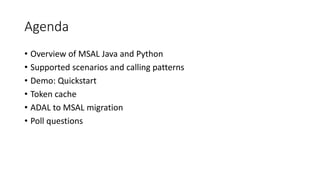
• Overview of MSAL Java and Python
• Supported scenarios and calling patterns
• Demo: Quickstart
• Token cache
• ADAL to MSAL migration
• Poll questions
Overview
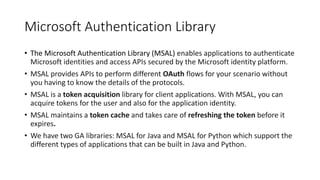
Microsoft Authentication Library
• The Microsoft Authentication Library (MSAL) enables applications to authenticate
Microsoft identities and access APIs secured by the Microsoft identity platform.
• MSAL provides APIs to perform different OAuth flows for your scenario without
you having to know the details of the protocols.
• MSAL is a token acquisition library for client applications. With MSAL, you can
acquire tokens for the user and also for the application identity.
• MSAL maintains a token cache and takes care of refreshing the token before it
expires.
• We have two GA libraries: MSAL for Java and MSAL for Python which support the
different types of applications that can be built in Java and Python.
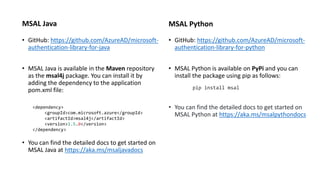
MSAL Java
• GitHub: https://github.com/AzureAD/microsoft-
authentication-library-for-java
• MSAL Java is available in the Maven repository
as the msal4j package. You can install it by
adding the dependency to the application
pom.xml file:
• You can find the detailed docs to get started on
MSAL Java at https://aka.ms/msaljavadocs
MSAL Python
• GitHub: https://github.com/AzureAD/microsoft-
authentication-library-for-python
• MSAL Python is available on PyPi and you can
install the package using pip as follows:
pip install msal
• You can find the detailed docs to get started on
MSAL Python at https://aka.ms/msalpythondocs
<dependency>
<groupId>com.microsoft.azure</groupId>
<artifactId>msal4j</artifactId>
<version>1.5.0</version>
</dependency>
Supported app scenarios
• MSAL for Java and MSAL for Python can be used on the following different platforms:
o Windows
o Linux
o MacOS
• The different types of applications supported by MSAL Java and MSAL Python are:
o Web apps
o Desktop apps
o Daemon apps
o Apps without a browser (such as IOT apps)
o Web APIs
• MSAL Java and MSAL Python model the application types based on the OAuth client types:
o Confidential clients are apps that run on servers and are considered difficult to access. They are capable of keeping an
application secret. Web apps, web APIs and service or daemon apps are confidential clients. In MSAL, you can create an instance
of ConfidentialClientApplication with a distinct client ID and secret.
o Public clients are apps that run on devices or desktop computers. They're not trusted to safely keep application secrets, so they
only access web APIs on behalf of an authenticated user. In MSAL, you can create an instance of PublicClientApplication with a
distinct client ID.
• MSAL provides the acquireToken methods for getting tokens in different scenarios.
Poll 1: What type of apps do you develop?
Poll 2: What web frameworks do you use to develop
web apps?
App scenarios
Web app
MSAL Java MSAL Python
ConfidentialClientApplication app = ConfidentialClientApplication
.builder(clientId,
ClientCredentialFactory.createFromSecret(clientSecret))
.authority(authority)
.build();
AuthorizationCodeParameters parameters = AuthorizationCodeParameters
.builder(authCode, new URI(currentUri))
.build();
Future<IAuthenticationResult> future = app.acquireToken(parameters);
result = future.get();
app = msal.ConfidentialClientApplication(
config["client_id"],
authority=config["authority"],
client_credential=config["secret"],
token_cache=cache)
result = None
result = app.acquire_token_by_authorization_code(
request.args["code"],
scopes=config["scope"],
redirect_uri=url_for("authorized", _external=True))
Demo: Quickstart
Poll 3: What other quickstarts or samples would you
like?
Daemon app
MSAL Java MSAL Python
ConfidentialClientApplication app = ConfidentialClientApplication
.builder(ClientId,
ClientCredentialFactory.createFromSecret(clientSecret))
.authority(authority)
.build();
ClientCredentialParameters clientCredentialParam = ClientCredentialParameters
.builder(Collections.singleton(scope))
.build();
CompletableFuture<IAuthenticationResult> future = app.acquireToken(clientCredentialParam);
return future.get();
app = msal.ConfidentialClientApplication(
config["client_id"],
authority=config["authority"],
client_credential=config["secret"])
result = None
result = app.acquire_token_for_client(scopes=config["scope"])
Desktop app
MSAL Java MSAL Python
PublicClientApplication app = PublicClientApplication.builder(CLIENT_ID)
.authority(AUTHORITY)
.setTokenCacheAccessAspect(tokenCacheAspect)
.build();
AuthorizationCodeParameters parameters = AuthorizationCodeParameters
.builder(authCode, new URI(currentUri))
.build();
result = app.acquireToken(parameters).join();
app = msal.PublicClientApplication(config["client_id"],
authority=config["authority"])
result = None
result = app.acquire_token_by_authorization_code(
request.args["code"],
scopes=config["scope"],
redirect_uri=url_for("authorized", _external=True))
App without browser
MSAL Java MSAL Python
PublicClientApplication app = PublicClientApplication.builder(CLIENT_ID)
.authority(AUTHORITY)
.setTokenCacheAccessAspect(tokenCacheAspect)
.build();
DeviceCodeFlowParameters parameters = DeviceCodeFlowParameters
.builder(SCOPE, deviceCodeConsumer)
.build();
result = app.acquireToken(parameters).join();
app = msal.PublicClientApplication(config["client_id"],
authority=config["authority"])
result = None
flow = app.initiate_device_flow(scopes=config["scope"])
result = app.acquire_token_by_device_flow(flow)
Web API
MSAL Java MSAL Python
ConfidentialClientApplication app = ConfidentialClientApplication
.builder(ClientId,
ClientCredentialFactory.createFromSecret(clientSecret))
.authority(authority)
.build();
OnBehalfOfParameters parameters = OnBehalfOfParameters.builder(Collections.singleton(scope),
new UserAssertion(authToken))
.build();
result = app.acquireToken(parameters).join();
app = msal.ConfidentialClientApplication(
config["client_id"],
authority=config["authority"],
client_credential=config["secret"])
result = None
result = app.acquire_token_on_behalf_of(user_assertion, scopes)
Poll 4: Do you have the scenario to secure a web API?
What do you use for token validation?
Calling pattern
MSAL Java
IAccount account = accountsInCache.iterator().next();
IAuthenticationResult result;
try {
SilentParameters silentParameters = SilentParameters.builder(SCOPE,account)
.build();
result = app.acquireTokenSilently(silentParameters).join();
} catch (Exception ex) {
if (ex.getCause() instanceof MsalException) {
InteractiveRequestParameters parameters = InteractiveRequestParameters
.builder(new URI("http://localhost"))
.scopes(SCOPE)
.build();
result = app.acquireToken(parameters).join();
}
else {
throw ex;
}
}
return result;
MSAL Python
result = None
accounts = app.get_accounts(username=config["username"])
if accounts:
result = app.acquire_token_silent(config["scope"],
account=accounts[0])
if not result:
result = app.acquire_token_by_authorization_code(
request.args['code’],
scopes=config["scope"])
In scenarios involving user interaction, the recommended pattern is to first acquire token silently. This tries to get a
cached token for the user and minimizes the authentication prompts. If the silent method fails, you can then invoke one
of the interactive acquireToken methods which will prompt the user to authenticate.
Token cache
• MSAL Java and MSAL Python provide an in-memory token cache for the duration
of the session.
• During silent token acquisition, MSAL checks the cache to see if a token exists for
the authenticated user account. If the token is close to expiration, MSAL uses the
refresh token to make a request to renew the token.
• MSAL Java and MSAL Python provide interfaces that allow you to implement
custom serialization of the token cache in order to persist it between app
instances.
• Extension libraries for MSAL Java and Python provide secure mechanisms
to perform cross-platform token cache serialization and persistence.
• https://github.com/AzureAD/microsoft-authentication-extensions-for-java
• https://github.com/AzureAD/microsoft-authentication-extensions-for-python
Migrate to MSAL
Migrating from ADAL to MSAL
• Key differences between ADAL and MSAL:
o Scopes- ADAL acquires tokens for resources, but MSAL acquires tokens for scopes. The MSAL APIs
take a scopes parameter which is a list of strings representing the desired permissions and
resources that are requested when getting a token.
o Core objects- In ADAL, the AuthenticationContext class represents the app’s connection to Azure AD.
However, MSAL provides two separate classes: PublicClientApplication and ConfidentialClientApplication to
represent types of client applications.
o Accounts- ADAL provided a User class. MSAL introduces the concept of Account where a user can have
one or more accounts with different Microsoft identities.
o Refreshing tokens- In ADAL, the refresh tokens were exposed to developers for them to be cached. MSAL
does not expose refresh tokens for security reasons and instead handles caching and refreshing tokens for
you. Additionally, MSAL provides an API that allows you to migrate refresh tokens acquired with ADAL
making the update smoother.
• Follow migration guides in MSAL docs to update your apps to MSAL!
Questions
Microsoft 365
https://aka.ms/adaptivecardscommunitycall
https://aka.ms/microsoftgraphcall
https://aka.ms/IDDevCommunityCalendar
https://aka.ms/microsoftteamscommunitycall
https://aka.ms/officeaddinscommunitycall
https://aka.ms/PowerAppsMonthlyCall
https://aka.ms/spdev-call
https://aka.ms/spdev-sig-call
https://aka.ms/spdev-spfx-call
https://aka.ms/M365DevCalls
Recording will be available soon on our
Microsoft 365 Developer YouTube channel
https://aka.ms/M365DevYouTube
(subscribe today)
Follow us on Twitter
@Microsoft365Dev and @azuread
Next call: Jun 18th at 9:00am PST
https://aka.ms/IDDevCommunityCalendar
Thank you

Microsoft identity platform community call-May 2020

  • 1.
    Microsoft identity platform May21, 2020 | 9:00AM PST Community call Secure Java and Python applications with the Microsoft identity platform using Microsoft Authentication Libraries (MSAL) Navya Canumalla Microsoft
  • 2.
    Introduction • First thingsfirst • Please note: We are recording this call so those unable to attend can benefit from the recording. • This call is designed for developers who implement or are interested in implementing Microsoft identity platform solutions. • What kind of topics will we discuss? • We will address development related topics submitted to us by the community for discussion. • We build a pipeline of topics for the next few weeks, please submit your feedback and topic suggestions - https://aka.ms/IDDevCommunityCallSurvey • View recordings on the Microsoft 365 Developer YouTube channel - https://aka.ms/M365DevYouTube • Follow us on Twitter @Microsoft365Dev and @azuread • This is NOT a support channel. Please use Stack Overflow to ask your immediate support related questions. • When is the next session? • Community Calls: Monthly – 3rd Thursday of every month • Next Identity Developer Community Call: Jun 18th
  • 3.
    Microsoft identity platform May21, 2020 | 9:00AM PST Community call Secure Java and Python applications with the Microsoft identity platform using Microsoft Authentication Libraries (MSAL) Navya Canumalla Microsoft
  • 4.
    Agenda • Overview ofMSAL Java and Python • Supported scenarios and calling patterns • Demo: Quickstart • Token cache • ADAL to MSAL migration • Poll questions
  • 5.
  • 6.
    Microsoft Authentication Library •The Microsoft Authentication Library (MSAL) enables applications to authenticate Microsoft identities and access APIs secured by the Microsoft identity platform. • MSAL provides APIs to perform different OAuth flows for your scenario without you having to know the details of the protocols. • MSAL is a token acquisition library for client applications. With MSAL, you can acquire tokens for the user and also for the application identity. • MSAL maintains a token cache and takes care of refreshing the token before it expires. • We have two GA libraries: MSAL for Java and MSAL for Python which support the different types of applications that can be built in Java and Python.
  • 7.
    MSAL Java • GitHub:https://github.com/AzureAD/microsoft- authentication-library-for-java • MSAL Java is available in the Maven repository as the msal4j package. You can install it by adding the dependency to the application pom.xml file: • You can find the detailed docs to get started on MSAL Java at https://aka.ms/msaljavadocs MSAL Python • GitHub: https://github.com/AzureAD/microsoft- authentication-library-for-python • MSAL Python is available on PyPi and you can install the package using pip as follows: pip install msal • You can find the detailed docs to get started on MSAL Python at https://aka.ms/msalpythondocs <dependency> <groupId>com.microsoft.azure</groupId> <artifactId>msal4j</artifactId> <version>1.5.0</version> </dependency>
  • 8.
    Supported app scenarios •MSAL for Java and MSAL for Python can be used on the following different platforms: o Windows o Linux o MacOS • The different types of applications supported by MSAL Java and MSAL Python are: o Web apps o Desktop apps o Daemon apps o Apps without a browser (such as IOT apps) o Web APIs • MSAL Java and MSAL Python model the application types based on the OAuth client types: o Confidential clients are apps that run on servers and are considered difficult to access. They are capable of keeping an application secret. Web apps, web APIs and service or daemon apps are confidential clients. In MSAL, you can create an instance of ConfidentialClientApplication with a distinct client ID and secret. o Public clients are apps that run on devices or desktop computers. They're not trusted to safely keep application secrets, so they only access web APIs on behalf of an authenticated user. In MSAL, you can create an instance of PublicClientApplication with a distinct client ID. • MSAL provides the acquireToken methods for getting tokens in different scenarios.
  • 9.
    Poll 1: Whattype of apps do you develop?
  • 10.
    Poll 2: Whatweb frameworks do you use to develop web apps?
  • 11.
  • 12.
    Web app MSAL JavaMSAL Python ConfidentialClientApplication app = ConfidentialClientApplication .builder(clientId, ClientCredentialFactory.createFromSecret(clientSecret)) .authority(authority) .build(); AuthorizationCodeParameters parameters = AuthorizationCodeParameters .builder(authCode, new URI(currentUri)) .build(); Future<IAuthenticationResult> future = app.acquireToken(parameters); result = future.get(); app = msal.ConfidentialClientApplication( config["client_id"], authority=config["authority"], client_credential=config["secret"], token_cache=cache) result = None result = app.acquire_token_by_authorization_code( request.args["code"], scopes=config["scope"], redirect_uri=url_for("authorized", _external=True))
  • 13.
  • 14.
    Poll 3: Whatother quickstarts or samples would you like?
  • 15.
    Daemon app MSAL JavaMSAL Python ConfidentialClientApplication app = ConfidentialClientApplication .builder(ClientId, ClientCredentialFactory.createFromSecret(clientSecret)) .authority(authority) .build(); ClientCredentialParameters clientCredentialParam = ClientCredentialParameters .builder(Collections.singleton(scope)) .build(); CompletableFuture<IAuthenticationResult> future = app.acquireToken(clientCredentialParam); return future.get(); app = msal.ConfidentialClientApplication( config["client_id"], authority=config["authority"], client_credential=config["secret"]) result = None result = app.acquire_token_for_client(scopes=config["scope"])
  • 16.
    Desktop app MSAL JavaMSAL Python PublicClientApplication app = PublicClientApplication.builder(CLIENT_ID) .authority(AUTHORITY) .setTokenCacheAccessAspect(tokenCacheAspect) .build(); AuthorizationCodeParameters parameters = AuthorizationCodeParameters .builder(authCode, new URI(currentUri)) .build(); result = app.acquireToken(parameters).join(); app = msal.PublicClientApplication(config["client_id"], authority=config["authority"]) result = None result = app.acquire_token_by_authorization_code( request.args["code"], scopes=config["scope"], redirect_uri=url_for("authorized", _external=True))
  • 17.
    App without browser MSALJava MSAL Python PublicClientApplication app = PublicClientApplication.builder(CLIENT_ID) .authority(AUTHORITY) .setTokenCacheAccessAspect(tokenCacheAspect) .build(); DeviceCodeFlowParameters parameters = DeviceCodeFlowParameters .builder(SCOPE, deviceCodeConsumer) .build(); result = app.acquireToken(parameters).join(); app = msal.PublicClientApplication(config["client_id"], authority=config["authority"]) result = None flow = app.initiate_device_flow(scopes=config["scope"]) result = app.acquire_token_by_device_flow(flow)
  • 18.
    Web API MSAL JavaMSAL Python ConfidentialClientApplication app = ConfidentialClientApplication .builder(ClientId, ClientCredentialFactory.createFromSecret(clientSecret)) .authority(authority) .build(); OnBehalfOfParameters parameters = OnBehalfOfParameters.builder(Collections.singleton(scope), new UserAssertion(authToken)) .build(); result = app.acquireToken(parameters).join(); app = msal.ConfidentialClientApplication( config["client_id"], authority=config["authority"], client_credential=config["secret"]) result = None result = app.acquire_token_on_behalf_of(user_assertion, scopes)
  • 19.
    Poll 4: Doyou have the scenario to secure a web API? What do you use for token validation?
  • 20.
    Calling pattern MSAL Java IAccountaccount = accountsInCache.iterator().next(); IAuthenticationResult result; try { SilentParameters silentParameters = SilentParameters.builder(SCOPE,account) .build(); result = app.acquireTokenSilently(silentParameters).join(); } catch (Exception ex) { if (ex.getCause() instanceof MsalException) { InteractiveRequestParameters parameters = InteractiveRequestParameters .builder(new URI("http://localhost")) .scopes(SCOPE) .build(); result = app.acquireToken(parameters).join(); } else { throw ex; } } return result; MSAL Python result = None accounts = app.get_accounts(username=config["username"]) if accounts: result = app.acquire_token_silent(config["scope"], account=accounts[0]) if not result: result = app.acquire_token_by_authorization_code( request.args['code’], scopes=config["scope"]) In scenarios involving user interaction, the recommended pattern is to first acquire token silently. This tries to get a cached token for the user and minimizes the authentication prompts. If the silent method fails, you can then invoke one of the interactive acquireToken methods which will prompt the user to authenticate.
  • 21.
    Token cache • MSALJava and MSAL Python provide an in-memory token cache for the duration of the session. • During silent token acquisition, MSAL checks the cache to see if a token exists for the authenticated user account. If the token is close to expiration, MSAL uses the refresh token to make a request to renew the token. • MSAL Java and MSAL Python provide interfaces that allow you to implement custom serialization of the token cache in order to persist it between app instances. • Extension libraries for MSAL Java and Python provide secure mechanisms to perform cross-platform token cache serialization and persistence. • https://github.com/AzureAD/microsoft-authentication-extensions-for-java • https://github.com/AzureAD/microsoft-authentication-extensions-for-python
  • 22.
  • 23.
    Migrating from ADALto MSAL • Key differences between ADAL and MSAL: o Scopes- ADAL acquires tokens for resources, but MSAL acquires tokens for scopes. The MSAL APIs take a scopes parameter which is a list of strings representing the desired permissions and resources that are requested when getting a token. o Core objects- In ADAL, the AuthenticationContext class represents the app’s connection to Azure AD. However, MSAL provides two separate classes: PublicClientApplication and ConfidentialClientApplication to represent types of client applications. o Accounts- ADAL provided a User class. MSAL introduces the concept of Account where a user can have one or more accounts with different Microsoft identities. o Refreshing tokens- In ADAL, the refresh tokens were exposed to developers for them to be cached. MSAL does not expose refresh tokens for security reasons and instead handles caching and refreshing tokens for you. Additionally, MSAL provides an API that allows you to migrate refresh tokens acquired with ADAL making the update smoother. • Follow migration guides in MSAL docs to update your apps to MSAL!
  • 24.
  • 25.
  • 26.
    Recording will beavailable soon on our Microsoft 365 Developer YouTube channel https://aka.ms/M365DevYouTube (subscribe today) Follow us on Twitter @Microsoft365Dev and @azuread Next call: Jun 18th at 9:00am PST https://aka.ms/IDDevCommunityCalendar Thank you

Editor's Notes

  • #13 The auth code flow takes an auth code which is exchanged for an access token in the request to Azure AD. You can get the auth code by making an interactive authentication request to AAD from your system’s browser so that the user can sign in. MSAL Java provides a helper method to do this using the system’s default browser. Can this be used in conf cli?