So You Want to Be a
SharePoint Developer,
After ~60 Minutes you can be a
SharePoint Padawan
SharePoint Saturday Silicon Valley 2015
May 30th, 2015
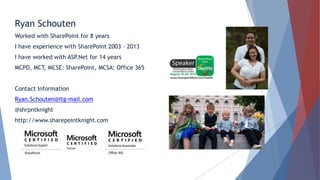
Ryan Schouten
Worked with SharePoint for 8 years
I have experience with SharePoint 2003 – 2013
I have worked with ASP.Net for 14 years
MCPD, MCT, MCSE: SharePoint, MCSA: Office 365
Contact Information
Ryan.Schouten@itg-mail.com
@shrpntknight
http://www.sharepointknight.com
• Office365 Implementations/Migrations
• Custom SharePoint Development
• Responsive Design
• Intranet Design/Implementations
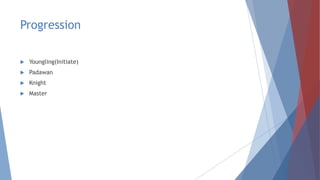
Progression
 Youngling(Initiate)
 Padawan
 Knight
 Master
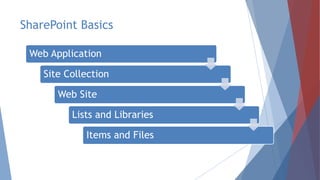
SharePoint Basics
Web Application
Site Collection
Web Site
Lists and Libraries
Items and Files
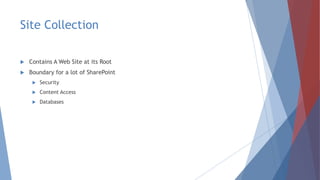
Site Collection
 Contains A Web Site at its Root
 Boundary for a lot of SharePoint
 Security
 Content Access
 Databases
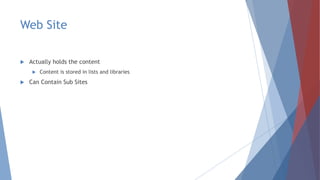
Web Site
 Actually holds the content
 Content is stored in lists and libraries
 Can Contain Sub Sites
Lists and Libraries
 Content inside SharePoint Stored in List Items and Files
 They are like data tables/Excel Sheets
 Allow storing of data with user definable fields
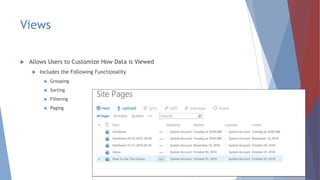
Views
 Allows Users to Customize How Data is Viewed
 Includes the Following Functionality
 Grouping
 Sorting
 Filtering
 Paging
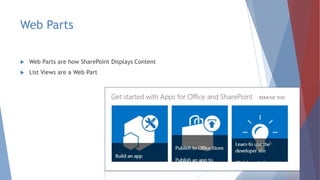
Web Parts
 Web Parts are how SharePoint Displays Content
 List Views are a Web Part
Workflows
 Allows for Process Automation
 SharePoint includes out of the box approvals
 Approval
 Collect Feedback
 Collect Signatures
 Publishing Approval
 Three State
 We can create our own
Search
 Indexes Content for Quick Retrieval
 Content is Cross Farm
 Can Include Content from Non SharePoint Sources
 Search can look across Millions of records in sub-second responses
Business Connectivity Services
 Allows us to expose data from external systems in SharePoint as if it was
Stored there
 This can be data stored in:
 SQL Server
 Web Services
 Oracle(with Custom Code)
 Any .Net Accessible source
Enterprise Content Management
 Allows Publishing and Approval of Content
 Gives us the ability to use page layouts
 Routing of content
 Records Management
Security
 Permissions can be granted to
 Groups
 Users
 Apps
 Groups can contain:
 Users
 AD Groups
 Apps
 Permissions Inherit by default but inheritance can be broken
But None of this achieves what I need
 This is where your development skills come in to the picture
 But beware of the dark side
 Do not reinvent the wheel
 Know what functionality comes out of the box
 Be mindful of resources
 Just because you can doesn’t mean you should
Different Ways of customizing
SharePoint
 Visual Studio
 Full Trust Solution
 Sandbox Solution
 SharePoint Apps/Add Ins
 Napa
 SharePoint Apps/Add Ins
 SharePoint Designer
 Allows Easy Modification of SharePoint Items
 Workflows
Full Trust Solutions
 Allows Full Access to the SharePoint Environment
 Can use VB.Net or C#
 Allows the greatest degree of customization but can also cause the most harm
 Files can be deployed to the SharePoint file system
 Deployed as .wsp(really a cab)
Sandbox Solutions
 Predecessor to SharePoint Apps
 Allowed deployment of SharePoint resources
 Admins could limit the amount of server resources solutions to prevent server
degradation
 Deployed as .wsp(really a cab)
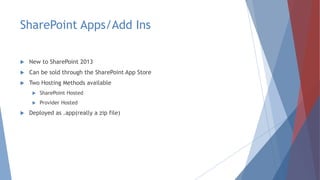
SharePoint Apps/Add Ins
 New to SharePoint 2013
 Can be sold through the SharePoint App Store
 Two Hosting Methods available
 SharePoint Hosted
 Provider Hosted
 Deployed as .app(really a zip file)
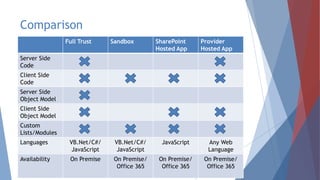
Comparison
Full Trust Sandbox SharePoint
Hosted App
Provider
Hosted App
Server Side
Code
Client Side
Code
Server Side
Object Model
Client Side
Object Model
Custom
Lists/Modules
Languages VB.Net/C#/
JavaScript
VB.Net/C#/
JavaScript
JavaScript Any Web
Language
Availability On Premise On Premise/
Office 365
On Premise/
Office 365
On Premise/
Office 365
Working with SharePoint
 Several Methods available for working with SharePoint
 Server Side Object Model
 Client Side Object Model
 Web Services
 REST
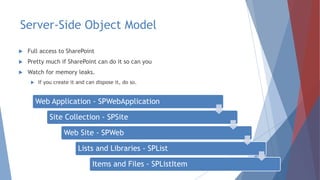
Server-Side Object Model
 Full access to SharePoint
 Pretty much if SharePoint can do it so can you
 Watch for memory leaks.
 If you create it and can dispose it, do so.
Web Application - SPWebApplication
Site Collection - SPSite
Web Site - SPWeb
Lists and Libraries - SPList
Items and Files - SPListItem
Client-Side Object Model
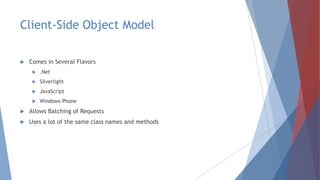
 Comes in Several Flavors
 .Net
 Silverlight
 JavaScript
 Windows Phone
 Allows Batching of Requests
 Uses a lot of the same class names and methods
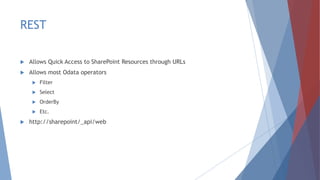
REST
 Allows Quick Access to SharePoint Resources through URLs
 Allows most Odata operators
 Filter
 Select
 OrderBy
 Etc.
 http://sharepoint/_api/web
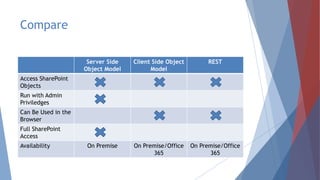
Compare
Server Side
Object Model
Client Side Object
Model
REST
Access SharePoint
Objects
Run with Admin
Priviledges
Can Be Used in the
Browser
Full SharePoint
Access
Availability On Premise On Premise/Office
365
On Premise/Office
365
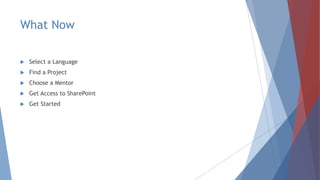
What Now
 Select a Language
 Find a Project
 Choose a Mentor
 Get Access to SharePoint
 Get Started
Questions
You are now a SharePoint Padawan
Please fill out the survey on
spsevents.org
Join us right after the event at the Tied House Cafe
& Brewery! Socialize and unwind after our day of
learning.
954 Villa St
Mountain View, CA 94041

So You Want To Be A SharePoint Developer-SPS Silicon Valley 2015

  • 1.
    So You Wantto Be a SharePoint Developer, After ~60 Minutes you can be a SharePoint Padawan SharePoint Saturday Silicon Valley 2015 May 30th, 2015
  • 4.
    Ryan Schouten Worked withSharePoint for 8 years I have experience with SharePoint 2003 – 2013 I have worked with ASP.Net for 14 years MCPD, MCT, MCSE: SharePoint, MCSA: Office 365 Contact Information Ryan.Schouten@itg-mail.com @shrpntknight http://www.sharepointknight.com
  • 5.
    • Office365 Implementations/Migrations •Custom SharePoint Development • Responsive Design • Intranet Design/Implementations
  • 7.
  • 8.
    SharePoint Basics Web Application SiteCollection Web Site Lists and Libraries Items and Files
  • 9.
    Site Collection  ContainsA Web Site at its Root  Boundary for a lot of SharePoint  Security  Content Access  Databases
  • 10.
    Web Site  Actuallyholds the content  Content is stored in lists and libraries  Can Contain Sub Sites
  • 11.
    Lists and Libraries Content inside SharePoint Stored in List Items and Files  They are like data tables/Excel Sheets  Allow storing of data with user definable fields
  • 12.
    Views  Allows Usersto Customize How Data is Viewed  Includes the Following Functionality  Grouping  Sorting  Filtering  Paging
  • 13.
    Web Parts  WebParts are how SharePoint Displays Content  List Views are a Web Part
  • 14.
    Workflows  Allows forProcess Automation  SharePoint includes out of the box approvals  Approval  Collect Feedback  Collect Signatures  Publishing Approval  Three State  We can create our own
  • 15.
    Search  Indexes Contentfor Quick Retrieval  Content is Cross Farm  Can Include Content from Non SharePoint Sources  Search can look across Millions of records in sub-second responses
  • 16.
    Business Connectivity Services Allows us to expose data from external systems in SharePoint as if it was Stored there  This can be data stored in:  SQL Server  Web Services  Oracle(with Custom Code)  Any .Net Accessible source
  • 17.
    Enterprise Content Management Allows Publishing and Approval of Content  Gives us the ability to use page layouts  Routing of content  Records Management
  • 18.
    Security  Permissions canbe granted to  Groups  Users  Apps  Groups can contain:  Users  AD Groups  Apps  Permissions Inherit by default but inheritance can be broken
  • 19.
    But None ofthis achieves what I need  This is where your development skills come in to the picture  But beware of the dark side  Do not reinvent the wheel  Know what functionality comes out of the box  Be mindful of resources  Just because you can doesn’t mean you should
  • 20.
    Different Ways ofcustomizing SharePoint  Visual Studio  Full Trust Solution  Sandbox Solution  SharePoint Apps/Add Ins  Napa  SharePoint Apps/Add Ins  SharePoint Designer  Allows Easy Modification of SharePoint Items  Workflows
  • 21.
    Full Trust Solutions Allows Full Access to the SharePoint Environment  Can use VB.Net or C#  Allows the greatest degree of customization but can also cause the most harm  Files can be deployed to the SharePoint file system  Deployed as .wsp(really a cab)
  • 22.
    Sandbox Solutions  Predecessorto SharePoint Apps  Allowed deployment of SharePoint resources  Admins could limit the amount of server resources solutions to prevent server degradation  Deployed as .wsp(really a cab)
  • 23.
    SharePoint Apps/Add Ins New to SharePoint 2013  Can be sold through the SharePoint App Store  Two Hosting Methods available  SharePoint Hosted  Provider Hosted  Deployed as .app(really a zip file)
  • 24.
    Comparison Full Trust SandboxSharePoint Hosted App Provider Hosted App Server Side Code Client Side Code Server Side Object Model Client Side Object Model Custom Lists/Modules Languages VB.Net/C#/ JavaScript VB.Net/C#/ JavaScript JavaScript Any Web Language Availability On Premise On Premise/ Office 365 On Premise/ Office 365 On Premise/ Office 365
  • 25.
    Working with SharePoint Several Methods available for working with SharePoint  Server Side Object Model  Client Side Object Model  Web Services  REST
  • 26.
    Server-Side Object Model Full access to SharePoint  Pretty much if SharePoint can do it so can you  Watch for memory leaks.  If you create it and can dispose it, do so. Web Application - SPWebApplication Site Collection - SPSite Web Site - SPWeb Lists and Libraries - SPList Items and Files - SPListItem
  • 27.
    Client-Side Object Model Comes in Several Flavors  .Net  Silverlight  JavaScript  Windows Phone  Allows Batching of Requests  Uses a lot of the same class names and methods
  • 28.
    REST  Allows QuickAccess to SharePoint Resources through URLs  Allows most Odata operators  Filter  Select  OrderBy  Etc.  http://sharepoint/_api/web
  • 29.
    Compare Server Side Object Model ClientSide Object Model REST Access SharePoint Objects Run with Admin Priviledges Can Be Used in the Browser Full SharePoint Access Availability On Premise On Premise/Office 365 On Premise/Office 365
  • 30.
    What Now  Selecta Language  Find a Project  Choose a Mentor  Get Access to SharePoint  Get Started
  • 31.
  • 32.
    You are nowa SharePoint Padawan
  • 33.
    Please fill outthe survey on spsevents.org
  • 34.
    Join us rightafter the event at the Tied House Cafe & Brewery! Socialize and unwind after our day of learning. 954 Villa St Mountain View, CA 94041

Editor's Notes

  • #3 Introduction slide
  • #4 Conclusion slide
  • #5 Worked with all but one version of SharePoint. I missed the first version. Slides will be posted to my blog at http://www.sharepointknight.com in the next 24 hours.
  • #35 SharePint