Build Modern Apps on
Microsoft Teams
The hub for teamwork in Office 365
Vishrut Shukla
Customer & Partner Ecosystem
Microsoft Teams Product Engineering
Microsoft Teams
The hub for teamwork in Office 365
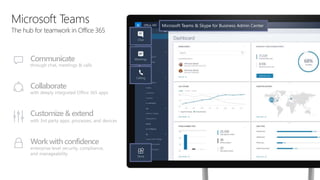
Communicate
through chat, meetings & calls
Collaborate
with deeply integrated Office 365 apps
Customize& extend
with 3rd party apps, processes, and devices
Work with confidence
enterprise level security, compliance,
and manageability
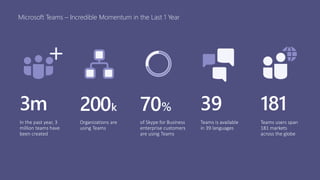
Microsoft Teams – Incredible Momentum in the Last 1 Year
200k
Organizations are
using Teams
181
Teams users span
181 markets
across the globe
39
Teams is available
in 39 languages
3m
In the past year, 3
million teams have
been created
70%
of Skype for Business
enterprise customers
are using Teams
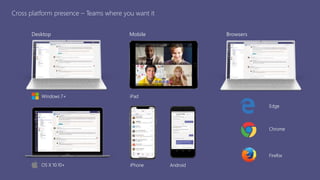
Cross platform presence – Teams where you want it
Desktop Mobile Browsers
iPhone Android
iPad
OS X 10.10+
Windows 7+
Edge
Chrome
Firefox
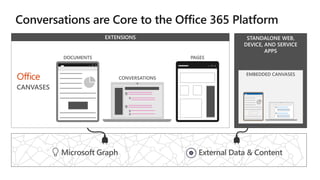
STANDALONE WEB,
DEVICE, AND SERVICE
APPS
 
EXTENSIONS
EMBEDDED CANVASES
Microsoft Graph External Data & Content
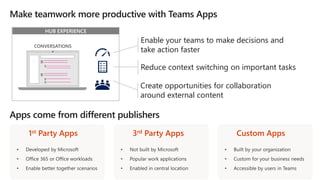
HUB EXPERIENCE
Enable your teams to make decisions and
take action faster
Reduce context switching on important tasks
Create opportunities for collaboration
around external content
1st Party Apps 3rd Party Apps Custom Apps
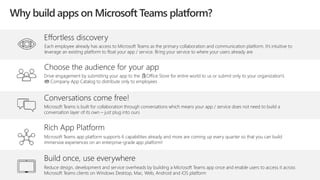
Effortless discovery
Each employee already has access to Microsoft Teams as the primary collaboration and communication platform. It’s intuitive to
leverage an existing platform to float your app / service. Bring your service to where your users already are
Rich App Platform
Microsoft Teams app platform supports 6 capabilities already and more are coming up every quarter so that you can build
immersive experiences on an enterprise-grade app platform!
Conversations come free!
Microsoft Teams is built for collaboration through conversations which means your app / service does not need to build a
conversation layer of its own – just plug into ours
Build once, use everywhere
Reduce design, development and service overheads by building a Microsoft Teams app once and enable users to access it across
Microsoft Teams clients on Windows Desktop, Mac, Web, Android and iOS platform
Choose the audience for your app
Drive engagement by submitting your app to the Office Store for entire world to us or submit only to your organization’s
Company App Catalog to distribute only to employees
Why build apps on Microsoft Teams platform?
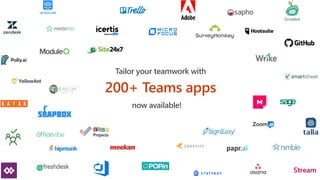
Tailor your teamwork with
200+ Teams apps
now available!
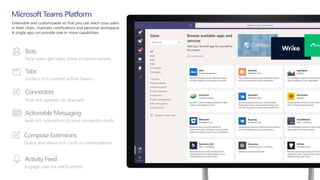
Bots
Help users get tasks done in conversations
Tabs
Surface rich content within Teams
Connectors
Post rich updates to channels
ActionableMessaging
Add rich interaction to your connector cards
MicrosoftTeams Platform
ActivityFeed
Engage user via notifications
Compose Extensions
Query and share rich cards in conversations
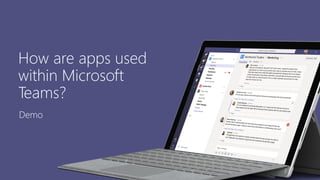
How are apps used
within Microsoft
Teams?
Demo
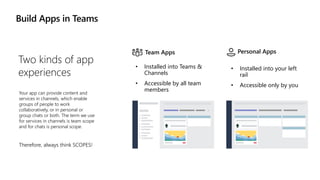
Build Apps in Teams
Two kinds of app
experiences
Your app can provide content and
services in channels, which enable
groups of people to work
collaboratively, or in personal or
group chats or both. The term we use
for services in channels is team scope
and for chats is personal scope.
Therefore, always think SCOPES!
• Installed into Teams &
Channels
• Accessible by all team
members
Team Apps Personal Apps
• Installed into your left
rail
• Accessible only by you
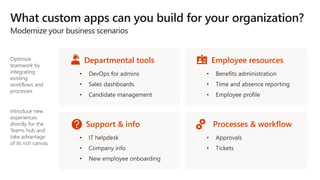
Optimize
teamwork by
integrating
existing
workflows and
processes
Introduce new
experiences
directly for the
Teams hub and
take advantage
of its rich canvas
Departmental tools Employee resources
Support & info Processes & workflow
Daily Usage
My Task
List
IT Helpdesk
Time
Sheet
Company
News
Cafeteria
Services
Team
Events
Weekly Usage
Monthly / Quarterly Usage
HR
Leave
App
Employee
Directory
Search
Connected
Employee
Project
Data &
Insights
L&D
Training
My
Requests
Weekly
Status
360o
Performance
& Goals
Business
Travel
Recruitment
Services
Payroll &
Rewards
Job
Referral
360o
Company
Poll
HR Services
Department
Tools
My Profile
Update
Company
Events
Portal
HR
Policies
FAQ
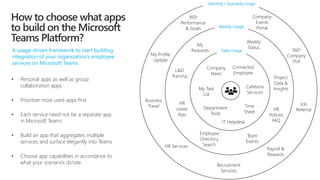
A usage-driven framework to start building
integration of your organization’s employee
services on Microsoft Teams
• Personal apps as well as group
collaboration apps
• Prioritize most used apps first
• Each service need not be a separate app
in Microsoft Teams
• Build an app that aggregates multiple
services and surface elegantly into Teams
• Choose app capabilities in accordance to
what your scenarios dictate
How to choose what apps
to build on the Microsoft
Teams Platform?
Choose one or more
platform capabilities
from our offerings to
suit your app
scenarios
Build immersive apps
by implementing
multiple platform
capabilities in your app
Implement bots to
leverage conversations
for quick workflows
and queries
Notify users 1:1 or in
channels through bot
notifications in the
Activity Feed
Leverage new
adaptive cards to
surface rich,
actionable UI across
all clients
Build intelligent
apps using Office
365 knowledge
available through
Graph APIs
Bake in-the-
moment actions
right inside your
app to reduce
context switching
Adopt a refined
way of querying
content & sharing
information from
your services
Tenets of Building on the Teams Platform
Navigate the user
flow from one app
capability to
another using deep
links
Leverage existing
SharePoint portals or
Websites by bringing
them in as tabs
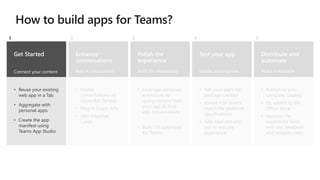
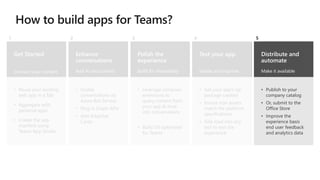
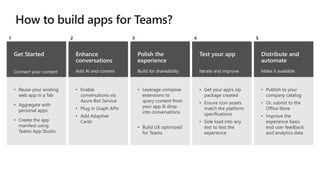
Get Started
Connect your content
• Reuse your existing
web app in a Tab
• Aggregate with
personal apps
• Create the app
manifest using
Teams App Studio
1
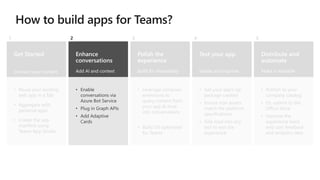
Enhance
conversations
Add AI and context
• Enable
conversations via
Azure Bot Service
• Plug in Graph APIs
• Add Adaptive
Cards
2
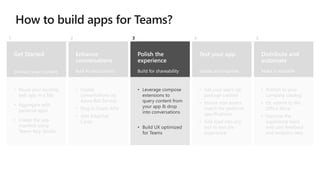
Polish the
experience
Build for shareability
• Leverage compose
extensions to
query content from
your app & drop
into conversations
• Build UX optimized
for Teams
3
Distribute and
automate
Make it available
• Publish to your
company catalog
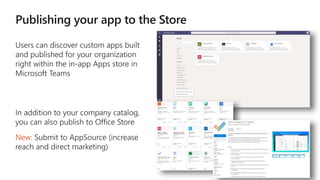
• Or, submit to the
Office Store
• Improve the
experience basis
end user feedback
and analytics data
5
Test your app
Iterate and improve
• Get your app’s zip
package created
• Ensure icon assets
match the platform
specifications
• Side load into any
test to test the
experience
4
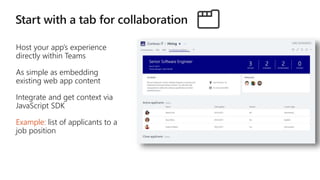
Host your app’s experience
directly within Teams
As simple as embedding
existing web app content
Integrate and get context via
JavaScript SDK
Example: list of applicants to a
job position
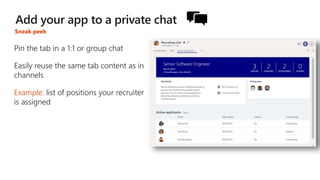
Pin the tab in a 1:1 or group chat
Easily reuse the same tab content as in
channels
Example: list of positions your recruiter
is assigned
Sneak peek
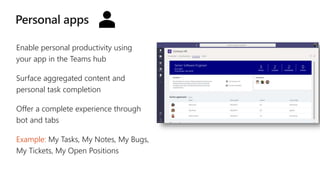
Enable personal productivity using
your app in the Teams hub
Surface aggregated content and
personal task completion
Offer a complete experience through
bot and tabs
Example: My Tasks, My Notes, My Bugs,
My Tickets, My Open Positions
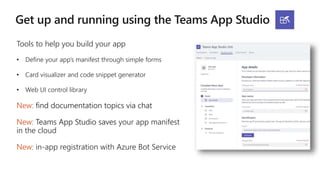
Tools to help you build your app
• Define your app’s manifest through simple forms
• Card visualizer and code snippet generator
• Web UI control library
New: find documentation topics via chat
New: Teams App Studio saves your app manifest
in the cloud
New: in-app registration with Azure Bot Service
Get Started
Connect your content
• Reuse your existing
web app in a Tab
• Aggregate with
personal apps
• Create the app
manifest using
Teams App Studio
1
Enhance
conversations
Add AI and context
• Enable
conversations via
Azure Bot Service
• Plug in Graph APIs
• Add Adaptive
Cards
2
Polish the
experience
Build for shareability
• Leverage compose
extensions to
query content from
your app & drop
into conversations
• Build UX optimized
for Teams
3
Distribute and
automate
Make it available
• Publish to your
company catalog
• Or, submit to the
Office Store
• Improve the
experience basis
end user feedback
and analytics data
5
Test your app
Iterate and improve
• Get your app’s zip
package created
• Ensure icon assets
match the platform
specifications
• Side load into any
test to test the
experience
4
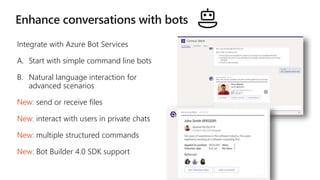
Integrate with Azure Bot Services
A. Start with simple command line bots
B. Natural language interaction for
advanced scenarios
New: send or receive files
New: interact with users in private chats
New: multiple structured commands
New: Bot Builder 4.0 SDK support
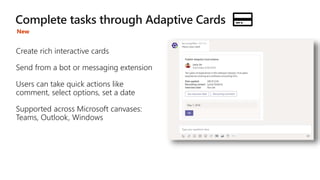
Create rich interactive cards
Send from a bot or messaging extension
Users can take quick actions like
comment, select options, set a date
Supported across Microsoft canvases:
Teams, Outlook, Windows
New
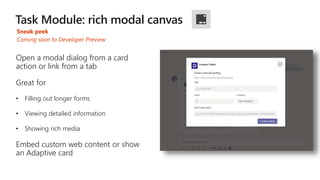
Sneak peek
Open a modal dialog from a card
action or link from a tab
Great for
• Filling out longer forms
• Viewing detailed information
• Showing rich media
Embed custom web content or show
an Adaptive card
Coming soon to Developer Preview
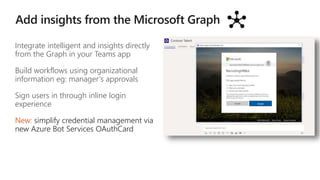
Integrate intelligent and insights directly
from the Graph in your Teams app
Build workflows using organizational
information eg: manager’s approvals
Sign users in through inline login
experience
New: simplify credential management via
new Azure Bot Services OAuthCard
Get Started
Connect your content
• Reuse your existing
web app in a Tab
• Aggregate with
personal apps
• Create the app
manifest using
Teams App Studio
1
Enhance
conversations
Add AI and context
• Enable
conversations via
Azure Bot Service
• Plug in Graph APIs
• Add Adaptive
Cards
2
Polish the
experience
Build for shareability
• Leverage compose
extensions to
query content from
your app & drop
into conversations
• Build UX optimized
for Teams
3
Distribute and
automate
Make it available
• Publish to your
company catalog
• Or, submit to the
Office Store
• Improve the
experience basis
end user feedback
and analytics data
5
Test your app
Iterate and improve
• Get your app’s zip
package created
• Ensure icon assets
match the platform
specifications
• Side load into any
test to test the
experience
4
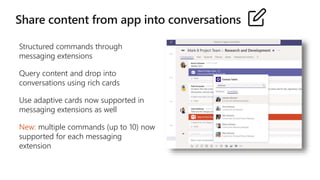
Structured commands through
messaging extensions
Query content and drop into
conversations using rich cards
Use adaptive cards now supported in
messaging extensions as well
New: multiple commands (up to 10) now
supported for each messaging
extension
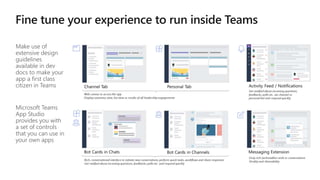
Make use of
extensive design
guidelines
available in dev
docs to make your
app a first class
citizen in Teams
Microsoft Teams
App Studio
provides you with
a set of controls
that you can use in
your own apps
Get Started
Connect your content
• Reuse your existing
web app in a Tab
• Aggregate with
personal apps
• Create the app
manifest using
Teams App Studio
1
Enhance
conversations
Add AI and context
• Enable
conversations via
Azure Bot Service
• Plug in Graph APIs
• Add Adaptive
Cards
2
Polish the
experience
Build for shareability
• Leverage compose
extensions to
query content from
your app & drop
into conversations
• Build UX optimized
for Teams
3
Distribute and
automate
Make it available
• Publish to your
company catalog
• Or, submit to the
Office Store
• Improve the
experience basis
end user feedback
and analytics data
5
Test your app
Iterate and improve
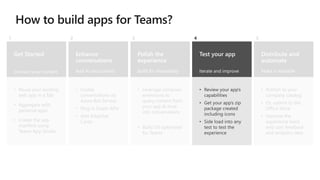
• Review your app’s
capabilities
• Get your app’s zip
package created
including icons
• Side load into any
test to test the
experience
4
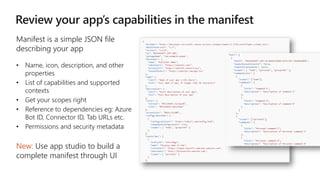
Manifest is a simple JSON file
describing your app
• Name, icon, description, and other
properties
• List of capabilities and supported
contexts
• Get your scopes right
• Reference to dependencies eg: Azure
Bot ID, Connector ID, Tab URLs etc.
• Permissions and security metadata
New: Use app studio to build a
complete manifest through UI
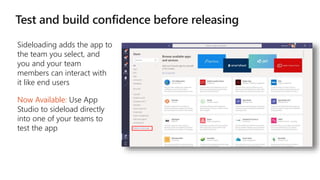
Sideloading adds the app to
the team you select, and
you and your team
members can interact with
it like end users
Now Available: Use App
Studio to sideload directly
into one of your teams to
test the app
Get Started
Connect your content
• Reuse your existing
web app in a Tab
• Aggregate with
personal apps
• Create the app
manifest using
Teams App Studio
1
Enhance
conversations
Add AI and context
• Enable
conversations via
Azure Bot Service
• Plug in Graph APIs
• Add Adaptive
Cards
2
Polish the
experience
Build for shareability
• Leverage compose
extensions to
query content from
your app & drop
into conversations
• Build UX optimized
for Teams
3
Distribute and
automate
Make it available
• Publish to your
company catalog
• Or, submit to the
Office Store
• Improve the
experience basis
end user feedback
and analytics data
5
Test your app
Iterate and improve
• Get your app’s zip
package created
• Ensure icon assets
match the platform
specifications
• Side load into any
test to test the
experience
4
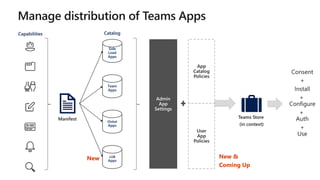
New:
Capabilities
Side
Load
Apps
Team
Apps
Global
Apps
LOB
Apps
Catalog
App
Catalog
Policies
New New &
Coming Up
User
App
Policies
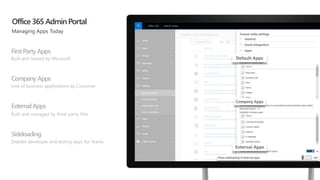
FirstPartyApps
Built and hosted by Microsoft
Company Apps
Line of business applications by Customer
ExternalApps
Built and managed by third-party ISVs
Sideloading
Enables developer and testing apps for Teams
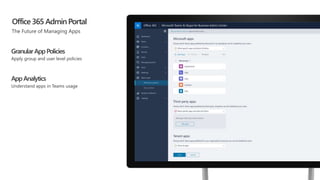
Office 365 AdminPortal
GranularAppPolicies
Apply group and user level policies
AppAnalytics
Understand apps in Teams usage
Get Started
Connect your content
• Reuse your existing
web app in a Tab
• Aggregate with
personal apps
• Create the app
manifest using
Teams App Studio
1
Enhance
conversations
Add AI and context
• Enable
conversations via
Azure Bot Service
• Plug in Graph APIs
• Add Adaptive
Cards
2
Polish the
experience
Build for shareability
• Leverage compose
extensions to
query content from
your app & drop
into conversations
• Build UX optimized
for Teams
3
Distribute and
automate
Make it available
• Publish to your
company catalog
• Or, submit to the
Office Store
• Improve the
experience basis
end user feedback
and analytics data
5
Test your app
Iterate and improve
• Get your app’s zip
package created
• Ensure icon assets
match the platform
specifications
• Side load into any
test to test the
experience
4
Yours is next?
Resources Start exploring
Teams App Studio Node.js
c#/.NET
Can’t wait to
get started?
Get started developing
Teams Developer Documentation
Leverage Teams in-house experts
Build Modern Apps on Microsoft Teams-September 2018

Build Modern Apps on Microsoft Teams-September 2018

  • 1.
    Build Modern Appson Microsoft Teams The hub for teamwork in Office 365 Vishrut Shukla Customer & Partner Ecosystem Microsoft Teams Product Engineering
  • 2.
    Microsoft Teams The hubfor teamwork in Office 365 Communicate through chat, meetings & calls Collaborate with deeply integrated Office 365 apps Customize& extend with 3rd party apps, processes, and devices Work with confidence enterprise level security, compliance, and manageability
  • 3.
    Microsoft Teams –Incredible Momentum in the Last 1 Year 200k Organizations are using Teams 181 Teams users span 181 markets across the globe 39 Teams is available in 39 languages 3m In the past year, 3 million teams have been created 70% of Skype for Business enterprise customers are using Teams
  • 4.
    Cross platform presence– Teams where you want it Desktop Mobile Browsers iPhone Android iPad OS X 10.10+ Windows 7+ Edge Chrome Firefox
  • 5.
    STANDALONE WEB, DEVICE, ANDSERVICE APPS   EXTENSIONS EMBEDDED CANVASES Microsoft Graph External Data & Content
  • 6.
    HUB EXPERIENCE Enable yourteams to make decisions and take action faster Reduce context switching on important tasks Create opportunities for collaboration around external content 1st Party Apps 3rd Party Apps Custom Apps
  • 7.
    Effortless discovery Each employeealready has access to Microsoft Teams as the primary collaboration and communication platform. It’s intuitive to leverage an existing platform to float your app / service. Bring your service to where your users already are Rich App Platform Microsoft Teams app platform supports 6 capabilities already and more are coming up every quarter so that you can build immersive experiences on an enterprise-grade app platform! Conversations come free! Microsoft Teams is built for collaboration through conversations which means your app / service does not need to build a conversation layer of its own – just plug into ours Build once, use everywhere Reduce design, development and service overheads by building a Microsoft Teams app once and enable users to access it across Microsoft Teams clients on Windows Desktop, Mac, Web, Android and iOS platform Choose the audience for your app Drive engagement by submitting your app to the Office Store for entire world to us or submit only to your organization’s Company App Catalog to distribute only to employees Why build apps on Microsoft Teams platform?
  • 8.
    Tailor your teamworkwith 200+ Teams apps now available!
  • 9.
    Bots Help users gettasks done in conversations Tabs Surface rich content within Teams Connectors Post rich updates to channels ActionableMessaging Add rich interaction to your connector cards MicrosoftTeams Platform ActivityFeed Engage user via notifications Compose Extensions Query and share rich cards in conversations
  • 10.
    How are appsused within Microsoft Teams? Demo
  • 11.
    Build Apps inTeams Two kinds of app experiences Your app can provide content and services in channels, which enable groups of people to work collaboratively, or in personal or group chats or both. The term we use for services in channels is team scope and for chats is personal scope. Therefore, always think SCOPES! • Installed into Teams & Channels • Accessible by all team members Team Apps Personal Apps • Installed into your left rail • Accessible only by you
  • 12.
    Optimize teamwork by integrating existing workflows and processes Introducenew experiences directly for the Teams hub and take advantage of its rich canvas Departmental tools Employee resources Support & info Processes & workflow
  • 13.
    Daily Usage My Task List ITHelpdesk Time Sheet Company News Cafeteria Services Team Events Weekly Usage Monthly / Quarterly Usage HR Leave App Employee Directory Search Connected Employee Project Data & Insights L&D Training My Requests Weekly Status 360o Performance & Goals Business Travel Recruitment Services Payroll & Rewards Job Referral 360o Company Poll HR Services Department Tools My Profile Update Company Events Portal HR Policies FAQ A usage-driven framework to start building integration of your organization’s employee services on Microsoft Teams • Personal apps as well as group collaboration apps • Prioritize most used apps first • Each service need not be a separate app in Microsoft Teams • Build an app that aggregates multiple services and surface elegantly into Teams • Choose app capabilities in accordance to what your scenarios dictate How to choose what apps to build on the Microsoft Teams Platform?
  • 14.
    Choose one ormore platform capabilities from our offerings to suit your app scenarios Build immersive apps by implementing multiple platform capabilities in your app Implement bots to leverage conversations for quick workflows and queries Notify users 1:1 or in channels through bot notifications in the Activity Feed Leverage new adaptive cards to surface rich, actionable UI across all clients Build intelligent apps using Office 365 knowledge available through Graph APIs Bake in-the- moment actions right inside your app to reduce context switching Adopt a refined way of querying content & sharing information from your services Tenets of Building on the Teams Platform Navigate the user flow from one app capability to another using deep links Leverage existing SharePoint portals or Websites by bringing them in as tabs
  • 15.
    Get Started Connect yourcontent • Reuse your existing web app in a Tab • Aggregate with personal apps • Create the app manifest using Teams App Studio 1 Enhance conversations Add AI and context • Enable conversations via Azure Bot Service • Plug in Graph APIs • Add Adaptive Cards 2 Polish the experience Build for shareability • Leverage compose extensions to query content from your app & drop into conversations • Build UX optimized for Teams 3 Distribute and automate Make it available • Publish to your company catalog • Or, submit to the Office Store • Improve the experience basis end user feedback and analytics data 5 Test your app Iterate and improve • Get your app’s zip package created • Ensure icon assets match the platform specifications • Side load into any test to test the experience 4
  • 16.
    Host your app’sexperience directly within Teams As simple as embedding existing web app content Integrate and get context via JavaScript SDK Example: list of applicants to a job position
  • 17.
    Pin the tabin a 1:1 or group chat Easily reuse the same tab content as in channels Example: list of positions your recruiter is assigned Sneak peek
  • 18.
    Enable personal productivityusing your app in the Teams hub Surface aggregated content and personal task completion Offer a complete experience through bot and tabs Example: My Tasks, My Notes, My Bugs, My Tickets, My Open Positions
  • 19.
    Tools to helpyou build your app • Define your app’s manifest through simple forms • Card visualizer and code snippet generator • Web UI control library New: find documentation topics via chat New: Teams App Studio saves your app manifest in the cloud New: in-app registration with Azure Bot Service
  • 20.
    Get Started Connect yourcontent • Reuse your existing web app in a Tab • Aggregate with personal apps • Create the app manifest using Teams App Studio 1 Enhance conversations Add AI and context • Enable conversations via Azure Bot Service • Plug in Graph APIs • Add Adaptive Cards 2 Polish the experience Build for shareability • Leverage compose extensions to query content from your app & drop into conversations • Build UX optimized for Teams 3 Distribute and automate Make it available • Publish to your company catalog • Or, submit to the Office Store • Improve the experience basis end user feedback and analytics data 5 Test your app Iterate and improve • Get your app’s zip package created • Ensure icon assets match the platform specifications • Side load into any test to test the experience 4
  • 21.
    Integrate with AzureBot Services A. Start with simple command line bots B. Natural language interaction for advanced scenarios New: send or receive files New: interact with users in private chats New: multiple structured commands New: Bot Builder 4.0 SDK support
  • 22.
    Create rich interactivecards Send from a bot or messaging extension Users can take quick actions like comment, select options, set a date Supported across Microsoft canvases: Teams, Outlook, Windows New
  • 23.
    Sneak peek Open amodal dialog from a card action or link from a tab Great for • Filling out longer forms • Viewing detailed information • Showing rich media Embed custom web content or show an Adaptive card Coming soon to Developer Preview
  • 24.
    Integrate intelligent andinsights directly from the Graph in your Teams app Build workflows using organizational information eg: manager’s approvals Sign users in through inline login experience New: simplify credential management via new Azure Bot Services OAuthCard
  • 25.
    Get Started Connect yourcontent • Reuse your existing web app in a Tab • Aggregate with personal apps • Create the app manifest using Teams App Studio 1 Enhance conversations Add AI and context • Enable conversations via Azure Bot Service • Plug in Graph APIs • Add Adaptive Cards 2 Polish the experience Build for shareability • Leverage compose extensions to query content from your app & drop into conversations • Build UX optimized for Teams 3 Distribute and automate Make it available • Publish to your company catalog • Or, submit to the Office Store • Improve the experience basis end user feedback and analytics data 5 Test your app Iterate and improve • Get your app’s zip package created • Ensure icon assets match the platform specifications • Side load into any test to test the experience 4
  • 26.
    Structured commands through messagingextensions Query content and drop into conversations using rich cards Use adaptive cards now supported in messaging extensions as well New: multiple commands (up to 10) now supported for each messaging extension
  • 27.
    Make use of extensivedesign guidelines available in dev docs to make your app a first class citizen in Teams Microsoft Teams App Studio provides you with a set of controls that you can use in your own apps
  • 28.
    Get Started Connect yourcontent • Reuse your existing web app in a Tab • Aggregate with personal apps • Create the app manifest using Teams App Studio 1 Enhance conversations Add AI and context • Enable conversations via Azure Bot Service • Plug in Graph APIs • Add Adaptive Cards 2 Polish the experience Build for shareability • Leverage compose extensions to query content from your app & drop into conversations • Build UX optimized for Teams 3 Distribute and automate Make it available • Publish to your company catalog • Or, submit to the Office Store • Improve the experience basis end user feedback and analytics data 5 Test your app Iterate and improve • Review your app’s capabilities • Get your app’s zip package created including icons • Side load into any test to test the experience 4
  • 29.
    Manifest is asimple JSON file describing your app • Name, icon, description, and other properties • List of capabilities and supported contexts • Get your scopes right • Reference to dependencies eg: Azure Bot ID, Connector ID, Tab URLs etc. • Permissions and security metadata New: Use app studio to build a complete manifest through UI
  • 30.
    Sideloading adds theapp to the team you select, and you and your team members can interact with it like end users Now Available: Use App Studio to sideload directly into one of your teams to test the app
  • 31.
    Get Started Connect yourcontent • Reuse your existing web app in a Tab • Aggregate with personal apps • Create the app manifest using Teams App Studio 1 Enhance conversations Add AI and context • Enable conversations via Azure Bot Service • Plug in Graph APIs • Add Adaptive Cards 2 Polish the experience Build for shareability • Leverage compose extensions to query content from your app & drop into conversations • Build UX optimized for Teams 3 Distribute and automate Make it available • Publish to your company catalog • Or, submit to the Office Store • Improve the experience basis end user feedback and analytics data 5 Test your app Iterate and improve • Get your app’s zip package created • Ensure icon assets match the platform specifications • Side load into any test to test the experience 4
  • 32.
  • 33.
  • 34.
    FirstPartyApps Built and hostedby Microsoft Company Apps Line of business applications by Customer ExternalApps Built and managed by third-party ISVs Sideloading Enables developer and testing apps for Teams Office 365 AdminPortal
  • 35.
    Office 365 AdminPortal GranularAppPolicies Applygroup and user level policies AppAnalytics Understand apps in Teams usage
  • 36.
    Get Started Connect yourcontent • Reuse your existing web app in a Tab • Aggregate with personal apps • Create the app manifest using Teams App Studio 1 Enhance conversations Add AI and context • Enable conversations via Azure Bot Service • Plug in Graph APIs • Add Adaptive Cards 2 Polish the experience Build for shareability • Leverage compose extensions to query content from your app & drop into conversations • Build UX optimized for Teams 3 Distribute and automate Make it available • Publish to your company catalog • Or, submit to the Office Store • Improve the experience basis end user feedback and analytics data 5 Test your app Iterate and improve • Get your app’s zip package created • Ensure icon assets match the platform specifications • Side load into any test to test the experience 4
  • 37.
  • 38.
    Resources Start exploring TeamsApp Studio Node.js c#/.NET Can’t wait to get started? Get started developing Teams Developer Documentation Leverage Teams in-house experts

Editor's Notes

  • #3 [This is an animated slide. Please show it in presentation mode] [MAIN POINT TO LAND] Microsoft Teams is a hub for teamwork, a chat-based workspace that enables teams to be more productive by giving them a single and secure location that brings together everything a team needs: chats, meetings, calls, files, and apps. Microsoft Teams is one place for all the needs your teams have.   Microsoft Teams delivers on four core promises to create a digital workspace for high performing teams. [COMMUNICATE] First, Microsoft Teams solves for the communication needs of a diverse workforce. Since preview, Microsoft Teams has evolved to include a complete meetings experience, as well as chat, voice and video - You can use Teams for informal 1:1 or group chats – directly on your phone if you’re on the go. Or you can have an open conversation in a channel. This enables people to share information in a transparent way to accelerate decision making. And it's super easy to move from a chat into a face to face meeting, helping you to bridge geographical barriers.   [COLLABORATE] When it comes to collaboration, the deep Office integration enables today’s multigenerational workforce to use the Office apps they are familiar with and love - Word, Excel, PowerPoint, OneNote, SharePoint, Planner, even Power BI - right within the context of Teams. Teams is unique in how we enable collaboration. Today, when you want somebody’s feedback, you send them the file via email, they store it locally with comments, you store it again…… it's a vicious cycle that results in v2, v3, v4 versions – and you have to jump between email and other apps to get the work done. Teams brings all the Office 365 services together – so that you can easily share and co-author files without the need for email attachments.   [CUSTOMIZE] Many of you use other services than Office 365 as well which results in you having to jump between and spend time in disparate experiences. We built Teams to not only be the hub for Office 365 services, but for all the services and tools teams use on a day to day basis. So, you can customize Teams with tabs, connector and bots to include the apps and services you need - <mention relevant 3rd party apps like GitHub and Trello that can be included in Teams>– we have integrations with over 150 partners. For our developer community, we have also created an extensible platform, to enable building apps and to integrate with business processes.   [WORK WITH CONFIDENCE] Microsoft Teams comes with the enterprise grade security, compliance and manageability that you expect from Office 365 which customers tell us is a huge value add for them.
  • #5 Finally, Microsoft Teams provides industry leading security and compliance capabilities and rich management capabilities. With Microsoft Teams, customers benefit from the Office 365 hyper-scale, enterprise-grade cloud. [MAIN POINT TO LAND] From Day 1, the requirement has been for Teams to provide you with the same Office 365 capabilities that you’re used to and to build security, privacy and trust directly into the service. You can manage and monitor all features in one centralized portal: Data encryption at all times, at-rest and in-transit. Customer data at rest remains in region Ability to have local data residency for core customer data at rest, plus failover and disaster recovery (see data residency slide in the appendix for details) Human back-up via on-call support engineers standing by 24×7 Customer content is never accessible in logs or telemetry Multi-factor authentication for enhanced identity protection. Secure guest access with AAD managed guest accounts A big privacy topic for all our European customers is of course GDPR – the Global Data Protection Regulation. We will adhere to this ahead of the May 2018 deadline Microsoft Teams supports key standards including SOC 1, SOC 2, EU Model Clauses, HIPPA, and more. Since preview, we’ve added mobile management with Microsoft Intune and new features for compliance and litigation support, including audit log search, eDiscovery and legal hold for channels, chats and files. The Microsoft Teams admin center [coming early 2018] provides you with a single coherent admin experience where you can manage all aspects of Microsoft Teams including users, settings, and analytics. Teams provides enterprise manageability to configure and set policies at a per-user level and manage trusted apps for employees and the organization. PSTN connectivity in Office 365 will give you the option to connect existing on-premises investments in the future. Advanced call management controls include call routing, auto attendant, call queues, and reporting.   While security and compliance are critical, our responsibility goes beyond this. Our mission talks about empowering every person to achieve more. With that in mind, we’re focused on building an inclusive experience, including support for those who use screen readers, high contrast, and keyboard-only navigation, to enable the collective brainpower and potential of everyone.
  • #6 We want to move frm the products to a more developer-oriented view of Office as a platform. The apps on slide 2 are merged into Office canvases, and then split out based on the type of “canvas”. Developers can extenod the User experience around these canvases by adding new commands, task panes, dialog, etc. Within the canvas, they can add in custom, dynamic blocks of content. We’ll have a deeper dive on both of those in subsequent slides. In addition, developers can build standalone web and device apps that are peers of our Office apps. From both standalone apps and extensions to Office apps, developers can connect to Office data through the Microsoft Graph. Build smarter apps by connecting to Office services Microsoft Graph is the API for accessing data and intelligence in the Microsoft Cloud Our own apps use the graph, and third-party applications can take advantage of it as well, to give their applications rich context, deep insights, and real-time awareness about the business-critical data within an organization, including people, documents, calendars, mail, and devices Embed Office canvases in your own standalone apps Some Office canvases are also embeddable in your own web and device apps Embedded documents Voice / video conversations Embedded calendars Make your solutions a native part of Office canvases Office apps have a collection of unique canvases for different modes of digital work: content authoring, conversations, sites/portals You can extend the UI that surrounds these canvases with things like commands, on-object UI, task panes, dialogs, etc These extensions are based on simple, open, web technologies Office automatically adapts these extensions to the right experience, depending on the app and platform where they appear. For example, a command in Outlook desktop shows up as a button in the ribbon, while it shows up in a separate menu in Outlook mobile We support a continuum of extensions, from simple, declarative extensions, to fully-custom experiences that require imperative code Each of these canvases also supports extensions that are unique to their experience Documents Conversations Bots Connectors Input Extensions Pages You can also extend the canvases themselves with custom content This custom content can be as simple as text or a static image, or it can scale up to fully custom HTML and JavaScript-powered content, depending on the needs of your scenario
  • #9 We’ve got over 150 apps in Teams and more coming soon.
  • #10 Zaki -> Sterling -> for Bot, Tabs, Connectors and Messaging, can we show them in action instead of showing store category labels. Similar to what we do within Partner Generic Pitch Deck. You might wonder how this all fits together. Usage scenarios like a specific process will map to a business scenario. The business scenarios align to the organization’s business strategy. Let’s take a look at another example. Tabs – Surface rich content within Teams Compose Extensions – allow users to query and share rich cards in conversations Actionable messaging – Add rich interaction to your connector cards Bots – Help users get tasks done in conversations Connectors – Post rich updates to channels Activity Feed – Engage user via notifications
  • #13 Land the point about why IT developers should be interested in building apps for their businesses. Give some examples
  • #15 Land the point about why IT developers should be interested in building apps for their businesses. Give some examples
  • #19 DEMO NEXT SLIDE
  • #20 Quick recap of the capabilities
  • #33 Karuana -> Sterling -> Very nice layout.  Text is too small however for projection and presentation, especially in webcasts
  • #36 Zaki -> Sterling -> Visual is missing company apps control, options on the left should be: First Party Apps, Third Party Apps, Company Apps and Side-loading Apps. Side-loading Apps: “Sideloading” is How developers deploy apps in Teams for testing How organizations scope access to Custom apps The sideloading process: IT Admins control access to this function at an org and user level Zip files are uploaded directly into a testing Team To configure access to individual apps turn off Allow sideloading of external apps. Then turn off any apps you don't want your users access. Company Apps: The Microsoft Teams Company App Catalog lets you distribute your line-of-business applications that were built specifically for your organization and that you rely on to complete critical business functions to your users. If you have apps that need bug fixes, you can temporarily disable apps through the Office 365 admin portal. In addition to previous settings, there is now a section dedicated to your company's apps. You can choose which apps you want to enable or disable
  • #39 We’ve got over 150 apps in Teams and more coming soon.