Fundamentals of
Microsoft Teams
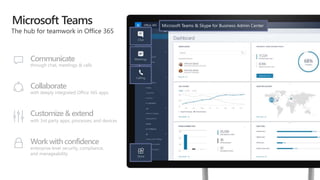
Microsoft Teams
Communicate
through chat, meetings & calls
Collaborate
with deeply integrated Office 365 apps
Customize& extend
with 3rd party apps, processes, and devices
Work withconfidence
enterprise level security, compliance,
and manageability
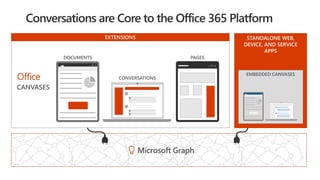
STANDALONE WEB,
DEVICE, AND SERVICE
APPS
 
EXTENSIONS
EMBEDDED CANVASES
Microsoft Graph
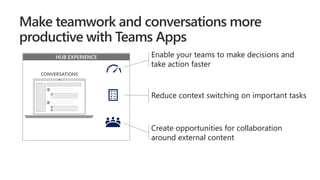
HUB EXPERIENCE Enable your teams to make decisions and
take action faster
Reduce context switching on important tasks
Create opportunities for collaboration
around external content
Tailoryourteamworkwith
200+ Teams apps
now available!
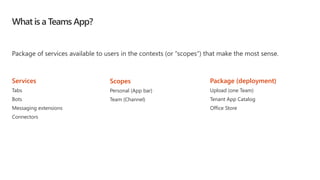
What is a Teams App?
Package of services available to users in the contexts (or “scopes”) that make the most sense.
Services
Tabs
Bots
Messaging extensions
Connectors
Scopes
Personal (App bar)
Team (Channel)
Package (deployment)
Upload (one Team)
Tenant App Catalog
Office Store
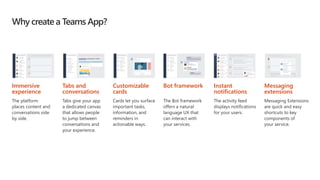
Why create a Teams App?
Immersive
experience
The platform
places content and
conversations side
by side.
Tabs and
conversations
Tabs give your app
a dedicated canvas
that allows people
to jump between
conversations and
your experience.
Customizable
cards
Cards let you surface
important tasks,
information, and
reminders in
actionable ways.
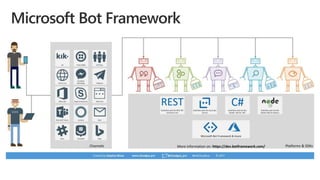
Bot framework
The Bot framework
offers a natural
language UX that
can interact with
your services.
Instant
notifications
The activity feed
displays notifications
for your users.
Messaging
extensions
Messaging Extensions
are quick and easy
shortcuts to key
components of
your service.
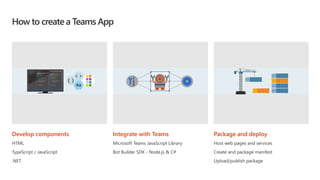
How to create a Teams App
Develop components
HTML
TypeScript / JavaScript
.NET
Integrate with Teams
Microsoft Teams JavaScript Library
Bot Builder SDK - Node.js & C#
Package and deploy
Host web pages and services
Create and package manifest
Upload/publish package
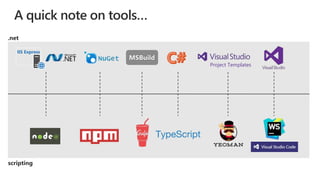
IIS Express
Project Templates
A quick note on tools…
.net
scripting
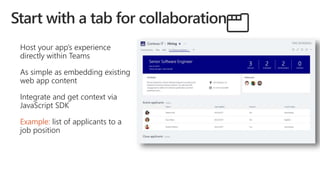
Host your app’s experience
directly within Teams
As simple as embedding existing
web app content
Integrate and get context via
JavaScript SDK
Example: list of applicants to a
job position
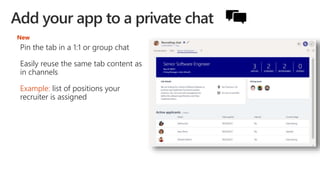
Pin the tab in a 1:1 or group chat
Easily reuse the same tab content as
in channels
Example: list of positions your
recruiter is assigned
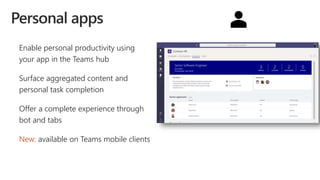
New
Enable personal productivity using
your app in the Teams hub
Surface aggregated content and
personal task completion
Offer a complete experience through
bot and tabs
New: available on Teams mobile clients
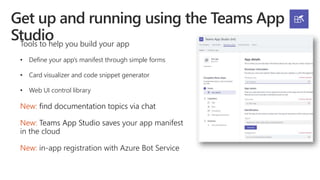
Tools to help you build your app
• Define your app’s manifest through simple forms
• Card visualizer and code snippet generator
• Web UI control library
New: find documentation topics via chat
New: Teams App Studio saves your app manifest
in the cloud
New: in-app registration with Azure Bot Service
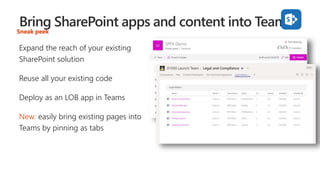
Expand the reach of your existing
SharePoint solution
Reuse all your existing code
Deploy as an LOB app in Teams
New: easily bring existing pages into
Teams by pinning as tabs
Sneak peek
Simple, Advanced, Dilbert.
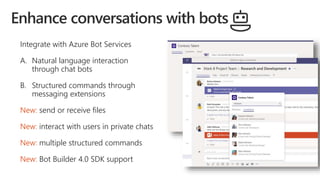
Integrate with Azure Bot Services
A. Natural language interaction
through chat bots
B. Structured commands through
messaging extensions
New: send or receive files
New: interact with users in private chats
New: multiple structured commands
New: Bot Builder 4.0 SDK support
Simple Bot and Tab
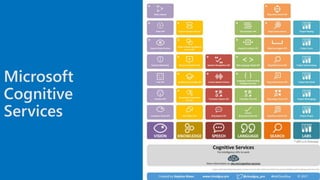
Microsoft
Cognitive
Services
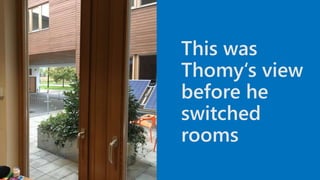
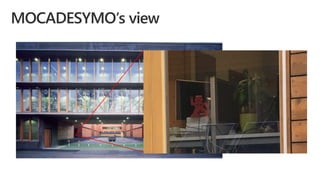
This was
Thomy‘s view
before he
switched
rooms
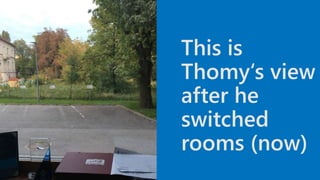
This is
Thomy‘s view
after he
switched
rooms (now)
How can Thomy solve that problem?
As a geek you have to do something
awesome
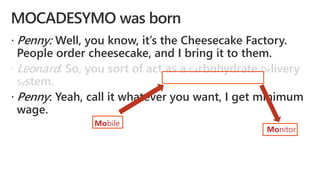
 Penny: Well, you know, it’s the Cheesecake Factory.
People order cheesecake, and I bring it to them.
 Leonard: So, you sort of act as a Carbohydrate Delivery
System.
 Penny: Yeah, call it whatever you want, I get minimum
wage.
Mobile
Monitor
Who or what is MOCADESYMO?
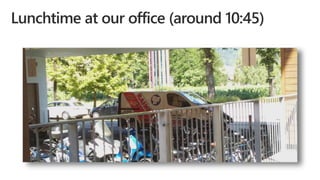
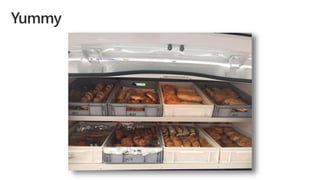
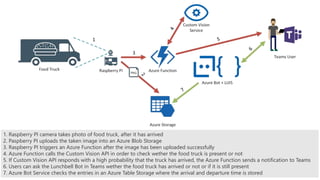
1. Raspberry PI camera takes photo of food truck, after it has arrived
2. Paspberry PI uploads the taken image into an Azure Blob Storage
3. Raspberry PI triggers an Azure Function after the image has been uploaded successfully
4. Azure Function calls the Custom Vision API in order to check wether the food truck is present or not
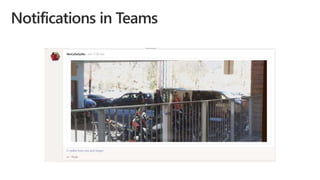
5. If Custom Vision API responds with a high probability that the truck has arrived, the Azure Function sends a notification to Teams
6. Users can ask the Lunchbell Bot in Teams wether the food truck has arrived or not or if it is still present
7. Azure Bot Service checks the entries in an Azure Table Storage where the arrival and departure time is stored
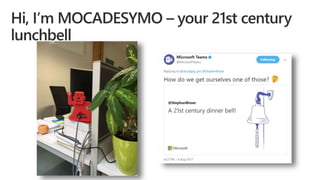
21st century digital lunch bell
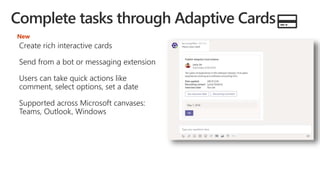
Create rich interactive cards
Send from a bot or messaging extension
Users can take quick actions like
comment, select options, set a date
Supported across Microsoft canvases:
Teams, Outlook, Windows
New
Sneak peek
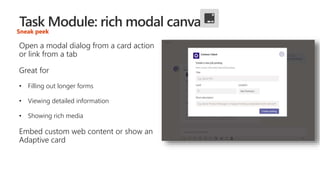
Open a modal dialog from a card action
or link from a tab
Great for
• Filling out longer forms
• Viewing detailed information
• Showing rich media
Embed custom web content or show an
Adaptive card
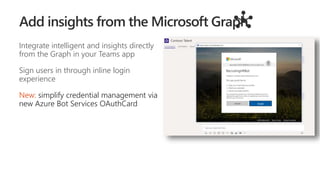
Integrate intelligent and insights directly
from the Graph in your Teams app
Sign users in through inline login
experience
New: simplify credential management via
new Azure Bot Services OAuthCard
your -
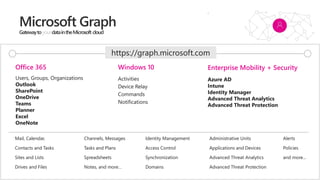
Users, Groups, Organizations
Outlook
SharePoint
OneDrive
Teams
Planner
Excel
OneNote
Activities
Device Relay
Commands
Notifications
Azure AD
Intune
Identity Manager
Advanced Threat Analytics
Advanced Threat Protection
Mail, Calendar,
Contacts and Tasks
Sites and Lists
Drives and Files
Channels, Messages
Tasks and Plans
Spreadsheets
Notes, and more…
Identity Management
Access Control
Synchronization
Domains
Administrative Units
Applications and Devices
Advanced Threat Analytics
Advanced Threat Protection
Alerts
Policies
and more…
Office 365 Windows 10 Enterprise Mobility + Security
https://graph.microsoft.com
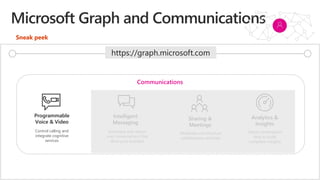
Programmable
Voice & Video
Intelligent
Messaging
Sharing &
Meetings
Analytics &
Insights
Control calling and
integrate cognitive
services
Automate and reason
over conversations that
drive your business
Moderate and structure
collaboration activities
Utilize conversation
data to build
compliant insights
Communications
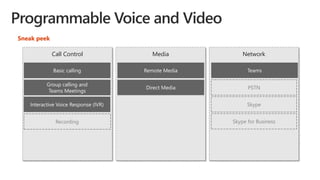
Sneak peek
https://graph.microsoft.com
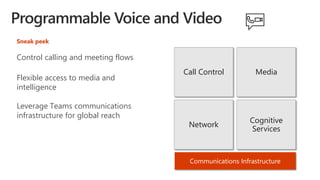
Communications Infrastructure
Call Control Media
Network
Cognitive
Services
Control calling and meeting flows
Flexible access to media and
intelligence
Leverage Teams communications
infrastructure for global reach
Sneak peek
NetworkCall Control Media
Direct Media
Remote MediaBasic calling
Group calling and
Teams Meetings
Teams
Interactive Voice Response (IVR)
Sneak peek
Skype for Business
Skype
PSTN
Recording
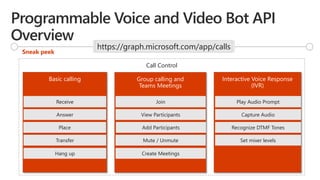
Group calling and
Teams Meetings
Basic calling
Call Control
Interactive Voice Response
(IVR)
Receive
Answer
Play Audio Prompt
Capture Audio
Recognize DTMF Tones
Set mixer levels
Place
Transfer
Hang up
View Participants
Join
Add Participants
Mute / Unmute
Create Meetings
Sneak peek
https://graph.microsoft.com/app/calls
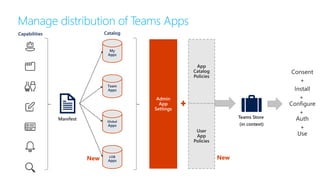
Capabilities
My
Apps
Team
Apps
Global
Apps
LOB
Apps
Catalog
App
Catalog
Policies
Manage distribution of Teams Apps
New New
User
App
Policies
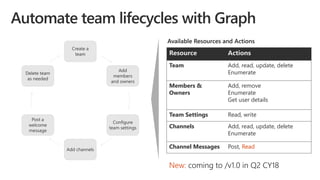
Create a
team
Add
members
and owners
Configure
team settings
Add channels
Post a
welcome
message
Delete team
as needed
Resource Actions
Team Add, read, update, delete
Enumerate
Members &
Owners
Add, remove
Enumerate
Get user details
Team Settings Read, write
Channels Add, read, update, delete
Enumerate
Channel Messages Post, Read
Available Resources and Actions
New: coming to /v1.0 in Q2 CY18
Thank you
Global office 365 developer bootcamp Slovenia 2018

Global office 365 developer bootcamp Slovenia 2018

  • 1.
  • 2.
    Microsoft Teams Communicate through chat,meetings & calls Collaborate with deeply integrated Office 365 apps Customize& extend with 3rd party apps, processes, and devices Work withconfidence enterprise level security, compliance, and manageability
  • 3.
    STANDALONE WEB, DEVICE, ANDSERVICE APPS   EXTENSIONS EMBEDDED CANVASES Microsoft Graph
  • 4.
    HUB EXPERIENCE Enableyour teams to make decisions and take action faster Reduce context switching on important tasks Create opportunities for collaboration around external content
  • 5.
  • 6.
    What is aTeams App? Package of services available to users in the contexts (or “scopes”) that make the most sense. Services Tabs Bots Messaging extensions Connectors Scopes Personal (App bar) Team (Channel) Package (deployment) Upload (one Team) Tenant App Catalog Office Store
  • 7.
    Why create aTeams App? Immersive experience The platform places content and conversations side by side. Tabs and conversations Tabs give your app a dedicated canvas that allows people to jump between conversations and your experience. Customizable cards Cards let you surface important tasks, information, and reminders in actionable ways. Bot framework The Bot framework offers a natural language UX that can interact with your services. Instant notifications The activity feed displays notifications for your users. Messaging extensions Messaging Extensions are quick and easy shortcuts to key components of your service.
  • 8.
    How to createa Teams App Develop components HTML TypeScript / JavaScript .NET Integrate with Teams Microsoft Teams JavaScript Library Bot Builder SDK - Node.js & C# Package and deploy Host web pages and services Create and package manifest Upload/publish package
  • 9.
    IIS Express Project Templates Aquick note on tools… .net scripting
  • 10.
    Host your app’sexperience directly within Teams As simple as embedding existing web app content Integrate and get context via JavaScript SDK Example: list of applicants to a job position
  • 11.
    Pin the tabin a 1:1 or group chat Easily reuse the same tab content as in channels Example: list of positions your recruiter is assigned New
  • 12.
    Enable personal productivityusing your app in the Teams hub Surface aggregated content and personal task completion Offer a complete experience through bot and tabs New: available on Teams mobile clients
  • 13.
    Tools to helpyou build your app • Define your app’s manifest through simple forms • Card visualizer and code snippet generator • Web UI control library New: find documentation topics via chat New: Teams App Studio saves your app manifest in the cloud New: in-app registration with Azure Bot Service
  • 14.
    Expand the reachof your existing SharePoint solution Reuse all your existing code Deploy as an LOB app in Teams New: easily bring existing pages into Teams by pinning as tabs Sneak peek
  • 15.
  • 16.
    Integrate with AzureBot Services A. Natural language interaction through chat bots B. Structured commands through messaging extensions New: send or receive files New: interact with users in private chats New: multiple structured commands New: Bot Builder 4.0 SDK support
  • 17.
  • 19.
  • 21.
  • 24.
    This is Thomy‘s view afterhe switched rooms (now)
  • 25.
    How can Thomysolve that problem?
  • 27.
    As a geekyou have to do something awesome
  • 28.
     Penny: Well,you know, it’s the Cheesecake Factory. People order cheesecake, and I bring it to them.  Leonard: So, you sort of act as a Carbohydrate Delivery System.  Penny: Yeah, call it whatever you want, I get minimum wage. Mobile Monitor
  • 29.
    Who or whatis MOCADESYMO?
  • 33.
    1. Raspberry PIcamera takes photo of food truck, after it has arrived 2. Paspberry PI uploads the taken image into an Azure Blob Storage 3. Raspberry PI triggers an Azure Function after the image has been uploaded successfully 4. Azure Function calls the Custom Vision API in order to check wether the food truck is present or not 5. If Custom Vision API responds with a high probability that the truck has arrived, the Azure Function sends a notification to Teams 6. Users can ask the Lunchbell Bot in Teams wether the food truck has arrived or not or if it is still present 7. Azure Bot Service checks the entries in an Azure Table Storage where the arrival and departure time is stored
  • 34.
  • 35.
    Create rich interactivecards Send from a bot or messaging extension Users can take quick actions like comment, select options, set a date Supported across Microsoft canvases: Teams, Outlook, Windows New
  • 36.
    Sneak peek Open amodal dialog from a card action or link from a tab Great for • Filling out longer forms • Viewing detailed information • Showing rich media Embed custom web content or show an Adaptive card
  • 37.
    Integrate intelligent andinsights directly from the Graph in your Teams app Sign users in through inline login experience New: simplify credential management via new Azure Bot Services OAuthCard
  • 38.
    your - Users, Groups,Organizations Outlook SharePoint OneDrive Teams Planner Excel OneNote Activities Device Relay Commands Notifications Azure AD Intune Identity Manager Advanced Threat Analytics Advanced Threat Protection Mail, Calendar, Contacts and Tasks Sites and Lists Drives and Files Channels, Messages Tasks and Plans Spreadsheets Notes, and more… Identity Management Access Control Synchronization Domains Administrative Units Applications and Devices Advanced Threat Analytics Advanced Threat Protection Alerts Policies and more… Office 365 Windows 10 Enterprise Mobility + Security https://graph.microsoft.com
  • 39.
    Programmable Voice & Video Intelligent Messaging Sharing& Meetings Analytics & Insights Control calling and integrate cognitive services Automate and reason over conversations that drive your business Moderate and structure collaboration activities Utilize conversation data to build compliant insights Communications Sneak peek https://graph.microsoft.com
  • 40.
    Communications Infrastructure Call ControlMedia Network Cognitive Services Control calling and meeting flows Flexible access to media and intelligence Leverage Teams communications infrastructure for global reach Sneak peek
  • 41.
    NetworkCall Control Media DirectMedia Remote MediaBasic calling Group calling and Teams Meetings Teams Interactive Voice Response (IVR) Sneak peek Skype for Business Skype PSTN Recording
  • 42.
    Group calling and TeamsMeetings Basic calling Call Control Interactive Voice Response (IVR) Receive Answer Play Audio Prompt Capture Audio Recognize DTMF Tones Set mixer levels Place Transfer Hang up View Participants Join Add Participants Mute / Unmute Create Meetings Sneak peek https://graph.microsoft.com/app/calls
  • 43.
  • 44.
    Create a team Add members and owners Configure teamsettings Add channels Post a welcome message Delete team as needed Resource Actions Team Add, read, update, delete Enumerate Members & Owners Add, remove Enumerate Get user details Team Settings Read, write Channels Add, read, update, delete Enumerate Channel Messages Post, Read Available Resources and Actions New: coming to /v1.0 in Q2 CY18
  • 46.

Editor's Notes

  • #3 2
  • #4 3
  • #6 5
  • #7 Apps in Microsoft Teams allow you to make your service available to users in the contexts - or "scopes" - that make the most sense. You declare precisely which capabilities you support, in which scopes, via your app package's manifest file. You can use most app capabilities (such as bots, tabs, etc) in most scopes. You offer these capabilities via a single Teams app package that users can acquire through our in-product app gallery, via the Office Store, or uploaded directly by your team.
  • #8 This information comes from the Microsoft Teams Design Guidelines: http://msteamsdesignguidelines.azurewebsites.net/#!/ All of these capabilities are possible in an app, not in a custom bot. Not all are required. Only publish those that make sense, or start with one and build out over time.
  • #10 Why introduce a new Toolchain for SP? SharePoint has moved from ASP.net to Front End Development. Rapid Web Development. Taking SharePoint to where the developers are. Standardizing and managing the way developers were already customizing SharePoint (jslink, script editor webpart, script injection). Reducing SharePoint proprietary components and the corresponding friction. Bringing modern Web Tech to classic SharePoint Sites & Pages. Allow customization on new SharePoint experiences
  • #13 Microsoft Build 2017
  • #14 Microsoft Build 2017
  • #20 SBI
  • #39 38
  • #40 39