More Tips and Tricks
Some “Non Bad” Practices
#>whoami?
- Ansible core maintainer
- bcoca @ IRC and github and mailing lists
- worn hats as SA/QA/Programmer/DBA/etc
- tech janitor
2
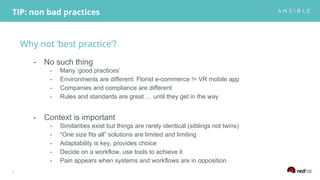
Why not ‘best practice’?
- No such thing
- Many ‘good practices’
- Environments are different: Florist e-commerce != VR mobile app
- Companies and compliance are different
- Rules and standards are great … until they get in the way
- Context is important
- Similarities exist but things are rarely identical (siblings not twins)
- “One size fits all” solutions are limited and limiting
- Adaptability is key, provides choice
- Decide on a workflow, use tools to achieve it
- Pain appears when systems and workflows are in opposition
TIP: non bad practices
3
PEP8
A style guide is about consistency.
Consistency with this style guide is important.
Consistency within a project is more important.
Consistency within one module or function is the most important.
However, know when to be inconsistent -- sometimes style guide recommendations just
aren't applicable. When in doubt, use your best judgment.
Look at other examples and decide what looks best. And don't hesitate to ask!
4
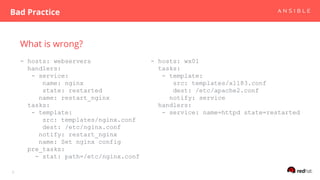
What is wrong?
- hosts: webservers
handlers:
- service:
name: nginx
state: restarted
name: restart_nginx
tasks:
- template:
src: templates/nginx.conf
dest: /etc/nginx.conf
notify: restart_nginx
name: Set nginx config
pre_tasks:
- stat: path=/etc/nginx.conf
Bad Practice
5
- hosts: wx01
tasks:
- template:
src: templates/xl183.conf
dest: /etc/apache2.conf
notify: service
handlers:
- service: name=httpd state=restarted
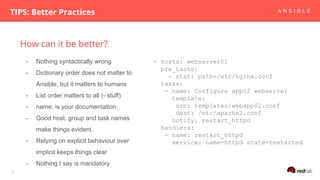
How can it be better?
TIPS: Better Practices
6
- hosts: webserver01
pre_tasks:
- stat: path=/etc/nginx.conf
tasks:
- name: Configure app02 webserver
template:
src: templates/webapp02.conf
dest: /etc/apache2.conf
notify: restart_httpd
handlers:
- name: restart_httpd
service: name=httpd state=restarted
- Nothing syntactically wrong
- Dictionary order does not matter to
Ansible, but it matters to humans
- List order matters to all (- stuff)
- name: is your documentation
- Good host, group and task names
make things evident.
- Relying on explicit behaviour over
implicit keeps things clear
- Nothing I say is mandatory
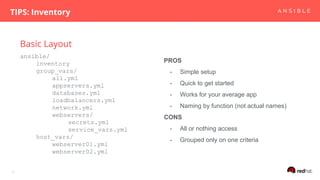
Basic Layout
TIPS: Inventory
7
ansible/
inventory
group_vars/
all.yml
appservers.yml
databases.yml
loadbalancers.yml
network.yml
webservers/
secrets.yml
service_vars.yml
host_vars/
webserver01.yml
webserver02.yml
PROS
- Simple setup
- Quick to get started
- Works for your average app
- Naming by function (not actual names)
CONS
- All or nothing access
- Grouped only on one criteria
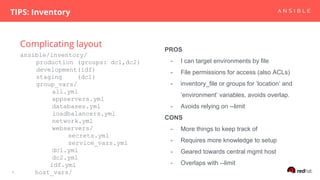
Complicating layout
TIPS: Inventory
8
ansible/inventory/
production (groups: dc1,dc2)
development(idf)
staging (dc1)
group_vars/
all.yml
appservers.yml
databases.yml
loadbalancers.yml
network.yml
webservers/
secrets.yml
service_vars.yml
dc1.yml
dc2.yml
idf.yml
host_vars/
PROS
- I can target environments by file
- File permissions for access (also ACLs)
- inventory_file or groups for ‘location’ and
‘environment’ variables, avoids overlap.
- Avoids relying on --limit
CONS
- More things to keep track of
- Requires more knowledge to setup
- Geared towards central mgmt host
- Overlaps with --limit
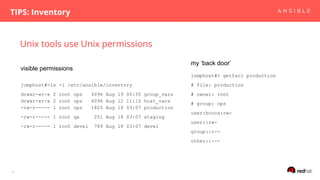
Unix tools use Unix permissions
TIPS: Inventory
9
jumphost#>ls -l /etc/ansible/inventory
drwxr-xr-x 2 root ops 4096 Aug 19 00:55 group_vars
drwxr-xr-x 2 root ops 4096 Aug 12 11:10 host_vars
-rw-r----- 1 root ops 1825 Aug 18 03:07 production
-rw-r----- 1 root qa 251 Aug 18 03:07 staging
-rw-r----- 1 root devel 789 Aug 18 03:07 devel
jumphost#> getfacl production
# file: production
# owner: root
# group: ops
user:bcoca:rw-
user::rw-
group::r--
other::---
visible permissions
my ‘back door’
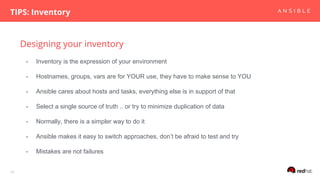
Designing your inventory
TIPS: Inventory
10
- Inventory is the expression of your environment
- Hostnames, groups, vars are for YOUR use, they have to make sense to YOU
- Ansible cares about hosts and tasks, everything else is in support of that
- Select a single source of truth .. or try to minimize duplication of data
- Normally, there is a simpler way to do it
- Ansible makes it easy to switch approaches, don’t be afraid to test and try
- Mistakes are not failures
Generate YAML Inventory
Tricks
11
- hosts: localhost
gather_facts: false
tasks:
- template:
src: dump_hosts_yaml.j2
dest: /tmp/hosts.yml
{% set builtins = ['hostvars', 'vars', … ]%}
{% set dumped_vars = [] %}
{% for group in groups if group != 'all'%}
{{group}}:
{% for host in groups[group] %}
{{ host }}:
{% for myhostvar in hostvars[host] if myhostvar not in builtins %}
{{ myhostvar}}: {{hostvars[host][myhostvar]|to_json}}
{% if loop.last %}{% do dumped_vars.append(host) %}{%endif %}
{% endfor %}
{% endfor %}
{% endfor %}
migrate_yaml_inventory.yml dump_hosts_yaml.j2
12
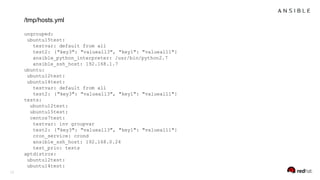
ungrouped:
ubuntu15test:
testvar: default from all
test2: {"key3": "valueall3", "key1": "valueall1"}
ansible_python_interpreter: /usr/bin/python2.7
ansible_ssh_host: 192.168.1.7
ubuntu:
ubuntu12test:
ubuntu14test:
testvar: default from all
test2: {"key3": "valueall3", "key1": "valueall1"}
tests:
ubuntu12test:
ubuntu15test:
centos7test:
testvar: inv groupvar
test2: {"key3": "valueall3", "key1": "valueall1"}
cron_service: crond
ansible_ssh_host: 192.168.0.24
test_prio: tests
aptdistros:
ubuntu12test:
ubuntu14test:
/tmp/hosts.yml
Generate INI Inventory
Tricks
13
{% set builtins = ['hostvars', 'vars', 'groups', 'group_names', … '] %}{% set
dumped_vars = [] %}
{% for group in groups if group != 'all'%}
[{{group}}]
{% for host in groups[group] %}
{{ host }} {% for myhostvar in hostvars[host] if myhostvar not in builtins and host
not in dumped_vars %} {{ myhostvar}}={{hostvars[host][myhostvar]|to_json}} {% if
loop.last %}{% do dum
ped_vars.append(host) %}{% endif %} {% endfor %}
{% endfor %}
{% endfor %}
dump_hosts_ini.j2
14
[ungrouped]
ubuntu15test testvar=”default from all” test= {"key3": "valueall3", "key1": "valueall1"}
[ubuntu]
ubuntu12test
ubuntu14test testvar=”default from all” test2= {"key3": "valueall3", "key1": "valueall1"}
[tests]
ubuntu12test
ubuntu15test
centos7test testvar=”inv groupvar” ansible_ssh_host="192.168.0.24" test2={"key3": ...
[aptdistros]
ubuntu12test
/tmp/hosts.ini
Variable Sources
TIPS: vars can go in many places
15
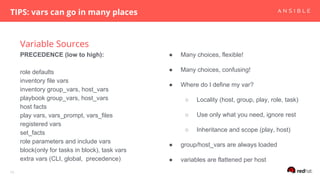
PRECEDENCE (low to high):
role defaults
inventory file vars
inventory group_vars, host_vars
playbook group_vars, host_vars
host facts
play vars, vars_prompt, vars_files
registered vars
set_facts
role parameters and include vars
block(only for tasks in block), task vars
extra vars (CLI, global, precedence)
● Many choices, flexible!
● Many choices, confusing!
● Where do I define my var?
○ Locality (host, group, play, role, task)
○ Use only what you need, ignore rest
○ Inheritance and scope (play, host)
● group/host_vars are always loaded
● variables are flattened per host
Variable Sources
TIPS: vars can go in many places
16
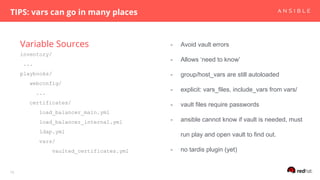
inventory/
...
playbooks/
webconfig/
...
certificates/
load_balancer_main.yml
load_balancer_internal.yml
ldap.yml
vars/
vaulted_certificates.yml
- Avoid vault errors
- Allows ‘need to know’
- group/host_vars are still autoloaded
- explicit: vars_files, include_vars from vars/
- vault files require passwords
- ansible cannot know if vault is needed, must
run play and open vault to find out.
- no tardis plugin (yet)
vars_prompt
TIPS: vars can go in many places
17
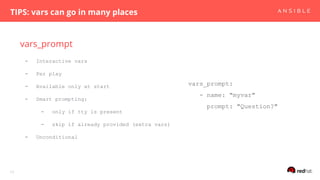
- Interactive vars
- Per play
- Available only at start
- Smart prompting:
- only if tty is present
- skip if already provided (extra vars)
- Unconditional
vars_prompt:
- name: "myvar"
prompt: "Question?"
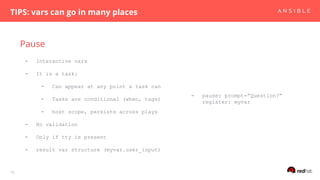
Pause
TIPS: vars can go in many places
18
- Interactive vars
- It is a task:
- Can appear at any point a task can
- Tasks are conditional (when, tags)
- host scope, persists across plays
- No validation
- Only if tty is present
- result var structure (myvar.user_input)
- pause: prompt=”Question?”
register: myvar
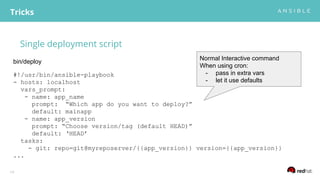
Single deployment script
Tricks
19
#!/usr/bin/ansible-playbook
- hosts: localhost
vars_prompt:
- name: app_name
prompt: “Which app do you want to deploy?”
default: mainapp
- name: app_version
prompt: “Choose version/tag (default HEAD)”
default: ‘HEAD’
tasks:
- git: repo=git@myreposerver/{{app_version}} version={{app_version}}
...
bin/deploy
Normal Interactive command
When using cron:
- pass in extra vars
- let it use defaults
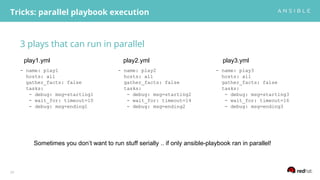
3 plays that can run in parallel
Tricks: parallel playbook execution
20
- name: play1
hosts: all
gather_facts: false
tasks:
- debug: msg=starting1
- wait_for: timeout=10
- debug: msg=ending1
- name: play2
hosts: all
gather_facts: false
tasks:
- debug: msg=starting2
- wait_for: timeout=14
- debug: msg=ending2
- name: play3
hosts: all
gather_facts: false
tasks:
- debug: msg=starting3
- wait_for: timeout=16
- debug: msg=ending3
play1.yml play3.ymlplay2.yml
Sometimes you don’t want to run stuff serially .. if only ansible-playbook ran in parallel!
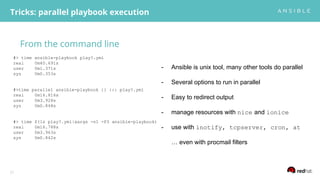
From the command line
Tricks: parallel playbook execution
21
#> time ansible-playbook play?.yml
real 0m40.691s
user 0m1.371s
sys 0m0.353s
#>time parallel ansible-playbook {} ::: play?.yml
real 0m16.816s
user 0m3.928s
sys 0m0.848s
#> time $(ls play?.yml|xargs -n1 -P3 ansible-playbook)
real 0m16.788s
user 0m3.963s
sys 0m0.842s
- Ansible is unix tool, many other tools do parallel
- Several options to run in parallel
- Easy to redirect output
- manage resources with nice and ionice
- use with inotify, tcpserver, cron, at
… even with procmail filters
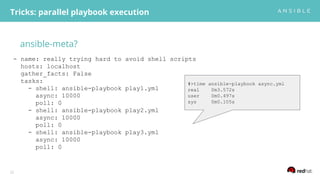
ansible-meta?
Tricks: parallel playbook execution
22
- name: really trying hard to avoid shell scripts
hosts: localhost
gather_facts: False
tasks:
- shell: ansible-playbook play1.yml
async: 10000
poll: 0
- shell: ansible-playbook play2.yml
async: 10000
poll: 0
- shell: ansible-playbook play3.yml
async: 10000
poll: 0
#>time ansible-playbook async.yml
real 0m3.572s
user 0m0.497s
sys 0m0.105s
Less typing!
Tricks: parallel playbook execution
23
- name: really trying hard to avoid shell scripts v2
hosts: localhost
gather_facts: False
tasks:
- shell: ansible-playbook play{{item}}.yml
async: 10000
poll: 0
with_items: [1,2,3]
#>time ansible-playbook async2.yml
real 0m3.531s
user 0m0.463s
sys 0m0.107s
ansible-meta … with results!
Tricks: parallel playbook execution
24
- name: really trying hard to avoid shell scripts v3
hosts: localhost
gather_facts: False
tasks:
- shell: ansible-playbook play{{item}}.yml
async: 10000
poll: 0
with_items: [1,2,3]
register: runplays
- async_status: jid={{runplays.results[item.index].ansible_job_id}}
resgister: jobs
until: jobs.finished
with_indexed_items: [1,2,3]
retries: 100
#>time ansible-playbook async3.yml
real 0m24.140s
user 0m1.239s
sys 0m0.265s
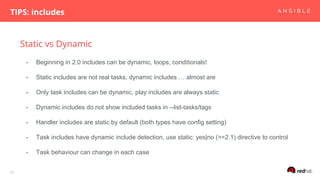
Static vs Dynamic
TIPS: includes
25
- Beginning in 2.0 includes can be dynamic, loops, conditionals!
- Static includes are not real tasks, dynamic includes … almost are
- Only task includes can be dynamic, play includes are always static
- Dynamic includes do not show included tasks in --list-tasks/tags
- Handler includes are static by default (both types have config setting)
- Task includes have dynamic include detection, use static: yes|no (>=2.1) directive to control
- Task behaviour can change in each case
dynamic include loops
TIPS: includes
26
- hosts: localhost
gather_facts: False
tasks:
- include: test.yml
with_items: [1,2]
static: yes
- set_fact: outer={{item}}
- debug: msg="{{outer}} and {{item}}"
with_items: ['a','b']
TASK [debug]
********************************************************
ok: [localhost] => (item=a) => {
"item": "a",
"msg": "1 and a"
}
ok: [localhost] => (item=b) => {
"item": "b",
"msg": "1 and b"
}
TASK [debug]
********************************************************
ok: [localhost] => (item=a) => {
"item": "a",
"msg": "2 and a"
}
ok: [localhost] => (item=b) => {
"item": "b",
"msg": "2 and b"
}
play.yml
test.yml
Since 2.1 you can use
loop_control instead of set_fact
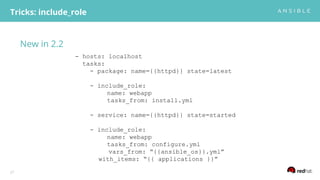
New in 2.2
Tricks: include_role
27
- hosts: localhost
tasks:
- package: name={{httpd}} state=latest
- include_role:
name: webapp
tasks_from: install.yml
- service: name={{httpd}} state=started
- include_role:
name: webapp
tasks_from: configure.yml
vars_from: “{{ansible_os}}.yml”
with_items: “{{ applications }}”
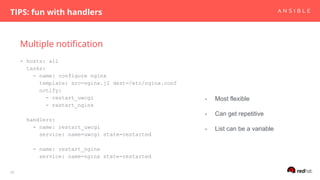
Multiple notification
TIPS: fun with handlers
28
- hosts: all
tasks:
- name: configure nginx
template: src=nginx.j2 dest=/etc/nginx.conf
notify:
- restart_uwcgi
- restart_nginx
handlers:
- name: restart_uwcgi
service: name=uwcgi state=restarted
- name: restart_nginx
service: name=nginx state=restarted
- Most flexible
- Can get repetitive
- List can be a variable
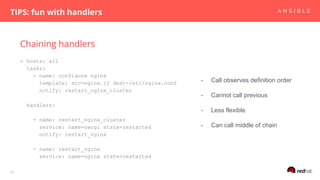
Chaining handlers
TIPS: fun with handlers
29
- hosts: all
tasks:
- name: configure nginx
template: src=nginx.j2 dest=/etc/nginx.conf
notify: restart_nginx_cluster
handlers:
- name: restart_nginx_cluster
service: name=uwcgi state=restarted
notify: restart_nginx
- name: restart_nginx
service: name=nginx state=restarted
- Call observes definition order
- Cannot call previous
- Less flexible
- Can call middle of chain
Grouping handlers
TIPS: fun with handlers
30
- hosts: all
tasks:
- name: configure nginx
template: src=nginx.j2 dest=/etc/nginx.conf
notify: restart_nginx_cluster
handlers:
- name: restart_nginx_cluster
wait_for: seconds=1
changed_when: true
notify: [‘restart_uwcgi’, ‘nginx’]
- name: restart_uwcgi
service: name=uwcgi state=restarted
- name: restart_nginx
service: name=nginx state=restarted
- Still flexible
- Less repetition
- Needs dummy task
- Also relies on chain
- List can be a variable
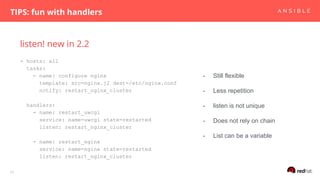
listen! new in 2.2
TIPS: fun with handlers
31
- hosts: all
tasks:
- name: configure nginx
template: src=nginx.j2 dest=/etc/nginx.conf
notify: restart_nginx_cluster
handlers:
- name: restart_uwcgi
service: name=uwcgi state=restarted
listen: restart_nginx_cluster
- name: restart_nginx
service: name=nginx state=restarted
listen: restart_nginx_cluster
- Still flexible
- Less repetition
- listen is not unique
- Does not rely on chain
- List can be a variable
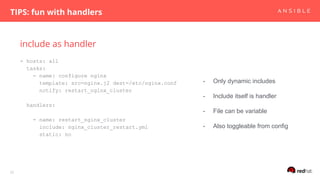
include as handler
TIPS: fun with handlers
32
- hosts: all
tasks:
- name: configure nginx
template: src=nginx.j2 dest=/etc/nginx.conf
notify: restart_nginx_cluster
handlers:
- name: restart_nginx_cluster
include: nginx_cluster_restart.yml
static: no
- Only dynamic includes
- Include itself is handler
- File can be variable
- Also toggleable from config
#>exit
- Ansible is flexible, many ways to do things
- Choice can be daunting
- Easy to make mistakes, easy to correct them
- “Best” is relative, depends on context, test it!
33

More tips n tricks

  • 1.
    More Tips andTricks Some “Non Bad” Practices
  • 2.
    #>whoami? - Ansible coremaintainer - bcoca @ IRC and github and mailing lists - worn hats as SA/QA/Programmer/DBA/etc - tech janitor 2
  • 3.
    Why not ‘bestpractice’? - No such thing - Many ‘good practices’ - Environments are different: Florist e-commerce != VR mobile app - Companies and compliance are different - Rules and standards are great … until they get in the way - Context is important - Similarities exist but things are rarely identical (siblings not twins) - “One size fits all” solutions are limited and limiting - Adaptability is key, provides choice - Decide on a workflow, use tools to achieve it - Pain appears when systems and workflows are in opposition TIP: non bad practices 3
  • 4.
    PEP8 A style guideis about consistency. Consistency with this style guide is important. Consistency within a project is more important. Consistency within one module or function is the most important. However, know when to be inconsistent -- sometimes style guide recommendations just aren't applicable. When in doubt, use your best judgment. Look at other examples and decide what looks best. And don't hesitate to ask! 4
  • 5.
    What is wrong? -hosts: webservers handlers: - service: name: nginx state: restarted name: restart_nginx tasks: - template: src: templates/nginx.conf dest: /etc/nginx.conf notify: restart_nginx name: Set nginx config pre_tasks: - stat: path=/etc/nginx.conf Bad Practice 5 - hosts: wx01 tasks: - template: src: templates/xl183.conf dest: /etc/apache2.conf notify: service handlers: - service: name=httpd state=restarted
  • 6.
    How can itbe better? TIPS: Better Practices 6 - hosts: webserver01 pre_tasks: - stat: path=/etc/nginx.conf tasks: - name: Configure app02 webserver template: src: templates/webapp02.conf dest: /etc/apache2.conf notify: restart_httpd handlers: - name: restart_httpd service: name=httpd state=restarted - Nothing syntactically wrong - Dictionary order does not matter to Ansible, but it matters to humans - List order matters to all (- stuff) - name: is your documentation - Good host, group and task names make things evident. - Relying on explicit behaviour over implicit keeps things clear - Nothing I say is mandatory
  • 7.
    Basic Layout TIPS: Inventory 7 ansible/ inventory group_vars/ all.yml appservers.yml databases.yml loadbalancers.yml network.yml webservers/ secrets.yml service_vars.yml host_vars/ webserver01.yml webserver02.yml PROS -Simple setup - Quick to get started - Works for your average app - Naming by function (not actual names) CONS - All or nothing access - Grouped only on one criteria
  • 8.
    Complicating layout TIPS: Inventory 8 ansible/inventory/ production(groups: dc1,dc2) development(idf) staging (dc1) group_vars/ all.yml appservers.yml databases.yml loadbalancers.yml network.yml webservers/ secrets.yml service_vars.yml dc1.yml dc2.yml idf.yml host_vars/ PROS - I can target environments by file - File permissions for access (also ACLs) - inventory_file or groups for ‘location’ and ‘environment’ variables, avoids overlap. - Avoids relying on --limit CONS - More things to keep track of - Requires more knowledge to setup - Geared towards central mgmt host - Overlaps with --limit
  • 9.
    Unix tools useUnix permissions TIPS: Inventory 9 jumphost#>ls -l /etc/ansible/inventory drwxr-xr-x 2 root ops 4096 Aug 19 00:55 group_vars drwxr-xr-x 2 root ops 4096 Aug 12 11:10 host_vars -rw-r----- 1 root ops 1825 Aug 18 03:07 production -rw-r----- 1 root qa 251 Aug 18 03:07 staging -rw-r----- 1 root devel 789 Aug 18 03:07 devel jumphost#> getfacl production # file: production # owner: root # group: ops user:bcoca:rw- user::rw- group::r-- other::--- visible permissions my ‘back door’
  • 10.
    Designing your inventory TIPS:Inventory 10 - Inventory is the expression of your environment - Hostnames, groups, vars are for YOUR use, they have to make sense to YOU - Ansible cares about hosts and tasks, everything else is in support of that - Select a single source of truth .. or try to minimize duplication of data - Normally, there is a simpler way to do it - Ansible makes it easy to switch approaches, don’t be afraid to test and try - Mistakes are not failures
  • 11.
    Generate YAML Inventory Tricks 11 -hosts: localhost gather_facts: false tasks: - template: src: dump_hosts_yaml.j2 dest: /tmp/hosts.yml {% set builtins = ['hostvars', 'vars', … ]%} {% set dumped_vars = [] %} {% for group in groups if group != 'all'%} {{group}}: {% for host in groups[group] %} {{ host }}: {% for myhostvar in hostvars[host] if myhostvar not in builtins %} {{ myhostvar}}: {{hostvars[host][myhostvar]|to_json}} {% if loop.last %}{% do dumped_vars.append(host) %}{%endif %} {% endfor %} {% endfor %} {% endfor %} migrate_yaml_inventory.yml dump_hosts_yaml.j2
  • 12.
    12 ungrouped: ubuntu15test: testvar: default fromall test2: {"key3": "valueall3", "key1": "valueall1"} ansible_python_interpreter: /usr/bin/python2.7 ansible_ssh_host: 192.168.1.7 ubuntu: ubuntu12test: ubuntu14test: testvar: default from all test2: {"key3": "valueall3", "key1": "valueall1"} tests: ubuntu12test: ubuntu15test: centos7test: testvar: inv groupvar test2: {"key3": "valueall3", "key1": "valueall1"} cron_service: crond ansible_ssh_host: 192.168.0.24 test_prio: tests aptdistros: ubuntu12test: ubuntu14test: /tmp/hosts.yml
  • 13.
    Generate INI Inventory Tricks 13 {%set builtins = ['hostvars', 'vars', 'groups', 'group_names', … '] %}{% set dumped_vars = [] %} {% for group in groups if group != 'all'%} [{{group}}] {% for host in groups[group] %} {{ host }} {% for myhostvar in hostvars[host] if myhostvar not in builtins and host not in dumped_vars %} {{ myhostvar}}={{hostvars[host][myhostvar]|to_json}} {% if loop.last %}{% do dum ped_vars.append(host) %}{% endif %} {% endfor %} {% endfor %} {% endfor %} dump_hosts_ini.j2
  • 14.
    14 [ungrouped] ubuntu15test testvar=”default fromall” test= {"key3": "valueall3", "key1": "valueall1"} [ubuntu] ubuntu12test ubuntu14test testvar=”default from all” test2= {"key3": "valueall3", "key1": "valueall1"} [tests] ubuntu12test ubuntu15test centos7test testvar=”inv groupvar” ansible_ssh_host="192.168.0.24" test2={"key3": ... [aptdistros] ubuntu12test /tmp/hosts.ini
  • 15.
    Variable Sources TIPS: varscan go in many places 15 PRECEDENCE (low to high): role defaults inventory file vars inventory group_vars, host_vars playbook group_vars, host_vars host facts play vars, vars_prompt, vars_files registered vars set_facts role parameters and include vars block(only for tasks in block), task vars extra vars (CLI, global, precedence) ● Many choices, flexible! ● Many choices, confusing! ● Where do I define my var? ○ Locality (host, group, play, role, task) ○ Use only what you need, ignore rest ○ Inheritance and scope (play, host) ● group/host_vars are always loaded ● variables are flattened per host
  • 16.
    Variable Sources TIPS: varscan go in many places 16 inventory/ ... playbooks/ webconfig/ ... certificates/ load_balancer_main.yml load_balancer_internal.yml ldap.yml vars/ vaulted_certificates.yml - Avoid vault errors - Allows ‘need to know’ - group/host_vars are still autoloaded - explicit: vars_files, include_vars from vars/ - vault files require passwords - ansible cannot know if vault is needed, must run play and open vault to find out. - no tardis plugin (yet)
  • 17.
    vars_prompt TIPS: vars cango in many places 17 - Interactive vars - Per play - Available only at start - Smart prompting: - only if tty is present - skip if already provided (extra vars) - Unconditional vars_prompt: - name: "myvar" prompt: "Question?"
  • 18.
    Pause TIPS: vars cango in many places 18 - Interactive vars - It is a task: - Can appear at any point a task can - Tasks are conditional (when, tags) - host scope, persists across plays - No validation - Only if tty is present - result var structure (myvar.user_input) - pause: prompt=”Question?” register: myvar
  • 19.
    Single deployment script Tricks 19 #!/usr/bin/ansible-playbook -hosts: localhost vars_prompt: - name: app_name prompt: “Which app do you want to deploy?” default: mainapp - name: app_version prompt: “Choose version/tag (default HEAD)” default: ‘HEAD’ tasks: - git: repo=git@myreposerver/{{app_version}} version={{app_version}} ... bin/deploy Normal Interactive command When using cron: - pass in extra vars - let it use defaults
  • 20.
    3 plays thatcan run in parallel Tricks: parallel playbook execution 20 - name: play1 hosts: all gather_facts: false tasks: - debug: msg=starting1 - wait_for: timeout=10 - debug: msg=ending1 - name: play2 hosts: all gather_facts: false tasks: - debug: msg=starting2 - wait_for: timeout=14 - debug: msg=ending2 - name: play3 hosts: all gather_facts: false tasks: - debug: msg=starting3 - wait_for: timeout=16 - debug: msg=ending3 play1.yml play3.ymlplay2.yml Sometimes you don’t want to run stuff serially .. if only ansible-playbook ran in parallel!
  • 21.
    From the commandline Tricks: parallel playbook execution 21 #> time ansible-playbook play?.yml real 0m40.691s user 0m1.371s sys 0m0.353s #>time parallel ansible-playbook {} ::: play?.yml real 0m16.816s user 0m3.928s sys 0m0.848s #> time $(ls play?.yml|xargs -n1 -P3 ansible-playbook) real 0m16.788s user 0m3.963s sys 0m0.842s - Ansible is unix tool, many other tools do parallel - Several options to run in parallel - Easy to redirect output - manage resources with nice and ionice - use with inotify, tcpserver, cron, at … even with procmail filters
  • 22.
    ansible-meta? Tricks: parallel playbookexecution 22 - name: really trying hard to avoid shell scripts hosts: localhost gather_facts: False tasks: - shell: ansible-playbook play1.yml async: 10000 poll: 0 - shell: ansible-playbook play2.yml async: 10000 poll: 0 - shell: ansible-playbook play3.yml async: 10000 poll: 0 #>time ansible-playbook async.yml real 0m3.572s user 0m0.497s sys 0m0.105s
  • 23.
    Less typing! Tricks: parallelplaybook execution 23 - name: really trying hard to avoid shell scripts v2 hosts: localhost gather_facts: False tasks: - shell: ansible-playbook play{{item}}.yml async: 10000 poll: 0 with_items: [1,2,3] #>time ansible-playbook async2.yml real 0m3.531s user 0m0.463s sys 0m0.107s
  • 24.
    ansible-meta … withresults! Tricks: parallel playbook execution 24 - name: really trying hard to avoid shell scripts v3 hosts: localhost gather_facts: False tasks: - shell: ansible-playbook play{{item}}.yml async: 10000 poll: 0 with_items: [1,2,3] register: runplays - async_status: jid={{runplays.results[item.index].ansible_job_id}} resgister: jobs until: jobs.finished with_indexed_items: [1,2,3] retries: 100 #>time ansible-playbook async3.yml real 0m24.140s user 0m1.239s sys 0m0.265s
  • 25.
    Static vs Dynamic TIPS:includes 25 - Beginning in 2.0 includes can be dynamic, loops, conditionals! - Static includes are not real tasks, dynamic includes … almost are - Only task includes can be dynamic, play includes are always static - Dynamic includes do not show included tasks in --list-tasks/tags - Handler includes are static by default (both types have config setting) - Task includes have dynamic include detection, use static: yes|no (>=2.1) directive to control - Task behaviour can change in each case
  • 26.
    dynamic include loops TIPS:includes 26 - hosts: localhost gather_facts: False tasks: - include: test.yml with_items: [1,2] static: yes - set_fact: outer={{item}} - debug: msg="{{outer}} and {{item}}" with_items: ['a','b'] TASK [debug] ******************************************************** ok: [localhost] => (item=a) => { "item": "a", "msg": "1 and a" } ok: [localhost] => (item=b) => { "item": "b", "msg": "1 and b" } TASK [debug] ******************************************************** ok: [localhost] => (item=a) => { "item": "a", "msg": "2 and a" } ok: [localhost] => (item=b) => { "item": "b", "msg": "2 and b" } play.yml test.yml Since 2.1 you can use loop_control instead of set_fact
  • 27.
    New in 2.2 Tricks:include_role 27 - hosts: localhost tasks: - package: name={{httpd}} state=latest - include_role: name: webapp tasks_from: install.yml - service: name={{httpd}} state=started - include_role: name: webapp tasks_from: configure.yml vars_from: “{{ansible_os}}.yml” with_items: “{{ applications }}”
  • 28.
    Multiple notification TIPS: funwith handlers 28 - hosts: all tasks: - name: configure nginx template: src=nginx.j2 dest=/etc/nginx.conf notify: - restart_uwcgi - restart_nginx handlers: - name: restart_uwcgi service: name=uwcgi state=restarted - name: restart_nginx service: name=nginx state=restarted - Most flexible - Can get repetitive - List can be a variable
  • 29.
    Chaining handlers TIPS: funwith handlers 29 - hosts: all tasks: - name: configure nginx template: src=nginx.j2 dest=/etc/nginx.conf notify: restart_nginx_cluster handlers: - name: restart_nginx_cluster service: name=uwcgi state=restarted notify: restart_nginx - name: restart_nginx service: name=nginx state=restarted - Call observes definition order - Cannot call previous - Less flexible - Can call middle of chain
  • 30.
    Grouping handlers TIPS: funwith handlers 30 - hosts: all tasks: - name: configure nginx template: src=nginx.j2 dest=/etc/nginx.conf notify: restart_nginx_cluster handlers: - name: restart_nginx_cluster wait_for: seconds=1 changed_when: true notify: [‘restart_uwcgi’, ‘nginx’] - name: restart_uwcgi service: name=uwcgi state=restarted - name: restart_nginx service: name=nginx state=restarted - Still flexible - Less repetition - Needs dummy task - Also relies on chain - List can be a variable
  • 31.
    listen! new in2.2 TIPS: fun with handlers 31 - hosts: all tasks: - name: configure nginx template: src=nginx.j2 dest=/etc/nginx.conf notify: restart_nginx_cluster handlers: - name: restart_uwcgi service: name=uwcgi state=restarted listen: restart_nginx_cluster - name: restart_nginx service: name=nginx state=restarted listen: restart_nginx_cluster - Still flexible - Less repetition - listen is not unique - Does not rely on chain - List can be a variable
  • 32.
    include as handler TIPS:fun with handlers 32 - hosts: all tasks: - name: configure nginx template: src=nginx.j2 dest=/etc/nginx.conf notify: restart_nginx_cluster handlers: - name: restart_nginx_cluster include: nginx_cluster_restart.yml static: no - Only dynamic includes - Include itself is handler - File can be variable - Also toggleable from config
  • 33.
    #>exit - Ansible isflexible, many ways to do things - Choice can be daunting - Easy to make mistakes, easy to correct them - “Best” is relative, depends on context, test it! 33