ANSIBLE TOWER BEST PRACTICES
How to write, how to execute, and how to use in real life
NICHOLAS CHIA
Senior Principal Product Manager
‹#›
HOW TO USE
‹#›
ALWAYS treat your Ansible content like code
● Version control your Ansible content
● Iterate
○ Start with a basic playbook and static inventory
○ Refactor and modularize later
AUTOMATION IS CODE
‹#›
Do It with Style
● Create a style guide for consistency:
○ Tagging
○ Whitespace
○ Naming of Tasks, Plays, Variables, and Roles
○ Directory Layouts
● Enforce the style
● Nice example: https://docs.ansible.com/ansible/latest/dev_guide/style_guide/index.html
CODE NEEDS TO HAVE STYLE GUIDELINES
CODE MUST BE
ORGANIZED
USE GIT!
‹#›
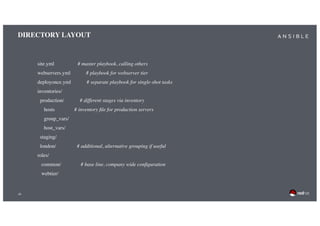
DIRECTORY LAYOUT
site.yml # master playbook, calling others
webservers.yml # playbook for webserver tier
deployonce.yml # separate playbook for single-shot tasks
inventories/
production/ # different stages via inventory
hosts # inventory file for production servers
group_vars/
host_vars/
staging/
london/ # additional, alternative grouping if useful
roles/
common/ # base line, company wide configuration
webtier/
‹#›
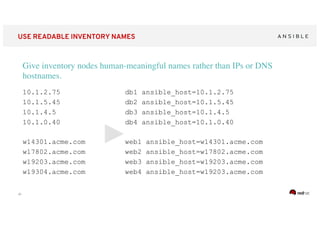
USE READABLE INVENTORY NAMES
Give inventory nodes human-meaningful names rather than IPs or DNS
hostnames.
10.1.2.75
10.1.5.45
10.1.4.5
10.1.0.40
w14301.acme.com
w17802.acme.com
w19203.acme.com
w19304.acme.com
db1 ansible_host=10.1.2.75
db2 ansible_host=10.1.5.45
db3 ansible_host=10.1.4.5
db4 ansible_host=10.1.0.40
web1 ansible_host=w14301.acme.com
web2 ansible_host=w17802.acme.com
web3 ansible_host=w19203.acme.com
web4 ansible_host=w19203.acme.com
‹#›
TAKE ADVANTAGE OF GROUPING
Group hosts for easier inventory selection and less conditional
tasks -- the more the better.
[db]
db[1:4]
[web]
web[1:4]
[dev]
db1
web1
[testing]
db3
web3
[prod]
db2
web2
db4
web4
[east]
db1
web1
db3
web3
[west]
db2
web2
db4
web4
‹#›
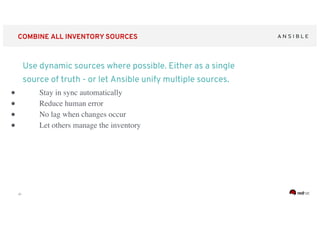
COMBINE ALL INVENTORY SOURCES
Use dynamic sources where possible. Either as a single
source of truth - or let Ansible unify multiple sources.
● Stay in sync automatically
● Reduce human error
● No lag when changes occur
● Let others manage the inventory
VARIABLES
JUST WORDS,
RIGHT?
‹#›
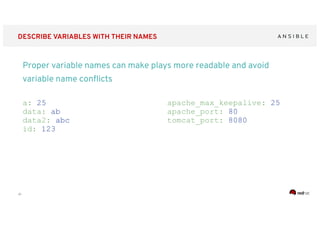
DESCRIBE VARIABLES WITH THEIR NAMES
Proper variable names can make plays more readable and avoid
variable name conflicts
a: 25
data: ab
data2: abc
id: 123
apache_max_keepalive: 25
apache_port: 80
tomcat_port: 8080
‹#›
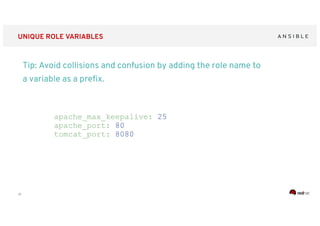
UNIQUE ROLE VARIABLES
Tip: Avoid collisions and confusion by adding the role name to
a variable as a prefix.
apache_max_keepalive: 25
apache_port: 80
tomcat_port: 8080
‹#›
PLACE VARIABLES APPROPRIATELY
Know where your variables are
● Find the appropriate place for your variables based on what,
where and when they are set or modified
● Separate logic (tasks) from variables and reduce repetitive
patterns
● Do not use every possibility to store variables - settle to a
defined scheme and as few places as possible
MAKE YOUR PLAYBOOK
READABLE
‹#›
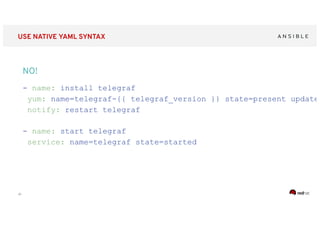
USE NATIVE YAML SYNTAX
- name: install telegraf
yum: name=telegraf-{{ telegraf_version }} state=present update_
notify: restart telegraf
- name: start telegraf
service: name=telegraf state=started
NO!
‹#›
USE FOLDING ONLY IF REALLY REQUIRED
- name: install telegraf
yum: >
name=telegraf-{{ telegraf_version }}
state=present
update_cache=yes
enablerepo=telegraf
notify: restart telegraf
- name: start telegraf
service: name=telegraf state=started
Better, but no
‹#›
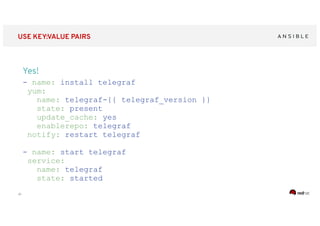
USE KEY:VALUE PAIRS
Yes!
- name: install telegraf
yum:
name: telegraf-{{ telegraf_version }}
state: present
update_cache: yes
enablerepo: telegraf
notify: restart telegraf
- name: start telegraf
service:
name: telegraf
state: started
‹#›
DO NOT OMIT THE TASK NAME
- hosts: web
tasks:
- yum:
name: httpd
state: latest
- service:
name: httpd
state: started
enabled: yes
PLAY [web]
********************************
TASK [setup]
********************************
ok: [web1]
TASK [yum]
********************************
ok: [web1]
TASK [service]
********************************
ok: [web1]
Exhibit A
‹#›
USE TASK NAMES
- hosts: web
name: installs and starts apache
tasks:
- name: install apache
packages
yum:
name: httpd
state: latest
- name: starts apache service
service:
name: httpd
state: started
enabled: yes
PLAY [install and starts apache]
********************************
TASK [setup]
********************************
ok: [web1]
TASK [install apache packages]
********************************
ok: [web1]
TASK [starts apache service]
********************************
ok: [web1]
Exhibit B
POWERFUL
BLOCKS
‹#›
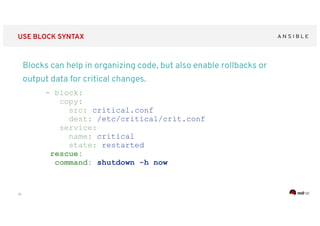
USE BLOCK SYNTAX
Blocks can help in organizing code, but also enable rollbacks or
output data for critical changes.
- block:
copy:
src: critical.conf
dest: /etc/critical/crit.conf
service:
name: critical
state: restarted
rescue:
command: shutdown -h now
‹#›
HOW TO EXECUTE
‹#›
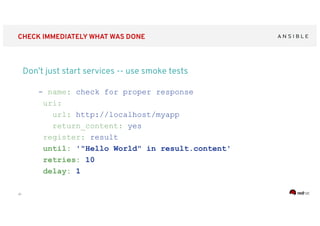
CHECK IMMEDIATELY WHAT WAS DONE
Don’t just start services -- use smoke tests
- name: check for proper response
uri:
url: http://localhost/myapp
return_content: yes
register: result
until: '"Hello World" in result.content'
retries: 10
delay: 1
‹#›
USE NATIVE MODULES WHERE POSSIBLE
Try to avoid the command module - always seek out a
module first
- name: add user
command: useradd appuser
- name: install apache
command: yum install httpd
- name: start apache
shell: |
service httpd start &&
chkconfig httpd on
- name: add user
user:
name: appuser
state: present
- name: install apache
yum:
name: httpd
state: latest
- name: start apache
service:
name: httpd
state: started
enabled: yes
‹#›
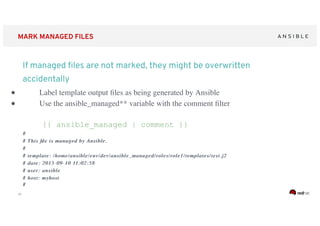
MARK MANAGED FILES
● Label template output files as being generated by Ansible
● Use the ansible_managed** variable with the comment filter
{{ ansible_managed | comment }}
##
# This file is managed by Ansible.# This file is managed by Ansible.
##
# template: /home/ansible/# template: /home/ansible/envenv/dev//dev/ansible_managedansible_managed/roles/role1/templates/test.j2/roles/role1/templates/test.j2
# date: 2015-09-10 11:02:58# date: 2015-09-10 11:02:58
# user: ansible# user: ansible
# host:# host: myhostmyhost
##
If managed files are not marked, they might be overwritten
accidentally
ROLES AND
GALAXIES
‹#›
USE ROLES WHERE POSSIBLE
Roles enable you to encapsulate your operations.
● Like playbooks -- keep roles purpose and function focused
● Use a roles/ subdirectory for roles developed for
organizational clarity in a single project
● Follow the Ansible Galaxy pattern for roles that are to be shared
beyond a single project
● Limit role dependencies
‹#›
USE GALAXY - WITH CARE
Get roles from Galaxy, but be careful and adopt them to your needs
● Galaxy provides thousands of roles
● Quality varies drastically
● Take them with a grain of salt
● Pick trusted or well known authors
ACCESS RIGHTS
‹#›
USE BECOME, DON’T BE A ROOT
Root access is harder to track than sudo - use sudo
wherever possible
● Ansible can be run as root only
● But login and security reasons often request non-root access
● Use become method - so Ansible scripts are executed via sudo
(sudo is easy to track)
● Best: create an Ansible only user
● Don’t try to limit sudo rights to certain commands - Ansible does
not work that way!
DEBUG YOUR
PROBLEM
‹#›
TROUBLESHOOT ON EXECUTION
Ansible provides multiple switches for command line interaction
and troubleshooting.
-vvvv
--step
--check
--diff
--start-at-task
‹#›
ANALYZE WHAT YOUR ARE RUNNING
Ansible has switches to show you what will be done
● Use the power of included options:
--list-tags
--list-hosts
--syntax-check
--list-tasks
‹#›
HAVE A LOOK AT THE NODE LEVEL
Check logging on target machine
ansible-node sshd[2395]:
pam_unix(sshd:session): session opened for
user liquidat by (uid=0)
ansible-node ansible-yum[2399]: Invoked with
name=['httpd'] list=None
install_repoquery=True conf_file=None
disable_gpg_check=False state=absent
disablerepo=None update_cache=False
enablerepo=None exclude=None
‹#›
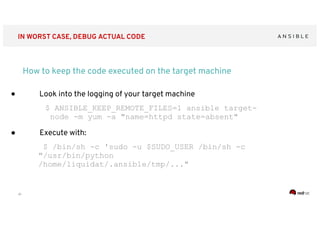
IN WORST CASE, DEBUG ACTUAL CODE
How to keep the code executed on the target machine
● Look into the logging of your target machine
$ ANSIBLE_KEEP_REMOTE_FILES=1 ansible target-
node -m yum -a "name=httpd state=absent"
● Execute with:
$ /bin/sh -c 'sudo -u $SUDO_USER /bin/sh -c
"/usr/bin/python
/home/liquidat/.ansible/tmp/..."
‹#›
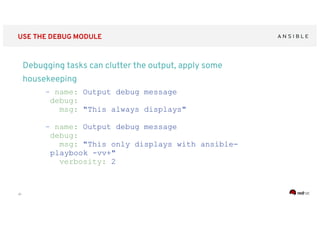
USE THE DEBUG MODULE
Debugging tasks can clutter the output, apply some
housekeeping
- name: Output debug message
debug:
msg: "This always displays"
- name: Output debug message
debug:
msg: "This only displays with ansible-
playbook -vv+"
verbosity: 2
‹#›
HOW TO USE IN REAL LIFE
‹#›
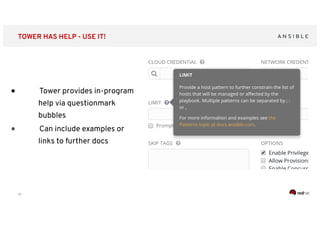
TOWER HAS HELP - USE IT!
● Tower provides in-program
help via questionmark
bubbles
● Can include examples or
links to further docs
BRANCHES, ANYONE?
‹#›
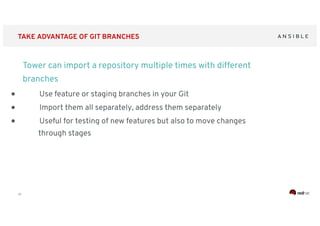
TAKE ADVANTAGE OF GIT BRANCHES
Tower can import a repository multiple times with different
branches
● Use feature or staging branches in your Git
● Import them all separately, address them separately
● Useful for testing of new features but also to move changes
through stages
WHAT ARE WE
TALKING TO?
‹#›
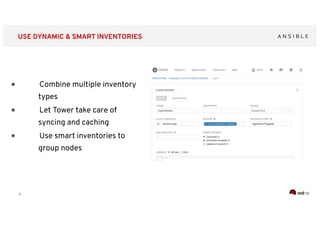
USE DYNAMIC & SMART INVENTORIES
● Combine multiple inventory
types
● Let Tower take care of
syncing and caching
● Use smart inventories to
group nodes
DOING GOOD JOBS
‹#›
USE THE POWER OF JOB TEMPLATES
Tower job templates provide multiple options - use them wisely
● Keep jobs simple, focussed - as playbooks or roles
● Add labels to them to better filter, see
● For idempotent jobs, create “check” templates as well - and let
them run over night
● Combine with notifications - and get feedback when a “check”
failed
1+1+1 = 1
‹#›
USE WORKFLOWS FOR COMPLEX TASKS
Multiple playbooks can be combined into one workflow
● Simple jobs, complex workflows
● React to problems via workflow
● Combine playbooks of different teams,
different repositories
● Re-sync inventories during the play
DO ASK PROPER QUESTIONS
‹#›
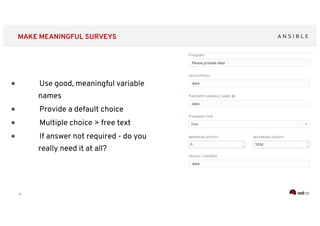
MAKE MEANINGFUL SURVEYS
● Use good, meaningful variable
names
● Provide a default choice
● Multiple choice > free text
● If answer not required - do you
really need it at all?
A POWERFUL
TEAM
‹#›
USE TOWER TEAMS, SEPARATIONS
Tower provides tenants, teams, and users - use them for
separation
● Provide automation to others
without exposing credentials
● Let others only see what they really
need
● Use personal view instead of full
Tower interface
ONE KEY TO RULE
THEM ALL ...
‹#›
USE TOWER SPECIFIC ACCESS CREDENTIALS
Tower credentials should only be used by Tower - not by others
● Set up a separate user and password/key for
Tower
● That way, automation can easily be identified
on target machines
● The key/password can be ridiculously
complicated secure
● Store key/password in a safe for emergencies
NOTIFY YOURSELF!
‹#›
LET TOWER SEND NOTIFICATIONS TO YOU
Tower cand send notifications if a job succeeds, fails or
always - as mail, IRC, web hook, and so on
● Let Tower notify you and your team if
something breaks
● Send mails/web hooks automatically to a
ticket systems and monitoring if there is a
serious problem
ALWAYS KEEP
THE LIGHTS ON
‹#›
USE HA, DEPLOY ISOLATED NODES
Tower can be easily set up HA - and for restricted networks,
deploy isolated nodes
● Make Tower HA - it is easy! (Well, except the
DB part maybe….)
● For distant or restricted networks, use isolated
nodes
THANK YOU!
Questions? Complains? Show some love?

03 ansible towerbestpractices-nicholas

  • 1.
    ANSIBLE TOWER BESTPRACTICES How to write, how to execute, and how to use in real life NICHOLAS CHIA Senior Principal Product Manager
  • 2.
  • 3.
    ‹#› ALWAYS treat yourAnsible content like code ● Version control your Ansible content ● Iterate ○ Start with a basic playbook and static inventory ○ Refactor and modularize later AUTOMATION IS CODE
  • 4.
    ‹#› Do It withStyle ● Create a style guide for consistency: ○ Tagging ○ Whitespace ○ Naming of Tasks, Plays, Variables, and Roles ○ Directory Layouts ● Enforce the style ● Nice example: https://docs.ansible.com/ansible/latest/dev_guide/style_guide/index.html CODE NEEDS TO HAVE STYLE GUIDELINES
  • 5.
  • 6.
    ‹#› DIRECTORY LAYOUT site.yml #master playbook, calling others webservers.yml # playbook for webserver tier deployonce.yml # separate playbook for single-shot tasks inventories/ production/ # different stages via inventory hosts # inventory file for production servers group_vars/ host_vars/ staging/ london/ # additional, alternative grouping if useful roles/ common/ # base line, company wide configuration webtier/
  • 7.
    ‹#› USE READABLE INVENTORYNAMES Give inventory nodes human-meaningful names rather than IPs or DNS hostnames. 10.1.2.75 10.1.5.45 10.1.4.5 10.1.0.40 w14301.acme.com w17802.acme.com w19203.acme.com w19304.acme.com db1 ansible_host=10.1.2.75 db2 ansible_host=10.1.5.45 db3 ansible_host=10.1.4.5 db4 ansible_host=10.1.0.40 web1 ansible_host=w14301.acme.com web2 ansible_host=w17802.acme.com web3 ansible_host=w19203.acme.com web4 ansible_host=w19203.acme.com
  • 8.
    ‹#› TAKE ADVANTAGE OFGROUPING Group hosts for easier inventory selection and less conditional tasks -- the more the better. [db] db[1:4] [web] web[1:4] [dev] db1 web1 [testing] db3 web3 [prod] db2 web2 db4 web4 [east] db1 web1 db3 web3 [west] db2 web2 db4 web4
  • 9.
    ‹#› COMBINE ALL INVENTORYSOURCES Use dynamic sources where possible. Either as a single source of truth - or let Ansible unify multiple sources. ● Stay in sync automatically ● Reduce human error ● No lag when changes occur ● Let others manage the inventory
  • 10.
  • 11.
    ‹#› DESCRIBE VARIABLES WITHTHEIR NAMES Proper variable names can make plays more readable and avoid variable name conflicts a: 25 data: ab data2: abc id: 123 apache_max_keepalive: 25 apache_port: 80 tomcat_port: 8080
  • 12.
    ‹#› UNIQUE ROLE VARIABLES Tip:Avoid collisions and confusion by adding the role name to a variable as a prefix. apache_max_keepalive: 25 apache_port: 80 tomcat_port: 8080
  • 13.
    ‹#› PLACE VARIABLES APPROPRIATELY Knowwhere your variables are ● Find the appropriate place for your variables based on what, where and when they are set or modified ● Separate logic (tasks) from variables and reduce repetitive patterns ● Do not use every possibility to store variables - settle to a defined scheme and as few places as possible
  • 14.
  • 15.
    ‹#› USE NATIVE YAMLSYNTAX - name: install telegraf yum: name=telegraf-{{ telegraf_version }} state=present update_ notify: restart telegraf - name: start telegraf service: name=telegraf state=started NO!
  • 16.
    ‹#› USE FOLDING ONLYIF REALLY REQUIRED - name: install telegraf yum: > name=telegraf-{{ telegraf_version }} state=present update_cache=yes enablerepo=telegraf notify: restart telegraf - name: start telegraf service: name=telegraf state=started Better, but no
  • 17.
    ‹#› USE KEY:VALUE PAIRS Yes! -name: install telegraf yum: name: telegraf-{{ telegraf_version }} state: present update_cache: yes enablerepo: telegraf notify: restart telegraf - name: start telegraf service: name: telegraf state: started
  • 18.
    ‹#› DO NOT OMITTHE TASK NAME - hosts: web tasks: - yum: name: httpd state: latest - service: name: httpd state: started enabled: yes PLAY [web] ******************************** TASK [setup] ******************************** ok: [web1] TASK [yum] ******************************** ok: [web1] TASK [service] ******************************** ok: [web1] Exhibit A
  • 19.
    ‹#› USE TASK NAMES -hosts: web name: installs and starts apache tasks: - name: install apache packages yum: name: httpd state: latest - name: starts apache service service: name: httpd state: started enabled: yes PLAY [install and starts apache] ******************************** TASK [setup] ******************************** ok: [web1] TASK [install apache packages] ******************************** ok: [web1] TASK [starts apache service] ******************************** ok: [web1] Exhibit B
  • 20.
  • 21.
    ‹#› USE BLOCK SYNTAX Blockscan help in organizing code, but also enable rollbacks or output data for critical changes. - block: copy: src: critical.conf dest: /etc/critical/crit.conf service: name: critical state: restarted rescue: command: shutdown -h now
  • 22.
  • 23.
    ‹#› CHECK IMMEDIATELY WHATWAS DONE Don’t just start services -- use smoke tests - name: check for proper response uri: url: http://localhost/myapp return_content: yes register: result until: '"Hello World" in result.content' retries: 10 delay: 1
  • 24.
    ‹#› USE NATIVE MODULESWHERE POSSIBLE Try to avoid the command module - always seek out a module first - name: add user command: useradd appuser - name: install apache command: yum install httpd - name: start apache shell: | service httpd start && chkconfig httpd on - name: add user user: name: appuser state: present - name: install apache yum: name: httpd state: latest - name: start apache service: name: httpd state: started enabled: yes
  • 25.
    ‹#› MARK MANAGED FILES ●Label template output files as being generated by Ansible ● Use the ansible_managed** variable with the comment filter {{ ansible_managed | comment }} ## # This file is managed by Ansible.# This file is managed by Ansible. ## # template: /home/ansible/# template: /home/ansible/envenv/dev//dev/ansible_managedansible_managed/roles/role1/templates/test.j2/roles/role1/templates/test.j2 # date: 2015-09-10 11:02:58# date: 2015-09-10 11:02:58 # user: ansible# user: ansible # host:# host: myhostmyhost ## If managed files are not marked, they might be overwritten accidentally
  • 26.
  • 27.
    ‹#› USE ROLES WHEREPOSSIBLE Roles enable you to encapsulate your operations. ● Like playbooks -- keep roles purpose and function focused ● Use a roles/ subdirectory for roles developed for organizational clarity in a single project ● Follow the Ansible Galaxy pattern for roles that are to be shared beyond a single project ● Limit role dependencies
  • 28.
    ‹#› USE GALAXY -WITH CARE Get roles from Galaxy, but be careful and adopt them to your needs ● Galaxy provides thousands of roles ● Quality varies drastically ● Take them with a grain of salt ● Pick trusted or well known authors
  • 29.
  • 30.
    ‹#› USE BECOME, DON’TBE A ROOT Root access is harder to track than sudo - use sudo wherever possible ● Ansible can be run as root only ● But login and security reasons often request non-root access ● Use become method - so Ansible scripts are executed via sudo (sudo is easy to track) ● Best: create an Ansible only user ● Don’t try to limit sudo rights to certain commands - Ansible does not work that way!
  • 31.
  • 32.
    ‹#› TROUBLESHOOT ON EXECUTION Ansibleprovides multiple switches for command line interaction and troubleshooting. -vvvv --step --check --diff --start-at-task
  • 33.
    ‹#› ANALYZE WHAT YOURARE RUNNING Ansible has switches to show you what will be done ● Use the power of included options: --list-tags --list-hosts --syntax-check --list-tasks
  • 34.
    ‹#› HAVE A LOOKAT THE NODE LEVEL Check logging on target machine ansible-node sshd[2395]: pam_unix(sshd:session): session opened for user liquidat by (uid=0) ansible-node ansible-yum[2399]: Invoked with name=['httpd'] list=None install_repoquery=True conf_file=None disable_gpg_check=False state=absent disablerepo=None update_cache=False enablerepo=None exclude=None
  • 35.
    ‹#› IN WORST CASE,DEBUG ACTUAL CODE How to keep the code executed on the target machine ● Look into the logging of your target machine $ ANSIBLE_KEEP_REMOTE_FILES=1 ansible target- node -m yum -a "name=httpd state=absent" ● Execute with: $ /bin/sh -c 'sudo -u $SUDO_USER /bin/sh -c "/usr/bin/python /home/liquidat/.ansible/tmp/..."
  • 36.
    ‹#› USE THE DEBUGMODULE Debugging tasks can clutter the output, apply some housekeeping - name: Output debug message debug: msg: "This always displays" - name: Output debug message debug: msg: "This only displays with ansible- playbook -vv+" verbosity: 2
  • 37.
    ‹#› HOW TO USEIN REAL LIFE
  • 38.
    ‹#› TOWER HAS HELP- USE IT! ● Tower provides in-program help via questionmark bubbles ● Can include examples or links to further docs
  • 39.
  • 40.
    ‹#› TAKE ADVANTAGE OFGIT BRANCHES Tower can import a repository multiple times with different branches ● Use feature or staging branches in your Git ● Import them all separately, address them separately ● Useful for testing of new features but also to move changes through stages
  • 41.
  • 42.
    ‹#› USE DYNAMIC &SMART INVENTORIES ● Combine multiple inventory types ● Let Tower take care of syncing and caching ● Use smart inventories to group nodes
  • 43.
  • 44.
    ‹#› USE THE POWEROF JOB TEMPLATES Tower job templates provide multiple options - use them wisely ● Keep jobs simple, focussed - as playbooks or roles ● Add labels to them to better filter, see ● For idempotent jobs, create “check” templates as well - and let them run over night ● Combine with notifications - and get feedback when a “check” failed
  • 45.
  • 46.
    ‹#› USE WORKFLOWS FORCOMPLEX TASKS Multiple playbooks can be combined into one workflow ● Simple jobs, complex workflows ● React to problems via workflow ● Combine playbooks of different teams, different repositories ● Re-sync inventories during the play
  • 47.
    DO ASK PROPERQUESTIONS
  • 48.
    ‹#› MAKE MEANINGFUL SURVEYS ●Use good, meaningful variable names ● Provide a default choice ● Multiple choice > free text ● If answer not required - do you really need it at all?
  • 49.
  • 50.
    ‹#› USE TOWER TEAMS,SEPARATIONS Tower provides tenants, teams, and users - use them for separation ● Provide automation to others without exposing credentials ● Let others only see what they really need ● Use personal view instead of full Tower interface
  • 51.
    ONE KEY TORULE THEM ALL ...
  • 52.
    ‹#› USE TOWER SPECIFICACCESS CREDENTIALS Tower credentials should only be used by Tower - not by others ● Set up a separate user and password/key for Tower ● That way, automation can easily be identified on target machines ● The key/password can be ridiculously complicated secure ● Store key/password in a safe for emergencies
  • 53.
  • 54.
    ‹#› LET TOWER SENDNOTIFICATIONS TO YOU Tower cand send notifications if a job succeeds, fails or always - as mail, IRC, web hook, and so on ● Let Tower notify you and your team if something breaks ● Send mails/web hooks automatically to a ticket systems and monitoring if there is a serious problem
  • 55.
  • 56.
    ‹#› USE HA, DEPLOYISOLATED NODES Tower can be easily set up HA - and for restricted networks, deploy isolated nodes ● Make Tower HA - it is easy! (Well, except the DB part maybe….) ● For distant or restricted networks, use isolated nodes
  • 57.