Foreman in Your
Data Center
Lukáš Zapletal
@lzap
Agenda
● Introduction
– Provisioning
– Configuration
– Monitoring
● History and Technology
● Architecture and Installation
● Demo: Foreman Basics
● Customizing foreman
– Automating with CLI + API
– Plugins (Bootdisk, Discovery, Docker, Katello, Chef, Salt, Hooks, Remote
Execution)
● Demo: Foreman Plugins
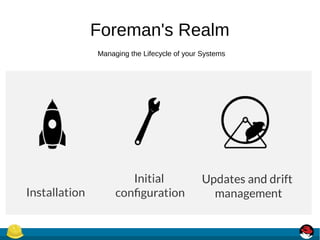
Foreman's Realm
Managing the Lifecycle of your Systems
Foreman
● Provision new machines or containers to
(almost) anything
– Bare metal, oVirt, libvirt, VMware, Docker, EC2,
Rackspace, Digital Ocean, OpenStack, etc.
● If we don't support it today, we can via new
plugins
● Provisioning types:
– PXE - via PXELinux and kickstart, preseed, AutoYAST, etc
– Image-based - cloning, configured over SSH or user data (cloudinit)
● For virtualization provider, we create the VM
● For everything we orchestrate related services through Smart Proxies
– DNS - DHCP / TFTP
– FreeIPA Realm - Configuration Management
● Puppet
● Via plugins:
– Chef
– Salt
– Ansible
● Automatic registration & setup of
clients, including autosigning
certs/keys
● Defining:
● Classes / states
● Parameters / pillars
● Inventory data:
● Facts / Grains
● results of configuration runs
● Generic Report API with graphs/trends:
– System Inventories
– Reports from runs
– Generic reports: ABRT, OpenSCAP
● Context sensitive search:
– Not full-text (SQL level)
– Keyword completion
– Works across whole application
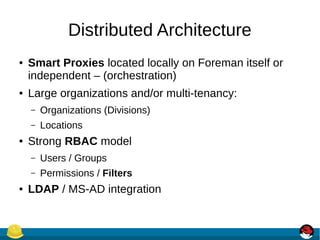
Distributed Architecture
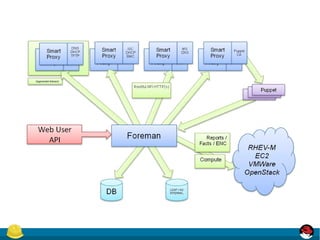
● Smart Proxies located locally on Foreman itself or
independent – (orchestration)
● Large organizations and/or multi-tenancy:
– Organizations (Divisions)
– Locations
● Strong RBAC model
– Users / Groups
– Permissions / Filters
● LDAP / MS-AD integration
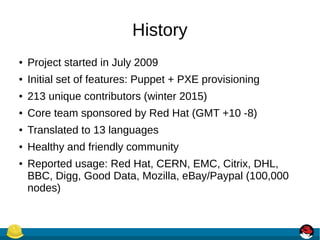
History
● Project started in July 2009
● Initial set of features: Puppet + PXE provisioning
● 213 unique contributors (winter 2015)
● Core team sponsored by Red Hat (GMT +10 -8)
● Translated to 13 languages
● Healthy and friendly community
● Reported usage: Red Hat, CERN, EMC, Citrix, DHL,
BBC, Digg, Good Data, Mozilla, eBay/Paypal (100,000
nodes)
Technology
Foreman itself
– Ruby on Rails application
– Targeted on UNIX platforms, Ruby 1.9+
– Steep learning curve (git clone, bundle install)
● Smart Proxy
– Ruby / Sinatra application
– Minimum dependencies
– Quick start (git clone, bundle install)
– On all Ruby 1.8+ platforms (incl. MS Windows)
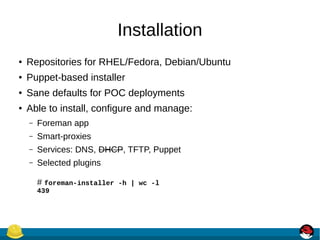
Installation
● Repositories for RHEL/Fedora, Debian/Ubuntu
● Puppet-based installer
● Sane defaults for POC deployments
● Able to install, configure and manage:
– Foreman app
– Smart-proxies
– Services: DNS, DHCP, TFTP, Puppet
– Selected plugins
# foreman-installer -h | wc -l
439
Demo: Foreman Basics
Customization
● Customize Foreman to support your workflows!
– Configuration options in UI: Adminster → Settings
– Smart proxy configuration values (features)
– Automation with API + CLI
– Foreman Plugins
– Smart Proxy Plugins
– Foreman Hooks Plugin
API & CLI
● Full UI coverage
● All of our API is documented
● Documentation DSL generates dynamic Ruby
bindings
● Full RESTful API
– Docs at /apidoc on your Foreman server
– Also available at
http://www.theforeman.org/api/1.9/index.html
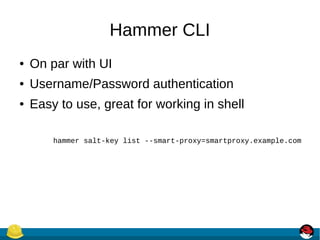
Hammer CLI
● On par with UI
● Username/Password authentication
● Easy to use, great for working in shell
hammer salt-key list --smart-proxy=smartproxy.example.com
Plugins
More Info: http://projects.theforeman.org/projects/foreman/wiki/List_of_Plugins
Rich ecosystem of existing plugins
Bootdisk plugin
● Small hybrid ISO downloaded from Host UI page
● Unknown or pre-registred hosts boot chainloads from
Foreman without PXE/TFTP
● Generic image
– iPXE-based, DHCP required
● Host image
– iPXE-based, DHCP not required
● Full host image
– SYSLINUX-based, DHCP required, OS specific
Discovery plugin
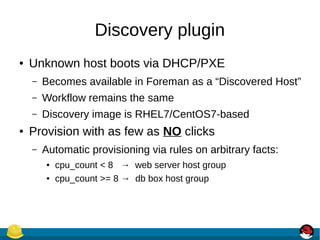
● Unknown host boots via DHCP/PXE
– Becomes available in Foreman as a “Discovered Host”
– Workflow remains the same
– Discovery image is RHEL7/CentOS7-based
● Provision with as few as NO clicks
– Automatic provisioning via rules on arbitrary facts:
● cpu_count < 8 → web server host group
● cpu_count >= 8 → db box host group
Discovery plugin
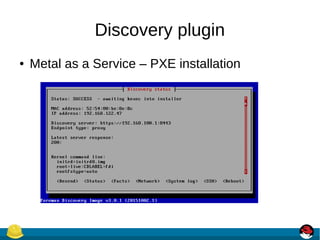
● Metal as a Service – PXE installation
Discovery plugin
● PXE-less (un)attended workflow (supports EFI)
Docker plugin
● Manage many docker hosts
● Deploy new containers easily & view their
status, logs, etc
● Multiple registry support & integration with
Katello
● https://github.com/theforeman/foreman-docker
Katello plugin
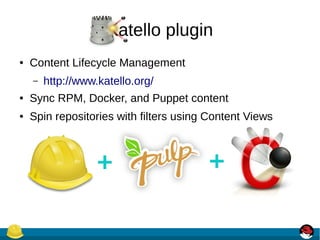
● Content Lifecycle Management
– http://www.katello.org/
● Sync RPM, Docker, and Puppet content
● Spin repositories with filters using Content Views
Katello plugin
● Manage through a lifecycle
– Dev → QA → Production (Environments)
● Patch Management
– Emergency Patches
– Errata Reports
● And much more!
Hooks plugin
● Hooks
– Triggered on actions: on action, do X
● host create/update/delete, build complete, etc.
● X could be anything
– add to nagios
– send an email
● Can be shell, python, ruby, etc.
– More info:
https://github.com/theforeman/foreman_hooks
Salt plugin
● Bootstrapping nodes
● Full interface to keys/autosign
● Define states, pillars via ext_node and ext_pillar
● Import reports (state.highstate results) and
grains into Foreman
● API & CLI
Chef plugin
● Automatic bootstrapping of clients
● Import reports and attributes into Foreman
● Decomission nodes from Chef server when
deleted in Foreman
Remote execution plugin
● Arbitrary commands on hosts
● Job Templates
– Based on Foreman Templating engine
– Input parameters
● Collected data available (Facts)
● Multiple providers architecture:
– SSH (via Smart Proxies)
Writing Foreman Plugins
● Foreman:
– Rails Engine
– Extra Foreman API (plugin registration)
– Distributed as a Ruby GEM
– Template and HOWTO available
● Smart Proxy:
– Sinatra app (REST API)
– Small plugin registration API
– Distributed as a Ruby GEM
What Next?
● Visit us http://theforeman.org/
● If you do something cool with Foreman, let us know!
● Find us:
– IRC: irc.freenode.net
● #theforeman
● #theforeman-dev
– Mailing Lists on Google groups
● foreman-users
● foreman-dev
Demo: Foreman Plugins

Foreman in your datacenter

  • 1.
    Foreman in Your DataCenter Lukáš Zapletal @lzap
  • 2.
    Agenda ● Introduction – Provisioning –Configuration – Monitoring ● History and Technology ● Architecture and Installation ● Demo: Foreman Basics ● Customizing foreman – Automating with CLI + API – Plugins (Bootdisk, Discovery, Docker, Katello, Chef, Salt, Hooks, Remote Execution) ● Demo: Foreman Plugins
  • 3.
    Foreman's Realm Managing theLifecycle of your Systems
  • 4.
  • 5.
    ● Provision newmachines or containers to (almost) anything – Bare metal, oVirt, libvirt, VMware, Docker, EC2, Rackspace, Digital Ocean, OpenStack, etc. ● If we don't support it today, we can via new plugins
  • 6.
    ● Provisioning types: –PXE - via PXELinux and kickstart, preseed, AutoYAST, etc – Image-based - cloning, configured over SSH or user data (cloudinit) ● For virtualization provider, we create the VM ● For everything we orchestrate related services through Smart Proxies – DNS - DHCP / TFTP – FreeIPA Realm - Configuration Management
  • 7.
    ● Puppet ● Viaplugins: – Chef – Salt – Ansible ● Automatic registration & setup of clients, including autosigning certs/keys ● Defining: ● Classes / states ● Parameters / pillars ● Inventory data: ● Facts / Grains ● results of configuration runs
  • 8.
    ● Generic ReportAPI with graphs/trends: – System Inventories – Reports from runs – Generic reports: ABRT, OpenSCAP ● Context sensitive search: – Not full-text (SQL level) – Keyword completion – Works across whole application
  • 9.
    Distributed Architecture ● SmartProxies located locally on Foreman itself or independent – (orchestration) ● Large organizations and/or multi-tenancy: – Organizations (Divisions) – Locations ● Strong RBAC model – Users / Groups – Permissions / Filters ● LDAP / MS-AD integration
  • 11.
    History ● Project startedin July 2009 ● Initial set of features: Puppet + PXE provisioning ● 213 unique contributors (winter 2015) ● Core team sponsored by Red Hat (GMT +10 -8) ● Translated to 13 languages ● Healthy and friendly community ● Reported usage: Red Hat, CERN, EMC, Citrix, DHL, BBC, Digg, Good Data, Mozilla, eBay/Paypal (100,000 nodes)
  • 12.
    Technology Foreman itself – Rubyon Rails application – Targeted on UNIX platforms, Ruby 1.9+ – Steep learning curve (git clone, bundle install) ● Smart Proxy – Ruby / Sinatra application – Minimum dependencies – Quick start (git clone, bundle install) – On all Ruby 1.8+ platforms (incl. MS Windows)
  • 13.
    Installation ● Repositories forRHEL/Fedora, Debian/Ubuntu ● Puppet-based installer ● Sane defaults for POC deployments ● Able to install, configure and manage: – Foreman app – Smart-proxies – Services: DNS, DHCP, TFTP, Puppet – Selected plugins # foreman-installer -h | wc -l 439
  • 14.
  • 15.
    Customization ● Customize Foremanto support your workflows! – Configuration options in UI: Adminster → Settings – Smart proxy configuration values (features) – Automation with API + CLI – Foreman Plugins – Smart Proxy Plugins – Foreman Hooks Plugin
  • 16.
    API & CLI ●Full UI coverage ● All of our API is documented ● Documentation DSL generates dynamic Ruby bindings ● Full RESTful API – Docs at /apidoc on your Foreman server – Also available at http://www.theforeman.org/api/1.9/index.html
  • 17.
    Hammer CLI ● Onpar with UI ● Username/Password authentication ● Easy to use, great for working in shell hammer salt-key list --smart-proxy=smartproxy.example.com
  • 18.
  • 19.
    Bootdisk plugin ● Smallhybrid ISO downloaded from Host UI page ● Unknown or pre-registred hosts boot chainloads from Foreman without PXE/TFTP ● Generic image – iPXE-based, DHCP required ● Host image – iPXE-based, DHCP not required ● Full host image – SYSLINUX-based, DHCP required, OS specific
  • 20.
    Discovery plugin ● Unknownhost boots via DHCP/PXE – Becomes available in Foreman as a “Discovered Host” – Workflow remains the same – Discovery image is RHEL7/CentOS7-based ● Provision with as few as NO clicks – Automatic provisioning via rules on arbitrary facts: ● cpu_count < 8 → web server host group ● cpu_count >= 8 → db box host group
  • 21.
    Discovery plugin ● Metalas a Service – PXE installation
  • 22.
    Discovery plugin ● PXE-less(un)attended workflow (supports EFI)
  • 23.
    Docker plugin ● Managemany docker hosts ● Deploy new containers easily & view their status, logs, etc ● Multiple registry support & integration with Katello ● https://github.com/theforeman/foreman-docker
  • 24.
    Katello plugin ● ContentLifecycle Management – http://www.katello.org/ ● Sync RPM, Docker, and Puppet content ● Spin repositories with filters using Content Views
  • 25.
    Katello plugin ● Managethrough a lifecycle – Dev → QA → Production (Environments) ● Patch Management – Emergency Patches – Errata Reports ● And much more!
  • 26.
    Hooks plugin ● Hooks –Triggered on actions: on action, do X ● host create/update/delete, build complete, etc. ● X could be anything – add to nagios – send an email ● Can be shell, python, ruby, etc. – More info: https://github.com/theforeman/foreman_hooks
  • 27.
    Salt plugin ● Bootstrappingnodes ● Full interface to keys/autosign ● Define states, pillars via ext_node and ext_pillar ● Import reports (state.highstate results) and grains into Foreman ● API & CLI
  • 28.
    Chef plugin ● Automaticbootstrapping of clients ● Import reports and attributes into Foreman ● Decomission nodes from Chef server when deleted in Foreman
  • 29.
    Remote execution plugin ●Arbitrary commands on hosts ● Job Templates – Based on Foreman Templating engine – Input parameters ● Collected data available (Facts) ● Multiple providers architecture: – SSH (via Smart Proxies)
  • 30.
    Writing Foreman Plugins ●Foreman: – Rails Engine – Extra Foreman API (plugin registration) – Distributed as a Ruby GEM – Template and HOWTO available ● Smart Proxy: – Sinatra app (REST API) – Small plugin registration API – Distributed as a Ruby GEM
  • 31.
    What Next? ● Visitus http://theforeman.org/ ● If you do something cool with Foreman, let us know! ● Find us: – IRC: irc.freenode.net ● #theforeman ● #theforeman-dev – Mailing Lists on Google groups ● foreman-users ● foreman-dev
  • 32.

Editor's Notes

  • #2 Talk slower
  • #3 Introductory talk – first half basic introduction, second half – customizing to fit your own needs in your data center How many people use Foreman today? Puppet? Chef? Salt? Anyone using non-puppet in foreman? TALK SLOWER
  • #4 Talk slower
  • #5 Talk slower
  • #6 Talk slower
  • #7 Talk slower
  • #8 Talk slower
  • #9 Talk slower
  • #10 Install a basic foreman – smart-proxy runs on the localhost with foreman
  • #11 Talk slower
  • #12 Install a basic foreman – smart-proxy runs on the localhost with foreman
  • #13 Install a basic foreman – smart-proxy runs on the localhost with foreman
  • #14 Install a basic foreman – smart-proxy runs on the localhost with foreman
  • #15 Talk slower
  • #16 Talk slower
  • #17 Talk slower
  • #18 Talk slower
  • #19 Talk slower
  • #20 Talk slower
  • #21 Talk slower
  • #22 Talk slower
  • #23 Talk slower
  • #24 Talk slower
  • #25 Talk slower
  • #26 Talk slower
  • #27 Talk slower
  • #28 Talk slower
  • #29 Talk slower
  • #30 Talk slower
  • #31 Talk slower.
  • #32 Let us know!
  • #33 Talk slower