Modes of Communication –
Telephone, ISDN, CCTV
S. CAROLINE,
Assistant Professor,
St. Xavier’s Catholic College of Engineering, Nagercoil.
What is Communication?
 The act of sharing or exchanging information, ideas or feelings.
 The methods that are used for travelling to and from a place or for sending
messages between places.
 Communication is simply the act of transferring information from one place,
person or group to another. Every communication involves (at least) one sender, a
message and a recipient. These include our emotions, the cultural situation, the
medium used to communicate, and even our location.
Telephones
 Telephone is one of the most marvelous and revolutionary inventions of the
communication era.
 This broke the physical distance barrier, so that any telephone in the world can
be reached through a vast communication network that spans oceans and
continents.
 The first successful telephone was invented by Alexander Graham Bell on March
7, 1876.
How does the Telephone work?
 A telephone converts a sound, typically and most efficiently the human voice, into
electronic signals that are transmitted via cables and other communication
channels to another telephone which reproduces the sound to the receiving user.
Mostly they are wired and lined,
Evolution and Advancements of
Communication in Telephones
 1876: Alexander Graham Bell invented the telephone
 1891: First dial phone; 512,000 phones in the U.S.
 1887: First coin-operated telephone installed in the Hartford Bank by the payphone's inventor,
William Gray.
 1958: Princess Phone introduced. First phone with a lighted dial, became a part of American pop
culture
 1968: 911 chosen as the nationwide emergency number. The nation's telephone companies agree
to make this three-digit sequence unavailable as an exchange number
 1984: First cellular phones
 2000: The "Web Phone" combines a traditional telephone with an LCD touch-screen and a
retractable keyboard to let customers surf the Internet, check e-mail, make phone calls and check
voice mail from a single device
 2000: The "Thin Phone" integrates wireless Internet access with local wireless phone service,
allowing International customers to stay connected with everything from Web pages to voice and
e-mail, all while on the move
 2000 and beyond: "Information Appliances" make Internet mobile, wireless "Web to Go," voice-
activated dialing, phone numbers for life, phone calls and Internet on your TV, TV via wireless
phones, and much more.
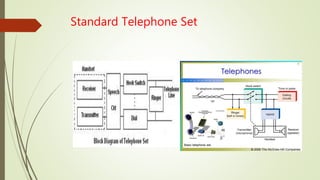
Standard Telephone Set
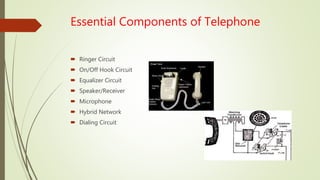
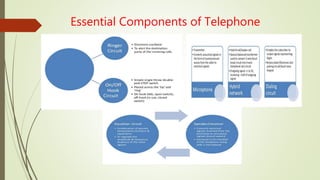
Essential Components of Telephone
 Ringer Circuit
 On/Off Hook Circuit
 Equalizer Circuit
 Speaker/Receiver
 Microphone
 Hybrid Network
 Dialing Circuit
Essential Components of Telephone
Types of Telephone System
 PSTN Line (Analog)
 Common Issues with PSTN (Analog) Telephone Lines
 Multiline
 Digital Lines
 ISDN
Advantages of Telephone Communication
 Easy and quick to use
 Fastest mode of communication.
 Easy and available means of communication
 Can call anybody/anytime
 Less expensive, cheap and very handy
 3G, 4G and 5G advancements
 Distance is not a matter
 No barrier: A phone call can reach any location where there is a barrier to physical
appearance
Disadvantages
 Signal might not be available everywhere.
 It is not very secure.
 There is no permanent record for legal purpose.
 Helps Terrorism.
 Misused for making anonymous calls.
 There might be noise or poor quality of voice.
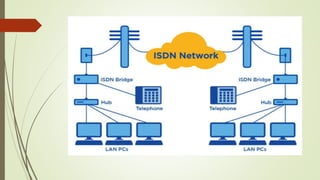
Integrated Services Digital Network (ISDN)
 Integrated Services Digital Network (ISDN) is a set of communication standards for
simultaneous digital transmission of voice, video, data, and other network services
over the digitalized circuits of the public switched telephone network.
 ISDN or Integrated Services Digital Network is a circuit-switched telephone
network system that transmits both data and voice over a digital line.
 These digital lines could be copper lines. It was designed to move outdated
landline technology to digital.
 ISDN connections have a reputation for providing better speeds and higher
quality than traditional connections. Faster speeds and better connections allow
data transmissions to travel more reliably.
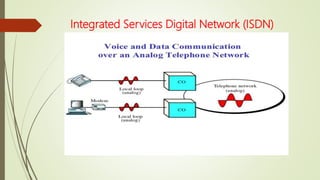
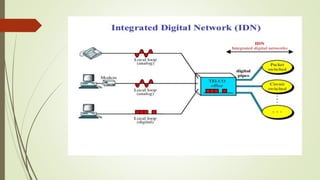
Integrated Services Digital Network (ISDN)
How ISDN works?
 Most people use ISDN for high-speed internet when options like DSL or cable
modem connections are not available.
 Setting up ISDN is like working on with Internet Service Provider (ISP). ISDN will be
plugged in through a traditional POTS (Plain Old Telephone Service) line that can
access both phone numbers at once.
 Make sure that there is a working POTS line and assigned phone numbers to begin.
 After that, follow the steps to get voice and data communications up and running.
Process of setting up ISDN
 Loading the modem driver disk and programming the modem
 Pointing the modem toward the right phone numbers
 Setting the connection speeds for each line
 Directing modem to dial ISP (Internet Service Provider) — this phone number
should be provided by ISP
 If necessary, set the modem for BONDING (the ability to access higher speeds by
allowing modem to dial both phone numbers at once)
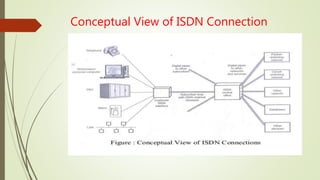
Conceptual View of ISDN Connection
ISDN Elements
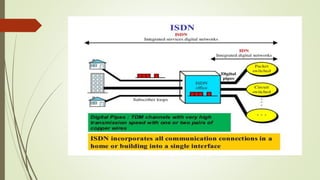
 Integrated services refers to ISDN's ability to deliver at minimum two simultaneous
connections, in any combination of data, voice, video, and fax, over a single line.
 Multiple devices can be attached to the line, and used as needed.
 ISDN line can take care of what were expected to be most people's complete
communication needs (apart from broadband internet access and
entertainment television) at a much higher transmission rate, without forcing the
purchase of multiple analog phone lines.
 It also refers to integrated switching and transmission in that telephone switching
and carrier wave transmission are integrated rather than separate.
Why people choose ISDN?
 It offers multiple digital services that operate through the same copper wire
 Digital signals broadcast through telephone lines.
 ISDN provides a higher data transfer rate.
 Can connect devices and allow them to operate over a single line. This includes
credit card readers, fax machines, and other manifold devices.
 It is up and running faster than other modems.
Advantages of ISDN
 It first started as an alternative to dial-up connection that provided higher internet
speeds.
 To access the internet with ISDN, users had to connect through a digital modem.
 People still use ISDN for internet access in areas where broadband internet isn’t an
option. For the most part, ISDN for internet access is being phased out. There have
been many attempts to improve the ISDN service.
 Broadband ISDN, also known as B-ISDN, transmitted data over fiber optic cable.
Another attempt was ISDN BRI which attempted to improve voice services.
Alternatives to ISDN
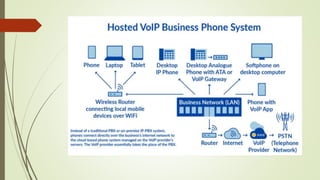
 VoIP (aka Voice over Internet Protocol), takes audio signals and turns them into
digital transmission data. That data can be sent from point-to-point through the
internet.
 VoIP is taking the place of traditional telephone system lines. It lets users make
phone calls over the internet without needing a physical telephone line.
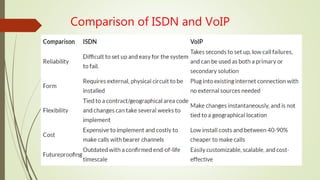
Comparison of ISDN and VoIP
CCTV
 Closed Circuit Television(CCTV) is the use of video cameras to transmit a signal to
a specific place on a limited set of monitors.
 It differs from a broadcast television in that the signal is not openly transmitted
through it may employ point to point ,point to multipoint or mesh wireless links.
Why we use CCTV..?
 Reduce cost and risk
 Prevent and determine crime
 Fool-proof coverage
 Reduce property insurance premiums
 Increase customer’s confidence
 Easy to implement
 Keep your employees honest
 Encourage good behavior
 Prevent safety incidents
Elements of CCTV system
 Camera
 Lens
 Monitor unit
 DVR/NVR
 Cable(coaxial/Ethernet)
 Storage devices
 DC power supply(12V)
Types of CCTV systems
 Analog CCTV system
 It captures an analog video signal and transfer that signal over coaxial cable to the
DVR.
 Each camera may be powered by plugging in the power supply right at the camera
or by using RG59 cables which bundles the video and the power cables.
 Requires an DVR to capture image.
 Digital/IP CCTV system
 IP stands for Internet Protocol, and basically refers to a digital video camera that
can send and receive data via a computer network.
 Requires an NVR to capture image.
CCTV camera types
 CCTV cameras are being installed every where for the purpose of security, crime
prevention and detection.
 There are many types of CCTV cameras available:
 Indoor camera
 Outdoor camera
 IR day/night camera
 Dome camera
 Bullet camera
 Vandal proof camera
 Hidden camera
 Pan tilt zoom camera
Indoor camera
 Used for indoor security mechanism
 Suitable for security in homes, schools, offices, hotels etc…
Outdoor camera
 Used for outdoor purpose
 Mostly used for entry and exist points with limited night lighting
 These cameras have hard shell vandal-proof casting
IR day/night camera
 Used for high alert security areas where surveillance needs to happen day and
night
 Used by military personal, in parking lots and high security zones
 Ideal for outdoor surveillance applications
Dome camera
 Installed inside a dark dome and are designed in a way that they go unnoticed by
visitors
 Can be rotated and tilted manually
 Used in public place like railway station, bus terminals, and other areas where there
is a huge gathering of people
Bullet camera
 Cylindrical
 Tapered shape, similar to that of a “rifle bullet”
 Outdoor use
 Installed inside protective casings, which protect against dust, dirt, rain, hail and
other harmful elements
 Require long distance viewing
 Fixed or varifocal lenses
Fish eye camera
 It is a single camera which allows you to record everything with a 180 or 360
degree panoramic view
 The strength of this camera can reduce the quantity of cameras needed to cover
the same surveillance area
PTZ(Pan Tilt Zoom)camera
 It is the movements, the camera can do when somebody is remotely controlling it
by using a computer or joystick
 Most valuable camera allow the person monitoring it to move the camera from
right to left (Pan), up to down (Tilt), & from a tight angle to a wide angle(close up
zoom)
Camera Selection
Selecting a camera requires these categories:
 Indoor/outdoor
 Day/night surveillance
 Lens selection
 Camera form factor
 Video codec
 Motion detection
 Power source
 Wireless and viewing
Types of CCTV lens
 Fixed Lens
 Varifocal Lens
 Fixed Lens - Lens size doesn’t change and we can focus but we cant zoom in or
zoom out
 Varifocal Lens - Lens size can be changed during the installation process & zoom in
and zoom out process is possible
Focal Length Adjustment of Lens
 Focal length can be adjusted by 3 methods :
 Manual (no cable)
 Auto Iris (with a cable)
 Motor zoom (with cable and telemetry receiver is needed)
Monitor Unit
 Function - is to display video images for viewing
 Selection is important to the quality of the image as the selection of cameras,
lenses and other components in the imaging chain
 LCDs and LED display, various sizes, and other features
 Considerations for monitor selection:
Pixels
Size
Video Recorders (DVR/NVR)
 This is the heart of CCTV installation
 They receive, manage, store & record the video captured by the cameras
 Video recorders are of two types:
DVR-Digital Video Recorder
NVR-Network Video Recorder
Cable
 Coaxial/Ethernet
 CCTV can be analog or IP based
 Depending on that the cables can be coaxial cable or CAT5/CAT6 cables also
known as Ethernet cables
 Cables connect the camera with the DVR/NVR
Cable
 VGA Cable: Video Graphics Array is a standard type of connection for video devices
such as monitors and projectors
 HDMI Cable: High definition Multimedia Interface - provides an interface between
any audio/video source for transferring uncompressed video data and compressed
or uncompressed digital audio data from HDMI-compliant source device
Cable connectors
 BSN connectors:
A type of connector used to connect coaxial cables
 RJ 45:
A type of connectors used to connect Ethernet cables
Storage devices
 Hard Disk Drive(HDD) need to store the CCTV footage
 It helps to review the CCTV footage
Applications of CCTV camera
It is useful to both patients and employees in
 safeguarding against security breach,
 preventing dishonest claims,
 serve as visual and audio evidence in fraud & collision legal cases
 research analysis to improve reaction time and services

Modes of Communication

  • 1.
    Modes of Communication– Telephone, ISDN, CCTV S. CAROLINE, Assistant Professor, St. Xavier’s Catholic College of Engineering, Nagercoil.
  • 2.
    What is Communication? The act of sharing or exchanging information, ideas or feelings.  The methods that are used for travelling to and from a place or for sending messages between places.  Communication is simply the act of transferring information from one place, person or group to another. Every communication involves (at least) one sender, a message and a recipient. These include our emotions, the cultural situation, the medium used to communicate, and even our location.
  • 3.
    Telephones  Telephone isone of the most marvelous and revolutionary inventions of the communication era.  This broke the physical distance barrier, so that any telephone in the world can be reached through a vast communication network that spans oceans and continents.  The first successful telephone was invented by Alexander Graham Bell on March 7, 1876.
  • 4.
    How does theTelephone work?  A telephone converts a sound, typically and most efficiently the human voice, into electronic signals that are transmitted via cables and other communication channels to another telephone which reproduces the sound to the receiving user. Mostly they are wired and lined,
  • 5.
    Evolution and Advancementsof Communication in Telephones  1876: Alexander Graham Bell invented the telephone  1891: First dial phone; 512,000 phones in the U.S.  1887: First coin-operated telephone installed in the Hartford Bank by the payphone's inventor, William Gray.  1958: Princess Phone introduced. First phone with a lighted dial, became a part of American pop culture  1968: 911 chosen as the nationwide emergency number. The nation's telephone companies agree to make this three-digit sequence unavailable as an exchange number  1984: First cellular phones  2000: The "Web Phone" combines a traditional telephone with an LCD touch-screen and a retractable keyboard to let customers surf the Internet, check e-mail, make phone calls and check voice mail from a single device  2000: The "Thin Phone" integrates wireless Internet access with local wireless phone service, allowing International customers to stay connected with everything from Web pages to voice and e-mail, all while on the move  2000 and beyond: "Information Appliances" make Internet mobile, wireless "Web to Go," voice- activated dialing, phone numbers for life, phone calls and Internet on your TV, TV via wireless phones, and much more.
  • 6.
  • 7.
    Essential Components ofTelephone  Ringer Circuit  On/Off Hook Circuit  Equalizer Circuit  Speaker/Receiver  Microphone  Hybrid Network  Dialing Circuit
  • 8.
  • 9.
    Types of TelephoneSystem  PSTN Line (Analog)  Common Issues with PSTN (Analog) Telephone Lines  Multiline  Digital Lines  ISDN
  • 10.
    Advantages of TelephoneCommunication  Easy and quick to use  Fastest mode of communication.  Easy and available means of communication  Can call anybody/anytime  Less expensive, cheap and very handy  3G, 4G and 5G advancements  Distance is not a matter  No barrier: A phone call can reach any location where there is a barrier to physical appearance
  • 11.
    Disadvantages  Signal mightnot be available everywhere.  It is not very secure.  There is no permanent record for legal purpose.  Helps Terrorism.  Misused for making anonymous calls.  There might be noise or poor quality of voice.
  • 12.
    Integrated Services DigitalNetwork (ISDN)  Integrated Services Digital Network (ISDN) is a set of communication standards for simultaneous digital transmission of voice, video, data, and other network services over the digitalized circuits of the public switched telephone network.  ISDN or Integrated Services Digital Network is a circuit-switched telephone network system that transmits both data and voice over a digital line.  These digital lines could be copper lines. It was designed to move outdated landline technology to digital.  ISDN connections have a reputation for providing better speeds and higher quality than traditional connections. Faster speeds and better connections allow data transmissions to travel more reliably.
  • 13.
  • 15.
    How ISDN works? Most people use ISDN for high-speed internet when options like DSL or cable modem connections are not available.  Setting up ISDN is like working on with Internet Service Provider (ISP). ISDN will be plugged in through a traditional POTS (Plain Old Telephone Service) line that can access both phone numbers at once.  Make sure that there is a working POTS line and assigned phone numbers to begin.  After that, follow the steps to get voice and data communications up and running.
  • 17.
    Process of settingup ISDN  Loading the modem driver disk and programming the modem  Pointing the modem toward the right phone numbers  Setting the connection speeds for each line  Directing modem to dial ISP (Internet Service Provider) — this phone number should be provided by ISP  If necessary, set the modem for BONDING (the ability to access higher speeds by allowing modem to dial both phone numbers at once)
  • 19.
    Conceptual View ofISDN Connection
  • 20.
    ISDN Elements  Integratedservices refers to ISDN's ability to deliver at minimum two simultaneous connections, in any combination of data, voice, video, and fax, over a single line.  Multiple devices can be attached to the line, and used as needed.  ISDN line can take care of what were expected to be most people's complete communication needs (apart from broadband internet access and entertainment television) at a much higher transmission rate, without forcing the purchase of multiple analog phone lines.  It also refers to integrated switching and transmission in that telephone switching and carrier wave transmission are integrated rather than separate.
  • 21.
    Why people chooseISDN?  It offers multiple digital services that operate through the same copper wire  Digital signals broadcast through telephone lines.  ISDN provides a higher data transfer rate.  Can connect devices and allow them to operate over a single line. This includes credit card readers, fax machines, and other manifold devices.  It is up and running faster than other modems.
  • 22.
    Advantages of ISDN It first started as an alternative to dial-up connection that provided higher internet speeds.  To access the internet with ISDN, users had to connect through a digital modem.  People still use ISDN for internet access in areas where broadband internet isn’t an option. For the most part, ISDN for internet access is being phased out. There have been many attempts to improve the ISDN service.  Broadband ISDN, also known as B-ISDN, transmitted data over fiber optic cable. Another attempt was ISDN BRI which attempted to improve voice services.
  • 23.
    Alternatives to ISDN VoIP (aka Voice over Internet Protocol), takes audio signals and turns them into digital transmission data. That data can be sent from point-to-point through the internet.  VoIP is taking the place of traditional telephone system lines. It lets users make phone calls over the internet without needing a physical telephone line.
  • 25.
  • 26.
    CCTV  Closed CircuitTelevision(CCTV) is the use of video cameras to transmit a signal to a specific place on a limited set of monitors.  It differs from a broadcast television in that the signal is not openly transmitted through it may employ point to point ,point to multipoint or mesh wireless links.
  • 27.
    Why we useCCTV..?  Reduce cost and risk  Prevent and determine crime  Fool-proof coverage  Reduce property insurance premiums  Increase customer’s confidence  Easy to implement  Keep your employees honest  Encourage good behavior  Prevent safety incidents
  • 28.
    Elements of CCTVsystem  Camera  Lens  Monitor unit  DVR/NVR  Cable(coaxial/Ethernet)  Storage devices  DC power supply(12V)
  • 29.
    Types of CCTVsystems  Analog CCTV system  It captures an analog video signal and transfer that signal over coaxial cable to the DVR.  Each camera may be powered by plugging in the power supply right at the camera or by using RG59 cables which bundles the video and the power cables.  Requires an DVR to capture image.  Digital/IP CCTV system  IP stands for Internet Protocol, and basically refers to a digital video camera that can send and receive data via a computer network.  Requires an NVR to capture image.
  • 30.
    CCTV camera types CCTV cameras are being installed every where for the purpose of security, crime prevention and detection.  There are many types of CCTV cameras available:  Indoor camera  Outdoor camera  IR day/night camera  Dome camera  Bullet camera  Vandal proof camera  Hidden camera  Pan tilt zoom camera
  • 31.
    Indoor camera  Usedfor indoor security mechanism  Suitable for security in homes, schools, offices, hotels etc… Outdoor camera  Used for outdoor purpose  Mostly used for entry and exist points with limited night lighting  These cameras have hard shell vandal-proof casting
  • 32.
    IR day/night camera Used for high alert security areas where surveillance needs to happen day and night  Used by military personal, in parking lots and high security zones  Ideal for outdoor surveillance applications Dome camera  Installed inside a dark dome and are designed in a way that they go unnoticed by visitors  Can be rotated and tilted manually  Used in public place like railway station, bus terminals, and other areas where there is a huge gathering of people
  • 33.
    Bullet camera  Cylindrical Tapered shape, similar to that of a “rifle bullet”  Outdoor use  Installed inside protective casings, which protect against dust, dirt, rain, hail and other harmful elements  Require long distance viewing  Fixed or varifocal lenses
  • 34.
    Fish eye camera It is a single camera which allows you to record everything with a 180 or 360 degree panoramic view  The strength of this camera can reduce the quantity of cameras needed to cover the same surveillance area PTZ(Pan Tilt Zoom)camera  It is the movements, the camera can do when somebody is remotely controlling it by using a computer or joystick  Most valuable camera allow the person monitoring it to move the camera from right to left (Pan), up to down (Tilt), & from a tight angle to a wide angle(close up zoom)
  • 35.
    Camera Selection Selecting acamera requires these categories:  Indoor/outdoor  Day/night surveillance  Lens selection  Camera form factor  Video codec  Motion detection  Power source  Wireless and viewing
  • 36.
    Types of CCTVlens  Fixed Lens  Varifocal Lens  Fixed Lens - Lens size doesn’t change and we can focus but we cant zoom in or zoom out  Varifocal Lens - Lens size can be changed during the installation process & zoom in and zoom out process is possible
  • 37.
    Focal Length Adjustmentof Lens  Focal length can be adjusted by 3 methods :  Manual (no cable)  Auto Iris (with a cable)  Motor zoom (with cable and telemetry receiver is needed)
  • 38.
    Monitor Unit  Function- is to display video images for viewing  Selection is important to the quality of the image as the selection of cameras, lenses and other components in the imaging chain  LCDs and LED display, various sizes, and other features  Considerations for monitor selection: Pixels Size
  • 39.
    Video Recorders (DVR/NVR) This is the heart of CCTV installation  They receive, manage, store & record the video captured by the cameras  Video recorders are of two types: DVR-Digital Video Recorder NVR-Network Video Recorder Cable  Coaxial/Ethernet  CCTV can be analog or IP based  Depending on that the cables can be coaxial cable or CAT5/CAT6 cables also known as Ethernet cables  Cables connect the camera with the DVR/NVR
  • 40.
    Cable  VGA Cable:Video Graphics Array is a standard type of connection for video devices such as monitors and projectors  HDMI Cable: High definition Multimedia Interface - provides an interface between any audio/video source for transferring uncompressed video data and compressed or uncompressed digital audio data from HDMI-compliant source device
  • 41.
    Cable connectors  BSNconnectors: A type of connector used to connect coaxial cables  RJ 45: A type of connectors used to connect Ethernet cables Storage devices  Hard Disk Drive(HDD) need to store the CCTV footage  It helps to review the CCTV footage
  • 42.
    Applications of CCTVcamera It is useful to both patients and employees in  safeguarding against security breach,  preventing dishonest claims,  serve as visual and audio evidence in fraud & collision legal cases  research analysis to improve reaction time and services