MOBILE-BASED
AUGMENTED REALITY
DEVELOPMENT
Mark Billinghurst
mark.billinghurst@unisa.edu.au
Zi Siang See
zisiang@reina.com.my
November 29th-30th 2015
About Us
• Mark
• PhD University of Washington
• Founder, HIT Lab NZ
• Professor, University South Australia
• Zi Siang
• Researcher, HIT Lab NZ
• Creative Director, Reina Imaging
• Academic, University Tunku Abdul Rahman
Course Outline - Saturday
• Morning
•  9:00 am Welcome
•  9:30 am 1: Introduction to Augmented Reality
•  11:00 am 2: Rapid Prototyping for Mobile AR
•  12:30 pm Lunch
• Afternoon
•  1:30 pm 3: Visual Programming for Mobile AR
•  3:00 pm 4: Location Based AR
•  3:45 pm Break
•  4:00 pm 4: ARML Scripting
•  5:00 pm Finish
Course Outline - Sunday
• Morning
• 9:00 am 5: Mobile AR Interaction
• 10:30 am 6: Introduction to Unity3D
• 11:30 am 7: Introduction to Vuforia
• 12:30 pm Lunch
• Afternoon
• 1:30 pm 8: Interactive AR Applications
• 3:00 pm 9: AR using HDRI Panorama
• 4:30 pm 10: Research Directions
• 5:00 pm Finish
What You Will Learn
• Overview of Augmented Reality
• Foundation of mobile Augmented Reality
• Prototyping methods for mobile AR
• Visual design tools for mobile AR
• Making image based and geo located Mobile AR
• Interaction methods for Mobile AR
• Basics of Unity3D
• Overview of Vuforia tracking library
• Research directions in Mobile AR
LECTURE 1:
INTRODUCTION
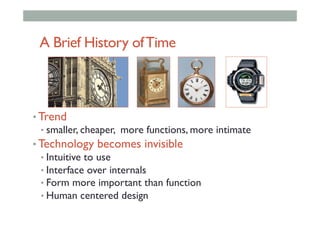
A Brief History ofTime
• Trend
• smaller, cheaper, more functions, more intimate
• Technology becomes invisible
• Intuitive to use
• Interface over internals
• Form more important than function
• Human centered design
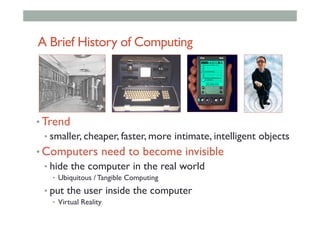
A Brief History of Computing
• Trend
• smaller, cheaper, faster, more intimate, intelligent objects
• Computers need to become invisible
• hide the computer in the real world
•  Ubiquitous / Tangible Computing
• put the user inside the computer
•  Virtual Reality
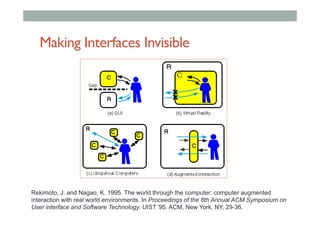
Making Interfaces Invisible
Rekimoto, J. and Nagao, K. 1995. The world through the computer: computer augmented
interaction with real world environments. In Proceedings of the 8th Annual ACM Symposium on
User interface and Software Technology. UIST '95. ACM, New York, NY, 29-36.
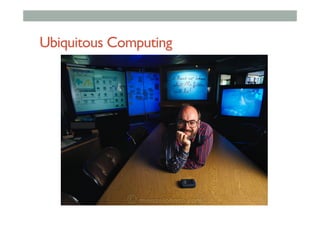
Ubiquitous Computing
Ubiquitous computing is the method of
enhancing computer use by making many
computers available throughout the physical
environment, but making them effectively
invisible to the user.
– Mark Weiser
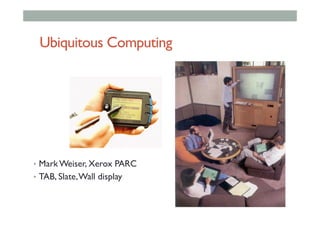
Ubiquitous Computing
•  Mark Weiser, Xerox PARC
•  TAB, Slate,Wall display
Ubiquitous Computing
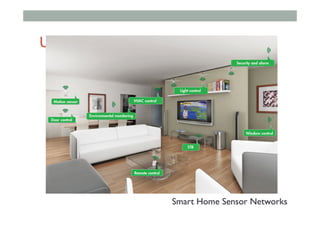
Smart Home Sensor Networks
Virtual Reality
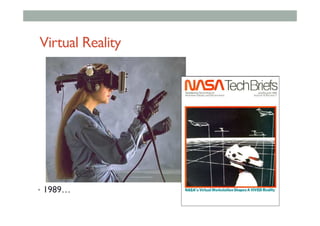
•  1989…
•  sddg
Virtual Reality
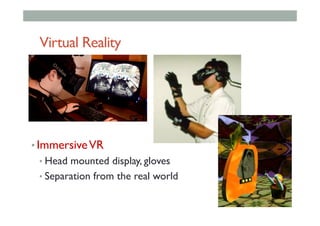
• ImmersiveVR
• Head mounted display, gloves
• Separation from the real world
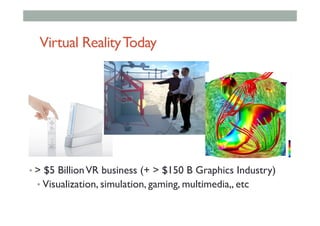
Virtual RealityToday
• > $5 BillionVR business (+ > $150 B Graphics Industry)
• Visualization, simulation, gaming, multimedia,, etc
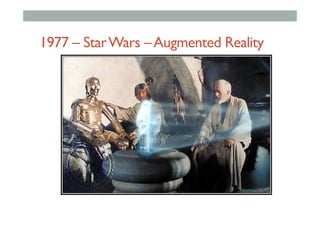
1977 – StarWars –Augmented Reality
Augmented Reality Definition
• Defining Characteristics [Azuma 97]
• Combines Real andVirtual Images
• Both can be seen at the same time
• Interactive in real-time
• The virtual content can be interacted with
• Registered in 3D
• Virtual objects appear fixed in space
Azuma, R. T. (1997). A survey of augmented reality. Presence, 6(4), 355-385.
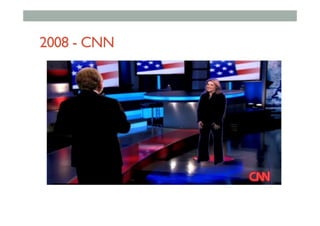
2008 - CNN
•  Put AR pictures here
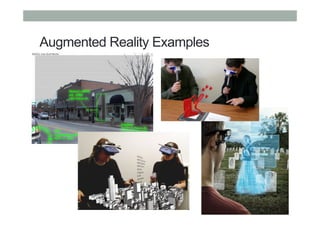
Augmented Reality Examples
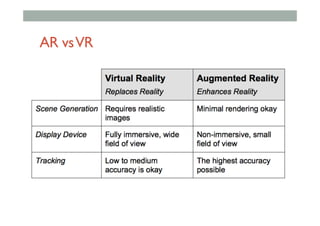
AR vsVR
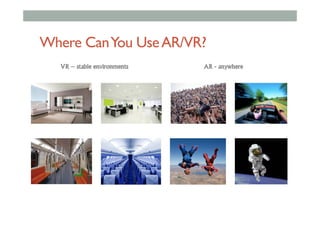
Where CanYou UseAR/VR?
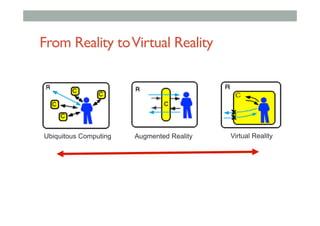
From Reality toVirtual Reality
Ubiquitous Computing Augmented Reality Virtual Reality
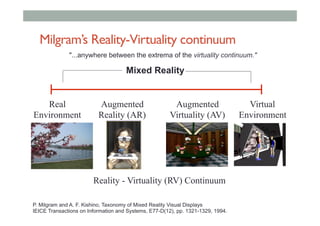
Milgram’s Reality-Virtuality continuum
Mixed Reality
Reality - Virtuality (RV) Continuum
Real
Environment
Augmented
Reality (AR)
Augmented
Virtuality (AV)
Virtual
Environment
"...anywhere between the extrema of the virtuality continuum."
P. Milgram and A. F. Kishino, Taxonomy of Mixed Reality Visual Displays
IEICE Transactions on Information and Systems, E77-D(12), pp. 1321-1329, 1994.
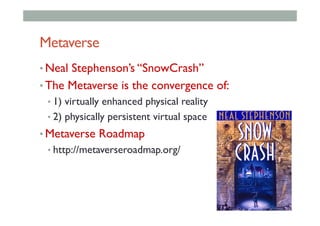
Metaverse
• Neal Stephenson’s “SnowCrash”
• The Metaverse is the convergence of:
• 1) virtually enhanced physical reality
• 2) physically persistent virtual space
• Metaverse Roadmap
• http://metaverseroadmap.org/
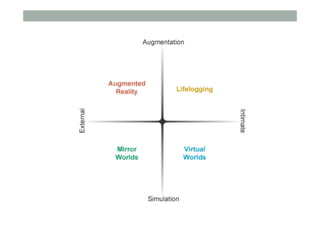
Metaverse Dimensions
• Augmentation technologies that layer information
onto our perception of the physical environment.
• Simulation refers to technologies that model
reality
• Intimate technologies are focused inwardly, on
the identity and actions of the individual or
object;
• External technologies are focused outwardly,
towards the world at large;
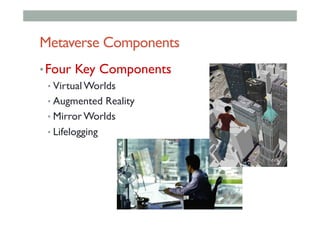
Metaverse Components
• Four Key Components
• Virtual Worlds
• Augmented Reality
• Mirror Worlds
• Lifelogging
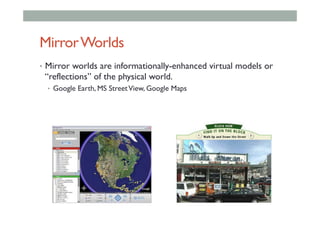
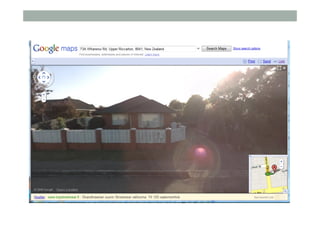
MirrorWorlds
•  Mirror worlds are informationally-enhanced virtual models or
“reflections” of the physical world.
•  Google Earth, MS StreetView, Google Maps
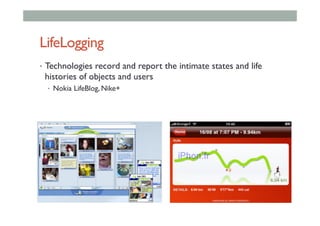
LifeLogging
•  Technologies record and report the intimate states and life
histories of objects and users
•  Nokia LifeBlog, Nike+
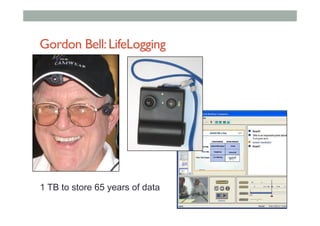
Gordon Bell:LifeLogging
1 TB to store 65 years of data
Summary
• Augmented Reality has three key features
• Combines Real andVirtual Images
• Interactive in real-time
• Registered in 3D
• AR can be classified alongside other technologies
• Invisible Interfaces
• Milgram’s Mixed Reality continuum
• Stephenson’s MetaVerse
HISTORY
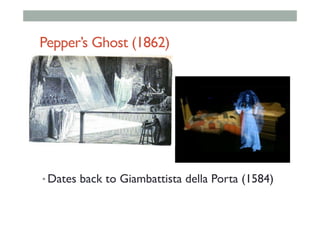
Pepper’s Ghost (1862)
• Dates back to Giambattista della Porta (1584)
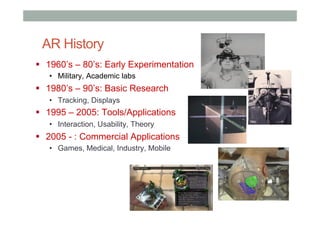
AR History
!  1960’s – 80’s: Early Experimentation
•  Military, Academic labs
!  1980’s – 90’s: Basic Research
•  Tracking, Displays
!  1995 – 2005: Tools/Applications
•  Interaction, Usability, Theory
!  2005 - : Commercial Applications
•  Games, Medical, Industry, Mobile
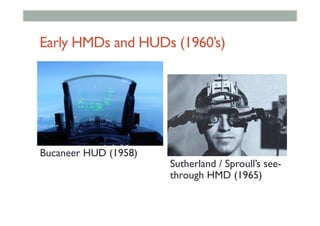
Early HMDs and HUDs (1960’s)
Sutherland / Sproull’s see-
through HMD (1965)
Bucaneer HUD (1958)
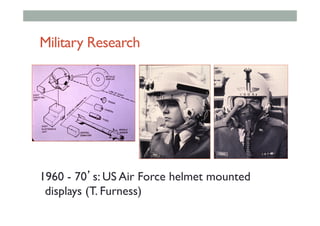
Military Research
1960 - 70’s: US Air Force helmet mounted
displays (T. Furness)
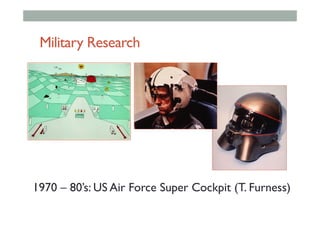
Military Research
1970 – 80’s: US Air Force Super Cockpit (T. Furness)
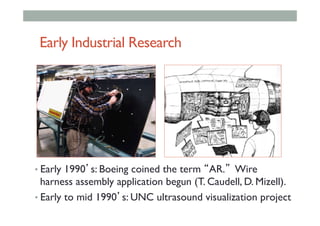
Early Industrial Research
• Early 1990’s: Boeing coined the term “AR.” Wire
harness assembly application begun (T. Caudell, D. Mizell).
• Early to mid 1990’s: UNC ultrasound visualization project
EarlyAcademic Research
• 1994: Motion stabilized display [Azuma]
• 1995: Fiducial tracking in video see-through [Bajura]
• 1996: UNC hybrid magnetic-vision tracker
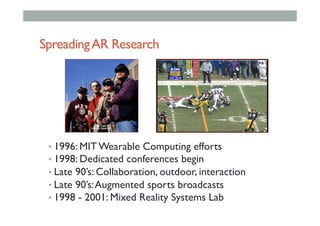
SpreadingAR Research
• 1996: MIT Wearable Computing efforts
• 1998: Dedicated conferences begin
• Late 90’s: Collaboration, outdoor, interaction
• Late 90’s:Augmented sports broadcasts
• 1998 - 2001: Mixed Reality Systems Lab
MOBILE AR HISTORY
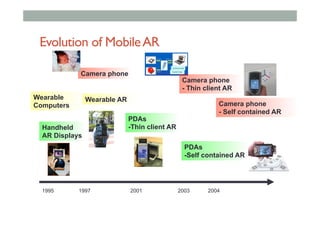
Evolution of MobileAR
Wearable AR
Handheld
AR Displays
Camera phone
1995 1997 2001 2003 2004
Camera phone
- Self contained AR
Wearable
Computers
PDAs
-Thin client AR
PDAs
-Self contained AR
Camera phone
- Thin client AR
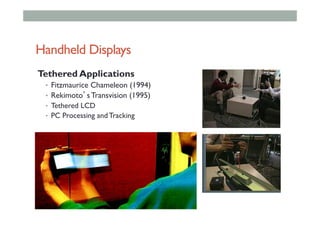
Handheld Displays
Tethered Applications
•  Fitzmaurice Chameleon (1994)
•  Rekimoto’s Transvision (1995)
•  Tethered LCD
•  PC Processing and Tracking
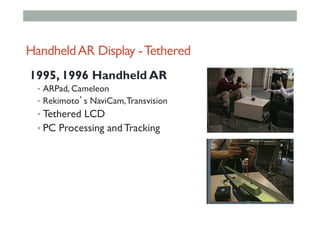
HandheldAR Display -Tethered
1995, 1996 Handheld AR
•  ARPad, Cameleon
•  Rekimoto’s NaviCam,Transvision
• Tethered LCD
• PC Processing and Tracking
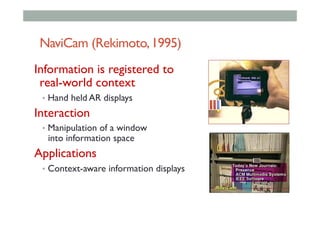
NaviCam (Rekimoto,1995)
Information is registered to
real-world context
•  Hand held AR displays
Interaction
•  Manipulation of a window
into information space
Applications
•  Context-aware information displays
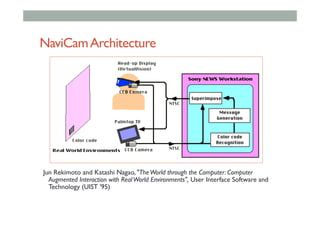
NaviCamArchitecture
Jun Rekimoto and Katashi Nagao, "TheWorld through the Computer: Computer
Augmented Interaction with RealWorld Environments", User Interface Software and
Technology (UIST '95)
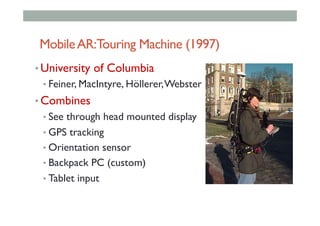
MobileAR:Touring Machine (1997)
• University of Columbia
• Feiner, MacIntyre, Höllerer,Webster
• Combines
• See through head mounted display
• GPS tracking
• Orientation sensor
• Backpack PC (custom)
• Tablet input
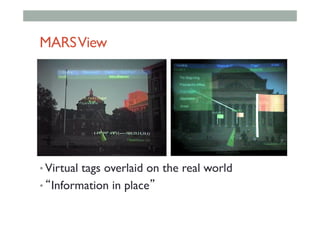
MARSView
• Virtual tags overlaid on the real world
• “Information in place”
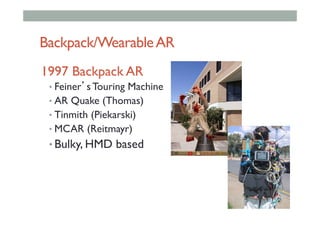
Backpack/WearableAR
1997 Backpack AR
• Feiner’s Touring Machine
• AR Quake (Thomas)
• Tinmith (Piekarski)
• MCAR (Reitmayr)
• Bulky, HMD based
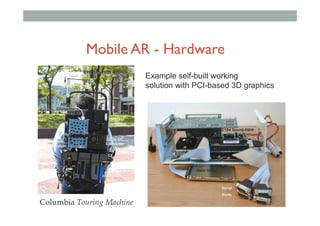
PCI 3D Graphics Board
Hard Drive
Serial
Ports
CPU
PC104 Sound Card
PC104 PCMCIA
GPS
Antenna
RTK correction Antenna
HMD
Controller
Tracker
Controller
DC to DC
Converter
Battery
Wearable
Computer
GPS RTK
correction
Radio
Example self-built working
solution with PCI-based 3D graphics
Columbia Touring Machine
Mobile AR - Hardware
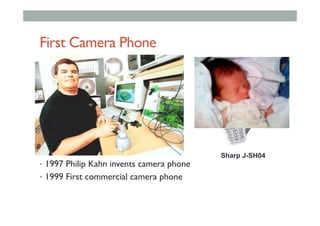
First Camera Phone
•  1997 Philip Kahn invents camera phone
•  1999 First commercial camera phone
Sharp J-SH04
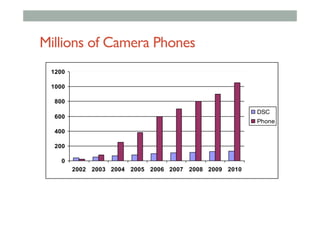
Millions of Camera Phones
0
200
400
600
800
1000
1200
2002 2003 2004 2005 2006 2007 2008 2009 2010
DSC
Phone
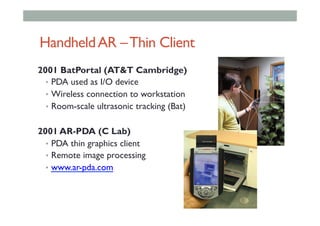
HandheldAR –Thin Client
2001 BatPortal (AT&T Cambridge)
•  PDA used as I/O device
•  Wireless connection to workstation
•  Room-scale ultrasonic tracking (Bat)
2001 AR-PDA (C Lab)
•  PDA thin graphics client
•  Remote image processing
•  www.ar-pda.com
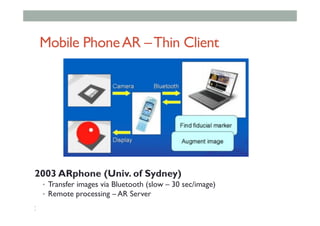
2003 ARphone (Univ. of Sydney)
•  Transfer images via Bluetooth (slow – 30 sec/image)
•  Remote processing – AR Server
• 
• 
Mobile PhoneAR –Thin Client
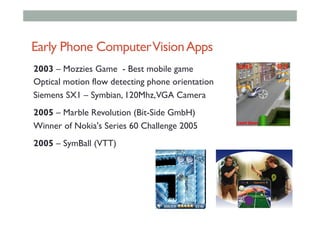
Early Phone ComputerVisionApps
2003 – Mozzies Game - Best mobile game
Optical motion flow detecting phone orientation
Siemens SX1 – Symbian, 120Mhz,VGA Camera
2005 – Marble Revolution (Bit-Side GmbH)
Winner of Nokia's Series 60 Challenge 2005
2005 – SymBall (VTT)
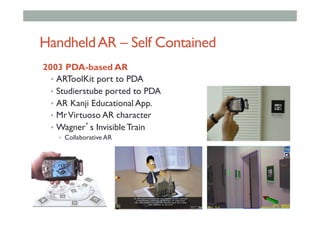
HandheldAR – Self Contained
2003 PDA-based AR
•  ARToolKit port to PDA
•  Studierstube ported to PDA
•  AR Kanji Educational App.
•  MrVirtuoso AR character
•  Wagner’s Invisible Train
•  Collaborative AR
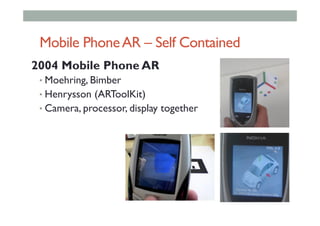
Mobile PhoneAR – Self Contained
2004 Mobile Phone AR
• Moehring, Bimber
• Henrysson (ARToolKit)
• Camera, processor, display together
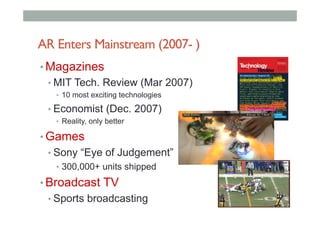
AR Enters Mainstream (2007- )
• Magazines
• MIT Tech. Review (Mar 2007)
•  10 most exciting technologies
• Economist (Dec. 2007)
•  Reality, only better
• Games
• Sony “Eye of Judgement”
•  300,000+ units shipped
• Broadcast TV
• Sports broadcasting
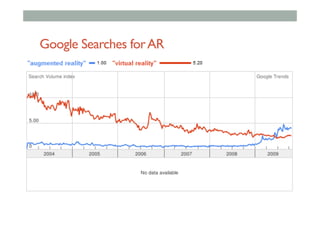
Google Searches forAR
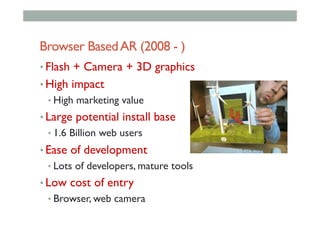
Browser BasedAR (2008 - )
• Flash + Camera + 3D graphics
• High impact
• High marketing value
• Large potential install base
• 1.6 Billion web users
• Ease of development
• Lots of developers, mature tools
• Low cost of entry
• Browser, web camera
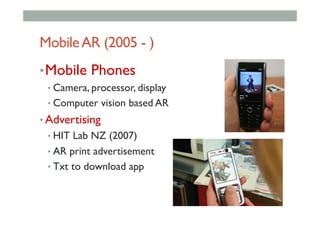
MobileAR (2005 - )
• Mobile Phones
• Camera, processor, display
• Computer vision based AR
• Advertising
• HIT Lab NZ (2007)
• AR print advertisement
• Txt to download app
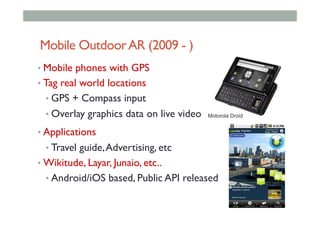
Mobile OutdoorAR (2009 - )
• Mobile phones with GPS
• Tag real world locations
• GPS + Compass input
• Overlay graphics data on live video
• Applications
• Travel guide,Advertising, etc
• Wikitude, Layar, Junaio, etc..
• Android/iOS based, Public API released
Motorola Droid
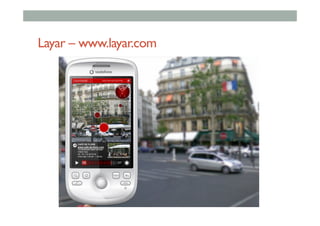
Layar – www.layar.com
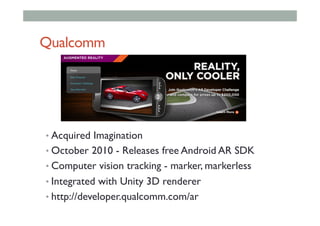
Qualcomm
• Acquired Imagination
• October 2010 - Releases free Android AR SDK
• Computer vision tracking - marker, markerless
• Integrated with Unity 3D renderer
• http://developer.qualcomm.com/ar
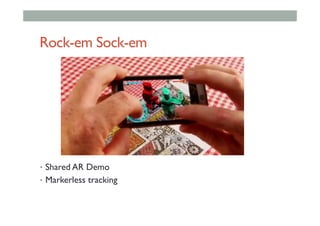
Rock-em Sock-em
•  Shared AR Demo
•  Markerless tracking
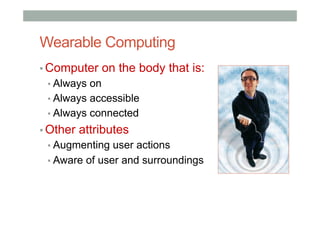
Wearable Computing
▪ Computer on the body that is:
▪ Always on
▪ Always accessible
▪ Always connected
▪ Other attributes
▪ Augmenting user actions
▪ Aware of user and surroundings
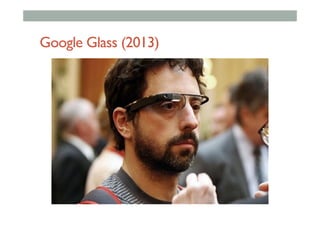
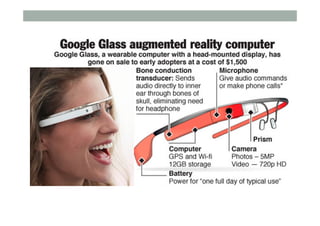
Google Glass (2013)
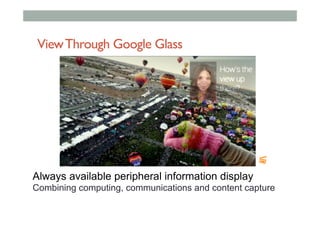
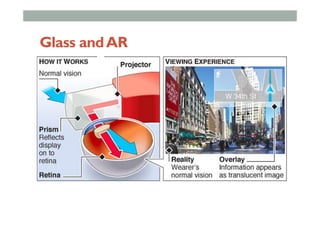
ViewThrough Google Glass
Always available peripheral information display
Combining computing, communications and content capture
Glass andAR
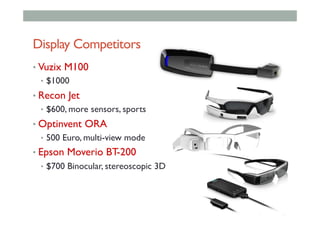
• Vuzix M100
•  $1000
• Recon Jet
•  $600, more sensors, sports
• Optinvent ORA
•  500 Euro, multi-view mode
• Epson Moverio BT-200
•  $700 Binocular, stereoscopic 3D
Display Competitors
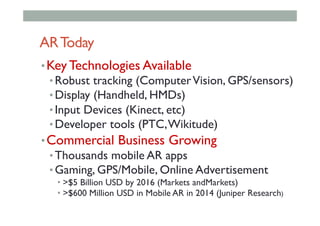
ARToday
• Key Technologies Available
• Robust tracking (ComputerVision, GPS/sensors)
• Display (Handheld, HMDs)
• Input Devices (Kinect, etc)
• Developer tools (PTC,Wikitude)
• Commercial Business Growing
• Thousands mobile AR apps
• Gaming, GPS/Mobile, Online Advertisement
• >$5 Billion USD by 2016 (Markets andMarkets)
• >$600 Million USD in Mobile AR in 2014 (Juniper Research)
AR BusinessToday
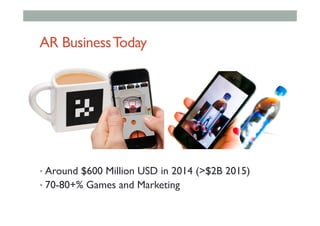
• Around $600 Million USD in 2014 (>$2B 2015)
• 70-80+% Games and Marketing
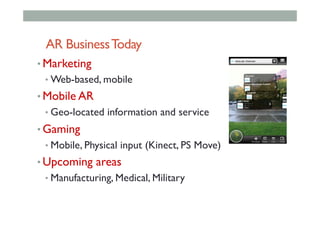
AR BusinessToday
• Marketing
• Web-based, mobile
• Mobile AR
• Geo-located information and service
• Gaming
• Mobile, Physical input (Kinect, PS Move)
• Upcoming areas
• Manufacturing, Medical, Military
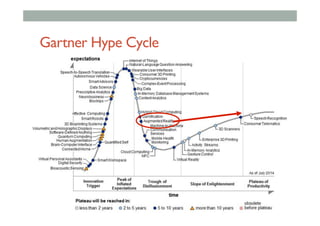
Gartner Hype Cycle
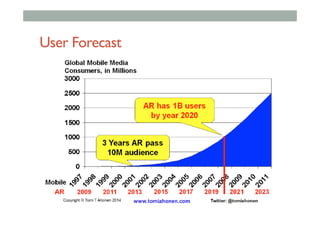
User Forecast
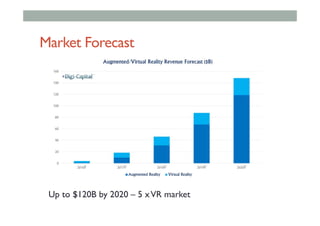
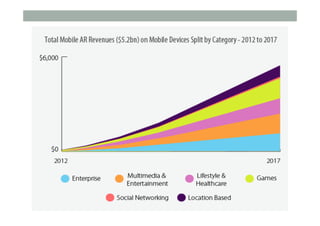
Market Forecast
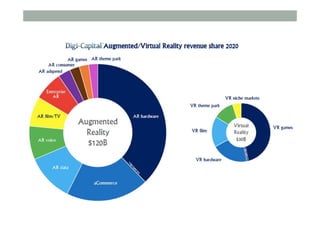
Up to $120B by 2020 – 5 xVR market
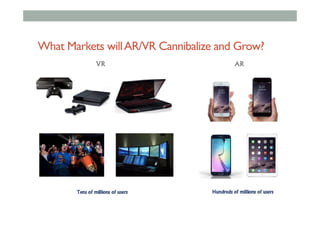
What Markets willAR/VR Cannibalize and Grow?
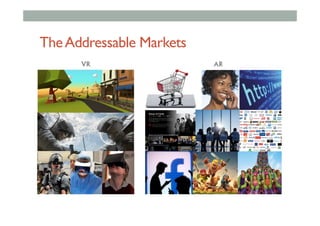
TheAddressable Markets
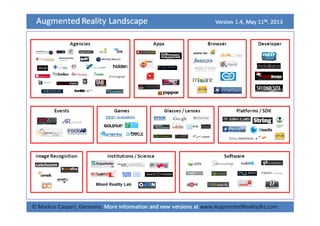
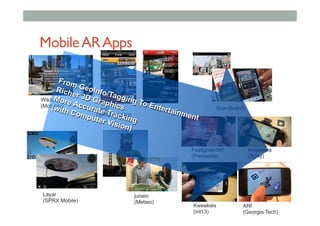
MobileARApps
Wikitude
(Mobilizy)
Layar
(SPRX Mobile)
junaio
(Metaio)
ScanSearchYelp
Layar
(SPRX Mobile)
Firefighter360
(Presselite)
ARf
(Georgia Tech)
Kweekies
(int13)
Invisimals
(Sony)
From GeoInfo/Tagging To Entertainment
Richer 3D Graphics
More Accurate Tracking
(with Computer Vision)
Summary
• Augmented Reality has a long history going
back to the 1960’s
• Interest in AR has exploded over the last few
years and is being commercialized quickly
• Smart Phones with sensors/cameras
• Mobile AR is growing in a number of areas
• Gaming,Tourism, Marketing experiences

Mobile AR Lecture1-introduction

  • 1.
  • 3.
    About Us • Mark • PhD Universityof Washington • Founder, HIT Lab NZ • Professor, University South Australia • Zi Siang • Researcher, HIT Lab NZ • Creative Director, Reina Imaging • Academic, University Tunku Abdul Rahman
  • 4.
    Course Outline -Saturday • Morning •  9:00 am Welcome •  9:30 am 1: Introduction to Augmented Reality •  11:00 am 2: Rapid Prototyping for Mobile AR •  12:30 pm Lunch • Afternoon •  1:30 pm 3: Visual Programming for Mobile AR •  3:00 pm 4: Location Based AR •  3:45 pm Break •  4:00 pm 4: ARML Scripting •  5:00 pm Finish
  • 5.
    Course Outline -Sunday • Morning • 9:00 am 5: Mobile AR Interaction • 10:30 am 6: Introduction to Unity3D • 11:30 am 7: Introduction to Vuforia • 12:30 pm Lunch • Afternoon • 1:30 pm 8: Interactive AR Applications • 3:00 pm 9: AR using HDRI Panorama • 4:30 pm 10: Research Directions • 5:00 pm Finish
  • 6.
    What You WillLearn • Overview of Augmented Reality • Foundation of mobile Augmented Reality • Prototyping methods for mobile AR • Visual design tools for mobile AR • Making image based and geo located Mobile AR • Interaction methods for Mobile AR • Basics of Unity3D • Overview of Vuforia tracking library • Research directions in Mobile AR
  • 7.
  • 8.
    A Brief HistoryofTime • Trend • smaller, cheaper, more functions, more intimate • Technology becomes invisible • Intuitive to use • Interface over internals • Form more important than function • Human centered design
  • 9.
    A Brief Historyof Computing • Trend • smaller, cheaper, faster, more intimate, intelligent objects • Computers need to become invisible • hide the computer in the real world •  Ubiquitous / Tangible Computing • put the user inside the computer •  Virtual Reality
  • 10.
    Making Interfaces Invisible Rekimoto,J. and Nagao, K. 1995. The world through the computer: computer augmented interaction with real world environments. In Proceedings of the 8th Annual ACM Symposium on User interface and Software Technology. UIST '95. ACM, New York, NY, 29-36.
  • 11.
  • 12.
    Ubiquitous computing isthe method of enhancing computer use by making many computers available throughout the physical environment, but making them effectively invisible to the user. – Mark Weiser
  • 13.
    Ubiquitous Computing •  MarkWeiser, Xerox PARC •  TAB, Slate,Wall display
  • 14.
  • 15.
  • 16.
  • 17.
    Virtual Reality • ImmersiveVR • Head mounteddisplay, gloves • Separation from the real world
  • 18.
    Virtual RealityToday • > $5BillionVR business (+ > $150 B Graphics Industry) • Visualization, simulation, gaming, multimedia,, etc
  • 19.
    1977 – StarWars–Augmented Reality
  • 20.
    Augmented Reality Definition • DefiningCharacteristics [Azuma 97] • Combines Real andVirtual Images • Both can be seen at the same time • Interactive in real-time • The virtual content can be interacted with • Registered in 3D • Virtual objects appear fixed in space Azuma, R. T. (1997). A survey of augmented reality. Presence, 6(4), 355-385.
  • 21.
  • 22.
    •  Put ARpictures here Augmented Reality Examples
  • 23.
  • 24.
  • 25.
    From Reality toVirtualReality Ubiquitous Computing Augmented Reality Virtual Reality
  • 26.
    Milgram’s Reality-Virtuality continuum MixedReality Reality - Virtuality (RV) Continuum Real Environment Augmented Reality (AR) Augmented Virtuality (AV) Virtual Environment "...anywhere between the extrema of the virtuality continuum." P. Milgram and A. F. Kishino, Taxonomy of Mixed Reality Visual Displays IEICE Transactions on Information and Systems, E77-D(12), pp. 1321-1329, 1994.
  • 27.
    Metaverse • Neal Stephenson’s “SnowCrash” • TheMetaverse is the convergence of: • 1) virtually enhanced physical reality • 2) physically persistent virtual space • Metaverse Roadmap • http://metaverseroadmap.org/
  • 28.
    Metaverse Dimensions • Augmentationtechnologies that layer information onto our perception of the physical environment. • Simulation refers to technologies that model reality • Intimate technologies are focused inwardly, on the identity and actions of the individual or object; • External technologies are focused outwardly, towards the world at large;
  • 29.
    Metaverse Components • Four KeyComponents • Virtual Worlds • Augmented Reality • Mirror Worlds • Lifelogging
  • 31.
    MirrorWorlds •  Mirror worldsare informationally-enhanced virtual models or “reflections” of the physical world. •  Google Earth, MS StreetView, Google Maps
  • 33.
    LifeLogging •  Technologies recordand report the intimate states and life histories of objects and users •  Nokia LifeBlog, Nike+
  • 34.
    Gordon Bell:LifeLogging 1 TBto store 65 years of data
  • 35.
    Summary • Augmented Reality hasthree key features • Combines Real andVirtual Images • Interactive in real-time • Registered in 3D • AR can be classified alongside other technologies • Invisible Interfaces • Milgram’s Mixed Reality continuum • Stephenson’s MetaVerse
  • 36.
  • 37.
    Pepper’s Ghost (1862) • Datesback to Giambattista della Porta (1584)
  • 38.
    AR History !  1960’s– 80’s: Early Experimentation •  Military, Academic labs !  1980’s – 90’s: Basic Research •  Tracking, Displays !  1995 – 2005: Tools/Applications •  Interaction, Usability, Theory !  2005 - : Commercial Applications •  Games, Medical, Industry, Mobile
  • 39.
    Early HMDs andHUDs (1960’s) Sutherland / Sproull’s see- through HMD (1965) Bucaneer HUD (1958)
  • 40.
    Military Research 1960 -70’s: US Air Force helmet mounted displays (T. Furness)
  • 41.
    Military Research 1970 –80’s: US Air Force Super Cockpit (T. Furness)
  • 42.
    Early Industrial Research • Early1990’s: Boeing coined the term “AR.” Wire harness assembly application begun (T. Caudell, D. Mizell). • Early to mid 1990’s: UNC ultrasound visualization project
  • 43.
    EarlyAcademic Research • 1994: Motionstabilized display [Azuma] • 1995: Fiducial tracking in video see-through [Bajura] • 1996: UNC hybrid magnetic-vision tracker
  • 44.
    SpreadingAR Research • 1996: MITWearable Computing efforts • 1998: Dedicated conferences begin • Late 90’s: Collaboration, outdoor, interaction • Late 90’s:Augmented sports broadcasts • 1998 - 2001: Mixed Reality Systems Lab
  • 45.
  • 46.
    Evolution of MobileAR WearableAR Handheld AR Displays Camera phone 1995 1997 2001 2003 2004 Camera phone - Self contained AR Wearable Computers PDAs -Thin client AR PDAs -Self contained AR Camera phone - Thin client AR
  • 47.
    Handheld Displays Tethered Applications • Fitzmaurice Chameleon (1994) •  Rekimoto’s Transvision (1995) •  Tethered LCD •  PC Processing and Tracking
  • 48.
    HandheldAR Display -Tethered 1995,1996 Handheld AR •  ARPad, Cameleon •  Rekimoto’s NaviCam,Transvision • Tethered LCD • PC Processing and Tracking
  • 49.
    NaviCam (Rekimoto,1995) Information isregistered to real-world context •  Hand held AR displays Interaction •  Manipulation of a window into information space Applications •  Context-aware information displays
  • 50.
    NaviCamArchitecture Jun Rekimoto andKatashi Nagao, "TheWorld through the Computer: Computer Augmented Interaction with RealWorld Environments", User Interface Software and Technology (UIST '95)
  • 51.
    MobileAR:Touring Machine (1997) • Universityof Columbia • Feiner, MacIntyre, Höllerer,Webster • Combines • See through head mounted display • GPS tracking • Orientation sensor • Backpack PC (custom) • Tablet input
  • 52.
    MARSView • Virtual tags overlaidon the real world • “Information in place”
  • 53.
    Backpack/WearableAR 1997 Backpack AR • Feiner’sTouring Machine • AR Quake (Thomas) • Tinmith (Piekarski) • MCAR (Reitmayr) • Bulky, HMD based
  • 54.
    PCI 3D GraphicsBoard Hard Drive Serial Ports CPU PC104 Sound Card PC104 PCMCIA GPS Antenna RTK correction Antenna HMD Controller Tracker Controller DC to DC Converter Battery Wearable Computer GPS RTK correction Radio Example self-built working solution with PCI-based 3D graphics Columbia Touring Machine Mobile AR - Hardware
  • 55.
    First Camera Phone • 1997 Philip Kahn invents camera phone •  1999 First commercial camera phone Sharp J-SH04
  • 56.
    Millions of CameraPhones 0 200 400 600 800 1000 1200 2002 2003 2004 2005 2006 2007 2008 2009 2010 DSC Phone
  • 57.
    HandheldAR –Thin Client 2001BatPortal (AT&T Cambridge) •  PDA used as I/O device •  Wireless connection to workstation •  Room-scale ultrasonic tracking (Bat) 2001 AR-PDA (C Lab) •  PDA thin graphics client •  Remote image processing •  www.ar-pda.com
  • 58.
    2003 ARphone (Univ.of Sydney) •  Transfer images via Bluetooth (slow – 30 sec/image) •  Remote processing – AR Server •  •  Mobile PhoneAR –Thin Client
  • 59.
    Early Phone ComputerVisionApps 2003– Mozzies Game - Best mobile game Optical motion flow detecting phone orientation Siemens SX1 – Symbian, 120Mhz,VGA Camera 2005 – Marble Revolution (Bit-Side GmbH) Winner of Nokia's Series 60 Challenge 2005 2005 – SymBall (VTT)
  • 60.
    HandheldAR – SelfContained 2003 PDA-based AR •  ARToolKit port to PDA •  Studierstube ported to PDA •  AR Kanji Educational App. •  MrVirtuoso AR character •  Wagner’s Invisible Train •  Collaborative AR
  • 61.
    Mobile PhoneAR –Self Contained 2004 Mobile Phone AR • Moehring, Bimber • Henrysson (ARToolKit) • Camera, processor, display together
  • 62.
    AR Enters Mainstream(2007- ) • Magazines • MIT Tech. Review (Mar 2007) •  10 most exciting technologies • Economist (Dec. 2007) •  Reality, only better • Games • Sony “Eye of Judgement” •  300,000+ units shipped • Broadcast TV • Sports broadcasting
  • 63.
  • 64.
    Browser BasedAR (2008- ) • Flash + Camera + 3D graphics • High impact • High marketing value • Large potential install base • 1.6 Billion web users • Ease of development • Lots of developers, mature tools • Low cost of entry • Browser, web camera
  • 65.
    MobileAR (2005 -) • Mobile Phones • Camera, processor, display • Computer vision based AR • Advertising • HIT Lab NZ (2007) • AR print advertisement • Txt to download app
  • 66.
    Mobile OutdoorAR (2009- ) • Mobile phones with GPS • Tag real world locations • GPS + Compass input • Overlay graphics data on live video • Applications • Travel guide,Advertising, etc • Wikitude, Layar, Junaio, etc.. • Android/iOS based, Public API released Motorola Droid
  • 67.
  • 68.
    Qualcomm • Acquired Imagination • October 2010- Releases free Android AR SDK • Computer vision tracking - marker, markerless • Integrated with Unity 3D renderer • http://developer.qualcomm.com/ar
  • 69.
    Rock-em Sock-em •  SharedAR Demo •  Markerless tracking
  • 70.
    Wearable Computing ▪ Computer onthe body that is: ▪ Always on ▪ Always accessible ▪ Always connected ▪ Other attributes ▪ Augmenting user actions ▪ Aware of user and surroundings
  • 71.
  • 72.
    ViewThrough Google Glass Alwaysavailable peripheral information display Combining computing, communications and content capture
  • 74.
  • 75.
    • Vuzix M100 •  $1000 • ReconJet •  $600, more sensors, sports • Optinvent ORA •  500 Euro, multi-view mode • Epson Moverio BT-200 •  $700 Binocular, stereoscopic 3D Display Competitors
  • 76.
    ARToday • Key Technologies Available • Robusttracking (ComputerVision, GPS/sensors) • Display (Handheld, HMDs) • Input Devices (Kinect, etc) • Developer tools (PTC,Wikitude) • Commercial Business Growing • Thousands mobile AR apps • Gaming, GPS/Mobile, Online Advertisement • >$5 Billion USD by 2016 (Markets andMarkets) • >$600 Million USD in Mobile AR in 2014 (Juniper Research)
  • 77.
    AR BusinessToday • Around $600Million USD in 2014 (>$2B 2015) • 70-80+% Games and Marketing
  • 78.
    AR BusinessToday • Marketing • Web-based, mobile • MobileAR • Geo-located information and service • Gaming • Mobile, Physical input (Kinect, PS Move) • Upcoming areas • Manufacturing, Medical, Military
  • 80.
  • 81.
  • 83.
    Market Forecast Up to$120B by 2020 – 5 xVR market
  • 85.
    What Markets willAR/VRCannibalize and Grow?
  • 86.
  • 87.
    MobileARApps Wikitude (Mobilizy) Layar (SPRX Mobile) junaio (Metaio) ScanSearchYelp Layar (SPRX Mobile) Firefighter360 (Presselite) ARf (GeorgiaTech) Kweekies (int13) Invisimals (Sony) From GeoInfo/Tagging To Entertainment Richer 3D Graphics More Accurate Tracking (with Computer Vision)
  • 88.
    Summary • Augmented Reality hasa long history going back to the 1960’s • Interest in AR has exploded over the last few years and is being commercialized quickly • Smart Phones with sensors/cameras • Mobile AR is growing in a number of areas • Gaming,Tourism, Marketing experiences