Research Directions
in Augmented Reality

   Mark Billinghurst
    The HIT Lab NZ
University of Canterbury
Augmented Reality Definition
Defining Characteristics [Azuma 97]
  Combines Real and Virtual Images
   - Both can be seen at the same time
  Interactive in real-time
   - The virtual content can be interacted with
  Registered in 3D
   - Virtual objects appear fixed in space
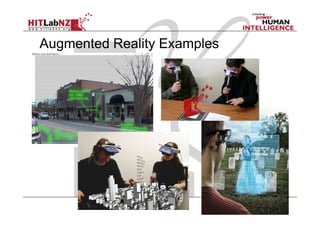
Augmented Reality Examples
 Put AR pictures here
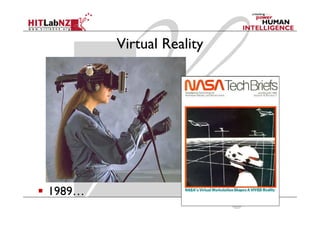
Virtual Reality


1989…
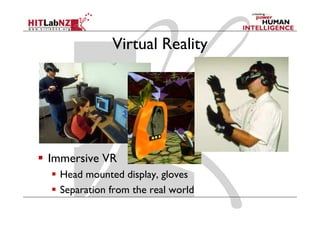
Virtual Reality


Immersive VR
  Head mounted display, gloves
  Separation from the real world
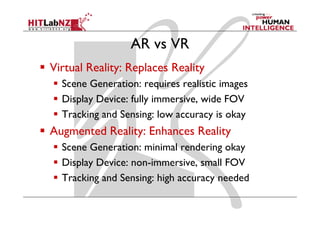
AR vs VR
Virtual Reality: Replaces Reality
  Scene Generation: requires realistic images
  Display Device: fully immersive, wide FOV
  Tracking and Sensing: low accuracy is okay
Augmented Reality: Enhances Reality
  Scene Generation: minimal rendering okay
  Display Device: non-immersive, small FOV
  Tracking and Sensing: high accuracy needed
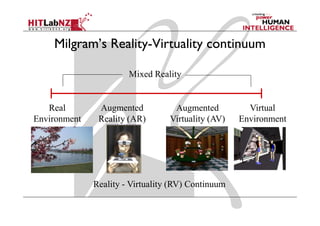
Milgram’s Reality-Virtuality continuum

                       Mixed Reality


   Real        Augmented           Augmented          Virtual
Environment    Reality (AR)       Virtuality (AV)   Environment


              Reality - Virtuality (RV) Continuum
AR History
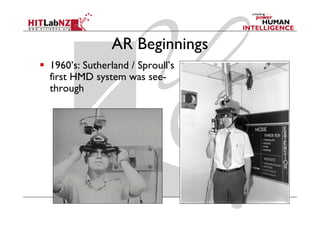
AR Beginnings
1960’s: Sutherland / Sproull’s
first HMD system was see-
through
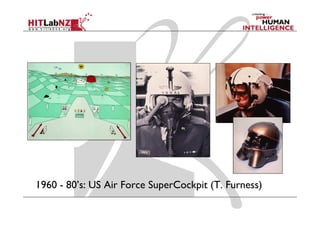
1960 - 80’s: US Air Force SuperCockpit (T. Furness)
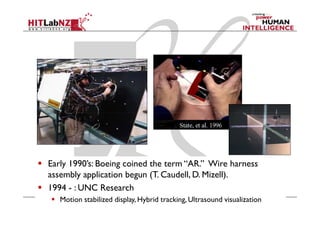
Early 1990’s: Boeing coined the
term “AR.” Wire harness
assembly application begun (T.
Caudell, D. Mizell).
Early to mid 1990’s: UNC
ultrasound visualization project


Early 1990’s: Boeing coined the term “AR.” Wire harness
assembly application begun (T. Caudell, D. Mizell).
1994 - : UNC Research
   Motion stabilized display, Hybrid tracking, Ultrasound visualization
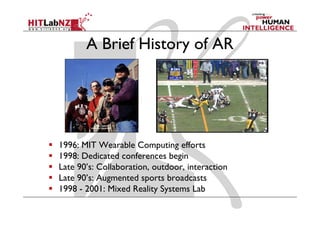
A Brief History of AR


1996: MIT Wearable Computing efforts
1998: Dedicated conferences begin
Late 90’s: Collaboration, outdoor, interaction
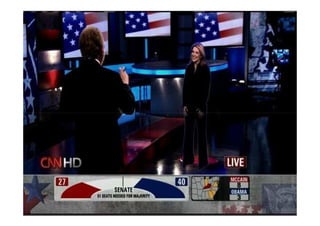
Late 90’s: Augmented sports broadcasts
1998 - 2001: Mixed Reality Systems Lab
History Summary
1960’s – 80’s: Early Experimentation
1980’s – 90’s: Basic Research
  Tracking, displays
1995 – 2005: Tools/Applications
  Interaction, usability, theory
2005 - : Commercial Applications
  Games, Medical, Industry
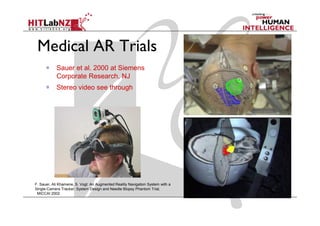
Medical AR Trials
            Sauer et al. 2000 at Siemens
            Corporate Research, NJ
            Stereo video see through


F. Sauer, Ali Khamene, S. Vogt: An Augmented Reality Navigation System with a
Single-Camera Tracker: System Design and Needle Biopsy Phantom Trial,
 MICCAI 2002
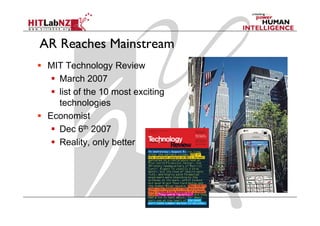
AR Reaches Mainstream
 MIT Technology Review
   March 2007
   list of the 10 most exciting
   technologies
 Economist
   Dec 6th 2007
   Reality, only better
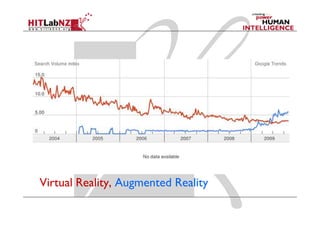
Virtual Reality, Augmented Reality
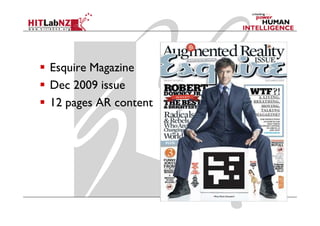
Esquire Magazine
Dec 2009 issue
12 pages AR content
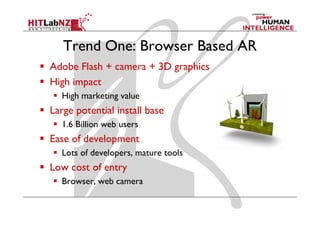
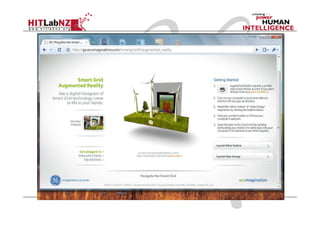
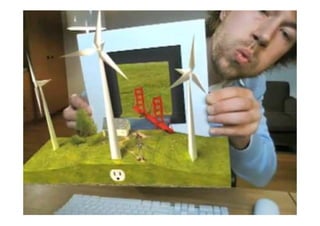
Trend One: Browser Based AR
Adobe Flash + camera + 3D graphics
High impact
  High marketing value
Large potential install base
  1.6 Billion web users
Ease of development
  Lots of developers, mature tools
Low cost of entry
  Browser, web camera
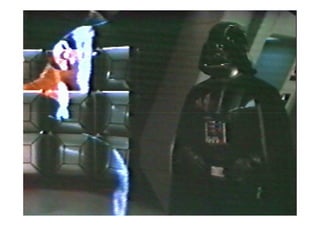
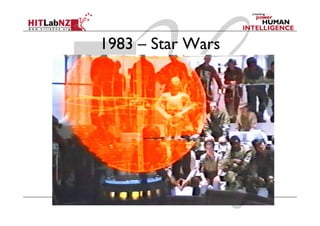
1983 – Star Wars
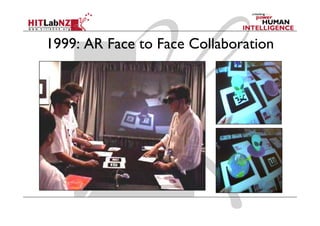
1999: AR Face to Face Collaboration
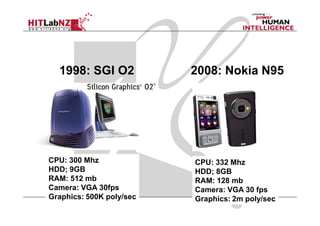
1998: SGI O2            2008: Nokia N95


CPU: 300 Mhz              CPU: 332 Mhz
HDD; 9GB                  HDD; 8GB
RAM: 512 mb               RAM: 128 mb
Camera: VGA 30fps         Camera: VGA 30 fps
Graphics: 500K poly/sec   Graphics: 2m poly/sec
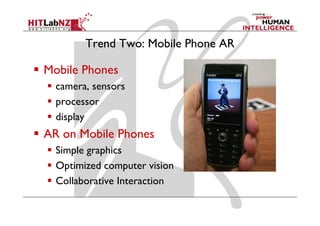
Trend Two: Mobile Phone AR

Mobile Phones
  camera, sensors
  processor
  display
AR on Mobile Phones
  Simple graphics
  Optimized computer vision
  Collaborative Interaction
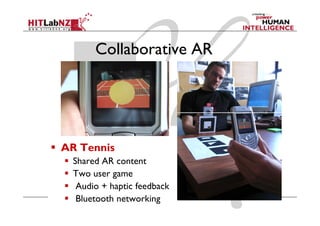
Collaborative AR


AR Tennis
  Shared AR content
  Two user game
   Audio + haptic feedback
   Bluetooth networking
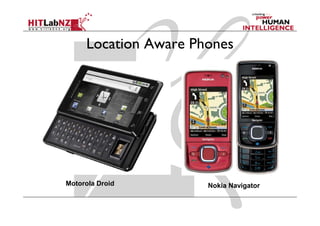
Location Aware Phones


Motorola Droid        Nokia Navigator
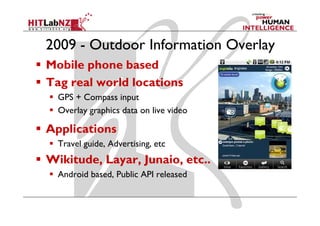
2009 - Outdoor Information Overlay
Mobile phone based
Tag real world locations
  GPS + Compass input
  Overlay graphics data on live video

Applications
  Travel guide, Advertising, etc
Wikitude, Layar, Junaio, etc..
  Android based, Public API released
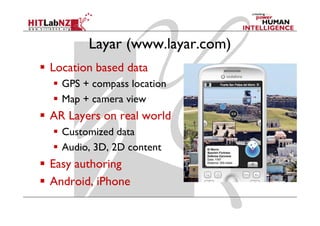
Layar (www.layar.com)
Location based data
  GPS + compass location
  Map + camera view
AR Layers on real world
  Customized data
  Audio, 3D, 2D content
Easy authoring
Android, iPhone
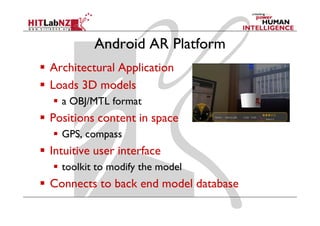
Android AR Platform
Architectural Application
Loads 3D models
  a OBJ/MTL format
Positions content in space
  GPS, compass
Intuitive user interface
  toolkit to modify the model
Connects to back end model database
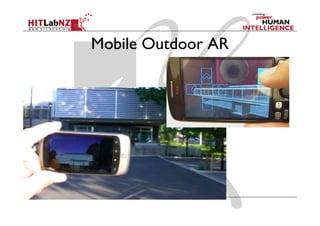
Mobile Outdoor AR
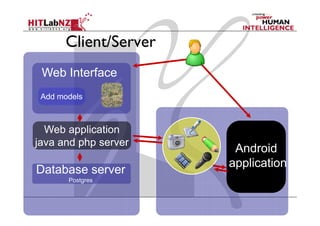
Client/Server
 Web Interface
 Add models


  Web application
java and php server
                       Android
                      application
Database server
       Postgres
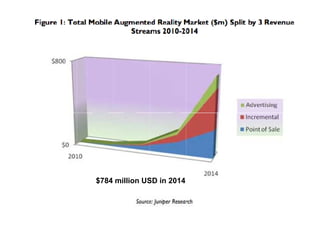
$784 million USD in 2014
Summary
Augmented Reality has a long history going
back to the 1960’s
Interest in AR has exploded over the last two
years and is being commercialized quickly
AR is growing in a number of areas
  Mobile AR
  Web based AR
  Advertising experiences
Looking to the Future
What’s Next?


               Sony CSL © 2004
“The product is no longer
  the basis of value. The
      experience is.”

      Venkat Ramaswamy
      The Future of Competition.
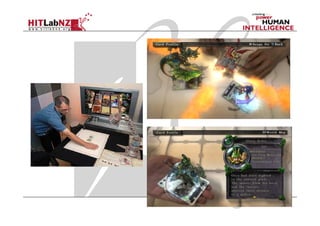
PS3 - Eye of Judgement
Computer Vision Tracking
Card based battle game
Collaborative AR
October 24th 2007
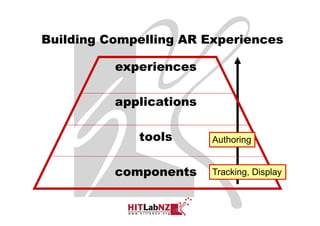
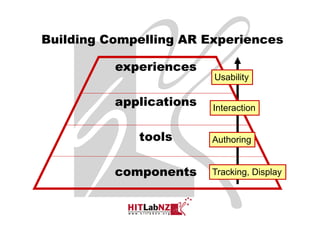
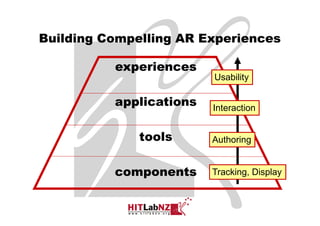
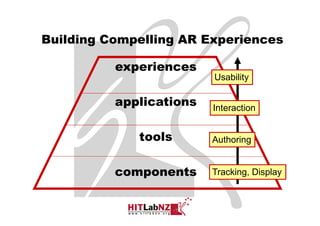
Building Compelling AR Experiences

          experiences
                         Usability

          applications   Interaction


             tools       Authoring


          components     Tracking, Display


                                       Sony CSL © 2004
AR Components
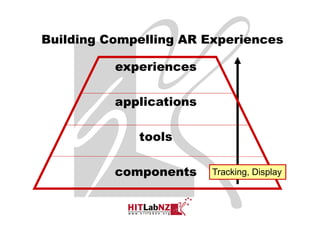
Building Compelling AR Experiences

          experiences

          applications

             tools

          components     Tracking, Display


                                    Sony CSL © 2004
Low Level AR Libraries
ARToolKit Enhancements
  Occlusion Handling
SSTT
  Simple Spatial Template Tracking
Opira
  Robust Natural Feature Tracking
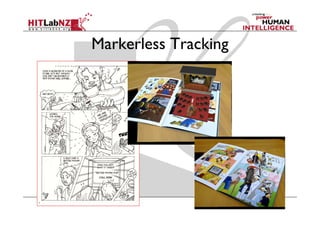
Markerless Tracking
AR Tools
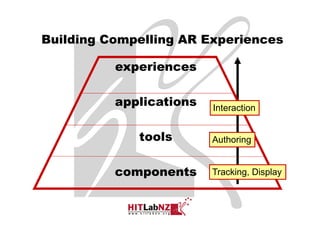
Building Compelling AR Experiences

          experiences

          applications

             tools       Authoring


          components     Tracking, Display


                                     Sony CSL © 2004
AR Authoring
Software Libraries
  OSGART, Studierstube, MXRToolKit
Plugin to existing software
  DART (Macromedia Director)
Stand Alone
  AMIRE, etc
Next Generation
  iaTAR (Tangible AR)
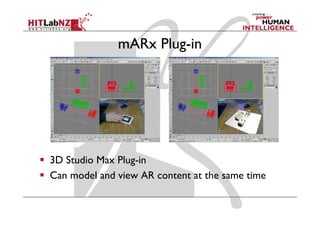
mARx Plug-in


3D Studio Max Plug-in
Can model and view AR content at the same time
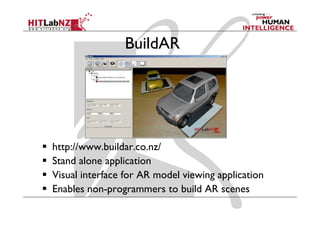
BuildAR


http://www.buildar.co.nz/
Stand alone application
Visual interface for AR model viewing application
Enables non-programmers to build AR scenes
AR Applications
Building Compelling AR Experiences

          experiences

          applications   Interaction


             tools       Authoring


          components     Tracking, Display


                                       Sony CSL © 2004
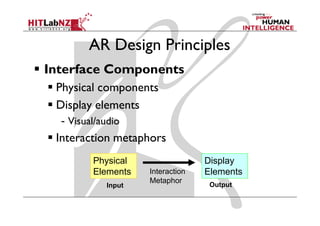
AR Design Principles
Interface Components
 Physical components
 Display elements
  - Visual/audio
 Interaction metaphors
         Physical                 Display
         Elements   Interaction   Elements
                    Metaphor
            Input                  Output
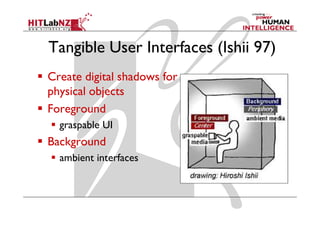
Tangible User Interfaces (Ishii 97)
Create digital shadows for
physical objects
Foreground
  graspable UI
Background
  ambient interfaces
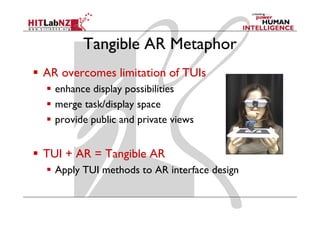
Tangible AR Metaphor
AR overcomes limitation of TUIs
  enhance display possibilities
  merge task/display space
  provide public and private views


TUI + AR = Tangible AR
  Apply TUI methods to AR interface design
Tangible AR Design Principles
Tangible AR Interfaces use TUI principles
  Physical controllers for moving virtual content
  Support for spatial 3D interaction techniques
  Support for multi-handed interaction
  Match object affordances to task requirements
  Support parallel activity with multiple objects
  Allow collaboration between multiple users
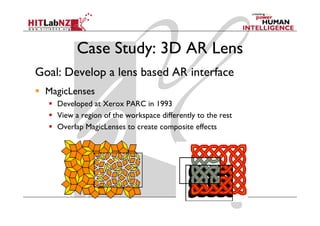
Case Study: 3D AR Lens
Goal: Develop a lens based AR interface
  MagicLenses
    Developed at Xerox PARC in 1993
    View a region of the workspace differently to the rest
    Overlap MagicLenses to create composite effects
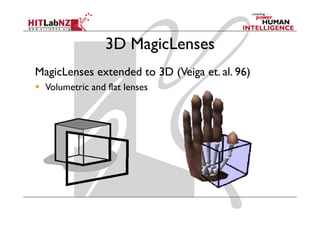
3D MagicLenses
MagicLenses extended to 3D (Veiga et. al. 96)
  Volumetric and flat lenses
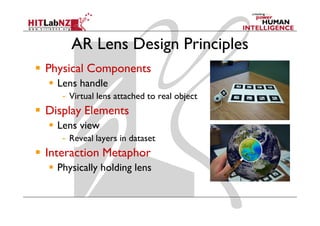
AR Lens Design Principles
Physical Components
  Lens handle
   - Virtual lens attached to real object
Display Elements
  Lens view
   - Reveal layers in dataset
Interaction Metaphor
  Physically holding lens
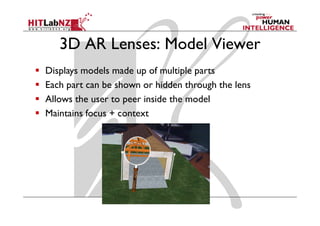
3D AR Lenses: Model Viewer
Displays models made up of multiple parts
Each part can be shown or hidden through the lens
Allows the user to peer inside the model
Maintains focus + context
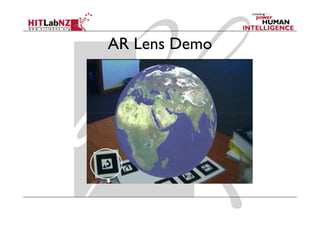
AR Lens Demo
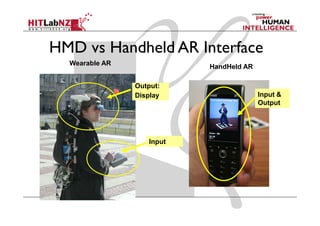
HMD vs Handheld AR Interface
  Wearable AR
                           HandHeld AR

                Output:
                Display                  Input &
                                         Output


                   Input
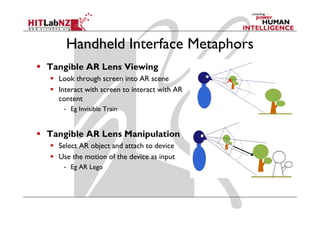
Handheld Interface Metaphors
Tangible AR Lens Viewing
  Look through screen into AR scene
  Interact with screen to interact with AR
  content
   - Eg Invisible Train


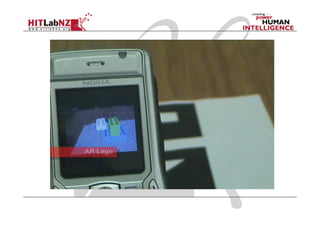
Tangible AR Lens Manipulation
  Select AR object and attach to device
  Use the motion of the device as input
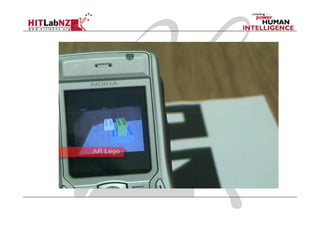
   - Eg AR Lego
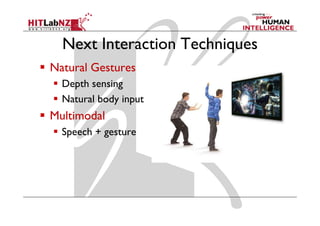
Next Interaction Techniques
Natural Gestures
  Depth sensing
  Natural body input
Multimodal
  Speech + gesture
AR Experiences
Building Compelling AR Experiences

          experiences
                         Usability

          applications   Interaction


             tools       Authoring


          components     Tracking, Display


                                       Sony CSL © 2004
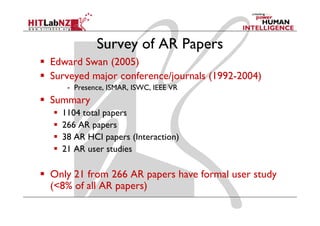
Survey of AR Papers
Edward Swan (2005)
Surveyed major conference/journals (1992-2004)
   - Presence, ISMAR, ISWC, IEEE VR
Summary
  1104 total papers
  266 AR papers
  38 AR HCI papers (Interaction)
  21 AR user studies

Only 21 from 266 AR papers have formal user study
(<8% of all AR papers)
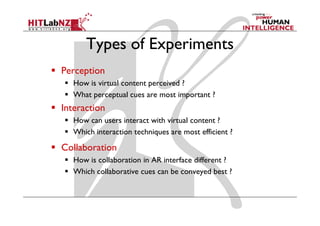
Types of Experiments
Perception
   How is virtual content perceived ?
   What perceptual cues are most important ?
Interaction
   How can users interact with virtual content ?
   Which interaction techniques are most efficient ?

Collaboration
   How is collaboration in AR interface different ?
   Which collaborative cues can be conveyed best ?
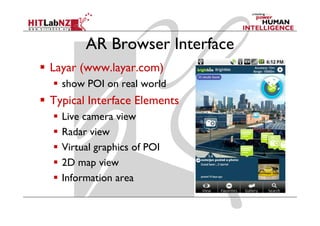
AR Browser Interface
Layar (www.layar.com)
  show POI on real world
Typical Interface Elements
  Live camera view
  Radar view
  Virtual graphics of POI
  2D map view
  Information area
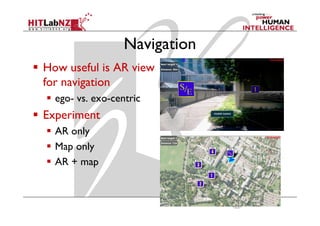
Navigation
How useful is AR view
for navigation
  ego- vs. exo-centric
Experiment
  AR only
  Map only
  AR + map
Experiment Design
Conditions
  AR: Using only an AR view
  2D-map: Using only a top down 2D map view
  AR+2D-map: Using both an AR and 2D map view
Measures
  Time to complete, Distance travelled
  User preference, subjective measures
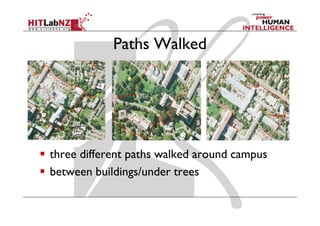
Paths Walked


three different paths walked around campus
between buildings/under trees
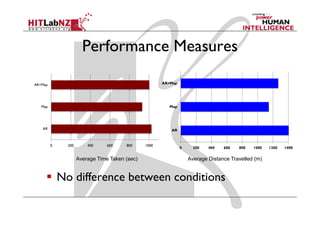
Performance Measures

AR+Map                                                 AR+Map


   Map                                                    Map


   AR                                                     AR


         0     200       400     600    800     1000
                                                                0     200   400   600   800   1000   1200   1400


                     Average Time Taken (sec)                       Average Distance Travelled (m)


             No difference between conditions
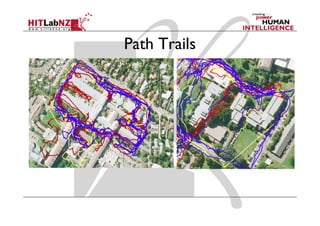
Path Trails
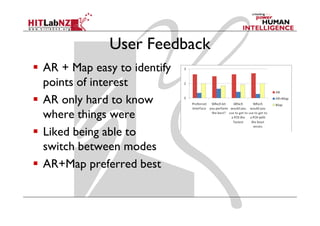
User Feedback
AR + Map easy to identify
points of interest
AR only hard to know
where things were
Liked being able to
switch between modes
AR+Map preferred best
Typical User Comments
“With the AR mode, I didn’t know where any of the
buildings were, a couple of times I went round in a
circle because I didn’t know where things were.”
“I found the map interface the best one to use
because you are actually able to see the physical
objects around you"
“I used the map at the beginning to understand where
the buildings were and the AR between each point”
Navigation Conclusion
AR alone provides no improvement
  Lack of depth cues
  Difficult to create spatial awareness
AR + Map preferred interface
  Map for creating mental mode
  AR for near navigation
Conclusions
“We’re living in the experience economy
 and the customer is the star of the show.
 If I’m going to spend thousands of dollars
 on something. I want the whole
 experience to be a fairy-tale”
         Milton Pedraza,
         The Luxury Institute Illustrative
Building Compelling AR Experiences

          experiences
                         Usability

          applications   Interaction


              tools      Authoring


          components     Tracking, Display


                                       Sony CSL © 2004
Conclusions
AR is on the verge of commercialization
There are interesting research opportunities in
  Developing AR Component Technology
  Build Easy to Use Tools
  Identify Application Domains
  Develop Compelling AR Experiences
More Information
• Mark Billinghurst
  – mark.billinghurst@hitlabnz.org
• Websites
  –   http://www.hitlabnz.org/
  –   http://artoolkit.sourceforge.net/
  –   http://www.osgart.org/
  –   http://www.hitlabnz.org/wiki/buildAR/

SVR2011 Keynote

  • 1.
    Research Directions in AugmentedReality Mark Billinghurst The HIT Lab NZ University of Canterbury
  • 4.
    Augmented Reality Definition DefiningCharacteristics [Azuma 97] Combines Real and Virtual Images - Both can be seen at the same time Interactive in real-time - The virtual content can be interacted with Registered in 3D - Virtual objects appear fixed in space
  • 5.
    Augmented Reality Examples Put AR pictures here
  • 6.
  • 7.
    Virtual Reality Immersive VR Head mounted display, gloves Separation from the real world
  • 8.
    AR vs VR VirtualReality: Replaces Reality Scene Generation: requires realistic images Display Device: fully immersive, wide FOV Tracking and Sensing: low accuracy is okay Augmented Reality: Enhances Reality Scene Generation: minimal rendering okay Display Device: non-immersive, small FOV Tracking and Sensing: high accuracy needed
  • 9.
    Milgram’s Reality-Virtuality continuum Mixed Reality Real Augmented Augmented Virtual Environment Reality (AR) Virtuality (AV) Environment Reality - Virtuality (RV) Continuum
  • 10.
  • 11.
    AR Beginnings 1960’s: Sutherland/ Sproull’s first HMD system was see- through
  • 12.
    1960 - 80’s:US Air Force SuperCockpit (T. Furness)
  • 13.
    Early 1990’s: Boeingcoined the term “AR.” Wire harness assembly application begun (T. Caudell, D. Mizell). Early to mid 1990’s: UNC ultrasound visualization project Early 1990’s: Boeing coined the term “AR.” Wire harness assembly application begun (T. Caudell, D. Mizell). 1994 - : UNC Research Motion stabilized display, Hybrid tracking, Ultrasound visualization
  • 14.
    A Brief Historyof AR 1996: MIT Wearable Computing efforts 1998: Dedicated conferences begin Late 90’s: Collaboration, outdoor, interaction Late 90’s: Augmented sports broadcasts 1998 - 2001: Mixed Reality Systems Lab
  • 15.
    History Summary 1960’s –80’s: Early Experimentation 1980’s – 90’s: Basic Research Tracking, displays 1995 – 2005: Tools/Applications Interaction, usability, theory 2005 - : Commercial Applications Games, Medical, Industry
  • 16.
    Medical AR Trials Sauer et al. 2000 at Siemens Corporate Research, NJ Stereo video see through F. Sauer, Ali Khamene, S. Vogt: An Augmented Reality Navigation System with a Single-Camera Tracker: System Design and Needle Biopsy Phantom Trial, MICCAI 2002
  • 18.
    AR Reaches Mainstream MIT Technology Review March 2007 list of the 10 most exciting technologies Economist Dec 6th 2007 Reality, only better
  • 19.
  • 20.
    Esquire Magazine Dec 2009issue 12 pages AR content
  • 21.
    Trend One: BrowserBased AR Adobe Flash + camera + 3D graphics High impact High marketing value Large potential install base 1.6 Billion web users Ease of development Lots of developers, mature tools Low cost of entry Browser, web camera
  • 24.
  • 25.
    1999: AR Faceto Face Collaboration
  • 26.
    1998: SGI O2 2008: Nokia N95 CPU: 300 Mhz CPU: 332 Mhz HDD; 9GB HDD; 8GB RAM: 512 mb RAM: 128 mb Camera: VGA 30fps Camera: VGA 30 fps Graphics: 500K poly/sec Graphics: 2m poly/sec
  • 27.
    Trend Two: MobilePhone AR Mobile Phones camera, sensors processor display AR on Mobile Phones Simple graphics Optimized computer vision Collaborative Interaction
  • 29.
    Collaborative AR AR Tennis Shared AR content Two user game Audio + haptic feedback Bluetooth networking
  • 30.
    Location Aware Phones MotorolaDroid Nokia Navigator
  • 31.
    2009 - OutdoorInformation Overlay Mobile phone based Tag real world locations GPS + Compass input Overlay graphics data on live video Applications Travel guide, Advertising, etc Wikitude, Layar, Junaio, etc.. Android based, Public API released
  • 32.
    Layar (www.layar.com) Location baseddata GPS + compass location Map + camera view AR Layers on real world Customized data Audio, 3D, 2D content Easy authoring Android, iPhone
  • 33.
    Android AR Platform ArchitecturalApplication Loads 3D models a OBJ/MTL format Positions content in space GPS, compass Intuitive user interface toolkit to modify the model Connects to back end model database
  • 34.
  • 35.
    Client/Server Web Interface Add models Web application java and php server Android application Database server Postgres
  • 36.
  • 37.
    Summary Augmented Reality hasa long history going back to the 1960’s Interest in AR has exploded over the last two years and is being commercialized quickly AR is growing in a number of areas Mobile AR Web based AR Advertising experiences
  • 38.
  • 39.
    What’s Next? Sony CSL © 2004
  • 40.
    “The product isno longer the basis of value. The experience is.” Venkat Ramaswamy The Future of Competition.
  • 41.
    PS3 - Eyeof Judgement Computer Vision Tracking Card based battle game Collaborative AR October 24th 2007
  • 43.
    Building Compelling ARExperiences experiences Usability applications Interaction tools Authoring components Tracking, Display Sony CSL © 2004
  • 44.
  • 45.
    Building Compelling ARExperiences experiences applications tools components Tracking, Display Sony CSL © 2004
  • 46.
    Low Level ARLibraries ARToolKit Enhancements Occlusion Handling SSTT Simple Spatial Template Tracking Opira Robust Natural Feature Tracking
  • 47.
  • 48.
  • 49.
    Building Compelling ARExperiences experiences applications tools Authoring components Tracking, Display Sony CSL © 2004
  • 50.
    AR Authoring Software Libraries OSGART, Studierstube, MXRToolKit Plugin to existing software DART (Macromedia Director) Stand Alone AMIRE, etc Next Generation iaTAR (Tangible AR)
  • 51.
    mARx Plug-in 3D StudioMax Plug-in Can model and view AR content at the same time
  • 52.
    BuildAR http://www.buildar.co.nz/ Stand alone application Visualinterface for AR model viewing application Enables non-programmers to build AR scenes
  • 53.
  • 54.
    Building Compelling ARExperiences experiences applications Interaction tools Authoring components Tracking, Display Sony CSL © 2004
  • 55.
    AR Design Principles InterfaceComponents Physical components Display elements - Visual/audio Interaction metaphors Physical Display Elements Interaction Elements Metaphor Input Output
  • 56.
    Tangible User Interfaces(Ishii 97) Create digital shadows for physical objects Foreground graspable UI Background ambient interfaces
  • 57.
    Tangible AR Metaphor ARovercomes limitation of TUIs enhance display possibilities merge task/display space provide public and private views TUI + AR = Tangible AR Apply TUI methods to AR interface design
  • 58.
    Tangible AR DesignPrinciples Tangible AR Interfaces use TUI principles Physical controllers for moving virtual content Support for spatial 3D interaction techniques Support for multi-handed interaction Match object affordances to task requirements Support parallel activity with multiple objects Allow collaboration between multiple users
  • 59.
    Case Study: 3DAR Lens Goal: Develop a lens based AR interface MagicLenses Developed at Xerox PARC in 1993 View a region of the workspace differently to the rest Overlap MagicLenses to create composite effects
  • 60.
    3D MagicLenses MagicLenses extendedto 3D (Veiga et. al. 96) Volumetric and flat lenses
  • 61.
    AR Lens DesignPrinciples Physical Components Lens handle - Virtual lens attached to real object Display Elements Lens view - Reveal layers in dataset Interaction Metaphor Physically holding lens
  • 62.
    3D AR Lenses:Model Viewer Displays models made up of multiple parts Each part can be shown or hidden through the lens Allows the user to peer inside the model Maintains focus + context
  • 63.
  • 64.
    HMD vs HandheldAR Interface Wearable AR HandHeld AR Output: Display Input & Output Input
  • 65.
    Handheld Interface Metaphors TangibleAR Lens Viewing Look through screen into AR scene Interact with screen to interact with AR content - Eg Invisible Train Tangible AR Lens Manipulation Select AR object and attach to device Use the motion of the device as input - Eg AR Lego
  • 67.
    Next Interaction Techniques NaturalGestures Depth sensing Natural body input Multimodal Speech + gesture
  • 68.
  • 69.
    Building Compelling ARExperiences experiences Usability applications Interaction tools Authoring components Tracking, Display Sony CSL © 2004
  • 70.
    Survey of ARPapers Edward Swan (2005) Surveyed major conference/journals (1992-2004) - Presence, ISMAR, ISWC, IEEE VR Summary 1104 total papers 266 AR papers 38 AR HCI papers (Interaction) 21 AR user studies Only 21 from 266 AR papers have formal user study (<8% of all AR papers)
  • 71.
    Types of Experiments Perception How is virtual content perceived ? What perceptual cues are most important ? Interaction How can users interact with virtual content ? Which interaction techniques are most efficient ? Collaboration How is collaboration in AR interface different ? Which collaborative cues can be conveyed best ?
  • 72.
    AR Browser Interface Layar(www.layar.com) show POI on real world Typical Interface Elements Live camera view Radar view Virtual graphics of POI 2D map view Information area
  • 73.
    Navigation How useful isAR view for navigation ego- vs. exo-centric Experiment AR only Map only AR + map
  • 74.
    Experiment Design Conditions AR: Using only an AR view 2D-map: Using only a top down 2D map view AR+2D-map: Using both an AR and 2D map view Measures Time to complete, Distance travelled User preference, subjective measures
  • 75.
    Paths Walked three differentpaths walked around campus between buildings/under trees
  • 76.
    Performance Measures AR+Map AR+Map Map Map AR AR 0 200 400 600 800 1000 0 200 400 600 800 1000 1200 1400 Average Time Taken (sec) Average Distance Travelled (m) No difference between conditions
  • 77.
  • 78.
    User Feedback AR +Map easy to identify points of interest AR only hard to know where things were Liked being able to switch between modes AR+Map preferred best
  • 79.
    Typical User Comments “Withthe AR mode, I didn’t know where any of the buildings were, a couple of times I went round in a circle because I didn’t know where things were.” “I found the map interface the best one to use because you are actually able to see the physical objects around you" “I used the map at the beginning to understand where the buildings were and the AR between each point”
  • 80.
    Navigation Conclusion AR aloneprovides no improvement Lack of depth cues Difficult to create spatial awareness AR + Map preferred interface Map for creating mental mode AR for near navigation
  • 81.
  • 82.
    “We’re living inthe experience economy and the customer is the star of the show. If I’m going to spend thousands of dollars on something. I want the whole experience to be a fairy-tale” Milton Pedraza, The Luxury Institute Illustrative
  • 83.
    Building Compelling ARExperiences experiences Usability applications Interaction tools Authoring components Tracking, Display Sony CSL © 2004
  • 84.
    Conclusions AR is onthe verge of commercialization There are interesting research opportunities in Developing AR Component Technology Build Easy to Use Tools Identify Application Domains Develop Compelling AR Experiences
  • 85.
    More Information • MarkBillinghurst – mark.billinghurst@hitlabnz.org • Websites – http://www.hitlabnz.org/ – http://artoolkit.sourceforge.net/ – http://www.osgart.org/ – http://www.hitlabnz.org/wiki/buildAR/