Defining AR
• Augmentedreality is made up of the word “augment” which
means to make something great by adding something to it.
• So basically, AR is a method by which we can alter our real
world by adding some digital elements to it. This is done by
superimposing a digital image on the person’s current view
thus it enhances the experience of reality.
• Holograms are a good example of AR enhancing events like
museum visits or live entertainment.
• EX: Snapchat,pokeman go games
3.
• AR aimsto present information that is directly registered to the physical environment.
• AR goes beyond mobile computing in that it bridges the gap between virtual world and
real world, both spatially and cognitively.
• With AR, the digital information appears to become part of the real world, at least in
the user’s perception.
• This can lead to misconceptions about what AR really is.
• For ex, many people associate the visual combination of virtual and real elements with
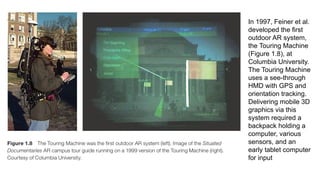
the special effects in movies such as Jurassic Park and Avatar. While the computer
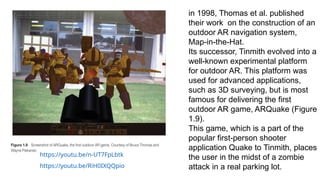
graphics techniques used in movies may be applicable to AR as well.
• The most widely accepted definition of AR was proposed by Azuma in his 1997 survey
paper. According to Azuma [1997], AR must have the following three characteristics:
• Combines real and virtual
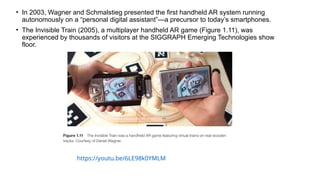
• Interactive in real time
• Registered in 3D
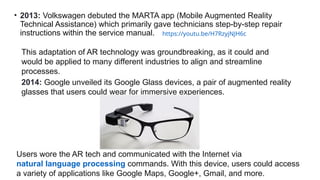
5.
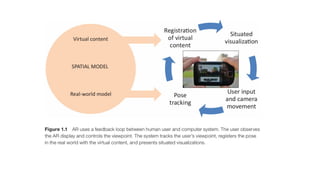
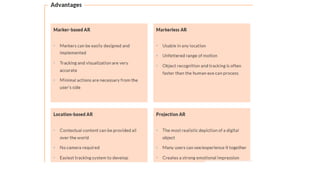
• A completeAR system requires at least 3 components:
1)a tracking component,
2)a registration component -Virtual objects must be spatially registered or
anchored in the real world.
3)a visualization component-Based on current location and viewpoint, the
visualization of virtual objects has to be adjusted.
4)a spatial model (i.e., a database)—stores information about both the real
world and the virtual world.
The real-world model is required to serve as a reference for the tracking
component, which must determine the user’s location in the real world.
Tracking Via sensors and camera, the system tracks the user's viewpoint.
The virtual-world model consists of the content used for the augmentation.
Both parts of the spatial model must be registered in the same coordinate
system.
6.
• While opinionson what qualifies as real-time performance may vary depending
on the individual and on the task or application, interactivity implies that the
human–computer interface operates in a tightly coupled feedback loop.
• The user continuously navigates the AR scene and controls the AR experience.
• The system, in turn, picks up the user’s input by tracking the user’s viewpoint or
pose. It registers the pose in the real world with the virtual content, and then
presents to the user a situated visualization (a visualization that is registered to
objects in the real world)
8.
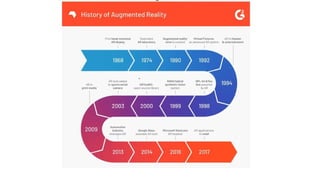
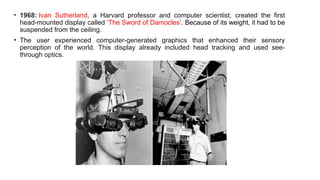
• 1968: IvanSutherland, a Harvard professor and computer scientist, created the first
head-mounted display called ‘The Sword of Damocles’. Because of its weight, it had to be
suspended from the ceiling.
• The user experienced computer-generated graphics that enhanced their sensory
perception of the world. This display already included head tracking and used see-
through optics.
9.
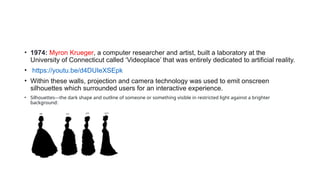
• 1974: MyronKrueger, a computer researcher and artist, built a laboratory at the
University of Connecticut called ‘Videoplace’ that was entirely dedicated to artificial reality.
• https://youtu.be/d4DUIeXSEpk
• Within these walls, projection and camera technology was used to emit onscreen
silhouettes which surrounded users for an interactive experience.
• Silhouettes---the dark shape and outline of someone or something visible in restricted light against a brighter
background:
10.
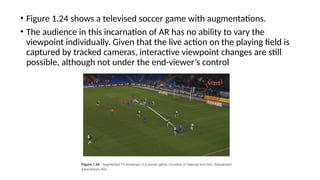
• Augmented realityin the 80s & 90s
• Now, let's learn how AR transitioned out of the lab and into various industries and business applications.
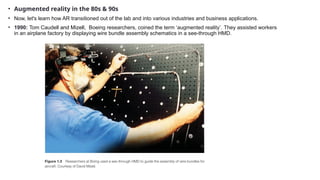
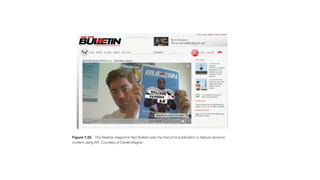
• 1990: Tom Caudell and Mizell, Boeing researchers, coined the term ‘augmented reality’. They assisted workers
in an airplane factory by displaying wire bundle assembly schematics in a see-through HMD.
11.
In 1993, Feineret al.
[1993a] introduced
KARMA, a system
that incorporated
knowledge-based
AR. This system was
capable of
automatically
inferring appropriate
instruction
sequences for repair
and maintenance
procedures.
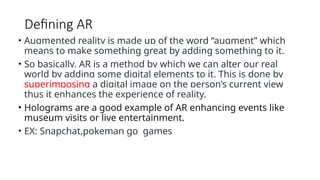
12.
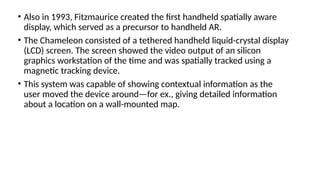
• Also in1993, Fitzmaurice created the first handheld spatially aware
display, which served as a precursor to handheld AR.
• The Chameleon consisted of a tethered handheld liquid-crystal display
(LCD) screen. The screen showed the video output of an silicon
graphics workstation of the time and was spatially tracked using a
magnetic tracking device.
• This system was capable of showing contextual information as the
user moved the device around—for ex., giving detailed information
about a location on a wall-mounted map.
13.
The Boom Chameleonis a ‘spatially-aware’ device, where the display acts
as a window onto a virtual world and moving the display in space changes
the viewpoint into this virtual world. This idea can also be thought of as a
‘video camera’ metaphor.
Figure 2: Navigating with the Boom Chameleon. When a user moves to the
front of the space the front of the virtual car is viewable, moving to the side
shows the corresponding side of the car, and moving closer to the center
zooms to a close-up of the car.
14.
• In 1994,State et al. at the University of North Carolina at Chapel Hill
presented a compelling medical AR application, capable of letting a
physician observe a fetus directly within a pregnant patient.
• Even though the accurate registration of computer graphics on top of
human body remains a challenge today, this seminal work hints at the
power of AR for medicine and other delicate tasks.
15.
• In 1995,Rekimoto and Nagao created the first true—albeit tethered—
handheld AR display.
• Their NaviCam was connected to a workstation, but was outfitted with a
forward-facing camera. From the video feed, it could detect color-coded
markers in the camera image and display information on a video see-
through view.
• https://youtu.be/S6XKPEexRbU
• Steve Mann [1997] explored wearable computing and mediated reality.
(Eye tap digital glass)
(https://link.springer.com/article/10.1007/BF01317885)
• His work ultimately helped establish the academic field of wearable
computing, which, in those early days, had a lot of synergy with AR
[Starner et al. 1997].
• https://youtu.be/vI9obFrfZ4Q
• https://youtu.be/Z9qiWqRPrcw
16.
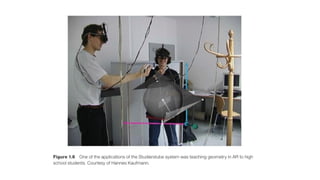
• In 1996,Schmalstieg et al. developed Studierstube, the first collaborative
AR system. With this system, multiple users could experience virtual
objects in the same shared space.
• Each user had a tracked HMD and could see perspectively correct
stereoscopic images from an individual viewpoint.
• Unlike in multi-user VR, natural communication cues, such as voice, body
posture, and gestures, were not affected in Studierstube, because the
virtual content was added to a conventional collaborative situation in a
minimally obtrusive way.
• One of the showcase applications was a geometry course [Kaufmann and
Schmalstieg 2003], which was successfully tested with actual high school
students (Figure 1.6).
18.
In 1997, Feineret al.
developed the first
outdoor AR system,
the Touring Machine
(Figure 1.8), at
Columbia University.
The Touring Machine
uses a see-through
HMD with GPS and
orientation tracking.
Delivering mobile 3D
graphics via this
system required a
backpack holding a
computer, various
sensors, and an
early tablet computer
for input
19.
in 1998, Thomaset al. published
their work on the construction of an
outdoor AR navigation system,
Map-in-the-Hat.
Its successor, Tinmith evolved into a
well-known experimental platform
for outdoor AR. This platform was
used for advanced applications,
such as 3D surveying, but is most
famous for delivering the first
outdoor AR game, ARQuake (Figure
1.9).
This game, which is a part of the
popular first-person shooter
application Quake to Tinmith, places
the user in the midst of a zombie
attack in a real parking lot.
https://youtu.be/n-UT7FpLbtk
https://youtu.be/RiH0IXQQpio
20.
• Raskar etal. [1998] at the University of North Carolina at Chapel Hill
presented the Office of the Future, a telepresence system built
around the idea of structured light- scanning and projector-camera
systems.
• Although the required hardware was not truly practical for everyday
use at the time, related technologies, such as depth sensors and
camera projection coupling, play a prominent role in AR and other
fields today.
21.
• Until 1999,no AR software was available outside specialized research labs.
• This situation changed when Kato and Billinghurst [1999] released ARToolKit, the first
open-source software library platform for AR.
• It featured a 3D tracking library using black-and-white fiducials, which could easily be
manufactured on a laser printer (Figure 1.10).
• The clever software design, in combination with the increased availability of webcams,
made ARToolKit widely popular.
• This package helps other developers build AR software programs. The library uses
video tracking to overlay virtual graphics on top of the real world.
https://youtu.be/i8l6rdp_a2k
22.
• In thesame year, Germany’s Federal Ministry for Education and
Research initiated a €21 million program for industrial AR, called ARVIKA
(Augmented Reality for Development, Production, and Servicing).
• More than 20 research groups from industry and academia worked on
developing advanced AR systems for industrial application, in particular
in the German automotive industry.
• This program raised the worldwide awareness of AR in professional
communities.
• IBM researcher Spohrer [1999] published an essay on Worldboard, a
scalable networked infrastructure for hyperlinked spatially registered
information, which Spohrer had first proposed while he was working with
Apple’s Advanced Technology Group. This work can be seen as the first
concept for an AR browser.
https://youtu.be/UhW12bILH7U
https://service-science.info/archives/2060
23.
• In 2003,Wagner and Schmalstieg presented the first handheld AR system running
autonomously on a “personal digital assistant”—a precursor to today’s smartphones.
• The Invisible Train (2005), a multiplayer handheld AR game (Figure 1.11), was
experienced by thousands of visitors at the SIGGRAPH Emerging Technologies show
floor.
https://youtu.be/6LE98k0YMLM
24.
• The paralleltracking and mapping (PTAM) system of Klein and
Murray [2007], can track without preparation in unknown
environments.
• The KinectFusion system developed by Newcombe et al.
[2011a], which builds detailed 3D models from an inexpensive
depth sensor.
• Today, AR developers can choose among many software
platforms, but these model systems continue to represent
important directions for researchers.
https://youtu.be/Y9HMn6bd-v8
25.
• 2013: Volkswagendebuted the MARTA app (Mobile Augmented Reality
Technical Assistance) which primarily gave technicians step-by-step repair
instructions within the service manual. https://youtu.be/H7RzyjNJH6c
This adaptation of AR technology was groundbreaking, as it could and
would be applied to many different industries to align and streamline
processes.
2014: Google unveiled its Google Glass devices, a pair of augmented reality
glasses that users could wear for immersive experiences.
Users wore the AR tech and communicated with the Internet via
natural language processing commands. With this device, users could access
a variety of applications like Google Maps, Google+, Gmail, and more.
26.
• 2016: Microsoftstarts shipping its version of wearable AR technology called the
HoloLens, which is more advanced than the Google Glass, but came with a
hefty price tag. It’s definitely not an everyday type of accessory.
• The headset runs on Windows 10 and is essentially a wearable computer. It also
allows users to scan their surroundings and create their own AR experiences.
https://youtu.be/4p0BDw4VHNo
Pokemon Go brought augmented reality to the masses in 2016 and changed the
way average consumers thought about the emerging technology.
2017: IKEA released its augmented reality app called IKEA Place that changed
the retail industry forever.
The app allows customers to virtually preview their home decor options before
actually making a purchase.
https://youtu.be/UudV1VdFtuQ
27.
• The futureof augmented reality
• As we become increasingly dependent on our mobile devices,
the adoption of AR technology will begin to rise.
• AR software advances will be the way forward as the
overwhelming majority of consumers have a smartphone and
already take it everywhere with them, making it a convenient
medium to bring AR to nearly every consumer.
• The truth is, AR is already used by everyday consumers – they
just don’t know it.
• The Snapchat dog filter and others are powered by AR. The
biggest shift in AR will have to be how its delivered to change the
perception.
• Snapchat introduced AR filters, allowing users to overlay
animations and effects on their selfies. This feature popularized
face-tracking AR for casual use, particularly among younger
audiences.
28.
•2017: Apple’s ARKitand Google’s ARCore were launched, giving developers frameworks to
build AR applications for iOS and Android. These platforms made it easier to create AR
experiences, particularly on mobile devices, and led to a surge of AR apps across multiple
categories such as education, entertainment,
and retail.
•2018: Magic Leap One was released. Though its development started earlier, Magic Leap
promised a “mixed reality” experience. However, its commercial reception was underwhelming,
partially due to high costs and limited content.
•2019: Facebook (Meta) began ramping up AR efforts through its Spark AR platform, allowing
creators to design AR experiences for Facebook, Instagram, and Messenger. The company
showed increasing interest in AR, positioning itself for long-term investment in immersive tech.
29.
•2020: Niantic, creatorsof Pokémon Go, further expanded AR with its Real
World Platform, enabling real-world AR experiences to scale beyond mobile
games.
•2021: AR began being integrated into more wearables, especially smart
glasses. Companies like Snap (with Spectacles), and Google, continued
developing wearable AR solutions.
•Though consumer adoption remained slow due to the lack of a "killer app" and
privacy concerns, the technology was getting better in terms of field of view,
processing power, and usability.
30.
• 2022–2024: Convergenceof AR and the Metaverse
• 2022: Meta (Facebook) rebranded itself with a heavy focus on the metaverse,
which included AR as a core component. The metaverse vision called for users to
interact with both virtual and augmented realities seamlessly. Meta's efforts also
included work on Project Cambria, a high-end AR/VR headset to enhance
immersive interactions.
• 2023: AR continued to mature as a critical part of enterprise solutions. Sectors like
healthcare, automotive, and education started leveraging AR for training,
maintenance, and remote assistance.
• Augmented reality remote collaboration tools became more robust, enabling
virtual environments for real-world problem-solving. 5G networks significantly
boosted AR’s potential by reducing latency and improving real-time data processing
capabilities.
31.
•2024: Advances inAR glasses made them more lightweight, with better battery life and
expanded functionality.
•Companies like Apple and Meta were reportedly working on consumer-focused AR glasses
with sleek designs. Apple’s rumored AR Glasses aimed to bring AR to everyday users by
integrating with their existing ecosystems (iPhones, iPads, etc.).
AR-based shopping and retail experiences became more refined, allowing users to try on
products virtually, see real-time product information in physical stores, and more.The fashion
industry particularly leaned into AR for virtual runway shows and virtual try-ons.
32.
•Gaming remained amajor driver of AR adoption, with Niantic’s newer
AR games and mobile experiences continuing to draw large audiences.
•Convergence with AI and computer vision: AR integrated more deeply
with AI, improving object recognition, scene understanding, and more
intelligent overlays.
•By 2025, AR had become a versatile technology influencing everyday
life, with strong potential in the consumer, enterprise, and industrial
sectors. The development of user-friendly AR glasses and platforms
indicated that AR was shifting towards mass adoption, especially as
part of broader immersive experiences in the metaverse.
33.
Types of AR
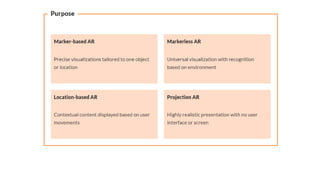
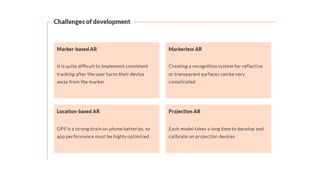
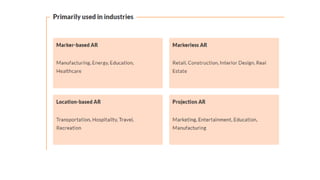
•Marker-based AR. This uses object recognition and target images, or markers, to
position objects within a real space via a smartphone or other device.
• The camera continuously scans the real environment, looking for appropriate ways
to place the mapped object into view.
• Tools like Instagram and TikTok filters use 2D markers to add visual stimuli into the
user’s real world.
• Markerless AR. In contrast, markerless AR places virtual objects into the
environment by looking at the details in the space in real time. This is more
complicated than marker-based, as the system needs an object database to consult.
• A recognition algorithm allows the software to look for patterns or similar features
in the real environment to overlay an image or sound on the user’s screen.
• Games like Pokémon GO are a good example of this type of AR, and businesses use
it for try-before-you-buy options for customers, like with makeup or glasses.
34.
•Location-based AR: Theuse of GPS plus sensor data (in
smartphones) enables apps that are location-centric such as finding
relevant shops nearby or showing directions. Information is overlaid
based on present location. This is also called Markerless AR.
https://devopedia.org/augmented-reality
35.
• The fiveprimary types of AR are
• marker-based,
• markerless AR,
projection-based,
superimposition-based, and
location-based.
36.
Marker-based AR
• Referredas image recognition AR—relies on a QR code or visual marker, also
known as a fiducial marker, to trigger the interactive experience.
• These markers could be images, QR codes, symbols that can be easily recognized
by the AR system.
• A shopper scans the marker with their device’s camera, activating the visual
effects. They can then move their mobile device around the static marker to see
the virtual image in 3D on their screen.
• The critical limitation of marker-based AR is that it can only be used with mobile
devices (e.g., smartphones or tablets). Users may also need to download a
dedicated app (like Google Play Services for AR for Android devices) to use this
type of AR.
• Arhaus’ room planner is an example of this type of AR in ecommerce. It lets users
create a 3D model of their own room, then see what the brand’s products look like
in a user’s space.
• https://digitalpromise.org/initiative/360-story-lab/360-production-guide/investigate/
augmented-reality/getting-started-with-ar/types-of-ar/
37.
2. Markerless AR
•Doesn’t rely on physical markers like a QR code or image. Instead, it
uses location-based data like GPS or accelerometers in mobile devices
to track the user’s environment and determine the location of the virtual
content. it positions the digital objects by examining the data obtained
through the sensors.
• This allows the AR software to understand the spatial relationships and
orientation of virtual objects and surfaces in the user’s view.
• With this type of AR, shoppers open the mobile app or webpage and
scan their physical environment with their device to make the digital
item appear on material surfaces, like the floor or a wall.
• Markerless AR can work on irregular surfaces, as long as there are
recognizable features like corners, textures, and objects to track.
• Markerless AR is usually more complex and costly to set up, but also
the most popular option in online shopping and gaming, thanks to its
ease of use and flexibility.
38.
3. Projection-based AR
•uses equipment to project images into a preprogrammed space.
• Relies on projectors to display 3D imagery or digital content onto a flat 2D
surface, like a wall, floor, or object. It doesn’t create fully immersive
environments—mainly holograms for events and movies.
• Used in store openings or pop-up shows, where you might want to show
holograms.
• Users experiencing the AR are free to walk around and explore the space,
but the projected images remain in the designated area. Users can
experience images, animations, text, or video in the confines of the
projection-based AR.
• For example, IKEA’s app (IKEA Place) allows you to project IKEA furniture
into your room so you can see how the products will fit in your space.
39.
• Projection-based ARinvolves projecting digital content onto physical
surfaces or objects in the real world. This creates an augmented
experience for the user without using a headset or any other device. It
uses projectors to display virtual images, animations, prototypes, or
information directly in the physical space. Some project-based AR also
includes sensors, allowing users to interact with the projection.
• Example
• Some entertainment venues use projection-based AR on floors. They
place the projector on the ceiling, casting visuals on the floor, and when a
person steps on it, their movements are tracked through sensors and
responds accordingly.
40.
4. Superimposition-based AR
•With this, an existing physical item is fully or partially replaced with a digital
augmentation.
• The system identifies specific objects or features in the user’s view—perhaps a
book cover, a product label, or a landmark—and then overlays relevant digital
content onto the object or feature.
• In physical stores, superimposition AR can give customers directions and
guidance. By overlaying virtual arrows onto the environment, Ex, shoppers can
find their way to the products they’re looking for.
• This AR can also provide customers with product details. By pointing their
smartphone camera at a product, shoppers can see virtual overlays with details
like price, features, and reviews.
• Replaces element of the visual field with something else or overlays an
enhanced image onto the object.
• For ex, image filters on social media that replace your face or background with
an enhanced image run on superimposition-based AR.
41.
5. Location-based AR
•This is a type of markerless AR that relies on geographic data to deliver
digital images at specific locations.
• It’s a popular type of AR for gaming. Pokémon Go, for example, relies on
a user’s location for the AR to work. AR uses the real-time location and
sensors of a smart device to place the virtual object in a physical space.
• {It is a smartphone game in which the AR links the virtual image of a
Pokemon to a specific location by analyzing the user's data from the
camera, GPS, and accelerometer.}
• Brands that want to gamify the shopping experience could use geographic
location-based AR to encourage shoppers to interact with their products.
• For instance, you could create a virtual scavenger hunt encouraging
shoppers to explore your store and collect rewards.
• Ex: To view the night sky provides an overlay of information, such as
labeling the stars and planets in your camera’s line of sight
46.
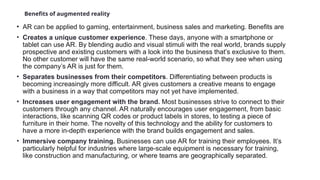
Benefits of augmentedreality
• AR can be applied to gaming, entertainment, business sales and marketing. Benefits are
• Creates a unique customer experience. These days, anyone with a smartphone or
tablet can use AR. By blending audio and visual stimuli with the real world, brands supply
prospective and existing customers with a look into the business that’s exclusive to them.
No other customer will have the same real-world scenario, so what they see when using
the company’s AR is just for them.
• Separates businesses from their competitors. Differentiating between products is
becoming increasingly more difficult. AR gives customers a creative means to engage
with a business in a way that competitors may not yet have implemented.
• Increases user engagement with the brand. Most businesses strive to connect to their
customers through any channel. AR naturally encourages user engagement, from basic
interactions, like scanning QR codes or product labels in stores, to testing a piece of
furniture in their home. The novelty of this technology and the ability for customers to
have a more in-depth experience with the brand builds engagement and sales.
• Immersive company training. Businesses can use AR for training their employees. It’s
particularly helpful for industries where large-scale equipment is necessary for training,
like construction and manufacturing, or where teams are geographically separated.
47.
• Increased engagement:AR experiences provide more immersive and interactive
experiences for users. When users are able to interact with digital content in a real-
world environment, it creates a more engaging experience than just viewing on a
screen.Ex: interactive game, virtual try-on, or even live AR concerts
• Competitive differentiation: AR provide unique experiences that will gain customers’
trust, and make your brand more memorable.
• Enhanced learning: makes learning more interactive and visual, more memorable and
engaging for most users. AR can allow teachers to show virtual examples of concepts,
or perhaps create gamified experiences to support traditional learning methods to make
education more memorable and interactive. Even in training programs.
• Reduced return rates: Online retailers are facing a significant challenge as high return
rates persist in the era of online shopping. AR empowers customers to make informed
decisions before making a purchase, thus reducing the likelihood of returns
• Incredibly accessible: AR on smartphones comes in two forms: app-based and web-
based. These forms of AR have significantly improved the accessibility of AR to broader
audiences and offer various advantages.
• Much higher conversions and Data, everywhere
48.
Benefits of ARin
•education
•health care
•Business and industry
•retail
•manufacturing
Tourism
49.
Advantages of AR
•Improved client experience and satisfaction with products
• Decrease of returns and a better brand image
• Product visualization
• Easy adoption of web AR technologies
50.
Disadvantages of AR
•Creation of digital content takes time
• Overdependence on AR can cause risky behaviour
• AR devices are costly, limited battery life
• Features of AR for mobile devices are limited
• Over-reliance on network connectivity
• S/w: AR apps prone to bugs and glitches
• Limited content available, incompatibility with existing systems
• Complexity in user interfaces
• information overload
51.
• Eye strain,discomfort,potential for accidents,
• increased isolation (Reduced face to face interactions,impact on child
development
• dependency and addiction,blurred distinction b/n real and virtual.
• Privacy and security risks.
• Learning impediments
52.
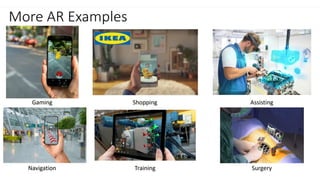
AR examples
Industry andConstruction
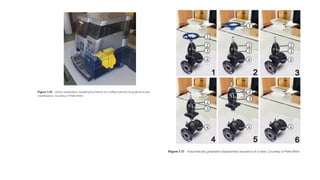
• Boeing’s wire bundle assembly needs and early maintenance and
repair examples.
53.
Maintenance and Training
•Understanding how things work, and learning how to assemble,
disassemble, or repair them, is an important challenge in many
professions.
• Maintenance engineers often devote a large amount of time to
studying manuals and documentation, since it is often impossible to
memorize all procedures in detail.
• AR, however, can present instructions directly superimposed in the
field of view of the worker. This can provide more effective training,
but, more importantly, allows personnel with less training to correctly
perform the work
55.
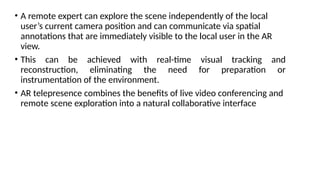
• A remoteexpert can explore the scene independently of the local
user’s current camera position and can communicate via spatial
annotations that are immediately visible to the local user in the AR
view.
• This can be achieved with real-time visual tracking and
reconstruction, eliminating the need for preparation or
instrumentation of the environment.
• AR telepresence combines the benefits of live video conferencing and
remote scene exploration into a natural collaborative interface
57.
Medical
• The useof X-ray imaging revolutionized diagnostics by allowing physicians to see
inside a patient without performing surgery.
• However, conventional X-ray and computed tomography devices separate the interior
view from the exterior view of the patient.
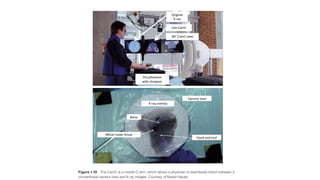
• AR integrates these views, enabling the physician to see directly inside the patient.
Ex: the Camera Augmented Mobile C-arm, or CamC (Figure 1.19).
• A mobile C-arm is used to provide X-ray views in the operating theater. CamC extends
these views with a conventional video camera, which is arranged coaxially with the X-
ray optics to deliver precisely registered image pairs [Navab et al. 2010].
• The physician can transition and blend between the inside and outside views as
desired. CamC has many clinical applications, including guiding needle biopsies and
facilitating orthopedic screw placement
59.
Personal Information Display
•A large variety of AR browser apps are already available on smartphones (e.g., Layar,
Wikitudes, Junaio, and others).
• These apps are intended to deliver information related to places of interest in the user’s
environment, superimposed over the live video from the device’s camera.
• The places of interest are either given in geo-coordinates and identified via the phone’s
sensors (GPS, compass readings) or identified by image recognition.
• AR browsers have obvious limitations, such as potentially poor GPS accuracy and
augmentation capabilities only for individual points rather than full objects. Nevertheless,
thanks to the proliferation of smartphones, these apps are universally available, and their
use is growing, owing to the social networking capabilities built into the AR browsers.
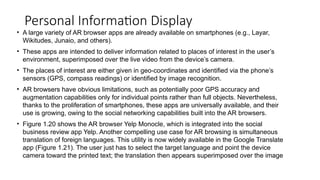
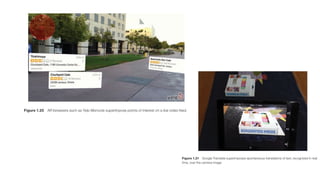
• Figure 1.20 shows the AR browser Yelp Monocle, which is integrated into the social
business review app Yelp. Another compelling use case for AR browsing is simultaneous
translation of foreign languages. This utility is now widely available in the Google Translate
app (Figure 1.21). The user just has to select the target language and point the device
camera toward the printed text; the translation then appears superimposed over the image
61.
Navigation
• The ideaof heads-up navigation, which does not distract the operator of a
vehicle moving at high speeds from the environment ahead, was first
considered in the context of military aircraft [Furness 1986].
• A variety of see-through displays, which can be mounted to the visor of a
pilot’s helmet, have been developed since the 1970s.
• These devices, which are usually called heads-up displays, are mostly
intended to show nonregistered information, such as the current speed or
torque, but can also be used to show a form of AR.
• Military technology, however, is usually not directly applicable to the
consumer market, which demands different ergonomics and pricing
structures.
• With improvedgeo-information, it has become possible to overlay larger
structures on in-car navigation systems, such as road networks.
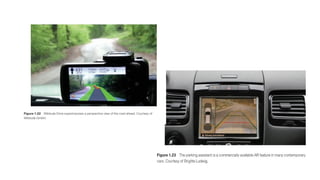
• Figure 1.22 shows Wikitude Drive, a first-person car navigation system.
• The driving instructions are overlaid on top of the live video feed rather than
being presented in a map-like view.
• The registration quality in this system is acceptable despite being based on
smartphone sensors such as GPS, as the inertia of a car allows the system to
predict the geography ahead with relative accuracy.
• Figure 1.23 shows a parking assistant, which overlays a graphical
visualization of the car trajectory onto the view of a rear-mounted camera.
64.
Television
• Many peoplelikely first encountered AR as annotations to live camera
footage brought to their homes via broadcast TV.
• The first and most prominent example of this concept is the virtual 1st &
10 line in American football, indicating the yardage needed for a first
down, which is superimposed directly on the TV screencast of a game.
While the idea and first patents for creating such on-field markers for
football broadcasts date back to the late 1970s, it took until 1998 for the
concept to be realized.
• The same concept of annotating TV footage with virtual overlays has
successfully been applied to many other sports, including baseball, ice
hockey, car racing, and sailing.
65.
• Figure 1.24shows a televised soccer game with augmentations.
• The audience in this incarnation of AR has no ability to vary the
viewpoint individually. Given that the live action on the playing field is
captured by tracked cameras, interactive viewpoint changes are still
possible, although not under the end-viewer’s control
66.
• Several competingcompanies provide augmentation solutions for various
broadcast events, creating convincing and informative live annotations.
• The annotation possibilities have long since moved beyond just sports
information or simple line graphics, and now include sophisticated 3D graphics
renderings of branding logos or product advertisements.
• Using similar technology, it is possible—and, in fact, common in today’s TV
broadcasts—to present a moderator and other TV personalities in virtual studio
settings.
• In this application, the moderator is filmed by tracked cameras in front of a
green screen and inserted into a virtual rendering of the studio.
• The system even allows for interactive manipulation of virtual props. Similar
technologies are being used in the film industry, such as for providing a movie
director and actors with live previews of what a film scene might look like after
special effects or other compositing has been applied to the camera footage of a
live set environment. This application of AR is sometimes referred to as Pre-Viz.
67.
Advertising and Commerce
•The ability of AR to instantaneously present arbitrary 3D views of a product to a
potential buyer is already being welcomed in advertising and commerce. This technology
can lead to truly interactive experiences for the customer.
• Ex: customers in Lego stores can hold a toy box up to an AR kiosk, which then displays a
3D image of the assembled Lego model. Customers can turn the box to view the model
from any vantage point.
• An obvious target for AR is the augmentation of printed material, such as flyers or
magazines. Readers of the Harry Potter novels know how pictures in the Daily Prophet
newspaper come alive.
• This idea can be realized with AR by superimposing digital movies and animations on top
of specific portions of a printed template. When the magazine is viewed on a computer
or smartphone, the static pictures are replaced by animated sequences or movies
(Figure 1.25).
69.
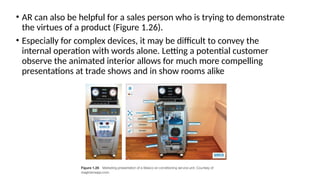
• AR canalso be helpful for a sales person who is trying to demonstrate
the virtues of a product (Figure 1.26).
• Especially for complex devices, it may be difficult to convey the
internal operation with words alone. Letting a potential customer
observe the animated interior allows for much more compelling
presentations at trade shows and in show rooms alike
70.
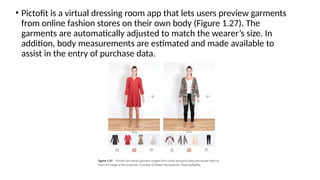
• Pictofit isa virtual dressing room app that lets users preview garments
from online fashion stores on their own body (Figure 1.27). The
garments are automatically adjusted to match the wearer’s size. In
addition, body measurements are estimated and made available to
assist in the entry of purchase data.
71.
Games
• One ofthe first commercial AR games was The Eye of Judgment, an interactive
trading card game for the Sony PlayStation 3.
• The game is delivered with an overhead camera, which picks up game cards
and summons corresponding creatures to fight matches.
• An important quality of traditional games is their tangible nature. Kids can turn
their entire room into a playground, with pieces of furniture being converted
into a landscape that supports physical activities such as jumping and hiding.
• In contrast, video games are usually confined to a purely virtual realm. AR can
bring digital games together with the real environment.
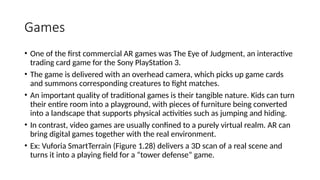
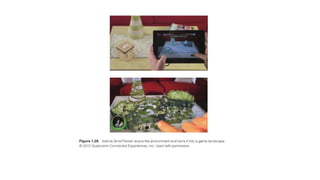
• Ex: Vuforia SmartTerrain (Figure 1.28) delivers a 3D scan of a real scene and
turns it into a playing field for a “tower defense” game.
73.
• Microsoft’s IllumiRoom[Jones et al. 2013] is a prototype of a projector-based AR game
experience.
• It combines a regular TV set with a home-theater projector to extend the game world
beyond the confines of the TV (Figure 1.29).
• The 3D game scene shown in the projection is registered with the one on the TV, but the
projection covers a much wider field of view.
• While the player concentrates on the center screen, the peripheral field of view is also
filled with dynamic images, leading to a greatly enhanced game experience
74.
• Example ofAR in Use
• One common example of AR is the mobile game Pokémon GO, where players
see Pokémon characters overlaid onto the real-world environment through
their smartphone screens. The game uses the device’s camera and GPS to
create this experience, making it seem as though the Pokémon are actually
present in the player's surroundings.
• Summary
• AR works by blending digital information with the physical world using a
combination of hardware (like cameras and sensors) and software (like
computer vision and rendering engines). This creates an interactive, enhanced
view of the world where digital objects coexist with the real environment.
78.
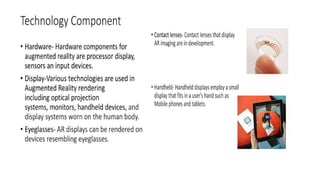
1. Input
• ARexperiences need some sort of input from the real world—typically
provided by mobile devices’ cameras. However, more sophisticated inputs
can enhance the experience as well. Light sensors, depth sensors,
microphones, and GPS can bolster a camera’s visual inputs. Essentially,
the input component is any technology that allows you to collect real-time
data from your environment.
2. Software
• The most complex and invisible part of AR is the work the computer does
with the input it gets. AR software processes the real-time data, uses
object recognition, and processes information on the depth, shape, and
texture of the environment. Then it uses its processing power to accurately
overlay virtual objects into the environment. Many AR apps leverage AI to
efficiently ingest and process the data they get from the various inputs.
79.
3. Output
• Oncethe software has processed the input data and figured out
where to overlay digital elements, it must then display the final
image to the user. This is where output devices come in.
• An output device can be a head-mounted display that places
visual elements in your field of vision. More common output
devices include smartphones, tablets, and projectors that display
digital objects in physical space.
• For example, video game Pokémon Go uses a player’s
smartphone camera for input, then the app processes the visual
data using the mobile app as software. Finally, the mobile phone
screen serves as the output, so the player can see a digital image
overlaid into their environment when looking at their phone
screen.
80.
• AR isa technology that superimposes digital content—such as images, sounds, or other data—onto the real
world, enhancing the user's perception of their environment. AR works by integrating the physical and digital
worlds through various hardware and software components. Here's how it generally works:
1. Hardware Components
• Display Device: AR content is typically viewed through devices like smartphones, tablets, smart glasses, or
headsets. These devices have screens that can overlay digital content onto the real-world view.
• Camera and Sensors: The creation of any AR elements requires precise capturing of real-world objects to
augment them realistically on your display. For these purposes, a variety of sensors has been adopted in the AR
software. The device's camera captures real-world images and videos. Sensors such as GPS, accelerometers,
gyroscopes, and depth sensors help in tracking the device's orientation, movement, and location.
• Processor: The device’s processor handles the computation required to render and display AR content in real-
time. It processes the input from the camera and sensors to accurately overlay the digital elements.
2. Software Components
• Computer Vision: AR systems use computer vision algorithms to recognize and interpret real-world objects and
environments captured by the camera. This process often involves detecting features like edges, surfaces, and
planes, enabling the digital content to be accurately placed in the physical world.
• Tracking and Mapping: To ensure that the digital content stays in place as you move, AR systems use tracking
and mapping technologies. SLAM (Simultaneous Localization and Mapping) is commonly used for this purpose,
allowing the system to create a 3D map of the environment and track the device's position within it.
• Rendering Engine: The rendering engine generates the digital content and overlays it onto the live camera
feed. This content can be anything from simple text to complex 3D models.
81.
3. Application Layer
•AR Applications: These are the software programs that users interact with.
They define what kind of AR experience is delivered—whether it's a game,
an educational tool, or a shopping assistant. The application processes user
input, manages the AR content, and ensures the experience is engaging and
functional.
4. User Interaction
• Interaction Methods: Users can interact with AR content in various ways,
such as tapping on a screen, using voice commands, or through hand
gestures. Advanced AR systems might even allow interaction through eye
tracking or other biometric inputs.
82.
How AR works?
•AR starts with a camera-equipped device—such as a smartphone,
a tablet, or smart glasses—loaded with AR software. When a user
points the device and looks at an object, the software recognizes it
through computer vision technology, which analyzes the video
stream.
• The device then downloads information about the object from the
cloud, in much the same way that a web browser loads a page via a
URL.
• A fundamental difference is that the AR information is presented in a
3-D “experience” superimposed on the object rather than in a 2-D
page on a screen. What the user sees, then, is part real and part
digital.
83.
• AR canprovide a view of the real-time data flowing from
products and allow users to control them by touchscreen,
voice, or gesture.
• As the user moves, the size and orientation of the AR display
automatically adjust to the shifting context. New graphical
or text information comes into view while other information
passes out of view.


![• AR aims to present information that is directly registered to the physical environment.
• AR goes beyond mobile computing in that it bridges the gap between virtual world and
real world, both spatially and cognitively.
• With AR, the digital information appears to become part of the real world, at least in
the user’s perception.
• This can lead to misconceptions about what AR really is.
• For ex, many people associate the visual combination of virtual and real elements with
the special effects in movies such as Jurassic Park and Avatar. While the computer
graphics techniques used in movies may be applicable to AR as well.
• The most widely accepted definition of AR was proposed by Azuma in his 1997 survey
paper. According to Azuma [1997], AR must have the following three characteristics:
• Combines real and virtual
• Interactive in real time
• Registered in 3D](https://image.slidesharecdn.com/arunit1-250316022414-024c8773/85/AR_unit1-pptxit-is-very-important-related-3-320.jpg)
![In 1993, Feiner et al.
[1993a] introduced
KARMA, a system
that incorporated
knowledge-based
AR. This system was
capable of
automatically
inferring appropriate
instruction
sequences for repair
and maintenance
procedures.](https://image.slidesharecdn.com/arunit1-250316022414-024c8773/85/AR_unit1-pptxit-is-very-important-related-11-320.jpg)


![• In 1995, Rekimoto and Nagao created the first true—albeit tethered—
handheld AR display.
• Their NaviCam was connected to a workstation, but was outfitted with a
forward-facing camera. From the video feed, it could detect color-coded
markers in the camera image and display information on a video see-
through view.
• https://youtu.be/S6XKPEexRbU
• Steve Mann [1997] explored wearable computing and mediated reality.
(Eye tap digital glass)
(https://link.springer.com/article/10.1007/BF01317885)
• His work ultimately helped establish the academic field of wearable
computing, which, in those early days, had a lot of synergy with AR
[Starner et al. 1997].
• https://youtu.be/vI9obFrfZ4Q
• https://youtu.be/Z9qiWqRPrcw](https://image.slidesharecdn.com/arunit1-250316022414-024c8773/85/AR_unit1-pptxit-is-very-important-related-15-320.jpg)
![• In 1996, Schmalstieg et al. developed Studierstube, the first collaborative
AR system. With this system, multiple users could experience virtual
objects in the same shared space.
• Each user had a tracked HMD and could see perspectively correct
stereoscopic images from an individual viewpoint.
• Unlike in multi-user VR, natural communication cues, such as voice, body
posture, and gestures, were not affected in Studierstube, because the
virtual content was added to a conventional collaborative situation in a
minimally obtrusive way.
• One of the showcase applications was a geometry course [Kaufmann and
Schmalstieg 2003], which was successfully tested with actual high school
students (Figure 1.6).](https://image.slidesharecdn.com/arunit1-250316022414-024c8773/85/AR_unit1-pptxit-is-very-important-related-16-320.jpg)
![• Raskar et al. [1998] at the University of North Carolina at Chapel Hill
presented the Office of the Future, a telepresence system built
around the idea of structured light- scanning and projector-camera
systems.
• Although the required hardware was not truly practical for everyday
use at the time, related technologies, such as depth sensors and
camera projection coupling, play a prominent role in AR and other
fields today.](https://image.slidesharecdn.com/arunit1-250316022414-024c8773/85/AR_unit1-pptxit-is-very-important-related-20-320.jpg)
![• Until 1999, no AR software was available outside specialized research labs.
• This situation changed when Kato and Billinghurst [1999] released ARToolKit, the first
open-source software library platform for AR.
• It featured a 3D tracking library using black-and-white fiducials, which could easily be
manufactured on a laser printer (Figure 1.10).
• The clever software design, in combination with the increased availability of webcams,
made ARToolKit widely popular.
• This package helps other developers build AR software programs. The library uses
video tracking to overlay virtual graphics on top of the real world.
https://youtu.be/i8l6rdp_a2k](https://image.slidesharecdn.com/arunit1-250316022414-024c8773/85/AR_unit1-pptxit-is-very-important-related-21-320.jpg)
![• In the same year, Germany’s Federal Ministry for Education and
Research initiated a €21 million program for industrial AR, called ARVIKA
(Augmented Reality for Development, Production, and Servicing).
• More than 20 research groups from industry and academia worked on
developing advanced AR systems for industrial application, in particular
in the German automotive industry.
• This program raised the worldwide awareness of AR in professional
communities.
• IBM researcher Spohrer [1999] published an essay on Worldboard, a
scalable networked infrastructure for hyperlinked spatially registered
information, which Spohrer had first proposed while he was working with
Apple’s Advanced Technology Group. This work can be seen as the first
concept for an AR browser.
https://youtu.be/UhW12bILH7U
https://service-science.info/archives/2060](https://image.slidesharecdn.com/arunit1-250316022414-024c8773/85/AR_unit1-pptxit-is-very-important-related-22-320.jpg)
![• The parallel tracking and mapping (PTAM) system of Klein and
Murray [2007], can track without preparation in unknown
environments.
• The KinectFusion system developed by Newcombe et al.
[2011a], which builds detailed 3D models from an inexpensive
depth sensor.
• Today, AR developers can choose among many software
platforms, but these model systems continue to represent
important directions for researchers.
https://youtu.be/Y9HMn6bd-v8](https://image.slidesharecdn.com/arunit1-250316022414-024c8773/85/AR_unit1-pptxit-is-very-important-related-24-320.jpg)





![Medical
• The use of X-ray imaging revolutionized diagnostics by allowing physicians to see
inside a patient without performing surgery.
• However, conventional X-ray and computed tomography devices separate the interior
view from the exterior view of the patient.
• AR integrates these views, enabling the physician to see directly inside the patient.
Ex: the Camera Augmented Mobile C-arm, or CamC (Figure 1.19).
• A mobile C-arm is used to provide X-ray views in the operating theater. CamC extends
these views with a conventional video camera, which is arranged coaxially with the X-
ray optics to deliver precisely registered image pairs [Navab et al. 2010].
• The physician can transition and blend between the inside and outside views as
desired. CamC has many clinical applications, including guiding needle biopsies and
facilitating orthopedic screw placement](https://image.slidesharecdn.com/arunit1-250316022414-024c8773/85/AR_unit1-pptxit-is-very-important-related-57-320.jpg)
![Navigation
• The idea of heads-up navigation, which does not distract the operator of a
vehicle moving at high speeds from the environment ahead, was first
considered in the context of military aircraft [Furness 1986].
• A variety of see-through displays, which can be mounted to the visor of a
pilot’s helmet, have been developed since the 1970s.
• These devices, which are usually called heads-up displays, are mostly
intended to show nonregistered information, such as the current speed or
torque, but can also be used to show a form of AR.
• Military technology, however, is usually not directly applicable to the
consumer market, which demands different ergonomics and pricing
structures.](https://image.slidesharecdn.com/arunit1-250316022414-024c8773/85/AR_unit1-pptxit-is-very-important-related-61-320.jpg)
![• Microsoft’s IllumiRoom [Jones et al. 2013] is a prototype of a projector-based AR game
experience.
• It combines a regular TV set with a home-theater projector to extend the game world
beyond the confines of the TV (Figure 1.29).
• The 3D game scene shown in the projection is registered with the one on the TV, but the
projection covers a much wider field of view.
• While the player concentrates on the center screen, the peripheral field of view is also
filled with dynamic images, leading to a greatly enhanced game experience](https://image.slidesharecdn.com/arunit1-250316022414-024c8773/85/AR_unit1-pptxit-is-very-important-related-73-320.jpg)