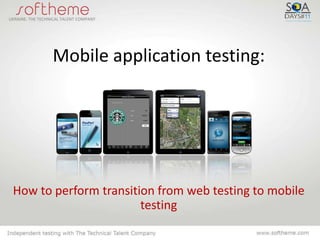
Mobile application testing:


How to perform transition from web testing to mobile
                       testing
Mobile applications popularity

• standalone applications
  for all platforms – about
  1 mln.

• mobile websites – even
  more

Mobile application testing has become a typical task in most of
                    IT outsourcing companies
Common features of web and mobile
              testing
• Browser compatibility checks
• Evaluation for different screen
  resolutions
• Similar instruments
  (emulators of browsers/
  devices)


 It is not hard for a web tester to switch to mobile devices
Setting testing objectives
• What are we testing – mobile
  website or mobile application
• For whom – user profile
  (geogrphy, technical
  skills, expectations etc.)
• Devices – which models and/or
  emulators will be used for testing
• How – defining approaches
  (Friends & Family
  testing, scenario-based etc.)
Testing mobile website

• Define suppported
  browsers
• Define test coverage
• Move on to testing


Web testers are familiar
with the process
Mobile application testing
• select platforms
  (iOS, Android, Blackberry, Win
  dows Mobile, Symbian, Bada)
• screen resolutions, supported
  by the application (for
  instance, it is critical for
  Galaxy Tab)
• hardware requirements
  (GPS, multitouch etc.)
Platforms and versions coverage

• Popularity of
  Symbian and iOS
  is steady
• Android is on
  the rise
• Blackberry loses
  market share
(worldwide stats)
Mobile platforms stats


Статистика по США, источник - http://gs.statcounter.com
Screen resolutions

• iOS = iPhone + iPad
  + iPod
• Andoid = screen +
  OS
• Blackberry = almost
  like Android
Screen resolution of iOS devices
iPhone      Original/3G/3GS: 320 × 480
            4/4S: 640 × 960


iPad        1024×768


iPod        1—3 generation: 320 × 480 px, 163 ppi
            4-е generation: 960 × 640 px, 326 ppi


            Source: http://developer.apple.com
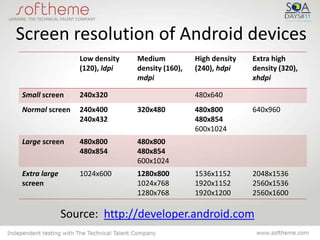
Screen resolution of Android devices
                 Low density   Medium           High density   Extra high
                 (120), ldpi   density (160),   (240), hdpi    density (320),
                               mdpi                            xhdpi

Small screen     240x320                        480x640
Normal screen    240x400       320x480          480x800        640x960
                 240x432                        480x854
                                                600x1024
Large screen     480x800       480x800
                 480x854       480x854
                               600x1024
Extra large      1024x600      1280x800         1536x1152      2048x1536
screen                         1024x768         1920x1152      2560x1536
                               1280x768         1920x1200      2560x1600

              Source: http://developer.android.com
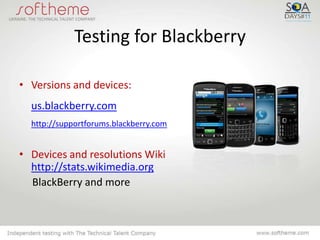
Testing for Blackberry

• Versions and devices:
  us.blackberry.com
  http://supportforums.blackberry.com


• Devices and resolutions Wiki
  http://stats.wikimedia.org
  BlackBerry and more
Coverage is defined. Now what?
• Buy many mobile
  devices?
• Download many
  emulators and
  simulatiors of mobile
  devices and browsers?
• Submit to multiple
  online services to gain
  access to all mobile
  devices?
Option 1: Purchasing devices
Pros:                     Cons:
• Real user               • Expensive
  environment             • Not always possible
• Tech specs are clear      to buy/order devices
• High speed of testing   • One device = One
                            QA Engineer
                          • Get out of date
                            quickly
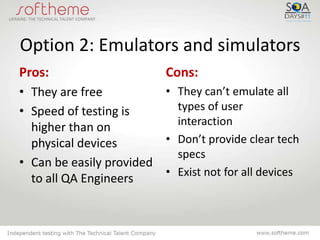
Option 2: Emulators and simulators
Pros:                      Cons:
• They are free          • They can’t emulate all
• Speed of testing is      types of user
  higher than on           interaction
  physical devices       • Don’t provide clear tech
                           specs
• Can be easily provided
                         • Exist not for all devices
  to all QA Engineers
Option 3: services that provide remote
            access to devices
Pros:                             Cons:
• Cover virtually all devices     • Don’t provide 100%
• Provide instant access            interaction
• Cost less than purchasing all   • Relatively slow
  the devices                     • Still costly – sometimes it’s
                                    cheaper to buy devices
Friends & Family testing
•   One person – one device
•   Variety of real-life interactions
•   Fast and easy
•   Real user experience
•   New unexpected bugs
•   Quick informal feedback

    Everyone has a mobile device
    nowadays, that is why for smoke testing it
    makes sense to gather a group
    friends, family and acquaintances
Let’s summarize
Mobile application testing is:
• Easy to perform – it can be
  described with a check-list, there is
  no complex fucntionality
• Easy to plan – coverage is defined
  by exploring current usage stats
• Inexpensive – we can use
  emulators, online services and use
  Friends&Family approach
• Challenging – variety of models and OS versions
Thanks!


About Softheme:
Softheme provides QA and testing services for desktop, web and mobile
applications since 2009.
More than 30 mobile applications successfully released.

Mobile application testing

  • 1.
    Mobile application testing: Howto perform transition from web testing to mobile testing
  • 2.
    Mobile applications popularity •standalone applications for all platforms – about 1 mln. • mobile websites – even more Mobile application testing has become a typical task in most of IT outsourcing companies
  • 3.
    Common features ofweb and mobile testing • Browser compatibility checks • Evaluation for different screen resolutions • Similar instruments (emulators of browsers/ devices) It is not hard for a web tester to switch to mobile devices
  • 4.
    Setting testing objectives •What are we testing – mobile website or mobile application • For whom – user profile (geogrphy, technical skills, expectations etc.) • Devices – which models and/or emulators will be used for testing • How – defining approaches (Friends & Family testing, scenario-based etc.)
  • 5.
    Testing mobile website •Define suppported browsers • Define test coverage • Move on to testing Web testers are familiar with the process
  • 6.
    Mobile application testing •select platforms (iOS, Android, Blackberry, Win dows Mobile, Symbian, Bada) • screen resolutions, supported by the application (for instance, it is critical for Galaxy Tab) • hardware requirements (GPS, multitouch etc.)
  • 7.
    Platforms and versionscoverage • Popularity of Symbian and iOS is steady • Android is on the rise • Blackberry loses market share (worldwide stats)
  • 8.
    Mobile platforms stats Статистикапо США, источник - http://gs.statcounter.com
  • 9.
    Screen resolutions • iOS= iPhone + iPad + iPod • Andoid = screen + OS • Blackberry = almost like Android
  • 10.
    Screen resolution ofiOS devices iPhone Original/3G/3GS: 320 × 480 4/4S: 640 × 960 iPad 1024×768 iPod 1—3 generation: 320 × 480 px, 163 ppi 4-е generation: 960 × 640 px, 326 ppi Source: http://developer.apple.com
  • 11.
    Screen resolution ofAndroid devices Low density Medium High density Extra high (120), ldpi density (160), (240), hdpi density (320), mdpi xhdpi Small screen 240x320 480x640 Normal screen 240x400 320x480 480x800 640x960 240x432 480x854 600x1024 Large screen 480x800 480x800 480x854 480x854 600x1024 Extra large 1024x600 1280x800 1536x1152 2048x1536 screen 1024x768 1920x1152 2560x1536 1280x768 1920x1200 2560x1600 Source: http://developer.android.com
  • 12.
    Testing for Blackberry •Versions and devices: us.blackberry.com http://supportforums.blackberry.com • Devices and resolutions Wiki http://stats.wikimedia.org BlackBerry and more
  • 13.
    Coverage is defined.Now what? • Buy many mobile devices? • Download many emulators and simulatiors of mobile devices and browsers? • Submit to multiple online services to gain access to all mobile devices?
  • 14.
    Option 1: Purchasingdevices Pros: Cons: • Real user • Expensive environment • Not always possible • Tech specs are clear to buy/order devices • High speed of testing • One device = One QA Engineer • Get out of date quickly
  • 15.
    Option 2: Emulatorsand simulators Pros: Cons: • They are free • They can’t emulate all • Speed of testing is types of user higher than on interaction physical devices • Don’t provide clear tech specs • Can be easily provided • Exist not for all devices to all QA Engineers
  • 16.
    Option 3: servicesthat provide remote access to devices Pros: Cons: • Cover virtually all devices • Don’t provide 100% • Provide instant access interaction • Cost less than purchasing all • Relatively slow the devices • Still costly – sometimes it’s cheaper to buy devices
  • 17.
    Friends & Familytesting • One person – one device • Variety of real-life interactions • Fast and easy • Real user experience • New unexpected bugs • Quick informal feedback Everyone has a mobile device nowadays, that is why for smoke testing it makes sense to gather a group friends, family and acquaintances
  • 18.
    Let’s summarize Mobile applicationtesting is: • Easy to perform – it can be described with a check-list, there is no complex fucntionality • Easy to plan – coverage is defined by exploring current usage stats • Inexpensive – we can use emulators, online services and use Friends&Family approach • Challenging – variety of models and OS versions
  • 19.
    Thanks! About Softheme: Softheme providesQA and testing services for desktop, web and mobile applications since 2009. More than 30 mobile applications successfully released.