Introduction - Mobile Testing 
Rakesh Kumar Jha 
Sr. Consultant – Mobility 
M.Tech, MBA
Contents 
• Introduction 
• Mobile Trends 
– Mobile Evolution 
– Top Ten Trends 
– Mobile Ecosystem 
– Smartphone Trends 
• Mobile Application Testing 
– Application Option 
– Approach to QA 
– Challenges 
– Implementation
Introduction 
• 10+ years of experience working in the IT 
industry providing solutions and 
outsourcing services focused in the areas 
of application development, quality 
assurance, mobile application 
development, and business intelligence. 
• 6+ years working with Mobility. serving in a 
variety of capacities including current 
position as SSE, Lead, Sr. Consultant.
Introduction 
• Experience working with clients to identify 
major challenges faced within their 
organization and implementing customized 
business solutions that are cost effective and 
centered around increasing productivity, 
company revenue, and streamlining 
processes. 
• Active member of PMI, HIMMS, Mobile Apps 
User Groups, and Hadoop User Group
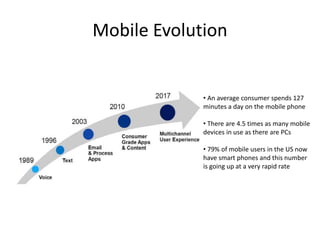
Mobile Evolution 
• An average consumer spends 127 
minutes a day on the mobile phone 
• There are 4.5 times as many mobile 
devices in use as there are PCs 
• 79% of mobile users in the US now 
have smart phones and this number 
is going up at a very rapid rate
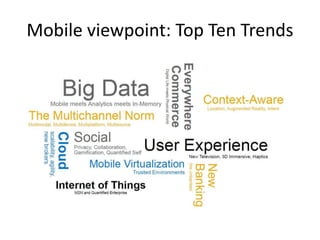
Mobile viewpoint: Top Ten Trends
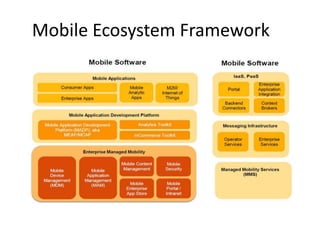
Mobile Ecosystem Framework
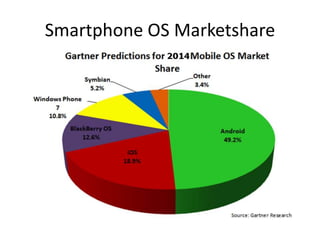
Smartphone OS Marketshare
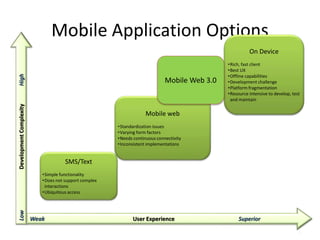
Mobile Application Options 
9 
Weak User Experience Superior 
Low Development Complexity High 
SMS/Text 
•Simple functionality 
•Does not support complex 
interactions 
•Ubiquitous access 
Mobile web 
•Standardization issues 
•Varying form factors 
•Needs continuous connectivity 
•Inconsistent implementations 
On Device 
•Rich, fast client 
•Best UX 
•Offline capabilities 
•Development challenge 
•Platform fragmentation 
•Resource intensive to develop, test 
and maintain 
Mobile Web 3.0
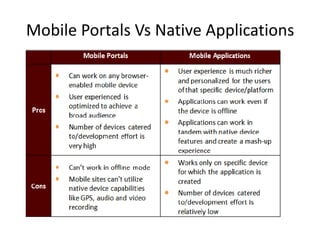
Mobile Portals Vs Native Applications
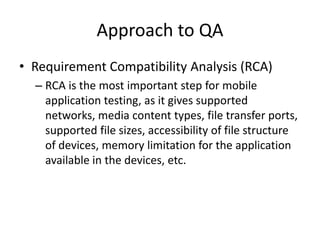
Approach to QA 
• Requirement Compatibility Analysis (RCA) 
– RCA is the most important step for mobile 
application testing, as it gives supported 
networks, media content types, file transfer ports, 
supported file sizes, accessibility of file structure 
of devices, memory limitation for the application 
available in the devices, etc.
Approach to QA – Challenges 
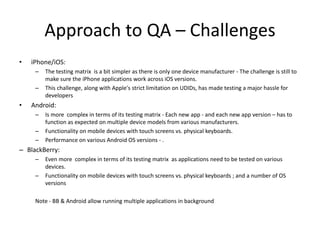
• iPhone/iOS: 
– The testing matrix is a bit simpler as there is only one device manufacturer - The challenge is still to 
make sure the iPhone applications work across iOS versions. 
– This challenge, along with Apple's strict limitation on UDIDs, has made testing a major hassle for 
developers 
• Android: 
– Is more complex in terms of its testing matrix - Each new app - and each new app version – has to 
function as expected on multiple device models from various manufacturers. 
– Functionality on mobile devices with touch screens vs. physical keyboards. 
– Performance on various Android OS versions - . 
– BlackBerry: 
– Even more complex in terms of its testing matrix as applications need to be tested on various 
devices. 
– Functionality on mobile devices with touch screens vs. physical keyboards ; and a number of OS 
versions 
Note - BB & Android allow running multiple applications in background
Approach to QA – Test Planning and 
Strategy 
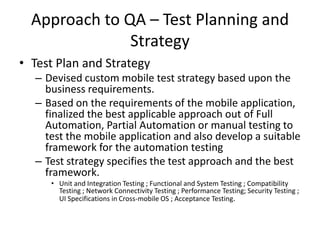
• Test Plan and Strategy 
– Devised custom mobile test strategy based upon the 
business requirements. 
– Based on the requirements of the mobile application, 
finalized the best applicable approach out of Full 
Automation, Partial Automation or manual testing to 
test the mobile application and also develop a suitable 
framework for the automation testing 
– Test strategy specifies the test approach and the best 
framework. 
• Unit and Integration Testing ; Functional and System Testing ; Compatibility 
Testing ; Network Connectivity Testing ; Performance Testing; Security Testing ; 
UI Specifications in Cross-mobile OS ; Acceptance Testing.
Mobile App Testing - Areas of Focus 
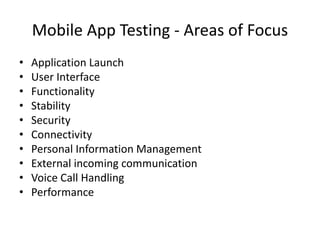
• Application Launch 
• User Interface 
• Functionality 
• Stability 
• Security 
• Connectivity 
• Personal Information Management 
• External incoming communication 
• Voice Call Handling 
• Performance
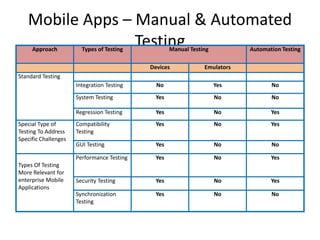
Mobile Apps – Manual & Automated 
Testing Approach Types of Testing Manual Testing Automation Testing 
Devices Emulators 
Standard Testing 
Integration Testing No Yes No 
System Testing Yes No No 
Regression Testing Yes No Yes 
Special Type of 
Testing To Address 
Specific Challenges 
Compatibility 
Testing 
Yes No Yes 
GUI Testing Yes No No 
Types Of Testing 
More Relevant for 
enterprise Mobile 
Applications 
Performance Testing Yes No Yes 
Security Testing Yes No Yes 
Synchronization 
Testing 
Yes No No
Mobile App Testing 
– Usability testing: Usability testing should happen as soon as the 
basic stable for the application is ready. This is also true in order to 
test whether the application UI is user-friendly or not, or whether 
some part/functionality of the application is easily discoverable or 
not. Also, usability studies should be done for the different types of 
devices, such as touch screen devices, since the user has different 
experience for the same application on these devices. 
– Some Key Criteria: 
• Device specific UI guidelines 
• Text entry 
• Finger sized targets 
• Well organized work flow 
• Consistency 
• Call handling 
• Response times
Mobile App Testing 
– Performance testing: Performance testing is key criteria 
for the application success on the market. It may happen 
that application testing is carried though wi-fi network 
under which application might perform well, but it also 
happens that application has the poor performance for 
the end-user who are accessing site through the mobile 
carries. Application must be tested with different devices 
+ carries wise mix depending on the county and region. 
– Some Key Criteria 
• Network 
• Battery 
• Volume 
• Rendering
Mobile App Testing 
• Compatibility testing: Compatibility testing assures that a 
given application works as intended with selected devices 
with different screen sizes, resolutions, and internal hardware 
(memory size, processor speed, and button/input 
differences).It defines the feasible compatibility combinations 
of devices and interfaces for a specific testing assignment, in 
concurrence with the customer’s requirement. 
• OS 
• Device 
• Screen resolution 
• Synchronization testing: This testing focuses on data 
exchange and synchronization among different mobile 
devices, PDAs, and PCs using infrared frequency and USB 
ports.
Mobile App Testing 
• Security testing - All the tests relevant to a thick 
client application can be applicable to mobile 
applications. 
– Authentication checks 
– Input Validation checks 
– Session Management checks 
– Encryption checks 
– Application checks 
– SQL injection checks 
– LDAP injection checks 
– XPATH injection checks
Testing Process 
• Ensure functionality of the site is stable – Test 
mobile applications on the desktop browser 
• Test on device emulator to get the 
browser/platform coverage 
• Test on the device itself to find the device 
specific bugs
Tools and Resources Used 
– Test Automation 
– Mobile Interactive Testing Environment (MITE) 
– SQUISH (http://www.froglogic.com/) 
– 3rd Party Testing Labs 
– Perfecto Mobile (http://www.perfectomobile.com/) 
– Device Anywhere (http://www.deviceanywhere.com/) 
• Crowd Testing 
• Challenges: 
– There is no one automation testing tool to cover all the mobile 
devices 
– GPS can't be tested on ALL the targeted devices in 3rd party test 
labs 
– 3rd party testing at test labs is very slow compared to physical 
testing
Conclusion 
• Scope Definition 
– Device/OS selection, keeping track of ever-changing trends 
– Requirements Compatibility Assessment 
• Investment to build expertise in specific areas of expertise in 
Mobile space 
– Areas of Focus/Critical to Quality Areas 
– Tools and Technologies and Resources 
• Comprehensive Test Strategy - judicious mix of manual and 
automated testing

Mobile testing practices

  • 1.
    Introduction - MobileTesting Rakesh Kumar Jha Sr. Consultant – Mobility M.Tech, MBA
  • 2.
    Contents • Introduction • Mobile Trends – Mobile Evolution – Top Ten Trends – Mobile Ecosystem – Smartphone Trends • Mobile Application Testing – Application Option – Approach to QA – Challenges – Implementation
  • 3.
    Introduction • 10+years of experience working in the IT industry providing solutions and outsourcing services focused in the areas of application development, quality assurance, mobile application development, and business intelligence. • 6+ years working with Mobility. serving in a variety of capacities including current position as SSE, Lead, Sr. Consultant.
  • 4.
    Introduction • Experienceworking with clients to identify major challenges faced within their organization and implementing customized business solutions that are cost effective and centered around increasing productivity, company revenue, and streamlining processes. • Active member of PMI, HIMMS, Mobile Apps User Groups, and Hadoop User Group
  • 5.
    Mobile Evolution •An average consumer spends 127 minutes a day on the mobile phone • There are 4.5 times as many mobile devices in use as there are PCs • 79% of mobile users in the US now have smart phones and this number is going up at a very rapid rate
  • 6.
  • 7.
  • 8.
  • 9.
    Mobile Application Options 9 Weak User Experience Superior Low Development Complexity High SMS/Text •Simple functionality •Does not support complex interactions •Ubiquitous access Mobile web •Standardization issues •Varying form factors •Needs continuous connectivity •Inconsistent implementations On Device •Rich, fast client •Best UX •Offline capabilities •Development challenge •Platform fragmentation •Resource intensive to develop, test and maintain Mobile Web 3.0
  • 10.
    Mobile Portals VsNative Applications
  • 11.
    Approach to QA • Requirement Compatibility Analysis (RCA) – RCA is the most important step for mobile application testing, as it gives supported networks, media content types, file transfer ports, supported file sizes, accessibility of file structure of devices, memory limitation for the application available in the devices, etc.
  • 12.
    Approach to QA– Challenges • iPhone/iOS: – The testing matrix is a bit simpler as there is only one device manufacturer - The challenge is still to make sure the iPhone applications work across iOS versions. – This challenge, along with Apple's strict limitation on UDIDs, has made testing a major hassle for developers • Android: – Is more complex in terms of its testing matrix - Each new app - and each new app version – has to function as expected on multiple device models from various manufacturers. – Functionality on mobile devices with touch screens vs. physical keyboards. – Performance on various Android OS versions - . – BlackBerry: – Even more complex in terms of its testing matrix as applications need to be tested on various devices. – Functionality on mobile devices with touch screens vs. physical keyboards ; and a number of OS versions Note - BB & Android allow running multiple applications in background
  • 13.
    Approach to QA– Test Planning and Strategy • Test Plan and Strategy – Devised custom mobile test strategy based upon the business requirements. – Based on the requirements of the mobile application, finalized the best applicable approach out of Full Automation, Partial Automation or manual testing to test the mobile application and also develop a suitable framework for the automation testing – Test strategy specifies the test approach and the best framework. • Unit and Integration Testing ; Functional and System Testing ; Compatibility Testing ; Network Connectivity Testing ; Performance Testing; Security Testing ; UI Specifications in Cross-mobile OS ; Acceptance Testing.
  • 14.
    Mobile App Testing- Areas of Focus • Application Launch • User Interface • Functionality • Stability • Security • Connectivity • Personal Information Management • External incoming communication • Voice Call Handling • Performance
  • 15.
    Mobile Apps –Manual & Automated Testing Approach Types of Testing Manual Testing Automation Testing Devices Emulators Standard Testing Integration Testing No Yes No System Testing Yes No No Regression Testing Yes No Yes Special Type of Testing To Address Specific Challenges Compatibility Testing Yes No Yes GUI Testing Yes No No Types Of Testing More Relevant for enterprise Mobile Applications Performance Testing Yes No Yes Security Testing Yes No Yes Synchronization Testing Yes No No
  • 16.
    Mobile App Testing – Usability testing: Usability testing should happen as soon as the basic stable for the application is ready. This is also true in order to test whether the application UI is user-friendly or not, or whether some part/functionality of the application is easily discoverable or not. Also, usability studies should be done for the different types of devices, such as touch screen devices, since the user has different experience for the same application on these devices. – Some Key Criteria: • Device specific UI guidelines • Text entry • Finger sized targets • Well organized work flow • Consistency • Call handling • Response times
  • 17.
    Mobile App Testing – Performance testing: Performance testing is key criteria for the application success on the market. It may happen that application testing is carried though wi-fi network under which application might perform well, but it also happens that application has the poor performance for the end-user who are accessing site through the mobile carries. Application must be tested with different devices + carries wise mix depending on the county and region. – Some Key Criteria • Network • Battery • Volume • Rendering
  • 18.
    Mobile App Testing • Compatibility testing: Compatibility testing assures that a given application works as intended with selected devices with different screen sizes, resolutions, and internal hardware (memory size, processor speed, and button/input differences).It defines the feasible compatibility combinations of devices and interfaces for a specific testing assignment, in concurrence with the customer’s requirement. • OS • Device • Screen resolution • Synchronization testing: This testing focuses on data exchange and synchronization among different mobile devices, PDAs, and PCs using infrared frequency and USB ports.
  • 19.
    Mobile App Testing • Security testing - All the tests relevant to a thick client application can be applicable to mobile applications. – Authentication checks – Input Validation checks – Session Management checks – Encryption checks – Application checks – SQL injection checks – LDAP injection checks – XPATH injection checks
  • 20.
    Testing Process •Ensure functionality of the site is stable – Test mobile applications on the desktop browser • Test on device emulator to get the browser/platform coverage • Test on the device itself to find the device specific bugs
  • 21.
    Tools and ResourcesUsed – Test Automation – Mobile Interactive Testing Environment (MITE) – SQUISH (http://www.froglogic.com/) – 3rd Party Testing Labs – Perfecto Mobile (http://www.perfectomobile.com/) – Device Anywhere (http://www.deviceanywhere.com/) • Crowd Testing • Challenges: – There is no one automation testing tool to cover all the mobile devices – GPS can't be tested on ALL the targeted devices in 3rd party test labs – 3rd party testing at test labs is very slow compared to physical testing
  • 22.
    Conclusion • ScopeDefinition – Device/OS selection, keeping track of ever-changing trends – Requirements Compatibility Assessment • Investment to build expertise in specific areas of expertise in Mobile space – Areas of Focus/Critical to Quality Areas – Tools and Technologies and Resources • Comprehensive Test Strategy - judicious mix of manual and automated testing