Presented By: Rahul kumar
Mobile Testing with
Appium
Lack of etiquette and manners is a huge turn off.
KnolX Etiquettes
Punctuality
Respect Knolx session timings, you
are requested not to join sessions
after a 5 minutes threshold post
the session start time.
Feedback
Make sure to submit a constructive
feedback for all sessions as it is
very helpful for the presenter.
Silent Mode
Keep your mobile devices in silent
mode, feel free to move out of
session in case you need to attend
an urgent call.
Avoid Disturbance
Avoid unwanted chit chat during
the session.
Agenda
01 What is Mobile Testing
02 What is Appium
03 Appium Architecture
04 Elements of Appium
05 Demo
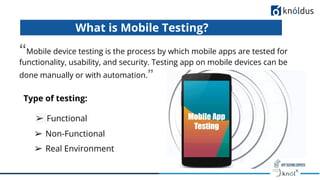
What is Mobile Testing?
“Mobile device testing is the process by which mobile apps are tested for
functionality, usability, and security. Testing app on mobile devices can be
done manually or with automation.”
➢ Functional
➢ Real Environment
➢ Non-Functional
Type of testing:
● Testing of mobile functionality will require more QA
resources.
How is Mobile App Testing different from
Web App Testing?
● Mobile applications are specifically designed and developed for
operating on mobile devices.
● web applications are software applications that reside on web
servers and are accessed through web browsers.
6
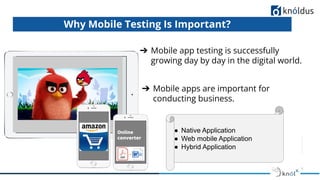
Why Mobile Testing Is Important?
➔ Mobile apps are important for
conducting business.
➔ Mobile app testing is successfully
growing day by day in the digital world.
Online
converter
● Native Application
● Web mobile Application
● Hybrid Application
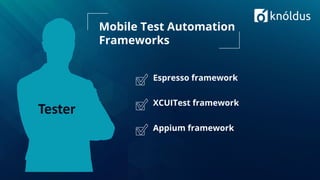
Espresso framework
XCUITest framework
Appium framework
Mobile Test Automation
Frameworks
Tester
What is Appium?
● Appium tool is an open-source, cross-platform automation testing tool.
● The Appium server is a script in Node.js and Appium tool is also
compatible with leading client libraries like Java, Python, Ruby, PHP, and a
few others.
● Mobile native and hybrid applications as well as web
mobile application.
● Appium was originally developed by Dan Cuellar in 2011
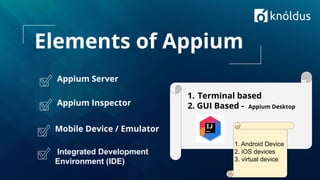
Elements of Appium
Appium Server
Appium Inspector
Mobile Device / Emulator
1. Terminal based
2. GUI Based - Appium Desktop
1. Android Device
2. iOS devices
3. virtual device
Integrated Development
Environment (IDE)
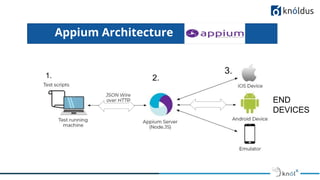
Appium Architecture
1. 2.
3.
END
DEVICES
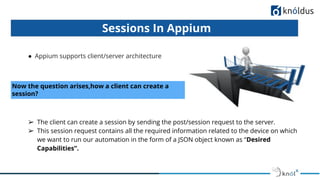
● Appium supports client/server architecture
Sessions In Appium
Now the question arises,how a client can create a
session?
➢ The client can create a session by sending the post/session request to the server.
➢ This session request contains all the required information related to the device on which
we want to run our automation in the form of a JSON object known as “Desired
Capabilities”.
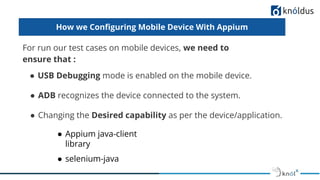
How we Configuring Mobile Device With Appium
For run our test cases on mobile devices, we need to
ensure that :
● USB Debugging mode is enabled on the mobile device.
● ADB recognizes the device connected to the system.
● Changing the Desired capability as per the device/application.
● Appium java-client
library
● selenium-java
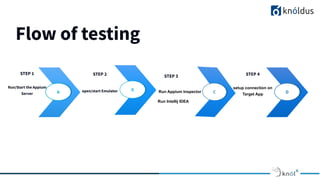
Flow of testing
STEP 1
Run/Start the Appium
Server
STEP 2
open/start Emulator
Run Intellij IDEA
STEP 4
setup connection on
Target App
A B C D
Run Appium Inspector
STEP 3
Demo
Thank You !

Mobile Testing with Appium

  • 1.
    Presented By: Rahulkumar Mobile Testing with Appium
  • 2.
    Lack of etiquetteand manners is a huge turn off. KnolX Etiquettes Punctuality Respect Knolx session timings, you are requested not to join sessions after a 5 minutes threshold post the session start time. Feedback Make sure to submit a constructive feedback for all sessions as it is very helpful for the presenter. Silent Mode Keep your mobile devices in silent mode, feel free to move out of session in case you need to attend an urgent call. Avoid Disturbance Avoid unwanted chit chat during the session.
  • 3.
    Agenda 01 What isMobile Testing 02 What is Appium 03 Appium Architecture 04 Elements of Appium 05 Demo
  • 4.
    What is MobileTesting? “Mobile device testing is the process by which mobile apps are tested for functionality, usability, and security. Testing app on mobile devices can be done manually or with automation.” ➢ Functional ➢ Real Environment ➢ Non-Functional Type of testing:
  • 5.
    ● Testing ofmobile functionality will require more QA resources. How is Mobile App Testing different from Web App Testing? ● Mobile applications are specifically designed and developed for operating on mobile devices. ● web applications are software applications that reside on web servers and are accessed through web browsers.
  • 6.
    6 Why Mobile TestingIs Important? ➔ Mobile apps are important for conducting business. ➔ Mobile app testing is successfully growing day by day in the digital world. Online converter ● Native Application ● Web mobile Application ● Hybrid Application
  • 7.
    Espresso framework XCUITest framework Appiumframework Mobile Test Automation Frameworks Tester
  • 8.
    What is Appium? ●Appium tool is an open-source, cross-platform automation testing tool. ● The Appium server is a script in Node.js and Appium tool is also compatible with leading client libraries like Java, Python, Ruby, PHP, and a few others. ● Mobile native and hybrid applications as well as web mobile application. ● Appium was originally developed by Dan Cuellar in 2011
  • 9.
    Elements of Appium AppiumServer Appium Inspector Mobile Device / Emulator 1. Terminal based 2. GUI Based - Appium Desktop 1. Android Device 2. iOS devices 3. virtual device Integrated Development Environment (IDE)
  • 10.
  • 11.
    ● Appium supportsclient/server architecture Sessions In Appium Now the question arises,how a client can create a session? ➢ The client can create a session by sending the post/session request to the server. ➢ This session request contains all the required information related to the device on which we want to run our automation in the form of a JSON object known as “Desired Capabilities”.
  • 12.
    How we ConfiguringMobile Device With Appium For run our test cases on mobile devices, we need to ensure that : ● USB Debugging mode is enabled on the mobile device. ● ADB recognizes the device connected to the system. ● Changing the Desired capability as per the device/application. ● Appium java-client library ● selenium-java
  • 13.
    Flow of testing STEP1 Run/Start the Appium Server STEP 2 open/start Emulator Run Intellij IDEA STEP 4 setup connection on Target App A B C D Run Appium Inspector STEP 3
  • 14.
  • 16.