Mobile Automation with Appium
Manoj Kumar
About Me
✓Open Source Enthusiast
(Selenium, ngWebdriver, Serenity, Protractor et..)
✓Author assertselenium.com & official documentation of Selenium
✓Organizer & Program Chair seleniumconf.com
✓Member of Project Leadership committee - Selenium
✓Accessibility enthusiast
✓I work at Applitools AI-POWERED VISUAL TESTING AND MONITORING
Today’s Session
✓Challenges of Mobile Automated testing
✓Getting started with Automated Mobile Testing -Appium
✓Advanced features and unique capabilities
✓Scaling your Appium tests
✓State of Mobile Automation testing tools
✓& More
TOO MANY
DEVICES
+
BROWSER
COMBINATIONS
TO TEST
TEST MATRIX IS
TOO BIG
TO COVER
MANUALLY
RELEASE
CYCLES
KEEP GETTING
SHORTER
CI-CD PROCESSES DEMAND
AUTOMATION
AND
ZERO
MANUAL BOTTLENECKS
Automate it!
Challenges - Mobile Automation
• Validate every OS version your app supports
• Validate every locale your app supports
• Validate different device manufacturers
• Validate performance of your mobile apps
• Simulator vs Real Device differences
Tools / Frameworks
Be Honest
Detox
WDA
Tool Stack
Appium
Appium Philosophy
• Test the Same app you submit to the marketplace
• Write automated tests in any language / framework
• An open-source mobile automation framework
• Come up With your own driver implementation
Appium
• Appium is a HTTP server that creates and handles WebDriver session
through Mobile JSON WP
Appium Architecture
• Similar to WebDriver Server
• A Client-Server architecture
• Server - Node Js
• Client - your Automated Scripts
• Receive request from Client > Executes commands on devices/emulators
> A HTTP response is responded
Appium Architecture
• When you download Appium Desktop or install via npm - you’re just
downloading or setting up the Server part of Appium
• When you write an automated Appium Script and execute it, a HTTP
request in JSON format is sent to Server
• Appium sends the commands to iOS and Android platform in a way that it
understands via bootstrap- which acts as a Unix/TCP server
Appium in a Nutshell
Appium Landscape
Source: Jonathan Lipps- CloudGrey
Appium Requirements
• Appium via npm server
• Driver Specific Setup
• XCUITest Driver - iOS
• Mac, Xcode > 7, XCUITest library
• UiAutomator2 Driver( EspressoDriver at it Beta Stage) - Android
• Java 7, Android SDK
• Windows Driver - Win Desktop Apps
• Mac Driver - Mac Desktop Apps
Appium Server
Appium Driver Service
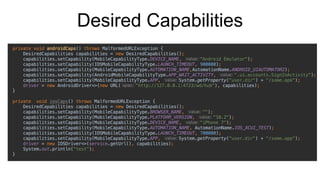
Desired Capabilities
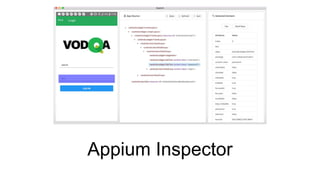
Appium Inspector
Advanced Appium Actions
Name Some please?
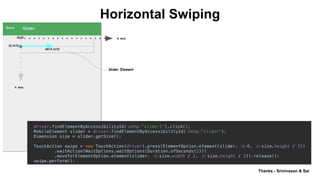
Horizontal Swiping
Thanks - Srinivasan & Sai
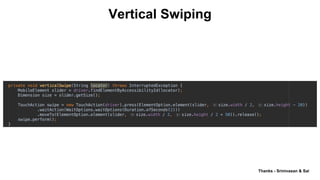
Vertical Swiping
Vertical Swiping
Thanks - Srinivasan & Sai
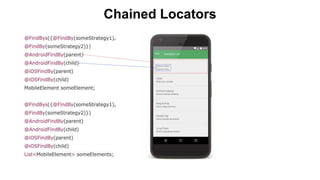
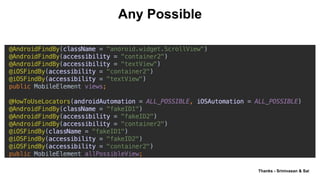
Chained Locators
Any Possible
Thanks - Srinivasan & Sai
Tips & Tricks
• No XPath
• Use Predicates in iOS
• Appium is slow
• Stability over speed
• No Docs
Performance Testing for Mobile apps
• Mobile apps are usually run in a very constrained environment
• Mobile apps have the potential to create bad user experience not only from
UI perspective but also by jamming CPU or memory and shown as a
“battery draining app”
• At least with Android
• dumpsys is a tool that runs on Android devices and provides information
about services and can be used wth Android Debug Bridge
• Allow you to check how your application affects the overall device through
CPU, RAM, Battery, storage stats
List<List<Object>> data =
driver.getPerformanceData("io.appium.android.apis", "memoryinfo",
10);
Performance Testing with Appium
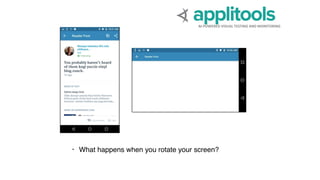
Visual Testing for mobile Apps
• Validate if your app looks same on different screen sizes, different
manufacturers
• How will your app layout or structure looks when used in different language
which has long strings like Deutsch
• Consider testing in Landscape mode
AI-POWERED VISUAL TESTING AND MONITORING
Accessibility Testing for Mobile Apps
• All activatable elements should be focusable
• The user flow on the screen should be from top to bottom and left to right.
The flow throughout the app should be intuitive.
Accessibility testing with Espresso
• Accessibility Test framework from Google - Plugged into any Java
framework
• Espresso:
import android.support.test.espresso.contrib.AccessibilityChecks;
@RunWith(AndroidJUnit4.class)
@LargeTest
public class AccessibilityChecksIntegrationTest {
@BeforeClass
public static void enableAccessibilityChecks() {
AccessibilityChecks.enable();
}
}
Scaling Mobile Automation
• Dockerize Appium Tests - Easy Parallel tests
• Docker based Setup
• https://github.com/butomo1989/docker-android
• https://github.com/appium/appium-docker-android
• No more worry about requirements
• Comes pre-built in a docker image
• Build an Image and execute it!
Scaling Mobile Automation
• Appium Test Distribution
• Appium Device Manager
• Remote Appium Manager
Video Demo
Mobile Automation landscape
Mobile Testing tools-Landscape
Questions
Thank you!

Mobile Automation with Appium

  • 1.
    Mobile Automation withAppium Manoj Kumar
  • 2.
    About Me ✓Open SourceEnthusiast (Selenium, ngWebdriver, Serenity, Protractor et..) ✓Author assertselenium.com & official documentation of Selenium ✓Organizer & Program Chair seleniumconf.com ✓Member of Project Leadership committee - Selenium ✓Accessibility enthusiast ✓I work at Applitools AI-POWERED VISUAL TESTING AND MONITORING
  • 3.
    Today’s Session ✓Challenges ofMobile Automated testing ✓Getting started with Automated Mobile Testing -Appium ✓Advanced features and unique capabilities ✓Scaling your Appium tests ✓State of Mobile Automation testing tools ✓& More
  • 4.
    TOO MANY DEVICES + BROWSER COMBINATIONS TO TEST TESTMATRIX IS TOO BIG TO COVER MANUALLY
  • 5.
    RELEASE CYCLES KEEP GETTING SHORTER CI-CD PROCESSESDEMAND AUTOMATION AND ZERO MANUAL BOTTLENECKS
  • 6.
  • 7.
    Challenges - MobileAutomation • Validate every OS version your app supports • Validate every locale your app supports • Validate different device manufacturers • Validate performance of your mobile apps • Simulator vs Real Device differences
  • 8.
  • 9.
  • 10.
  • 11.
  • 12.
    Appium Philosophy • Testthe Same app you submit to the marketplace • Write automated tests in any language / framework • An open-source mobile automation framework • Come up With your own driver implementation
  • 13.
    Appium • Appium isa HTTP server that creates and handles WebDriver session through Mobile JSON WP
  • 14.
    Appium Architecture • Similarto WebDriver Server • A Client-Server architecture • Server - Node Js • Client - your Automated Scripts • Receive request from Client > Executes commands on devices/emulators > A HTTP response is responded
  • 15.
    Appium Architecture • Whenyou download Appium Desktop or install via npm - you’re just downloading or setting up the Server part of Appium • When you write an automated Appium Script and execute it, a HTTP request in JSON format is sent to Server • Appium sends the commands to iOS and Android platform in a way that it understands via bootstrap- which acts as a Unix/TCP server
  • 16.
    Appium in aNutshell
  • 17.
  • 18.
  • 19.
    Appium Requirements • Appiumvia npm server • Driver Specific Setup • XCUITest Driver - iOS • Mac, Xcode > 7, XCUITest library • UiAutomator2 Driver( EspressoDriver at it Beta Stage) - Android • Java 7, Android SDK • Windows Driver - Win Desktop Apps • Mac Driver - Mac Desktop Apps
  • 20.
  • 21.
  • 22.
  • 23.
  • 24.
  • 25.
  • 26.
  • 27.
    Vertical Swiping Thanks -Srinivasan & Sai
  • 28.
  • 29.
    Any Possible Thanks -Srinivasan & Sai
  • 30.
    Tips & Tricks •No XPath • Use Predicates in iOS • Appium is slow • Stability over speed • No Docs
  • 31.
    Performance Testing forMobile apps • Mobile apps are usually run in a very constrained environment • Mobile apps have the potential to create bad user experience not only from UI perspective but also by jamming CPU or memory and shown as a “battery draining app”
  • 32.
    • At leastwith Android • dumpsys is a tool that runs on Android devices and provides information about services and can be used wth Android Debug Bridge • Allow you to check how your application affects the overall device through CPU, RAM, Battery, storage stats List<List<Object>> data = driver.getPerformanceData("io.appium.android.apis", "memoryinfo", 10); Performance Testing with Appium
  • 33.
    Visual Testing formobile Apps • Validate if your app looks same on different screen sizes, different manufacturers • How will your app layout or structure looks when used in different language which has long strings like Deutsch • Consider testing in Landscape mode
  • 34.
  • 35.
    Accessibility Testing forMobile Apps • All activatable elements should be focusable • The user flow on the screen should be from top to bottom and left to right. The flow throughout the app should be intuitive.
  • 36.
    Accessibility testing withEspresso • Accessibility Test framework from Google - Plugged into any Java framework • Espresso: import android.support.test.espresso.contrib.AccessibilityChecks; @RunWith(AndroidJUnit4.class) @LargeTest public class AccessibilityChecksIntegrationTest { @BeforeClass public static void enableAccessibilityChecks() { AccessibilityChecks.enable(); } }
  • 37.
  • 38.
    Scaling Mobile Automation •Dockerize Appium Tests - Easy Parallel tests • Docker based Setup • https://github.com/butomo1989/docker-android • https://github.com/appium/appium-docker-android • No more worry about requirements • Comes pre-built in a docker image • Build an Image and execute it!
  • 39.
    Scaling Mobile Automation •Appium Test Distribution • Appium Device Manager • Remote Appium Manager
  • 40.
  • 41.
  • 42.
  • 43.

Editor's Notes

  • #5 Unlike 5 or 10 years ago in todays world, when testing a web or mobile app - whether native or responsive, it’s important to be able to test on all devices and browsers. The problem is, there are simply too many device and browser combinations. Chrome, Firefox, IE, Safari, each one has multiple versions that customers may be using, on different devices (PC, MAC, Mobile Devices, Smart watches) Running on different operating systems (Windows, Linux, IOS, Android etc.) and in different screen resolutions according to the device. In some cases the application under test may also have responsive design to optimize the layout according to the viewable portion of the screen. In these cases we also need to check the app across the different layouts. While there are tools that let you test on a wide variety of devices, there is no automated testing tool that can see that the app looks and acts right on all devices. So someone still manually goes through each and every device, to ensure that everything is displaying properly. This causes major bottlenecks which adds cost to the dev process.
  • #6 On top of that we also know that release cycle are keep getting shorter and shorter. Many organisations already have CI in place and some already has full CD. It simply means that everything must be automated has we have zero time for manual bottle necks. So, we have more and more things that we need to cover and less and less time to do it.