Mobile App Virtualization
101
BYOD
has forced IT departments
to change the way that
they manage and secure
applications and devices.
Due to BYOD, IT must:
 Provision and maintain mobile apps
 Support phones and tablets from
different manufacturers
 Protect business data on mobile devices
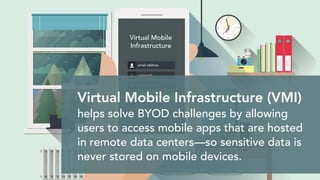
Virtual Mobile Infrastructure (VMI)
helps solve BYOD challenges by allowing
users to access mobile apps that are hosted
in remote data centers—so sensitive data is
never stored on mobile devices.
Virtual Mobile
Infrastructure
VMI empowers organizations to:
 Develops apps once and support any device
 Centralize mobile app management
 Detect unauthorized access or data loss
 Enforce strong authentication and encryption
Not all VMI solutions are equal.
Mobile App Virtualization
offers better session density than
other VMI solutions. It can run
multiple, isolated user instances on
a single Android operating system.
64-bit Android
Multi User Extensions
User 1
User 3
User 2
HW Offload Engines
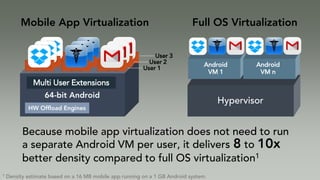
Because mobile app virtualization does not need to run
a separate Android VM per user, it delivers 8 to 10x
better density compared to full OS virtualization1
Android
VM 1
Android
VM n
Mobile App Virtualization Full OS Virtualization
Hypervisor
1 Density estimate based on a 16 MB mobile app running on a 1 GB Android system.
Mobile app virtualization
requires fewer servers, so
it lowers hardware and
operating costs.
The cost savings are even greater
in the cloud. Organizations can
rent one VM for hundreds of
users rather per user.
Mobile app virtualization:
 Accelerates app “boot up time”
 Reduces storage requirements
 Processes input events and images at
the app level to maximize performance
 64-bit Android VM needs more than 2GB of RAM
 More VMs will require
• Large data center with higher power and cooling costs
• Complex IT management
• Expensive external storage solution
• Additional VM management solution like OpenStack
 Most VMI solutions require professional services
• Not a drop in solution
• High initial setup cost and time
Cost and Scalability of Alternative Approaches
Android VM
App App
Display
Audio
Input
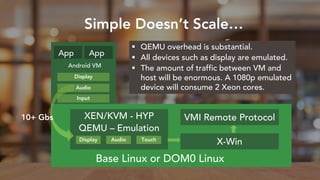
Simple Doesn’t Scale…
XEN/KVM - HYP
Base Linux or DOM0 Linux
QEMU – Emulation
X-Win
VMI Remote Protocol
 QEMU overhead is substantial.
 All devices such as display are emulated.
 The amount of traffic between VM and
host will be enormous. A 1080p emulated
device will consume 2 Xeon cores.
10+ Gbs
Display Audio Touch
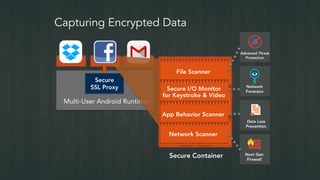
Capturing Encrypted Data
Multi-User Android Runtime
Secure Container
Secure
SSL Proxy
File Scanner
Secure I/O Monitor
for Keystroke & Video
App Behavior Scanner
Network Scanner
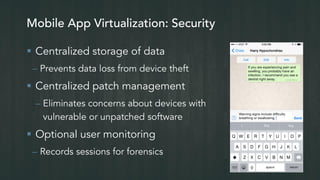
Mobile App Virtualization: Security
 Centralized storage of data
– Prevents data loss from device theft
 Centralized patch management
– Eliminates concerns about devices with
vulnerable or unpatched software
 Optional user monitoring
– Records sessions for forensics
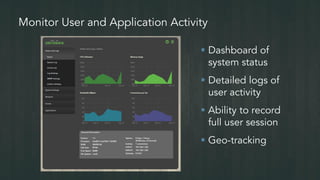
Monitor User and Application Activity
 Dashboard of
system status
 Detailed logs of
user activity
 Ability to record
full user session
 Geo-tracking
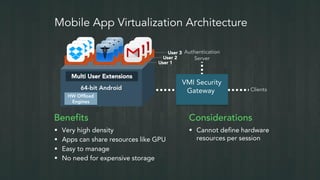
Mobile App Virtualization Architecture
VMI Security
Gateway Clients
Authentication
Server
Benefits
 Very high density
 Apps can share resources like GPU
 Easy to manage
 No need for expensive storage
Considerations
 Cannot define hardware
resources per session
64-bit Android
Multi User Extensions
User 1
User 3
User 2
HW Offload
Engines
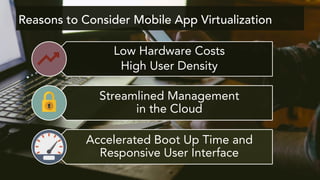
Reasons to Consider Mobile App Virtualization
Low Hardware Costs
High User Density
Streamlined Management
in the Cloud
Accelerated Boot Up Time and
Responsive User Interface
Try Mobile App Virtualization at www.sierraware.com/demo

Mobile App Virtualization 101

  • 1.
  • 2.
    BYOD has forced ITdepartments to change the way that they manage and secure applications and devices.
  • 3.
    Due to BYOD,IT must:  Provision and maintain mobile apps  Support phones and tablets from different manufacturers  Protect business data on mobile devices
  • 4.
    Virtual Mobile Infrastructure(VMI) helps solve BYOD challenges by allowing users to access mobile apps that are hosted in remote data centers—so sensitive data is never stored on mobile devices. Virtual Mobile Infrastructure
  • 5.
    VMI empowers organizationsto:  Develops apps once and support any device  Centralize mobile app management  Detect unauthorized access or data loss  Enforce strong authentication and encryption
  • 6.
    Not all VMIsolutions are equal. Mobile App Virtualization offers better session density than other VMI solutions. It can run multiple, isolated user instances on a single Android operating system.
  • 7.
    64-bit Android Multi UserExtensions User 1 User 3 User 2 HW Offload Engines Because mobile app virtualization does not need to run a separate Android VM per user, it delivers 8 to 10x better density compared to full OS virtualization1 Android VM 1 Android VM n Mobile App Virtualization Full OS Virtualization Hypervisor 1 Density estimate based on a 16 MB mobile app running on a 1 GB Android system.
  • 8.
    Mobile app virtualization requiresfewer servers, so it lowers hardware and operating costs.
  • 9.
    The cost savingsare even greater in the cloud. Organizations can rent one VM for hundreds of users rather per user.
  • 10.
    Mobile app virtualization: Accelerates app “boot up time”  Reduces storage requirements  Processes input events and images at the app level to maximize performance
  • 11.
     64-bit AndroidVM needs more than 2GB of RAM  More VMs will require • Large data center with higher power and cooling costs • Complex IT management • Expensive external storage solution • Additional VM management solution like OpenStack  Most VMI solutions require professional services • Not a drop in solution • High initial setup cost and time Cost and Scalability of Alternative Approaches
  • 12.
    Android VM App App Display Audio Input SimpleDoesn’t Scale… XEN/KVM - HYP Base Linux or DOM0 Linux QEMU – Emulation X-Win VMI Remote Protocol  QEMU overhead is substantial.  All devices such as display are emulated.  The amount of traffic between VM and host will be enormous. A 1080p emulated device will consume 2 Xeon cores. 10+ Gbs Display Audio Touch
  • 13.
    Capturing Encrypted Data Multi-UserAndroid Runtime Secure Container Secure SSL Proxy File Scanner Secure I/O Monitor for Keystroke & Video App Behavior Scanner Network Scanner
  • 14.
    Mobile App Virtualization:Security  Centralized storage of data – Prevents data loss from device theft  Centralized patch management – Eliminates concerns about devices with vulnerable or unpatched software  Optional user monitoring – Records sessions for forensics
  • 15.
    Monitor User andApplication Activity  Dashboard of system status  Detailed logs of user activity  Ability to record full user session  Geo-tracking
  • 16.
    Mobile App VirtualizationArchitecture VMI Security Gateway Clients Authentication Server Benefits  Very high density  Apps can share resources like GPU  Easy to manage  No need for expensive storage Considerations  Cannot define hardware resources per session 64-bit Android Multi User Extensions User 1 User 3 User 2 HW Offload Engines
  • 17.
    Reasons to ConsiderMobile App Virtualization Low Hardware Costs High User Density Streamlined Management in the Cloud Accelerated Boot Up Time and Responsive User Interface
  • 18.
    Try Mobile AppVirtualization at www.sierraware.com/demo