Contents
Ⅰ . What is Samsung Knox?
Ⅱ . Product Overview
Ⅲ . Product Offerings
Ⅳ . Appendix
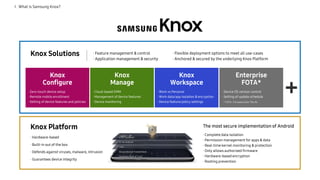
Knox Solutions · Feature management & control
· Application management & security
· Flexible deployment options to meet all use-cases
· Anchored & secured by the underlying Knox Platform
Knox
Configure
· Zero-touch device setup
· Remote mobile enrollment
· Setting of device features and policies
Enterprise
FOTA*
· Device OS version control
· Setting of update schedule
* FOTA : Firmware Over The Air
Knox Platform
· Hardware-based
· Built-in out of the box
· Defends against viruses, malware, intrusion
· Guarantees device integrity
· Complete data isolation
· Permission management for apps & data
· Real-time kernel monitoring & protection
· Only allows authorized firmware
· Hardware-based encryption
· Rooting prevention
The most secure implementation of Android
I . What is Samsung Knox?
Knox
Workspace
· Work vs Personal
· Work data/app isolation & encryption
· Device feature/policy settings
Knox
Manage
· Cloud-based EMM
· Management of device features
· Device monitoring
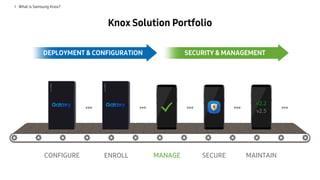
Knox Solution Portfolio
DEPLOYMENT & CONFIGURATION SECURITY & MANAGEMENT
I . What is Samsung Knox?
CONFIGURE ENROLL MANAGE SECURE MAINTAIN
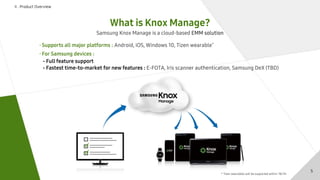
What is Knox Manage?
Ⅱ . Product Overview
Samsung Knox Manage is a cloud-based EMM solution
· Supports all major platforms : Android, iOS, Windows 10, Tizen wearable*
· For Samsung devices :
- Full feature support
- Fastest time-to-market for new features : E-FOTA, Iris scanner authentication, Samsung DeX (TBD)
5
* Tizen wearables will be supported within ‘18/1H.
Ⅱ . Product Overview
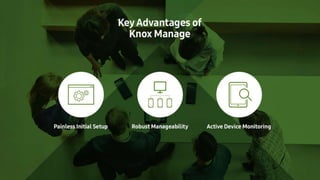
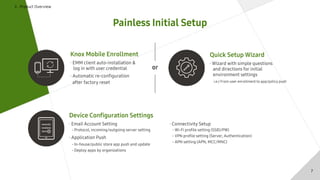
Painless Initial Setup
Knox Mobile Enrollment
· EMM client auto-installation &
log in with user credential
· Automatic re-configuration
after factory reset
Quick Setup Wizard
· Wizard with simple questions
and directions for initial
environment settings
i.e.) From user enrollment to app/policy push
Device Configuration Settings
· Email Account Setting
- Protocol, incoming/outgoing server setting
· Application Push
- In-house/public store app push and update
- Deploy apps by organizations
· Connectivity Setup
- Wi-Fi profile setting (SSID/PW)
- VPN profile setting (Server, Authentication)
- APN setting (APN, MCC/MNC)
or
7
Ⅱ . Product Overview
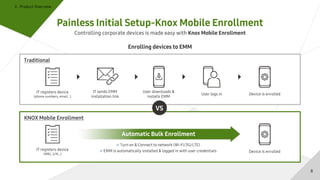
Painless Initial Setup-Knox Mobile Enrollment
Controlling corporate devices is made easy with Knox Mobile Enrollment
Enrolling devices to EMM
Traditional
IT registers device
(phone numbers, email…)
IT sends EMM
installation link
User downloads &
installs EMM
User logs in Device is enrolled
IT registers device
(IMEI, S/N…)
Device is enrolled
Turn on & Connect to network (Wi-Fi/3G/LTE)
EMM is automatically installed & logged in with user credentials
Automatic Bulk Enrollment
VS
KNOX Mobile Enrollment
8
Ⅱ . Product Overview
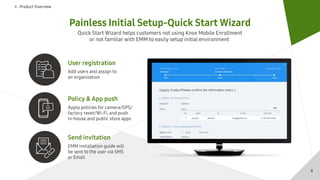
Painless Initial Setup-Quick Start Wizard
Quick Start Wizard helps customers not using Knox Mobile Enrollment
or not familiar with EMM to easily setup initial environment
Policy & App push
Apply policies for camera/GPS/
factory reset/Wi-Fi, and push
in-house and public store apps
Send invitation
EMM installation guide will
be sent to the user via SMS
or Email
User registration
Add users and assign to
an organization
9
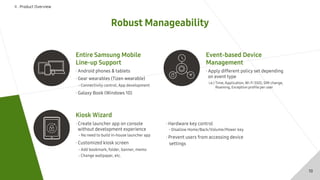
Robust Manageability
Ⅱ . Product Overview
· Apply different policy set depending
on event type
Event-based Device
Management
i.e.) Time, Application, Wi-Fi SSID, SIM change,
Roaming, Exception profile per user
Kiosk Wizard
· Create launcher app on console
without development experience
- No need to build in-house launcher app
· Customized kiosk screen
- Add bookmark, folder, banner, memo
- Change wallpaper, etc.
· Hardware key control
- Disallow Home/Back/Volume/Power key
· Prevent users from accessing device
settings
Entire Samsung Mobile
Line-up Support
· Android phones & tablets
· Gear wearables (Tizen wearable)
- Connectivity control, App development
· Galaxy Book (Windows 10)
10
Ⅱ . Product Overview
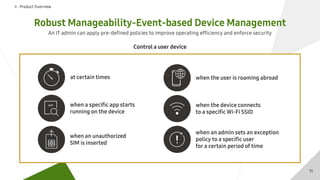
Robust Manageability-Event-based Device Management
An IT admin can apply pre-defined policies to improve operating efficiency and enforce security
Control a user device
at certain times
when a specific app starts
running on the device
when an unauthorized
SIM is inserted
when the user is roaming abroad
when the device connects
to a specific Wi-Fi SSID
when an admin sets an exception
policy to a specific user
for a certain period of time
11
Ⅱ . Product Overview
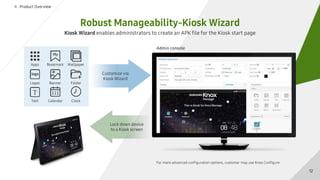
Robust Manageability-Kiosk Wizard
Kiosk Wizard enables administrators to create an APK file for the Kiosk start page
Admin console
For more advanced configuration options, customer may use Knox Configure
Customize via
Kiosk Wizard
Lock down device
to a Kiosk screen
Apps
Logos
Text
Bookmark
Banner
Calendar
Wallpaper
Folder
Clock
12
Ⅱ . Product Overview
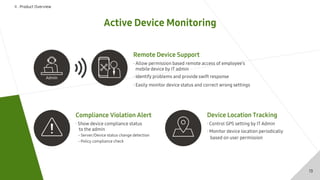
Active Device Monitoring
Compliance Violation Alert
· Show device compliance status
to the admin
- Server/Device status change detection
- Policy compliance check
Device Location Tracking
· Control GPS setting by IT Admin
· Monitor device location periodically
based on user permission
Remote Device Support
· Allow permission based remote access of employee’s
mobile device by IT admin
· Identify problems and provide swift response
· Easily monitor device status and correct wrong settings
13
Ⅱ . Product Overview
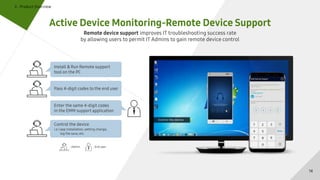
Active Device Monitoring-Remote Device Support
Remote device support improves IT troubleshooting success rate
by allowing users to permit IT Admins to gain remote device control
Install & Run Remote support
tool on the PC
Pass 4-digit codes to the end user
Enter the same 4-digit codes
in the EMM support application
Control the device
i.e.) app installation, setting change,
log file save, etc.
: End user: Admin
14
Ⅲ . Product Offerings
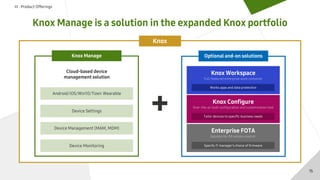
Knox Manage is a solution in the expanded Knox portfolio
Knox
Cloud-based device
management solution
Android/iOS/Win10/Tizen Wearable
Device Settings
Device Management (MAM, MDM)
Device Monitoring
Knox Manage
Knox Workspace
Full-featured enterprise work container
Over-the-air bulk configuration and customization tool
Solution for OS version control
Tailor devices to specific business needs
Works apps and data protection
Specify IT manager’s choice of firmware
Knox Configure
Enterprise FOTA
Optional and-on solutions
15
Ⅲ . Product Offerings
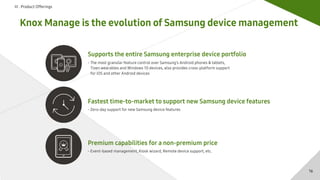
Knox Manage is the evolution of Samsung device management
Fastest time-to-market to support new Samsung device features
- Zero-day support for new Samsung device features
Premium capabilities for a non-premium price
- Event-based management, Kiosk wizard, Remote device support, etc.
Supports the entire Samsung enterprise device portfolio
- The most granular feature control over Samsung’s Android phones & tablets,
Tizen wearables and Windows 10 devices, also provides cross-platform support
for iOS and other Android devices
16
Ⅳ . Appendix
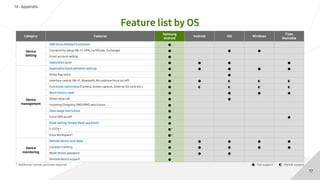
Feature list by OS
* Additional license purchase required : Full support : Partial support
17
Category Features
Samsung
Android
Android iOS Windows
Tizen
Wearable
Device
Setting
KME (Knox Mobile Enrollment) ●
Connectivity setup (Wi-Fi, VPN, Certificate, Exchange) ● ● ●
Email account setting ●
Application push ● ● ● ●
Device
management
Application black/whitelist settings ● ● ● ● ●
Allow App store ● ●
Interface control (Wi-Fi, Bluetooth, Microphone force on/off) ● ● ◐ ◐ ◐
Functional restrictions (Camera, Screen capture, External SD card, etc.) ● ◐ ◐ ◐ ◐
Block factory reset ● ● ● ●
Allow voice call ● ●
Incoming/Outgoing SMS/MMS restrictions ●
Data usage restrictions ●
Force GPS on/off ● ●
Kiosk setting (Single/Multi app kiosk) ●
E-FOTA* ●*
Knox Workspace* ●*
Device
monitoring
Remote device lock/wipe ● ● ● ● ●
Location tracking ● ● ● ● ●
Reset device password ● ● ●
Remote device support ●

Knox Manage

  • 2.
    Contents Ⅰ . Whatis Samsung Knox? Ⅱ . Product Overview Ⅲ . Product Offerings Ⅳ . Appendix
  • 3.
    Knox Solutions ·Feature management & control · Application management & security · Flexible deployment options to meet all use-cases · Anchored & secured by the underlying Knox Platform Knox Configure · Zero-touch device setup · Remote mobile enrollment · Setting of device features and policies Enterprise FOTA* · Device OS version control · Setting of update schedule * FOTA : Firmware Over The Air Knox Platform · Hardware-based · Built-in out of the box · Defends against viruses, malware, intrusion · Guarantees device integrity · Complete data isolation · Permission management for apps & data · Real-time kernel monitoring & protection · Only allows authorized firmware · Hardware-based encryption · Rooting prevention The most secure implementation of Android I . What is Samsung Knox? Knox Workspace · Work vs Personal · Work data/app isolation & encryption · Device feature/policy settings Knox Manage · Cloud-based EMM · Management of device features · Device monitoring
  • 4.
    Knox Solution Portfolio DEPLOYMENT& CONFIGURATION SECURITY & MANAGEMENT I . What is Samsung Knox? CONFIGURE ENROLL MANAGE SECURE MAINTAIN
  • 5.
    What is KnoxManage? Ⅱ . Product Overview Samsung Knox Manage is a cloud-based EMM solution · Supports all major platforms : Android, iOS, Windows 10, Tizen wearable* · For Samsung devices : - Full feature support - Fastest time-to-market for new features : E-FOTA, Iris scanner authentication, Samsung DeX (TBD) 5 * Tizen wearables will be supported within ‘18/1H.
  • 7.
    Ⅱ . ProductOverview Painless Initial Setup Knox Mobile Enrollment · EMM client auto-installation & log in with user credential · Automatic re-configuration after factory reset Quick Setup Wizard · Wizard with simple questions and directions for initial environment settings i.e.) From user enrollment to app/policy push Device Configuration Settings · Email Account Setting - Protocol, incoming/outgoing server setting · Application Push - In-house/public store app push and update - Deploy apps by organizations · Connectivity Setup - Wi-Fi profile setting (SSID/PW) - VPN profile setting (Server, Authentication) - APN setting (APN, MCC/MNC) or 7
  • 8.
    Ⅱ . ProductOverview Painless Initial Setup-Knox Mobile Enrollment Controlling corporate devices is made easy with Knox Mobile Enrollment Enrolling devices to EMM Traditional IT registers device (phone numbers, email…) IT sends EMM installation link User downloads & installs EMM User logs in Device is enrolled IT registers device (IMEI, S/N…) Device is enrolled Turn on & Connect to network (Wi-Fi/3G/LTE) EMM is automatically installed & logged in with user credentials Automatic Bulk Enrollment VS KNOX Mobile Enrollment 8
  • 9.
    Ⅱ . ProductOverview Painless Initial Setup-Quick Start Wizard Quick Start Wizard helps customers not using Knox Mobile Enrollment or not familiar with EMM to easily setup initial environment Policy & App push Apply policies for camera/GPS/ factory reset/Wi-Fi, and push in-house and public store apps Send invitation EMM installation guide will be sent to the user via SMS or Email User registration Add users and assign to an organization 9
  • 10.
    Robust Manageability Ⅱ .Product Overview · Apply different policy set depending on event type Event-based Device Management i.e.) Time, Application, Wi-Fi SSID, SIM change, Roaming, Exception profile per user Kiosk Wizard · Create launcher app on console without development experience - No need to build in-house launcher app · Customized kiosk screen - Add bookmark, folder, banner, memo - Change wallpaper, etc. · Hardware key control - Disallow Home/Back/Volume/Power key · Prevent users from accessing device settings Entire Samsung Mobile Line-up Support · Android phones & tablets · Gear wearables (Tizen wearable) - Connectivity control, App development · Galaxy Book (Windows 10) 10
  • 11.
    Ⅱ . ProductOverview Robust Manageability-Event-based Device Management An IT admin can apply pre-defined policies to improve operating efficiency and enforce security Control a user device at certain times when a specific app starts running on the device when an unauthorized SIM is inserted when the user is roaming abroad when the device connects to a specific Wi-Fi SSID when an admin sets an exception policy to a specific user for a certain period of time 11
  • 12.
    Ⅱ . ProductOverview Robust Manageability-Kiosk Wizard Kiosk Wizard enables administrators to create an APK file for the Kiosk start page Admin console For more advanced configuration options, customer may use Knox Configure Customize via Kiosk Wizard Lock down device to a Kiosk screen Apps Logos Text Bookmark Banner Calendar Wallpaper Folder Clock 12
  • 13.
    Ⅱ . ProductOverview Active Device Monitoring Compliance Violation Alert · Show device compliance status to the admin - Server/Device status change detection - Policy compliance check Device Location Tracking · Control GPS setting by IT Admin · Monitor device location periodically based on user permission Remote Device Support · Allow permission based remote access of employee’s mobile device by IT admin · Identify problems and provide swift response · Easily monitor device status and correct wrong settings 13
  • 14.
    Ⅱ . ProductOverview Active Device Monitoring-Remote Device Support Remote device support improves IT troubleshooting success rate by allowing users to permit IT Admins to gain remote device control Install & Run Remote support tool on the PC Pass 4-digit codes to the end user Enter the same 4-digit codes in the EMM support application Control the device i.e.) app installation, setting change, log file save, etc. : End user: Admin 14
  • 15.
    Ⅲ . ProductOfferings Knox Manage is a solution in the expanded Knox portfolio Knox Cloud-based device management solution Android/iOS/Win10/Tizen Wearable Device Settings Device Management (MAM, MDM) Device Monitoring Knox Manage Knox Workspace Full-featured enterprise work container Over-the-air bulk configuration and customization tool Solution for OS version control Tailor devices to specific business needs Works apps and data protection Specify IT manager’s choice of firmware Knox Configure Enterprise FOTA Optional and-on solutions 15
  • 16.
    Ⅲ . ProductOfferings Knox Manage is the evolution of Samsung device management Fastest time-to-market to support new Samsung device features - Zero-day support for new Samsung device features Premium capabilities for a non-premium price - Event-based management, Kiosk wizard, Remote device support, etc. Supports the entire Samsung enterprise device portfolio - The most granular feature control over Samsung’s Android phones & tablets, Tizen wearables and Windows 10 devices, also provides cross-platform support for iOS and other Android devices 16
  • 17.
    Ⅳ . Appendix Featurelist by OS * Additional license purchase required : Full support : Partial support 17 Category Features Samsung Android Android iOS Windows Tizen Wearable Device Setting KME (Knox Mobile Enrollment) ● Connectivity setup (Wi-Fi, VPN, Certificate, Exchange) ● ● ● Email account setting ● Application push ● ● ● ● Device management Application black/whitelist settings ● ● ● ● ● Allow App store ● ● Interface control (Wi-Fi, Bluetooth, Microphone force on/off) ● ● ◐ ◐ ◐ Functional restrictions (Camera, Screen capture, External SD card, etc.) ● ◐ ◐ ◐ ◐ Block factory reset ● ● ● ● Allow voice call ● ● Incoming/Outgoing SMS/MMS restrictions ● Data usage restrictions ● Force GPS on/off ● ● Kiosk setting (Single/Multi app kiosk) ● E-FOTA* ●* Knox Workspace* ●* Device monitoring Remote device lock/wipe ● ● ● ● ● Location tracking ● ● ● ● ● Reset device password ● ● ● Remote device support ●