CLOUD COLLABORATION Using  PBworks Campus Edition  &  Google Apps  (Groups, Docs & Sites) for classroom and professional collaboration.
CLOUD COMPUTING Accessing applications and creating/editing/storing data online ,  through a Web browser  (ie. using web-based applications) rather than by opening/using software installed on your computer/server Or, to put it another way-  Online vs. On-your-computer
SO… The cloud is great for collaborating with anyone, anywhere, anytime. Two (or four) Resources I use for collaboration Google Apps [Free] Google Groups Google Docs Google Sites Used to work online with colleagues from multiple institutions (MN Library Futurist group) PBworks  Campus Edition  [Not Free] Used in MCTC INFS 1000 classes for group work/student collaboration
GOOGLE APPS Challenge:  How do you collaborate with 24 people who, by the way, work in different organizations all across the state and can only meet about once a month? Old timey solution: E-mail Problems with ye olde e-mail Messy Working with attachments Revision, then re-attach Cloud solution: Google Apps Create a Google Group Utilize Google Docs  Create a Google Site (and Blog- not created through Google Apps) for public communication
GOOGLE GROUPS All messages/message threads for group stored in one place Don’t get buried/lost in e-mail inbox/folders/trash Still want to get an e-mail when something is posted to the group? You will get an e-mail copy of the message on your Gmail account (which, yes, you DO need a Gmail account to work with Google Apps)  Can also set up as digest e-mail or to not send you e-mails at all. Google Groups is also good for e-mail lists You get a group e-mail address Great for messaging everyone in the group with one e-mail address Great contact for folks who want to contact the group Without setting up a separate e-mail account Messages are posted to the group and also come to our individual Gmail accounts as part of the Google Group (unless you choose to not receive e-mails)
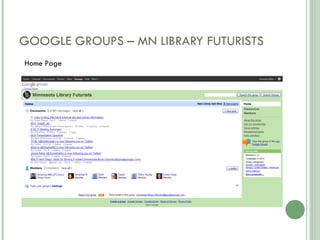
GOOGLE GROUPS – MN LIBRARY FUTURISTS Home Page
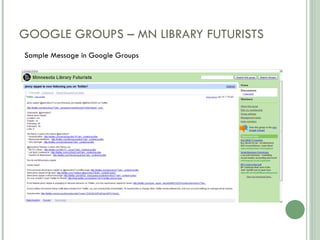
GOOGLE GROUPS – MN LIBRARY FUTURISTS Sample Message in Google Groups
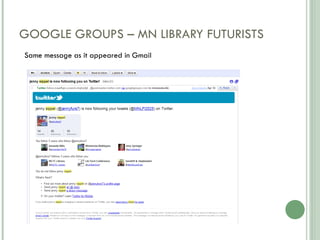
GOOGLE GROUPS – MN LIBRARY FUTURISTS Same message as it appeared in Gmail
GOOGLE DOCS Assuming you all have some familiarity with Google Docs Basically like an online, editable Word document, shared (and viewing or editing rights given) using a Gmail address Easy sharing/editing rights with Google Group e-mail address Don’t have to add everyone individually Just add the group e-mail and all have access Used for minutes, agendas, small group work, & other group documents Can be viewed/edited by all members of the group
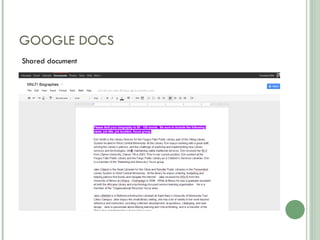
GOOGLE DOCS Shared document
GOOGLE SITES EASY & FREE website creation Futurists used our Google Group and Google Docs for internal communication and more attractive, cleaned up Google Site for external communication That said… Once  Google Docs  (such as Minutes) are ready for prime time, they  can be easily added to a Google Site Collaborative creation of website content via Google Docs embedded in uniform design of Google Site
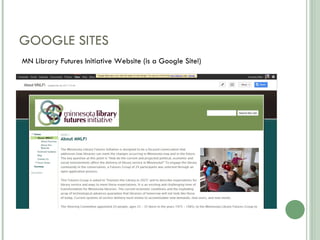
GOOGLE SITES MN Library Futures Initiative Website (is a Google Site!)
PBWORKS CAMPUS EDITION INFS 1000: Information Literacy & Research Skills Semester-long, credit-bearing IL course taught at Minneapolis Community & Technical College Course requires students to work in groups and complete (among other coursework) six team assignments Challenge: Multiple students editing/completing assignments together; most students do not finish in class and want to coninue working together outside of class Old timey solution: Word document, shared as e-mail attachment Problems with ye olde Word document Messy, inefficient/extra work compiling into one assignment Working with one document circulated as an e-mail attachment Revision, then re-attach Or one student made responsible for compiling separate documents/work Computer (il)literacy complictions Cloud solution: PBworks wiki (PBworks Campus Edition) Create a wiki version of the assignments One document, editable by all students
PBWORKS CAMPUS EDITION Assuming you all have some familiarity with FREE PBworks wikis Why Campus Edition? Page level permissions  (Customized Access/Privacy) Give permission for students to access and/or edit only some areas of wiki at page level Hidden Pages: students cannot see other teams’ work. Can give different permissions on individual pages  Example: students can edit their assignment, cannot edit main/home page of wiki/their team’s workspace “ Dashboard”  for the administrator(s) of the workspaces so he/she/they can see and manage all “campus wikis” in one area  This makes cloning possible; good with the kind of collaboration we do as a department (shared syllabus, assignments, etc.) Create template wiki, copy (“clone”) for each section of INFS 1000 Other editions of PBworks are designed for individual instructors/users More space! It’s not clear what the space limitations are for other accounts, but for the campus edition we are allowed 1000 users (can rotate in and out) and unlimited file space storage (presumably less space and users for other editions).
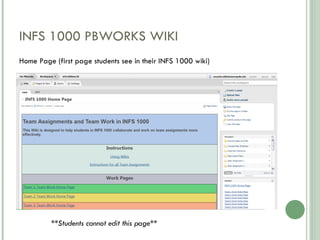
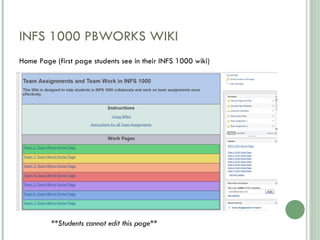
INFS 1000 PBWORKS WIKI **Students cannot edit this page** Home Page (first page students see in their INFS 1000 wiki)
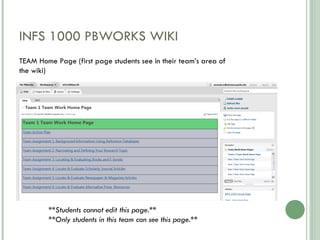
INFS 1000 PBWORKS WIKI **Students cannot edit this page.** **Only students in this team can see this page.** TEAM Home Page (first page students see in their team’s area of the wiki)
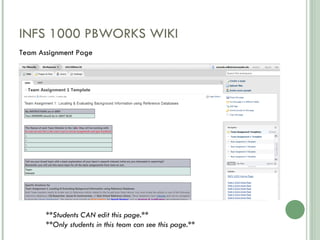
INFS 1000 PBWORKS WIKI **Students CAN edit this page.** **Only students in this team can see this page.** Team Assignment Page
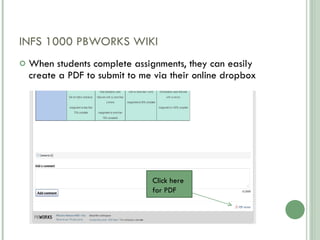
INFS 1000 PBWORKS WIKI When students complete assignments, they can easily create a PDF to submit to me via their online dropbox Click here for PDF
HOW COULD YOU USE THESE IN YOUR LIBRARY? Some ideas: Collaborative projects (Google Apps or wiki) Keep (online) work related to a project in one place, where all can view & edit Work across multiple institutions/Long-distance collaboration These tools can be very helpful in organizing, coordinating and completing work done primarily online E-mail functions of Google Groups can be helpful for collaboration across institutions Teaching/Instruction with teams (wiki) Has especially enriched online teaching (can see work AS students are working on it, before it is due; online equivalent to face-to-face lab days where students are working and can seek instructor feedback in class.) Librarian collaboration with Instructors/Faculty (wiki) Embedded librarians and/or liaisons could work with/support/create content for classes in wiki Agendas, minutes, and other important information (Google Docs, Google Group or wiki) Shared documents, shared editing E-mail lists/Google Group  Get an e-mail but also have archive of all messages in Google Group) Concerns:  Privacy Make sure you know who can see and edit your information, documents, etc. Be aware of permissions, settings and/or editions of these tools specific to your needs Cost Additional functionality and capabilities often come at a price/are not free.
ADDITIONAL SOURCES Links to additional Sources on our (PBworks!) wiki for this session.
QUESTIONS? Thank you.   Amanda Mills Faculty Librarian, Minneapolis Community & Technical College [email_address]

Mla 2011 cloud collaboration

  • 1.
    CLOUD COLLABORATION Using PBworks Campus Edition & Google Apps (Groups, Docs & Sites) for classroom and professional collaboration.
  • 2.
    CLOUD COMPUTING Accessingapplications and creating/editing/storing data online , through a Web browser (ie. using web-based applications) rather than by opening/using software installed on your computer/server Or, to put it another way- Online vs. On-your-computer
  • 3.
    SO… The cloudis great for collaborating with anyone, anywhere, anytime. Two (or four) Resources I use for collaboration Google Apps [Free] Google Groups Google Docs Google Sites Used to work online with colleagues from multiple institutions (MN Library Futurist group) PBworks Campus Edition [Not Free] Used in MCTC INFS 1000 classes for group work/student collaboration
  • 4.
    GOOGLE APPS Challenge: How do you collaborate with 24 people who, by the way, work in different organizations all across the state and can only meet about once a month? Old timey solution: E-mail Problems with ye olde e-mail Messy Working with attachments Revision, then re-attach Cloud solution: Google Apps Create a Google Group Utilize Google Docs Create a Google Site (and Blog- not created through Google Apps) for public communication
  • 5.
    GOOGLE GROUPS Allmessages/message threads for group stored in one place Don’t get buried/lost in e-mail inbox/folders/trash Still want to get an e-mail when something is posted to the group? You will get an e-mail copy of the message on your Gmail account (which, yes, you DO need a Gmail account to work with Google Apps) Can also set up as digest e-mail or to not send you e-mails at all. Google Groups is also good for e-mail lists You get a group e-mail address Great for messaging everyone in the group with one e-mail address Great contact for folks who want to contact the group Without setting up a separate e-mail account Messages are posted to the group and also come to our individual Gmail accounts as part of the Google Group (unless you choose to not receive e-mails)
  • 6.
    GOOGLE GROUPS –MN LIBRARY FUTURISTS Home Page
  • 7.
    GOOGLE GROUPS –MN LIBRARY FUTURISTS Sample Message in Google Groups
  • 8.
    GOOGLE GROUPS –MN LIBRARY FUTURISTS Same message as it appeared in Gmail
  • 9.
    GOOGLE DOCS Assumingyou all have some familiarity with Google Docs Basically like an online, editable Word document, shared (and viewing or editing rights given) using a Gmail address Easy sharing/editing rights with Google Group e-mail address Don’t have to add everyone individually Just add the group e-mail and all have access Used for minutes, agendas, small group work, & other group documents Can be viewed/edited by all members of the group
  • 10.
  • 11.
    GOOGLE SITES EASY& FREE website creation Futurists used our Google Group and Google Docs for internal communication and more attractive, cleaned up Google Site for external communication That said… Once Google Docs (such as Minutes) are ready for prime time, they can be easily added to a Google Site Collaborative creation of website content via Google Docs embedded in uniform design of Google Site
  • 12.
    GOOGLE SITES MNLibrary Futures Initiative Website (is a Google Site!)
  • 13.
    PBWORKS CAMPUS EDITIONINFS 1000: Information Literacy & Research Skills Semester-long, credit-bearing IL course taught at Minneapolis Community & Technical College Course requires students to work in groups and complete (among other coursework) six team assignments Challenge: Multiple students editing/completing assignments together; most students do not finish in class and want to coninue working together outside of class Old timey solution: Word document, shared as e-mail attachment Problems with ye olde Word document Messy, inefficient/extra work compiling into one assignment Working with one document circulated as an e-mail attachment Revision, then re-attach Or one student made responsible for compiling separate documents/work Computer (il)literacy complictions Cloud solution: PBworks wiki (PBworks Campus Edition) Create a wiki version of the assignments One document, editable by all students
  • 14.
    PBWORKS CAMPUS EDITIONAssuming you all have some familiarity with FREE PBworks wikis Why Campus Edition? Page level permissions (Customized Access/Privacy) Give permission for students to access and/or edit only some areas of wiki at page level Hidden Pages: students cannot see other teams’ work. Can give different permissions on individual pages Example: students can edit their assignment, cannot edit main/home page of wiki/their team’s workspace “ Dashboard” for the administrator(s) of the workspaces so he/she/they can see and manage all “campus wikis” in one area This makes cloning possible; good with the kind of collaboration we do as a department (shared syllabus, assignments, etc.) Create template wiki, copy (“clone”) for each section of INFS 1000 Other editions of PBworks are designed for individual instructors/users More space! It’s not clear what the space limitations are for other accounts, but for the campus edition we are allowed 1000 users (can rotate in and out) and unlimited file space storage (presumably less space and users for other editions).
  • 15.
    INFS 1000 PBWORKSWIKI **Students cannot edit this page** Home Page (first page students see in their INFS 1000 wiki)
  • 16.
    INFS 1000 PBWORKSWIKI **Students cannot edit this page** Home Page (first page students see in their INFS 1000 wiki)
  • 17.
    INFS 1000 PBWORKSWIKI **Students cannot edit this page.** **Only students in this team can see this page.** TEAM Home Page (first page students see in their team’s area of the wiki)
  • 18.
    INFS 1000 PBWORKSWIKI **Students CAN edit this page.** **Only students in this team can see this page.** Team Assignment Page
  • 19.
    INFS 1000 PBWORKSWIKI When students complete assignments, they can easily create a PDF to submit to me via their online dropbox Click here for PDF
  • 20.
    HOW COULD YOUUSE THESE IN YOUR LIBRARY? Some ideas: Collaborative projects (Google Apps or wiki) Keep (online) work related to a project in one place, where all can view & edit Work across multiple institutions/Long-distance collaboration These tools can be very helpful in organizing, coordinating and completing work done primarily online E-mail functions of Google Groups can be helpful for collaboration across institutions Teaching/Instruction with teams (wiki) Has especially enriched online teaching (can see work AS students are working on it, before it is due; online equivalent to face-to-face lab days where students are working and can seek instructor feedback in class.) Librarian collaboration with Instructors/Faculty (wiki) Embedded librarians and/or liaisons could work with/support/create content for classes in wiki Agendas, minutes, and other important information (Google Docs, Google Group or wiki) Shared documents, shared editing E-mail lists/Google Group Get an e-mail but also have archive of all messages in Google Group) Concerns: Privacy Make sure you know who can see and edit your information, documents, etc. Be aware of permissions, settings and/or editions of these tools specific to your needs Cost Additional functionality and capabilities often come at a price/are not free.
  • 21.
    ADDITIONAL SOURCES Linksto additional Sources on our (PBworks!) wiki for this session.
  • 22.
    QUESTIONS? Thank you.  Amanda Mills Faculty Librarian, Minneapolis Community & Technical College [email_address]

Editor's Notes

  • #3 http://www.cloudcomputingdefined.com/