Part 7
Chapter 12
Developing and
Implementing
Business/IT Systems
Content
Section 1: Systems Approach
• Business and Consumer Software;
• IS Development;
• The Systems Approach;
• Systems Thinking;
• Systems Analysis and Design;
• The Systems Development Life Cycle;
• Starting the Systems Development Process;
• Feasibility Studies;
Content
Section 2: System Analysis
• Systems Analysis;
• Organizational Analysis;
• Analysis of the Present System;
• Logical Analysis;
• Functional Requirements Analysis and Determination;
• Systems Design;
• Prototyping; The Prototyping Process;
• User Interface Design;
• System Specification;
• End-User Development;
• Focus on IS Activities;
• End-User Development.
Developing Business Systems
Section 1: Systems Approach
1. Introduction:
• Information Systems (IS) play a crucial role in creating solutions that meet
the needs of organizations and individuals.
• These systems are developed to streamline processes, enhance efficiency,
and provide valuable insights through data analysis.
• Suppose the CEO asks you to find a web enabled way to get information to
and from the salespeople in your company. How would you start? Would
you just plunge ahead and hope you could produce a reasonable solution?
How would you know whether your solution was a good one for your
company?
• There is a systematic way, It’s a problem-solving process called the
systems approach.
2. IS Development
→ When the systems approach to problem-solving is applied to the development of
information systems solutions to business problems, it is called information
systems development or application development.
→ The Systems Approach is a systematic way to develop a solution to a problem or
business opportunity.
3. The Systems Approach
The systems approach to problem-solving: uses a systems orientation to define
problems and opportunities and then develop appropriate, feasible solutions in
response.
Analyzing a problem and formulating a solution involve interrelated activities.
A systems approach is a problem-solving method that looks at complex issues as
interconnected systems rather than isolated parts.
Applying this approach to IS development means considering how different
components of an information system interact and impact each other, ensuring that
the final solution addresses the entire system's needs.
→Problem Solving Steps
The Systems Approach is a systematic way to develop a solution to a problem or
business opportunity.
Problem Solving – there are specific steps in solving any problem
1. Recognize/Define a Problem or Opportunity – recognize it exists
2. Develop and Evaluate Alternative System Solutions – what are
the different ways to solve this problem?
3. Select the Best System Solution – decide which alternative is best
4. Design the Selected System Solution – design the system for the
chosen solution
5. Implement and Evaluate the Success of the Designed System –
put the solution into effect and monitor results for the outcome
4. Systems thinking (1)
Using systems thinking to understand a problem or opportunity is one
of the most important aspects of the systems approach.
Systems thinking involves understanding the interrelationships and
dynamics within complex systems, seeing beyond individual components
to grasp the system as a whole. Seeing the system context:
1. See the Interrelationships among the systems rather than linear
cause-and-effect chains.
2. See the Process of change among the systems rather than
discrete ‘snapshots’ of change
Systems thinking (2)
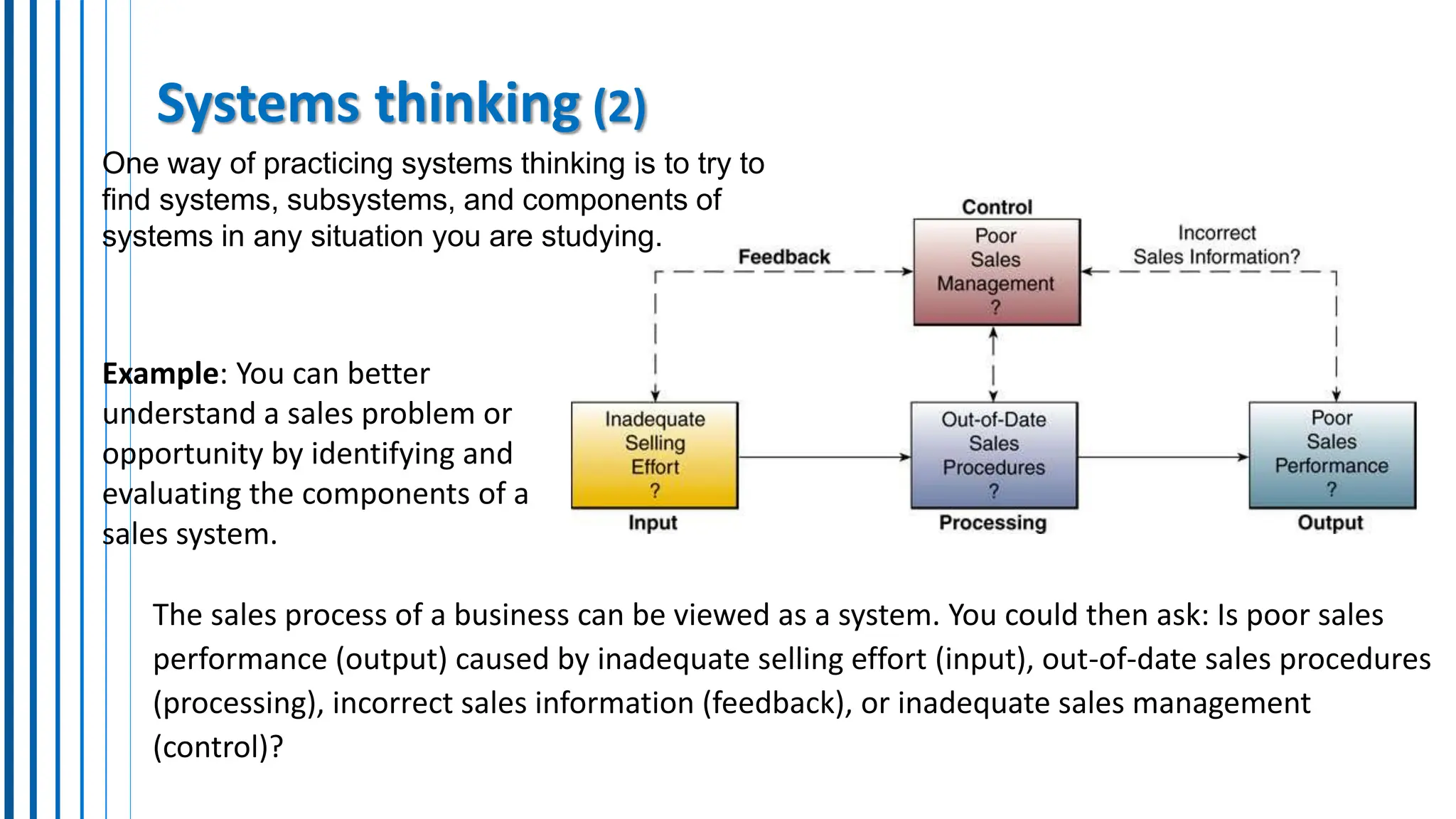
The sales process of a business can be viewed as a system. You could then ask: Is poor sales
performance (output) caused by inadequate selling effort (input), out-of-date sales procedures
(processing), incorrect sales information (feedback), or inadequate sales management
(control)?
Example: You can better
understand a sales problem or
opportunity by identifying and
evaluating the components of a
sales system.
One way of practicing systems thinking is to try to
find systems, subsystems, and components of
systems in any situation you are studying.
5. Systems Analysis and Design
Systems Analysis and Design (SAD) refers to the systematic process of
designing and implementing information systems (IS) within
organizations.
It involves identifying business problems, proposing IS solutions, and
then designing and implementing those solutions to achieve
organizational goals.
There are many approaches to SAD. The two most common approaches
are: object-oriented analysis and design and the systems development
life cycle approach. each has its advantages and disadvantages
Systems Analysis and Design
Object-Oriented Analysis and Design (OOAD):
Focuses on modeling the system using real-world objects and their
interactions. Offers advantages in modularity and reusability.
Systems Development Life Cycle (SDLC) Approach:
Structures the development process into distinct phases (planning,
analysis, design, implementation, operation, maintenance). Provides
a clear roadmap for project management and control.
→ The choice between approaches depends on the system complexity &
user involvement.
• OOAD might be suitable for complex systems with well-defined objects.
• SDLC might be preferred for projects with clearer requirements and structured proces
6. The Systems Development Life Cycle
 SLDC is a multistep, iterative process to designing systems and is very popular.
 Follows a structured cycle of phases (investigation, analysis, design, implementation, and
maintenance), ensuring a systematic and thorough development process.
 Each phase contributes to the systematic development of an information system, with the
ability to revisit and refine previous steps as needed.
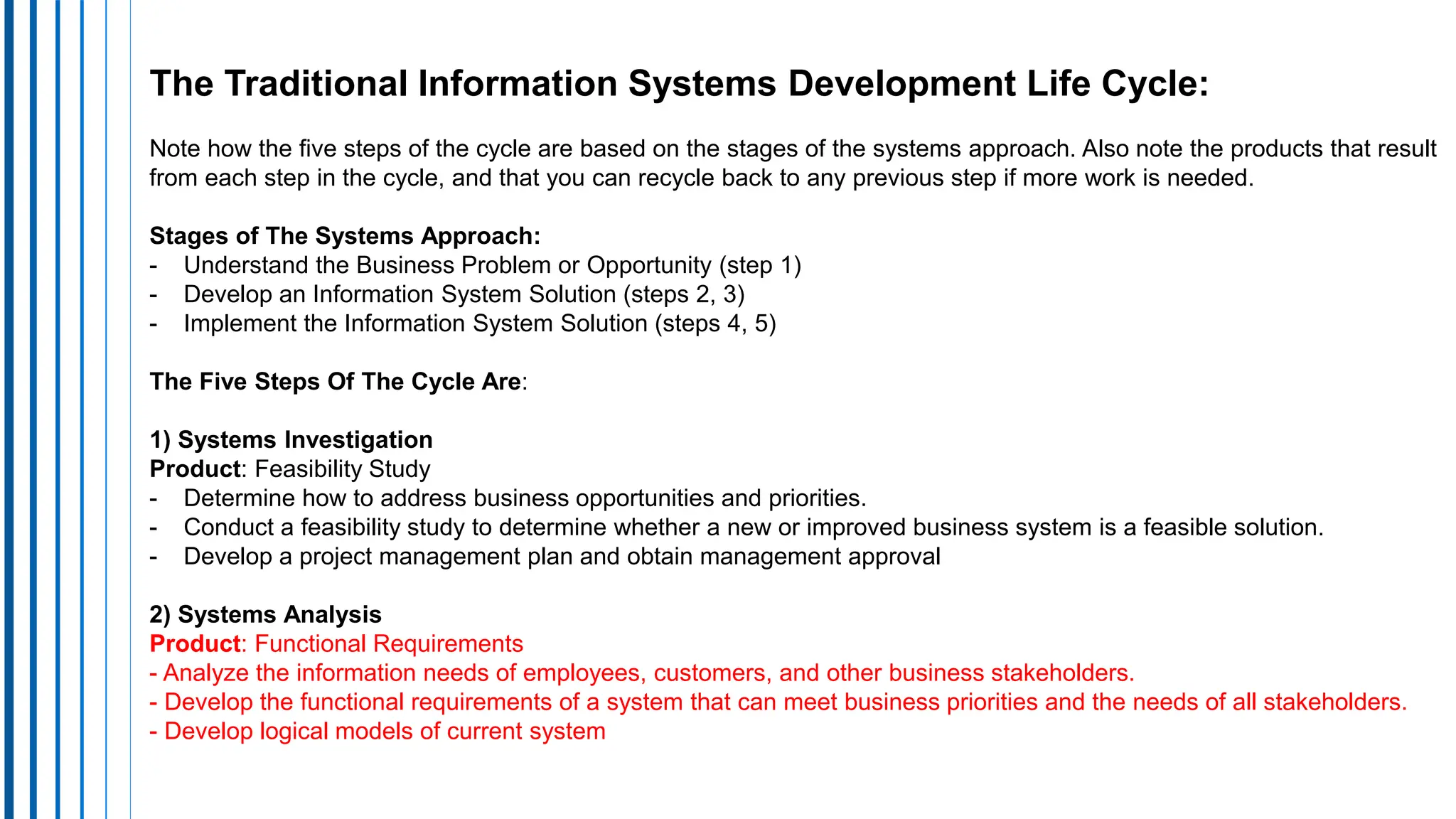
7. The Systems Development Process
FIGURE 12.3 The traditional information systems development life cycle. Note how the five steps are based on
the stages of the systems approach. Also note the products that result from each step in the
cycle, and that you can recycle back to any previous step if more work is needed.
The Traditional Information Systems Development Life Cycle:
Note how the five steps of the cycle are based on the stages of the systems approach. Also note the products that result
from each step in the cycle, and that you can recycle back to any previous step if more work is needed.
Stages of The Systems Approach:
- Understand the Business Problem or Opportunity (step 1)
- Develop an Information System Solution (steps 2, 3)
- Implement the Information System Solution (steps 4, 5)
The Five Steps Of The Cycle Are:
1) Systems Investigation
Product: Feasibility Study
- Determine how to address business opportunities and priorities.
- Conduct a feasibility study to determine whether a new or improved business system is a feasible solution.
- Develop a project management plan and obtain management approval
2) Systems Analysis
Product: Functional Requirements
- Analyze the information needs of employees, customers, and other business stakeholders.
- Develop the functional requirements of a system that can meet business priorities and the needs of all stakeholders.
- Develop logical models of current system
3) Systems Design
Product: System Specifications
- Develop specifications for the hardware, software, people, network, and data resources,
and the information products that will satisfy the functional requirements of the proposed
business information system
- Develop logical models of new system
4) Systems Implementation
Product: Operational System
Acquire (or develop) hardware and software.
- Test the system, and train people to operate and use it.
- Convert to the new business system.
- Manage the effects of system changes on end users
5) Systems Maintenance
Product: Improved System
- Use a postimplementation review process to monitor, evaluate, and modify the business
system as needed.
Starting the Systems Development Process
• The systems investigation stage typically requires the development of
a feasibility study which identify needs, resources, costs, benefits.
• Before starting development, investigations are conducted to
determine the feasibility and strategic alignment of the proposed
system with business priorities. This ensures that resources are
allocated efficiently to projects that offer significant value.
• Feasibility study involve a comprehensive assessment of various
factors to determine the viability and potential success of the
proposed system.
8. Feasibility Studies
 Feasibility Studies involve a comprehensive assessment of various
factors to determine the viability and potential success of the
proposed system, those are:
 Operational Feasibility
 Technical Feasibility
 Human Factors
 Economic Feasibility
 Legal/Political Feasibility
A. Operational Feasibility
Will the proposed system fit existing business environment and
objectives?
Operational Feasibility evaluates how well the proposed system aligns
with the current operations, processes, and goals of the organization. It
looks at whether the system can be smoothly integrated into existing
workflows and whether users will be able to adapt to and effectively use
the new system.
B. Economic Feasibility
The economic feasibility assessment determine to which extent the
proposed system will provide positive economic benefits to the
organization. It involves a thorough analysis of the costs and benefits,
including tangible and intangible factors, associated with the proposed
system throughout its lifecycle. This includes estimating initial
development costs, ongoing operational expenses, potential cost savings
or revenue generation, and the overall return on investment (ROI).
• Cost/Benefit Analysis – do the benefits justify the costs?
• Tangible Costs/Benefits – (hardware, software, increase in payroll)
• Intangible Benefits – hard to calculate (customer approval, political
feedback)
C. Technical Feasibility
Technical Feasibility involves evaluating the organization's existing technical
resources, such as hardware, software, and operating environments, to
determine their suitability for meeting the requirements of the proposed
system.
If the current technology is deemed sufficient, then the technical feasibility of
the project is clear. If this is not the case, however, the analyst must determine
whether the technology necessary to meet the stated specifications exists.
Despite the claims of vendors that they can supply whatever is required, the
analyst must be able to assess accurately the degree to which the needed
technology exists in a form suitable for the proposed project.
D. Human Factors Feasibility
The human factors feasibility assessment focuses on the managers and
end users. The system will not work if the end users and managers do
not perceive it to be relevant and, therefore, do not support it.
In this category, we assess the degree of resistance to the proposed
system, the perceived role of the end users in the development process,
the degree of change to the end users’ working environment, and the
current state of human resources available to conduct the project and to
manage and use the system on completion.
E. Legal/Political Feasibility
It includes analysis of any potential legal complications resulting from
the implementation of the new system. Such legal issues include
copyright or patent infringements, violation of existing antitrust laws,
foreign trade restrictions, or any existing contractual obligations of the
organization.
The political side of the assessment focuses on understanding to which
degree the proposed system may positively or negatively affect the
distribution of power of key stakeholders. Such distribution can have
major political impacts and may cause disruption or failure of a relevant
development effort.
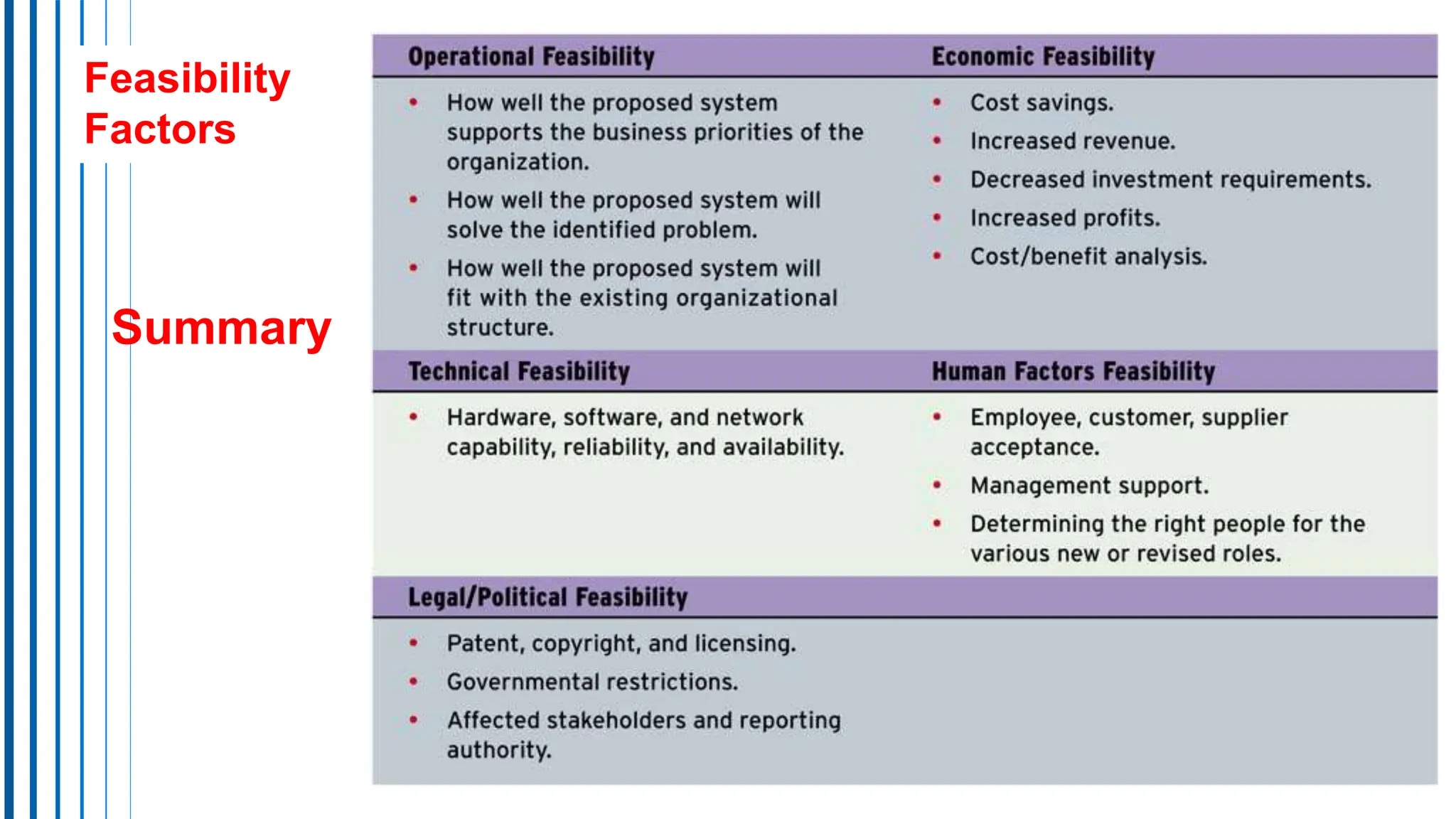
Feasibility
Factors
Summary
Developing Business Systems
Section 2: System Analysis
Content
Section 2:
• Systems Analysis;
• Organizational Analysis;
• Analysis of the Present System;
• Logical Analysis;
• Functional Requirements Analysis and Determination;
• Systems Design;
• Prototyping; The Prototyping Process;
• User Interface Design;
• System Specification;
• End-User Development;
• Focus on IS Activities;
• End-User Development.
1. SYSTEMS ANALYSIS
Systems analysis is the study of end-user information needs to produce functional
requirements that are used for the design of a new information system.
Systems analysis traditionally involves a detailed study of:
→ The information needs of a company and end users like yourself.
→ The activities, resources, and products of the present information systems being used.
→ The information system capabilities required to meet your information needs, and those of other
business stakeholders that may use the system.
System analysis involves:
Organizational analysis, analysis of present systems,
logical analysis, functional requirement analysis.
Functional requirements are specifications that describe the intended behavior and
functionality of a system, software application, or product. These requirements detail what the
system should do in order to fulfill the needs of its users or stakeholders. They typically
outline specific features, functions, and capabilities that the system must possess
2. Organizational Analysis (starting point)
• Organizational analysis is an important starting point in systems analysis
because the development team needs an in-depth understanding of the
organization, including its management structure, people, business
activities, environmental systems, and current information systems.
• This knowledge must be more detailed for specific business units or end-
user workgroups impacted by proposed system changes.
• For instance, designing a new inventory control system for a chain of
department stores requires a team member with extensive knowledge of
the company and its inventory-related business activities..
3. Analysis of the Present Systems
Before designing a new system, it's vital to analyze the current system
being improved or replaced. This involves understanding how the
system uses hardware, software, networks, and human resources to
turn data into useful information like reports and displays. You also
document how the system manages input, processing, output, storage,
and control activities.
For instance, you assess the format, timing, volume, and quality of input
and output processes crucial for user-computer interaction. This analysis
guides the specification of resources, products, and activities supporting
the user interface in the new system during the design phase.
Why Analysis of the Present System
• Analysis of the Present System is important as it lays the foundation
for identifying strengths, weaknesses, opportunities, and threats
within the existing system (SWOT).
• By studying the past performance and outcomes, organizations can
learn valuable lessons and avoid repeating mistakes.
• It also aids in recognizing areas for improvement and innovation,
ensuring that the new system meets evolving business needs
effectively.
4. Logical Analysis
Logical Analysis focuses on creating logical models that define WHAT the
system should do without getting into the specifics of HOW it
accomplishes those tasks.
This approach helps in conceptualizing the core functions and processes
required in the new system.
By separating the logical structure from implementation details, analysts
can develop a clear blueprint that outlines the essential functionalities
and data flows necessary for the system's success.
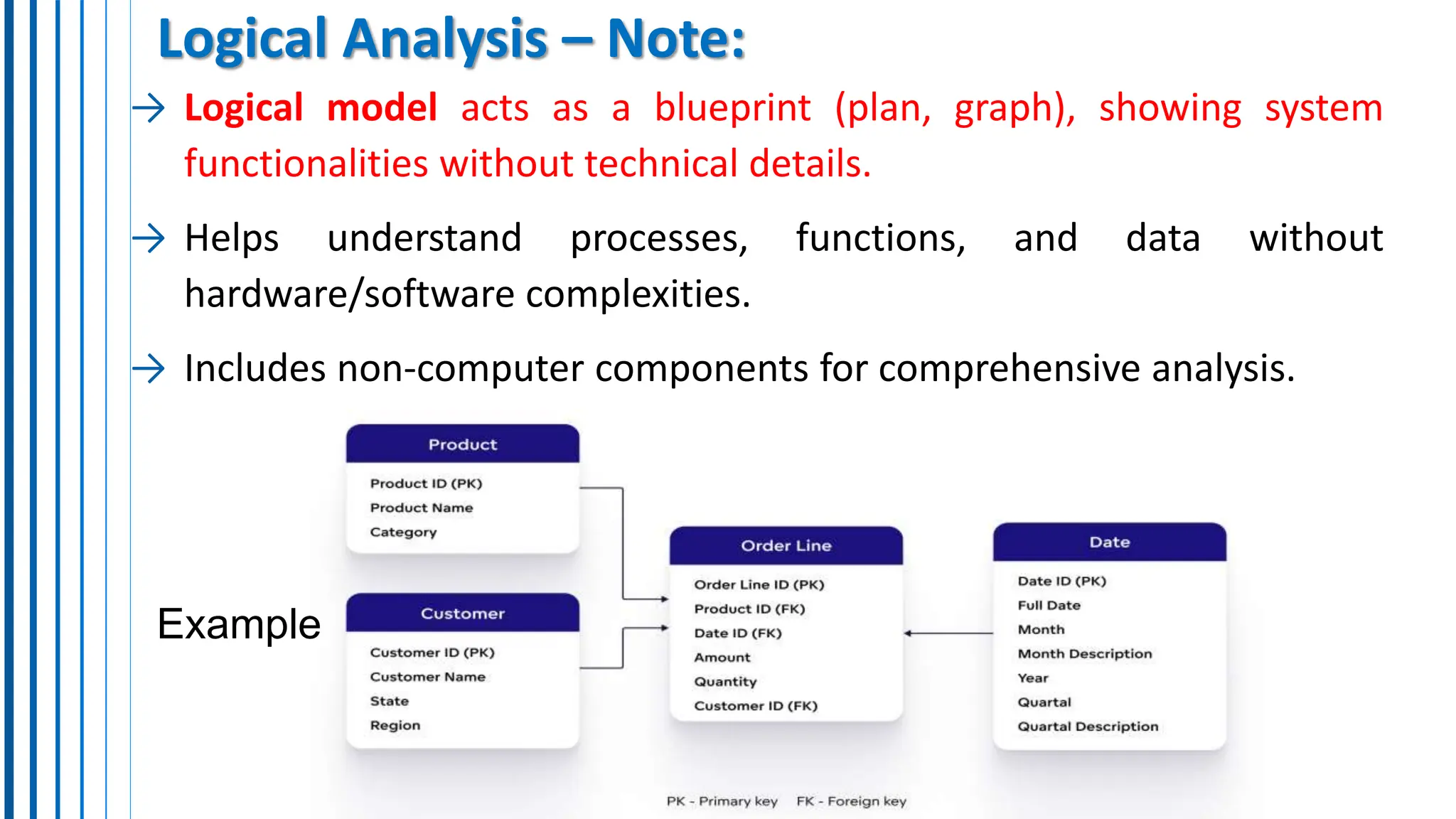
Logical Analysis – Note:
→ Logical model acts as a blueprint (plan, graph), showing system
functionalities without technical details.
→ Helps understand processes, functions, and data without
hardware/software complexities.
→ Includes non-computer components for comprehensive analysis.
Example
5. Functional Requirements Analysis and Determination
Functional Requirements Analysis and Determination is a detailed
process of identifying the specific information needs for each business
activity within the organization.
It involves determining what information is required, in what format,
and with what frequency for various operational tasks. Simultaneously,
this analysis considers the processing capabilities needed to transform
raw data into meaningful insights and outputs.
By defining functional requirements, organizations can ensure that the
new system aligns perfectly with business objectives and supports
efficient decision-making processes across all levels.
6. SYSTEMS DESIGN
Once systems analysis is finished, systems design can commence.
This stage involves refining the logical model of the current system to create a
blueprint for the new system. The modified logical model reflects the functionality
of the new system.
During the physical design phase, attention shifts to how the system will achieve its
goals, covering aspects like hardware, software, networking, data storage, and
security. Systems design produces specifications that meet the functional
requirements identified in systems analysis.
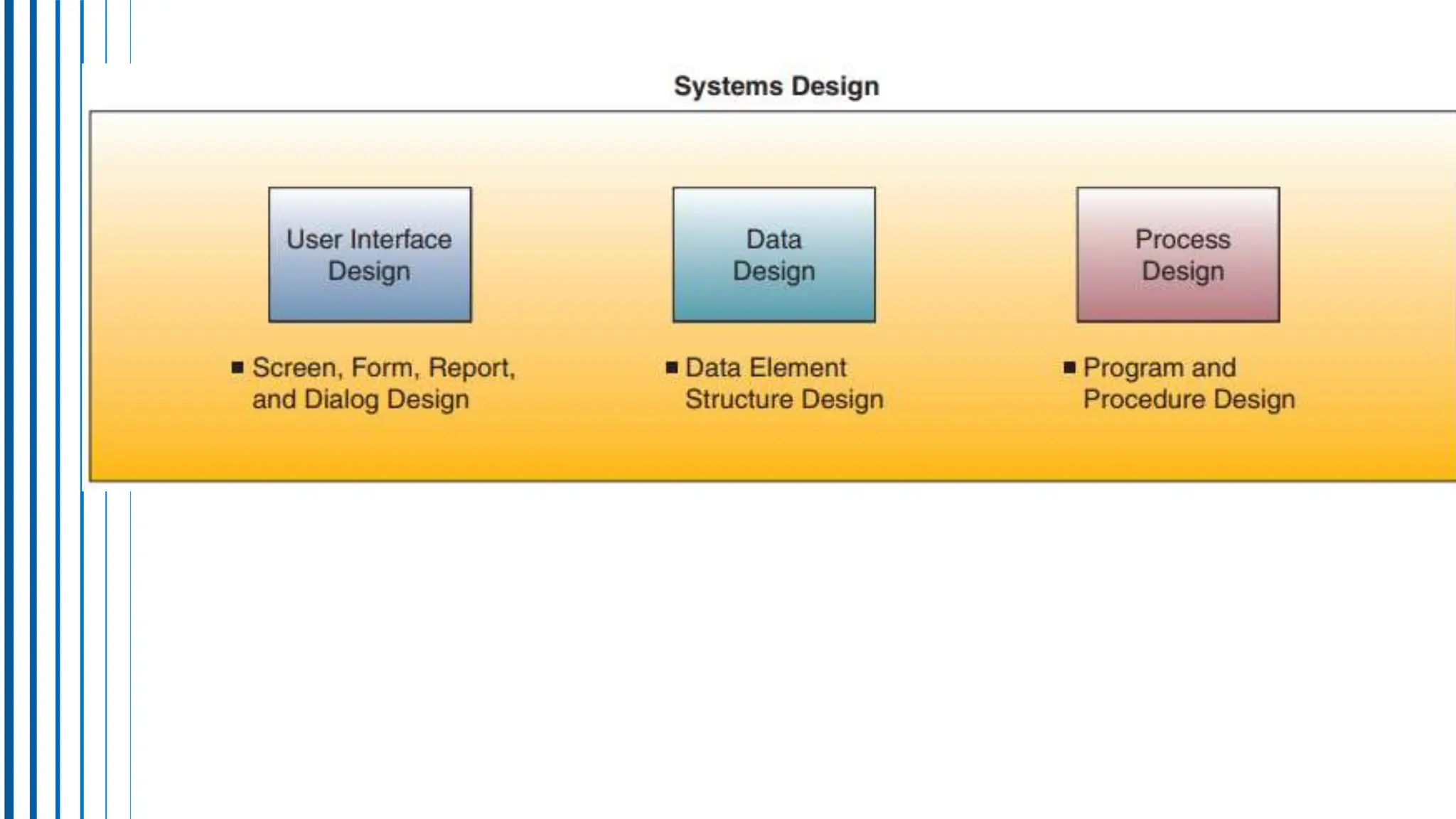
This process includes three key activities: user interface, data, and process design,
resulting in specifications for user interface methods and products, database
structures, and processing procedures.
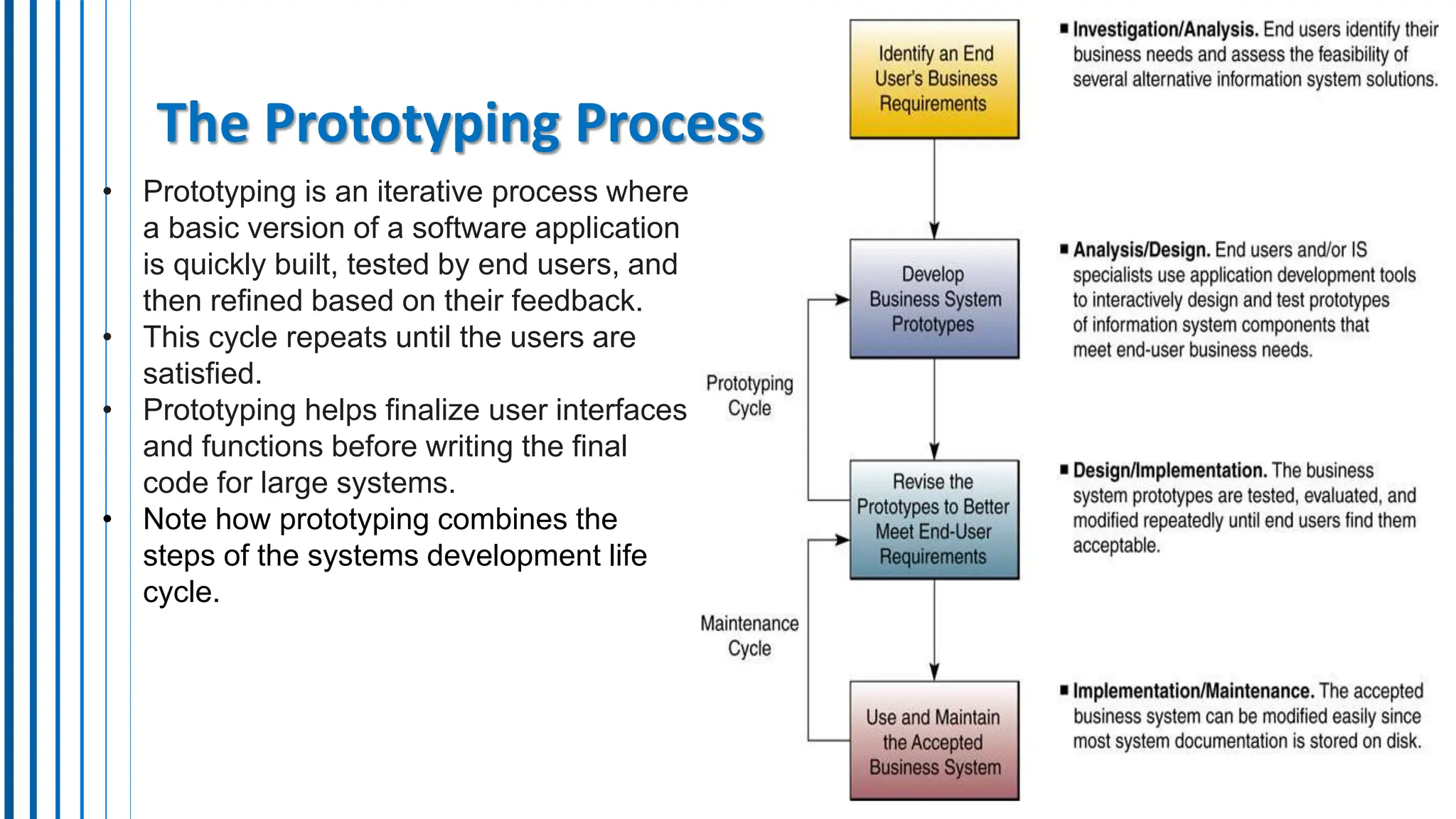
7. The Prototyping Process
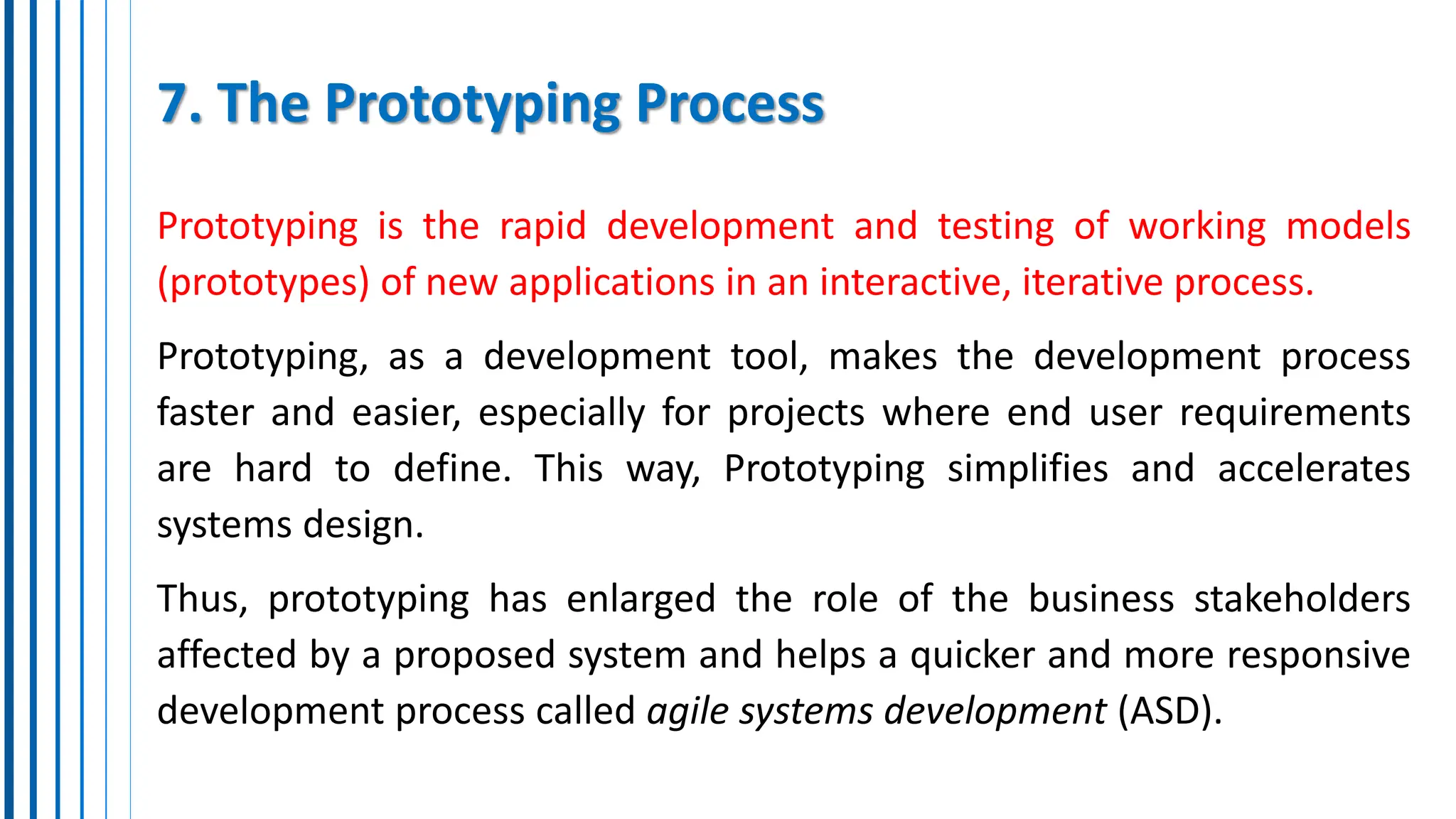
Prototyping is the rapid development and testing of working models
(prototypes) of new applications in an interactive, iterative process.
Prototyping, as a development tool, makes the development process
faster and easier, especially for projects where end user requirements
are hard to define. This way, Prototyping simplifies and accelerates
systems design.
Thus, prototyping has enlarged the role of the business stakeholders
affected by a proposed system and helps a quicker and more responsive
development process called agile systems development (ASD).
The Prototyping Process
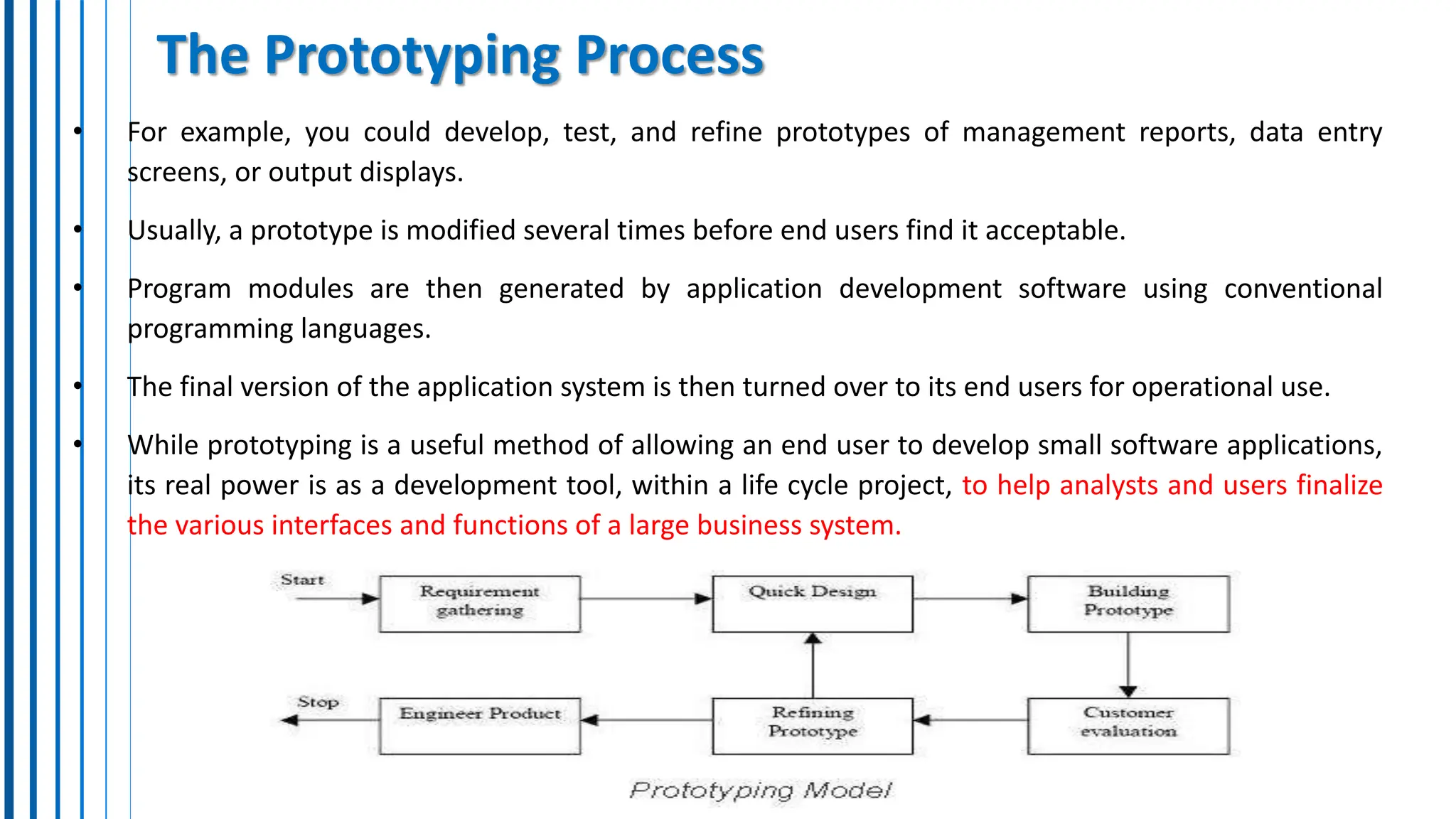
• Prototyping is an iterative process where
a basic version of a software application
is quickly built, tested by end users, and
then refined based on their feedback.
• This cycle repeats until the users are
satisfied.
• Prototyping helps finalize user interfaces
and functions before writing the final
code for large systems.
• Note how prototyping combines the
steps of the systems development life
cycle.
The Prototyping Process
• For example, you could develop, test, and refine prototypes of management reports, data entry
screens, or output displays.
• Usually, a prototype is modified several times before end users find it acceptable.
• Program modules are then generated by application development software using conventional
programming languages.
• The final version of the application system is then turned over to its end users for operational use.
• While prototyping is a useful method of allowing an end user to develop small software applications,
its real power is as a development tool, within a life cycle project, to help analysts and users finalize
the various interfaces and functions of a large business system.
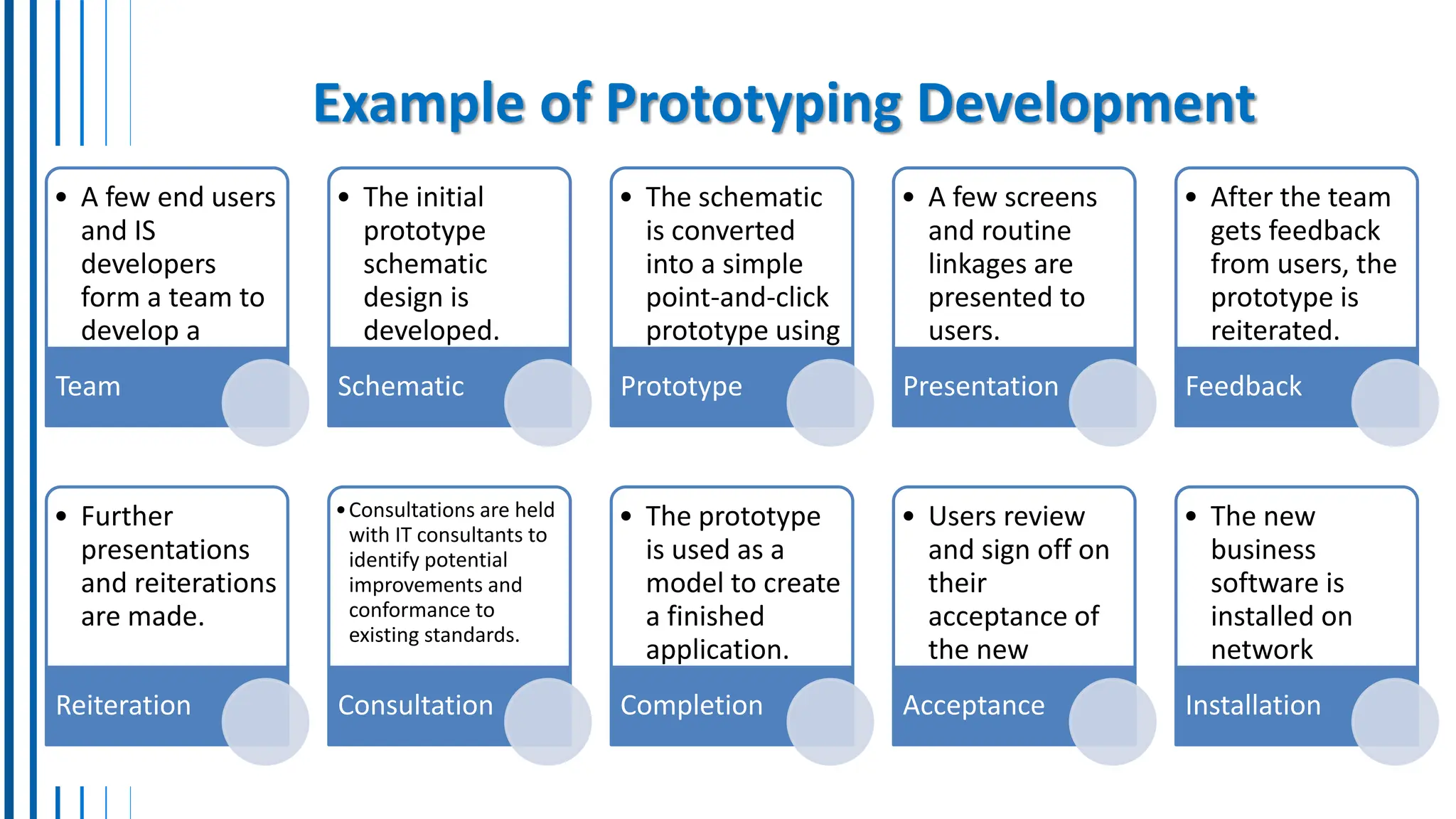
Example of Prototyping Development
• A few end users
and IS
developers
form a team to
develop a
business
application.
Team
• The initial
prototype
schematic
design is
developed.
Schematic
• The schematic
is converted
into a simple
point-and-click
prototype using
prototyping
tools.
Prototype
• A few screens
and routine
linkages are
presented to
users.
Presentation
• After the team
gets feedback
from users, the
prototype is
reiterated.
Feedback
• Further
presentations
and reiterations
are made.
Reiteration
•Consultations are held
with IT consultants to
identify potential
improvements and
conformance to
existing standards.
Consultation
• The prototype
is used as a
model to create
a finished
application.
Completion
• Users review
and sign off on
their
acceptance of
the new
business
system.
Acceptance
• The new
business
software is
installed on
network
servers.
Installation
8. User Interface Design (1)
•User interface design is a prototyping-like process, where working models or prototypes of user
interface methods are designed and modified several times with feedback from end users.
•Designers concentrate on the design of attractive and efficient forms of user input and output, such as
easy-to-use Internet or intranet Web pages.
•The user interface design process produces detailed design specifications for information products like
display screens, interactive user/computer dialogues audio responses, forms, documents, reports.
•The user interface design activity focuses on supporting the interactions between end users and their
computer-based applications.
•Based on this feedback, they refine the design, making it more user-friendly and efficient
•This iterative process continues until the UI is considered optimal for user interaction.
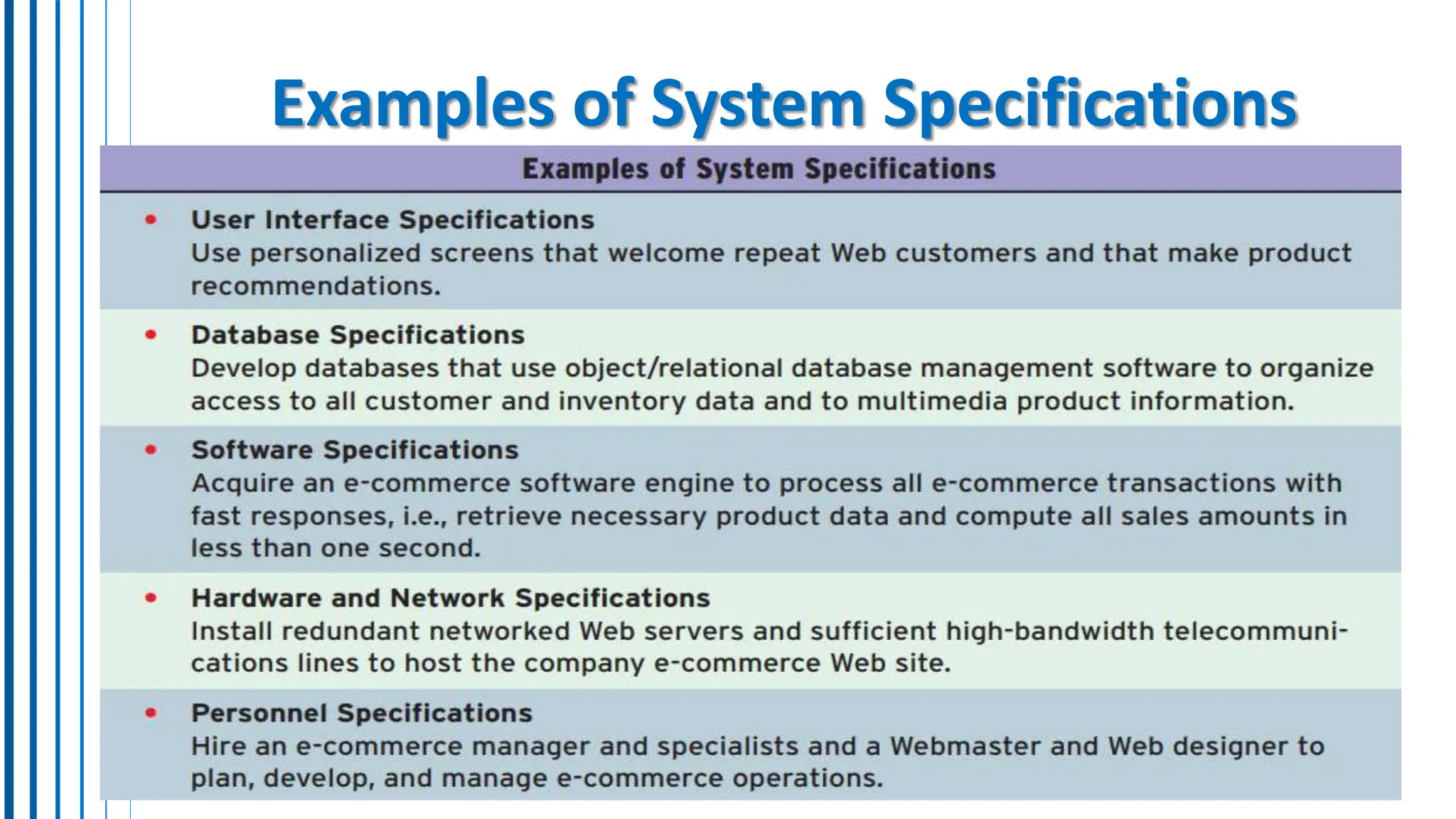
9. System Specifications
• System specifications formalize the design of an application’s user
interface methods and products, database structures, and processing
and control procedures.
• System specifications refer to detailed descriptions of the
technical characteristics and requirements of a system,
software application, or hardware device (hardware, software,
security, functional, UI requirements, performance, etc..)
• Therefore, systems designers will frequently develop hardware,
software, network, data, and personnel specifications for a proposed
system.
Examples of System Specifications
10. End-User Development/Involvement
Traditional Approach: You (the business user) request a system from
IT, answer questions, and provide background information. IT
analyzes, suggests solutions, then designs and implements the
chosen option. You might be involved in prototyping or
implementation. (Ex. need a certain registration system, outsource it)
End-User Development (EUD): IT acts as a consultant while
the business user take the lead in developing their own applications.
User consultants can help with training, software selection, data
access, and analysis/design/implementation (Ex. need a certain
registration system, do it locally and get some help)
11. Focus on IS Activities while developing designs
End-User applications should focus on:
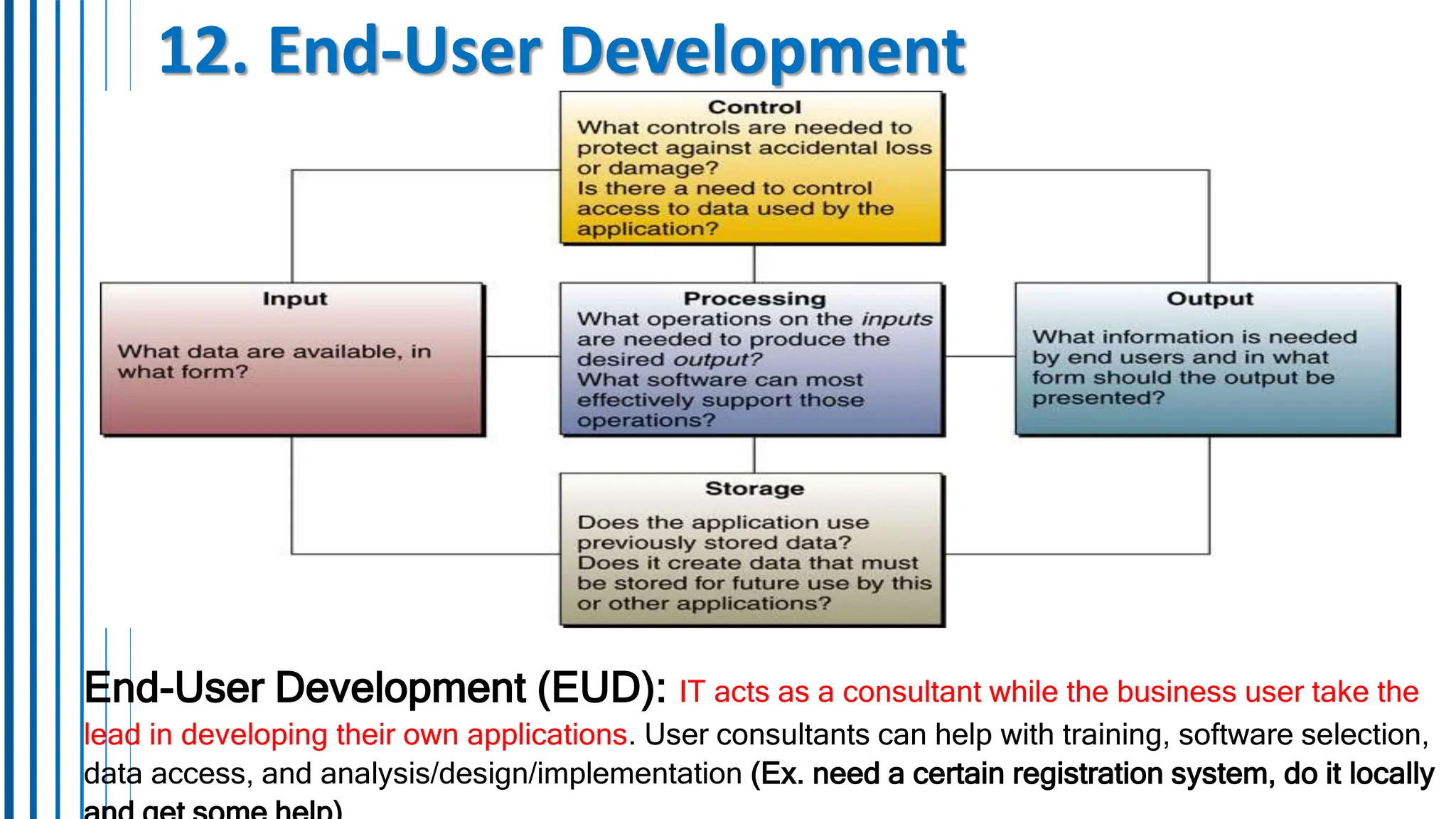
• Input: What data is needed? From where?
• Processing: What operations are needed to transform data?
• Output: What information is needed in what format?
• Storage: How much and where will data be stored?
• Control: How will data be protected from accidental loss or
misuse?
12. End-User Development
End-User Development (EUD): IT acts as a consultant while the business user take the
lead in developing their own applications. User consultants can help with training, software selection,
data access, and analysis/design/implementation (Ex. need a certain registration system, do it locally
End-User Tools
Developing with EUD Tools:
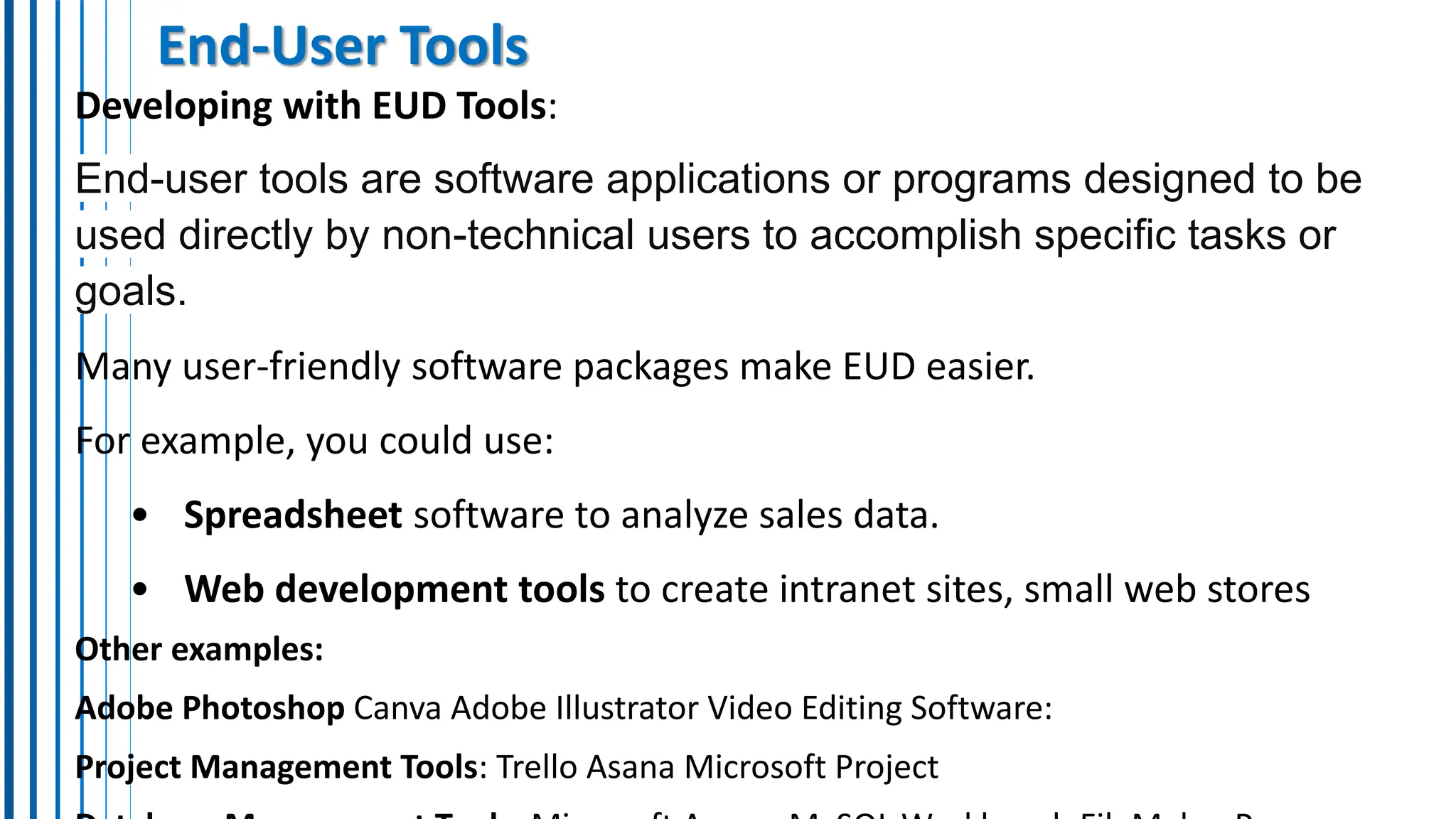
End-user tools are software applications or programs designed to be
used directly by non-technical users to accomplish specific tasks or
goals.
Many user-friendly software packages make EUD easier.
For example, you could use:
• Spreadsheet software to analyze sales data.
• Web development tools to create intranet sites, small web stores
Other examples:
Adobe Photoshop Canva Adobe Illustrator Video Editing Software:
Project Management Tools: Trello Asana Microsoft Project
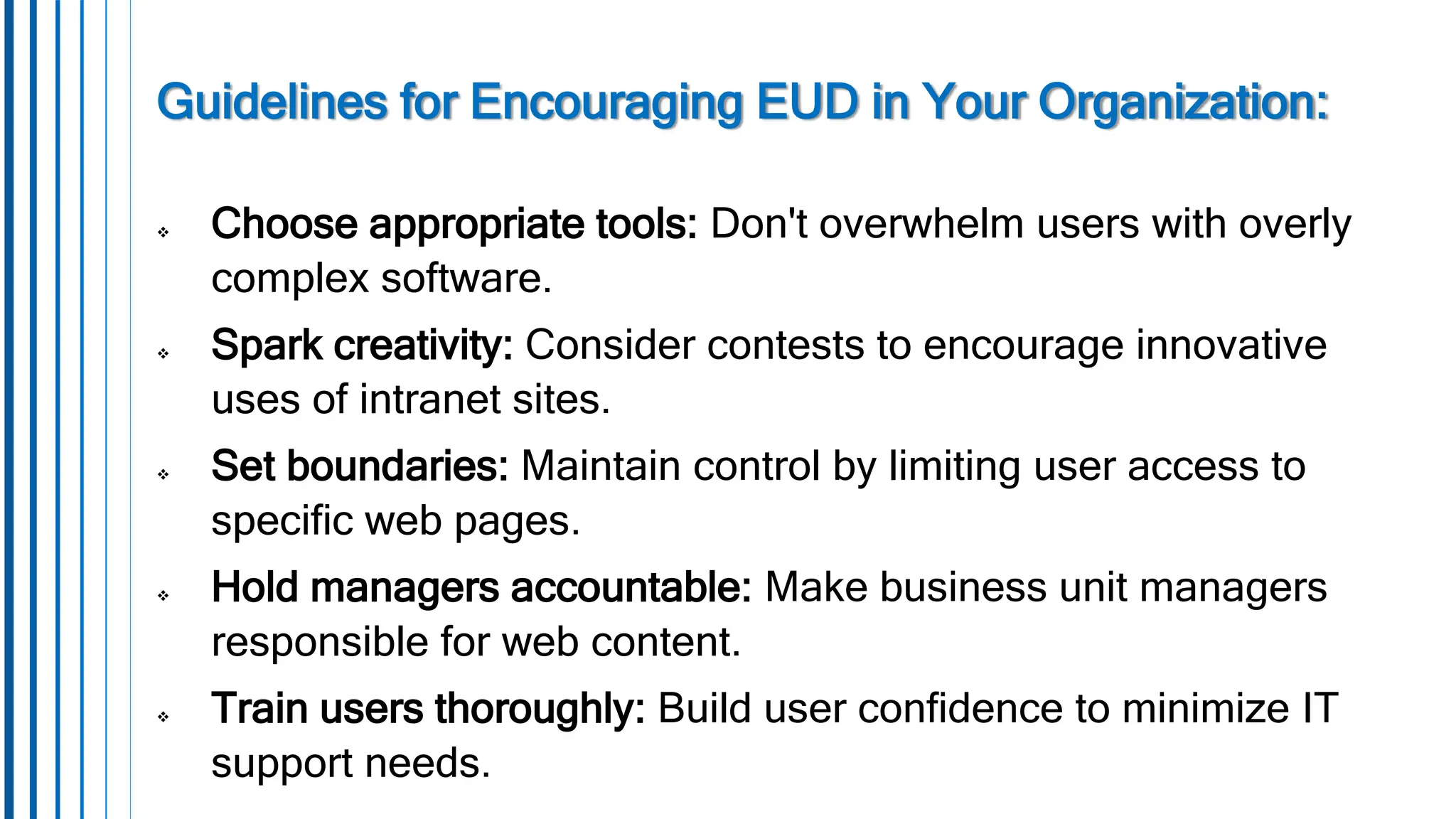
Guidelines for Encouraging EUD in Your Organization:
 Choose appropriate tools: Don't overwhelm users with overly
complex software.
 Spark creativity: Consider contests to encourage innovative
uses of intranet sites.
 Set boundaries: Maintain control by limiting user access to
specific web pages.
 Hold managers accountable: Make business unit managers
responsible for web content.
 Train users thoroughly: Build user confidence to minimize IT
support needs.
What we learned
• Use the systems development process,
• the model of IS components,
• problem-solving frameworks
• steps of the information systems development life cycle
• Systems Thinking;
• Feasibility Studies;
• Systems Analysis;
• Logical Analysis;
• Functional Requirements Analysis and Determination;
• Prototyping; The Prototyping Process;
• User Interface Design;

Part7-updated.pptx descrription of lectures

  • 1.
    Part 7 Chapter 12 Developingand Implementing Business/IT Systems
  • 2.
    Content Section 1: SystemsApproach • Business and Consumer Software; • IS Development; • The Systems Approach; • Systems Thinking; • Systems Analysis and Design; • The Systems Development Life Cycle; • Starting the Systems Development Process; • Feasibility Studies;
  • 3.
    Content Section 2: SystemAnalysis • Systems Analysis; • Organizational Analysis; • Analysis of the Present System; • Logical Analysis; • Functional Requirements Analysis and Determination; • Systems Design; • Prototyping; The Prototyping Process; • User Interface Design; • System Specification; • End-User Development; • Focus on IS Activities; • End-User Development.
  • 4.
  • 5.
    1. Introduction: • InformationSystems (IS) play a crucial role in creating solutions that meet the needs of organizations and individuals. • These systems are developed to streamline processes, enhance efficiency, and provide valuable insights through data analysis. • Suppose the CEO asks you to find a web enabled way to get information to and from the salespeople in your company. How would you start? Would you just plunge ahead and hope you could produce a reasonable solution? How would you know whether your solution was a good one for your company? • There is a systematic way, It’s a problem-solving process called the systems approach.
  • 6.
    2. IS Development →When the systems approach to problem-solving is applied to the development of information systems solutions to business problems, it is called information systems development or application development. → The Systems Approach is a systematic way to develop a solution to a problem or business opportunity.
  • 7.
    3. The SystemsApproach The systems approach to problem-solving: uses a systems orientation to define problems and opportunities and then develop appropriate, feasible solutions in response. Analyzing a problem and formulating a solution involve interrelated activities. A systems approach is a problem-solving method that looks at complex issues as interconnected systems rather than isolated parts. Applying this approach to IS development means considering how different components of an information system interact and impact each other, ensuring that the final solution addresses the entire system's needs.
  • 8.
    →Problem Solving Steps TheSystems Approach is a systematic way to develop a solution to a problem or business opportunity. Problem Solving – there are specific steps in solving any problem 1. Recognize/Define a Problem or Opportunity – recognize it exists 2. Develop and Evaluate Alternative System Solutions – what are the different ways to solve this problem? 3. Select the Best System Solution – decide which alternative is best 4. Design the Selected System Solution – design the system for the chosen solution 5. Implement and Evaluate the Success of the Designed System – put the solution into effect and monitor results for the outcome
  • 9.
    4. Systems thinking(1) Using systems thinking to understand a problem or opportunity is one of the most important aspects of the systems approach. Systems thinking involves understanding the interrelationships and dynamics within complex systems, seeing beyond individual components to grasp the system as a whole. Seeing the system context: 1. See the Interrelationships among the systems rather than linear cause-and-effect chains. 2. See the Process of change among the systems rather than discrete ‘snapshots’ of change
  • 10.
    Systems thinking (2) Thesales process of a business can be viewed as a system. You could then ask: Is poor sales performance (output) caused by inadequate selling effort (input), out-of-date sales procedures (processing), incorrect sales information (feedback), or inadequate sales management (control)? Example: You can better understand a sales problem or opportunity by identifying and evaluating the components of a sales system. One way of practicing systems thinking is to try to find systems, subsystems, and components of systems in any situation you are studying.
  • 11.
    5. Systems Analysisand Design Systems Analysis and Design (SAD) refers to the systematic process of designing and implementing information systems (IS) within organizations. It involves identifying business problems, proposing IS solutions, and then designing and implementing those solutions to achieve organizational goals. There are many approaches to SAD. The two most common approaches are: object-oriented analysis and design and the systems development life cycle approach. each has its advantages and disadvantages
  • 12.
    Systems Analysis andDesign Object-Oriented Analysis and Design (OOAD): Focuses on modeling the system using real-world objects and their interactions. Offers advantages in modularity and reusability. Systems Development Life Cycle (SDLC) Approach: Structures the development process into distinct phases (planning, analysis, design, implementation, operation, maintenance). Provides a clear roadmap for project management and control. → The choice between approaches depends on the system complexity & user involvement. • OOAD might be suitable for complex systems with well-defined objects. • SDLC might be preferred for projects with clearer requirements and structured proces
  • 13.
    6. The SystemsDevelopment Life Cycle  SLDC is a multistep, iterative process to designing systems and is very popular.  Follows a structured cycle of phases (investigation, analysis, design, implementation, and maintenance), ensuring a systematic and thorough development process.  Each phase contributes to the systematic development of an information system, with the ability to revisit and refine previous steps as needed.
  • 14.
    7. The SystemsDevelopment Process FIGURE 12.3 The traditional information systems development life cycle. Note how the five steps are based on the stages of the systems approach. Also note the products that result from each step in the cycle, and that you can recycle back to any previous step if more work is needed.
  • 15.
    The Traditional InformationSystems Development Life Cycle: Note how the five steps of the cycle are based on the stages of the systems approach. Also note the products that result from each step in the cycle, and that you can recycle back to any previous step if more work is needed. Stages of The Systems Approach: - Understand the Business Problem or Opportunity (step 1) - Develop an Information System Solution (steps 2, 3) - Implement the Information System Solution (steps 4, 5) The Five Steps Of The Cycle Are: 1) Systems Investigation Product: Feasibility Study - Determine how to address business opportunities and priorities. - Conduct a feasibility study to determine whether a new or improved business system is a feasible solution. - Develop a project management plan and obtain management approval 2) Systems Analysis Product: Functional Requirements - Analyze the information needs of employees, customers, and other business stakeholders. - Develop the functional requirements of a system that can meet business priorities and the needs of all stakeholders. - Develop logical models of current system
  • 16.
    3) Systems Design Product:System Specifications - Develop specifications for the hardware, software, people, network, and data resources, and the information products that will satisfy the functional requirements of the proposed business information system - Develop logical models of new system 4) Systems Implementation Product: Operational System Acquire (or develop) hardware and software. - Test the system, and train people to operate and use it. - Convert to the new business system. - Manage the effects of system changes on end users 5) Systems Maintenance Product: Improved System - Use a postimplementation review process to monitor, evaluate, and modify the business system as needed.
  • 17.
    Starting the SystemsDevelopment Process • The systems investigation stage typically requires the development of a feasibility study which identify needs, resources, costs, benefits. • Before starting development, investigations are conducted to determine the feasibility and strategic alignment of the proposed system with business priorities. This ensures that resources are allocated efficiently to projects that offer significant value. • Feasibility study involve a comprehensive assessment of various factors to determine the viability and potential success of the proposed system.
  • 18.
    8. Feasibility Studies Feasibility Studies involve a comprehensive assessment of various factors to determine the viability and potential success of the proposed system, those are:  Operational Feasibility  Technical Feasibility  Human Factors  Economic Feasibility  Legal/Political Feasibility
  • 19.
    A. Operational Feasibility Willthe proposed system fit existing business environment and objectives? Operational Feasibility evaluates how well the proposed system aligns with the current operations, processes, and goals of the organization. It looks at whether the system can be smoothly integrated into existing workflows and whether users will be able to adapt to and effectively use the new system.
  • 20.
    B. Economic Feasibility Theeconomic feasibility assessment determine to which extent the proposed system will provide positive economic benefits to the organization. It involves a thorough analysis of the costs and benefits, including tangible and intangible factors, associated with the proposed system throughout its lifecycle. This includes estimating initial development costs, ongoing operational expenses, potential cost savings or revenue generation, and the overall return on investment (ROI). • Cost/Benefit Analysis – do the benefits justify the costs? • Tangible Costs/Benefits – (hardware, software, increase in payroll) • Intangible Benefits – hard to calculate (customer approval, political feedback)
  • 21.
    C. Technical Feasibility TechnicalFeasibility involves evaluating the organization's existing technical resources, such as hardware, software, and operating environments, to determine their suitability for meeting the requirements of the proposed system. If the current technology is deemed sufficient, then the technical feasibility of the project is clear. If this is not the case, however, the analyst must determine whether the technology necessary to meet the stated specifications exists. Despite the claims of vendors that they can supply whatever is required, the analyst must be able to assess accurately the degree to which the needed technology exists in a form suitable for the proposed project.
  • 22.
    D. Human FactorsFeasibility The human factors feasibility assessment focuses on the managers and end users. The system will not work if the end users and managers do not perceive it to be relevant and, therefore, do not support it. In this category, we assess the degree of resistance to the proposed system, the perceived role of the end users in the development process, the degree of change to the end users’ working environment, and the current state of human resources available to conduct the project and to manage and use the system on completion.
  • 23.
    E. Legal/Political Feasibility Itincludes analysis of any potential legal complications resulting from the implementation of the new system. Such legal issues include copyright or patent infringements, violation of existing antitrust laws, foreign trade restrictions, or any existing contractual obligations of the organization. The political side of the assessment focuses on understanding to which degree the proposed system may positively or negatively affect the distribution of power of key stakeholders. Such distribution can have major political impacts and may cause disruption or failure of a relevant development effort.
  • 24.
  • 25.
  • 26.
    Content Section 2: • SystemsAnalysis; • Organizational Analysis; • Analysis of the Present System; • Logical Analysis; • Functional Requirements Analysis and Determination; • Systems Design; • Prototyping; The Prototyping Process; • User Interface Design; • System Specification; • End-User Development; • Focus on IS Activities; • End-User Development.
  • 27.
    1. SYSTEMS ANALYSIS Systemsanalysis is the study of end-user information needs to produce functional requirements that are used for the design of a new information system. Systems analysis traditionally involves a detailed study of: → The information needs of a company and end users like yourself. → The activities, resources, and products of the present information systems being used. → The information system capabilities required to meet your information needs, and those of other business stakeholders that may use the system. System analysis involves: Organizational analysis, analysis of present systems, logical analysis, functional requirement analysis. Functional requirements are specifications that describe the intended behavior and functionality of a system, software application, or product. These requirements detail what the system should do in order to fulfill the needs of its users or stakeholders. They typically outline specific features, functions, and capabilities that the system must possess
  • 28.
    2. Organizational Analysis(starting point) • Organizational analysis is an important starting point in systems analysis because the development team needs an in-depth understanding of the organization, including its management structure, people, business activities, environmental systems, and current information systems. • This knowledge must be more detailed for specific business units or end- user workgroups impacted by proposed system changes. • For instance, designing a new inventory control system for a chain of department stores requires a team member with extensive knowledge of the company and its inventory-related business activities..
  • 29.
    3. Analysis ofthe Present Systems Before designing a new system, it's vital to analyze the current system being improved or replaced. This involves understanding how the system uses hardware, software, networks, and human resources to turn data into useful information like reports and displays. You also document how the system manages input, processing, output, storage, and control activities. For instance, you assess the format, timing, volume, and quality of input and output processes crucial for user-computer interaction. This analysis guides the specification of resources, products, and activities supporting the user interface in the new system during the design phase.
  • 30.
    Why Analysis ofthe Present System • Analysis of the Present System is important as it lays the foundation for identifying strengths, weaknesses, opportunities, and threats within the existing system (SWOT). • By studying the past performance and outcomes, organizations can learn valuable lessons and avoid repeating mistakes. • It also aids in recognizing areas for improvement and innovation, ensuring that the new system meets evolving business needs effectively.
  • 31.
    4. Logical Analysis LogicalAnalysis focuses on creating logical models that define WHAT the system should do without getting into the specifics of HOW it accomplishes those tasks. This approach helps in conceptualizing the core functions and processes required in the new system. By separating the logical structure from implementation details, analysts can develop a clear blueprint that outlines the essential functionalities and data flows necessary for the system's success.
  • 32.
    Logical Analysis –Note: → Logical model acts as a blueprint (plan, graph), showing system functionalities without technical details. → Helps understand processes, functions, and data without hardware/software complexities. → Includes non-computer components for comprehensive analysis. Example
  • 33.
    5. Functional RequirementsAnalysis and Determination Functional Requirements Analysis and Determination is a detailed process of identifying the specific information needs for each business activity within the organization. It involves determining what information is required, in what format, and with what frequency for various operational tasks. Simultaneously, this analysis considers the processing capabilities needed to transform raw data into meaningful insights and outputs. By defining functional requirements, organizations can ensure that the new system aligns perfectly with business objectives and supports efficient decision-making processes across all levels.
  • 34.
    6. SYSTEMS DESIGN Oncesystems analysis is finished, systems design can commence. This stage involves refining the logical model of the current system to create a blueprint for the new system. The modified logical model reflects the functionality of the new system. During the physical design phase, attention shifts to how the system will achieve its goals, covering aspects like hardware, software, networking, data storage, and security. Systems design produces specifications that meet the functional requirements identified in systems analysis. This process includes three key activities: user interface, data, and process design, resulting in specifications for user interface methods and products, database structures, and processing procedures.
  • 36.
    7. The PrototypingProcess Prototyping is the rapid development and testing of working models (prototypes) of new applications in an interactive, iterative process. Prototyping, as a development tool, makes the development process faster and easier, especially for projects where end user requirements are hard to define. This way, Prototyping simplifies and accelerates systems design. Thus, prototyping has enlarged the role of the business stakeholders affected by a proposed system and helps a quicker and more responsive development process called agile systems development (ASD).
  • 37.
    The Prototyping Process •Prototyping is an iterative process where a basic version of a software application is quickly built, tested by end users, and then refined based on their feedback. • This cycle repeats until the users are satisfied. • Prototyping helps finalize user interfaces and functions before writing the final code for large systems. • Note how prototyping combines the steps of the systems development life cycle.
  • 38.
    The Prototyping Process •For example, you could develop, test, and refine prototypes of management reports, data entry screens, or output displays. • Usually, a prototype is modified several times before end users find it acceptable. • Program modules are then generated by application development software using conventional programming languages. • The final version of the application system is then turned over to its end users for operational use. • While prototyping is a useful method of allowing an end user to develop small software applications, its real power is as a development tool, within a life cycle project, to help analysts and users finalize the various interfaces and functions of a large business system.
  • 39.
    Example of PrototypingDevelopment • A few end users and IS developers form a team to develop a business application. Team • The initial prototype schematic design is developed. Schematic • The schematic is converted into a simple point-and-click prototype using prototyping tools. Prototype • A few screens and routine linkages are presented to users. Presentation • After the team gets feedback from users, the prototype is reiterated. Feedback • Further presentations and reiterations are made. Reiteration •Consultations are held with IT consultants to identify potential improvements and conformance to existing standards. Consultation • The prototype is used as a model to create a finished application. Completion • Users review and sign off on their acceptance of the new business system. Acceptance • The new business software is installed on network servers. Installation
  • 40.
    8. User InterfaceDesign (1) •User interface design is a prototyping-like process, where working models or prototypes of user interface methods are designed and modified several times with feedback from end users. •Designers concentrate on the design of attractive and efficient forms of user input and output, such as easy-to-use Internet or intranet Web pages. •The user interface design process produces detailed design specifications for information products like display screens, interactive user/computer dialogues audio responses, forms, documents, reports. •The user interface design activity focuses on supporting the interactions between end users and their computer-based applications. •Based on this feedback, they refine the design, making it more user-friendly and efficient •This iterative process continues until the UI is considered optimal for user interaction.
  • 41.
    9. System Specifications •System specifications formalize the design of an application’s user interface methods and products, database structures, and processing and control procedures. • System specifications refer to detailed descriptions of the technical characteristics and requirements of a system, software application, or hardware device (hardware, software, security, functional, UI requirements, performance, etc..) • Therefore, systems designers will frequently develop hardware, software, network, data, and personnel specifications for a proposed system.
  • 42.
    Examples of SystemSpecifications
  • 43.
    10. End-User Development/Involvement TraditionalApproach: You (the business user) request a system from IT, answer questions, and provide background information. IT analyzes, suggests solutions, then designs and implements the chosen option. You might be involved in prototyping or implementation. (Ex. need a certain registration system, outsource it) End-User Development (EUD): IT acts as a consultant while the business user take the lead in developing their own applications. User consultants can help with training, software selection, data access, and analysis/design/implementation (Ex. need a certain registration system, do it locally and get some help)
  • 44.
    11. Focus onIS Activities while developing designs End-User applications should focus on: • Input: What data is needed? From where? • Processing: What operations are needed to transform data? • Output: What information is needed in what format? • Storage: How much and where will data be stored? • Control: How will data be protected from accidental loss or misuse?
  • 45.
    12. End-User Development End-UserDevelopment (EUD): IT acts as a consultant while the business user take the lead in developing their own applications. User consultants can help with training, software selection, data access, and analysis/design/implementation (Ex. need a certain registration system, do it locally
  • 46.
    End-User Tools Developing withEUD Tools: End-user tools are software applications or programs designed to be used directly by non-technical users to accomplish specific tasks or goals. Many user-friendly software packages make EUD easier. For example, you could use: • Spreadsheet software to analyze sales data. • Web development tools to create intranet sites, small web stores Other examples: Adobe Photoshop Canva Adobe Illustrator Video Editing Software: Project Management Tools: Trello Asana Microsoft Project
  • 47.
    Guidelines for EncouragingEUD in Your Organization:  Choose appropriate tools: Don't overwhelm users with overly complex software.  Spark creativity: Consider contests to encourage innovative uses of intranet sites.  Set boundaries: Maintain control by limiting user access to specific web pages.  Hold managers accountable: Make business unit managers responsible for web content.  Train users thoroughly: Build user confidence to minimize IT support needs.
  • 49.
    What we learned •Use the systems development process, • the model of IS components, • problem-solving frameworks • steps of the information systems development life cycle • Systems Thinking; • Feasibility Studies; • Systems Analysis; • Logical Analysis; • Functional Requirements Analysis and Determination; • Prototyping; The Prototyping Process; • User Interface Design;

Editor's Notes

  • #15 The Traditional Information Systems Development Life Cycle: Note how the five steps of the cycle are based on the stages of the systems approach. Also note the products that result from each step in the cycle, and that you can recycle back to any previous step if more work is needed. Stages of The Systems Approach: Understand the Business Problem or Opportunity (step 1) Develop an Information System Solution (steps 2, 3) Implement the Information System Solution (steps 4, 5) The Five Steps Of The Cycle Are: 1) Systems Investigation Product: Feasibility Study Determine how to address business opportunities and priorities. Conduct a feasibility study to determine whether a new or improved business system is a feasible solution. Develop a project management plan and obtain management approval 2) Systems Analysis Product: Functional Requirements - Analyze the information needs of employees, customers, and other business stakeholders. - Develop the functional requirements of a system that can meet business priorities and the needs of all stakeholders. - Develop logical models of current system 3) Systems Design Product: System Specifications - Develop specifications for the hardware, software, people, network, and data resources, and the information products that will satisfy the functional requirements of the proposed business information system - Develop logical models of new system 4) Systems Implementation Product: Operational System Acquire (or develop) hardware and software. - Test the system, and train people to operate and use it. - Convert to the new business system. - Manage the effects of system changes on end users 5) Systems Maintenance Product: Improved System - Use a postimplementation review process to monitor, evaluate, and modify the business system as needed.
  • #34 During the analysis phase, one crucial activity is creating a logical model of the current system. This model acts as a blueprint, showing what the system does without delving into the technical details of how it operates. By developing and studying this logical model, a systems analyst gains a clear understanding of the system's processes, functions, and data without being overwhelmed by hardware or software complexities. Moreover, the logical model allows for the inclusion, analysis, and comprehension of non-computer components within the system. For instance, in a physical system, an inbox might serve as a temporary storage for new orders before they are entered digitally. In the logical model, this inbox is treated akin to electronic storage, simplifying data management. Logical and physical models are not unique to information system design but are widely applicable, as seen in home remodeling scenarios. Imagine wanting to expand two bedrooms into one and add a new bathroom. Without a blueprint, demolishing a wall could lead to structural issues. In contrast, with a logical model, potential changes can be assessed before physical alterations, avoiding costly mistakes. Similarly, in information system design, a solid logical model ensures informed decision-making during the subsequent design phases, ultimately leading to successful implementations. Thus, the logical model serves as a roadmap for planning and executing system improvements efficiently.