Chapter 1
Assuming the Role of the
Systems Analyst
Systems Analysis and Design
Kendall & Kendall
Sixth Edition
Kendall & Kendall 2005 Pearson Prentice Hall 1-2
Major Topics
• Information systems
• Phases of analysis and design
• System maintenance
• CASE tools
• Alternate methodologies
Kendall & Kendall 2005 Pearson Prentice Hall 1-3
Information
• Information is an organizational
resource, which must be managed as
carefully as other resources.
• Costs are associated with information
processing.
• Information processing must be
managed to take full advantage of its
potential.
Kendall & Kendall 2005 Pearson Prentice Hall 1-4
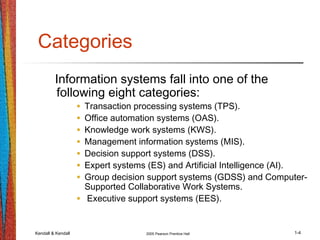
Categories
Information systems fall into one of the
following eight categories:
• Transaction processing systems (TPS).
• Office automation systems (OAS).
• Knowledge work systems (KWS).
• Management information systems (MIS).
• Decision support systems (DSS).
• Expert systems (ES) and Artificial Intelligence (AI).
• Group decision support systems (GDSS) and Computer-
Supported Collaborative Work Systems.
• Executive support systems (EES).
Kendall & Kendall 2005 Pearson Prentice Hall 1-5
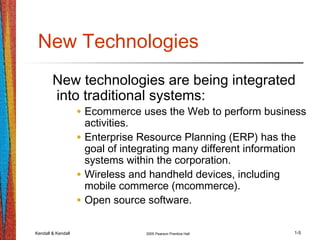
New Technologies
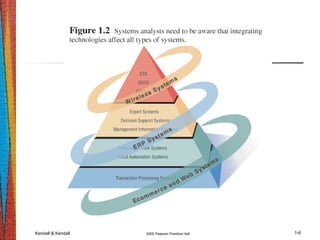
New technologies are being integrated
into traditional systems:
• Ecommerce uses the Web to perform business
activities.
• Enterprise Resource Planning (ERP) has the
goal of integrating many different information
systems within the corporation.
• Wireless and handheld devices, including
mobile commerce (mcommerce).
• Open source software.
Kendall & Kendall 2005 Pearson Prentice Hall 1-6
Kendall & Kendall 2005 Pearson Prentice Hall 1-7
Advantages of Using the Web
• The benefits of using the Web are:
• Increasing awareness of the availability
of the service, product, industry,
person, or group.
• 24-hour access for users.
• Standard interface design.
• Creating a global system.
Kendall & Kendall 2005 Pearson Prentice Hall 1-8
Nature of Analysis and Design
Systems analysis and design is a
systematic approach to:
• Identifying problems, opportunities, and
objectives.
• Analyzing the information flows in
organizations.
• Designing computerized information
systems to solve a problem.
Kendall & Kendall 2005 Pearson Prentice Hall 1-9
Systems Analyst
• Systems analysts act as:
• Outside consultants to businesses.
• Supporting experts within a business.
• As change agents.
• Analysts are problem solvers, and
require communication skills.
• Analysts must be ethical with users and
customers.
Kendall & Kendall 2005 Pearson Prentice Hall 1-10
Systems Development Life
Cycle
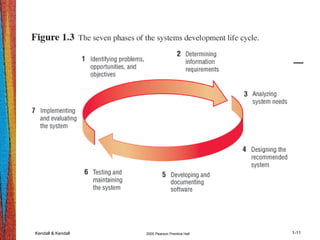
• The systems development life cycle is a
systematic approach to solving
business problems.
• It is divided into seven phases.
• Each phase has unique activities.
Kendall & Kendall 2005 Pearson Prentice Hall 1-11
Kendall & Kendall 2005 Pearson Prentice Hall 1-12
Phase 1
• Identifying:
• Problems.
• Opportunities.
• Objectives.
• Personnel involved:
• Analyst.
• User management.
• Systems management.
Kendall & Kendall 2005 Pearson Prentice Hall 1-13
Phase 2
• Determining information requirements:
• Interview management, operations personnel.
• Gather systems/operating documents.
• Use questionnaires.
• Observe the system and personnel involved.
• Learn the who, what, where, when, and how,
and the why for each of these.
Kendall & Kendall 2005 Pearson Prentice Hall 1-14
Phase 2 (Continued)
• Personnel involved:
• Analyst.
• User management.
• User operations workers.
• Systems management.
Kendall & Kendall 2005 Pearson Prentice Hall 1-15
Phase 3
• Analyzing system needs:
• Create data flow diagrams.
• Document procedural logic for data flow diagram
processes.
• Complete the data dictionary.
• Make semistructured decisions.
• Prepare and present the system proposal.
• Recommend the optimal solution to management.
Kendall & Kendall 2005 Pearson Prentice Hall 1-16
Phase 3 (Continued)
• Personnel involved:
• Analyst.
• User management.
• Systems management.
Kendall & Kendall 2005 Pearson Prentice Hall 1-17
Phase 4
• Designing the recommended system:
• Design the user interface.
• Design output.
• Design input.
• Design system controls.
• Design files and/or database.
• Produce program specifications.
• Produce decision trees or tables.
Kendall & Kendall 2005 Pearson Prentice Hall 1-18
Phase 4 (Continued)
• Personnel involved:
• Analyst.
• System designer.
• User management.
• User operations workers.
• Systems management.
Kendall & Kendall 2005 Pearson Prentice Hall 1-19
Phase 5
• Developing and documenting software:
• Design computer programs using structure
charts, Nassi-Schneiderman charts, and
pseudocode.
• Walkthrough program design.
• Write computer programs.
• Document software with help files,
procedure manuals, and Web sites with
Frequently Asked Questions.
Kendall & Kendall 2005 Pearson Prentice Hall 1-20
Phase 5 (Continued)
• Personnel involved:
• Analyst.
• System designer.
• Programmers.
• Systems management.
Kendall & Kendall 2005 Pearson Prentice Hall 1-21
Phase 6
• Testing and maintaining the system:
• Test and debug computer programs.
• Test the computer system.
• Enhance system.
Kendall & Kendall 2005 Pearson Prentice Hall 1-22
Phase 6 (Continued)
• Personnel involved:
• Analyst.
• System designer.
• Programmers.
• Systems management.
Kendall & Kendall 2005 Pearson Prentice Hall 1-23
Phase 7
• Implementing and evaluating the
system:
• Plan conversion.
• Train users.
• Purchase and install new equipment.
• Convert files.
• Install system.
• Review and evaluate system.
Kendall & Kendall 2005 Pearson Prentice Hall 1-24
Phase 7 (Continued)
• Personnel involved:
• Analyst.
• System designer.
• Programmers.
• User management.
• User operations workers.
• Systems management.
Kendall & Kendall 2005 Pearson Prentice Hall 1-25
Rapid Application
Development
Rapid Application development (RAD) is
an object-oriented approach to systems
development.
Kendall & Kendall 2005 Pearson Prentice Hall 1-26
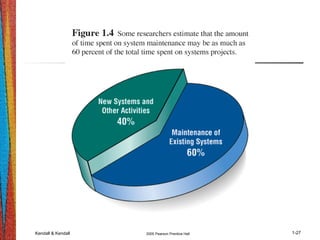
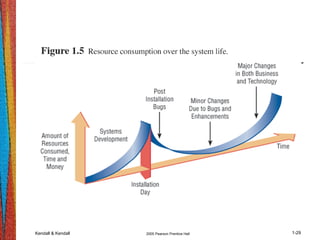
System Maintenance
• System maintenance is:
• Removing undetected errors, and
• Enhancing existing software.
• Time spent on maintenance typically
ranges from 48-60 percent of total time.
Kendall & Kendall 2005 Pearson Prentice Hall 1-27
Kendall & Kendall 2005 Pearson Prentice Hall 1-28
System Enhancements
Systems are enhanced for the following
reasons:
• Adding additional features to the system.
• Business and governmental requirements
change over time.
• Technology, hardware, and software are
rapidly changing.
Kendall & Kendall 2005 Pearson Prentice Hall 1-29
Kendall & Kendall 2005 Pearson Prentice Hall 1-30
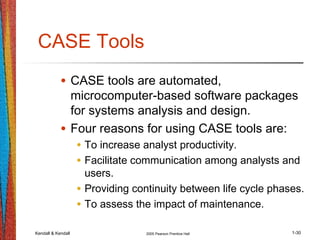
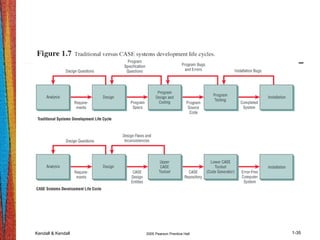
CASE Tools
• CASE tools are automated,
microcomputer-based software packages
for systems analysis and design.
• Four reasons for using CASE tools are:
• To increase analyst productivity.
• Facilitate communication among analysts and
users.
• Providing continuity between life cycle phases.
• To assess the impact of maintenance.
Kendall & Kendall 2005 Pearson Prentice Hall 1-31
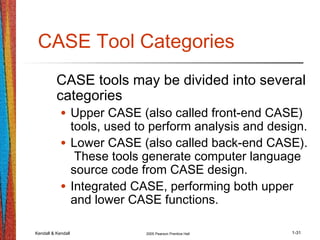
CASE Tool Categories
CASE tools may be divided into several
categories
• Upper CASE (also called front-end CASE)
tools, used to perform analysis and design.
• Lower CASE (also called back-end CASE).
These tools generate computer language
source code from CASE design.
• Integrated CASE, performing both upper
and lower CASE functions.
Kendall & Kendall 2005 Pearson Prentice Hall 1-32
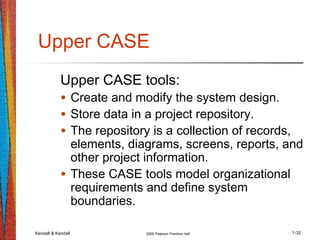
Upper CASE
Upper CASE tools:
• Create and modify the system design.
• Store data in a project repository.
• The repository is a collection of records,
elements, diagrams, screens, reports, and
other project information.
• These CASE tools model organizational
requirements and define system
boundaries.
Kendall & Kendall 2005 Pearson Prentice Hall 1-33
Lower CASE
• Lower CASE tools generate computer
source code from the CASE design.
• Source code may usually be generated
in several languages.
Kendall & Kendall 2005 Pearson Prentice Hall 1-34
Advantages of Generating
Code
• Time to develop new systems decreases.
• The time to maintain generated code is less than
to maintain traditional systems.
• Computer programs may be generated in more
than one language.
• CASE design may be purchased from third-party
vendors and tailored to organizational needs.
• Generated code is free from program coding
errors.
Kendall & Kendall 2005 Pearson Prentice Hall 1-35
Kendall & Kendall 2005 Pearson Prentice Hall 1-36
Reverse Engineering
• Reverse engineering is generating the
CASE design from computer program
code.
• Source code is examined, analyzed,
and converted into repository entities.
Kendall & Kendall 2005 Pearson Prentice Hall 1-37
Reverse Engineering
(Continued)
• Reverse engineering produces
(depending on the tool set used):
• Data structures and elements, describing
the files, records, and field.
• Screen designs, if the program is online.
• Report layouts for batch programs.
• A structure chart showing the hierarchy of
the modules in the program.
• Database design and relationships.
Kendall & Kendall 2005 Pearson Prentice Hall 1-38
Advantages of Reverse
Engineering
Reverse Engineering has the following
advantages:
• Reduced system maintenance time.
• Program documentation is produced for loosely
documented programs.
• Structured programs may be generated from
unstructured, older programs.
• Future system maintenance is easier to
implement.
• Unused portions of programs may be eliminated.
Kendall & Kendall 2005 Pearson Prentice Hall 1-39
Object-Oriented Analysis and
Design
• Object-oriented (O-O) analysis and
design is used to build object-oriented
programs.
• O-O programming examines the objects
of a system.
• Objects are grouped into classes for
optimal reuse and maintainability.
Kendall & Kendall 2005 Pearson Prentice Hall 1-40
The Unified Modeling
Language
• The Unified Modeling Language (UML)
is an industry standard for modeling
object-oriented systems.
• It breaks down a system into a use
case model.
Kendall & Kendall 2005 Pearson Prentice Hall 1-41
Extreme Programming (XP)
• Extreme programming takes good
software development practices and
pushes them to the limit.
• It is based on:
• Values.
• Principles.
• Core practices.
Kendall & Kendall 2005 Pearson Prentice Hall 1-42
Extreme Programming (XP)
(Continued)
• Extreme programming values are:
• Communication.
• Simplicity.
• Feedback.
• Courage.
Kendall & Kendall 2005 Pearson Prentice Hall 1-43
Alternate Methodologies
• Alternate methodologies are available
for analyzing systems.
• These include:
• Prototyping.
• ETHICS.
• Project Champions.
• Soft Systems Methodology.
• Multi-view.

PPT01

  • 1.
    Chapter 1 Assuming theRole of the Systems Analyst Systems Analysis and Design Kendall & Kendall Sixth Edition
  • 2.
    Kendall & Kendall2005 Pearson Prentice Hall 1-2 Major Topics • Information systems • Phases of analysis and design • System maintenance • CASE tools • Alternate methodologies
  • 3.
    Kendall & Kendall2005 Pearson Prentice Hall 1-3 Information • Information is an organizational resource, which must be managed as carefully as other resources. • Costs are associated with information processing. • Information processing must be managed to take full advantage of its potential.
  • 4.
    Kendall & Kendall2005 Pearson Prentice Hall 1-4 Categories Information systems fall into one of the following eight categories: • Transaction processing systems (TPS). • Office automation systems (OAS). • Knowledge work systems (KWS). • Management information systems (MIS). • Decision support systems (DSS). • Expert systems (ES) and Artificial Intelligence (AI). • Group decision support systems (GDSS) and Computer- Supported Collaborative Work Systems. • Executive support systems (EES).
  • 5.
    Kendall & Kendall2005 Pearson Prentice Hall 1-5 New Technologies New technologies are being integrated into traditional systems: • Ecommerce uses the Web to perform business activities. • Enterprise Resource Planning (ERP) has the goal of integrating many different information systems within the corporation. • Wireless and handheld devices, including mobile commerce (mcommerce). • Open source software.
  • 6.
    Kendall & Kendall2005 Pearson Prentice Hall 1-6
  • 7.
    Kendall & Kendall2005 Pearson Prentice Hall 1-7 Advantages of Using the Web • The benefits of using the Web are: • Increasing awareness of the availability of the service, product, industry, person, or group. • 24-hour access for users. • Standard interface design. • Creating a global system.
  • 8.
    Kendall & Kendall2005 Pearson Prentice Hall 1-8 Nature of Analysis and Design Systems analysis and design is a systematic approach to: • Identifying problems, opportunities, and objectives. • Analyzing the information flows in organizations. • Designing computerized information systems to solve a problem.
  • 9.
    Kendall & Kendall2005 Pearson Prentice Hall 1-9 Systems Analyst • Systems analysts act as: • Outside consultants to businesses. • Supporting experts within a business. • As change agents. • Analysts are problem solvers, and require communication skills. • Analysts must be ethical with users and customers.
  • 10.
    Kendall & Kendall2005 Pearson Prentice Hall 1-10 Systems Development Life Cycle • The systems development life cycle is a systematic approach to solving business problems. • It is divided into seven phases. • Each phase has unique activities.
  • 11.
    Kendall & Kendall2005 Pearson Prentice Hall 1-11
  • 12.
    Kendall & Kendall2005 Pearson Prentice Hall 1-12 Phase 1 • Identifying: • Problems. • Opportunities. • Objectives. • Personnel involved: • Analyst. • User management. • Systems management.
  • 13.
    Kendall & Kendall2005 Pearson Prentice Hall 1-13 Phase 2 • Determining information requirements: • Interview management, operations personnel. • Gather systems/operating documents. • Use questionnaires. • Observe the system and personnel involved. • Learn the who, what, where, when, and how, and the why for each of these.
  • 14.
    Kendall & Kendall2005 Pearson Prentice Hall 1-14 Phase 2 (Continued) • Personnel involved: • Analyst. • User management. • User operations workers. • Systems management.
  • 15.
    Kendall & Kendall2005 Pearson Prentice Hall 1-15 Phase 3 • Analyzing system needs: • Create data flow diagrams. • Document procedural logic for data flow diagram processes. • Complete the data dictionary. • Make semistructured decisions. • Prepare and present the system proposal. • Recommend the optimal solution to management.
  • 16.
    Kendall & Kendall2005 Pearson Prentice Hall 1-16 Phase 3 (Continued) • Personnel involved: • Analyst. • User management. • Systems management.
  • 17.
    Kendall & Kendall2005 Pearson Prentice Hall 1-17 Phase 4 • Designing the recommended system: • Design the user interface. • Design output. • Design input. • Design system controls. • Design files and/or database. • Produce program specifications. • Produce decision trees or tables.
  • 18.
    Kendall & Kendall2005 Pearson Prentice Hall 1-18 Phase 4 (Continued) • Personnel involved: • Analyst. • System designer. • User management. • User operations workers. • Systems management.
  • 19.
    Kendall & Kendall2005 Pearson Prentice Hall 1-19 Phase 5 • Developing and documenting software: • Design computer programs using structure charts, Nassi-Schneiderman charts, and pseudocode. • Walkthrough program design. • Write computer programs. • Document software with help files, procedure manuals, and Web sites with Frequently Asked Questions.
  • 20.
    Kendall & Kendall2005 Pearson Prentice Hall 1-20 Phase 5 (Continued) • Personnel involved: • Analyst. • System designer. • Programmers. • Systems management.
  • 21.
    Kendall & Kendall2005 Pearson Prentice Hall 1-21 Phase 6 • Testing and maintaining the system: • Test and debug computer programs. • Test the computer system. • Enhance system.
  • 22.
    Kendall & Kendall2005 Pearson Prentice Hall 1-22 Phase 6 (Continued) • Personnel involved: • Analyst. • System designer. • Programmers. • Systems management.
  • 23.
    Kendall & Kendall2005 Pearson Prentice Hall 1-23 Phase 7 • Implementing and evaluating the system: • Plan conversion. • Train users. • Purchase and install new equipment. • Convert files. • Install system. • Review and evaluate system.
  • 24.
    Kendall & Kendall2005 Pearson Prentice Hall 1-24 Phase 7 (Continued) • Personnel involved: • Analyst. • System designer. • Programmers. • User management. • User operations workers. • Systems management.
  • 25.
    Kendall & Kendall2005 Pearson Prentice Hall 1-25 Rapid Application Development Rapid Application development (RAD) is an object-oriented approach to systems development.
  • 26.
    Kendall & Kendall2005 Pearson Prentice Hall 1-26 System Maintenance • System maintenance is: • Removing undetected errors, and • Enhancing existing software. • Time spent on maintenance typically ranges from 48-60 percent of total time.
  • 27.
    Kendall & Kendall2005 Pearson Prentice Hall 1-27
  • 28.
    Kendall & Kendall2005 Pearson Prentice Hall 1-28 System Enhancements Systems are enhanced for the following reasons: • Adding additional features to the system. • Business and governmental requirements change over time. • Technology, hardware, and software are rapidly changing.
  • 29.
    Kendall & Kendall2005 Pearson Prentice Hall 1-29
  • 30.
    Kendall & Kendall2005 Pearson Prentice Hall 1-30 CASE Tools • CASE tools are automated, microcomputer-based software packages for systems analysis and design. • Four reasons for using CASE tools are: • To increase analyst productivity. • Facilitate communication among analysts and users. • Providing continuity between life cycle phases. • To assess the impact of maintenance.
  • 31.
    Kendall & Kendall2005 Pearson Prentice Hall 1-31 CASE Tool Categories CASE tools may be divided into several categories • Upper CASE (also called front-end CASE) tools, used to perform analysis and design. • Lower CASE (also called back-end CASE). These tools generate computer language source code from CASE design. • Integrated CASE, performing both upper and lower CASE functions.
  • 32.
    Kendall & Kendall2005 Pearson Prentice Hall 1-32 Upper CASE Upper CASE tools: • Create and modify the system design. • Store data in a project repository. • The repository is a collection of records, elements, diagrams, screens, reports, and other project information. • These CASE tools model organizational requirements and define system boundaries.
  • 33.
    Kendall & Kendall2005 Pearson Prentice Hall 1-33 Lower CASE • Lower CASE tools generate computer source code from the CASE design. • Source code may usually be generated in several languages.
  • 34.
    Kendall & Kendall2005 Pearson Prentice Hall 1-34 Advantages of Generating Code • Time to develop new systems decreases. • The time to maintain generated code is less than to maintain traditional systems. • Computer programs may be generated in more than one language. • CASE design may be purchased from third-party vendors and tailored to organizational needs. • Generated code is free from program coding errors.
  • 35.
    Kendall & Kendall2005 Pearson Prentice Hall 1-35
  • 36.
    Kendall & Kendall2005 Pearson Prentice Hall 1-36 Reverse Engineering • Reverse engineering is generating the CASE design from computer program code. • Source code is examined, analyzed, and converted into repository entities.
  • 37.
    Kendall & Kendall2005 Pearson Prentice Hall 1-37 Reverse Engineering (Continued) • Reverse engineering produces (depending on the tool set used): • Data structures and elements, describing the files, records, and field. • Screen designs, if the program is online. • Report layouts for batch programs. • A structure chart showing the hierarchy of the modules in the program. • Database design and relationships.
  • 38.
    Kendall & Kendall2005 Pearson Prentice Hall 1-38 Advantages of Reverse Engineering Reverse Engineering has the following advantages: • Reduced system maintenance time. • Program documentation is produced for loosely documented programs. • Structured programs may be generated from unstructured, older programs. • Future system maintenance is easier to implement. • Unused portions of programs may be eliminated.
  • 39.
    Kendall & Kendall2005 Pearson Prentice Hall 1-39 Object-Oriented Analysis and Design • Object-oriented (O-O) analysis and design is used to build object-oriented programs. • O-O programming examines the objects of a system. • Objects are grouped into classes for optimal reuse and maintainability.
  • 40.
    Kendall & Kendall2005 Pearson Prentice Hall 1-40 The Unified Modeling Language • The Unified Modeling Language (UML) is an industry standard for modeling object-oriented systems. • It breaks down a system into a use case model.
  • 41.
    Kendall & Kendall2005 Pearson Prentice Hall 1-41 Extreme Programming (XP) • Extreme programming takes good software development practices and pushes them to the limit. • It is based on: • Values. • Principles. • Core practices.
  • 42.
    Kendall & Kendall2005 Pearson Prentice Hall 1-42 Extreme Programming (XP) (Continued) • Extreme programming values are: • Communication. • Simplicity. • Feedback. • Courage.
  • 43.
    Kendall & Kendall2005 Pearson Prentice Hall 1-43 Alternate Methodologies • Alternate methodologies are available for analyzing systems. • These include: • Prototyping. • ETHICS. • Project Champions. • Soft Systems Methodology. • Multi-view.