An Introduction March 2010
This Presentation Minerva-HR: An Overview Minerva HR: Module details Minerva HR : The Architecture MinVesta: An Introduction
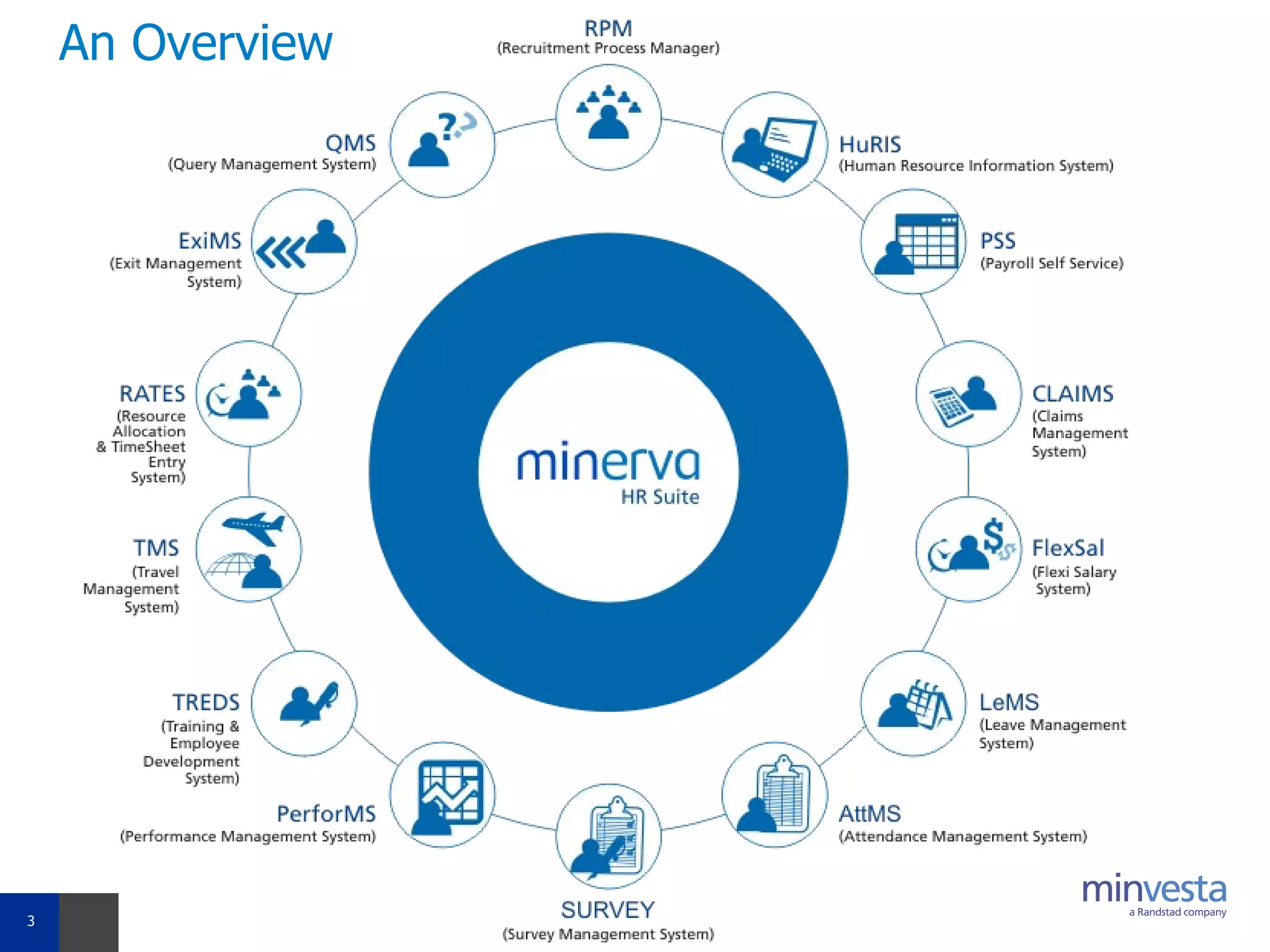
An Overview
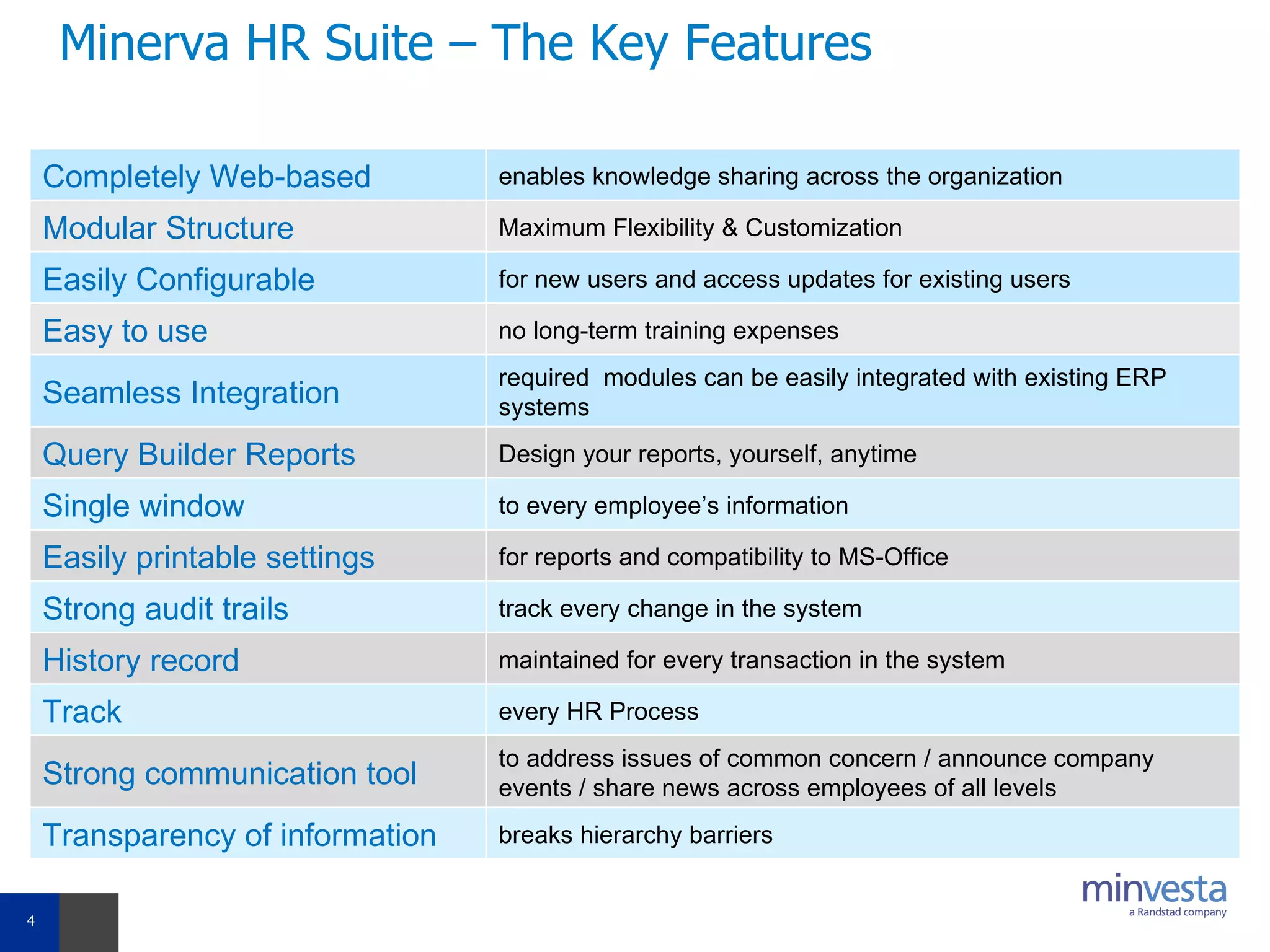
Minerva HR Suite – The Key Features Completely Web-based  enables knowledge sharing across the organization  Modular Structure  Maximum Flexibility & Customization Easily Configurable  for new users and access updates for existing users Easy to use  no long-term training expenses  Seamless Integration required  modules can be easily integrated with existing ERP systems Query Builder Reports  Design your reports, yourself, anytime Single window  to every employee’s information  Easily printable settings  for reports and compatibility to MS-Office Strong audit trails  track every change in the system History record  maintained for every transaction in the system Track   every HR Process Strong communication tool  to address issues of common concern / announce company events / share news across employees of all levels Transparency of information  breaks hierarchy barriers
The Recruitment Module- RPM Your own recruitment portal  Completely automated workflow De-duplication Check for resumes automated Consolidated Reports  Status Tracking of every recruitment process  Maintains your own resume repository Parsing Technology from world’s leading parser, Burning Glass Technology (BGT) The Recruitment Process Manager The Functionalities Create Job Request Approve Job Request Publish Job Request Create a selection Plan Upload Resumes Search Resumes Shortlist resumes Schedule Interview Provide interview feedback  Select a candidate Generate offer Letter Track Job Status
The Human Resource Information Module– HURIS Captures personal, professional, statutory and official  information of each employee  Updates and maintenance of employee details can be achieved at the click of a button Tracks promotions, salary increments, transfers…etc any transition for an employee Dynamic Organogram generated by the system Generates Personal history reports on all employees. The Human Resource Information System  Add an Employee Migrate candidates from RPM Enter Employee details Official Personal Professional…etc Bulk Data Upload View Organogram  Update transition Detail Promotion  Increment Transfer …etc The Functionalities
Payroll Self Service: PSS Every employee can access the self service  facility, allowing them to view their monthly payroll details viz, Pay Slip, Reimbursement Slip, and Tax Computations.  Print documents in user friendly formats, enabling employees to print Pay Slip, Reimbursement Slip, etc  directly from the system.   Enables employees  view company policies, download forms…. Submit investment declaration / proofs details
The Claims Management System: CLAIMS Provides the organization an end to end automated Claims/Reimbursement Management System Employees  are empowered to put in their reimbursement details and initiate the claims process on line Reimbursement categories can be defined and employees can chose the type of reimbursement and enter the details. Employees can take a print of the reimbursement form filled up and furnish with the original bills. The Claims Module
FlexSal: The Flexible Salary module Every eligible employee will be able to select the flexi components  of their salary in the system  System will validate their level wise eligibility and accordingly allow   selections against all components HR will be able to approve such selections for payroll team to   include in payroll  HR will activate / deactivate / reactivate Flexi Declaration (FDF) access   for any employee  Employee can view / print his / her entire history of FDFs in the system
The Leave Management System - LEMS The Leave Module Enables employees to apply for leave, view request status, cancel / withdraw leave, view leave balance online, request for encashment….etc Enables Reporting Seniors / HR Managers to authorize and view leave requests and leave balance of all employees Automated Process of Leave Balance Calculation, Carry Forward , Lapse etc Some Functionalities View Leave Balance View Leave Transactions Apply for Leave Cancel Leave Approve Leave Withdraw Leave Apply Compensatory Leave Credit Compensatory Leave Manual Correction Year End Processing Reports
The Attendance Management System: AttMS Captures daily employee turnout through manual swipe Employee Attendance status viewable for user defined periods Bulk upload of Attendance data from Swipe System Reports Online absence authorization and feedback The Attendance Module Some Functionalities Manual Swipe View attendance status Process attendance Absence Authorization Application
The Survey Management System: SURVEY HR can create employee surveys and define rules for every survey  HR can design the questionnaire for every survey independently    Employee mapping can be done for creating the list of participants for the survey  HR can deactivate / activate a survey at any point of time MIS reports can be generated on Survey results
The Performance Appraisal Module - Performs Automates the entire Performance Management Process of an organization.  Allows employee to set their performance objectives and submit appraisal forms online.  Reporting Senior can view, approve or reject submitted appraisal forms. They can also add remarks and ratings to the same.  The HR department is the global viewer of the online appraisal process. Multiple Appraisal form templates can be assigned for different categories of employees. Set Up Appraisal Process Initiate Appraisal Goal Setting Create multiple appraisal templates Self Appraisal Reviewer Rating The Functionalities Final Review Bell Curve Analysis / Normalization
The Training & Employee Development System: Treds Focused on managing the Training needs of the organization.  Enables HR Managers to: Design and upload training calendars,  Prepare participants list,  Approve training requests,  Monitor training attendance  Provide / view feedback on training programs Interfaced with  Performance Management (PerforMS) module allowing proficient management of organization’s training needs.  The Training Module The Functionalities Training Needs Analysis  Schedule Training Create Session details Publish Training Program Accept Nominations Maintain attendance Capture Training Feedback View Test Scores Update Skills for employees
The Travel Management System: TMS Employees to give their travel request online Approval work flow can be used for defining the approval process as per organization policy. Travel Requests can be categorized as per travel policy and the requests can be routed to the travel desk. The online option allows employees to put in their travel details and preferences which the travel desk uses for booking purposes. Stream lines requisition process and also helps an organization to do away with the manual process. It also eliminates the need for a approval through email /hard copies
The Resource Allocation & Timesheet Entry System: RATES  Enables allocation of employees as resources to various  projects in the organization.  Employees can  be assigned, reassigned and released from projects at any time through this module. Skill levels, resource allocation status and project details can be viewed  for efficient planning and utilization of  manpower.  Empowers employees to enter timesheets and daily activity details into the system.  Timesheet  periodicity  is configurable as per client's requirements.  Daily activity sheets can also be configured, thus enabling support function employees to record their daily activities. Allows viewing of processing status information. Some Functionalities Create project Assign resources View Projects Release Resource Resource Allocation Status Add New Client/ Projects Timesheet entry Approve Timesheet Daily Activity Sheet Approve Daily Activity Sheet Timesheet submission status
The Exit Management System: ExiMS The Exit Module ExiMS provides the organization an end to end automated  Employee Exit Management System  HR managers are empowered to initiate the exit process on line Enables the HR department to: Conduct online Exit interviews. Disburse department wise exit checklists.  Collate and file check list responses. Approve F&F settlement and Generate relieving letter. Some Functionalities Initiate exit Approve Initiation Exit Interview form Track exit Update exit details Exit Checklist Final Approval Generate Relieving Letter Reports
The Query Management System - QMS Emails can be triggered for employee birthdays/anniversary/ confirmations etc. Homepage Content can be customized  FAQ’s can be managed Employee Policy documents or other forms etc. can be uploaded  Employee can post queries under different categories Identified process owners will be responsible for query resolution SLA Timelines can be configured for escalation The Query Module
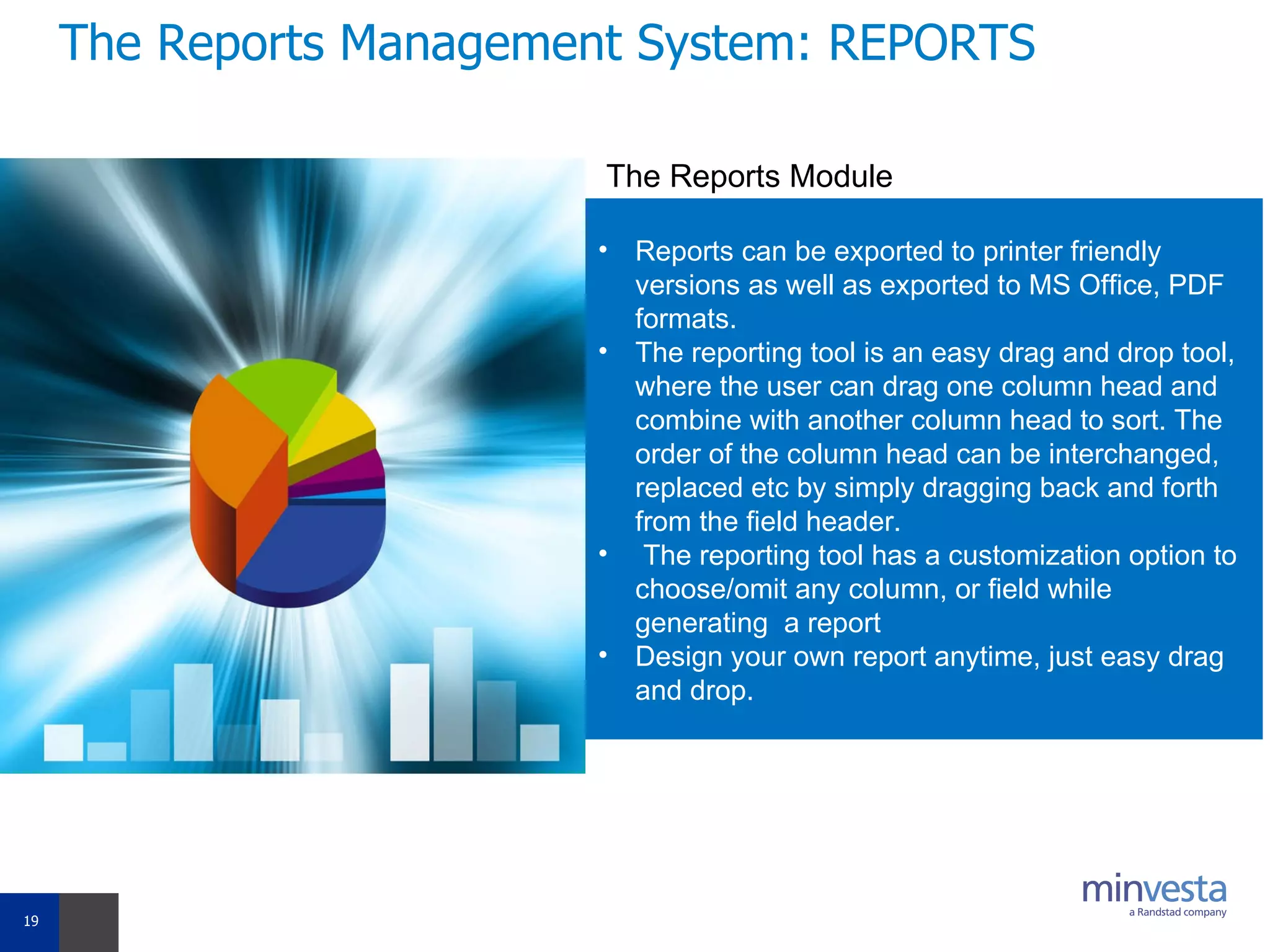
The Reports Management System: REPORTS Reports can be exported to printer friendly versions as well as exported to MS Office, PDF formats. The reporting tool is an easy drag and drop tool, where the user can drag one column head and combine with another column head to sort. The order of the column head can be interchanged, replaced etc by simply dragging back and forth from the field header. The reporting tool has a customization option to choose/omit any column, or field while generating  a report Design your own report anytime, just easy drag and drop. The Reports Module
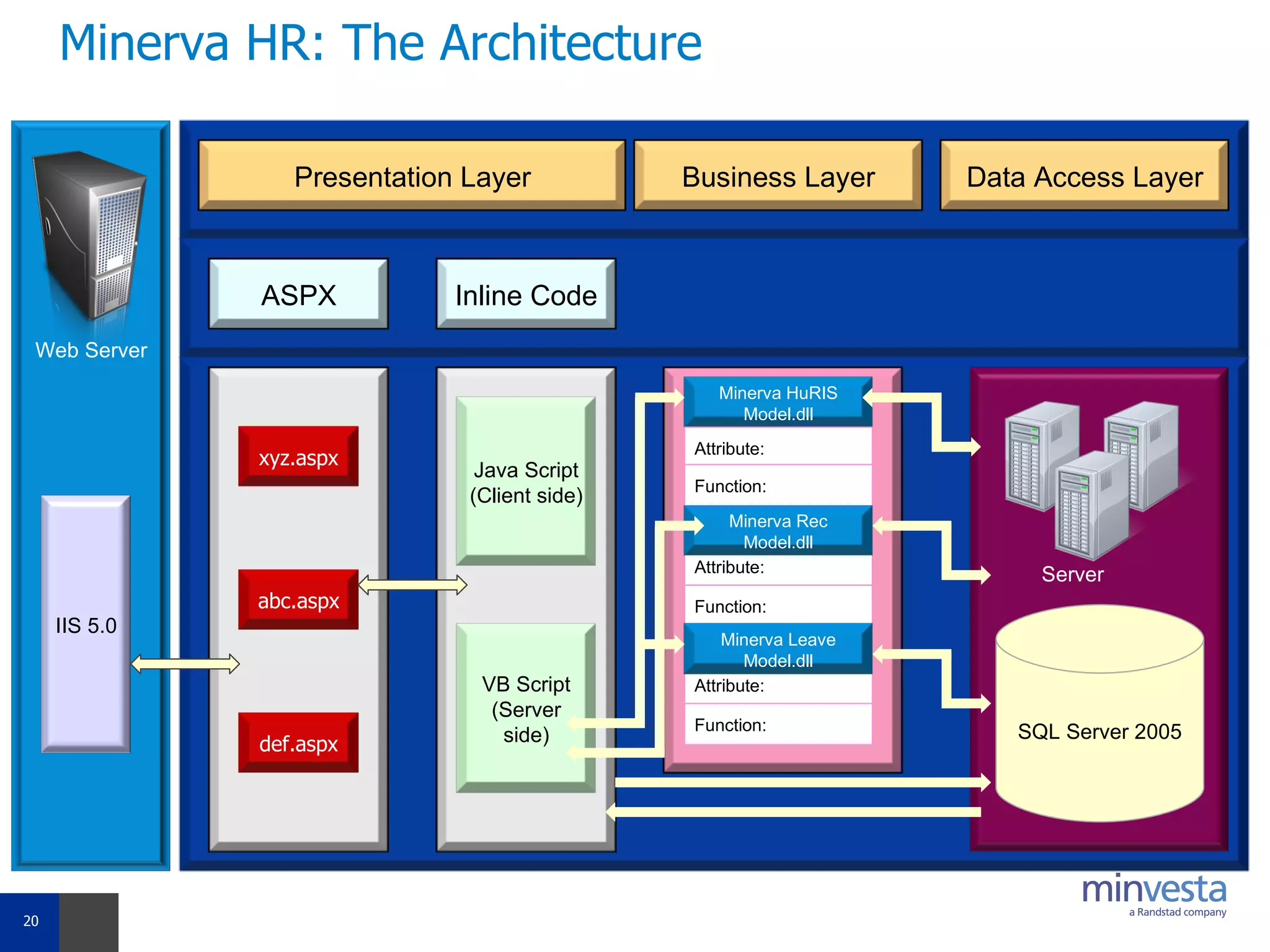
Minerva HR: The Architecture Web Server IIS 5.0 Presentation Layer Business Layer Data Access Layer ASPX Inline Code xyz.aspx abc.aspx def.aspx Java Script (Client side) VB Script (Server side) Minerva HuRIS Model.dll Attribute: Function: Attribute: Function: Minerva Rec Model.dll Attribute: Function: Minerva Leave Model.dll SQL Server 2005 Server
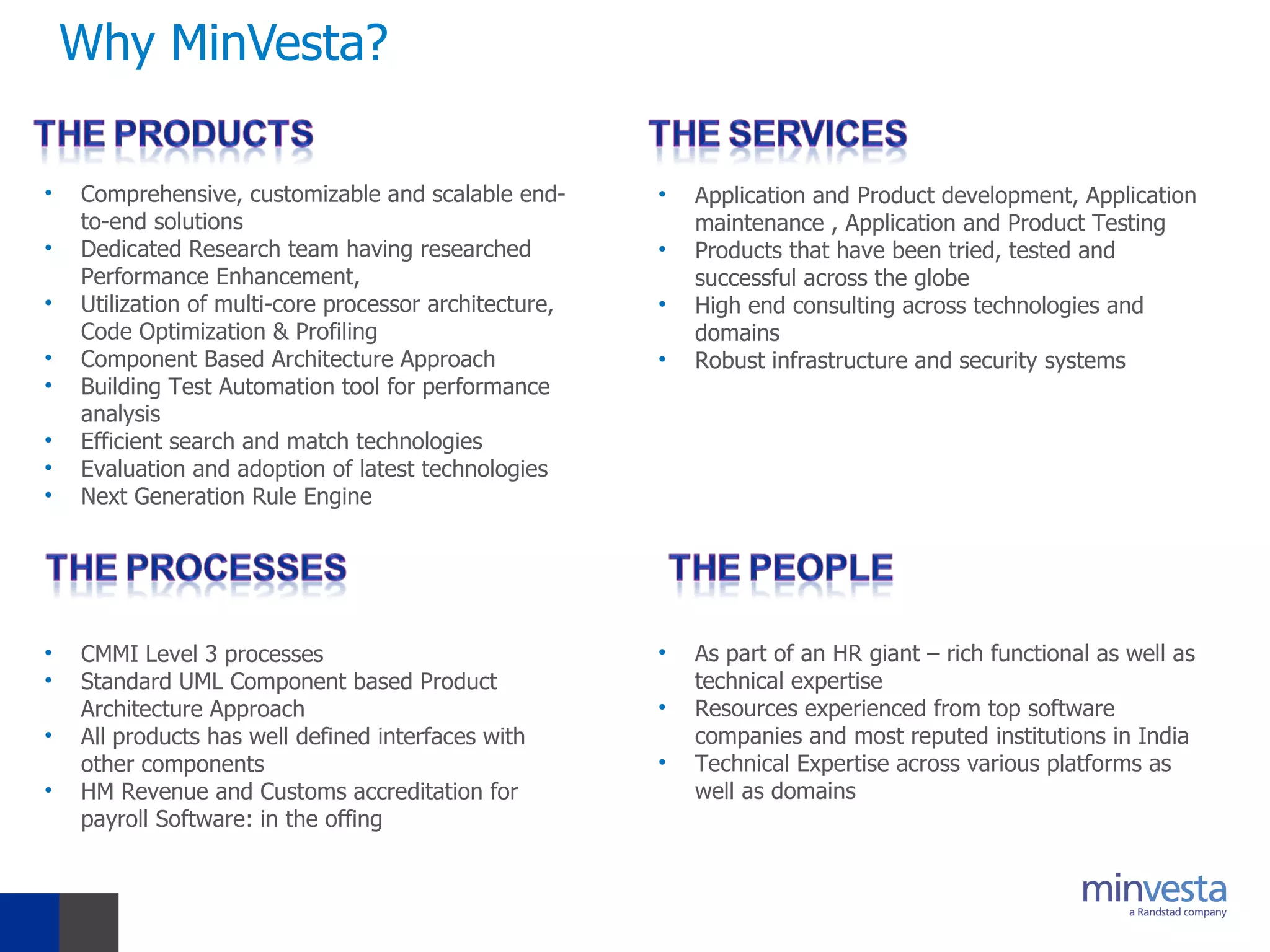
Why MinVesta? Comprehensive, customizable and scalable end-to-end solutions Dedicated Research team having researched Performance Enhancement, Utilization of multi-core processor architecture, Code Optimization & Profiling Component Based Architecture Approach Building Test Automation tool for performance analysis Efficient search and match technologies Evaluation and adoption of latest technologies Next Generation Rule Engine CMMI Level 3 processes Standard UML Component based Product Architecture Approach  All products has well defined interfaces with other components HM Revenue and Customs accreditation for payroll Software: in the offing  As part of an HR giant – rich functional as well as technical expertise Resources experienced from top software companies and most reputed institutions in India Technical Expertise across various platforms as well as domains  Application and Product development, Application maintenance , Application and Product Testing Products that have been tried, tested and successful across the globe High end consulting across technologies and domains Robust infrastructure and security systems
Thank You!

Minerva Hr Suite An Introduction March 2010

  • 1.
  • 2.
    This Presentation Minerva-HR:An Overview Minerva HR: Module details Minerva HR : The Architecture MinVesta: An Introduction
  • 3.
  • 4.
    Minerva HR Suite– The Key Features Completely Web-based enables knowledge sharing across the organization Modular Structure Maximum Flexibility & Customization Easily Configurable for new users and access updates for existing users Easy to use no long-term training expenses Seamless Integration required modules can be easily integrated with existing ERP systems Query Builder Reports Design your reports, yourself, anytime Single window to every employee’s information Easily printable settings for reports and compatibility to MS-Office Strong audit trails track every change in the system History record maintained for every transaction in the system Track every HR Process Strong communication tool to address issues of common concern / announce company events / share news across employees of all levels Transparency of information breaks hierarchy barriers
  • 5.
    The Recruitment Module-RPM Your own recruitment portal Completely automated workflow De-duplication Check for resumes automated Consolidated Reports Status Tracking of every recruitment process Maintains your own resume repository Parsing Technology from world’s leading parser, Burning Glass Technology (BGT) The Recruitment Process Manager The Functionalities Create Job Request Approve Job Request Publish Job Request Create a selection Plan Upload Resumes Search Resumes Shortlist resumes Schedule Interview Provide interview feedback Select a candidate Generate offer Letter Track Job Status
  • 6.
    The Human ResourceInformation Module– HURIS Captures personal, professional, statutory and official information of each employee Updates and maintenance of employee details can be achieved at the click of a button Tracks promotions, salary increments, transfers…etc any transition for an employee Dynamic Organogram generated by the system Generates Personal history reports on all employees. The Human Resource Information System Add an Employee Migrate candidates from RPM Enter Employee details Official Personal Professional…etc Bulk Data Upload View Organogram Update transition Detail Promotion Increment Transfer …etc The Functionalities
  • 7.
    Payroll Self Service:PSS Every employee can access the self service facility, allowing them to view their monthly payroll details viz, Pay Slip, Reimbursement Slip, and Tax Computations. Print documents in user friendly formats, enabling employees to print Pay Slip, Reimbursement Slip, etc directly from the system.  Enables employees view company policies, download forms…. Submit investment declaration / proofs details
  • 8.
    The Claims ManagementSystem: CLAIMS Provides the organization an end to end automated Claims/Reimbursement Management System Employees are empowered to put in their reimbursement details and initiate the claims process on line Reimbursement categories can be defined and employees can chose the type of reimbursement and enter the details. Employees can take a print of the reimbursement form filled up and furnish with the original bills. The Claims Module
  • 9.
    FlexSal: The FlexibleSalary module Every eligible employee will be able to select the flexi components of their salary in the system System will validate their level wise eligibility and accordingly allow selections against all components HR will be able to approve such selections for payroll team to include in payroll HR will activate / deactivate / reactivate Flexi Declaration (FDF) access for any employee Employee can view / print his / her entire history of FDFs in the system
  • 10.
    The Leave ManagementSystem - LEMS The Leave Module Enables employees to apply for leave, view request status, cancel / withdraw leave, view leave balance online, request for encashment….etc Enables Reporting Seniors / HR Managers to authorize and view leave requests and leave balance of all employees Automated Process of Leave Balance Calculation, Carry Forward , Lapse etc Some Functionalities View Leave Balance View Leave Transactions Apply for Leave Cancel Leave Approve Leave Withdraw Leave Apply Compensatory Leave Credit Compensatory Leave Manual Correction Year End Processing Reports
  • 11.
    The Attendance ManagementSystem: AttMS Captures daily employee turnout through manual swipe Employee Attendance status viewable for user defined periods Bulk upload of Attendance data from Swipe System Reports Online absence authorization and feedback The Attendance Module Some Functionalities Manual Swipe View attendance status Process attendance Absence Authorization Application
  • 12.
    The Survey ManagementSystem: SURVEY HR can create employee surveys and define rules for every survey HR can design the questionnaire for every survey independently   Employee mapping can be done for creating the list of participants for the survey HR can deactivate / activate a survey at any point of time MIS reports can be generated on Survey results
  • 13.
    The Performance AppraisalModule - Performs Automates the entire Performance Management Process of an organization. Allows employee to set their performance objectives and submit appraisal forms online. Reporting Senior can view, approve or reject submitted appraisal forms. They can also add remarks and ratings to the same. The HR department is the global viewer of the online appraisal process. Multiple Appraisal form templates can be assigned for different categories of employees. Set Up Appraisal Process Initiate Appraisal Goal Setting Create multiple appraisal templates Self Appraisal Reviewer Rating The Functionalities Final Review Bell Curve Analysis / Normalization
  • 14.
    The Training &Employee Development System: Treds Focused on managing the Training needs of the organization. Enables HR Managers to: Design and upload training calendars, Prepare participants list, Approve training requests, Monitor training attendance Provide / view feedback on training programs Interfaced with Performance Management (PerforMS) module allowing proficient management of organization’s training needs. The Training Module The Functionalities Training Needs Analysis Schedule Training Create Session details Publish Training Program Accept Nominations Maintain attendance Capture Training Feedback View Test Scores Update Skills for employees
  • 15.
    The Travel ManagementSystem: TMS Employees to give their travel request online Approval work flow can be used for defining the approval process as per organization policy. Travel Requests can be categorized as per travel policy and the requests can be routed to the travel desk. The online option allows employees to put in their travel details and preferences which the travel desk uses for booking purposes. Stream lines requisition process and also helps an organization to do away with the manual process. It also eliminates the need for a approval through email /hard copies
  • 16.
    The Resource Allocation& Timesheet Entry System: RATES Enables allocation of employees as resources to various projects in the organization. Employees can be assigned, reassigned and released from projects at any time through this module. Skill levels, resource allocation status and project details can be viewed for efficient planning and utilization of manpower. Empowers employees to enter timesheets and daily activity details into the system. Timesheet periodicity is configurable as per client's requirements. Daily activity sheets can also be configured, thus enabling support function employees to record their daily activities. Allows viewing of processing status information. Some Functionalities Create project Assign resources View Projects Release Resource Resource Allocation Status Add New Client/ Projects Timesheet entry Approve Timesheet Daily Activity Sheet Approve Daily Activity Sheet Timesheet submission status
  • 17.
    The Exit ManagementSystem: ExiMS The Exit Module ExiMS provides the organization an end to end automated Employee Exit Management System HR managers are empowered to initiate the exit process on line Enables the HR department to: Conduct online Exit interviews. Disburse department wise exit checklists. Collate and file check list responses. Approve F&F settlement and Generate relieving letter. Some Functionalities Initiate exit Approve Initiation Exit Interview form Track exit Update exit details Exit Checklist Final Approval Generate Relieving Letter Reports
  • 18.
    The Query ManagementSystem - QMS Emails can be triggered for employee birthdays/anniversary/ confirmations etc. Homepage Content can be customized FAQ’s can be managed Employee Policy documents or other forms etc. can be uploaded Employee can post queries under different categories Identified process owners will be responsible for query resolution SLA Timelines can be configured for escalation The Query Module
  • 19.
    The Reports ManagementSystem: REPORTS Reports can be exported to printer friendly versions as well as exported to MS Office, PDF formats. The reporting tool is an easy drag and drop tool, where the user can drag one column head and combine with another column head to sort. The order of the column head can be interchanged, replaced etc by simply dragging back and forth from the field header. The reporting tool has a customization option to choose/omit any column, or field while generating a report Design your own report anytime, just easy drag and drop. The Reports Module
  • 20.
    Minerva HR: TheArchitecture Web Server IIS 5.0 Presentation Layer Business Layer Data Access Layer ASPX Inline Code xyz.aspx abc.aspx def.aspx Java Script (Client side) VB Script (Server side) Minerva HuRIS Model.dll Attribute: Function: Attribute: Function: Minerva Rec Model.dll Attribute: Function: Minerva Leave Model.dll SQL Server 2005 Server
  • 21.
    Why MinVesta? Comprehensive,customizable and scalable end-to-end solutions Dedicated Research team having researched Performance Enhancement, Utilization of multi-core processor architecture, Code Optimization & Profiling Component Based Architecture Approach Building Test Automation tool for performance analysis Efficient search and match technologies Evaluation and adoption of latest technologies Next Generation Rule Engine CMMI Level 3 processes Standard UML Component based Product Architecture Approach All products has well defined interfaces with other components HM Revenue and Customs accreditation for payroll Software: in the offing As part of an HR giant – rich functional as well as technical expertise Resources experienced from top software companies and most reputed institutions in India Technical Expertise across various platforms as well as domains Application and Product development, Application maintenance , Application and Product Testing Products that have been tried, tested and successful across the globe High end consulting across technologies and domains Robust infrastructure and security systems
  • 22.