WORKFLOW 101
WHITE PAPER AUTOMATED WORKFLOWS 101
WORKFLOW 101
Subject to a variety of interpretations, “workflow” can
mean anything from the steps in a work process to
Business Process Automation.
It is a fairly general term that can be applied to refer to
either:
yy A collection of business processes which collectively
serve to accomplish the business objectives of an
organization.
yy An individual business Workflow Process that is
defined to accomplish a specific set of business
operations (tasks).
yy A process is distinguished from a workflow because
it has well-defined inputs, outputs (i.e. a work-item)
and purposes - Whereas workflow refers more
generally to multiple related processes.
A Workflow Process is composed of specific manual
and/or automatic tasks that are connected by paths
that allow work to flow based on rules defined within each
process.
Workflows can be as simple as filling out and getting travel
requests approved, or as complex as the steps involved in
connecting disparate departments to manage inventory.
The traditional processes in a business without workflow
automation software are tenuous. Employees have to
physically hand deliver documents, sort through files, and
notify people of tasks they need to complete via email, notes
and meetings.
These manual procedures can often be defined,
standardized and set to specific business rules in an
electronic environment; this is workflow automation.
Workflow automation is a defined set of rules required
to accomplish a specific goal; the software is able to
automatically route tasks through the process to each
subsequent step, all the way to the completion of that goal.
Example
yy A salesman incurs an expense and fills out an electronic
form directly within the system.
yy He takes a photo of his receipt with his iPhone camera
and attaches it to the expense form he just completed.
yy When he presses the submit button, it is uploaded and
deposited into the Document Management repository
yy The system recognizes the total amount on the expense
form and automatically sends it to the appropriate
person for approval prior to accounting receiving it
yy The manager receives a notification on his tablet that an
approval must be completed. He opens the form, reviews
the receipt, and approves the expense
yy It then gets automatically routed to accounting to kick
off the reimbursement workflow and get posted to the
appropriate accounts.
Four Kinds of Workflow
There are levels of sophistication in regards to workflow
automation. At the most basic level, it is referred to as
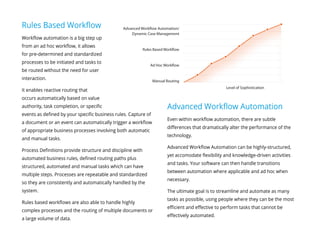
manual routing. As the workflow grows in sophistication,
it encompasses the capabilities of the more simplistic
technology, but also adds an additional layer of functionality
and power, effectively creating four different variations of
workflow technology.
Manual Routing
Routing involves a very simple workflow where assignments are
sent through the system manually. They are very simple, straight
line processes that rely solely on user interaction and are not often
repeatable.
Ad Hoc
From there, ad hoc workflow is a bit more advanced and can handle
more complex processes than manual routing, although they are
still unstructured, undefined and typically unrepeatable. It is user
initiated; a worker must choose the participants and route for each
task.
However, there are limitations with this level of workflow. An ad
hoc environment only allows for a user initiated process and does
not handle automation, the system relies on people to consistently
make correct decisions and act accordingly in a timely manner.
It also cannot handle large volumes of documents or data; only
single items can be sent through the workflow. This will be
expanded upon further in the following paragraphs.
Rules Based Workflow
Workflow automation is a big step up
from an ad hoc workflow, it allows
for pre-determined and standardized
processes to be initiated and tasks to
be routed without the need for user
interaction.
It enables reactive routing that
occurs automatically based on value
authority, task completion, or specific
events as defined by your specific business rules. Capture of
a document or an event can automatically trigger a workflow
of appropriate business processes involving both automatic
and manual tasks.
Process Definitions provide structure and discipline with
automated business rules, defined routing paths plus
structured, automated and manual tasks which can have
multiple steps. Processes are repeatable and standardized
so they are consistently and automatically handled by the
system.
Rules based workflows are also able to handle highly
complex processes and the routing of multiple documents or
a large volume of data.
Advanced Workflow Automation
Even within workflow automation, there are subtle
differences that dramatically alter the performance of the
technology.
Advanced Workflow Automation can be highly-structured,
yet accomodate flexibility and knowledge-driven activities
and tasks. Your software can then handle transitions
between automation where applicable and ad hoc when
necessary.
The ultimate goal is to streamline and automate as many
tasks as possible, using people where they can be the most
efficient and effective to perform tasks that cannot be
effectively automated.
Advanced Workflow Automation/
Dynamic Case Management
Rules Based Workflow
Ad Hoc Workflow
Manual Routing
Level of Sophistication
The primary variances within workflow automation software
are fixed and dynamic queues, parallel process support and
sophisticated case management capabilities, which will be
explained in further detail below.
Now that the foundation of workflow automation has been
set, let’s rewind and delve a bit deeper into each of the
aforementioned variables.It was previously explained that ad
hoc workflow is a more primitive form of workflow and does not
handle automation.
Generally speaking, the inability to automate is major limitation
for any organization. Automation is ideal because it hardens and
standardizes common processes for consistency and scalability
the enterprise. It also eliminates the need for manual and
repetitive, allowing workers to focus on value added activities.
Yet there are situations where complete automation simply
is not possible and user interaction is required in order to
complete each unique process. This is often referred to as
Dynamic Case Management.
This is where exceptions become necessary; unpredictable
processes. These processes include knowledge workers that
must take a proactive role in deciding the fate of each task.
Exceptions too often cripple an
otherwise successful process.
Sophisticated exception handling
must be present and accounted
for so that when unpredictable
situations arise, the process doesn’t
break down.
Workflow Automation
As previously mentioned, there are subtle differences in
the technology behind the workflow automation software
currently on the market.
A distinct power of having the most sophisticated
workflow available is that while advanced capabilities are
obtainable, the basic functions are still supported. This
allows your business to have all the tools accessible to build
a solution that truly fits your needs.
Ideally, your solution is all-encompassing. Thus, when
your process requires ad hoc routing, it is available, but
when dynamic queues and automation are essential for
critical processes, your business will not be crippled by the
limitations of your system.
Parallel Process Support
Parallel process support is vital to create a more effective
workflow that is flexible and scalable to the growth and
changes within a business. Traditional routing and ad hoc
workflows are sequential; they follow a step by step order.
Unable to support parallel processes, these workflow
solutions cannot handle the more complex processes
required to most effectively run a business.
More advanced workflow automation solutions allow
for tasks and projects to occur simultaneously. Multiple
components of the same process can be completed in
parallel; this eliminates unnecessary wait times; tasks are
completed quicker and easier.
Dynamic Queues
Workflow automation aims to maximize the value of an
organizations most expensive resource; people. However,
the majority of processes contain static queues which
drastically limit the performance ability of employee’s. With
this style of queue, the general opinion is that the work is
assigned to the user, when in actuality; the user is bound to
the work. It is a subtle difference, but it drastically changes
the functionality of your workflow.
Static queues are unable to adapt to the changing business
environment. What if multiple employees are able to
complete the same task? What if a user has work items
across departments, and not within the same process? These
fixed queue’s quickly break down under pressure. Ideally, your
workflow should support static queues for simplicities sake, while
also supporting the enhanced capabilities of a content and people
centric workflow which utilize dynamic queues. This creates a
more powerful and flexible workflow environment.
Dynamic queues consist of all the tasks each employee is
subscribed or assigned to, in order of their particular priorities.
These queues may have one or many users with access to them,
depending on the number of people appointed to each particular
task. As work items are completed or priorities change, the
dynamic queue will adapt in real time, allowing for your workflow
to become a flexible and intuitive part of the business.
Example
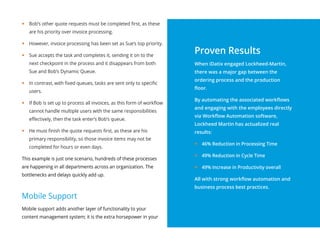
yy Bob handles quote requests, invoice processing and order
approvals over $5,000
yy Sue handles invoice processing, new hire processing and order
approvals under $5,000
yy Bob and Sue have separate dashboards - their Dynamic
Queues - within their workflow viewer.
yy Bob is currently processing quote requests, when an invoice
enters the workflow.
yy Bob and Sue both see this item appear in their Dynamic
Queue.
yy Bob’s other quote requests must be completed first, as these
are his priority over invoice processing.
yy However, invoice processing has been set as Sue’s top priority.
yy Sue accepts the task and completes it, sending it on to the
next checkpoint in the process and it disappears from both
Sue and Bob’s Dynamic Queue.
yy In contrast, with fixed queues, tasks are sent only to specific
users.
yy If Bob is set up to process all invoices, as this form of workflow
cannot handle multiple users with the same responsibilities
effectively, then the task enter’s Bob’s queue.
yy He must finish the quote requests first, as these are his
primary responsibility, so those invoice items may not be
completed for hours or even days.
This example is just one scenario, hundreds of these processes
are happening in all departments across an organization. The
bottlenecks and delays quickly add up.
Mobile Support
Mobile support adds another layer of functionality to your
content management system; it is the extra horsepower in your
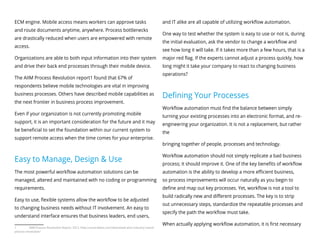
Proven Results
When iDatix engaged Lockheed-Martin,
there was a major gap between the
ordering process and the production
floor.
By automating the associated workflows
and engaging with the employees directly
via Workflow Automation software,
Lockheed Martin has actualized real
results:
yy 46% Reduction in Processing Time
yy 49% Reduction in Cycle Time
yy 49% Increase in Productivity overall
All with strong workflow automation and
business process best practices.
ECM engine. Mobile access means workers can approve tasks
and route documents anytime, anywhere. Process bottlenecks
are drastically reduced when users are empowered with remote
access.
Organizations are able to both input information into their system
and drive their back end processes through their mobile device.
The AIIM Process Revolution report1 found that 67% of
respondents believe mobile technologies are vital in improving
business processes. Others have described mobile capabilities as
the next frontier in business process improvement.
Even if your organization is not currently promoting mobile
support, it is an important consideration for the future and it may
be beneficial to set the foundation within our current system to
support remote access when the time comes for your enterprise.
Easy to Manage, Design & Use
The most powerful workflow automation solutions can be
managed, altered and maintained with no coding or programming
requirements.
Easy to use, flexible systems allow the workflow to be adjusted
to changing business needs without IT involvement. An easy to
understand interface ensures that business leaders, end users,
1	 AIIM Process Revolution Report, 2012. http://www.idatix.com/download-aiim-industry-watch-
process-revolution/
and IT alike are all capable of utilizing workflow automation.
One way to test whether the system is easy to use or not is, during
the initial evaluation, ask the vendor to change a workflow and
see how long it will take. If it takes more than a few hours, that is a
major red flag. If the experts cannot adjust a process quickly, how
long might it take your company to react to changing business
operations?
Defining Your Processes
Workflow automation must find the balance between simply
turning your existing processes into an electronic format, and re-
engineering your organization. It is not a replacement, but rather
the
bringing together of people, processes and technology.
Workflow automation should not simply replicate a bad business
process; it should improve it. One of the key benefits of workflow
automation is the ability to develop a more efficient business,
so process improvements will occur naturally as you begin to
define and map out key processes. Yet, workflow is not a tool to
build radically new and different processes. The key is to strip
out unnecessary steps, standardize the repeatable processes and
specify the path the workflow must take.
When actually applying workflow automation, it is first necessary
to define the core business processes. Even those that appear not
be repeatable are typically set upon a standard foundation. This
discovery phase is absolutely vital for a successful implementation
and adoption of the new technology. The key is in finding the
baseline and then customizing the workflow to fit the specific
nuances and requirements of the business. Workflow automation
is more than simply choosing the right technology; it is about
choosing the right partner than can guide the organization
through these vital first steps.
Benefits of Workflow Software
There will be overarching advantages common across any
organization when applying workflow automation; reducing costs,
improving operations, generating greater revenue. Yet, there are
also unique benefits to each company based on their specific
goals and considerations.
yy For example, ClosetMaid described the complete process
visibility they gained into their manufacturing operations as
one of the critical advantages they gained after implementation
yy Lockheed Martin utilized the technology to synchronize
communication between the production floor and the front
office.
yy The Antigua Group took a 3-day process and shortened it to 24
hours, a major benefit to their operations.
Conclusion
So you can see that the value workflow automation provides will
vary greatly depending on the organization, but overall there are
always major benefits provided when any company implements a
solution to improve their business processes.
It’s important to remember that workflow will be critical to
your business in the future, as well. Whether you plan to grow,
sustain, or aggressively scale - strong business processes that are
sustainably automated will be key to the progress that you intend
to make.
We are your process improvement specialist and know
how to leverage today’s technology to get the most from
your people, processes and information.
Each client is a partner and our passion is helping to
deliver solutions that provide unmatched performance.
Let us show you the possibilities, help you to create a new
vision and empower you with the tools, knowledge and
resources to get the job done.
Discover how our process improvement solutions have
already helped companies like Lockheed-Martin, AG First
Farm Credit, ClosetMaid and Morton Plant Hospital gain
more from their existing systems, fill the gaps between
departments and make their workforce more effective.
iDatix Corporation
www.iDatix.com
iDatix
We make your business better

Workflow-101-Whitepaper-iDatix

  • 1.
    WORKFLOW 101 WHITE PAPERAUTOMATED WORKFLOWS 101
  • 2.
    WORKFLOW 101 Subject toa variety of interpretations, “workflow” can mean anything from the steps in a work process to Business Process Automation. It is a fairly general term that can be applied to refer to either: yy A collection of business processes which collectively serve to accomplish the business objectives of an organization. yy An individual business Workflow Process that is defined to accomplish a specific set of business operations (tasks). yy A process is distinguished from a workflow because it has well-defined inputs, outputs (i.e. a work-item) and purposes - Whereas workflow refers more generally to multiple related processes. A Workflow Process is composed of specific manual and/or automatic tasks that are connected by paths
  • 3.
    that allow workto flow based on rules defined within each process. Workflows can be as simple as filling out and getting travel requests approved, or as complex as the steps involved in connecting disparate departments to manage inventory. The traditional processes in a business without workflow automation software are tenuous. Employees have to physically hand deliver documents, sort through files, and notify people of tasks they need to complete via email, notes and meetings. These manual procedures can often be defined, standardized and set to specific business rules in an electronic environment; this is workflow automation. Workflow automation is a defined set of rules required to accomplish a specific goal; the software is able to automatically route tasks through the process to each subsequent step, all the way to the completion of that goal. Example yy A salesman incurs an expense and fills out an electronic form directly within the system. yy He takes a photo of his receipt with his iPhone camera and attaches it to the expense form he just completed. yy When he presses the submit button, it is uploaded and deposited into the Document Management repository yy The system recognizes the total amount on the expense form and automatically sends it to the appropriate person for approval prior to accounting receiving it yy The manager receives a notification on his tablet that an approval must be completed. He opens the form, reviews the receipt, and approves the expense yy It then gets automatically routed to accounting to kick off the reimbursement workflow and get posted to the appropriate accounts. Four Kinds of Workflow There are levels of sophistication in regards to workflow automation. At the most basic level, it is referred to as manual routing. As the workflow grows in sophistication, it encompasses the capabilities of the more simplistic technology, but also adds an additional layer of functionality and power, effectively creating four different variations of workflow technology.
  • 4.
    Manual Routing Routing involvesa very simple workflow where assignments are sent through the system manually. They are very simple, straight line processes that rely solely on user interaction and are not often repeatable. Ad Hoc From there, ad hoc workflow is a bit more advanced and can handle more complex processes than manual routing, although they are still unstructured, undefined and typically unrepeatable. It is user initiated; a worker must choose the participants and route for each task. However, there are limitations with this level of workflow. An ad hoc environment only allows for a user initiated process and does not handle automation, the system relies on people to consistently make correct decisions and act accordingly in a timely manner. It also cannot handle large volumes of documents or data; only single items can be sent through the workflow. This will be expanded upon further in the following paragraphs.
  • 5.
    Rules Based Workflow Workflowautomation is a big step up from an ad hoc workflow, it allows for pre-determined and standardized processes to be initiated and tasks to be routed without the need for user interaction. It enables reactive routing that occurs automatically based on value authority, task completion, or specific events as defined by your specific business rules. Capture of a document or an event can automatically trigger a workflow of appropriate business processes involving both automatic and manual tasks. Process Definitions provide structure and discipline with automated business rules, defined routing paths plus structured, automated and manual tasks which can have multiple steps. Processes are repeatable and standardized so they are consistently and automatically handled by the system. Rules based workflows are also able to handle highly complex processes and the routing of multiple documents or a large volume of data. Advanced Workflow Automation Even within workflow automation, there are subtle differences that dramatically alter the performance of the technology. Advanced Workflow Automation can be highly-structured, yet accomodate flexibility and knowledge-driven activities and tasks. Your software can then handle transitions between automation where applicable and ad hoc when necessary. The ultimate goal is to streamline and automate as many tasks as possible, using people where they can be the most efficient and effective to perform tasks that cannot be effectively automated. Advanced Workflow Automation/ Dynamic Case Management Rules Based Workflow Ad Hoc Workflow Manual Routing Level of Sophistication
  • 6.
    The primary varianceswithin workflow automation software are fixed and dynamic queues, parallel process support and sophisticated case management capabilities, which will be explained in further detail below. Now that the foundation of workflow automation has been set, let’s rewind and delve a bit deeper into each of the aforementioned variables.It was previously explained that ad hoc workflow is a more primitive form of workflow and does not handle automation. Generally speaking, the inability to automate is major limitation for any organization. Automation is ideal because it hardens and standardizes common processes for consistency and scalability the enterprise. It also eliminates the need for manual and repetitive, allowing workers to focus on value added activities. Yet there are situations where complete automation simply is not possible and user interaction is required in order to complete each unique process. This is often referred to as Dynamic Case Management. This is where exceptions become necessary; unpredictable processes. These processes include knowledge workers that must take a proactive role in deciding the fate of each task. Exceptions too often cripple an otherwise successful process. Sophisticated exception handling must be present and accounted for so that when unpredictable situations arise, the process doesn’t break down.
  • 7.
    Workflow Automation As previouslymentioned, there are subtle differences in the technology behind the workflow automation software currently on the market. A distinct power of having the most sophisticated workflow available is that while advanced capabilities are obtainable, the basic functions are still supported. This allows your business to have all the tools accessible to build a solution that truly fits your needs. Ideally, your solution is all-encompassing. Thus, when your process requires ad hoc routing, it is available, but when dynamic queues and automation are essential for critical processes, your business will not be crippled by the limitations of your system. Parallel Process Support Parallel process support is vital to create a more effective workflow that is flexible and scalable to the growth and changes within a business. Traditional routing and ad hoc workflows are sequential; they follow a step by step order. Unable to support parallel processes, these workflow solutions cannot handle the more complex processes required to most effectively run a business. More advanced workflow automation solutions allow for tasks and projects to occur simultaneously. Multiple components of the same process can be completed in parallel; this eliminates unnecessary wait times; tasks are completed quicker and easier. Dynamic Queues Workflow automation aims to maximize the value of an organizations most expensive resource; people. However, the majority of processes contain static queues which drastically limit the performance ability of employee’s. With this style of queue, the general opinion is that the work is assigned to the user, when in actuality; the user is bound to the work. It is a subtle difference, but it drastically changes the functionality of your workflow. Static queues are unable to adapt to the changing business environment. What if multiple employees are able to complete the same task? What if a user has work items across departments, and not within the same process? These
  • 8.
    fixed queue’s quicklybreak down under pressure. Ideally, your workflow should support static queues for simplicities sake, while also supporting the enhanced capabilities of a content and people centric workflow which utilize dynamic queues. This creates a more powerful and flexible workflow environment. Dynamic queues consist of all the tasks each employee is subscribed or assigned to, in order of their particular priorities. These queues may have one or many users with access to them, depending on the number of people appointed to each particular task. As work items are completed or priorities change, the dynamic queue will adapt in real time, allowing for your workflow to become a flexible and intuitive part of the business. Example yy Bob handles quote requests, invoice processing and order approvals over $5,000 yy Sue handles invoice processing, new hire processing and order approvals under $5,000 yy Bob and Sue have separate dashboards - their Dynamic Queues - within their workflow viewer. yy Bob is currently processing quote requests, when an invoice enters the workflow. yy Bob and Sue both see this item appear in their Dynamic Queue.
  • 9.
    yy Bob’s otherquote requests must be completed first, as these are his priority over invoice processing. yy However, invoice processing has been set as Sue’s top priority. yy Sue accepts the task and completes it, sending it on to the next checkpoint in the process and it disappears from both Sue and Bob’s Dynamic Queue. yy In contrast, with fixed queues, tasks are sent only to specific users. yy If Bob is set up to process all invoices, as this form of workflow cannot handle multiple users with the same responsibilities effectively, then the task enter’s Bob’s queue. yy He must finish the quote requests first, as these are his primary responsibility, so those invoice items may not be completed for hours or even days. This example is just one scenario, hundreds of these processes are happening in all departments across an organization. The bottlenecks and delays quickly add up. Mobile Support Mobile support adds another layer of functionality to your content management system; it is the extra horsepower in your Proven Results When iDatix engaged Lockheed-Martin, there was a major gap between the ordering process and the production floor. By automating the associated workflows and engaging with the employees directly via Workflow Automation software, Lockheed Martin has actualized real results: yy 46% Reduction in Processing Time yy 49% Reduction in Cycle Time yy 49% Increase in Productivity overall All with strong workflow automation and business process best practices.
  • 10.
    ECM engine. Mobileaccess means workers can approve tasks and route documents anytime, anywhere. Process bottlenecks are drastically reduced when users are empowered with remote access. Organizations are able to both input information into their system and drive their back end processes through their mobile device. The AIIM Process Revolution report1 found that 67% of respondents believe mobile technologies are vital in improving business processes. Others have described mobile capabilities as the next frontier in business process improvement. Even if your organization is not currently promoting mobile support, it is an important consideration for the future and it may be beneficial to set the foundation within our current system to support remote access when the time comes for your enterprise. Easy to Manage, Design & Use The most powerful workflow automation solutions can be managed, altered and maintained with no coding or programming requirements. Easy to use, flexible systems allow the workflow to be adjusted to changing business needs without IT involvement. An easy to understand interface ensures that business leaders, end users, 1 AIIM Process Revolution Report, 2012. http://www.idatix.com/download-aiim-industry-watch- process-revolution/ and IT alike are all capable of utilizing workflow automation. One way to test whether the system is easy to use or not is, during the initial evaluation, ask the vendor to change a workflow and see how long it will take. If it takes more than a few hours, that is a major red flag. If the experts cannot adjust a process quickly, how long might it take your company to react to changing business operations? Defining Your Processes Workflow automation must find the balance between simply turning your existing processes into an electronic format, and re- engineering your organization. It is not a replacement, but rather the bringing together of people, processes and technology. Workflow automation should not simply replicate a bad business process; it should improve it. One of the key benefits of workflow automation is the ability to develop a more efficient business, so process improvements will occur naturally as you begin to define and map out key processes. Yet, workflow is not a tool to build radically new and different processes. The key is to strip out unnecessary steps, standardize the repeatable processes and specify the path the workflow must take. When actually applying workflow automation, it is first necessary
  • 11.
    to define thecore business processes. Even those that appear not be repeatable are typically set upon a standard foundation. This discovery phase is absolutely vital for a successful implementation and adoption of the new technology. The key is in finding the baseline and then customizing the workflow to fit the specific nuances and requirements of the business. Workflow automation is more than simply choosing the right technology; it is about choosing the right partner than can guide the organization through these vital first steps. Benefits of Workflow Software There will be overarching advantages common across any organization when applying workflow automation; reducing costs, improving operations, generating greater revenue. Yet, there are also unique benefits to each company based on their specific goals and considerations. yy For example, ClosetMaid described the complete process visibility they gained into their manufacturing operations as one of the critical advantages they gained after implementation yy Lockheed Martin utilized the technology to synchronize communication between the production floor and the front office. yy The Antigua Group took a 3-day process and shortened it to 24 hours, a major benefit to their operations. Conclusion So you can see that the value workflow automation provides will vary greatly depending on the organization, but overall there are always major benefits provided when any company implements a solution to improve their business processes. It’s important to remember that workflow will be critical to your business in the future, as well. Whether you plan to grow, sustain, or aggressively scale - strong business processes that are sustainably automated will be key to the progress that you intend to make.
  • 12.
    We are yourprocess improvement specialist and know how to leverage today’s technology to get the most from your people, processes and information. Each client is a partner and our passion is helping to deliver solutions that provide unmatched performance. Let us show you the possibilities, help you to create a new vision and empower you with the tools, knowledge and resources to get the job done. Discover how our process improvement solutions have already helped companies like Lockheed-Martin, AG First Farm Credit, ClosetMaid and Morton Plant Hospital gain more from their existing systems, fill the gaps between departments and make their workforce more effective. iDatix Corporation www.iDatix.com iDatix We make your business better