Migrating to the Cloud
Deborah Adams
Enterprise Network Architecture
Northcentral University
Enterpreneur-ideas.org
Introduction
The company’s sales department works remotely across various regions, which have
exponentially increased. Tracking sales data is a priority for the company, one which the current
network or any proposed network changes must support. This presentation serves to provide
information to the company’s President, VP of Sales, and the executive management team to
examine and explain how the Cloud can be implemented as a solution for remotely and securely
entering and tracking sales data. In addition, details of the benefits and the constraints of this
complex project will be demonstrated for a comprehensive understanding of the proposed
undertaking.
April 24, 2016 MIS7005-7 2
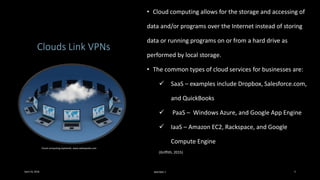
Clouds Link VPNs
• Cloud computing allows for the storage and accessing of
data and/or programs over the Internet instead of storing
data or running programs on or from a hard drive as
performed by local storage.
• The common types of cloud services for businesses are:
 SaaS – examples include Dropbox, Salesforce.com,
and QuickBooks
 PaaS – Windows Azure, and Google App Engine
 IaaS – Amazon EC2, Rackspace, and Google
Compute Engine
(Griffith, 2015)
Cloud computing explained, www.webopedia.com
April 24, 2016 MIS7005-7 3
Migration & Real-time
Network
• Cloud computing simply described is a type of technology
services delivered over the Internet.
• Follow the path to ensure migration success :
Have a clear vision of the benefits of moving services to
the cloud.
Define the most important present/future business
requirements.
Work with an experienced professional.
Do your due diligence by researching vendors.
Verify potential savings through cost analysis (i.e. reduced
infrastructure and IT support costs, reduced employee
licensing costs, space savings, and increased bandwidth
costs)
Explore all internal/external possibilities with an
experienced professional. Seek assistance in
implementing cloud computing solutions.
(Huxford, 2012)
www.blog.sungardas.com
April 24, 2016 MIS7005-7 4
Remote data management in the cloud
Q: What is cloud computing?
A: Resources provided as general utilities either leased and/or released by users through the Internet in an
on-demand fashion. Clouds are hardware based services offering compute, network, and storage
capacity.
Fact: There has been a shift of more core business functions onto cloud platforms by organizations.
Q: What is in the clouds?
A: A large pool of easily usable and accessible virtualized resources (such as hardware, development
platforms and/or services.
(Avram, 2014)
April 24, 2016 MIS7005-7 5
Migrating Applications to the
Case Study #1 : Infosys EA Survey,
2008 - 2009
1. Improved customer satisfaction;
2. Reduced IT cost;
3. Business process improvement/ standardization;
4. Better business-IT alignment;
5. Higher business and process flexibility;
6. EA enables business transformation;
7. EA practices mature with increasing metrics
use/processes; and
8. EA teams have not seriously considered
outsourcing EA activities.
(Baba, Aziz, & Obitz, 2011; Tamm, Seddon, Shanks, & Reynolds, 2011).
April 24, 2016 MIS7005-7 6
www.computerweekly.com
Migrating Applications to the
Case Study #2 : SIM EA Survey,
2007
1. Improves interoperability between information
systems;
2. Better situational awareness;
3. Improves organizational communications and
information sharing;
4. Better collaboration within organization;
5. Improves communications between the
organization and IT department;
6. Standardizes organizational performance
measures;
7. Improves communications within organization; and
8. More effective use of IT resources
(Tamm, Seddon, Shanks, & Reynolds, 2011)
April 24, 2016 MIS7005-7 7
www.computerweekly.com
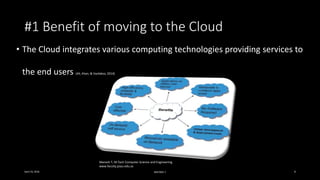
#1 Benefit of moving to the Cloud
• The Cloud integrates various computing technologies providing services to
the end users (Ali, Khan, & Vasilakos, 2014)
April 24, 2016 MIS7005-7 8
Manesh T, M.Tech Computer Science and Engineering.
www.faculty.psau.edu.sa
#2 Benefit of moving to the Cloud
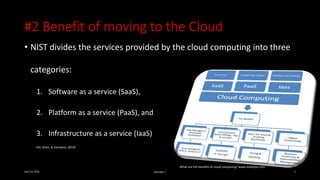
• NIST divides the services provided by the cloud computing into three
categories:
1. Software as a service (SaaS),
2. Platform as a service (PaaS), and
3. Infrastructure as a service (IaaS)
(Ali, Khan, & Vasilakos, 2014)
April 24, 2016 MIS7005-7 9
What are the benefits of cloud computing? www.shebytes.com
#3 Benefit of moving to the Cloud
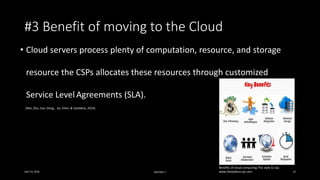
• Cloud servers process plenty of computation, resource, and storage
resource the CSPs allocates these resources through customized
Service Level Agreements (SLA).
(Wei, Zhu, Cao, Dong, Jia, Chen, & Vasilakos, 2014).
April 24, 2016 MIS7005-7 10
Benefits of cloud computing-The style Co-op.
www.thestyleco-op.com
Cloud Weaknesses
#1 Security/Privacy
How can security
be obtained for
network, host,
application, and
data levels.
April 24, 2016 MIS7005-7 11
#2 IT Changes
New skill sets must
be acquired/deployed
to solve business
problems in the cloud.
In the virtual world
of computing there
is variability of
where the physical
data resides.
#3 Political Issues
www.dedalvs.conlang.org
(Avram, 2014).
Business Concerns
Concern #1
• How to negotiate with the CSP
for the creation of service level
agreement (SLA).
Concern #2
• The effects to software/hardware
applications, Web connectivity,
virtual/disk storage, and
responsibility for business-owned
applications.
April 24, 2016 MIS7005-7 12
(Avram, 2014).
Conclusion
The purpose for exploring cloud services is to find a solution for the company’s priority to
track sales data throughout its multiple locations. The presentation reviewed how the virtual
services of cloud computing can benefit the sales department’s business process by allowing for
remote recording and/or tracking of sales data. The cloud has both benefits and weaknesses, but it
is deemed that the benefits of remote access, ease of deployment, and cost efficiency outweigh its
weaknesses.
April 24, 2016 MIS7005-7 13
References
Ali, M., Khan, S. & Vasilakos, A. (2014). Security in cloud computing: Opportunities and challenges. Retrieved
from: http://ac.els-cdn.com.proxy1.ncu.edu/S0020025515000638/1-s2.0-S0020025515000638-
main.pdf?_tid=c7441dec-05d4-11e6-87a6-
00000aacb361&acdnat=1461032391_7a58d72f61e7b02ffd2d70f2a068df56
Avram, M.G. (2014). Advantages and challenges of adopting cloud computing from an enterprise perspective.
Procedia Technology. Retrieved from: http://ac.els-cdn.com.proxy1.ncu.edu/S221201731300710X/1-s2.0-
S221201731300710X-main.pdf?_tid=ff215170-05d5-11e6-8ce3-
00000aab0f02&acdnat=1461032914_55767c167794424428ee380792e807f9
Babu, M., Aziz, S., and Obitz, T. (2011). Enterprise Architecture Survey 2008. Infosys. Retrieved from:
https://www.infosys.com/consulting/architecture-services/ea-survey/Documents/EA-survey-2008.pdf
References
Griffith, E. (2015). What is cloud computing? PC Magazine. Retrieved from:
http://www.pcmag.com/article2/0,2817,2372163,00.asp
Huxford Jr., D. C. (2012). 6 Steps for Transitioning to the Cloud. Journal of Financial Planning, 25(3), 30-32.
Tamm, T., Seddon, P., Shanks, G. & Reynolds, P. (2011). How does enterprise architecture add value to
organisations? Retrieved from:
http://proxy1.ncu.edu/login?url=http://search.ebscohost.com/login.aspx?direct=true&db=bth&AN=7040019
4&site=ehost-live
Wei, L., Zhu, H., Cao, Z., Dong, X., Jia, W., Chen, Y., & Vasilakos, A. V. (2014). Security and privacy for storage and
computation in cloud computing. Information Sciences, 258371-386. doi:10.1016/j.ins.2013.04.028

Migrating to the Cloud

  • 1.
    Migrating to theCloud Deborah Adams Enterprise Network Architecture Northcentral University Enterpreneur-ideas.org
  • 2.
    Introduction The company’s salesdepartment works remotely across various regions, which have exponentially increased. Tracking sales data is a priority for the company, one which the current network or any proposed network changes must support. This presentation serves to provide information to the company’s President, VP of Sales, and the executive management team to examine and explain how the Cloud can be implemented as a solution for remotely and securely entering and tracking sales data. In addition, details of the benefits and the constraints of this complex project will be demonstrated for a comprehensive understanding of the proposed undertaking. April 24, 2016 MIS7005-7 2
  • 3.
    Clouds Link VPNs •Cloud computing allows for the storage and accessing of data and/or programs over the Internet instead of storing data or running programs on or from a hard drive as performed by local storage. • The common types of cloud services for businesses are:  SaaS – examples include Dropbox, Salesforce.com, and QuickBooks  PaaS – Windows Azure, and Google App Engine  IaaS – Amazon EC2, Rackspace, and Google Compute Engine (Griffith, 2015) Cloud computing explained, www.webopedia.com April 24, 2016 MIS7005-7 3
  • 4.
    Migration & Real-time Network •Cloud computing simply described is a type of technology services delivered over the Internet. • Follow the path to ensure migration success : Have a clear vision of the benefits of moving services to the cloud. Define the most important present/future business requirements. Work with an experienced professional. Do your due diligence by researching vendors. Verify potential savings through cost analysis (i.e. reduced infrastructure and IT support costs, reduced employee licensing costs, space savings, and increased bandwidth costs) Explore all internal/external possibilities with an experienced professional. Seek assistance in implementing cloud computing solutions. (Huxford, 2012) www.blog.sungardas.com April 24, 2016 MIS7005-7 4
  • 5.
    Remote data managementin the cloud Q: What is cloud computing? A: Resources provided as general utilities either leased and/or released by users through the Internet in an on-demand fashion. Clouds are hardware based services offering compute, network, and storage capacity. Fact: There has been a shift of more core business functions onto cloud platforms by organizations. Q: What is in the clouds? A: A large pool of easily usable and accessible virtualized resources (such as hardware, development platforms and/or services. (Avram, 2014) April 24, 2016 MIS7005-7 5
  • 6.
    Migrating Applications tothe Case Study #1 : Infosys EA Survey, 2008 - 2009 1. Improved customer satisfaction; 2. Reduced IT cost; 3. Business process improvement/ standardization; 4. Better business-IT alignment; 5. Higher business and process flexibility; 6. EA enables business transformation; 7. EA practices mature with increasing metrics use/processes; and 8. EA teams have not seriously considered outsourcing EA activities. (Baba, Aziz, & Obitz, 2011; Tamm, Seddon, Shanks, & Reynolds, 2011). April 24, 2016 MIS7005-7 6 www.computerweekly.com
  • 7.
    Migrating Applications tothe Case Study #2 : SIM EA Survey, 2007 1. Improves interoperability between information systems; 2. Better situational awareness; 3. Improves organizational communications and information sharing; 4. Better collaboration within organization; 5. Improves communications between the organization and IT department; 6. Standardizes organizational performance measures; 7. Improves communications within organization; and 8. More effective use of IT resources (Tamm, Seddon, Shanks, & Reynolds, 2011) April 24, 2016 MIS7005-7 7 www.computerweekly.com
  • 8.
    #1 Benefit ofmoving to the Cloud • The Cloud integrates various computing technologies providing services to the end users (Ali, Khan, & Vasilakos, 2014) April 24, 2016 MIS7005-7 8 Manesh T, M.Tech Computer Science and Engineering. www.faculty.psau.edu.sa
  • 9.
    #2 Benefit ofmoving to the Cloud • NIST divides the services provided by the cloud computing into three categories: 1. Software as a service (SaaS), 2. Platform as a service (PaaS), and 3. Infrastructure as a service (IaaS) (Ali, Khan, & Vasilakos, 2014) April 24, 2016 MIS7005-7 9 What are the benefits of cloud computing? www.shebytes.com
  • 10.
    #3 Benefit ofmoving to the Cloud • Cloud servers process plenty of computation, resource, and storage resource the CSPs allocates these resources through customized Service Level Agreements (SLA). (Wei, Zhu, Cao, Dong, Jia, Chen, & Vasilakos, 2014). April 24, 2016 MIS7005-7 10 Benefits of cloud computing-The style Co-op. www.thestyleco-op.com
  • 11.
    Cloud Weaknesses #1 Security/Privacy Howcan security be obtained for network, host, application, and data levels. April 24, 2016 MIS7005-7 11 #2 IT Changes New skill sets must be acquired/deployed to solve business problems in the cloud. In the virtual world of computing there is variability of where the physical data resides. #3 Political Issues www.dedalvs.conlang.org (Avram, 2014).
  • 12.
    Business Concerns Concern #1 •How to negotiate with the CSP for the creation of service level agreement (SLA). Concern #2 • The effects to software/hardware applications, Web connectivity, virtual/disk storage, and responsibility for business-owned applications. April 24, 2016 MIS7005-7 12 (Avram, 2014).
  • 13.
    Conclusion The purpose forexploring cloud services is to find a solution for the company’s priority to track sales data throughout its multiple locations. The presentation reviewed how the virtual services of cloud computing can benefit the sales department’s business process by allowing for remote recording and/or tracking of sales data. The cloud has both benefits and weaknesses, but it is deemed that the benefits of remote access, ease of deployment, and cost efficiency outweigh its weaknesses. April 24, 2016 MIS7005-7 13
  • 14.
    References Ali, M., Khan,S. & Vasilakos, A. (2014). Security in cloud computing: Opportunities and challenges. Retrieved from: http://ac.els-cdn.com.proxy1.ncu.edu/S0020025515000638/1-s2.0-S0020025515000638- main.pdf?_tid=c7441dec-05d4-11e6-87a6- 00000aacb361&acdnat=1461032391_7a58d72f61e7b02ffd2d70f2a068df56 Avram, M.G. (2014). Advantages and challenges of adopting cloud computing from an enterprise perspective. Procedia Technology. Retrieved from: http://ac.els-cdn.com.proxy1.ncu.edu/S221201731300710X/1-s2.0- S221201731300710X-main.pdf?_tid=ff215170-05d5-11e6-8ce3- 00000aab0f02&acdnat=1461032914_55767c167794424428ee380792e807f9 Babu, M., Aziz, S., and Obitz, T. (2011). Enterprise Architecture Survey 2008. Infosys. Retrieved from: https://www.infosys.com/consulting/architecture-services/ea-survey/Documents/EA-survey-2008.pdf
  • 15.
    References Griffith, E. (2015).What is cloud computing? PC Magazine. Retrieved from: http://www.pcmag.com/article2/0,2817,2372163,00.asp Huxford Jr., D. C. (2012). 6 Steps for Transitioning to the Cloud. Journal of Financial Planning, 25(3), 30-32. Tamm, T., Seddon, P., Shanks, G. & Reynolds, P. (2011). How does enterprise architecture add value to organisations? Retrieved from: http://proxy1.ncu.edu/login?url=http://search.ebscohost.com/login.aspx?direct=true&db=bth&AN=7040019 4&site=ehost-live Wei, L., Zhu, H., Cao, Z., Dong, X., Jia, W., Chen, Y., & Vasilakos, A. V. (2014). Security and privacy for storage and computation in cloud computing. Information Sciences, 258371-386. doi:10.1016/j.ins.2013.04.028

Editor's Notes

  • #4 Points worth remembering: Software-as-a-service (SaaS) allows small or medium size businesses to subscribe to an application it can access over the Internet. Platform-as-a-service (PaaS) allows businesses to create a customized application for use throughout the company. A business may create and deploy custom apps, databases, and a line of business services, which have been integrated into a singular platform. Infrastructure-as-a-service (IaaS) can be rented out by companies to other companies. Benefits of utilizing the Cloud are the ability to transfer the management/operational services of complex systems/applications, cost efficiency, reduced internal hardware/software, and allow for increased computing services on a broader range. Problems with utilizing cloud computing services are the control of access by ISPs, Telcos, and media companies, and the increased costs with increased use of bandwidth. It is highly likely that when a crash occurs at the cloud service provider (CSP) level it will affect all the companies that use the services of this provider. In addition, there is no central governing body over the use of the Cloud. Although there are standards created by the Institute of Electrical and Electronics Engineers (IEEE) in 2011. The best protection for businesses is to ensure that the SLA contains language of specific compliance to IEEE standards by the CSP. (Griffith, 2015)
  • #5 Question: What are technology service of which the “cloud” is comprised? Answer: Technology services are delivered based upon business requirements which range from internet connectivity to enterprise application software. These services include, but are not limited to, Web-design/development, IT/Network services, Cloud computing, Information security, and/or Mobile services. The path to migrating success will have a significant impact on vendor selection and ultimately cost. Search for experienced professionals inside/outside the business to get the best objective advice. Plan migration in a linear path from PC solution to cloud solution. The plan is a process that should be implemented in steps over a period of time. Utilizing the cloud brings the following benefits to an organization: All you need is Internet access, browser, tablet, and/or mobile phone to access your data and programs in the cloud. Devices that access the cloud do not require the processing power to run local complex applications, and the devices in most cases are cheaper. IT support costs are reduced with the reduction in desktops, servers, and software. Reduction in office space. Elimination of filing cabinets to store software source CDs and upgrades. Cloud computing providers are familiar/equipped to address most compliance needs. Problems associated with cloud computing: Companies have suffered security breaches, but cloud computing vendors are strongly incentivized to keep data secure. Possibility that the user's data can be compromised. In order to reach more people, the richness must be reduced meaning that Web applications minimize the data being presented and manipulated to increase speed, resulting in decreased functionality compared with a PC-based product. Offices typically have to increase bandwidth to accommodate the increased demand, resulting in raising costs. (Huxford, 2012)
  • #6 Yet another definition of cloud computing: The cloud is considered a parallel/distributed computing system that consists of a collection of inter-connected computers on the Web, which are dynamically provisioned and presented as one (a unified computing resources) based on established negotiation of the SLA between the service provider and consumers. Points for remembering: The cloud becomes an adaptive infrastructure shared by various end users, each of whom might use it differently. The flexibility of the infrastructure allows for computing loads to be balanced on demand as more users join the system. As the number of users goes up, the demand load on the system becomes more balanced, even as its economies of scale expand. The goal of cloud computing is to scale resources up or down dynamically through software APIs. Important take away: Mobile interactive applications that are aware of location, environment, and context are capable of responding in real time to information provided by users. So sales data can be remotely tracked/data specific to regions throughout the organization. Another example of how the cloud can foster the current business objective: Companies have made considerable progress toward standardizing their processes, data, and systems through implementation of ERPs. This has enabled scalable infrastructures to create single instances, or highly integrated connections between instances, to manage the consistency of master/transaction data while producing reliable consolidated information. (Avram, 2014)
  • #7 This slide reviews the findings from an annual survey of EA use among CIOs, Chief Architects, and Business and IT managers. The survey’s aim was to understand then explain how EA may benefit organizations and how it is integrated with other organizational activities like strategic business planning, enterprise, and IT governance. (Tamm, Seddon, Shanks, & Reynolds, 2011)
  • #8 In review of the 2nd case study, this slide lists eight of the nineteen benefits of EA from an academic study SIM EA Survey, 2007. Additionally key points in the article were: The key purpose of EA is to guide the building of an improved operating platform (IT systems/digitized business processes that support or automate an organization's core capabilities). EA enables an enterprise to achieve improved information flows and reduced IT costs. EA‘s impact on benefits that are contingent on implementation is somewhat weaker than on benefits that can be derived from the EA plans directly. The term, ‘benefit enablers’ emphasizes that some EA outcomes are not benefits per se, but are factors which have been demonstrated in earlier research to have a high potential for enabling organizational benefits.
  • #9 Additional benefits that are desirable for a sales department network: CSPs are typically transparent with the organizations they service about security measures taken. Cloud resources can be rapidly and elastically scaled. Resources can be scaled either up or down while delivering dynamic performance. Used services are metered and reported to both customers and CSP. Customers can request/manage cloud services without human interaction with the CSP. Services, applications, and data are accessible to customers using standard mechanisms and protocols. The cloud’s services are made available to mobile phones, laptops, tablets and/or workstations. (Ali, Khan, & Vasilakos, 2014)
  • #10 Define/explain the categories of service: SaaS enables customers to use CSP’s applications which run on the cloud infrastructure through the Internet. This type of interface can be used to access various applications (i.e. Web browser). 2. The applications owned by customers (i.e. integrated development environments (IDE), operating systems, and platform layer resources) need a framework where they can be executed and managed. PaaS provide customers with control over the applications that are moved to the cloud. 3. The IaaS is hardware infrastructure provided by the CSP including the network, storage, memory, processor, and various other computing resources. The resources are provided in the form of virtualized systems accessible through Internet. (Ali, Khan, & Vasilakos, 2014)
  • #11  To address the issue of security, which is every cloud user’s concern author’s Wei, Zhu, Cao, Dong, Jia, Chen, & Vasilakos (2014) propose the following: Design/create a basic protocol relying on the identity-based cryptography. The proposed protocol consists of four phases: ‘‘system initialization’’, ‘‘secure cloud storage’’, ‘‘secure cloud computation’’, and ‘‘computation result auditing’’. SecCloud, a privacy-cheating discouragement and secure-computation auditing protocol for data security in the cloud, is proposed. Study shows that SecCloud can attain data storage security and computation auditing security as well as privacy cheating discouragement and an advanced protocol to achieve computation and communication efficiency improvement through batch verification.
  • #12 Three valid concerns with cloud services: How can/does the cloud protect individual and/or propriety information? There must be consideration/planning for how technology will affect the IT role. CSPs may be unable to guarantee the location of information on a specified set of servers within a specified location. (Avram, 2014).
  • #13  The two foremost concerns when deciding to use the cloud’s services are (1) drafting the SLA and (2) the effects of the service to propriety information and assets. Prior to selecting a vendor, there should be ample planning to ensure that the business objectives are clearly outlined with clear concise language in the SLA. Selecting a knowledgeable diverse team to work on the project will serve to be valuable when its time to select a vendor and create the SLA. Being aware of how propriety assets will be handled and secured by the CSP is essential across all areas of the endeavor. Knowing what to expect, what is common practice, and limitations of the vendor/services will help foster a better working relationship between the business and CSP. (Avram, 2014)