PRESENTED BY:
MOHAMMAD DANISH
 Introduction to wearable computers
 Aim of wearable computing
 History of wearable computers
 Wearable computing implementation
 Pros & cons
 Future of wearable computers
 Conclusion
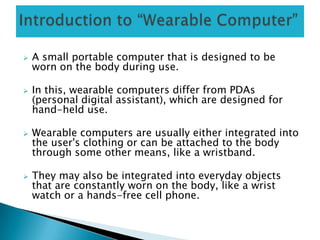
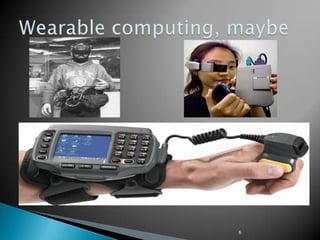
 A small portable computer that is designed to be
worn on the body during use.
 In this, wearable computers differ from PDAs
(personal digital assistant), which are designed for
hand-held use.
 Wearable computers are usually either integrated into
the user's clothing or can be attached to the body
through some other means, like a wristband.
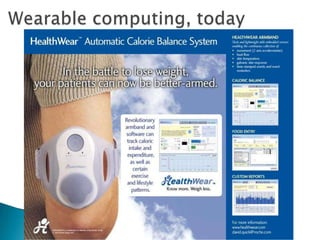
 They may also be integrated into everyday objects
that are constantly worn on the body, like a wrist
watch or a hands-free cell phone.
 Wearable Technology is a portable computer
that is included into the space of a user, this
can be worn anywhere around the body and
can be hands free use.
 Particularly it is a device that is always with
the user, the user is able to enter commands
and execute a set of entered commands while
the user is walking around or doing any other
activity.
 To develop new interfaces that modify non-
computer activities.
 Without interfering with the user’s everyday
tasks.
 The design of wearable computers is still a topic
of research & a variety of user interfaces are
being proposed.
6
7
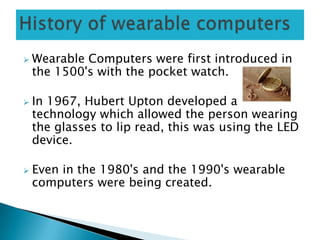
 Wearable Computers were first introduced in
the 1500's with the pocket watch.
 In 1967, Hubert Upton developed a
technology which allowed the person wearing
the glasses to lip read, this was using the LED
device.
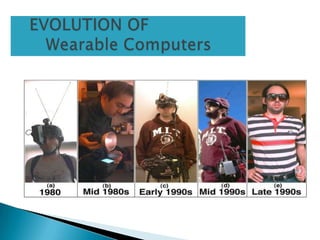
 Even in the 1980's and the 1990's wearable
computers were being created.
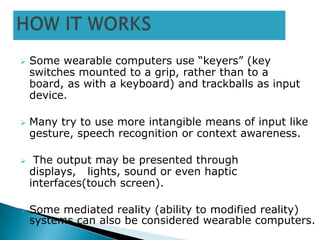
 Some wearable computers use “keyers” (key
switches mounted to a grip, rather than to a
board, as with a keyboard) and trackballs as input
device.
 Many try to use more intangible means of input like
gesture, speech recognition or context awareness.
 The output may be presented through
displays, lights, sound or even haptic
interfaces(touch screen).
 Some mediated reality (ability to modified reality)
systems can also be considered wearable computers.
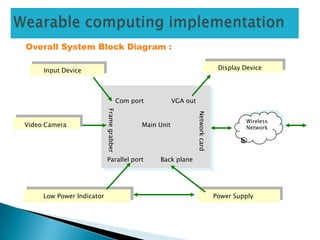
Overall System Block Diagram :
Wireless
Network
Input Device Display Device
Video Camera
Low Power Indicator Power Supply
Com port VGA out
Framegrabber
Networkcard
Parallel port Back plane
Main Unit
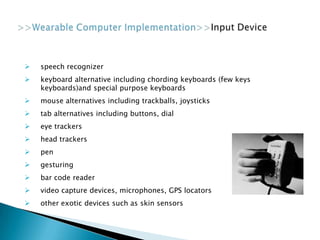
 speech recognizer
 keyboard alternative including chording keyboards (few keys
keyboards)and special purpose keyboards
 mouse alternatives including trackballs, joysticks
 tab alternatives including buttons, dial
 eye trackers
 head trackers
 pen
 gesturing
 bar code reader
 video capture devices, microphones, GPS locators
 other exotic devices such as skin sensors
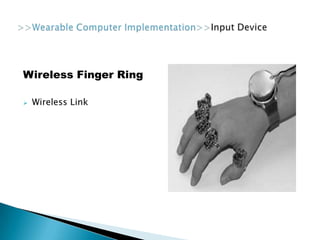
Wireless Finger Ring
 Wireless Link
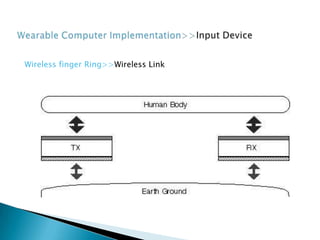
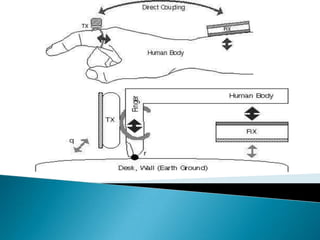
Wireless finger Ring>>Wireless Link
head mounted displays (HMDs)
flat panels, text to speech
tactile output
non speech auditory output
paper and olfactory output (scent)
5 categories of performers:
 1) Entertainers
 2) Animators
 3) Provocateurs
 4) Communicators
 5) Performance Artists
Examples:
 Water turned into fire
 Simple objects become dangerous
 Mime(multipurpose internet mail extension) wearing small
wearable computer in pack pack
 Flat panel display is connected for audience to use
 The advantages of Wearable Computers are:-
- Enhanced Communication
- Able to use wearable computers to complete daily tasks such
as a computer which tracks the movements and habits of a person.
- Flexibility
- Freedom
- Work from anywhere
- Convenience
The disadvantages of Wearable Computers:-
- Equipment can be heavy, Expensive
- Some Wearable Computers can consist of a lot of wiring
- Can cause irritation in heat, Side-Effects such as Headaches
- Can be used to gain an unfair advantage over others
- It may become easier to get data on an individual if the item is
lost/stolen
 Wearable Computers would dominate in the near future.
 Years ago you would not have thought that you could
do somethings that you can do today as computers are
getting smaller and more powerful they can be
integrated into virtually anything.
 Now you can class your mobile phone as a mobile
computer as that can be used take photos, surf
internet, and many other things.
 We believe that all electronic devices will be able to
communicate with each other. and recognize who you
are similar to minority report where eyes are scanned to
welcome a person instead of scanning your eyes it will
be scanning any electronic devices that you may be
carrying, this would bring in to the picture security .
The use of mobile and wearable computers
as actual “tools” on the construction site will
enable interaction with smart infrastructure
systems in the future. But to reach this goal,
we face some challenges that have to be
solved.
ANY QUERIES ????

Ppt wearable computer

  • 1.
  • 2.
     Introduction towearable computers  Aim of wearable computing  History of wearable computers  Wearable computing implementation  Pros & cons  Future of wearable computers  Conclusion
  • 3.
     A smallportable computer that is designed to be worn on the body during use.  In this, wearable computers differ from PDAs (personal digital assistant), which are designed for hand-held use.  Wearable computers are usually either integrated into the user's clothing or can be attached to the body through some other means, like a wristband.  They may also be integrated into everyday objects that are constantly worn on the body, like a wrist watch or a hands-free cell phone.
  • 4.
     Wearable Technologyis a portable computer that is included into the space of a user, this can be worn anywhere around the body and can be hands free use.  Particularly it is a device that is always with the user, the user is able to enter commands and execute a set of entered commands while the user is walking around or doing any other activity.
  • 5.
     To developnew interfaces that modify non- computer activities.  Without interfering with the user’s everyday tasks.  The design of wearable computers is still a topic of research & a variety of user interfaces are being proposed.
  • 6.
  • 7.
  • 8.
     Wearable Computerswere first introduced in the 1500's with the pocket watch.  In 1967, Hubert Upton developed a technology which allowed the person wearing the glasses to lip read, this was using the LED device.  Even in the 1980's and the 1990's wearable computers were being created.
  • 10.
     Some wearablecomputers use “keyers” (key switches mounted to a grip, rather than to a board, as with a keyboard) and trackballs as input device.  Many try to use more intangible means of input like gesture, speech recognition or context awareness.  The output may be presented through displays, lights, sound or even haptic interfaces(touch screen).  Some mediated reality (ability to modified reality) systems can also be considered wearable computers.
  • 11.
    Overall System BlockDiagram : Wireless Network Input Device Display Device Video Camera Low Power Indicator Power Supply Com port VGA out Framegrabber Networkcard Parallel port Back plane Main Unit
  • 12.
     speech recognizer keyboard alternative including chording keyboards (few keys keyboards)and special purpose keyboards  mouse alternatives including trackballs, joysticks  tab alternatives including buttons, dial  eye trackers  head trackers  pen  gesturing  bar code reader  video capture devices, microphones, GPS locators  other exotic devices such as skin sensors
  • 13.
  • 14.
  • 16.
    head mounted displays(HMDs) flat panels, text to speech tactile output non speech auditory output paper and olfactory output (scent)
  • 19.
    5 categories ofperformers:  1) Entertainers  2) Animators  3) Provocateurs  4) Communicators  5) Performance Artists Examples:  Water turned into fire  Simple objects become dangerous  Mime(multipurpose internet mail extension) wearing small wearable computer in pack pack  Flat panel display is connected for audience to use
  • 20.
     The advantagesof Wearable Computers are:- - Enhanced Communication - Able to use wearable computers to complete daily tasks such as a computer which tracks the movements and habits of a person. - Flexibility - Freedom - Work from anywhere - Convenience The disadvantages of Wearable Computers:- - Equipment can be heavy, Expensive - Some Wearable Computers can consist of a lot of wiring - Can cause irritation in heat, Side-Effects such as Headaches - Can be used to gain an unfair advantage over others - It may become easier to get data on an individual if the item is lost/stolen
  • 21.
     Wearable Computerswould dominate in the near future.  Years ago you would not have thought that you could do somethings that you can do today as computers are getting smaller and more powerful they can be integrated into virtually anything.  Now you can class your mobile phone as a mobile computer as that can be used take photos, surf internet, and many other things.  We believe that all electronic devices will be able to communicate with each other. and recognize who you are similar to minority report where eyes are scanned to welcome a person instead of scanning your eyes it will be scanning any electronic devices that you may be carrying, this would bring in to the picture security .
  • 22.
    The use ofmobile and wearable computers as actual “tools” on the construction site will enable interaction with smart infrastructure systems in the future. But to reach this goal, we face some challenges that have to be solved.
  • 23.