Seminar on
Augmented
Reality
Submitted To:
Ms Neelam Goel
Submitted By:
Md. Al-faran
(UE148057)
Content
 Introduction - Augmented reality
 Augmented reality system
 Augmenting our world
 Evolution
 How It Works?
 Components of AR system
 Display Devices
 Monitor Based Display
 Head mounted display
 Video see through
 Optical see through
 Tracking & orientation
 Global positioning system
 Differential GPS
 Digital compass
 Mobile computing
 AR Technology
 Marker based
 Markerless
 Application
 Looking into future..
 References
Augmented Reality
 Augmented reality (AR) is a direct or indirect live view of a physical,
real-world environment whose elements are "augmented" by
computer-generated perceptual information.
 The overlaid information can be constructive (i.e. additive to the
natural environment-Augmented Reality) or destructive (i.e.
masking of the natural environment-virtual reality) and is spatially
registered with the physical world such that it is perceived as
an immersive aspect of the real environment
 The primary nature of augmented reality is that it brings
components of the digital world into a person's perception of the
real world.
Hawk eye view
Off Side in soccer
Heads-Up Display (HUD) for pilots
Hawk eye in Tennis
Evolution
 1990: The term 'Augmented Reality' is attributed to Thomas P. Caudell, a
former Boeing researcher.
 1992: Louis Rosenberg develops one of the first functioning AR systems,
called Virtual Fixtures, at the U.S. Air Force Research Laboratory, and
demonstrates benefits to human performance..
 2002:Bruce H. Thomas is the inventor of the first outdoor augmented
reality game ARQuake.
 2008: Wikitude AR Travel Guide launched on 20 Oct 2008 with
the Android phone
 2013: Google announces an open beta test of its Google
Glass augmented reality glasses. The glasses reach the Internet through
Bluetooth, which connects to the wireless service on a user’s cellphone.
 2015: Microsoft announces Windows Holographic and
the HoloLens augmented reality headset. The headset utilizes various
sensors and a processing unit to blend high definition "holograms" with
the real world.
 2016: Niantic released Pokémon Go for iOS and Android in July 2016. The
game quickly became one of the most popular smartphone applications
and in turn spikes the popularity of augmented reality games.
How it works
 The basic idea of augmented reality is to superimpose graphics, audio
and other sense enhancements over a real-world environment in real-
time.
 The graphics will then change to accommodate the user’s eye or head
movements
 To implement Augmented Reality there are three things are required.
i. find user’s location
ii. find user’s orientation (view)
iii. generating information
Find user’s location
Find user’s orientation (view)
Generate data
Augment generated
data to user’s view
Component of Augmented
Reality
 Here are the three components needed to make an augmented-
reality system work:
 Display - To see text and graphics generated
 Tracking system - To know where the user is located
 Mobile Computing Power - To generate text or graphics
Display Devices
 Monitor Based:
 Laptops
 Cell phones
 Head Mounted Displays:
 Video see-through
 Optical see-through
Monitor Based Displays
 Simplest available
 Treat laptop/PDA/cell phone as a window through which you can see
AR world.
 Yellow line of Off side in soccer, Hawk eye view in cricket and Tennis
Head-mounted Displays
 Just as monitors allow us to see text and graphics generated by
computers, head-mounted displays (HMDs) will enable us to view
graphics and text created by augmented-reality systems
 There are two basic types of HMDS:
 video see-through
 optical see-through
Video See Through Displays
 They block out the wearer's surrounding environment, using small video cameras
attached to the outside of the goggles to capture images. On the inside of the
display, the video image is played in real-time and the graphics are superimposed
on the video. One problem with the use of video cameras is that there is more lag,
meaning that there is a delay in image-adjustment when the viewer moves his or
her head.
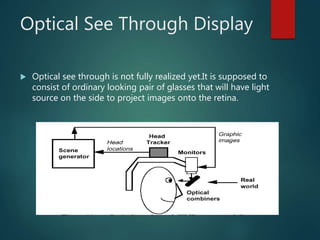
Optical See Through Display
 Optical see through is not fully realized yet.It is supposed to
consist of ordinary looking pair of glasses that will have light
source on the side to project images onto the retina.
Tracking System
 The biggest challenge facing developers of augmented reality is
the need to know where the user is located in reference to his or
her surroundings.
 There's also the additional problem of tracking the movement of
users' eyes and heads.
 AR System needs to know two things:
 Where the user is located
 Where he is looking
GPS – Tracking Technology
 Currently, the best tracking technology available is the Global
Positioning System. However, GPS receivers have an accuracy of
about 10 to 30 meters, which isn't good enough for augmented
reality
 To increase accuracy Differential GPS can be used.
 Differential GPS involves using an area that has already been
surveyed. A more accurate system being developed, known as
real-time kinematic GPS, can achieve centimeter-level accuracy
Real time Differential GPS
 DGPS (Differential GPS) is essentially a system to provide
positional corrections to GPS signals. DGPS uses a fixed, known
position to adjust real time GPS signals.
Digital compass
 To find where user is looking at digital compass can be used
 A digital compass consists of sensors to measure the earth's
magnetic field, some conditioning of those sensor signals, and a
microcontroller to interpret the data
Mobile Computing Power
 Wearable computers - Mobile computing can be accomplished
with help of wearable computers
 A wearable computer is a battery powered computer system
worn on the user’s body(belt, backpack, HMDs etc).
 It is designed for mobile & predominantly hand free operations
often incorporating head mounted display & speech input.
AR Implementation
 Augmented Reality can be implemented in many
different forms:
 Marker Based
 Marker less
 Location Based
Marker Based
 One method for an AR system to recognize elements of the physical
world is through the use of ‘markers’ that, when processed through the
camera, alert the system that relevant information for overlay can be
downloaded from the Internet.
 A marker, generally a black square is used by the app on the mobile as a
placeholder for “augmented information” to be displayed.
 As is the case with many encoded markers or tags, QR (Quick Response)
codes were originally conceived for use in the industrial sector to rapidly
scan and track products along the supply chain.
 With the advent of the Internet-enabled smartphone and accompanying
camera, apps have been developed to allow the wider public to scan
these codes and access further information.
Marker
Augmented
information
Augmented
information
Markerless
 Where the intention to present AR is in a particularly dynamic
environment, such as while on the move, outside and so on, it is
infeasible that markers will be positioned on the majority of surrounding
objects.
 Consequently, in the majority of envisioned use cases, where markers are
unavailable, an image recognition system is required.
 Owing to the fact that real-world entities, such as humans, vehicles and
buildings present far greater complexity to the system than a simple 2D
marker, image recognition software requires high processing power.
 Passive: the user simply views AR through a suitable display, where the
camera is orientated away from the user (view-only mode, where the use
does not interact directly with the AR presentation).
Application
 Medical - To provide the doctor with decision
support for treatment by communicating
comprehensive information from multiple
sources, to guide the procedure by means of
visual and haptic feedback. Guidance is based
on several imaging modalities, such as
ultrasound, MRI and video-endoscopy. AR
helps the medical community in treading
towards their goal of minimal invasive surgery.
 Education - In an Augmented Reality
interfaces students can be seated around a
table and see each other at the same time as
a virtual anatomy floating in their midst
 Military - In military an augmented-reality
system could provide troops with vital
information about their surroundings, such as
showing where entrances are on the opposite
end of a building, highlight troop
movements, and give soldiers the ability to
move to where the enemy can't see them
 Instant information -Tourists and students
could use these systems to learn more about
a certain historical event. Imagine walking
onto a Civil War battlefield and seeing a re-
creation of historical events on a head-
mounted, augmented-reality display
Looking into future ….
 Replacement of cell phones: eye dialing, insertion of information
directly into environment.
 Expanding a PC screen to real environment, program windows &
icons appear as virtual devices in real space & are eye or gesture
operated, by gazing or pointing.
 Examples might be a virtual wall clock, a to-do list for the day
docked by your bed for you to look at first thing in the morning,
etc.
 And the list goes on as your imagination….
References …
 http://www.metalliccloud.com/rob/future_thinking/
 http://en.wikipedia.org/wiki/Augmented_reality
 http://www.howstuffworks.com/augmented-reality.htm
 http://www.youtube.com/
Thank You

Augmented Reality

  • 1.
    Seminar on Augmented Reality Submitted To: MsNeelam Goel Submitted By: Md. Al-faran (UE148057)
  • 2.
    Content  Introduction -Augmented reality  Augmented reality system  Augmenting our world  Evolution  How It Works?  Components of AR system  Display Devices  Monitor Based Display  Head mounted display  Video see through  Optical see through  Tracking & orientation  Global positioning system  Differential GPS  Digital compass  Mobile computing  AR Technology  Marker based  Markerless  Application  Looking into future..  References
  • 3.
    Augmented Reality  Augmentedreality (AR) is a direct or indirect live view of a physical, real-world environment whose elements are "augmented" by computer-generated perceptual information.  The overlaid information can be constructive (i.e. additive to the natural environment-Augmented Reality) or destructive (i.e. masking of the natural environment-virtual reality) and is spatially registered with the physical world such that it is perceived as an immersive aspect of the real environment  The primary nature of augmented reality is that it brings components of the digital world into a person's perception of the real world.
  • 4.
    Hawk eye view OffSide in soccer Heads-Up Display (HUD) for pilots Hawk eye in Tennis
  • 5.
    Evolution  1990: Theterm 'Augmented Reality' is attributed to Thomas P. Caudell, a former Boeing researcher.  1992: Louis Rosenberg develops one of the first functioning AR systems, called Virtual Fixtures, at the U.S. Air Force Research Laboratory, and demonstrates benefits to human performance..  2002:Bruce H. Thomas is the inventor of the first outdoor augmented reality game ARQuake.  2008: Wikitude AR Travel Guide launched on 20 Oct 2008 with the Android phone
  • 6.
     2013: Googleannounces an open beta test of its Google Glass augmented reality glasses. The glasses reach the Internet through Bluetooth, which connects to the wireless service on a user’s cellphone.  2015: Microsoft announces Windows Holographic and the HoloLens augmented reality headset. The headset utilizes various sensors and a processing unit to blend high definition "holograms" with the real world.  2016: Niantic released Pokémon Go for iOS and Android in July 2016. The game quickly became one of the most popular smartphone applications and in turn spikes the popularity of augmented reality games.
  • 7.
    How it works The basic idea of augmented reality is to superimpose graphics, audio and other sense enhancements over a real-world environment in real- time.  The graphics will then change to accommodate the user’s eye or head movements  To implement Augmented Reality there are three things are required. i. find user’s location ii. find user’s orientation (view) iii. generating information Find user’s location Find user’s orientation (view) Generate data Augment generated data to user’s view
  • 8.
    Component of Augmented Reality Here are the three components needed to make an augmented- reality system work:  Display - To see text and graphics generated  Tracking system - To know where the user is located  Mobile Computing Power - To generate text or graphics
  • 9.
    Display Devices  MonitorBased:  Laptops  Cell phones  Head Mounted Displays:  Video see-through  Optical see-through
  • 10.
    Monitor Based Displays Simplest available  Treat laptop/PDA/cell phone as a window through which you can see AR world.  Yellow line of Off side in soccer, Hawk eye view in cricket and Tennis
  • 11.
    Head-mounted Displays  Justas monitors allow us to see text and graphics generated by computers, head-mounted displays (HMDs) will enable us to view graphics and text created by augmented-reality systems  There are two basic types of HMDS:  video see-through  optical see-through
  • 12.
    Video See ThroughDisplays  They block out the wearer's surrounding environment, using small video cameras attached to the outside of the goggles to capture images. On the inside of the display, the video image is played in real-time and the graphics are superimposed on the video. One problem with the use of video cameras is that there is more lag, meaning that there is a delay in image-adjustment when the viewer moves his or her head.
  • 13.
    Optical See ThroughDisplay  Optical see through is not fully realized yet.It is supposed to consist of ordinary looking pair of glasses that will have light source on the side to project images onto the retina.
  • 14.
    Tracking System  Thebiggest challenge facing developers of augmented reality is the need to know where the user is located in reference to his or her surroundings.  There's also the additional problem of tracking the movement of users' eyes and heads.  AR System needs to know two things:  Where the user is located  Where he is looking
  • 15.
    GPS – TrackingTechnology  Currently, the best tracking technology available is the Global Positioning System. However, GPS receivers have an accuracy of about 10 to 30 meters, which isn't good enough for augmented reality  To increase accuracy Differential GPS can be used.  Differential GPS involves using an area that has already been surveyed. A more accurate system being developed, known as real-time kinematic GPS, can achieve centimeter-level accuracy
  • 16.
    Real time DifferentialGPS  DGPS (Differential GPS) is essentially a system to provide positional corrections to GPS signals. DGPS uses a fixed, known position to adjust real time GPS signals.
  • 17.
    Digital compass  Tofind where user is looking at digital compass can be used  A digital compass consists of sensors to measure the earth's magnetic field, some conditioning of those sensor signals, and a microcontroller to interpret the data
  • 18.
    Mobile Computing Power Wearable computers - Mobile computing can be accomplished with help of wearable computers  A wearable computer is a battery powered computer system worn on the user’s body(belt, backpack, HMDs etc).  It is designed for mobile & predominantly hand free operations often incorporating head mounted display & speech input.
  • 19.
    AR Implementation  AugmentedReality can be implemented in many different forms:  Marker Based  Marker less  Location Based
  • 20.
    Marker Based  Onemethod for an AR system to recognize elements of the physical world is through the use of ‘markers’ that, when processed through the camera, alert the system that relevant information for overlay can be downloaded from the Internet.  A marker, generally a black square is used by the app on the mobile as a placeholder for “augmented information” to be displayed.  As is the case with many encoded markers or tags, QR (Quick Response) codes were originally conceived for use in the industrial sector to rapidly scan and track products along the supply chain.  With the advent of the Internet-enabled smartphone and accompanying camera, apps have been developed to allow the wider public to scan these codes and access further information.
  • 21.
  • 22.
    Markerless  Where theintention to present AR is in a particularly dynamic environment, such as while on the move, outside and so on, it is infeasible that markers will be positioned on the majority of surrounding objects.  Consequently, in the majority of envisioned use cases, where markers are unavailable, an image recognition system is required.  Owing to the fact that real-world entities, such as humans, vehicles and buildings present far greater complexity to the system than a simple 2D marker, image recognition software requires high processing power.  Passive: the user simply views AR through a suitable display, where the camera is orientated away from the user (view-only mode, where the use does not interact directly with the AR presentation).
  • 23.
    Application  Medical -To provide the doctor with decision support for treatment by communicating comprehensive information from multiple sources, to guide the procedure by means of visual and haptic feedback. Guidance is based on several imaging modalities, such as ultrasound, MRI and video-endoscopy. AR helps the medical community in treading towards their goal of minimal invasive surgery.  Education - In an Augmented Reality interfaces students can be seated around a table and see each other at the same time as a virtual anatomy floating in their midst
  • 24.
     Military -In military an augmented-reality system could provide troops with vital information about their surroundings, such as showing where entrances are on the opposite end of a building, highlight troop movements, and give soldiers the ability to move to where the enemy can't see them  Instant information -Tourists and students could use these systems to learn more about a certain historical event. Imagine walking onto a Civil War battlefield and seeing a re- creation of historical events on a head- mounted, augmented-reality display
  • 25.
    Looking into future….  Replacement of cell phones: eye dialing, insertion of information directly into environment.  Expanding a PC screen to real environment, program windows & icons appear as virtual devices in real space & are eye or gesture operated, by gazing or pointing.  Examples might be a virtual wall clock, a to-do list for the day docked by your bed for you to look at first thing in the morning, etc.  And the list goes on as your imagination….
  • 26.
    References …  http://www.metalliccloud.com/rob/future_thinking/ http://en.wikipedia.org/wiki/Augmented_reality  http://www.howstuffworks.com/augmented-reality.htm  http://www.youtube.com/
  • 27.