15BCA015 Dave Rutul
15BCA005 Uttam Bhut
A case study on
INTRODUCTION
▪ Microsoft HoloLens is a smart glass which is the first cordless,
self-contained holographic computer running Windows 10.The
HoloLens is similar to Google Glass in that it uses AR technology
WHAT IS A HOLOGRAM?
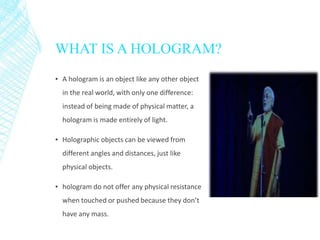
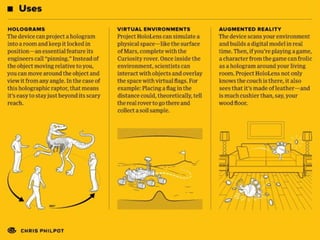
▪ A hologram is an object like any other object
in the real world, with only one difference:
instead of being made of physical matter, a
hologram is made entirely of light.
▪ Holographic objects can be viewed from
different angles and distances, just like
physical objects.
▪ hologram do not offer any physical resistance
when touched or pushed because they don’t
have any mass.
WHAT IS MICROSOFT HOLOLENS
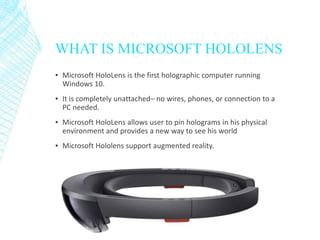
▪ Microsoft HoloLens is the first holographic computer running
Windows 10.
▪ It is completely unattached– no wires, phones, or connection to a
PC needed.
▪ Microsoft HoloLens allows user to pin holograms in his physical
environment and provides a new way to see his world
▪ Microsoft Hololens support augmented reality.
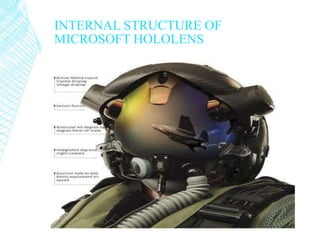
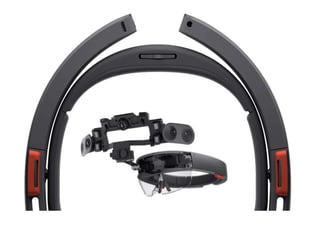
INTERNAL STRUCTURE OF
MICROSOFT HOLOLENS
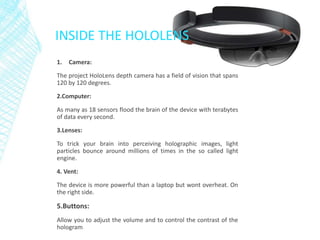
INSIDE THE HOLOLENS
1. Camera:
The project HoloLens depth camera has a field of vision that spans
120 by 120 degrees.
2.Computer:
As many as 18 sensors flood the brain of the device with terabytes
of data every second.
3.Lenses:
To trick your brain into perceiving holographic images, light
particles bounce around millions of times in the so called light
engine.
4. Vent:
The device is more powerful than a laptop but wont overheat. On
the right side.
5.Buttons:
Allow you to adjust the volume and to control the contrast of the
hologram
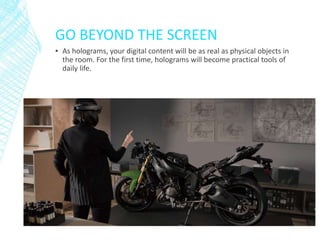
GO BEYOND THE SCREEN
▪ As holograms, your digital content will be as real as physical objects in
the room. For the first time, holograms will become practical tools of
daily life.
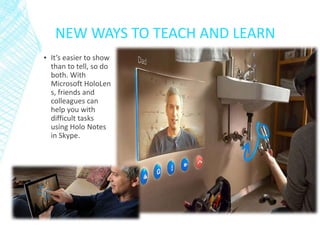
NEW WAYS TO TEACH AND LEARN
▪ It’s easier to show
than to tell, so do
both. With
Microsoft HoloLen
s, friends and
colleagues can
help you with
difficult tasks
using Holo Notes
in Skype.
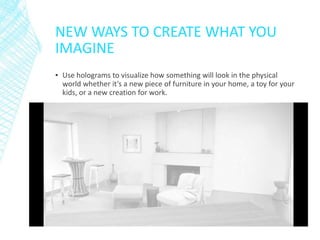
NEW WAYS TO CREATE WHAT YOU
IMAGINE
▪ Use holograms to visualize how something will look in the physical
world whether it’s a new piece of furniture in your home, a toy for your
kids, or a new creation for work.
ADVANTAGE OF MICROSOFT
HOLOLENS
▪ No cords, no phones, no wires, no tethers.
▪ Transparent lens and advanced sensors allow you to see your world
and move confidently in it.
▪ Lightweight and adjustable to fit any adult head size. Work and play
comfortably.
▪ Built-in spatial sound lets you hear holograms wherever they are in the
room with pinpoint precision.
▪ Next-generation technology enabled by Windows 10.
DIS-ADVANTAGE OF
MICROSOFT HOLOLENS
▪ Can be easily damaged or broken. User will have a tough time taking
care of it.
▪ It may lead to accident while driving.
▪ Privacy of people may break due to new glasses.
FUTURE SCOPE OF MICROSOFT
HOLOLENS
▪ Visual diagrams would actually show up in space around the user
indicating exactly what you need to do next.
▪ This application could even extend to the battlefield, where detailed
medical instructions could be given to untrained personnel in the midst
of combat.
▪ Pin holograms to physical objects so user can size and scale them in
each angle and with gesture do all new creation.
THANK YOU

Holo lance

  • 1.
    15BCA015 Dave Rutul 15BCA005Uttam Bhut A case study on
  • 2.
    INTRODUCTION ▪ Microsoft HoloLensis a smart glass which is the first cordless, self-contained holographic computer running Windows 10.The HoloLens is similar to Google Glass in that it uses AR technology
  • 3.
    WHAT IS AHOLOGRAM? ▪ A hologram is an object like any other object in the real world, with only one difference: instead of being made of physical matter, a hologram is made entirely of light. ▪ Holographic objects can be viewed from different angles and distances, just like physical objects. ▪ hologram do not offer any physical resistance when touched or pushed because they don’t have any mass.
  • 4.
    WHAT IS MICROSOFTHOLOLENS ▪ Microsoft HoloLens is the first holographic computer running Windows 10. ▪ It is completely unattached– no wires, phones, or connection to a PC needed. ▪ Microsoft HoloLens allows user to pin holograms in his physical environment and provides a new way to see his world ▪ Microsoft Hololens support augmented reality.
  • 5.
  • 6.
    INSIDE THE HOLOLENS 1.Camera: The project HoloLens depth camera has a field of vision that spans 120 by 120 degrees. 2.Computer: As many as 18 sensors flood the brain of the device with terabytes of data every second. 3.Lenses: To trick your brain into perceiving holographic images, light particles bounce around millions of times in the so called light engine. 4. Vent: The device is more powerful than a laptop but wont overheat. On the right side. 5.Buttons: Allow you to adjust the volume and to control the contrast of the hologram
  • 10.
    GO BEYOND THESCREEN ▪ As holograms, your digital content will be as real as physical objects in the room. For the first time, holograms will become practical tools of daily life.
  • 11.
    NEW WAYS TOTEACH AND LEARN ▪ It’s easier to show than to tell, so do both. With Microsoft HoloLen s, friends and colleagues can help you with difficult tasks using Holo Notes in Skype.
  • 12.
    NEW WAYS TOCREATE WHAT YOU IMAGINE ▪ Use holograms to visualize how something will look in the physical world whether it’s a new piece of furniture in your home, a toy for your kids, or a new creation for work.
  • 13.
    ADVANTAGE OF MICROSOFT HOLOLENS ▪No cords, no phones, no wires, no tethers. ▪ Transparent lens and advanced sensors allow you to see your world and move confidently in it. ▪ Lightweight and adjustable to fit any adult head size. Work and play comfortably. ▪ Built-in spatial sound lets you hear holograms wherever they are in the room with pinpoint precision. ▪ Next-generation technology enabled by Windows 10.
  • 14.
    DIS-ADVANTAGE OF MICROSOFT HOLOLENS ▪Can be easily damaged or broken. User will have a tough time taking care of it. ▪ It may lead to accident while driving. ▪ Privacy of people may break due to new glasses.
  • 15.
    FUTURE SCOPE OFMICROSOFT HOLOLENS ▪ Visual diagrams would actually show up in space around the user indicating exactly what you need to do next. ▪ This application could even extend to the battlefield, where detailed medical instructions could be given to untrained personnel in the midst of combat. ▪ Pin holograms to physical objects so user can size and scale them in each angle and with gesture do all new creation.
  • 16.