Microsoft
Excel 2013
(Basics)
Introduction
Presenter: SHAKIR MUHAMMAD
Group IT Department
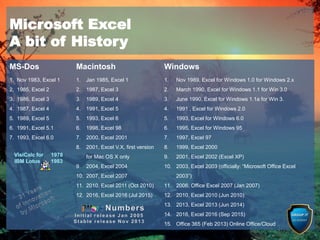
MS-Dos Macintosh Windows
1. Nov 1983, Excel 1
2. 1985, Excel 2
3. 1986, Excel 3
4. 1987, Excel 4
5. 1989, Excel 5
6. 1991, Excel 5.1
7. 1993, Excel 6.0
1. Jan 1985, Excel 1
2. 1987, Excel 3
3. 1989, Excel 4
4. 1991, Excel 5
5. 1993, Excel 6
6. 1998, Excel 98
7. 2000, Excel 2001
8. 2001, Excel V.X, first version
for Mac OS X only
9. 2004, Excel 2004
10. 2007, Excel 2007
11. 2010, Excel 2011 (Oct 2010)
12. 2016, Excel 2016 (Jul 2015)
1. Nov 1989, Excel for Windows 1.0 for Windows 2.x
2. March 1990, Excel for Windows 1.1 for Win 3.0
3. June 1990, Excel for Windows 1.1a for Win 3.
4. 1991 , Excel for Windows 2.0
5. 1993, Excel for Windows 6.0
6. 1995, Excel for Windows 95
7. 1997, Excel 97
8. 1999, Excel 2000
9. 2001, Excel 2002 (Excel XP)
10. 2003, Excel 2003 (officially: “Microsoft Office Excel
2003”)
11. 2006, Office Excel 2007 (Jan 2007)
12. 2010, Excel 2010 (Jun 2010)
13. 2013, Excel 2013 (Jun 2014)
14. 2016, Excel 2016 (Sep 2015)
15. Office 365 (Feb 2013) Online Office/Cloud
Microsoft Excel
A bit of History
What is an Excel?
It is an electronic spreadsheet program that people use for storing, organizing,
manipulating data and reports.
What is a Cell?
A cell in a spreadsheet that the space available for data manipulation
What is a Worksheet?
1. A paper listing questions or tasks for students
2. A paper for recording work done or in progress
What is a Workbook?
A worksheet is a single spreadsheet page and a workbook is a collection of
all the worksheets in a single file
1. Spreadsheets and formulas are an excellent way of handling numbers,
accounts and tracking/automating processes and complex calculations
2. Convert figures into graphical representation and many more …. .. .. .
Why Microsoft Excel 2013?
in
Computing, is
to handle
data in it for
manipulation
There are many
applications i.e.
iWork Numbers,
Calc Open
Office, Corel
Quattro Pro etc.
New Features
Excel 2013
10 awesome new features in Excel 2013
1. Start screen sets the scene – a new Backstage View
2. Quick Analysis – offers immediate results
3. Make Flash Fill magic
4. Simplify choices with Recommended Charts – Chart tools get smarter
5. Answer questions instantly with Pivot Tables
6. Add time lines to Pivot Tables along with Slicers
7. Quickly analyze your data
8. Make quick reports with Power View
9. New Graphical Add-ins
10. Share work with other people and to your social networks
and many more ……
10 awesome new features in Excel 2013
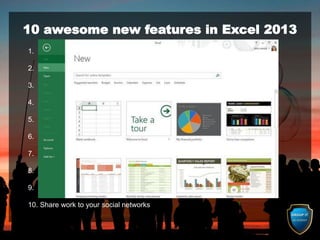
1. Start screen sets the scene
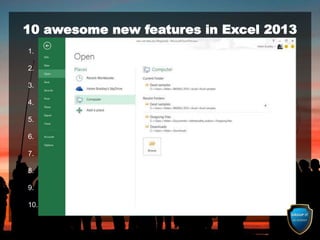
2. Enjoy a new Backstage View
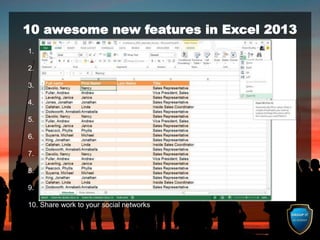
3. Make Flash Fill magic
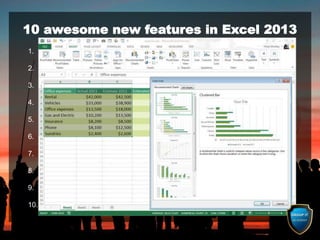
4. Simplify choices with Recommended Charts
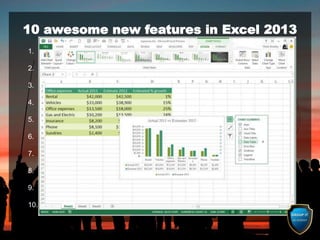
5. Chart tools get smarter
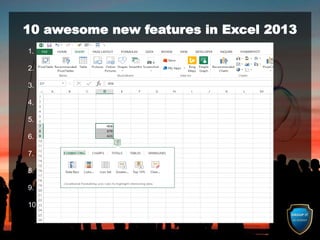
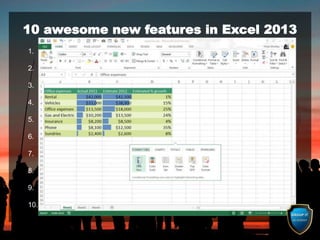
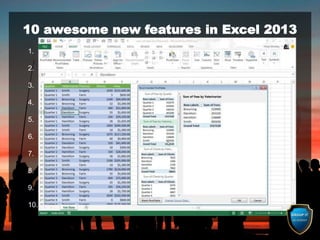
6. Quickly analyze your data
7. Answer questions instantly with Pivot Tables
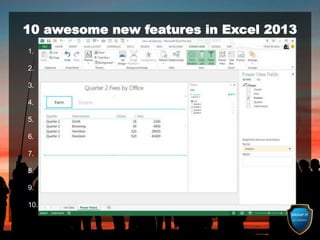
8. Make quick reports with Power View
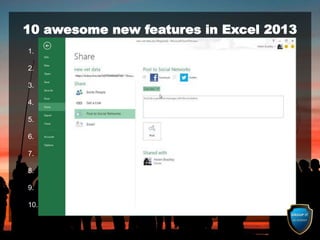
9. Share files and work with other people
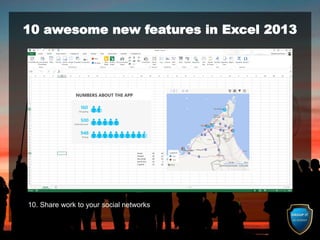
10. Share work to your social networks
10 awesome new features in Excel 2013
1. Start screen sets the scene
2. Enjoy a new Backstage View
3. Make Flash Fill magic
4. Simplify choices with Recommended Charts
5. Chart tools get smarter
6. Quickly analyze your data
7. Answer questions instantly with Pivot Tables
8. Make quick reports with Power View
9. Share files and work with other people
10. Share work to your social networks
10 awesome new features in Excel 2013
1. Start screen sets the scene
2. Enjoy a new Backstage View
3. Make Flash Fill magic
4. Simplify choices with Recommended Charts
5. Chart tools get smarter
6. Quickly analyze your data
7. Answer questions instantly with Pivot Tables
8. Make quick reports with Power View
9. Share files and work with other people
10. Share work to your social networks
10 awesome new features in Excel 2013
1. Start screen sets the scene
2. Enjoy a new Backstage View
3. Make Flash Fill magic
4. Simplify choices with Recommended Charts
5. Chart tools get smarter
6. Quickly analyze your data
7. Answer questions instantly with Pivot Tables
8. Make quick reports with Power View
9. Share files and work with other people
10. Share work to your social networks
10 awesome new features in Excel 2013
1. Start screen sets the scene
2. Enjoy a new Backstage View
3. Make Flash Fill magic
4. Simplify choices with Recommended Charts
5. Chart tools get smarter
6. Quickly analyze your data
7. Answer questions instantly with Pivot Tables
8. Make quick reports with Power View
9. Share files and work with other people
10. Share work to your social networks
10 awesome new features in Excel 2013
1. Start screen sets the scene
2. Enjoy a new Backstage View
3. Make Flash Fill magic
4. Simplify choices with Recommended Charts
5. Chart tools get smarter
6. Quickly analyze your data
7. Answer questions instantly with Pivot Tables
8. Make quick reports with Power View
9. Share files and work with other people
10. Share work to your social networks
10 awesome new features in Excel 2013
1. Start screen sets the scene
2. Enjoy a new Backstage View
3. Make Flash Fill magic
4. Simplify choices with Recommended Charts
5. Chart tools get smarter
6. Quickly analyze your data
7. Answer questions instantly with Pivot Tables
8. Make quick reports with Power View
9. Share files and work with other people
10. Share work to your social networks
10 awesome new features in Excel 2013
1. Start screen sets the scene
2. Enjoy a new Backstage View
3. Make Flash Fill magic
4. Simplify choices with Recommended Charts
5. Chart tools get smarter
6. Quickly analyze your data
7. Answer questions instantly with Pivot Tables
8. Make quick reports with Power View
9. Share files and work with other people
10. Share work to your social networks
10 awesome new features in Excel 2013
1. Start screen sets the scene
2. Enjoy a new Backstage View
3. Make Flash Fill magic
4. Simplify choices with Recommended Charts
5. Chart tools get smarter
6. Quickly analyze your data
7. Answer questions instantly with Pivot Tables
8. Make quick reports with Power View
9. Share files and work with other people
10. Share work to your social networks
10 awesome new features in Excel 2013
1. Start screen sets the scene
2. Enjoy a new Backstage View
3. Make Flash Fill magic
4. Simplify choices with Recommended Charts
5. Chart tools get smarter
6. Quickly analyze your data
7. Answer questions instantly with Pivot Tables
8. Make quick reports with Power View
9. Share files and work with other people
10. Share work to your social networks
10 awesome new features in Excel 2013
1. Start screen sets the scene
2. Enjoy a new Backstage View
3. Make Flash Fill magic
4. Simplify choices with Recommended Charts
5. Chart tools get smarter
6. Quickly analyze your data
7. Answer questions instantly with Pivot Tables
8. Make quick reports with Power View
9. Share files and work with other people
10. Share work to your social networks
Microsoft Excel 2013 – Screen Layout
Quick Access Toolbar
Backstage View
Worksheet
Window
Title Bar
Minimize, Restore
and Close buttons
Columns
Rows
Ribbon
Status Bar
Zoom Slider
Full Sheet
Selector
Tabs
Workbook
Views
Scroll Bars
Active
(Working)
Cell
Dialogue Box
Launcher
Groups
Formula Bar
Name Box
Ribbon
Minimize /
Maximize
Worksheet
Select/Add
The Microsoft Excel 2013 Screen Layout
The Backstage Button, Tabs, Groups & Dialog box launcher
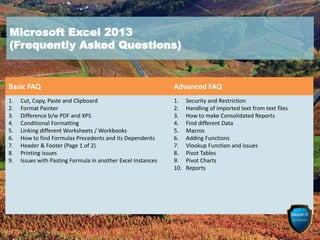
Basic FAQ Advanced FAQ
1. Cut, Copy, Paste and Clipboard
2. Format Painter
3. Difference b/w PDF and XPS
4. Conditional Formatting
5. Linking different Worksheets / Workbooks
6. How to find Formulas Precedents and its Dependents
7. Header & Footer (Page 1 of 2)
8. Printing issues
9. Issues with Pasting Formula in another Excel Instances
1. Security and Restriction
2. Handling of imported text from text files
3. How to make Consolidated Reports
4. Find different Data
5. Macros
6. Adding Functions
7. Vlookup Function and issues
8. Pivot Tables
9. Pivot Charts
10. Reports
Microsoft Excel 2013
(Frequently Asked Questions)
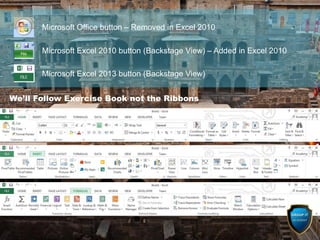
We’ll Follow Exercise Book not the Ribbons
Microsoft Office button – Removed in Excel 2010
Microsoft Excel 2010 button (Backstage View) – Added in Excel 2010
Microsoft Excel 2013 button (Backstage View)
Practical Session
(THANK YOU)

Microsoft Excel 2013 Basics course

  • 1.
  • 2.
  • 3.
    MS-Dos Macintosh Windows 1.Nov 1983, Excel 1 2. 1985, Excel 2 3. 1986, Excel 3 4. 1987, Excel 4 5. 1989, Excel 5 6. 1991, Excel 5.1 7. 1993, Excel 6.0 1. Jan 1985, Excel 1 2. 1987, Excel 3 3. 1989, Excel 4 4. 1991, Excel 5 5. 1993, Excel 6 6. 1998, Excel 98 7. 2000, Excel 2001 8. 2001, Excel V.X, first version for Mac OS X only 9. 2004, Excel 2004 10. 2007, Excel 2007 11. 2010, Excel 2011 (Oct 2010) 12. 2016, Excel 2016 (Jul 2015) 1. Nov 1989, Excel for Windows 1.0 for Windows 2.x 2. March 1990, Excel for Windows 1.1 for Win 3.0 3. June 1990, Excel for Windows 1.1a for Win 3. 4. 1991 , Excel for Windows 2.0 5. 1993, Excel for Windows 6.0 6. 1995, Excel for Windows 95 7. 1997, Excel 97 8. 1999, Excel 2000 9. 2001, Excel 2002 (Excel XP) 10. 2003, Excel 2003 (officially: “Microsoft Office Excel 2003”) 11. 2006, Office Excel 2007 (Jan 2007) 12. 2010, Excel 2010 (Jun 2010) 13. 2013, Excel 2013 (Jun 2014) 14. 2016, Excel 2016 (Sep 2015) 15. Office 365 (Feb 2013) Online Office/Cloud Microsoft Excel A bit of History
  • 4.
    What is anExcel? It is an electronic spreadsheet program that people use for storing, organizing, manipulating data and reports. What is a Cell? A cell in a spreadsheet that the space available for data manipulation What is a Worksheet? 1. A paper listing questions or tasks for students 2. A paper for recording work done or in progress What is a Workbook? A worksheet is a single spreadsheet page and a workbook is a collection of all the worksheets in a single file 1. Spreadsheets and formulas are an excellent way of handling numbers, accounts and tracking/automating processes and complex calculations 2. Convert figures into graphical representation and many more …. .. .. . Why Microsoft Excel 2013? in Computing, is to handle data in it for manipulation There are many applications i.e. iWork Numbers, Calc Open Office, Corel Quattro Pro etc.
  • 5.
  • 6.
    10 awesome newfeatures in Excel 2013 1. Start screen sets the scene – a new Backstage View 2. Quick Analysis – offers immediate results 3. Make Flash Fill magic 4. Simplify choices with Recommended Charts – Chart tools get smarter 5. Answer questions instantly with Pivot Tables 6. Add time lines to Pivot Tables along with Slicers 7. Quickly analyze your data 8. Make quick reports with Power View 9. New Graphical Add-ins 10. Share work with other people and to your social networks and many more ……
  • 7.
    10 awesome newfeatures in Excel 2013 1. Start screen sets the scene 2. Enjoy a new Backstage View 3. Make Flash Fill magic 4. Simplify choices with Recommended Charts 5. Chart tools get smarter 6. Quickly analyze your data 7. Answer questions instantly with Pivot Tables 8. Make quick reports with Power View 9. Share files and work with other people 10. Share work to your social networks
  • 8.
    10 awesome newfeatures in Excel 2013 1. Start screen sets the scene 2. Enjoy a new Backstage View 3. Make Flash Fill magic 4. Simplify choices with Recommended Charts 5. Chart tools get smarter 6. Quickly analyze your data 7. Answer questions instantly with Pivot Tables 8. Make quick reports with Power View 9. Share files and work with other people 10. Share work to your social networks
  • 9.
    10 awesome newfeatures in Excel 2013 1. Start screen sets the scene 2. Enjoy a new Backstage View 3. Make Flash Fill magic 4. Simplify choices with Recommended Charts 5. Chart tools get smarter 6. Quickly analyze your data 7. Answer questions instantly with Pivot Tables 8. Make quick reports with Power View 9. Share files and work with other people 10. Share work to your social networks
  • 10.
    10 awesome newfeatures in Excel 2013 1. Start screen sets the scene 2. Enjoy a new Backstage View 3. Make Flash Fill magic 4. Simplify choices with Recommended Charts 5. Chart tools get smarter 6. Quickly analyze your data 7. Answer questions instantly with Pivot Tables 8. Make quick reports with Power View 9. Share files and work with other people 10. Share work to your social networks
  • 11.
    10 awesome newfeatures in Excel 2013 1. Start screen sets the scene 2. Enjoy a new Backstage View 3. Make Flash Fill magic 4. Simplify choices with Recommended Charts 5. Chart tools get smarter 6. Quickly analyze your data 7. Answer questions instantly with Pivot Tables 8. Make quick reports with Power View 9. Share files and work with other people 10. Share work to your social networks
  • 12.
    10 awesome newfeatures in Excel 2013 1. Start screen sets the scene 2. Enjoy a new Backstage View 3. Make Flash Fill magic 4. Simplify choices with Recommended Charts 5. Chart tools get smarter 6. Quickly analyze your data 7. Answer questions instantly with Pivot Tables 8. Make quick reports with Power View 9. Share files and work with other people 10. Share work to your social networks
  • 13.
    10 awesome newfeatures in Excel 2013 1. Start screen sets the scene 2. Enjoy a new Backstage View 3. Make Flash Fill magic 4. Simplify choices with Recommended Charts 5. Chart tools get smarter 6. Quickly analyze your data 7. Answer questions instantly with Pivot Tables 8. Make quick reports with Power View 9. Share files and work with other people 10. Share work to your social networks
  • 14.
    10 awesome newfeatures in Excel 2013 1. Start screen sets the scene 2. Enjoy a new Backstage View 3. Make Flash Fill magic 4. Simplify choices with Recommended Charts 5. Chart tools get smarter 6. Quickly analyze your data 7. Answer questions instantly with Pivot Tables 8. Make quick reports with Power View 9. Share files and work with other people 10. Share work to your social networks
  • 15.
    10 awesome newfeatures in Excel 2013 1. Start screen sets the scene 2. Enjoy a new Backstage View 3. Make Flash Fill magic 4. Simplify choices with Recommended Charts 5. Chart tools get smarter 6. Quickly analyze your data 7. Answer questions instantly with Pivot Tables 8. Make quick reports with Power View 9. Share files and work with other people 10. Share work to your social networks
  • 16.
    10 awesome newfeatures in Excel 2013 1. Start screen sets the scene 2. Enjoy a new Backstage View 3. Make Flash Fill magic 4. Simplify choices with Recommended Charts 5. Chart tools get smarter 6. Quickly analyze your data 7. Answer questions instantly with Pivot Tables 8. Make quick reports with Power View 9. Share files and work with other people 10. Share work to your social networks
  • 17.
    10 awesome newfeatures in Excel 2013 1. Start screen sets the scene 2. Enjoy a new Backstage View 3. Make Flash Fill magic 4. Simplify choices with Recommended Charts 5. Chart tools get smarter 6. Quickly analyze your data 7. Answer questions instantly with Pivot Tables 8. Make quick reports with Power View 9. Share files and work with other people 10. Share work to your social networks
  • 18.
    Microsoft Excel 2013– Screen Layout Quick Access Toolbar Backstage View Worksheet Window Title Bar Minimize, Restore and Close buttons Columns Rows Ribbon Status Bar Zoom Slider Full Sheet Selector Tabs Workbook Views Scroll Bars Active (Working) Cell Dialogue Box Launcher Groups Formula Bar Name Box Ribbon Minimize / Maximize Worksheet Select/Add The Microsoft Excel 2013 Screen Layout The Backstage Button, Tabs, Groups & Dialog box launcher
  • 19.
    Basic FAQ AdvancedFAQ 1. Cut, Copy, Paste and Clipboard 2. Format Painter 3. Difference b/w PDF and XPS 4. Conditional Formatting 5. Linking different Worksheets / Workbooks 6. How to find Formulas Precedents and its Dependents 7. Header & Footer (Page 1 of 2) 8. Printing issues 9. Issues with Pasting Formula in another Excel Instances 1. Security and Restriction 2. Handling of imported text from text files 3. How to make Consolidated Reports 4. Find different Data 5. Macros 6. Adding Functions 7. Vlookup Function and issues 8. Pivot Tables 9. Pivot Charts 10. Reports Microsoft Excel 2013 (Frequently Asked Questions)
  • 20.
    We’ll Follow ExerciseBook not the Ribbons Microsoft Office button – Removed in Excel 2010 Microsoft Excel 2010 button (Backstage View) – Added in Excel 2010 Microsoft Excel 2013 button (Backstage View)
  • 21.