INTRODUCTION
DYNAMICS 365 & CE - CONCEPT
By Sanjaya Prakash Pradhan (MCT)
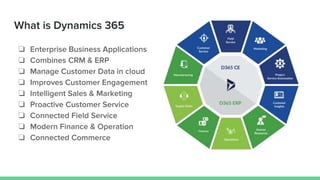
What is Dynamics 365
❏ Enterprise Business Applications
❏ Combines CRM & ERP
❏ Manage Customer Data in cloud
❏ Improves Customer Engagement
❏ Intelligent Sales & Marketing
❏ Proactive Customer Service
❏ Connected Field Service
❏ Modern Finance & Operation
❏ Connected Commerce
Customer Engagement Apps
❏ Sales Hub
❏ Customer Service Hub
❏ Marketing
❏ Field Service
❏ Project Service
Automation
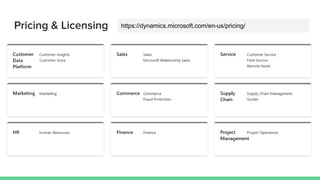
Pricing & Licensing https://dynamics.microsoft.com/en-us/pricing/
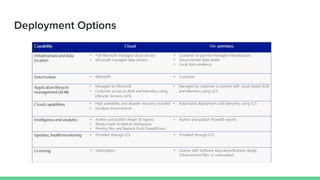
Deployment Options
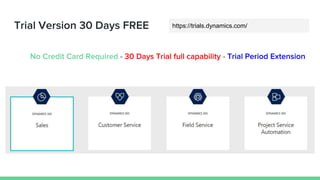
Trial Version 30 Days FREE
No Credit Card Required - 30 Days Trial full capability - Trial Period Extension
https://trials.dynamics.com/
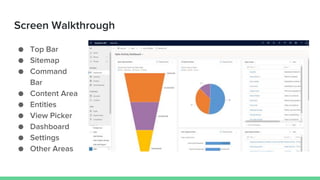
Screen Walkthrough
● Top Bar
● Sitemap
● Command
Bar
● Content Area
● Entities
● View Picker
● Dashboard
● Settings
● Other Areas
CRM Terminologies
1 ACCOUNTS
2 CONTACTS
3 CASES
4 OPPORTUNITIES
5 WORK ORDERS
6 ACTIVITIES
7 NOTES
8 DASHBOARDS
9 REPORTS
10 RECORDS
11 VIEWS
12 FORMS
13 FIELDS
14 BUSINESS RULES
15 SITEMAP
16 RIBBON
17 FLOWS
18 IMPORTS
19 APP SWITCHER
20 UCI
21 FILTERS
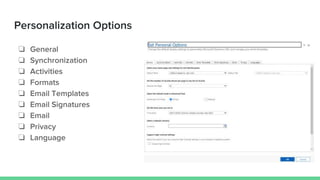
Personalization Options
❏ General
❏ Synchronization
❏ Activities
❏ Formats
❏ Email Templates
❏ Email Signatures
❏ Email
❏ Privacy
❏ Language
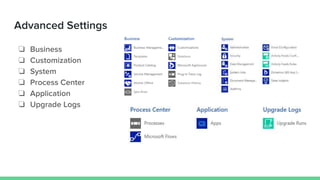
Advanced Settings
❏ Business
❏ Customization
❏ System
❏ Process Center
❏ Application
❏ Upgrade Logs
Thank You

Dynamics 365 CRM Introduction

  • 1.
    INTRODUCTION DYNAMICS 365 &CE - CONCEPT By Sanjaya Prakash Pradhan (MCT)
  • 2.
    What is Dynamics365 ❏ Enterprise Business Applications ❏ Combines CRM & ERP ❏ Manage Customer Data in cloud ❏ Improves Customer Engagement ❏ Intelligent Sales & Marketing ❏ Proactive Customer Service ❏ Connected Field Service ❏ Modern Finance & Operation ❏ Connected Commerce
  • 3.
    Customer Engagement Apps ❏Sales Hub ❏ Customer Service Hub ❏ Marketing ❏ Field Service ❏ Project Service Automation
  • 4.
    Pricing & Licensinghttps://dynamics.microsoft.com/en-us/pricing/
  • 5.
  • 6.
    Trial Version 30Days FREE No Credit Card Required - 30 Days Trial full capability - Trial Period Extension https://trials.dynamics.com/
  • 7.
    Screen Walkthrough ● TopBar ● Sitemap ● Command Bar ● Content Area ● Entities ● View Picker ● Dashboard ● Settings ● Other Areas
  • 8.
    CRM Terminologies 1 ACCOUNTS 2CONTACTS 3 CASES 4 OPPORTUNITIES 5 WORK ORDERS 6 ACTIVITIES 7 NOTES 8 DASHBOARDS 9 REPORTS 10 RECORDS 11 VIEWS 12 FORMS 13 FIELDS 14 BUSINESS RULES 15 SITEMAP 16 RIBBON 17 FLOWS 18 IMPORTS 19 APP SWITCHER 20 UCI 21 FILTERS
  • 9.
    Personalization Options ❏ General ❏Synchronization ❏ Activities ❏ Formats ❏ Email Templates ❏ Email Signatures ❏ Email ❏ Privacy ❏ Language
  • 10.
    Advanced Settings ❏ Business ❏Customization ❏ System ❏ Process Center ❏ Application ❏ Upgrade Logs
  • 11.