DirectAccess SolutionPhilippine Windows Users GroupJohn D. Delizo, MCTS MCPD
What will we cover?DirectAccess SolutionDirectAccessDeploymentWindows 7 and Direct Access
Helpful ExperienceIPv4IPv6NATFirewallIIS, HTTP & HTTPSIPSECADDSADCS
AgendaDirectAccess OverviewSupporting infrastructure and technologiesConfiguring DirectAccessUsing DirectAccess with Windows 7
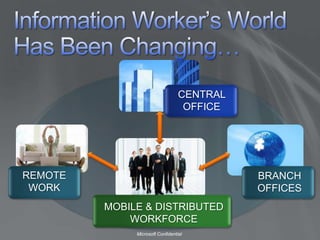
Information Worker’s World Has Been Changing…CENTRAL OFFICEREMOTE WORKBRANCH OFFICESMOBILE & DISTRIBUTED WORKFORCE
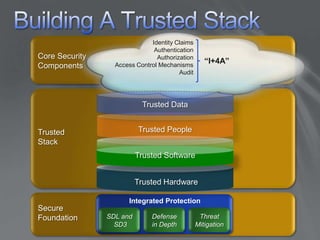
Building A Trusted StackIdentity ClaimsAuthenticationAuthorizationAccess Control MechanismsAuditCore Security Components“I+4A”Trusted DataTrusted PeopleTrustedStackTrusted SoftwareTrusted HardwareIntegrated ProtectionSecureFoundationSDL and SD3Defensein DepthThreatMitigation
What Is DirectAccess?Comprehensive anywhere access solution available in Windows 7 and Windows Server 2008 R2Provides seamless, always-on, secure connectivity to on-premise and remote users alikeEliminates the need to connect explicitly to corpnet while remoteFacilitates secure, end-to-end communication and collaborationLeverages a policy-based network access approach Enables IT to easily service/secure/update/provision mobile machines whether they are inside or outside the network
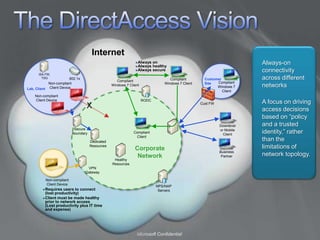
The DirectAccess VisionInternetAlways-on connectivity across different networksAlways onAlways healthyAlways secureISA FW, TSG802.1xCustomer SiteCompliant  Windows 7 ClientCompliant  Windows 7 ClientCompliant  Windows 7 ClientNon-compliant Client DeviceLab, ClientNon-compliant Client DeviceA focus on driving access decisions based on “policy and a trusted identity,” rather than the limitations of network topology. RODCXCust FWDownlevel or Mobile ClientSecure BoundaryCompliant ClientDedicated ResourcesCorporate NetworkBusiness PartnerHealthy ResourcesVPN GatewayNon-compliant Client DeviceNPS/NAP ServersRequires users to connect (lost productivity)Client must be made healthy prior to network access(Lost productivity plus IT time and expense)
Benefits Of DirectAccessBringing Corpnet to the User
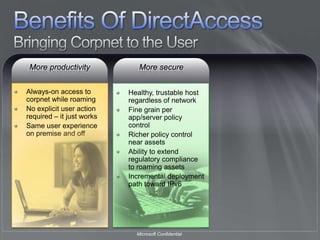
Benefits Of DirectAccessBringing Corpnet to the UserMore productivityAlways-on access to corpnet while roamingNo explicit user action required – it just worksSame user experience on premise and off
Benefits Of DirectAccessBringing Corpnet to the UserMore secureMore productivityAlways-on access to corpnet while roamingNo explicit user action required – it just worksSame user experience on premise and offHealthy, trustable host regardless of networkFine grain per app/server policy controlRicher policy control near assetsAbility to extend regulatory compliance to roaming assetsIncremental deployment path toward IPv6
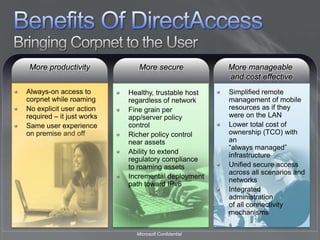
Benefits Of DirectAccessBringing Corpnet to the UserMore secureMore manageable and cost effectiveMore productivityAlways-on access to corpnet while roamingNo explicit user action required – it just worksSame user experience on premise and offSimplified remote management of mobile resources as if they were on the LANLower total cost of ownership (TCO) with an “always managed” infrastructure Unified secure access across all scenarios and networksIntegrated administration of all connectivity mechanismsHealthy, trustable host regardless of networkFine grain per app/server policy controlRicher policy control near assetsAbility to extend regulatory compliance to roaming assetsIncremental deployment path toward IPv6
AgendaDirectAccess OverviewSupporting infrastructure and technologiesConfiguring DirectAccessUsing DirectAccess with Windows 7
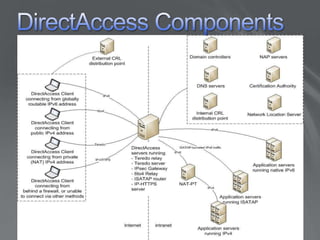
DirectAccess Components
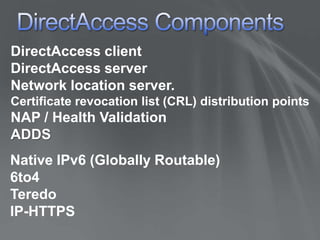
DirectAccess ComponentsDirectAccess clientDirectAccess serverNetwork location server.Certificate revocation list (CRL) distribution pointsNAP / Health ValidationADDSNative IPv6 (Globally Routable)6to4TeredoIP-HTTPS
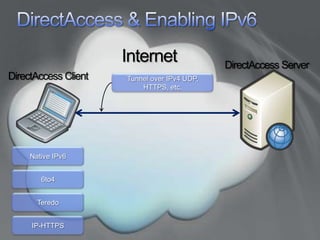
DirectAccess & Enabling IPv6InternetDirectAccessServerDirectAccessClientTunnel over IPv4 UDP, HTTPS, etc.Native IPv66to4TeredoIP-HTTPS
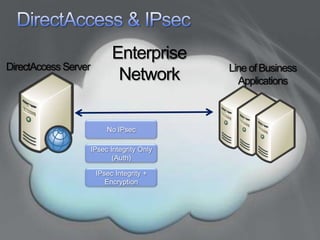
DirectAccess & IPsecEnterpriseNetworkDirectAccess ServerLine of Business ApplicationsNo IPsecIPsec Integrity Only (Auth)IPsec Integrity + Encryption
DirectAccess Supporting TechnologiesCorporate NetworkTrusted, compliant,healthy machineDC & DNS(Win 2008)Applications & DataWindows 7 clientIAG SP2NAP (includes Server & Domain Isolation [SDI])Forefront Client SecurityWindows FirewallBitLocker + Trusted Platform Module (TPM)

Microsoft Direct Access (part 1)_John Delizo

  • 2.
    DirectAccess SolutionPhilippine WindowsUsers GroupJohn D. Delizo, MCTS MCPD
  • 3.
    What will wecover?DirectAccess SolutionDirectAccessDeploymentWindows 7 and Direct Access
  • 4.
  • 5.
    AgendaDirectAccess OverviewSupporting infrastructureand technologiesConfiguring DirectAccessUsing DirectAccess with Windows 7
  • 6.
    AgendaDirectAccess OverviewSupporting infrastructureand technologiesConfiguring DirectAccessUsing DirectAccess with Windows 7
  • 7.
    Information Worker’s WorldHas Been Changing…CENTRAL OFFICEREMOTE WORKBRANCH OFFICESMOBILE & DISTRIBUTED WORKFORCE
  • 8.
    Building A TrustedStackIdentity ClaimsAuthenticationAuthorizationAccess Control MechanismsAuditCore Security Components“I+4A”Trusted DataTrusted PeopleTrustedStackTrusted SoftwareTrusted HardwareIntegrated ProtectionSecureFoundationSDL and SD3Defensein DepthThreatMitigation
  • 9.
    What Is DirectAccess?Comprehensiveanywhere access solution available in Windows 7 and Windows Server 2008 R2Provides seamless, always-on, secure connectivity to on-premise and remote users alikeEliminates the need to connect explicitly to corpnet while remoteFacilitates secure, end-to-end communication and collaborationLeverages a policy-based network access approach Enables IT to easily service/secure/update/provision mobile machines whether they are inside or outside the network
  • 10.
    The DirectAccess VisionInternetAlways-onconnectivity across different networksAlways onAlways healthyAlways secureISA FW, TSG802.1xCustomer SiteCompliant Windows 7 ClientCompliant Windows 7 ClientCompliant Windows 7 ClientNon-compliant Client DeviceLab, ClientNon-compliant Client DeviceA focus on driving access decisions based on “policy and a trusted identity,” rather than the limitations of network topology. RODCXCust FWDownlevel or Mobile ClientSecure BoundaryCompliant ClientDedicated ResourcesCorporate NetworkBusiness PartnerHealthy ResourcesVPN GatewayNon-compliant Client DeviceNPS/NAP ServersRequires users to connect (lost productivity)Client must be made healthy prior to network access(Lost productivity plus IT time and expense)
  • 11.
  • 12.
    Benefits Of DirectAccessBringingCorpnet to the UserMore productivityAlways-on access to corpnet while roamingNo explicit user action required – it just worksSame user experience on premise and off
  • 13.
    Benefits Of DirectAccessBringingCorpnet to the UserMore secureMore productivityAlways-on access to corpnet while roamingNo explicit user action required – it just worksSame user experience on premise and offHealthy, trustable host regardless of networkFine grain per app/server policy controlRicher policy control near assetsAbility to extend regulatory compliance to roaming assetsIncremental deployment path toward IPv6
  • 14.
    Benefits Of DirectAccessBringingCorpnet to the UserMore secureMore manageable and cost effectiveMore productivityAlways-on access to corpnet while roamingNo explicit user action required – it just worksSame user experience on premise and offSimplified remote management of mobile resources as if they were on the LANLower total cost of ownership (TCO) with an “always managed” infrastructure Unified secure access across all scenarios and networksIntegrated administration of all connectivity mechanismsHealthy, trustable host regardless of networkFine grain per app/server policy controlRicher policy control near assetsAbility to extend regulatory compliance to roaming assetsIncremental deployment path toward IPv6
  • 15.
    AgendaDirectAccess OverviewSupporting infrastructureand technologiesConfiguring DirectAccessUsing DirectAccess with Windows 7
  • 16.
  • 17.
    DirectAccess ComponentsDirectAccess clientDirectAccessserverNetwork location server.Certificate revocation list (CRL) distribution pointsNAP / Health ValidationADDSNative IPv6 (Globally Routable)6to4TeredoIP-HTTPS
  • 18.
    DirectAccess & EnablingIPv6InternetDirectAccessServerDirectAccessClientTunnel over IPv4 UDP, HTTPS, etc.Native IPv66to4TeredoIP-HTTPS
  • 19.
    DirectAccess & IPsecEnterpriseNetworkDirectAccessServerLine of Business ApplicationsNo IPsecIPsec Integrity Only (Auth)IPsec Integrity + Encryption
  • 20.
    DirectAccess Supporting TechnologiesCorporateNetworkTrusted, compliant,healthy machineDC & DNS(Win 2008)Applications & DataWindows 7 clientIAG SP2NAP (includes Server & Domain Isolation [SDI])Forefront Client SecurityWindows FirewallBitLocker + Trusted Platform Module (TPM)

Editor's Notes

  • #12 PRODUCTIVESECURECOST EFFECTIVE